
Yealink USB2CAT5E-EXT Tanzania
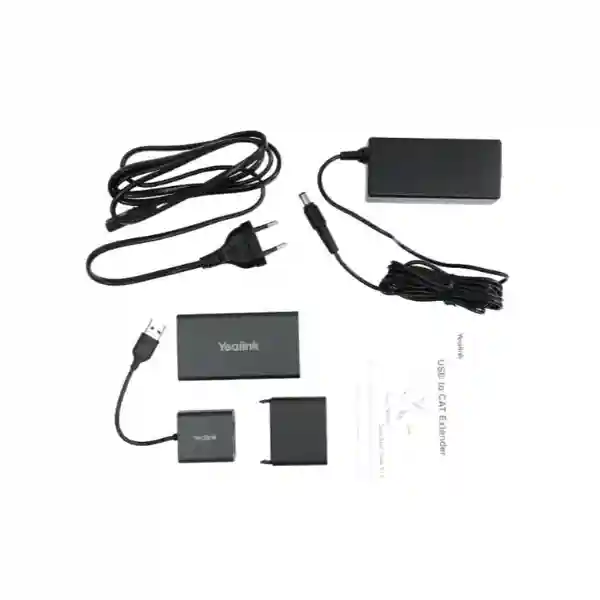
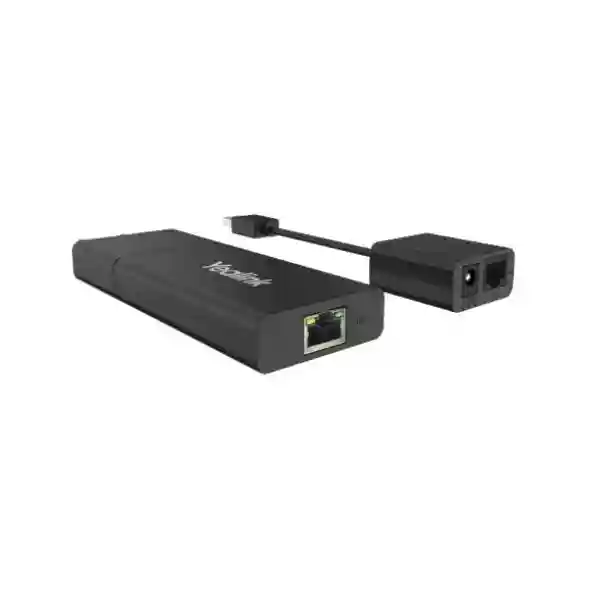
Yealink USB2CAT5E-EXT is a purpose-built USB extender for meeting-room and collaboration deployments where a USB peripheral needs to sit farther from the host computer than a conventional passive USB cable comfortably allows. Yealink specifies USB 2.0 high-speed transmission up to 480 Mbps and an extension distance of up to 40 metres using CAT5e cabling. The transmitter provides a short USB Type-A lead, an RJ45 interface and a 48V/0.7A power input; the receiver provides an RJ45 interface and two USB Type-A ports. For Tanzania buyers, the practical value is not simply “longer USB.” It is the ability to separate a room PC, mini-PC or host from a camera, speaker or other supported USB peripheral while routing a familiar structured cable through furniture, conduit or ceiling pathways.
Choose USB2CAT5E-EXT when the requirement is USB 2.0 extension over a long room run. Confirm the exact peripheral and required USB mode before purchase, especially for newer devices that depend on USB 3.0 bandwidth or advanced camera features.
Maximum extension distance stated by Yealink for the USB signal over the CAT5e-based link.
USB 2.0 high-speed transmission rate listed in Yealink’s current USB Extender datasheet.
Receiver-side USB Type-A ports for connecting supported peripherals at the remote end.
What the Yealink USB2CAT5E-EXT is designed to solve
Conference-room equipment is often physically separated by architecture. A mini-PC may be mounted behind a display, placed inside a lectern or located in a cabinet, while a USB camera needs to be centred above the display or positioned on the opposite side of a large table. Passive USB cable length can quickly become a constraint, and ad-hoc extension methods may complicate installation. USB2CAT5E-EXT addresses that layout problem by converting the connection into a longer structured-cabling run between a transmitter and receiver.
This matters particularly in professionally finished rooms. CAT5e cable is generally easier to route through existing pathways than a bulky USB cable with fixed connectors, and the required length can be selected around the room geometry up to the supported maximum. The result can produce cleaner cable management, more flexible placement of compatible cameras or audio devices, and a clearer separation between the computing side and the room-peripheral side. It is still important to treat the extender as part of a complete signal path: cable quality, terminations, peripheral USB requirements and the host platform all affect a successful installation.
Yealink’s support guidance specifically lists the USB2CAT5E extender as a recommended extension method for UVC34, UVC40, UVC84 and UVC86 camera families operating through USB 2.0. That same support guidance distinguishes newer devices and modes that need USB 3.0 bandwidth. Buyers should therefore avoid assuming that every USB camera or every advanced feature will behave identically simply because the physical connector fits.
Verified Yealink USB2CAT5E-EXT specifications
| Product type | USB to CAT5e extender kit |
| Maximum stated distance | Up to 40 metres |
| USB transmission | USB 2.0 high-speed, up to 480 Mbps |
| Transmitter interfaces | 0.1 m USB Type-A cable, 1 × RJ45, 48V/0.7A power port |
| Receiver interfaces | 1 × RJ45, 2 × USB Type-A |
| External power adapter | AC 100–240V input, DC 48V/0.7A output |
| Operating temperature | 0–40°C |
| Operating humidity | 10–95% |
| Package | Transmitter, receiver, interface protective cover, 48V/0.7A power adapter and quick-start guide |
Deployment and compatibility guidance
Plan the USB mode first
USB2CAT5E-EXT is a USB 2.0 extender. If a camera, capture device or collaboration feature needs USB 3.0 throughput, a different extension design may be necessary. Confirm the exact device, firmware and feature mode rather than selecting only by connector type.
Treat CAT cabling as a point-to-point link
The RJ45 sockets are used for the extender’s transport link. They should not be interpreted as ordinary Ethernet network interfaces. Route and label the cable clearly so installers and facilities teams do not accidentally patch the extender through an unrelated network path.
Test before final concealment
Bench-test the host, extender, selected cable length and peripheral before ceiling closure, cabinetry completion or permanent fixing. Validate video, audio, peripheral detection and meeting-platform behaviour under normal operating conditions.
Buyer note: cable and accessory scope
Yealink’s current product information describes the extender kit and its powered transmitter/receiver components, while quick-start documentation notes that the Ethernet-style cable used between the units is purchased separately. A quotation should therefore state whether the required CAT5e/CAT6 cable, termination, containment, patching and installation labour are part of the scope. This avoids a common procurement problem where the extender arrives but the room still lacks a tested cable route of the correct length.
Yealink USB2CAT5E-EXT Tanzania
Organizations sourcing Yealink USB2CAT5E-EXT in Tanzania are usually solving a room-design problem rather than buying a stand-alone accessory for its own sake. The useful starting point is the distance between the host computer or room appliance and the USB peripheral. In a small huddle room, a direct USB lead may be sufficient. In a boardroom, training room, executive meeting space or divisible conference room, the camera or speaker position can be many metres away from the mini-PC, display cabinet or equipment rack. The extender is relevant when that route needs to reach up to 40 metres while remaining within USB 2.0 requirements.
Tanzania procurement teams should define the exact Yealink endpoint or third-party USB device before ordering. Yealink describes the extender as applicable to nearly all USB peripherals, but a responsible design still checks protocol and bandwidth requirements. Yealink support explicitly recommends this extender for UVC34, UVC40, UVC84 and UVC86 USB 2.0 camera connections. Newer devices or feature modes that depend on USB 3.0 should be evaluated separately. This detail is important when a room is being upgraded in stages, because the extender that fits the current camera may not be the right transport method for a later high-bandwidth camera.
The physical installation should also be quoted as a system. Include the proposed cable route, cable category and length, containment, power availability near the transmitter, mounting or fixing method, room PC location, camera position and final acceptance test. If the room forms part of a wider communications refresh, compare relevant Yealink categories and quotation factors on the FourTeck Tanzania Yealink product guide. That resource helps place accessories alongside phones, conferencing equipment and other UC components rather than treating each item as an isolated purchase.
For organizations buying several rooms, standardization can reduce support effort. Record which rooms use USB2CAT5E-EXT, the installed cable lengths, connected peripherals and host models. Label the point-to-point RJ45 link at both ends so it is not confused with a normal Ethernet network drop. A simple commissioning record can also document that the peripheral was detected, video and audio were tested, and the meeting application worked as expected. This makes later troubleshooting significantly faster when room equipment is moved or replaced.
Yealink USB2CAT5E-EXT Dar es Salaam
Dar es Salaam businesses frequently deploy collaboration equipment in headquarters, professional-service offices, hotels, training centres, corporate boardrooms and customer-facing meeting spaces. In these environments, room aesthetics can be nearly as important as the technology itself. A USB cable draped across furniture or a computer placed awkwardly near the camera creates both visual and operational compromises. Yealink USB2CAT5E-EXT provides a structured way to separate the host and compatible USB peripheral while keeping the connection within a USB 2.0 design.
For a new Dar es Salaam meeting room, the installer should establish equipment positions before cable containment is closed. Confirm where the display will be mounted, where the camera needs to be for proper framing, where the mini-PC or room computer will reside, and where mains power is available. Then measure the real cable path rather than estimating the straight-line distance. Ceiling routes, wall drops, furniture transitions and service loops can add several metres. Because Yealink states a maximum 40-metre extension distance, that complete path needs to remain inside the supported design envelope.
Procurement should also define whether the project includes only the USB extender hardware or a complete ready-to-use room. A complete scope may require CAT cabling, termination, cable testing, display mounting, camera mounting, network connectivity, power protection, audio configuration and meeting-platform validation. Buyers can review the broader FourTeck Tanzania technology shop when related conferencing, networking or infrastructure components are part of the same project.
In an existing room, troubleshooting should begin with a direct connection test. Verify that the camera or other USB device works correctly when connected directly to the host, then introduce the extender and the actual installed cable. This isolates peripheral, host and extension-path issues. For rooms with newer high-bandwidth cameras, ask specifically whether USB 3.0 is required for the intended feature set. A connector that physically plugs in is not proof that every mode is supported. That simple compatibility check can prevent expensive rework after furniture and cabling are already complete.
Yealink USB2CAT5E-EXT Mwanza
Mwanza organizations evaluating Yealink USB2CAT5E-EXT may be fitting meeting rooms in branch offices, education facilities, healthcare administration spaces, hospitality venues or distributed business locations where central technical support is not always physically present. That makes a predictable, documented installation particularly valuable. The extender’s job is straightforward: carry a USB 2.0 connection over a longer CAT5e-based path between a transmitter and receiver, with Yealink specifying up to 40 metres and 480 Mbps high-speed transmission.
Before procurement, map the room from endpoint to host. If the camera is mounted above a display while the room computer sits inside a side cabinet, note the vertical and horizontal routing distance and any ceiling path. If the receiver will serve more than one compatible USB peripheral through its two Type-A ports, validate the intended combination during commissioning rather than assuming every device pairing will behave identically. USB devices can differ in power, bandwidth and driver behaviour even when each device works correctly by itself.
For sites where replacement visits involve travel, keep spare installation details with the asset record: cable length, port labels, power-adapter specification, host device, connected peripheral and meeting software. Photographing the completed cabling before panels are closed can also help future support teams understand the signal route. The aim is to make the room serviceable without needing to rediscover its topology during an outage.
A quotation for Mwanza should therefore distinguish product supply from deployment work. Ask whether the CAT cable is included, whether it will be tested, whether the camera and room computer will be installed at the same time, and what acceptance criteria will be used. A useful acceptance test covers device detection, camera image, microphone and speaker behaviour where relevant, stable operation during a real meeting and successful reconnection after a controlled restart. That process gives the buyer evidence that the complete room works, not merely that the extender powers on.
Yealink USB2CAT5E-EXT Arusha
Arusha meeting spaces can range from compact offices to hospitality conference rooms, tourism-sector boardrooms, institutional meeting facilities and training venues. These environments often need clean equipment placement without turning the room into a visible collection of cables and adapters. Yealink USB2CAT5E-EXT can support that objective when the required peripheral operates within USB 2.0 parameters and the distance between the host and peripheral fits within Yealink’s 40-metre maximum.
Room planning should start with the user experience. The camera must be positioned where participants are framed naturally, the display should be visible from the seating area, and the room computer or appliance should remain accessible for maintenance without dominating the room. Once those positions are fixed, the extender allows the USB path to follow a more installation-friendly CAT cable route. This can be useful in rooms where the host is hidden behind a screen, mounted in a credenza or located away from the ideal camera position.
Arusha buyers should also consider environmental and operational conditions. Yealink lists a 0–40°C operating-temperature range and 10–95% operating humidity for the extender. Equipment cabinets should therefore have reasonable ventilation, and power adapters should be installed where they are protected from accidental disconnection. Cable labels matter in shared or serviced facilities because an RJ45 connector may otherwise be mistaken for a normal network connection. Clear labels such as “USB EXTENDER LINK — DO NOT PATCH TO LAN” can reduce mistakes during maintenance.
When multiple meeting rooms are being equipped, standardize the installation record and test procedure. Use consistent mounting locations where practical, document cable lengths, confirm compatible peripherals and retain model information for both room hosts and cameras. This creates a repeatable support model and makes expansion easier. The same planning discipline also helps procurement compare quotations fairly, because each supplier can be asked to price the same defined hardware, cabling, installation and commissioning scope.
Yealink USB2CAT5E-EXT Dodoma
Dodoma organizations may use conferencing infrastructure for administration, professional collaboration, institutional meetings, training and multi-site communication. In such rooms, dependable cabling is a foundation rather than a visible feature. The Yealink USB2CAT5E-EXT is useful where a compatible USB camera, speaker or other peripheral must be located at a distance from the room computer and the connection remains within USB 2.0 requirements. The key planning figures are the up-to-40-metre supported link and USB 2.0 high-speed transmission up to 480 Mbps.
A procurement specification should avoid vague phrases such as “USB over network.” The extender uses RJ45 interfaces and CAT-style cable, but its purpose is point-to-point USB extension rather than normal IP networking. Documenting that distinction helps the IT team reserve the correct cable path and prevents accidental connection to network switches. If the building uses structured cabling panels, the signal path should be clearly documented and kept within the design recommended for the extender rather than being treated as an ordinary switched Ethernet service.
For a Dodoma boardroom upgrade, include the connected device model and intended meeting platform in the request for quotation. A camera may be physically compatible but use different USB modes depending on resolution or feature selection. Yealink’s support material identifies USB2CAT5E as appropriate for specific UVC camera families using USB 2.0 and separately advises USB 3.0 extension for use cases that require higher throughput. Procurement and technical teams should make that compatibility decision before installation, not after cabling is concealed.
Finally, plan how the room will be supported. Keep the power adapter accessible, label both extender units, and record which receiver ports are used. A basic fault-isolation procedure can test the peripheral directly at the host, then through a short known-good cable, then through the installed extension path. This method reduces guesswork and avoids replacing working equipment simply because the root cause is a damaged or incorrectly terminated cable.
Yealink USB2CAT5E-EXT UAE
UAE organizations planning executive meeting rooms, Microsoft Teams Rooms, Zoom rooms, training spaces or hospitality conference facilities often place substantial emphasis on clean AV integration. The Yealink USB2CAT5E-EXT fits projects where a USB 2.0 peripheral needs to be positioned away from a host without running a conventional USB cable across a long architectural route. Yealink specifies extension up to 40 metres over CAT5e-style cabling, with a powered transmitter and a receiver offering two USB Type-A ports.
The most important UAE design question is not distance alone but bandwidth. Modern video peripherals increasingly support high-resolution or multi-stream features that may need USB 3.0. Yealink support differentiates these cases: several UVC camera models can use USB2CAT5E for USB 2.0 extension, while higher-bandwidth requirements should use an appropriate USB 3.0 extender. A professional AV design should therefore document the exact camera, desired feature mode and host platform before selecting the transport accessory.
In larger fit-out projects, coordinate USB extension with containment, power, network outlets, display cabling and furniture. The power adapter should remain serviceable, and the RJ45 transport link should be labelled so facilities or network engineers do not treat it as a LAN connection. Where a project spans multiple technology categories, the FourTeck UAE technology portfolio provides regional context for integrating conferencing with broader IT and telecom infrastructure.
For quotation preparation, provide the room count, approximate cable route for each room, host model, peripheral model, meeting application and whether supply-only or installation is required. This lets the scope account for cable materials, terminations, testing and commissioning rather than quoting the extender in isolation. A successful handover should prove not only that the USB device is recognized but that the intended camera, audio and meeting workflow operate reliably across the completed installation.
Yealink USB2CAT5E-EXT Uganda
Uganda businesses and institutions may need USB extension in boardrooms, branch offices, training rooms, education environments and collaboration spaces where the host computer cannot sit close to the camera or other peripheral. Yealink USB2CAT5E-EXT supports that kind of room layout through an up-to-40-metre link designed for USB 2.0 high-speed transmission. The kit’s transmitter, receiver and external power adapter create a dedicated extension path that can be planned alongside the room’s structured cabling.
For Uganda procurement, verify the connected peripheral rather than buying the extender solely from a generic accessory list. Yealink states broad peripheral applicability and specifically recommends USB2CAT5E extension for multiple UVC USB 2.0 camera models. However, newer cameras and advanced modes may require USB 3.0 throughput. A pre-purchase compatibility check should therefore capture the device model, host platform, intended video mode and any specialized features the room must use.
The installation quotation should state who supplies the CAT cable, who terminates it, whether cable certification or continuity testing is included, where the 48V/0.7A adapter will be powered and how the transmitter and receiver will be mounted or protected. These details are especially important for multi-site rollouts because hidden exclusions can become repeated costs across every room. Buyers working across Uganda can also review FourTeck Uganda for regional IT, telecom and network context.
After installation, maintain simple room documentation. Record the cable length, both extender locations, connected devices, power source and tested application. If the room later changes from one camera family to another, review USB bandwidth again before assuming the existing extender remains suitable. This lifecycle approach makes the extender part of a documented collaboration design instead of an invisible adapter that future support teams have to discover during troubleshooting.
Yealink USB2CAT5E-EXT Kampala
Kampala organizations often have a mix of new office fit-outs and existing meeting rooms being modernized in place. In both cases, the distance between a room computer and the ideal camera position can create installation friction. Yealink USB2CAT5E-EXT offers a USB 2.0 extension method over a CAT5e-based point-to-point connection up to 40 metres, allowing compatible peripherals to be positioned where the room design needs them rather than where a short USB cable dictates.
For an existing Kampala boardroom, first inspect the current cable pathways. If spare CAT cabling already exists between the equipment cabinet and display area, confirm that the path is dedicated and suitable for the extender rather than assuming any patched office-network route will work. If new cable is required, measure the full installed path and include service loops. The RJ45 connectors should be labelled clearly to distinguish the USB extension link from ordinary Ethernet outlets.
A good procurement request names the host and peripheral. For example, if the room uses a Yealink UVC camera, state the exact UVC model and the intended mode. Yealink support currently identifies UVC34, UVC40, UVC84 and UVC86 as USB 2.0 cameras for which USB2CAT5E extension is an option. For devices or modes that need USB 3.0, the buyer should request an alternative extension solution. This prevents a low-level cabling accessory from becoming the bottleneck in an otherwise capable conferencing system.
Commissioning should reproduce normal business use. Join an actual meeting, verify stable video, check audio paths if the connected device carries audio, confirm peripheral detection after a reboot and test user controls. If the room supports multiple meeting platforms, test the platforms that staff genuinely use. The objective is not merely electrical continuity but a dependable room experience that non-technical users can operate without troubleshooting every session.
Yealink USB2CAT5E-EXT Arua
Arua buyers considering Yealink USB2CAT5E-EXT may place a particularly high value on installation simplicity and supportability. When specialized AV support is not immediately on site, a well-documented point-to-point extender can be easier to manage than an improvised collection of active USB leads and adapters. Yealink’s solution uses a powered transmitter and receiver pair, with USB 2.0 high-speed transmission up to 480 Mbps and a stated maximum link length of 40 metres.
The project should begin by deciding where equipment genuinely needs to be. A camera should be placed for participant framing, not simply near the computer. The host should be located where it can be secured, powered and serviced. Once these positions are fixed, calculate the actual cable path. If the design approaches the maximum supported distance, avoid unnecessary detours and ensure the cable is properly terminated and protected from physical damage.
Because the receiver includes two USB Type-A ports, teams may be tempted to connect multiple peripherals without testing. Treat every combination as a system and validate it with the intended host and meeting application. USB bandwidth and peripheral behaviour can vary. Similarly, do not infer USB 3.0 support from the presence of a modern camera. USB2CAT5E-EXT is explicitly a USB 2.0 extender, so advanced devices that require USB 3.0 should use an appropriate alternative.
For long-term support in Arua, label the cable at both ends and keep a small room record with the extender model, adapter rating, cable length, host device and connected peripheral. If a fault occurs, test the USB device directly at the host before replacing hardware. Then test the extender with a known-good short cable. This staged process can separate a peripheral failure, host problem, extender issue or in-wall cable fault without unnecessary part swapping.
Yealink USB2CAT5E-EXT Mbarara
Mbarara organizations deploying meeting-room technology may need to connect cameras or other compatible USB peripherals across furniture, wall or ceiling distances that exceed ordinary passive USB cabling. Yealink USB2CAT5E-EXT provides a defined USB 2.0 extension architecture using CAT5e-style cabling, with Yealink stating up to 40 metres of transmission and 480 Mbps high-speed USB performance. This can make room layout more flexible while keeping the host computer in a practical service location.
Buying decisions should include both technical fit and maintainability. Confirm the camera or peripheral model, meeting platform and required USB mode. If the peripheral is one of Yealink’s UVC USB 2.0 camera families supported for this extension method, the USB2CAT5E-EXT can be a natural accessory. If the deployment requires USB 3.0 bandwidth, higher-resolution modes or special multi-stream features, the extension method should be reviewed before the purchase order is issued.
Infrastructure preparation should include the correct cable route, reliable power for the external adapter and protection for the extender units. Avoid placing the transmitter or receiver where they can be kicked, crushed by furniture or disconnected during cleaning. If cabling passes through shared patch areas, label it as a dedicated extender link. The RJ45 form factor is convenient for cabling but can create confusion if someone assumes it belongs on the normal network.
For multi-room installations, use one documented template for every room: room name, host, camera/peripheral, cable length, extender serial details if recorded by the customer, power location and commissioning date. Test a complete video call rather than only checking device-manager detection. This creates a consistent baseline, making it easier for local staff or remote support personnel to identify what changed if a room later develops a problem.
Yealink USB2CAT5E-EXT Gulu
Gulu organizations can use Yealink USB2CAT5E-EXT where the room’s physical design requires more separation between a USB 2.0 peripheral and the host device. This situation can arise in meeting rooms, training facilities and institutional spaces where the camera belongs near a display but the computing equipment is stored securely elsewhere. The extender allows a CAT5e-based cable path up to 40 metres, with a transmitter at the host side and a receiver with two USB Type-A ports at the peripheral side.
A practical Gulu deployment should avoid overengineering. If a short certified USB cable already reaches reliably, an extender may not be necessary. The USB2CAT5E-EXT is most useful when room dimensions, cable routing or equipment-security requirements justify the additional distance. Measure the route and design around the actual requirement rather than automatically using the maximum length.
Compatibility remains the critical technical check. Yealink describes USB 2.0 high-speed performance up to 480 Mbps. Some current cameras can operate in USB 2.0 modes, while other features may depend on USB 3.0. Buyers should state exactly what they expect the connected device to do. This is especially important during upgrades, where a new camera may expose limitations that were irrelevant to the previous device.
Supportability should influence the installation. Keep the power adapter in an accessible location, protect the receiver near the display or camera, and label both sides. When testing, verify video quality, audio if applicable, peripheral reconnection and stability during a normal-length call. If the organization has several sites, retain the same documentation format across all rooms. Consistency turns troubleshooting into a repeatable process rather than a site-by-site investigation.
Yealink USB2CAT5E-EXT Kenya
Kenya organizations often deploy collaboration technology across headquarters, branch offices, training rooms and customer meeting spaces, creating a wide range of physical room layouts. Yealink USB2CAT5E-EXT is relevant when a USB 2.0 peripheral needs to be separated from the host by a cable run longer than a simple passive USB connection. The manufacturer specifies up to 40 metres and USB 2.0 high-speed transfer up to 480 Mbps, providing a clear design boundary for planners.
A Nairobi boardroom and an upcountry branch room may use the same extender but need different installation scopes. One may have raised floors and professional AV containment; the other may need a simple surface route. In both cases, keep the transport link point to point and clearly labelled. Plan power for the transmitter, protect the receiver near the peripheral and include the CAT cable itself in the project scope if it is not already installed.
Compatibility should be written into the quotation. Name the intended Yealink UVC camera or third-party peripheral and define whether USB 2.0 is sufficient for the required functions. If the device depends on USB 3.0 bandwidth, ask for a suitable higher-speed extension approach rather than assuming USB2CAT5E-EXT will preserve every feature. This is particularly important for organizations standardizing rooms for several years, because camera capabilities tend to evolve faster than in-wall cabling.
For regional procurement and related infrastructure planning, FourTeck Kenya provides context for business IT, telecom and networking requirements. Whether the purchase is one extender or part of a wider meeting-room rollout, ask for a scope that distinguishes hardware, cabling, installation, configuration and acceptance testing. This makes supplier comparisons more meaningful and reduces the risk of missing installation items after equipment arrives.
Yealink USB2CAT5E-EXT Kuwait
Kuwait meeting-room projects can involve boardrooms, government-related facilities, hospitality venues, corporate offices and training environments where cabling is expected to be discreet and professionally integrated. Yealink USB2CAT5E-EXT supports a clean separation between host and compatible USB peripheral by carrying a USB 2.0 signal over a CAT5e-based link up to 40 metres. The receiver’s two USB Type-A ports provide flexibility at the remote end, while the powered transmitter maintains the extender architecture.
Designers should first confirm whether USB 2.0 is technically sufficient. Yealink lists a high-speed transmission rate of 480 Mbps and recommends the extender for multiple UVC camera families using USB 2.0. Modern cameras and advanced framing or multi-stream functions may require more bandwidth. The safest procurement approach is to identify the exact camera, desired video functions and host platform before selecting the extension accessory.
In a new fit-out, coordinate the extender cable with HDMI, power, network and control cabling. Keep separation and containment practices appropriate to the building design, and ensure the external 48V/0.7A adapter can be serviced without dismantling fixed furniture. The point-to-point RJ45 link should be marked clearly because its connector resembles standard Ethernet even though it is serving the USB extender path.
For tender or quotation documents, specify the maximum expected cable distance, cable category, connected peripheral, room count, required testing and whether commissioning must include Microsoft Teams, Zoom or another meeting platform. This converts a small accessory purchase into a verifiable installation requirement. It also allows the contractor to identify compatibility concerns before site work begins rather than discovering them during final handover.
Yealink USB2CAT5E-EXT Ghana
Ghana organizations planning collaboration spaces can use Yealink USB2CAT5E-EXT when room geometry requires a USB 2.0 device to operate farther from its host. Typical examples include a camera mounted at the front of a boardroom while the room PC is stored in a cabinet, or an audio peripheral positioned near participants while computing equipment remains close to the display. Yealink specifies a maximum extension distance of 40 metres and USB 2.0 high-speed transmission up to 480 Mbps.
The best buying process starts with a simple room diagram. Mark the host, peripheral, cable route and power source. Then identify any equipment that may be upgraded during the expected life of the room. If a future camera is likely to need USB 3.0, the organization can decide whether to install alternative cabling or spare pathways now. This is often cheaper than reopening walls or ceilings later.
A technical quotation should identify the cable separately because the extender kit and the point-to-point cable are distinct elements. Ask for the installed length, termination method and test responsibility. If the route passes through patch panels or shared spaces, documentation becomes especially important. The extender link should not be casually repatched through ordinary network switches just because it uses RJ45 connectors.
During acceptance, test the actual collaboration workflow with the selected camera and host. Confirm that the USB device is recognized consistently, that video and audio functions behave normally and that the system recovers after a reboot. Record the configuration and cable length. This disciplined handover makes future diagnosis easier and gives procurement evidence that the installed solution meets the room requirement rather than only matching a product datasheet.
Yealink USB2CAT5E-EXT Nigeria
Nigeria enterprises can encounter long USB paths in executive boardrooms, training centres, customer-experience facilities and large offices where AV equipment is integrated into furniture or racks. Yealink USB2CAT5E-EXT is designed for these USB 2.0 extension scenarios, using a transmitter and receiver linked by CAT5e-style cabling and supporting distances up to 40 metres. The receiver provides two USB Type-A interfaces for compatible devices at the remote end.
For larger Nigerian deployments, standardization is valuable. Select a defined room architecture, approved peripheral list, cable-length range and commissioning procedure. This can reduce differences between sites and simplify remote support. However, standardization should not override bandwidth requirements. If some rooms use USB 3.0-dependent cameras or advanced features, those rooms may need a different extension technology even if the physical layout looks identical.
Power planning also deserves attention. The extender uses a 48V/0.7A external Yealink adapter with universal AC input specified at 100–240V. Install the adapter on a stable power source and avoid locations where users can disconnect it accidentally. Where room equipment is protected by UPS power, decide whether the extender should share that protected supply so the USB path remains available during short power disturbances along with the rest of the conferencing system.
A complete procurement request should include host model, camera or peripheral, cable route, room count, mounting needs and meeting platform. Ask the supplier to state what is included in supply, installation and testing. This avoids comparing one quote that includes only hardware with another that includes cabling and commissioning. The result should be a room that is operationally tested, documented and ready for ordinary users rather than a collection of unverified components.
Yealink USB2CAT5E-EXT Seychelles
Seychelles organizations in hospitality, corporate, public-sector and professional environments may need compact, clean meeting-room installations where visible cabling is minimized. Yealink USB2CAT5E-EXT can support that goal by moving a USB 2.0 connection onto a longer CAT5e-based point-to-point route. Yealink specifies up to 40 metres of extension and USB 2.0 high-speed transfer up to 480 Mbps, making it appropriate where the connected peripheral stays within those requirements.
Because island logistics can make replacement or rework more disruptive, careful pre-deployment testing is especially worthwhile. Bench-test the exact room computer, extender, intended cable length and peripheral before installation. Confirm the meeting application and required features, not merely basic USB recognition. If a camera needs USB 3.0 for an advanced mode, identify that before the room is completed and select a suitable alternative extension method.
The physical installation should protect both electronics and cabling. Keep the external power adapter accessible but secure, provide ventilation around enclosed equipment and avoid exposing connectors to unnecessary strain. Label the RJ45 transport link clearly because it is not an ordinary LAN connection. If a maintenance contractor later sees the cable without documentation, clear labelling can prevent accidental repatching or disconnection.
For procurement, request a complete bill of materials that identifies the extender, CAT cable, installation accessories and any related camera or room hardware. Include testing and documentation in the scope. A reliable meeting room is the outcome; the extender is only one component. By defining room layout, bandwidth requirements, power and support procedures in advance, Seychelles buyers can reduce avoidable site visits and make future upgrades easier to plan.
Related FourTeck resources
Tanzania technology shop
Review conferencing, networking and supporting business technology categories in the FourTeck Tanzania shop when the extender is part of a wider room build.
Yealink quotation planning
Use the Yealink Tanzania product and quote guide to review broader Yealink device families and purchasing factors.
Regional project context
For multi-country requirements, consult FourTeck Uganda, FourTeck Kenya and FourTeck UAE for surrounding regional IT and telecom planning.
Quotation checklist
Yealink USB2CAT5E-EXT FAQ
How far can Yealink USB2CAT5E-EXT extend USB?
Yealink specifies long-distance transmission up to 40 metres. The actual installation should be planned around the complete cable route, not a straight-line room measurement.
Is the USB2CAT5E-EXT USB 2.0 or USB 3.0?
It is a USB 2.0 extender. Yealink’s datasheet lists USB 2.0 high-speed transmission up to 480 Mbps. Devices or features that require USB 3.0 should use an extension solution designed for that bandwidth.
Can it be used with Yealink UVC cameras?
Yealink support recommends USB2CAT5E extension for UVC34, UVC40, UVC84 and UVC86 USB connections. Confirm the exact device and feature mode because newer cameras or advanced modes can have different USB-bandwidth requirements.
Does the receiver have more than one USB port?
Yes. Yealink lists two USB Type-A ports on the receiver. When using more than one peripheral, validate the complete combination with the host and meeting application before final installation.
Is the CAT5e cable included?
Yealink’s package list covers the transmitter, receiver, protective cover, power adapter and quick-start guide. Yealink quick-start documentation states that the Ethernet-style cable between units is purchased separately. Confirm cable supply in the quotation.
Can the RJ45 ports connect through a normal Ethernet switch?
The RJ45 connection is used for the extender’s point-to-point transport path, not as an ordinary LAN interface. Plan and label the cable as a dedicated extender link rather than treating it as a switched network connection.
What information should I provide for a quotation?
Provide the quantity, room location, host device, USB peripheral, approximate cable distance, meeting platform and whether you need supply only or complete cabling, installation and commissioning.
Decision recap
Yealink USB2CAT5E-EXT is best understood as a meeting-room infrastructure accessory for extending USB 2.0 across a longer structured-cabling route. Its verified headline capabilities are up to 40 metres of transmission, USB 2.0 high-speed operation up to 480 Mbps, a powered transmitter and a receiver with two USB Type-A ports.
Choose it when the connected peripheral is compatible with USB 2.0 and the room layout benefits from the longer distance. Do not select it merely because the device has a USB connector. Confirm bandwidth and feature requirements, include the CAT cable and installation scope in the quotation, and test the full room workflow before handover.
Consultation panel
For a useful Yealink USB2CAT5E-EXT quotation, send the peripheral model, host device, room count, approximate cable distance and installation location. If the accessory is part of a full conferencing room, include the display, camera, microphone and preferred meeting platform so compatibility can be reviewed as one system.
FourTeck Tanzania can use that information to structure a quotation around product fit, cabling, installation and commissioning without assuming stock, delivery time or compatibility that has not been verified for the specific project.




Reviews
There are no reviews yet.