
YEALINK COLLABORATION FOR SMALL ROOMS
Yealink UVC34 USB Video Bar
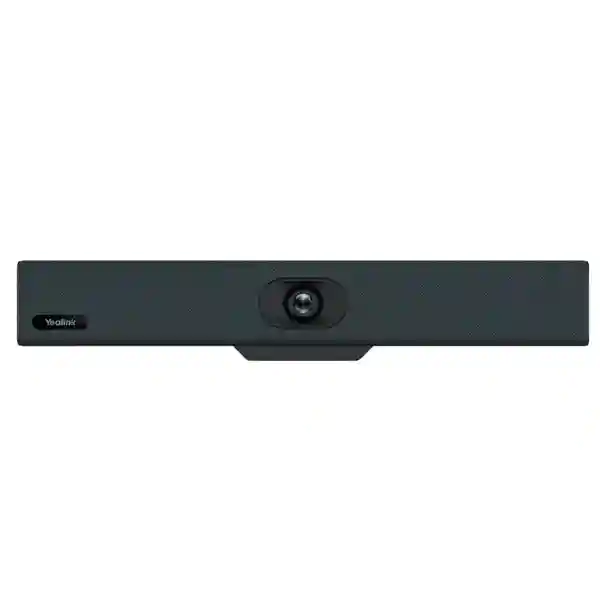
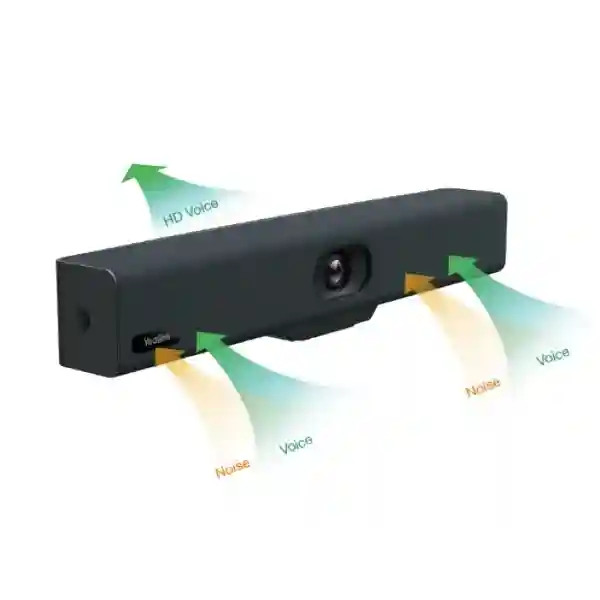
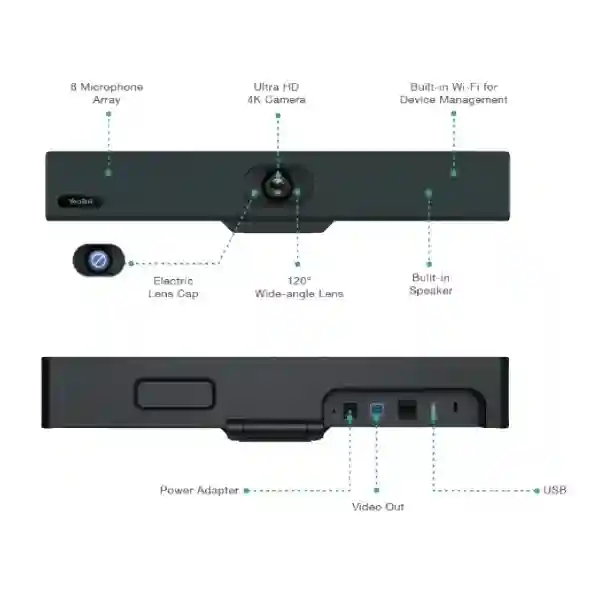
The Yealink UVC34 is an all-in-one BYOD USB video bar designed for small and huddle rooms. It combines an 8MP 4K camera, 120° field of view, 5x e-PTZ, an 8-microphone array and a 5W speaker, so a compact room can gain a complete camera-and-audio endpoint without assembling separate devices. Auto Framing, AI Face Enhancement, Yealink Noise Proof Technology and an electric lens cap support more natural meetings and clearer privacy cues, while built-in Wi-Fi enables remote device management.
Best fit: small meeting rooms, huddle spaces and focused BYOD collaboration.
Video: up to 4K at 30fps with 120° field of view.
Audio: 8-microphone array, full duplex, echo cancellation and 5W speaker.
Privacy: automatic electric lens cap.
What the Yealink UVC34 solves
Small meeting rooms often start with a laptop webcam, a table speakerphone or a collection of unrelated accessories. That approach can work for one person, but it becomes harder to manage when several people sit around a table. The camera may not capture everyone, the microphone may be too far from the person at the opposite end, and users can waste time selecting different audio and video devices before every call. The UVC34 addresses this with one purpose-built room bar that integrates the core camera, microphone and speaker functions and presents them to the host computer through standard USB audio/video operation.
Yealink positions the UVC34 for small and huddle rooms and work-from-home scenarios. Its 8MP 1/2.8-inch CMOS camera supports 4K at 30 frames per second, with 1440p, 1080p and 720p options also documented. The 120° field of view helps capture people seated close to the display, while 5x e-PTZ and nine camera presets give administrators and users additional control. Auto Framing can adjust the composition around participants, and AI Face Enhancement is intended to improve how faces are presented in the meeting image.
For audio, the device includes an 8-microphone array, full-duplex operation, echo cancellation, Yealink Noise Proof Technology and a 5W high-fidelity speaker. Yealink documentation lists a 4.5-metre voice pickup range in the UVC34 datasheet, while more recent product pages describe up to 5 metres; room acoustics and seating layout still matter, so procurement teams should treat published pickup distance as a planning reference rather than a guarantee for every room. This is especially important in glass-heavy spaces, rooms with loud air-conditioning, or layouts where participants sit well beyond the normal huddle-room footprint.
4K room video
An 8MP sensor supports 4K/30fps, giving remote participants a detailed room image when the meeting platform, host computer, display path and available bandwidth support that resolution.
120° field of view
The wide lens is useful where people sit relatively close to the display and camera. It can reduce the need to position the camera far back simply to include everyone around a compact table.
Integrated room audio
The built-in microphone array and speaker reduce the number of separate USB endpoints users need to select, helping make a simple BYOD room more consistent from one meeting to the next.
Visible privacy state
The electric lens cap closes when the camera is not in use, giving occupants a clear physical indication that the lens is covered rather than relying only on software status.
Verified Yealink UVC34 specifications
| Camera | 8MP, 1/2.8-inch CMOS; up to 4K 30fps |
| Field of view / zoom | 120° field of view; 5x e-PTZ; 9 camera presets |
| AI video features | Auto Framing and AI Face Enhancement |
| Microphones | Built-in 8-microphone array; Yealink Noise Proof Technology; echo cancellation; full duplex |
| Speaker | Built-in 5W speaker; documented frequency response 100Hz–20kHz |
| Connections | USB 2.0 Type-B, USB 2.0 Type-A, Yealink microphone port (RJ-45), power, security lock slot, reset |
| Wireless / management | Built-in Wi-Fi for remote device management; Bluetooth 4.2; Yealink USB Connect, RoomConnect and Yealink device-management services documented |
| Dimensions | 380 × 55 × 55 mm |
| Package items in Yealink datasheet | UVC34 bar, VCR20 remote control with batteries, power adapter, wall bracket/accessories and 7m USB-B to USB-A cable |
Compatibility, BYOD workflow and deployment planning
The UVC34 operates as a standard USB audio/video device, which is why it suits bring-your-own-device rooms. Yealink documentation lists compatibility with mainstream platforms including Microsoft Teams, Zoom, Google Meet, Cisco Webex and GoToMeeting, among others. In practice, the computer still needs a supported operating system, the conferencing application must be able to select the Yealink camera and audio endpoints, and the room should have a suitable display and internet connection. Organisations standardising on one platform should test their approved software build, host laptops, USB policies and security controls before a wider deployment.
The physical plan matters as much as software compatibility. The camera should generally be close to eye level relative to the display, not hidden behind a laptop or mounted so high that everyone appears to be looking downward. The 120° view is useful in compact rooms, but an extremely wide image can make people look small if the camera is placed too far from the table. The included wall bracket and long USB cable give useful flexibility, yet cable routes, power-socket position, screen mounting, table location and host-device access should be checked before installation.
For wider collaboration planning, review Fourteck Tanzania’s technology services, which cover video conferencing alongside networking, Wi-Fi, security and supporting infrastructure. Buyers comparing several endpoint types can also use the Fourteck Tanzania technology shop as a broader procurement starting point, while the Fourteck Tanzania approach explains how room technology is considered with the network and operational environment rather than as an isolated appliance.
Yealink UVC34 USB Video Bar Tanzania
For organisations sourcing the Yealink UVC34 USB Video Bar in Tanzania, the strongest use case is a compact meeting space where users regularly join different online meeting platforms from their own laptops. A consulting office, project room, management huddle space, branch meeting room or small training room may not need a permanently licensed native room system, yet it still needs better framing and room audio than a laptop alone can provide. The UVC34 fits that middle ground by giving the room a fixed professional camera-and-audio endpoint while allowing the meeting application to remain on the user’s computer.
Procurement should begin with room geometry. Measure the distance from the display wall to the furthest seat, note how many people normally attend, identify whether the table is short and wide or long and narrow, and consider whether the camera will be mounted above or below the display. The 120° field of view is particularly useful when participants sit close to the screen, but buyers should still validate framing for their actual furniture arrangement. The published microphone pickup range also needs to be checked against real acoustic conditions. Hard surfaces, glass partitions, open doors and air-conditioning noise can influence intelligibility even when the endpoint itself is technically capable.
Tanzania buyers should also include the host computer, display connectivity, USB route, power stability and internet quality in the project. Video meetings can expose weaknesses in Wi-Fi coverage and upstream bandwidth that are not obvious during ordinary web browsing. Where multiple rooms are being equipped, standardising mounting heights, cable paths, approved laptops and conferencing settings can simplify support. Built-in Wi-Fi management on the UVC34 can also help administrators handle configuration and device maintenance without physically reconnecting a laptop to every room for routine tasks.
When requesting a quotation in Tanzania, specify the quantity of UVC34 units, the number of rooms, preferred installation arrangement, display sizes, conferencing platforms and whether wall mounting or integration services are required. Avoid assuming stock, delivery date or warranty terms until the exact commercial proposal confirms them. The product decision is strongest when it is tied to the room rather than made from specifications alone.
Yealink UVC34 USB Video Bar Dar es Salaam
In Dar es Salaam, the UVC34 is particularly relevant to offices that conduct frequent hybrid meetings with regional teams, overseas suppliers, customers, consultants or remote staff. A small conference room in a corporate office, professional-services firm, logistics company or project site can benefit from a permanent video bar because users no longer need to carry a separate webcam and speakerphone into the room. The room becomes easier to understand: connect the host laptop by USB, select the Yealink endpoint in the meeting application, and use the room display as the shared visual surface.
Dar es Salaam meeting spaces vary widely. Modern offices may have glass partitions and reflective surfaces, while converted buildings may have hard walls, high ceilings or background noise from corridors and air-conditioning. Those conditions affect audio, so the published microphone capabilities should be considered together with acoustic reality. Before purchase, sit in the seats that matter most and think about whether a compact all-in-one bar can cover them comfortably. If the room extends far beyond normal huddle-room dimensions, a larger conferencing design with additional microphones or different camera architecture may be more appropriate.
Network planning is equally important. Cloud meetings depend on a stable connection, and an office that feels fast for email can still experience freezes when several rooms run HD video at the same time. Check wired versus wireless connectivity for the host laptop, available internet capacity, firewall policy and guest-meeting requirements. The UVC34 itself does not replace a conferencing computer or internet service; it improves the room endpoint that the computer uses. Businesses with several small rooms should create a standard commissioning checklist covering camera angle, microphone selection, speaker volume, privacy-cap operation and platform testing.
A useful Dar es Salaam quotation request should include room photos or measurements, seat count, preferred conferencing apps, number of endpoints and any requirement for displays, wall brackets, cable management or network improvement. This produces a more meaningful proposal than asking only for a unit price, because the commercial decision can then include what is needed to make the room actually work.
Yealink UVC34 USB Video Bar Mwanza
For organisations in Mwanza, a compact BYOD meeting bar can reduce the friction of connecting branch teams to headquarters, suppliers, field staff and external partners. The Yealink UVC34 is useful where a dedicated meeting room exists but the organisation wants users to continue joining meetings from familiar laptops rather than maintaining a separate room computer for every collaboration platform. This can suit management rooms, project offices, financial or administrative teams, and small conference spaces where three to six people regularly join the same call.
Room selection should focus on participant distance and acoustics. A wide-angle camera helps when people sit near the screen, but it does not make every long room a huddle room. Check the most distant seat, table width and mounting height. The 8-microphone array, full duplex and echo cancellation provide a strong foundation for normal small-room conversation, but furnishings and ambient sound remain important. Curtains, acoustic panels, softer furniture and practical microphone-to-participant distances can improve meetings more than simply increasing speaker volume.
Mwanza deployments should also consider serviceability. If the UVC34 will be used daily, label the USB cable clearly, secure the power adapter, document the preferred camera and speaker selections in common meeting applications, and keep a simple room-start guide near the display. The electric lens cap gives a useful visual privacy cue when the camera is not active. Remote device-management capability can also be valuable when technical staff support more than one location, because routine configuration and status work may not always require a site visit.
For procurement, define whether the request is for supply only or a complete room package. A complete requirement may include the UVC34, display, mounting, cable routing, network readiness, UPS protection and user orientation. Ask for current commercial terms rather than assuming availability, shipping time or warranty details from another market. That discipline helps Mwanza organisations compare quotations on a like-for-like basis and avoids discovering installation dependencies after the hardware arrives.
Yealink UVC34 USB Video Bar Arusha
Arusha organisations often coordinate with people outside the immediate office, whether they work in tourism, NGOs, professional services, education, project administration or regional operations. The Yealink UVC34 can be a practical small-room conferencing endpoint where visitors and staff may use different meeting platforms. Because it behaves as a USB camera and audio device, the meeting itself stays on the user’s laptop while the room gains a much wider camera view and purpose-built microphone and speaker system.
For guest-heavy environments, simplicity should guide installation. Users need a clearly accessible USB connection, an obvious display input method and minimal ambiguity about which microphone and camera should be selected. Mount the bar in a stable position instead of leaving it loose on a table, and test the framing with both one participant and a full group. Auto Framing can improve the composition, but camera placement is still fundamental. The electric lens cap is also valuable in shared spaces because occupants can immediately see when the lens is covered after a meeting.
Audio should be tested against the specific room. A quiet four-seat meeting space is different from a room near a reception area, restaurant operation or busy corridor. Keep the device within a realistic distance of participants and avoid placing speakers or noisy equipment directly beside it. If remote attendees report echo, inconsistent volume or excessive room noise, investigate surfaces, seating and host-computer settings before assuming the endpoint is defective.
When preparing an Arusha quotation request, state how many rooms will be equipped, the intended seat count, the collaboration applications commonly used, the distance from camera to furthest seat and whether the project includes displays or network work. For organisations supporting dispersed locations, it can also be useful to discuss device-management practice and standard room configuration so every meeting room does not become a unique support case. A consistent setup improves user confidence and can reduce the number of small operational issues that interrupt meetings.
Yealink UVC34 USB Video Bar Dodoma
In Dodoma, the Yealink UVC34 suits small hybrid meeting rooms where departments, institutions, project teams or businesses need dependable video interaction without building a complex dedicated room system. The core buying question is not simply whether 4K video is available; it is whether the room needs a compact device that integrates camera, microphone and speaker functions and can be driven by whichever approved laptop joins the meeting. For that workflow, the UVC34 provides a focused combination of 120° room capture, integrated audio and standard USB connectivity.
Meeting governance can matter in institutional environments. Decide who is responsible for connecting the room, whether guest laptops are permitted, which meeting applications are approved, and whether the room must support confidential discussions. The automatic electric lens cap is a helpful physical privacy feature, but organisations should still consider meeting-account permissions, recording policies, room access and host-device security. Camera privacy is one layer of a broader meeting-security process.
The host laptop and network should also be part of acceptance testing. Verify USB recognition, preferred default audio devices, display output, screen sharing and internet performance. If meetings frequently include presentations, check that users can connect the room display and the UVC34 without adapters becoming a daily obstacle. Where Wi-Fi is the primary host connection, test the room during normal business hours when wireless load is realistic. A system that works perfectly late in the day may behave differently when the office network is busy.
For Dodoma procurement, ask suppliers to separate verified product specifications from optional installation or integration services. Confirm exactly what is included in the package and whether extra cabling, display mounts, surge protection, UPS, or room accessories are needed. Commercial terms such as price, stock, lead time and warranty should be confirmed at quotation stage. This gives technical and procurement teams a clean record of what was evaluated and prevents assumptions based on product listings from becoming contractual expectations.
Yealink UVC34 USB Video Bar UAE
For UAE offices, the UVC34 fits the common requirement for compact meeting spaces where employees move between Microsoft Teams, Zoom, Google Meet, Webex and customer-selected platforms. BYOD is often attractive in these environments because consultants, sales teams and visitors can join from their own managed laptops while the room supplies consistent camera and audio hardware. The device is especially relevant to smaller meeting rooms where a 120° field of view can include several people without pushing the camera far back from the table.
Installation quality matters in premium office interiors. The bar should be aligned with the display, cabling should be concealed or properly managed, and the camera should not be mounted so high that remote participants see the table from an unnatural downward angle. Glass walls and hard finishes can make rooms visually attractive while increasing reverberation, so audio testing should be included during commissioning. The UVC34’s noise processing, echo cancellation and full-duplex design support speech clarity, but acoustic design and microphone distance still influence the result.
Organisations with multiple UAE rooms should consider lifecycle management at the same time as procurement. Consistent firmware, standard host-computer settings, room naming, cable labelling and a repeatable user guide can reduce help-desk calls. Built-in Wi-Fi allows the UVC34 to participate in Yealink remote device-management workflows, which can be useful when several endpoints are distributed across an office or across multiple sites. Security teams should still apply their own network and device-management policies before enabling management connectivity.
UAE buyers requiring a broader regional technology conversation can refer to the Fourteck UAE technology site. When requesting a UVC34 quote, include room count, delivery destination, installation requirement and preferred conferencing platforms, then ask for current price, availability, warranty and delivery terms. Avoid treating online pricing from another country as a reliable UAE commercial reference because taxes, freight, channel terms and package scope can differ.
Yealink UVC34 USB Video Bar Uganda
In Uganda, the UVC34 can serve organisations connecting branch teams, project offices and management groups without requiring a dedicated room appliance for every space. Its strongest fit is a small room where users are comfortable bringing a laptop and where the organisation values platform flexibility. A single device handling video capture, microphone input and speaker output can reduce the usual confusion around webcams, USB speakerphones and separate audio selections.
Before procurement, measure the room and validate the participant layout. The 120° field of view is intentionally wide, which helps in short rooms where the first row of seats may be close to the screen. However, a very long room can still exceed the practical comfort zone of an all-in-one huddle bar. The same applies to audio: Yealink’s published pickup range is useful for planning, but background noise and room acoustics affect real performance. If a room is substantially larger or has a long boardroom table, buyers should compare the UVC34 with designs intended for greater microphone and camera coverage.
Uganda deployments also benefit from reliable power and network planning. The external power adapter should be connected through appropriate protection where the site requires it, and the meeting host needs stable internet connectivity. For branch offices, test upstream bandwidth because sending video is as important as receiving it. If the room relies on Wi-Fi, evaluate capacity and coverage during busy periods. A fixed Ethernet connection for the host laptop can be useful where meeting continuity is a priority and cabling is practical.
For broader regional support context, buyers can review Fourteck Uganda technology solutions. A quotation request should identify the number of meeting rooms, seat count, platform preferences, mounting needs and whether installation or network readiness is included. Confirm current stock and warranty conditions commercially; neither should be inferred from unrelated listings or another market.
Yealink UVC34 USB Video Bar Kampala
Kampala offices with frequent client calls and cross-border meetings can use the UVC34 to turn a compact meeting room into a more consistent BYOD space. The key advantage is operational simplicity: instead of asking each user to rely on a laptop webcam and microphone, the room provides a fixed camera view, microphone array and speaker. Users still launch the meeting on the device and platform they already know, which can be useful for businesses dealing with customers that send invitations from different conferencing services.
A useful room design places the camera near the display so people appear to look toward remote participants rather than far above or below them. Test the 120° framing from the end seats and verify that Auto Framing behaves naturally with different group sizes. Where the room is used for one-to-one executive calls as well as group meetings, preset views can help produce a tighter composition. The electric lens cover is helpful between sessions, especially in rooms used for sensitive discussions or as general office space when no call is active.
Kampala buyers should also plan for support. Keep the VCR20 remote control in a defined location, secure the power and USB cables, document firmware and room settings, and identify who owns device administration. If several UVC34 units are deployed, standardise settings so users do not encounter different behaviour in every room. Where remote management is enabled, involve the network team so Wi-Fi access and device-management traffic follow organisational policy.
A quotation comparison should look beyond purchase price. Check included accessories, installation scope, mounting, cable route, display integration, testing, user orientation and support expectations. Ask suppliers to state warranty terms and lead time clearly. If the organisation expects rapid expansion, also consider whether future rooms will remain small enough for the UVC34 or whether a mixed conferencing portfolio will be required. Standardising only where the room profile genuinely matches the product produces a more supportable estate than forcing one model into every space.
Yealink UVC34 USB Video Bar Arua
For an Arua office or project location, the UVC34 can provide a compact meeting endpoint for communication with headquarters, partners and remote specialists. The all-in-one design is useful where technical simplicity matters: one bar replaces the need to coordinate separate webcam, speaker and microphone devices. Users can still join meetings from their usual laptop, which keeps platform choice flexible and reduces dependence on a dedicated room operating system.
Room readiness should be checked before ordering. Verify that the display has the input needed by the host laptop, that the USB path from the table to the bar is practical, and that a suitable power point is available. The Yealink package documentation lists a 7m USB-B to USB-A cable, which helps in many rooms, but cable routing should be measured rather than assumed. If cables must pass through floor boxes, furniture or conduits, confirm dimensions and connector clearance early.
Connectivity is often the difference between good equipment and a good meeting. Test the actual conferencing platforms under normal internet conditions, particularly if the site relies on shared bandwidth. Video resolution may adapt when network conditions change; a 4K-capable endpoint cannot guarantee a 4K call when the application, host, network or remote side selects a lower stream. Clear audio and stable participation are usually more important than pursuing maximum resolution at all times.
Arua procurement teams should document the intended use, expected participant count and support model. If the room is used occasionally, simple instructions can help nontechnical staff connect correctly. If it is used daily, consider stronger cable management and a permanent host connection approach. Confirm price, availability, warranty and delivery scope in the final quotation, and make sure optional services are described separately from the verified Yealink package contents. This protects the project from hidden assumptions and makes future replacements or expansions easier to plan.
Yealink UVC34 USB Video Bar Mbarara
Mbarara organisations can use the UVC34 in compact rooms where branch communication, internal management calls, interviews or partner meetings happen regularly. The device makes sense when the organisation wants better room coverage than a personal webcam can provide but does not require the complexity of a large-boardroom system. Its integrated 4K camera, microphone array and speaker create a defined room endpoint, while USB connectivity keeps the user’s laptop at the centre of the meeting workflow.
One of the most important decisions is camera placement. A wide 120° view is designed to capture groups at short distance, so mounting the bar too far away can make participants appear smaller than necessary. Position it close to the display and test both a full room and a single person. The nine camera presets can be useful where the same space is used for different layouts. Auto Framing can reduce manual adjustment, but organisations should still confirm that framing behaviour suits their meeting culture and seating arrangement.
For audio, avoid treating the published microphone range as a substitute for room assessment. A softly furnished room can behave very differently from a tiled or glass-walled room. Ensure participants are seated within a reasonable distance and listen from the remote side during commissioning. If voices sound distant, the best remedy may be a different room layout or a larger audio design rather than additional software processing. The UVC34’s full-duplex and echo-cancellation features help conversation flow naturally when the room itself is suitable.
A well-structured Mbarara purchase request should include the room dimensions, number of seats, conferencing applications, expected frequency of use and any requirement for installation. If several branch rooms are being standardised, define a repeatable configuration and acceptance test. Confirm commercial details such as shipping, lead time, warranty and support in writing. Doing this at procurement stage gives both technical and finance teams a clearer basis for approving the project and reduces surprises after equipment reaches the site.
Yealink UVC34 USB Video Bar Gulu
In Gulu, the Yealink UVC34 can support small-room collaboration for businesses, institutions and project teams that need regular remote participation. A fixed conferencing bar is especially useful when meetings involve several people sitting together at one site. Rather than crowding around a single laptop, the group can use a room display and a camera with a much wider view, while the built-in microphone array and speaker handle shared conversation.
The BYOD model should be planned around actual users. Decide whether meetings will normally be launched from organisation-owned laptops, visitor devices or a shared room computer. That choice affects USB access, display connection, security policy and the instructions placed in the room. If guest devices are permitted, avoid complex drivers or software dependencies; the UVC34’s standard USB audio/video approach helps here, but the operating system and meeting platform should still be validated before important sessions.
Power and internet stability deserve equal attention. Protect the conferencing equipment according to site power conditions, and check whether the display and host laptop also need UPS support for short interruptions. For internet, test actual calls rather than relying only on speed-test figures. Latency, packet loss and congestion can affect real-time meetings even when headline bandwidth appears sufficient. If the room is business-critical, coordinate Wi-Fi, switching and firewall settings with the conferencing requirement.
For Gulu procurement, prepare a checklist covering quantity, seat count, room dimensions, required platform compatibility, mounting method, display, cabling and power. Ask for the exact package contents and current commercial terms. Where support teams are based elsewhere, device-management capability and clear documentation become more valuable because they can reduce unnecessary travel for simple configuration issues. The goal is not just to buy a video bar, but to create a meeting room that staff can operate confidently and that administrators can maintain predictably over time.
Yealink UVC34 USB Video Bar Kenya
Kenyan businesses evaluating the Yealink UVC34 often need a flexible endpoint for hybrid work, customer meetings and regional coordination. A compact room may host Microsoft Teams in the morning, Zoom with a customer in the afternoon and Webex with a supplier later. A BYOD USB bar supports that mixed environment because the room hardware remains consistent while the conferencing application runs on the user’s laptop.
The product’s 120° field of view and 4K-capable camera are well aligned with smaller rooms where participants sit close to the screen. Buyers should still measure the room and test the far seats. If a table is long, or the room regularly hosts many participants, a solution with different camera optics or expandable audio may provide a more comfortable experience. In small rooms, the UVC34’s integrated 8-microphone array and 5W speaker reduce cable clutter and device-selection complexity while providing full-duplex conversation and echo cancellation.
For organisations with several branches, standardisation can be a major benefit. Define one approved mounting approach, room cabling standard, host-device guide and platform-testing checklist. This makes support easier for users moving between locations. Remote management over the device’s built-in Wi-Fi can help IT teams maintain UVC34 endpoints, but any management network should be deployed in accordance with security policy and documented credentials.
Kenya buyers can review Fourteck Kenya IT and collaboration solutions for regional technology context. When comparing quotations, confirm whether the price is for hardware only or includes installation, display mounting, cable management, network work and commissioning. Also confirm availability, warranty and delivery conditions for the specific order. Treat those commercial items as quotation-stage facts rather than assumptions based on web listings, because channel and logistics conditions change independently of the product’s technical specification.
Yealink UVC34 USB Video Bar Kuwait
In Kuwait, the UVC34 is a strong candidate for compact corporate meeting rooms where teams need polished video and audio without a dedicated appliance-based room system. The value of the BYOD design is flexibility: users connect a laptop that already carries their organisation’s meeting applications and authentication, while the room contributes a wider camera, shared microphones and speaker. This can simplify guest meetings and mixed-platform collaboration compared with rooms that are locked to a single meeting service.
Room interiors can affect performance. Reflective surfaces, glass partitions and hard tables increase reverberation, while air-conditioning noise can reduce perceived voice clarity. The UVC34 includes noise processing and echo cancellation, but good room design still matters. During commissioning, place participants in the normal seats and ask someone joining remotely to evaluate voice consistency from each position. That test is more informative than checking only whether the microphone is detected by the laptop.
The camera should be mounted with the screen at a natural viewing height. The 120° field of view can capture a broad group close to the display, but excessively wide framing can reduce participant size on the far end. Use the e-PTZ controls or presets where a tighter view is useful, and verify Auto Framing with the room’s typical attendance. The electric lens cap provides a useful privacy state between meetings, particularly in executive rooms that are also used for discussions without remote participants.
Kuwait procurement teams should specify quantity, room sizes, platform requirements, installation scope and any display or network dependencies. If several rooms are planned, consider device administration and firmware processes rather than treating each unit as a standalone purchase. Ask the supplier to confirm commercial terms, warranty and lead time for the exact order. A clear statement of scope makes it easier to compare proposals and prevents a low hardware price from hiding the cost of missing mounting, cabling or commissioning services.
Yealink UVC34 USB Video Bar Ghana
Ghanaian organisations can use the UVC34 to improve small-room collaboration without changing the way employees schedule and join meetings. Staff continue using their laptop and preferred conferencing application, but the room provides a fixed camera and audio system that is better suited to several participants than a personal webcam. This model can be useful for branch meetings, management huddles, interviews, project reviews and customer calls where reliable group participation matters.
A 4K-capable camera is useful only when the rest of the meeting path supports it, so buyers should focus on total experience rather than resolution alone. Platform settings, laptop capability, internet bandwidth and remote-side conditions can all cause meetings to operate at lower resolutions. The UVC34 still provides value through its wide lens, framing features, microphone array and shared speaker even when the platform chooses a lower video stream. Clear framing and intelligible audio are often the most important outcomes for daily work.
If a Ghana deployment covers several rooms or offices, standardise the room profile before buying. Define a maximum seat count and table depth for UVC34 rooms, then use a different design when a room exceeds those assumptions. This avoids pushing a small-room product into spaces where participants are too far from the camera or microphones. Standardisation also makes training easier because users recognise the same connection method and controls across locations.
For quotation purposes, document the exact model name, number of units, preferred wall or display mounting, host connection point and required testing. Ask whether optional installation, user orientation or network assessment is part of the scope. Confirm current availability and warranty directly with the supplier. If the business expects future expansion, request advice on how the UVC34 fits into a broader Yealink conferencing estate so upgrades can be planned deliberately rather than replacing equipment simply because the room use changed.
Yealink UVC34 USB Video Bar Nigeria
For Nigerian organisations, the UVC34 can be an efficient way to equip smaller collaboration rooms across headquarters and branch sites. A standard room bar reduces variation created when each team buys its own webcam, speaker and microphone. The camera, microphones and speaker become part of the room, while the meeting application remains on the user’s computer. This balance can suit businesses that work with multiple conferencing platforms or frequently host external attendees.
The buying decision should include power, connectivity and support. The UVC34 uses an external power adapter, and critical rooms may benefit from appropriate power conditioning or UPS coverage alongside the display and network equipment. Internet reliability must also be considered at the branch level. A large organisation can standardise the endpoint while still needing different WAN strategies at different sites. Conferencing tests should include periods of real business traffic to see whether packet loss or congestion causes audio and video problems.
Room acoustics and dimensions should determine where the UVC34 is used. The 120° view is designed for compact spaces, and the integrated microphone array works best when people remain within a reasonable distance. For long tables, large boardrooms or training spaces, a system designed for broader camera and microphone coverage may be more appropriate. Using the right room profile protects the investment because users judge conferencing equipment by the experience, not by the specification sheet.
When preparing a Nigeria quotation, state the number of locations, number of rooms, seat count, meeting platforms and installation requirements. If the units will be centrally managed, include firmware and remote-management expectations. Ask the supplier to list package contents, warranty, delivery scope and any services separately. This gives procurement a clear comparison point and helps technical teams prepare power, network and display infrastructure before installation rather than reacting to missing dependencies after devices have arrived.
Yealink UVC34 USB Video Bar Seychelles
In Seychelles, the UVC34 can suit compact business, hospitality, administration or project meeting rooms that rely on video calls with overseas offices, suppliers and customers. An all-in-one USB bar is useful where a clean room appearance and straightforward operation are important. Instead of placing a webcam on a table and moving a portable speakerphone between rooms, the organisation can create a fixed collaboration space with a predictable camera angle and audio path.
Because logistics can add complexity in island markets, procurement should be precise. Confirm the exact model, package contents, power requirements, mounting accessories and cable lengths before shipment. The Yealink datasheet lists the VCR20 remote, power adapter, wall bracket accessories and a 7m USB-B to USB-A cable, but any additional adapters, display cables or structural mounting hardware should be defined separately. This is especially important when an installation team is coordinating work around renovation or fit-out schedules.
The network path also deserves planning. Hospitality and mixed-use environments can have many concurrent wireless users, so a meeting room should not rely on assumed Wi-Fi quality. Test the host device’s connectivity where the meeting actually happens. Where practical, a wired network connection can provide a predictable option for important sessions. If the UVC34’s built-in Wi-Fi is used for device management, keep that administrative function distinct from the media path of the host computer and apply the organisation’s network-security practices.
A Seychelles buyer should request a quotation that states hardware, freight or delivery scope, installation, warranty and support terms explicitly. Avoid assuming that availability in another country means immediate local availability. For multiple properties or offices, standardise the room design so replacement and support remain manageable. The UVC34 is most effective when matched to genuinely small rooms; larger boardrooms should be evaluated separately rather than treated as scaled-up versions of the same deployment.
Buying guidance: is the UVC34 the right room device?
Choose the UVC34 when the room is genuinely small, users prefer BYOD, a single integrated camera/microphone/speaker is desirable, and platform flexibility matters. Consider a different design when the room is long, participants sit far from the display, the organisation requires a native one-touch room appliance, or audio needs expansion well beyond a normal huddle space. The correct endpoint is determined by room behaviour, not simply by comparing feature counts.
Before ordering, confirm room dimensions, seat count, platform list, host computer operating systems, USB accessibility, display connection, power, internet quality, mounting location and support ownership. That information lets a supplier evaluate whether the UVC34 fits the space and identify any accessories or infrastructure work required.
Frequently asked questions
Is the Yealink UVC34 a standalone meeting-room computer?
No. The UVC34 is an all-in-one USB video bar that provides camera, microphone and speaker functions. In a BYOD setup, the meeting application runs on the connected computer. Yealink also uses the UVC34 as part of certain broader room-system bundles, but the UVC34 itself is not the computer that runs Teams or Zoom.
Does the UVC34 support Microsoft Teams and Zoom?
Yealink documentation lists Microsoft Teams, Zoom and several other mainstream conferencing platforms among the supported applications. Buyers should still validate their organisation’s exact operating-system build, meeting-client version and security policy before a larger rollout.
What size room is the UVC34 intended for?
Yealink positions it for small and huddle rooms. Rather than using a fixed seat number, evaluate table length, distance from camera to the furthest participant, room acoustics and the 120° field of view. Large boardrooms generally need a different design with broader camera and audio coverage.
Does it have a privacy shutter?
Yes. Yealink specifies an electric lens cap that closes when video is not in use, providing a physical privacy indicator at the camera.
Can the UVC34 be managed remotely?
Yes. Yealink documents built-in Wi-Fi for remote device management and lists management tools including Yealink USB Connect, RoomConnect and Yealink device-management services. Organisations should enable management according to their network and security policies.
What comes in the UVC34 package?
The Yealink datasheet lists the UVC34 video bar, VCR20 remote control with two AAA batteries, power adapter, wall bracket and accessories, and a 7m USB-B to USB-A cable. Commercial quotations should still confirm the exact package supplied in the target market.
Quotation checklist
Provide the number of rooms and UVC34 units required.
Share room dimensions, seat count and camera-to-furthest-seat distance.
List Microsoft Teams, Zoom, Google Meet, Webex or other platforms in use.
State whether wall mounting, displays, cable management or installation are required.
Request current price, stock status, delivery scope and warranty terms in writing.
Decision recap
The UVC34 is a strong match for compact BYOD meeting rooms that need one integrated USB camera, microphone array and speaker rather than several separate peripherals.
Its 4K camera, 120° view, 5x e-PTZ, automatic framing, AI face enhancement, noise-processing features and electric privacy cover are most valuable when the room is correctly sized, the camera is well positioned and the network is ready for real-time collaboration.
Plan the complete meeting-room requirement
Fourteck Tanzania can discuss the Yealink UVC34 as part of a complete small-room requirement that may include display selection, mounting, USB and display cabling, network readiness and room commissioning. The objective is to make the room simple for users while giving IT a supportable design. Share the room dimensions, number of participants and preferred conferencing platforms so the product can be evaluated against the actual space rather than selected only from a datasheet.




Reviews
There are no reviews yet.