
Yealink meeting-room accessory • Tanzania procurement guide
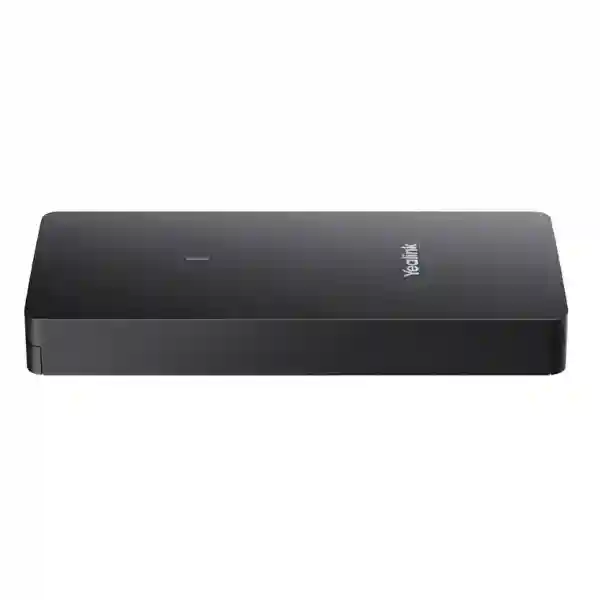
Yealink VCH51 Pro Video Conferencing Hub
The Yealink VCH51 Pro is designed to simplify wired BYOD and content sharing in compatible Yealink meeting rooms. A user connects a laptop through USB-C and can make use of the room’s installed audio and video resources for meetings on the required conferencing application, subject to the capabilities and settings of the connected room system. Yealink documents support for content presentation up to 4K/60fps in supported scenarios, a one-cable workflow for BYOD and sharing, and laptop charging up to 65W when a suitable PD power adapter is connected.
What the Yealink VCH51 Pro does
The VCH51 Pro sits between a user’s laptop and a compatible Yealink room environment to make wired collaboration more predictable. Instead of relying only on a room’s native meeting platform, organisations can give visitors and employees a practical BYOD path: connect a laptop, open the preferred conferencing application, and use the room’s professional camera, microphone and speaker resources where the selected Yealink deployment supports that workflow. This is particularly useful in meeting rooms shared by teams that use Microsoft Teams, Zoom and other PC-based collaboration applications.
For presentation, Yealink specifies wired content sharing up to 4K at 60 frames per second in supported situations. The hub has a built-in hardware encoding approach, so Yealink states that no driver or additional software installation is required for the VCH51 Pro itself. That reduces friction for guest laptops and helps IT teams standardise a meeting-room connection method. The USB-C path can also provide up to 65W PD 2.0 laptop charging when the deployment includes a compatible PD power adapter, helping users avoid connecting a second charger during longer meetings.
One-cable meeting workflow
USB-C can carry the wired BYOD/content-sharing workflow and, with appropriate PD power, charge the connected laptop. This can make table connections cleaner and easier to explain to room users.
High-resolution presentation
Yealink lists presentation resolution up to 4K/60fps. Actual behaviour depends on the connected Yealink system, laptop, cable and deployment mode, so compatibility should be confirmed before ordering.
Plug-and-play design
The VCH51 Pro uses built-in hardware encoding and is intended to work without requiring users to install a dedicated driver, helping reduce meeting start-up friction.
Room-system integration
The hub is intended for selected Yealink MeetingBar, MeetingBoard, MVC, ZVC and related room deployments. Exact model and firmware compatibility should always be checked against Yealink’s current list.
Verified technical specifications
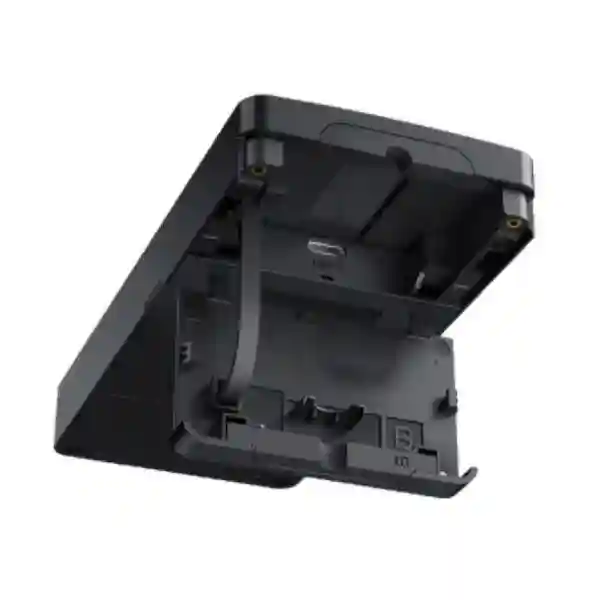
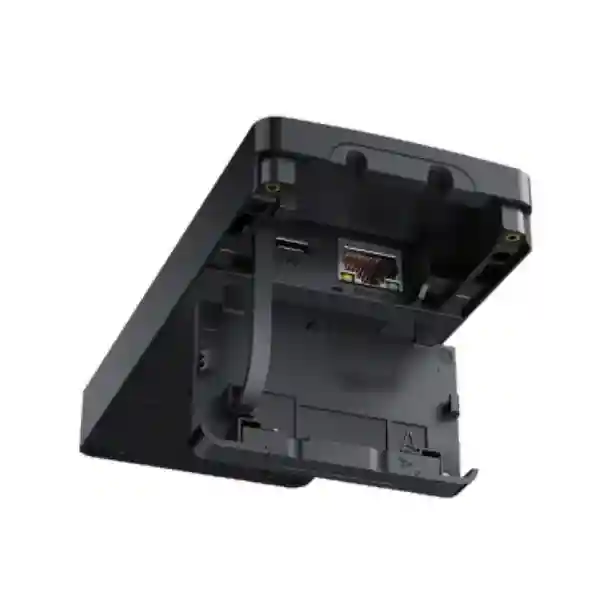
| Network interface | 1 × 1000Mbps RJ45, IEEE 802.3af, full-duplex |
| Laptop interface | 1 × USB 2.0 Type-C with DisplayPort video input |
| Power | 1 × PD power port; up to 65W PD 2.0 laptop charging with appropriate power adapter |
| Presentation | Up to 4K/60fps in supported configurations |
| Operating systems | Windows 7/8.1/10/11; macOS 10.6 or later |
| Dimensions | 144 × 65 × 18 mm |
| Weight | 0.602 kg |
| Operating temperature | 0–40°C |
| Operating humidity | 10–95% |
Compatibility is model-specific. Yealink’s current product page lists support for selected MeetingBar, MeetingBoard, MVC and ZVC models while identifying some models as unsupported or coming soon. Confirm the exact room-system model, firmware and deployment architecture before procurement.
Buying and deployment guidance
Before requesting a Yealink VCH51 Pro quotation, identify the exact Yealink room system already installed or planned. A buyer should not assume that every MeetingBar, MeetingBoard, MVC or ZVC model uses the hub in the same way. Yealink’s compatibility matrix distinguishes supported and unsupported systems, and deployment guidance differs between Android-based and Windows-based meeting-room solutions. For some networked deployments, Yealink specifies an unmanaged PoE switch with Gigabit or higher transmission capability, so the switching design may be part of the bill of materials rather than an afterthought.
Also verify the laptop connection requirement. The VCH51 Pro connects to a PC by USB-C, and the port must support the functions required by the use case. If a user expects presentation, audio/video access and charging from one cable, the laptop, cable, connected Yealink endpoint and PD power arrangement all need to support the intended mode. In mixed-device organisations, a short pilot with the standard laptop models used by executives, sales teams and visitors can prevent surprises.
For meeting-room design beyond the hub itself, see FourTeck Tanzania’s video conferencing and integrated IT guidance, the business technology shop, technology services, FourTeck Tanzania company information and the quotation and contact page. The Tanzania site currently exposes fewer than seven distinct indexed Yealink-specific product/category pages, so no unverified internal URLs are included here.
Yealink VCH51 Pro Tanzania
Organisations evaluating the Yealink VCH51 Pro in Tanzania are usually solving a practical meeting-room problem: how to let employees and guests bring a laptop into a professional room and use the installed camera, microphones, speakers and displays without turning every meeting into a cable or driver troubleshooting session. The VCH51 Pro is particularly relevant where a compatible Yealink room system is already deployed or planned, because it adds a structured wired BYOD and content-sharing path. For procurement teams, the first step should be to document the exact room hardware, the collaboration platforms users need, laptop USB-C capabilities, display arrangement and whether laptop charging is expected from the meeting-table connection.
Tanzania deployments also benefit from considering the room as a complete system rather than purchasing the hub in isolation. Video quality depends on the camera and lighting; intelligible speech depends on microphone coverage and acoustics; meeting stability depends on the LAN and internet connection. Where the VCH51 Pro connects through a network path, switching and PoE requirements should be reviewed. A meeting room that is used for customer presentations, board discussions or hybrid training may need more attention to display size, cable routing and user instructions than a small huddle room.
For a useful quotation, provide the Yealink room-system model, quantity of rooms, laptop types, preferred platforms, required presentation resolution and whether the installation is new or an upgrade. It is also helpful to identify available Ethernet and power at the table or equipment location. FourTeck can then position the VCH51 Pro within a broader collaboration design rather than treating it as an isolated accessory. Buyers with multi-country standards can also reference FourTeck Africa when aligning regional collaboration procurement.
Yealink VCH51 Pro Dar es Salaam
Dar es Salaam businesses often operate busy meeting environments where executives, sales teams, consultants and visiting partners may use different laptops and conferencing applications. In that setting, the VCH51 Pro can be valuable when the room is built around a compatible Yealink system and the organisation wants a repeatable USB-C connection experience. A wired BYOD path can reduce dependence on guest wireless casting and can make it clearer to a visitor which connection should be used for presenting and joining a call.
When planning a Dar es Salaam boardroom or client meeting room, confirm the physical route between table, display wall and Yealink endpoint. The VCH51 Pro’s Gigabit RJ45 interface and PoE capability can influence where the device is placed and how cabling is organised. If a PoE switch is part of the deployment, use Yealink’s current instructions for the particular Android or Windows room architecture instead of applying a generic network design. The same applies to USB-C: a charging-only cable is not an acceptable substitute for the data/video cable required by the meeting workflow.
Procurement teams should also decide whether 65W laptop charging is an operational requirement. If it is, include the appropriate PD power adapter and validate that the standard corporate laptops accept the intended charging profile. For rooms used heavily throughout the day, label the user cable and provide a short instruction card so guests understand whether to select a room camera or speaker in their application. A quotation request should include room count, installed Yealink model, display count, laptop fleet and any requirement for installation, testing or user handover. This produces a more accurate proposal than requesting only a unit price.
Yealink VCH51 Pro Mwanza
For organisations in Mwanza, the VCH51 Pro can support a more standardised hybrid-meeting experience in branch offices, financial-services locations, education environments, healthcare administration, hospitality operations and other workplaces where remote collaboration connects the site with teams elsewhere. The most important buying question is whether the hub is compatible with the exact Yealink room device in use. Because Yealink updates compatibility as its room portfolio evolves, procurement should reference the current list rather than assume compatibility from the brand name alone.
A Mwanza deployment may also place extra value on maintainability. A simple wired workflow is easier for local users to understand when there is no dedicated AV technician in every meeting. The VCH51 Pro’s plug-and-play concept can help, but the room still needs correct configuration, cabling and network design. If the endpoint uses a PoE network path, verify switching requirements and make sure the room rack or communications cabinet has enough power protection. For installations where occasional power interruption is a concern, protecting the broader network and conferencing equipment with an appropriately sized UPS may be more important than focusing only on the hub.
Before shipment or installation, test the intended laptop and application combination where possible. Confirm screen sharing, room audio/video selection, display behaviour and charging. Record the working setup in the site’s documentation so future support does not depend on individual memory. Organisations standardising multiple branches should use a common room naming convention, cabling plan and handover checklist. That approach helps the VCH51 Pro become part of a repeatable collaboration standard rather than another accessory whose purpose is unclear to users.
Yealink VCH51 Pro Arusha
Arusha has organisations whose meeting requirements can range from corporate offices and development-sector teams to tourism, hospitality and conference operations. In rooms that regularly host external participants, a wired BYOD option can be especially useful because a visitor may arrive with a laptop and need to join a meeting on a platform that differs from the room’s default service. With a compatible Yealink environment, the VCH51 Pro is intended to provide that bridge through a USB-C connection while using room-grade audio and video resources.
For conference and hospitality settings, user turnover matters. The connection method should be obvious, resilient and documented. Place the VCH51 Pro where the cable can be reached without stretching across walkways, and choose furniture cable management that protects connectors from repeated strain. If the deployment uses the hub for 4K/60fps content sharing, verify that the whole presentation chain is appropriate for that output, including laptop capability, display resolution and Yealink room configuration. High-resolution support is valuable for detailed slides, drawings and visual material, but only when every component in the path is correctly matched.
Arusha buyers should request a quotation that distinguishes the hub itself from any required power adapter, switch, cabling, room endpoint, display and installation work. If the room already contains Yealink hardware, share exact model and firmware information. If the room is new, describe seating capacity, table position, display wall and conferencing platforms. A properly scoped solution can then combine the VCH51 Pro with the right room system instead of forcing the room design around a single accessory.
Yealink VCH51 Pro Dodoma
Dodoma organisations considering the Yealink VCH51 Pro may include government-facing businesses, professional services, education, project teams and enterprises that need dependable communication with colleagues in other cities. In these environments, consistency can be more important than having many connection options. A clear USB-C BYOD workflow can give users one known method for presenting and joining calls through compatible Yealink room hardware, while the room remains available for its native meeting platform when appropriate.
The deployment should begin with compatibility validation. Yealink’s current VCH51 Pro page lists specific supported MeetingBar, MeetingBoard, MVC and ZVC systems and also lists models that are not supported. That means model verification is a procurement control, not a minor technical detail. Where the room is Windows-based, follow the current Yealink Windows deployment guidance; where it is Android-based, follow the corresponding Android guidance. Network switch requirements and feature behaviour can differ between designs.
For Dodoma sites that need standardisation across departments or buildings, prepare a room template that records the endpoint model, VCH51 Pro connection, cable labels, IP/network assumptions, power arrangement and supported user workflow. Include a simple test for content sharing, camera, microphone, speakers and charging before handover. When requesting a commercial proposal, state whether the requirement is supply only or includes integration and testing. This helps procurement compare quotations on the same scope and reduces the risk of discovering missing accessories only during installation.
Yealink VCH51 Pro UAE
UAE businesses often operate highly standardised meeting-room estates across headquarters, branches, free-zone offices and customer-facing spaces. The Yealink VCH51 Pro can fit into that strategy when organisations want a wired BYOD option on compatible Yealink systems. It is particularly useful in rooms where employees and visitors may use different meeting platforms and where IT wants the room camera, microphones and speakers to remain the common professional AV layer.
A UAE project should distinguish between simple accessory supply and full room integration. For enterprise rollouts, confirm the precise MeetingBar, MeetingBoard, MVC or ZVC model, firmware baseline, MTR architecture, network segmentation and support ownership. If PoE switching is used as part of the VCH51 Pro topology, follow Yealink’s recommended switch type and speed for that deployment. If laptop charging is expected, include and validate the PD power design rather than assuming every USB-C connection provides power automatically.
For organisations coordinating UAE and Tanzania sites, a standard bill of materials and acceptance checklist can reduce support variation. Test the main corporate laptop models and conferencing applications, document the expected device-selection behaviour, and make the table connection easy to recognise. For UAE-specific technology procurement and integration, buyers can also consult FourTeck UAE. The objective is not merely to add BYOD, but to make the meeting room predictable for users across locations.
Yealink VCH51 Pro Uganda
Uganda-based organisations planning Yealink collaboration rooms can use the VCH51 Pro as a wired bridge between personal laptops and supported room systems. This is useful for companies whose staff move between offices or whose meeting rooms frequently host customers, suppliers and project partners. The business value comes from reducing the number of unfamiliar steps a user faces: connect the laptop, select the required conferencing application and use the room AV resources where the supported Yealink architecture enables it.
For procurement, the model-specific compatibility list should be part of the approval record. Do not purchase the VCH51 Pro solely because an existing device carries the Yealink brand. Confirm exact hardware and software versions and whether the desired workflow is BYOD, content sharing, or both. If deployment instructions specify a PoE switch, make sure the device is appropriately selected and that the network path is not shared in a way that violates Yealink’s design guidance.
Organisations with branches in Uganda and Tanzania can benefit from using the same test script and documentation template in both countries. A successful room acceptance should include a wired sharing test, audio/video device selection, display verification, connection recovery after unplugging and any expected laptop charging. For regional assistance, FourTeck Uganda provides a matching regional point of reference while Tanzania enquiries can be coordinated through the FourTeck Tanzania contact page.
Yealink VCH51 Pro Kampala
Kampala offices frequently need collaboration rooms that support internal meetings, customer calls, interviews, training and cross-border management sessions. The VCH51 Pro is a practical consideration where a compatible Yealink room system needs a wired laptop option. It allows organisations to preserve investment in room-grade cameras and microphones while giving the meeting organiser flexibility to run a conferencing application from a laptop.
The strongest deployment starts with user behaviour. Decide where the laptop will sit, how the USB-C cable is presented, whether charging is required, and what users should see on the room display after connection. If staff commonly use Windows and macOS devices, include representative machines in acceptance testing. Yealink lists support for Windows 7/8.1/10/11 and macOS 10.6 or later, but application and endpoint behaviour should still be verified against the exact room solution.
Kampala procurement teams should also verify whether the existing Ethernet infrastructure can support the chosen topology. The VCH51 Pro includes a 1000Mbps RJ45 interface and supports IEEE 802.3af, while some Yealink deployment guidance calls for an unmanaged Gigabit-or-faster PoE switch. If the room system has other AV devices on the same architecture, review the complete connection diagram before ordering. A quotation should list all required accessories and implementation work so that the comparison between suppliers reflects a complete operational room rather than a partial hardware list.
Yealink VCH51 Pro Arua
For an Arua branch, project office or regional facility, simplicity and supportability can matter more than adding multiple meeting technologies. The Yealink VCH51 Pro can contribute to a straightforward room experience by providing a wired USB-C path for supported BYOD and content-sharing scenarios. This can be helpful when staff need to connect quickly with headquarters, partners or customers without depending on wireless presentation methods.
Because remote branches may have less on-site AV expertise, installation quality should reduce future troubleshooting. Label the VCH51 Pro, use the intended cable type, secure strain relief where practical and document which laptop port should be used. If the room relies on PoE, record the switch port and power source. If PD charging is supplied, make that explicit in the room instructions so users know whether the connection should keep their laptop powered during a meeting.
The internet connection still determines the quality of cloud meetings, so a VCH51 Pro does not replace the need for adequate WAN bandwidth and stable LAN design. For branch procurement, collect the room-system model, endpoint firmware, user platform, internet architecture and display details before requesting a quote. If the organisation has several remote sites, standardise the room setup so support staff can diagnose problems using the same checklist. That disciplined approach often provides more value than selecting accessories independently for each location.
Yealink VCH51 Pro Mbarara
Mbarara organisations can use modern hybrid meeting rooms to connect branch operations, education, healthcare administration, commercial teams and project staff with colleagues elsewhere. Where a compatible Yealink room system is already part of the environment, the VCH51 Pro offers a structured way to bring a laptop into that room for wired BYOD or content presentation. This may be preferable to ad-hoc adapters when the objective is to create a repeatable user experience.
A buyer should confirm the expected meeting workflow before ordering. Some rooms primarily need presentation; others need the laptop to access the room camera and audio for a third-party conferencing application. Clarifying that requirement determines whether the VCH51 Pro and the connected Yealink platform are being used in the correct mode. The laptop’s USB-C port capability should also be checked, especially in fleets that contain older systems or multiple hardware generations.
For Mbarara deployments, resilience may include protecting the room endpoint, display, switch and network equipment with suitable power backup where required. The hub is only one element in the meeting chain, and stable collaboration depends on all components working together. When preparing a quotation request, include room quantity, exact Yealink models, cable distances, available network ports, required laptop charging and whether installation and testing are needed. That gives the supplier enough context to identify dependencies before equipment arrives on site.
Yealink VCH51 Pro Gulu
In Gulu, businesses and organisations that rely on remote collaboration may value meeting technology that is easy for non-specialists to operate. The VCH51 Pro’s wired USB-C concept can simplify the front-end experience in compatible Yealink rooms: a user connects a laptop and can present content or use a supported BYOD workflow without installing a dedicated VCH51 Pro driver. That can help reduce meeting delays caused by unfamiliar casting tools or last-minute software installation.
However, plug-and-play at the user level still requires thoughtful setup behind the scenes. The room endpoint must be compatible, the correct firmware and settings need to be in place, the network path must follow Yealink guidance and the USB-C cable must support data/video. Where a PoE switch is needed, choose it according to the documented topology. For support teams, record LED states and basic troubleshooting steps so local staff can distinguish a disconnected device from a software upgrade condition.
A Gulu quotation request should therefore include both the commercial quantity and the technical environment. If the organisation expects to replicate the same room in Kampala, Arua, Mbarara or Tanzania, request a standard design that can be repeated. Consistent cable labels, firmware baselines and user instructions make remote support easier and help ensure the VCH51 Pro serves the same purpose at every site.
Yealink VCH51 Pro Kenya
Kenya organisations evaluating the Yealink VCH51 Pro often have a strong need for flexible meeting rooms that serve both resident teams and visitors. A compatible Yealink room may already be optimised for Microsoft Teams or Zoom, while guests bring laptops using other applications. Wired BYOD allows the professional room camera, microphones and speakers to remain useful even when the call originates from the visitor’s computer, subject to the selected room configuration.
For offices in Nairobi and other Kenyan locations, standardisation is a major advantage. IT teams can define a room type—small, medium or boardroom—and decide whether the VCH51 Pro is included in each standard. The decision should be based on how frequently users need laptop-driven meetings, whether 4K/60fps wired presentation matters for the room, and whether USB-C charging up to 65W adds practical value. Where users mostly join native room meetings, the hub may be an occasional-access accessory; where external platforms are common, it can be central to room usability.
Before procurement, verify the Yealink compatibility matrix and the exact topology for the endpoint. Include all dependencies in the bill of materials and test common laptop types. For Kenya-specific technology enquiries, FourTeck Kenya can complement Tanzania planning, especially for organisations maintaining the same collaboration standard across East Africa.
Yealink VCH51 Pro Kuwait
Kuwait enterprises can use the VCH51 Pro in compatible Yealink meeting rooms where a one-cable laptop connection is preferred for BYOD and presentation. This is relevant in executive rooms, professional-services offices and customer meeting spaces where users may switch between different conferencing applications during the same day. A wired method can offer a predictable alternative to wireless casting, particularly when sensitive presentations or guest workflows require a simple physical connection.
The procurement process should confirm room-system support before pricing becomes the main comparison point. Yealink’s VCH51 Pro compatibility is not universal across every historical MeetingBar or MeetingBoard model. The exact endpoint and deployment architecture determine how the device is connected and what functionality is available. For rooms that use a PoE switch in the VCH network path, follow the current Yealink guidance and confirm Gigabit capability.
Kuwait projects should also consider cable management, PD charging expectations and user instructions. If the USB-C cable is regularly handled by visitors, provide a durable table route and avoid placing the connector under constant mechanical stress. If 65W charging is required, ensure the PD adapter is included and appropriate for the design. Regional buyers can also reference FourTeck Kuwait when coordinating local procurement with a broader FourTeck collaboration standard.
Yealink VCH51 Pro Ghana
Ghana businesses deploying hybrid meeting rooms may consider the Yealink VCH51 Pro when they want to give laptop users access to a compatible room’s professional AV system. The use case is straightforward: an employee or visitor brings a notebook, connects by USB-C and starts the preferred meeting application. In supported configurations, the hub enables room audio/video access and high-resolution content sharing without requiring a dedicated VCH51 Pro software installation.
For a Ghana procurement team, the key is to avoid treating the device as a universal USB-C adapter. It is a Yealink room accessory whose behaviour depends on the connected Yealink platform. Verify the current compatibility matrix and document the endpoint model. Then confirm whether the planned workflow includes BYOD, wired presentation, laptop charging or all three. If charging is part of the user promise, include the appropriate PD power source and test the standard corporate laptops.
For multiple locations, use the same acceptance process: connect a supported laptop, confirm display output, start a call, verify microphone and speaker selection, test the room camera, unplug and reconnect, and record the expected LED status. This makes post-installation support easier. Ghana-specific regional coordination can be aligned through FourTeck Ghana, while Tanzania buyers can maintain the same technical standard on projects spanning both markets.
Yealink VCH51 Pro Nigeria
Nigeria’s large corporate and professional-services environments often operate many meeting rooms with varied user needs. The VCH51 Pro can be useful in organisations standardising on compatible Yealink room systems but still needing a laptop-driven BYOD option. Instead of equipping every room with a collection of adapters and separate USB peripherals, the organisation can define one wired connection workflow tied into the room’s installed AV resources.
At scale, central IT should create an approved compatibility list rather than relying on ad-hoc purchasing. Record which MeetingBar, MeetingBoard, MVC or ZVC versions are supported, the required firmware baseline and the approved network topology. If an unmanaged PoE switch is specified for a design, include it in the standard. Also consider how meeting rooms are monitored and supported; a clear room inventory with serials, switch ports, cable labels and configuration notes makes troubleshooting much faster.
A Nigeria quotation should separate unit hardware from integration, cabling, PD power and any room-system upgrades required to make the hub useful. The lowest accessory price may not represent the lowest complete-room cost if critical dependencies are missing. For multi-country organisations, aligning Nigeria and Tanzania room standards can reduce training and support effort. Buyers can also consult FourTeck Nigeria for regional coordination while maintaining a shared collaboration specification.
Yealink VCH51 Pro Seychelles
Seychelles organisations in hospitality, professional services, government-facing operations and multi-island business environments can benefit from meeting rooms that are easy to use without continuous AV support. The Yealink VCH51 Pro can support that goal in compatible rooms by providing a wired USB-C connection for content sharing and BYOD. This can be useful in conference rooms where external guests arrive with their own laptops and need a dependable connection to room-quality audio and video.
For island environments, procurement planning should pay close attention to completeness because missing accessories can create avoidable delays. Confirm the exact Yealink endpoint, required network components, USB-C cable, PD power arrangement and any mounting or cable-management accessories before shipment. If the design uses an Ethernet/PoE path, verify the switch requirements and available ports. If the room is expected to support 4K/60fps presentation, test the complete display chain rather than relying only on the VCH51 Pro specification.
Documentation is especially useful where support may be coordinated remotely. Create a room diagram, label cables, record network ports and provide a concise user guide. For organisations with sites in Seychelles and mainland Africa, a common collaboration standard can simplify remote assistance and spare planning. The VCH51 Pro should be evaluated as one part of that standard: a practical interface between the user’s laptop and a supported Yealink meeting-room system.
Related meeting-room and infrastructure planning
Video conferencing rooms
Match the hub to the correct camera, microphone, speakers, room controller and display arrangement. FourTeck Tanzania’s home and shop pages outline collaboration-room purchasing factors.
Network and PoE
Where the VCH51 Pro topology uses Ethernet and PoE, confirm switch type, speed, available ports and cabling against Yealink’s documented deployment method.
Displays and room layout
Presentation resolution only creates value when display resolution, viewing distance, cable routes and room furniture are correctly planned.
Regional standardisation
Use repeatable room templates across Tanzania, Kenya, Uganda, UAE, Kuwait, Ghana and Nigeria so users see the same connection method and support teams follow the same checklist.
Frequently asked questions
What is the Yealink VCH51 Pro used for?
It is a video conferencing hub for compatible Yealink room systems, designed to support wired USB-C BYOD, content sharing and optional laptop charging in supported deployments.
Does the VCH51 Pro support 4K content sharing?
Yealink specifies wired presentation up to 4K/60fps in supported situations. The connected laptop, cable, Yealink endpoint and display chain must also support the required mode.
Can the VCH51 Pro charge a laptop?
Yes, Yealink documents up to 65W PD 2.0 charging when the hub is connected to an appropriate PD power adapter. Confirm the laptop’s charging requirements and ensure the power adapter is included in the intended solution.
Does it work with every Yealink MeetingBar or MeetingBoard?
No. Compatibility is model-specific. Yealink’s current list identifies supported and unsupported models, so the exact room-system model and firmware should be confirmed before purchase.
Does the VCH51 Pro require a software driver?
Yealink describes the VCH51 Pro as plug-and-play and states that its built-in hardware encoding design does not require dedicated software or driver installation for the hub itself.
What should I provide for a quotation?
Provide the exact Yealink room-system model, number of rooms, laptop types, conferencing platforms, required BYOD/content-sharing workflow, charging expectations, network/PoE availability and whether installation or testing is required.
Quotation checklist
✓ Exact Yealink endpoint model and firmware
✓ Number of meeting rooms and VCH51 Pro units
✓ BYOD, presentation or combined workflow
✓ Laptop models and USB-C capability
✓ PD charging requirement
✓ Ethernet/PoE switch availability
✓ Display resolution and room layout
✓ Supply-only or installation/testing scope
Decision recap
Choose the Yealink VCH51 Pro when the requirement is a clean wired USB-C BYOD and content-sharing experience for a compatible Yealink meeting-room system. Its strongest advantages are a one-cable workflow, presentation up to 4K/60fps, optional laptop charging up to 65W with PD power, Gigabit/PoE connectivity and plug-and-play operation. The most important purchasing control is compatibility: verify the exact Yealink endpoint and topology before ordering. For Tanzania projects, FourTeck can help convert the room requirement into a complete bill of materials that accounts for the hub, Yealink endpoint, displays, network, power and installation dependencies.
Consultation panel
Send the room-system model, number of rooms, meeting platforms and laptop connection requirements. FourTeck can help check whether the VCH51 Pro is the correct Yealink accessory and identify the supporting components that should be included in the quotation.
Validation notes
Official Yealink product and support information was used for technical facts. Non-vendor reseller/industry pages were reviewed for commercial intent themes such as BYOD, one-cable simplicity, quotation and price searches; no competitor wording was copied. Search-intent patterns considered included Yealink VCH51 Pro price, supplier, reseller, Tanzania, BYOD, USB-C, 4K content sharing, compatibility, setup and quotation. Conversational-search patterns considered included questions such as “Will VCH51 Pro work with my MeetingBar?”, “Can it charge my laptop?”, “How do I add BYOD to a Yealink room?” and “What do I need to deploy VCH51 Pro?”. No claim is made that these are private ChatGPT, Copilot or Gemini query logs. The supplied image list was reviewed but contains Fortinet/FortiGate images unrelated to this Yealink product, so none were used. FourTeck Tanzania’s home, shop, services, about and contact pages were verified; seven distinct indexed Yealink-specific internal product/category pages were not available in the research results, so the content uses the relevant verified pages only and does not invent URLs. The verified Tanzania contact page is used for the CTA. No stock, price, warranty, delivery time, office location or vendor-authorisation claim is made.




Reviews
There are no reviews yet.