
Executive desktop video collaboration
Yealink VP59 Smart Video Phone
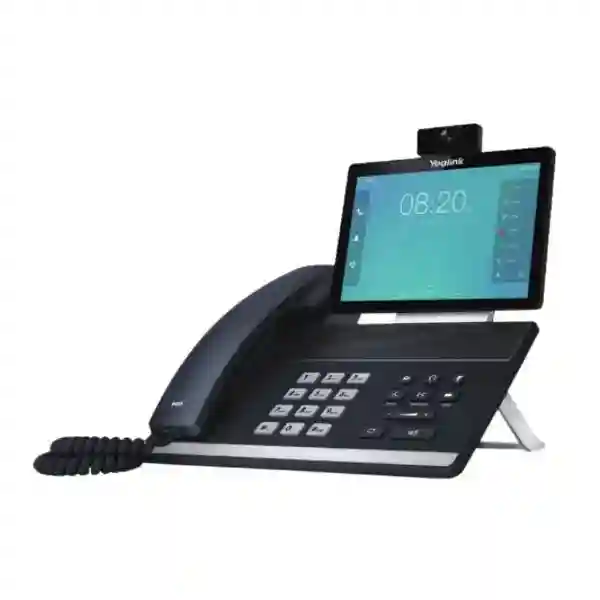
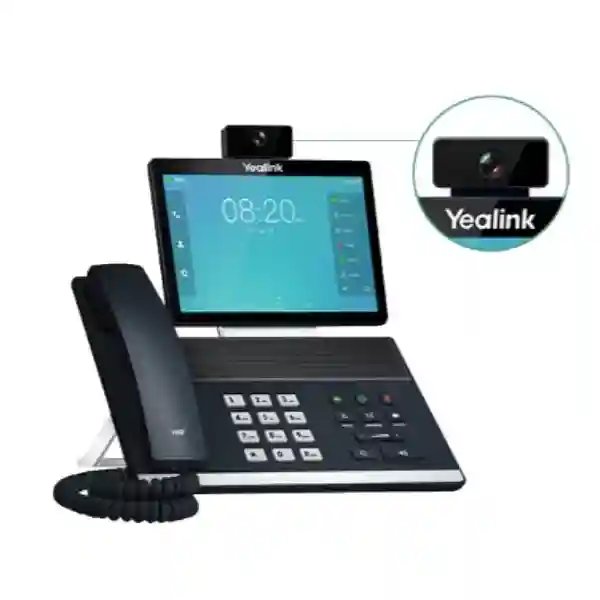
The Yealink VP59 Smart Video Phone is built for professionals who want a single desktop endpoint for high-quality voice, video and business collaboration. Yealink positions the VP59 as a flagship smart video phone for executives, teleworkers and workgroups with video collaboration demands. Its adjustable 8-inch 1280 × 800 capacitive touchscreen, removable 1080p camera, integrated wireless connectivity and enterprise SIP capabilities make it suitable for executive offices, management desks, hybrid-working positions, reception escalation points and selected huddle-space workflows where a conventional audio-only desk phone is not enough.
What the Yealink VP59 solves
Many senior users now move between voice calls, video meetings, SIP extensions, Bluetooth headsets and hybrid collaboration during the same working day. The VP59 reduces the need to treat those requirements as unrelated tools. It places business telephony and face-to-face video communication on a familiar desk-phone platform while adding a larger touch interface and wireless connectivity. For organizations standardizing executive communication, this can simplify the endpoint experience, provided the chosen VP59 edition is compatible with the organization’s PBX, cloud calling service, meeting platform and provisioning method.
Direct answer for buyers
Choose the VP59 when your user needs more than a standard SIP handset: a large touch interface, full-HD desktop video, Wi-Fi, Bluetooth, HDMI output and multi-account VoIP support. Before ordering, confirm the exact software edition, PBX or UC compatibility, licensing requirements, power method, camera requirement, headset type and management approach. Yealink documentation is available for SIP, Microsoft Teams and Zoom-oriented VP59 variants, so procurement teams should not assume every VP59 software image behaves identically.
Verified Yealink VP59 features
8-inch touch display
The phone uses an 8-inch 1280 × 800 capacitive adjustable touchscreen, giving users a larger visual interface than conventional desk phones and making touch navigation, call control and video interaction easier to follow.
1080p video camera
Yealink specifies 1080p at 30 frames per second video and a dynamic removable HD camera, supporting face-to-face communication directly from the desk while allowing the camera to be removed when it is not required.
HD audio technologies
Yealink highlights Optimal HD Voice, Noise Proof and Acoustic Shield technologies for clearer business conversations and reduced background distraction. Actual call quality also depends on codecs, network performance and the far-end system.
Wireless connectivity
Built-in Bluetooth 4.2 supports compatible wireless accessories, while integrated dual-band 2.4 GHz and 5 GHz Wi-Fi provides a wireless network option where a wired data connection is inconvenient or not preferred.
SIP and account capacity
The general VP59 specification supports up to 16 VoIP accounts. This can suit users who handle multiple identities, departments, branches or line registrations, subject to the capabilities of the connected calling platform.
PoE, USB and HDMI
Power over Ethernet can simplify desktop cabling when a compatible PoE network switch is available. USB supports selected headsets, media or storage applications, while standard HDMI output enables connection to an external display for supported workflows.
Technical specification planning guide
| Display | 8-inch, 1280 × 800 capacitive adjustable touchscreen |
| Video | 1080p at 30 fps, removable HD camera |
| VoIP accounts | Up to 16 on the general SIP specification |
| Wireless | Bluetooth 4.2 and dual-band 2.4/5 GHz Wi-Fi |
| Network/power | Ethernet connectivity with PoE support |
| Expansion | USB connectivity; HDMI output for supported display workflows |
| DECT option | Can work with the Yealink DD10K DECT USB dongle and support up to four compatible DECT handsets |
| Software edition | Android-based VP59 editions exist for different collaboration environments; verify exact edition and current firmware before purchase |
The specification above is intentionally limited to broadly verified VP59 capabilities. Buyers should confirm the exact SKU, software edition, package contents and platform certification associated with the unit being quoted. Yealink publishes separate resources for general SIP, Microsoft Teams and Zoom-oriented VP59 implementations, and software or accessory details can differ.
Deployment, compatibility and integration
A smart video phone should be evaluated as part of the wider voice and network environment. The first compatibility question is the calling platform: SIP PBX, hosted PBX, unified communications service, Microsoft Teams or Zoom-oriented deployment. The second is the network. Voice and video benefit from stable switching, adequate bandwidth, sensible Quality of Service, secure VLAN design and reliable DNS and internet access. If PoE is planned, the access switch must provide sufficient power budget for all connected endpoints. If Wi-Fi is planned, signal strength alone is not enough; the wireless network should also have enough capacity and consistent roaming behavior for the user’s workload.
Provisioning also matters in larger rollouts. A small deployment may be configured manually, while larger estates benefit from repeatable templates, centralized provisioning and documented settings. Yealink references its Redirection and Provisioning Service and boot mechanisms for deployment workflows. Administrators should define extension naming, VLAN policy, firmware governance, local administrator access, certificate handling, time synchronization and user onboarding before mass deployment. These practices make support easier than configuring every phone as an isolated endpoint.
For buyers comparing a VP59 with a conventional executive SIP phone, the key question is whether integrated video and the larger touch interface create enough operational value. If users rarely make video calls and already rely entirely on laptop conferencing, a simpler premium audio phone may be sufficient. If the role benefits from persistent desk-based video, quick call handling, multi-account SIP, headset integration and visual controls, the VP59 can be a stronger fit.
Related FourTeck resources
Explore the FourTeck Tanzania technology shop when the VP59 is part of a larger equipment requirement involving IP phones, IP PBX hardware, conferencing, switching or supporting infrastructure.
Review FourTeck Tanzania integration services when the project includes configuration, network preparation, IP telephony, collaboration, switching or lifecycle support.
For organizations with regional operations, the FourTeck Kenya technology practice and FourTeck Uganda technology practice provide related regional context for multi-country planning.
Businesses evaluating broader desk-phone and VoIP environments can also reference FourTeck’s IP phone and business telephony resource for related communication-system considerations.
Yealink VP59 Smart Video Phone Tanzania
Businesses searching for the Yealink VP59 Smart Video Phone in Tanzania are usually looking for more than a desk handset. The typical requirement is an executive-grade endpoint that can combine SIP telephony, high-quality audio, desktop video and flexible connectivity in one device. In Tanzania, that requirement may appear in corporate head offices, financial organizations, professional-services firms, hospitality groups, education institutions, healthcare administration, government-related environments, NGOs and multi-branch businesses that need reliable communications between local teams and regional or international colleagues. The VP59 is relevant where a senior user needs a dedicated communication device that remains available even when a laptop is occupied with other work.
A Tanzania deployment should begin with the existing voice platform. If the organization already operates an IP PBX, the administrator should confirm SIP feature compatibility, codec expectations, provisioning method and the number of registrations required. If the business is adopting a cloud calling or collaboration platform, the exact VP59 edition and certification status should be confirmed before procurement. The phone’s built-in Wi-Fi and Bluetooth can be useful in modern workspaces, but wired Ethernet with PoE may still be preferable where the network is designed for voice VLANs and centrally backed-up switching. PoE reduces dependence on individual desk power adapters and can simplify cable management, especially in structured corporate environments.
Connectivity conditions can vary between Tanzanian sites, so video readiness should be checked rather than assumed. A phone can support 1080p video while the real experience is limited by internet quality, upstream bandwidth, congestion, firewall policy or wireless interference. For multi-site businesses, Quality of Service and consistent branch network policies can be more important than adding endpoints without network preparation. Organizations should also consider power continuity for switches, routers and internet equipment, because keeping the phone powered has limited value if the supporting network fails during an outage.
When requesting a VP59 quotation in Tanzania, provide the quantity, intended user roles, PBX or UC platform, preferred connection method, headset requirement, camera use, PoE availability and whether configuration or installation is required. That information helps separate a simple hardware request from a complete deployment requirement and reduces the risk of overlooking accessories, licenses or network changes.
Yealink VP59 Smart Video Phone Dar es Salaam
Dar es Salaam organizations often operate in dense commercial environments where executive communication, customer interaction and coordination with branches can happen continuously throughout the day. The Yealink VP59 can suit headquarters, professional offices, corporate management floors, logistics companies, hotels, financial operations and technology teams that want a dedicated smart video phone at the desk. Its large touchscreen is particularly useful for users who manage several lines or identities and prefer visible call control rather than relying only on physical keys. The removable camera also gives businesses flexibility when video is useful for selected calls but should not remain active in every workspace.
For an office in Dar es Salaam, the best technical result comes from checking the LAN and internet path before installing the endpoint. Managed switching can provide the correct voice VLAN, PoE and traffic visibility. The firewall should allow required SIP or UC traffic according to the chosen platform, and administrators should avoid insecure shortcuts such as unnecessarily exposing phone management interfaces to the public internet. If the phone will use Wi-Fi, the 2.4 GHz and 5 GHz environment should be assessed for coverage and congestion. Busy office floors may have many neighboring wireless networks, so a wired connection can still offer more predictable performance for an executive endpoint.
Procurement teams in Dar es Salaam should also distinguish between a product quotation and a working communication solution. A complete scope may include the VP59, PoE switching, SIP extensions, PBX licensing, headsets, configuration, network segmentation, firmware preparation and user onboarding. If the organization is replacing older phones, it is useful to document the current extension plan, hunt groups, reception call flow and executive assistant requirements before migration. That process makes it easier to preserve important workflows instead of simply moving numbers from one device to another.
For projects involving several executive offices, standardize the deployment template. Define the same VLAN policy, firmware baseline, display settings, directory behavior and support process for all VP59 units. A repeatable template lowers troubleshooting effort and makes future additions easier. Include those requirements in the Dar es Salaam quotation so hardware, configuration and infrastructure are evaluated together.
Yealink VP59 Smart Video Phone Mwanza
For businesses in Mwanza, the Yealink VP59 can provide a practical executive communication point for organizations that coordinate with teams in Dar es Salaam, other Tanzanian regions or international partners. Companies in distribution, services, healthcare administration, education, tourism, manufacturing support and branch operations may value a desk endpoint that offers both voice and video without requiring the user to launch a laptop meeting for every discussion. The 8-inch adjustable display supports a more visual interaction model than a conventional phone, while the handset and speakerphone maintain familiar business telephony workflows.
Site readiness should be considered carefully in Mwanza offices where the communication endpoint depends on shared network infrastructure. If the VP59 is powered by PoE, confirm the switch power budget and UPS strategy. If the office uses separate networks for business data, phones and guest access, the handset should be placed on the intended voice VLAN with appropriate DHCP, routing and security policies. A well-designed voice network can help keep call traffic independent from less predictable user traffic. For video, the available upstream internet capacity and firewall configuration are important because video places greater demand on the connection than ordinary audio calls.
The buying decision should also consider the user’s actual workflow. A branch manager who regularly joins remote video discussions, handles several numbers and uses a wireless headset may gain meaningful value from the VP59. A standard user who only makes occasional internal voice calls may be better served by a simpler SIP phone. Matching endpoint capability to role keeps the overall project budget focused on areas where advanced functionality is used rather than deploying premium hardware uniformly.
For a Mwanza quotation, provide the number of phones, locations within the site, current PBX brand or service, SIP account requirements, PoE availability, Wi-Fi use, headset preference and whether the phones must be preconfigured. If the office is part of a wider branch network, include the existing VPN or SD-WAN approach so voice and video routing can be reviewed as part of the deployment plan.
Yealink VP59 Smart Video Phone Arusha
Arusha businesses frequently communicate with national and international partners, making executive video and dependable voice particularly useful in sectors such as tourism, hospitality, conferences, NGOs, professional services and regional administration. The Yealink VP59 can fit managers and decision-makers who want a dedicated communication endpoint that remains ready for SIP calls and video interaction throughout the day. Its removable 1080p camera, adjustable touchscreen, Bluetooth support and dual-band Wi-Fi create flexibility for offices where users alternate between handset calls, speakerphone discussions, wireless headsets and video sessions.
Hospitality and travel-related organizations in Arusha may have mixed network environments connecting front office, administration, guest Wi-Fi, CCTV and back-office systems. The VP59 should not simply be added to an unsegmented network without considering traffic separation and security. A voice VLAN, managed PoE switching and sensible firewall policies can improve maintainability. Where guest wireless networks are heavily used, an executive video phone should normally remain on a controlled business network rather than sharing the same access policy. This is especially important when the phone contains directories, account credentials and management functions that belong to the corporate environment.
Organizations operating conference facilities or hybrid meeting spaces should decide whether the VP59 is intended as a personal executive device or part of a room workflow. It can support desktop and selected huddle use, but larger meeting rooms often require wider camera framing, broader microphone pickup and room-specific controllers. Making that distinction prevents a desktop product from being stretched into a room size it was not selected to serve. Where the VP59 is used for an executive who also joins boardroom meetings, it can complement rather than replace the room system.
When seeking a VP59 in Arusha, request confirmation of the exact edition and current software, accessories and platform compatibility. Include information about the PBX, internet connection, number of users and any branch-to-branch calling requirements. This creates a better basis for quotation than requesting only a unit price, especially when deployment support and network changes may be needed.
Yealink VP59 Smart Video Phone Dodoma
In Dodoma, the Yealink VP59 can support management offices, public-sector administration, professional organizations, education institutions, NGOs and businesses that coordinate with teams across Tanzania. The device is most relevant where the user needs an executive-grade phone with integrated video and a larger touch interface rather than a basic voice-only endpoint. Its combination of SIP account capacity, HD audio, 1080p video, Bluetooth and Wi-Fi can help centralize communications at a desk while keeping the familiar handset format used in structured office environments.
For institutional deployments, governance and repeatability are important. Administrators should define who can change local settings, how firmware is approved, whether phones are provisioned centrally and how extension information is documented. A smart endpoint should not become an unmanaged device simply because it resembles a conventional phone. Network access controls, secure administration and consistent configuration reduce the chance that different departments end up with conflicting settings. If multiple sites are involved, a common template for VLANs, DHCP options, directories and provisioning can make remote support significantly easier.
Power continuity should also be included in the deployment design. PoE can remove individual power adapters from desks, but the PoE switch and upstream router still require dependable power. Organizations that need calling during short interruptions should evaluate UPS coverage for switching, firewall, PBX and internet equipment, not only the endpoint. For video calling, the internet circuit and firewall policy should be reviewed so the phone can establish supported sessions without exposing management services or using unnecessary port-forwarding practices.
A Dodoma procurement request should describe whether the VP59 will connect to an on-premises PBX, hosted service or a platform-specific environment. Include user count, quantity, required call features, video expectations, preferred headset type and whether deployment documentation is required. For government or larger institutional procurement, also define acceptance criteria such as successful registration, internal and external calling, directory behavior, video test calls and documented handover so the project is evaluated on working outcomes rather than boxes delivered.
Yealink VP59 Smart Video Phone UAE
Organizations with offices in both Tanzania and the UAE may use the Yealink VP59 as part of a standardized executive communications environment. The value of standardization is not that every branch must have identical network conditions; it is that the endpoint policy, calling platform, extension conventions and support documentation can follow the same principles. A user moving between offices can encounter a familiar interface, while IT teams can manage a smaller set of device models. This can be useful for regional businesses in trading, logistics, professional services, hospitality, construction and technology that maintain frequent communication between East Africa and Gulf operations.
Before purchasing for a UAE location, confirm whether the unit is intended for SIP, Microsoft Teams or Zoom-oriented use and whether the exact software edition aligns with the corporate collaboration platform. Yealink publishes different VP59 resources for these environments, and feature sets can differ. The device’s 8-inch touch display, 1080p camera, Bluetooth and Wi-Fi are attractive for executive desks, but platform compatibility and licensing remain more important than raw hardware capability. A phone that cannot be managed or certified correctly for the chosen service creates avoidable operational friction.
For multinational deployments, security policies should also be harmonized. Use approved firmware, restricted administrator access, secure provisioning, certificate-based services where appropriate and documented network segmentation. If the UAE office uses a cloud communications service while Tanzania uses an on-premises PBX, the same phone model may still require different configurations or even different editions. Procurement should therefore record the destination site and platform rather than assuming units are interchangeable across markets.
A cross-border quotation should identify quantities by country, local power and network assumptions, shipping or sourcing responsibilities, platform licensing and the expected level of configuration support. That level of detail helps regional IT managers compare total deployment scope instead of only hardware pricing and creates a clearer migration path if older executive phones are being replaced.
Yealink VP59 Smart Video Phone Uganda
The Yealink VP59 can serve Ugandan businesses that need an executive desktop device for SIP telephony and high-quality video collaboration. Organizations with branches in Tanzania and Uganda may find value in using a consistent endpoint family for senior staff, especially when the same PBX or cloud calling platform spans both countries. The phone’s touchscreen, removable HD camera, wireless connectivity and multi-account capacity can support managers who coordinate frequently between offices, remote workers and external partners.
A Uganda deployment should still be designed around the site rather than copied mechanically from another country. Internet performance, firewall architecture, switch capacity and local support processes can differ. Where the VP59 uses PoE, confirm that the access switch has adequate power budget and that uplinks are not congested. If the business relies on Wi-Fi, check the 5 GHz coverage at the actual desk instead of assuming a general office wireless survey is sufficient. Video calls expose weaknesses in network consistency more quickly than low-bandwidth voice traffic.
For branch offices, a useful question is whether calls remain local, route through a central PBX or use a cloud service. That architecture affects resilience and troubleshooting. If all extensions depend on a remote head-office PBX, the WAN path becomes critical. If the branch uses local survivability or independent registration, failover behavior should be documented. The VP59 can be part of either approach, but the surrounding communication design determines how the user experiences outages and network changes.
When requesting a quote for Uganda, include the intended city, number of units, voice platform, video platform, headset needs, PoE availability and deployment timeline. For cross-border organizations, provide the Tanzania configuration standard if one already exists. That gives the implementation team a reference for extension naming, VLANs, firmware and user settings while still allowing the Ugandan site to be adjusted for local network conditions.
Yealink VP59 Smart Video Phone Kampala
Kampala businesses commonly operate fast-moving headquarters and service environments where managers handle voice calls, supplier discussions, customer escalations and video meetings from the same desk. The Yealink VP59 is suited to users who want a dedicated communications endpoint rather than moving every conversation onto a laptop. Its large adjustable touch display gives clear visual control, while the removable camera supports direct video interaction. Bluetooth can simplify wireless headset use and Wi-Fi can help where desk cabling is constrained, although managed wired Ethernet is often preferred for high-priority executive endpoints.
In a Kampala office, IP telephony should be integrated with the LAN design. Separate voice VLANs, PoE switching, reliable DHCP, appropriate Quality of Service and firewall rules can make support more predictable. If the office uses a hosted PBX or cloud UC service, the internet edge becomes part of the voice solution. Redundant connectivity may be worth evaluating for organizations where executive communication is operationally critical. The phone itself cannot compensate for an unstable gateway, overloaded wireless environment or misconfigured SIP path.
For companies replacing older executive phones, migration planning should document features such as call transfer, busy lamp fields, shared lines, hunt groups, directory integration and voicemail access. The VP59’s advanced hardware is valuable only when the business workflows users rely on are preserved or improved. A pilot deployment with one or two representative users can expose configuration issues before a larger rollout. This is particularly useful when switching PBX platforms at the same time as replacing endpoints.
Kampala buyers should request the exact model edition, software version and included accessories on the quotation. If configuration is needed, specify whether phones should arrive pre-provisioned or be enrolled onsite. Add headset, cabling, PoE and network-readiness requirements to the same request so procurement can see the full cost of putting the phone into productive service rather than treating the handset as an isolated purchase.
Yealink VP59 Smart Video Phone Arua
For organizations operating in Arua, the Yealink VP59 can provide a useful executive endpoint when local teams need regular communication with headquarters, suppliers, NGOs, project offices or regional partners. The combination of professional SIP telephony and desktop video can reduce dependence on ad-hoc consumer calling tools, particularly where an organization wants calls to remain tied to managed business extensions and a documented communications platform. The phone’s touch interface also makes it easier for senior users to handle a richer set of features without learning a complicated key sequence.
Connectivity planning is especially important for branches outside the largest metropolitan centers. A video-capable phone should be tested against the available WAN capacity and latency at the actual site. Where bandwidth is limited, administrators may prioritize voice quality and use video selectively. If multiple staff members share the same internet circuit for cloud applications, backups and calls, network congestion should be considered in the design. Quality of Service can help organize traffic inside the LAN, but it cannot create bandwidth that the internet connection does not provide.
Power resilience and remote support should also be part of the plan. PoE is convenient because the phone can draw power from the network switch, but the switch, router and internet equipment should be protected by an appropriately sized UPS if short outages are common and communications need to continue. Remote management is easier when the device configuration is standardized and securely reachable through approved management methods rather than informal remote-access tools.
For an Arua requirement, the quotation request should explain whether the VP59 is for a single manager, a branch leadership team or a larger standardized rollout. Include details about PBX location, WAN connectivity, available switching, desired headset and camera use. If the branch communicates frequently with Tanzania or Kampala, include those calling patterns so the solution can be designed around real operational traffic rather than generic assumptions.
Yealink VP59 Smart Video Phone Mbarara
Mbarara organizations in education, healthcare administration, hospitality, trade, professional services and regional business operations can use the Yealink VP59 where managers need a combination of desk telephony and direct video communication. A dedicated smart video phone is useful when calls are frequent enough that opening a laptop collaboration client for every interaction becomes inconvenient. The handset preserves conventional business calling habits, while the touchscreen and camera add a visual collaboration layer for remote discussions.
The VP59 should be matched to the communication platform before purchase. If the site uses SIP, confirm registration parameters, codecs, directory services and any PBX-specific features. If the organization is standardized on a cloud collaboration platform, verify that the exact VP59 edition is appropriate and current. Avoid buying based only on the model name because Yealink has published platform-specific VP59 resources. This check is particularly important when equipment is sourced through different regional procurement channels.
From a network perspective, assess whether the phone will use wired Ethernet with PoE or wireless connectivity. For a permanent executive desk, wired connectivity can provide predictable performance and allows the phone to participate in a managed voice VLAN. Wi-Fi remains useful for flexible spaces, temporary locations or desks without suitable cabling, but the wireless network should be checked for capacity and coverage. Bluetooth headsets can improve mobility around the desk, although headset compatibility and charging workflows should be considered before standardizing an accessory.
Mbarara buyers should provide a clear bill-of-requirements with phone quantity, user roles, PBX or UC service, number of SIP accounts, video expectations, network method and installation needs. If the devices are part of a national or East African rollout, include the common configuration baseline so the site can align with other offices while maintaining local network settings. This approach supports easier troubleshooting, documentation and future replacement planning.
Yealink VP59 Smart Video Phone Gulu
In Gulu, the Yealink VP59 may be appropriate for branch directors, program managers, institutional leaders and senior business users who coordinate with teams across Uganda and other countries. The product is best viewed as a managed business endpoint rather than simply a video gadget. Its SIP account capacity, HD audio, camera and connectivity options become valuable when they are integrated with an organization’s calling plan, directory, security policy and network standards.
For distributed organizations, remote support design is as important as initial installation. Phones should use a documented naming convention, approved firmware and a repeatable provisioning method. Administrators should know how to restore a device, move an extension and collect diagnostics without relying on a single technician who remembers the original setup. If a Gulu branch is connected to a central PBX elsewhere, WAN monitoring can help distinguish endpoint problems from network-path issues. When calls fail, the cause may be routing, DNS, firewall rules or upstream connectivity rather than the phone itself.
Video use should be planned around realistic bandwidth. A branch may have enough performance for routine cloud applications but experience variation during busy periods. Test the expected calling platform at representative times and confirm that upstream capacity supports the number of simultaneous video sessions required. For executive users who must always be reachable, consider how calls should behave during internet outages and whether alternative mobile or PSTN routes are part of the continuity plan.
A Gulu quote should state whether the requirement is hardware only or includes configuration, installation, testing and handover. Include the existing switch model, PoE availability, PBX details, headset requirements and any branch VPN. That context makes it possible to identify missing dependencies before procurement and avoids discovering during installation that the network or platform does not support the intended workflow.
Yealink VP59 Smart Video Phone Kenya
Kenyan businesses evaluating the Yealink VP59 are commonly comparing it with premium executive SIP phones, smart collaboration phones and platform-specific desk devices. The VP59 is most compelling for a user who benefits from integrated 1080p video and a larger touchscreen while still requiring conventional business telephony. Regional companies with offices in Nairobi, Mombasa or other Kenyan locations and operations in Tanzania can use a common endpoint strategy to reduce the number of device families their IT teams support.
Cross-border standardization should start with platform consistency. If both countries use the same SIP PBX or hosted service, templates can often share account structures, codec preferences, button layouts and user policies while retaining site-specific network settings. If the platforms differ, procurement should verify the correct VP59 edition for each country. Yealink’s portfolio includes general SIP and collaboration-platform-specific VP59 resources, so the exact commercial unit should be matched to the intended service instead of assuming that software can always be changed later without licensing or support implications.
Network engineering should address PoE, VLANs, internet bandwidth and firewall behavior. A premium endpoint still depends on ordinary infrastructure fundamentals. For executive areas with many wireless devices, wired Gigabit Ethernet and PoE can provide a clean and manageable design. Wi-Fi is useful where cabling is impractical, but performance should be verified at each desk. Bluetooth headsets may also require a standardized accessory policy so users receive compatible devices and support teams know how they pair and charge.
When requesting a Kenya quote, provide the number of VP59 units, office locations, intended calling platform, required video service, headset type and whether configuration is centralized. For organizations procuring in both Kenya and Tanzania, ask for clearly separated country quantities and deployment responsibilities. This improves commercial comparison and helps ensure the technical design stays consistent even when delivery, taxation or local installation arrangements differ.
Yealink VP59 Smart Video Phone Kuwait
Kuwait-based branches and regional headquarters may use the Yealink VP59 where senior staff need a dedicated desktop endpoint for business calling and video collaboration. For companies with East African operations, a common executive-phone standard can simplify user experience and support documentation across offices. The VP59’s touch interface, removable camera, Bluetooth, Wi-Fi, PoE and multi-account capabilities provide flexibility, but a regional standard should still define which features are actually enabled and supported by the corporate platform.
The exact VP59 edition should be confirmed during procurement. An organization using generic SIP services has different requirements from one standardized on Microsoft Teams or Zoom. Yealink maintains product resources for multiple environments, so hardware name alone is not enough to guarantee the desired user experience. IT teams should identify the approved software image, firmware baseline, account type and management platform before units are ordered for multiple countries.
Kuwait offices may also have highly structured enterprise networks with strict security controls. The deployment should account for VLAN assignment, 802.1X or certificate requirements where applicable, proxy or firewall policies, DNS and NTP services and access to provisioning servers. A pilot phone can be validated against those controls before broader rollout. For voice and video quality, Quality of Service policy should be consistent from the desk switch through the network path where possible, while internet-facing communication should follow the provider’s documented recommendations.
A Kuwait quotation for the VP59 should therefore include technical assumptions rather than only quantity. State the calling platform, user type, network connection, PoE availability, headset model if known, camera use and any centralized management requirement. Regional businesses can also specify whether the same endpoint must interoperate with Tanzania, Uganda or Kenya offices so numbering plans, directories and call-routing expectations are considered from the beginning.
Yealink VP59 Smart Video Phone Ghana
Ghanaian organizations with executive teams, regional branch structures or hybrid-working requirements can consider the Yealink VP59 when an ordinary desk phone does not provide enough visual collaboration capability. The device can serve as a permanent communication point for managers who handle voice calls and video meetings repeatedly throughout the day. Its touchscreen and HD camera support a more integrated workflow, while Bluetooth and Wi-Fi provide options for flexible workspaces and accessory use.
For multi-country companies linking Ghana with Tanzania or other African offices, endpoint standardization can reduce support complexity. IT teams can maintain one approved device profile, one firmware policy and one documentation format, then adapt network settings for each location. The key is to standardize the principles rather than blindly copying settings. Different sites may use different PBX services, internet providers or VLAN structures. The VP59 configuration should reflect those local details while remaining consistent in user-facing behavior.
A proper deployment review should check PoE, switch port configuration, DHCP, DNS, SIP or UC connectivity, firewall rules and video bandwidth. For organizations using centralized provisioning, confirm that the Ghana site can reach the management service securely. If a phone is expected to support multiple SIP accounts, document why each account is needed and how incoming and outgoing calls should present to the user. Clear call-flow design matters more than simply enabling the maximum number of accounts.
When requesting a Ghana quote, provide the exact use case and platform. Procurement teams should ask for confirmation of included accessories, software edition and warranty terms rather than assuming these are uniform across all supply channels. If the phones are part of a regional rollout, include a configuration checklist and acceptance test covering registration, call transfer, voicemail, directories, video sessions and headset operation so each country deployment is validated consistently.
Yealink VP59 Smart Video Phone Nigeria
Nigeria’s large and distributed business environment creates many situations where senior users need reliable communication across offices, cities and countries. The Yealink VP59 can be a useful executive endpoint for financial services, energy, professional services, logistics, technology, education and multi-site enterprises that need both SIP telephony and direct video from the desk. The 8-inch touchscreen provides a clear interface for calls and meetings, while the removable camera allows organizations to balance convenience with workspace privacy preferences.
In larger Nigerian offices, the phone should be integrated into the enterprise network architecture rather than connected as an unmanaged device. Managed PoE switches can provide power and VLAN assignment, while firewalls control access to PBX or cloud services. Where organizations operate redundant internet links, voice and video routing should be tested during failover so sessions behave predictably. DNS, NTP and certificate services should also be included in troubleshooting documentation because smart phones rely on several network services beyond simple SIP registration.
For companies with several offices, centralized provisioning can reduce configuration drift. The organization can define a standard VP59 template for executive users, including account naming, button behavior, security settings, approved firmware and support contacts. Local differences can then be layered on top. This is more scalable than configuring each phone independently and becomes especially valuable when hundreds of endpoints or multiple countries are involved.
Nigeria buyers should ask suppliers to confirm the exact VP59 variant rather than relying only on a generic product title. Specify whether the phone will register to a SIP PBX, hosted service, Teams environment or Zoom-oriented deployment. Include quantity, city, headset requirements, PoE readiness and installation scope. A well-defined request makes it easier to compare quotations fairly and reduces the risk that two suppliers are quoting different software editions or accessory bundles under the same model name.
Yealink VP59 Smart Video Phone Seychelles
Seychelles organizations in hospitality, government, tourism, finance and professional services may use the Yealink VP59 when managers need a dedicated endpoint for international calling and video collaboration. The compact nature of many office and hotel environments can make an integrated desktop device attractive because it combines phone, camera and touch interface without requiring a full meeting-room installation. For executive offices that communicate regularly with regional headquarters, suppliers or remote teams, the VP59 can offer a consistent business communication experience.
Island connectivity makes network planning important. The phone’s video capability should be aligned with available internet capacity and other critical applications. If multiple departments share a connection, peak-hour performance should be tested. Voice traffic usually needs less bandwidth than video, so organizations may choose policies that protect voice quality during congestion. A managed LAN with VLAN separation and Quality of Service can help prioritize business communications inside the site, while firewall rules should follow the requirements of the selected SIP or collaboration platform.
Hospitality environments should also distinguish between administrative communication and guest networks. The VP59 belongs on a controlled corporate network with appropriate authentication and management, not on an open or guest wireless segment. Where PoE is available, a wired connection can simplify power and improve predictability. If the phone is used in a private management office with limited cabling, dual-band Wi-Fi provides another option, but the access point coverage should be verified at the desk.
A Seychelles quotation should include delivery destination, quantity, platform type, power method, headset requirement and whether remote configuration or onsite integration is needed. Regional companies can also specify whether the VP59 must fit a common East African or Gulf communications standard. Confirm the exact edition and software before purchase so the product matches the required platform and can be supported throughout its operational life.
Buying guidance: when the VP59 is the right choice
The VP59 is a strong fit for executives and professionals who make frequent video calls, need multiple SIP registrations, prefer a dedicated desk endpoint and benefit from a larger touch interface. It is also relevant when a business wants to reduce dependence on laptop audio for every call or provide a consistent communication experience in executive offices. The phone is less compelling for users who only need basic voice calling, do not use video and have no requirement for advanced wireless or display features. In those cases, a simpler SIP phone may provide better value.
Compare total deployment cost rather than handset price alone. Include PoE switching, network preparation, PBX licenses, cloud service subscriptions, headsets, configuration, user training, support and any accessories. A premium phone performs best when the surrounding voice and network environment is equally well prepared.
Quotation checklist
Frequently asked questions
Does the Yealink VP59 support 1080p video?
Yes. Yealink specifies 1080p video at 30 frames per second and a removable HD camera for the VP59. Actual meeting quality also depends on the calling platform, network performance and far-end system.
How many VoIP accounts can the VP59 support?
The general SIP specification lists support for up to 16 VoIP accounts. The way those accounts are used depends on the PBX or service provider and the exact software edition.
Does the VP59 have Wi-Fi and Bluetooth?
Yes. Yealink lists built-in Bluetooth 4.2 and dual-band 2.4 GHz/5 GHz Wi-Fi. Compatibility with specific Bluetooth accessories should be checked before standardization.
Can the VP59 be powered by PoE?
Yes. PoE support allows a compatible network switch to provide power and data through Ethernet, which can simplify desk cabling. The switch must have sufficient PoE capacity.
Is the Yealink VP59 a Microsoft Teams phone or a SIP phone?
Yealink has published VP59 resources for general SIP and platform-specific environments including Microsoft Teams and Zoom. Buyers should confirm the exact edition and current certification or firmware applicable to their intended platform before ordering.
Can FourTeck help plan a VP59 deployment in Tanzania?
FourTeck Tanzania’s wider service scope includes IP telephony, networking, conferencing and integration planning. A VP59 requirement can therefore be assessed together with PBX compatibility, PoE switching, VLANs, internet readiness, headsets and configuration rather than as an isolated endpoint purchase.
Decision recap
The Yealink VP59 is designed for organizations that need premium desktop voice and video in one managed business endpoint. Its 8-inch adjustable touchscreen, 1080p camera, HD audio technologies, Bluetooth 4.2, dual-band Wi-Fi, PoE, USB, HDMI output and support for up to 16 VoIP accounts make it well suited to executive and collaboration-heavy roles. The most important buying step is confirming the exact VP59 edition and how it integrates with your PBX, cloud calling platform and network.
For Tanzania projects, plan the phone together with switching, VLANs, internet quality, power continuity, provisioning and user workflows. That approach gives procurement teams a clearer total solution and helps IT teams support the deployment after installation.
Consultation panel
Share your VP59 quantity, city, existing PBX or UC platform, current network switch, PoE availability, preferred headset and whether configuration is required. FourTeck can use those details to structure the product quotation around the actual deployment rather than provide a generic hardware-only response.




Reviews
There are no reviews yet.