
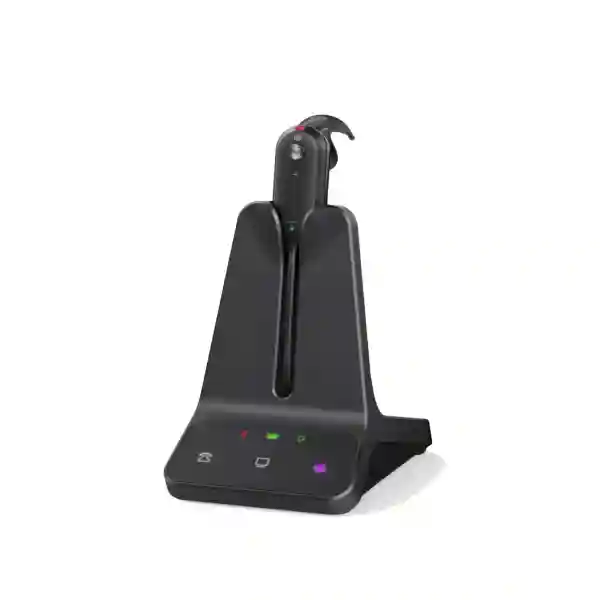
Yealink WH63 E2 Tanzania
The Yealink WH63 E2 is a convertible DECT wireless headset designed for users who spend a significant part of the working day on business calls, softphones, Microsoft Teams or other UC platforms. It combines a very light headset body, multiple wearing options and a dedicated desktop base so users can move away from their workstation while remaining connected to a supported phone or computer. For organizations in Tanzania evaluating a headset for reception staff, sales teams, customer service, administration, finance, operations or hybrid work, the WH63 E2 offers a practical balance between mobility, call clarity, device flexibility and all-day usability.
Yealink publishes two primary variants: WH63 E2 Teams and WH63 E2 UC. Both are designed for professional collaboration environments. The Teams edition adds Microsoft Teams-oriented controls, while the UC edition is intended for broader unified-communications deployments. Before ordering, businesses should confirm the preferred collaboration platform, the desk-phone model if one is used, required call-control accessories, quantity and user wearing preference.
Quick answer
WH63 E2 is best suited to office users who want long-range DECT mobility, flexible wearing styles, reliable voice pickup and convenient switching between PC and supported desk-phone workflows.
Why businesses choose the Yealink WH63 E2
Flexible wearing
The headset supports four wearing styles: shark-fin eartip, earhook, headband and an optional neckband. This matters in shared teams because different users have different comfort preferences.
Long DECT range
Yealink specifies wireless range up to 185 m / 606 ft in suitable conditions, giving users more freedom to move within the workplace while staying connected to calls.
Noise-focused calling
Dual microphones and Acoustic Shield Technology 3.0 are designed to reduce surrounding noise reaching the far-end participant, which is useful in open offices and shared work areas.
PC and phone workflows
The base provides USB connectivity for PC and IP-phone use, with optional accessories such as the EHS62 or telephone cable for compatible third-party phone scenarios.
Verified Yealink WH63 E2 specifications
| Wireless technology | DECT |
| Published wireless range | Up to 185 m / 606 ft |
| Microphones | Dual microphone, 100 Hz–10 kHz microphone frequency range |
| Speaker | 13.6 mm speaker; 20 Hz–14 kHz speaker frequency range |
| Talk time | Up to 8 hours |
| Standby time | Up to 77 hours in Yealink technical specifications |
| Charge time | Approximately 2 hours at 5V/0.6A |
| Headset weight | 16 g without wearing accessory |
| Base weight | 236 g |
| Ports | 2 × USB Type-C 2.0, 1 × Mini USB, 1 × DC power, 1 × busylight |
| Management | Yealink USB Connect and Yealink Management Cloud Service |
| Variants | WH63 E2 Teams (Yealink part 1208711) and WH63 E2 UC (Yealink part 1208712) |
Published range and battery figures are manufacturer maximums and can vary with environment, configuration and usage. Desk-phone call control may require an optional compatible accessory depending on the phone model.
Connectivity, call control and compatibility planning
The WH63 E2 is designed around business telephony rather than casual mobile use. Its DECT base connects the headset to a computer and supported IP-phone environment, giving users a dedicated platform for handling calls without being tied to the desk. On the headset, users can answer, end and reject calls, adjust volume and mute the microphone. The base provides separate phone and PC controls, making source selection straightforward when the user works with both a desk phone and a softphone.
Compatibility should be checked before a bulk purchase. Yealink states that WH63 E2 supports USB connectivity to PC and IP phone and can work with various manufacturers’ phones and UC platforms. However, third-party desk-phone integration can depend on the model and may require Yealink EHS62 or a telephone cable for electronic hook-switch functions. Procurement teams should therefore provide the exact desk-phone brand and model, the preferred softphone or meeting platform, and whether remote answer/end control is required.
For customers standardizing telephony, Fourteck Tanzania’s business technology portfolio provides context for headsets as part of a wider IP-phone, PBX and collaboration environment. Customers can also review the Tanzania Fourteck shop and technology services when the headset purchase is part of a broader workplace deployment.
Who is the WH63 E2 suitable for?
The most natural users are people who need to talk frequently but still move around their immediate workplace. Reception teams may need to step away from the counter, salespeople may consult colleagues while staying on a customer call, and support staff may move between a workstation and nearby equipment. The very light headset and convertible fit make it attractive where different users have strong preferences about over-the-head versus earhook or in-ear wearing.
The product is also relevant in Microsoft Teams-focused organizations that want a certified headset option and in mixed-UC environments that prefer a general UC variant. Its built-in busylight can help colleagues see when the wearer is on a call, and an optional external BLT60 busylight is available for stronger visual signaling. Teams with many headsets can use Yealink’s management tools to handle supported device settings more systematically rather than relying only on manual configuration.
It is less appropriate for buyers whose primary requirement is direct Bluetooth connection to a mobile phone; the WH63 E2 is a DECT office headset. Buyers who require Bluetooth as a central feature should compare Yealink’s hybrid headset families before finalizing the model.
Yealink WH63 E2 Tanzania
For organizations searching for the Yealink WH63 E2 in Tanzania, the key purchasing question is not only the headset price. The more important issue is whether the selected variant and accessories match the calling environment. A customer using Microsoft Teams as the primary platform may prefer the Teams version, while a business using another UC environment may select the UC version. A company with Yealink IP phones can have a different integration path from one using third-party desk phones, so the phone model should be included with the quotation request.
Tanzanian organizations with call-intensive users can benefit from the WH63 E2’s combination of DECT mobility and flexible wearing. In a reception area, the user may need to retrieve documents or walk to a nearby office while remaining on a call. In a sales team, mobility can make it easier to consult stock, pricing or technical colleagues without placing the caller on hold. In a shared office, Acoustic Shield 3.0 and the two-microphone design are intended to reduce the amount of surrounding conversation transmitted to the far end. The built-in busylight also gives nearby colleagues a useful visual indication that the wearer is occupied.
Before procurement, it is useful to define quantity, PC connection type, desk-phone model, collaboration platform, expected working hours and whether the optional neckband, BLT60 busylight, EHS62 or telephone cable is required. Larger rollouts should also consider spare accessories, user training, firmware and management procedures. Fourteck can help customers relate the headset purchase to the wider voice environment, including IP phones, PBX, UC applications and network readiness. For a regional comparison, customers with operations in East Africa can also reference Fourteck Kenya and Fourteck Uganda.
A strong Tanzania quotation request should state the exact model name “Yealink WH63 E2”, preferred Teams or UC edition, user quantity, existing desk-phone brand/model and whether the purchase is for a new deployment or replacement cycle. This allows compatibility and accessories to be reviewed before commercial terms are finalized.
Yealink WH63 E2 Dar es Salaam
Businesses in Dar es Salaam evaluating the Yealink WH63 E2 often have diverse office profiles, from corporate headquarters and professional-service firms to logistics, hospitality, trading, finance and customer-support teams. In these environments, a headset is part of the user’s daily communications workflow. The WH63 E2 can be useful where users alternate between a computer softphone and a desk-phone setup and need the freedom to stand, move to a filing area or consult nearby colleagues while staying engaged in a call.
For open-plan offices, the dual-microphone design and Acoustic Shield Technology 3.0 can be particularly relevant because they are intended to reduce distracting background sound transmitted to the caller. The convertible wearing design also helps when different employees prefer different fits. Three styles are supported with standard accessories—shark-fin eartip, earhook and headband—while the neckband is optional. This can be useful when a business wants a standardized headset platform but does not want every employee forced into the same wearing style.
Procurement teams in Dar es Salaam should plan compatibility before ordering at scale. Confirm whether each user connects to a PC, a Yealink IP phone, a supported third-party phone or a mixture. If remote desk-phone call control is required, the appropriate EHS or telephone cable should be verified against the phone model. Teams-heavy companies should decide whether the Teams variant is preferred, whereas organizations with another primary UC platform may prefer the UC edition.
For a quotation, include the number of headsets, workstation type, desk-phone models, collaboration applications and any required accessories. This makes it possible to quote a usable solution rather than just the base headset. Businesses planning voice upgrades at the same time should consider whether their IP-phone, PBX, network and headset choices are being standardized together, which can simplify future support and user onboarding.
Yealink WH63 E2 Mwanza
For organizations in Mwanza, the Yealink WH63 E2 can support teams that need professional voice communication without remaining fixed to a desk. Administrative staff, service desks, sales operations and managers may all benefit from a DECT headset that allows movement within the office. Yealink specifies up to 185 metres of wireless range under suitable conditions, although practical distance depends on building materials, walls, radio conditions and the location of the base.
A useful procurement approach is to begin with workflows. If the user takes most calls through a Windows or macOS collaboration application, confirm the UC platform and workstation ports. If the user relies on a physical business phone, provide the exact phone model so connectivity and call-control requirements can be checked. If both are used, the WH63 E2 base is designed to support multi-device scenarios, allowing phone and PC sources to be managed from one headset environment.
Comfort also deserves attention in Mwanza deployments where a headset may be worn for many hours. The WH63 E2 weighs only 16 g without a wearing accessory and offers multiple fit options. Individual preference matters, so pilot testing with representative users can be valuable before a large rollout. A user who dislikes an over-the-head style may prefer the earhook or shark-fin eartip, while an optional neckband can serve another preference group.
When requesting pricing for Mwanza, specify whether the requirement is a single user, a departmental rollout or a multi-site standard. Include Teams versus UC preference, quantities, optional accessories and any need for external busylights. If the project also involves IP-phone replacement, PBX changes or network upgrades, grouping those details in one request helps avoid a headset choice that later requires unexpected adapters or compromises.
Yealink WH63 E2 Arusha
Organizations in Arusha looking for the Yealink WH63 E2 may include tourism and hospitality operations, NGOs, professional offices, education providers, customer-facing businesses and branch operations. Many of these workplaces depend on consistent communication with customers, suppliers, internal teams and international contacts. The WH63 E2 is designed for this type of professional calling, combining a DECT link, a dedicated base and microphone technologies intended to improve how the user’s voice is transmitted in busy environments.
The model is especially worth considering when users move around during calls. A hotel reservations team may need to consult front-office colleagues, an administrator may move between a desk and records area, and a manager may need to step into a nearby office. The published DECT range provides significantly more mobility than remaining physically tethered to a phone, while the base keeps the headset centered on the workstation rather than depending on a mobile-device pairing workflow.
Arusha buyers should distinguish between the WH63 E2 Teams and UC versions before ordering. If Microsoft Teams is the organization’s standard collaboration platform, the Teams edition may provide the preferred user experience. Other UC environments can use the UC version. Desk-phone integration must still be checked by exact model, especially where remote call answering, call ending or ring signaling is required through an EHS accessory.
For teams that work long call shifts, discuss charging routines and user behavior as part of the rollout. Yealink specifies up to eight hours of talk time, so the charging base should be used consistently between sessions. A small pool of spare headsets may also be sensible for larger departments. Request a quote with user count, applications, phone models and accessories so the supplied configuration matches the real Arusha office workflow.
Yealink WH63 E2 Dodoma
In Dodoma, the Yealink WH63 E2 can fit offices where clear, professional communication is required across administrative, public-facing, project, support and coordination roles. Users who spend much of the day on meetings or voice calls often benefit from a dedicated headset rather than relying on laptop speakers or holding a handset. The WH63 E2 keeps one ear available to the surrounding workspace while providing a boom microphone and selectable wearing styles for different user preferences.
For organizations operating structured Teams or UC environments, the headset can be incorporated into a standard endpoint specification. Standardization can simplify onboarding, replacement, troubleshooting and user guidance. It is important, however, to standardize the complete configuration rather than only the model name. Decide whether users need the Teams or UC edition, whether any desks require EHS62 or telephone cable integration, and whether optional external busylights are useful in departments with frequent calls.
Dodoma offices with many simultaneous wireless headsets should also think about density and layout. Yealink positions the WH63 E2 for professional deployment and highlights anti-interference and high-density capabilities, but real-world performance still depends on the building and deployment. Locating bases sensibly and following manufacturer guidance is preferable to assuming maximum published range across multiple walls or floors.
A procurement request should list quantities by department, the collaboration platform in use, desk-phone models and any special requirements such as reception call handling, shared desks or centralized device management. This information helps determine whether the WH63 E2 is the correct model for all users or whether some roles are better served by a different Yealink headset family. The objective is a consistent calling experience that aligns with the existing communications system.
Yealink WH63 E2 UAE
For UAE businesses, the Yealink WH63 E2 is relevant to corporate offices, contact centers, professional services, hospitality groups, retail headquarters and distributed teams that require reliable voice communication. Many workplaces use a combination of desk phones and cloud collaboration platforms, and the WH63 E2 is designed around this multi-device reality. Its DECT base can support PC and IP-phone connectivity, helping a user manage different call sources through one headset setup.
The decision between the Teams and UC versions should reflect the organization’s standard application. Enterprises with Microsoft Teams as the dominant collaboration platform may prefer the Teams-certified variant, while mixed or non-Teams environments can choose the UC model. For third-party desk phones, compatibility and remote call-control requirements should be checked carefully because an EHS62 or telephone cable may be needed for specific models.
The UAE’s large open offices and shared business centers make voice pickup and user comfort important. Acoustic Shield 3.0 and the dual-microphone arrangement are designed to suppress surrounding noise transmitted to callers, while four wearing choices help accommodate different employee preferences. The built-in busylight gives colleagues an immediate visual indication of call status, and BLT60 can be added where a larger external signal is useful.
For cross-border customers coordinating offices between Tanzania and the UAE, it is sensible to standardize versions, approved phone compatibility and accessories across locations where possible. This can reduce support variation and simplify procurement. A quotation request should include quantity, site, Teams/UC preference, phone models and required accessory bundle rather than requesting an unspecified “Yealink WH63” because the E2 generation and platform version matter.
Yealink WH63 E2 Uganda
Ugandan organizations considering the Yealink WH63 E2 can use it as part of a standardized business calling environment for sales, administration, customer service and management. The headset’s DECT architecture is designed for workplace mobility, allowing users to leave the immediate desk area without ending a call. This is useful in offices where staff frequently consult colleagues, retrieve documents or move between nearby workstations.
Purchasing decisions should focus on compatibility as much as headline specifications. The WH63 E2 supports PC and IP-phone connectivity, but the exact integration method varies by phone model. A Yealink IP-phone environment may connect differently from a third-party phone that requires an optional EHS62 or telephone cable. Businesses should therefore document existing phones and preferred UC platforms before requesting a final quote.
For offices with shared work areas, Yealink’s two-microphone noise-canceling design and Acoustic Shield 3.0 can help keep the speaker’s voice clearer for the remote participant. The four wearing options make the model more adaptable across a team. A headband can suit users who want a conventional office headset, while an earhook or eartip can feel less intrusive. The optional neckband creates another choice without changing the base platform.
Uganda customers should specify Teams or UC edition, quantity, desk-phone models, PC interfaces and any optional accessories when requesting commercial terms. For regional organizations, consistent configuration between Uganda and Tanzania can simplify user training and spare management. The Fourteck Uganda site linked above can also support customers coordinating country-specific technology enquiries within the wider Fourteck network.
Yealink WH63 E2 Kampala
Kampala has a wide range of offices where a professional wireless headset can improve everyday call handling, including banks, professional services, NGOs, technology companies, support teams and multi-branch businesses. The Yealink WH63 E2 is appropriate when users want a dedicated business headset with more movement than a corded USB model and more office-focused control than a consumer Bluetooth headset.
Teams that spend long periods on voice calls should pay attention to fit. The WH63 E2 provides three standard wearing accessories and a fourth optional neckband style. Because the bare headset weighs only 16 g, it is designed to remain light during extended use. Nevertheless, individual comfort varies, so larger Kampala deployments may benefit from testing the available fit options with representative staff before committing to a uniform accessory choice.
The up-to-185 m DECT specification can be attractive to managers and support users who move within an office, but buyers should treat this as a maximum manufacturer figure rather than a guaranteed in-building distance. Walls, floors, equipment and radio conditions affect real performance. Planning a workflow around realistic office movement—rather than the maximum published number—produces a more reliable user expectation.
For a Kampala quotation, identify whether the headset connects to PC only, desk phone only or both. State the exact phone make and model and the primary collaboration platform. If call answering from the headset is expected on a third-party phone, request compatibility confirmation for the appropriate EHS or telephone cable. Clear requirements reduce the risk of receiving a headset that works for audio but lacks the desired remote call-control behavior.
Yealink WH63 E2 Arua
For businesses and organizations in Arua, the Yealink WH63 E2 can support office communications where staff need to handle calls professionally while remaining free to move. This may include administrative teams, branch offices, service organizations, logistics operations, project groups and customer-facing staff. The headset’s DECT design keeps the user connected to the base and provides a dedicated office calling experience.
When comparing wireless headsets, buyers should consider what the user connects to. The WH63 E2 is not positioned primarily as a mobile Bluetooth accessory; it is a business DECT headset for computer and desk-phone workflows. If the user’s main device is a laptop running Teams or another UC client, the USB connection is central. If a desk phone is involved, the exact phone model determines whether a direct USB path is possible or whether an optional accessory is required.
Arua procurement teams should also consider charging discipline and shared-desk scenarios. Up to eight hours of talk time is suitable for many workdays, but users with extremely heavy back-to-back calls should return the headset to its charging base whenever practical. Shared devices should have a clear ownership and hygiene process, while dedicated devices can be fitted to each user’s preferred wearing style.
For branch deployments, it can be useful to keep the same headset platform across multiple Ugandan sites while documenting any differences in phone models. A structured quote request should contain quantities per branch, Teams/UC preference, phone inventory, optional accessories and required delivery destination. This supports a cleaner bill of materials and makes future replacements easier to plan.
Yealink WH63 E2 Mbarara
Organizations in Mbarara considering the Yealink WH63 E2 can evaluate it for business users who handle frequent internal and external calls. The product is especially useful when the employee must remain reachable while moving around the immediate workspace. DECT gives the headset a dedicated wireless link to the base, which can be more appropriate for office calling than depending solely on the computer’s speakers, a handset or a short cable.
The headset offers an adaptable fit, and this can matter more than it first appears. Users who dislike traditional over-the-head headsets can switch to the earhook or eartip approach, while a neckband can be purchased for another style. For larger offices, this flexibility can reduce the need to source entirely different headset models simply because of wearing preference. The business can standardize one technical platform while giving users a choice of fit.
Mbarara buyers should verify the chosen version. The Teams model and UC model serve slightly different collaboration preferences, so a mixed order should be intentional rather than accidental. If an office uses a combination of Yealink and third-party desk phones, create a compatibility list before ordering. This makes it easier to identify which desks need additional EHS or telephone cable accessories.
A good quotation request should also mention whether centralized headset management is important. Yealink USB Connect and Yealink Management Cloud Service are part of the vendor’s device-management approach and can be useful in structured deployments. For smaller teams, the focus may instead be simple plug-and-use operation, correct accessories and user training. In either case, describe the existing communications environment rather than asking only for a generic headset price.
Yealink WH63 E2 Gulu
The Yealink WH63 E2 can serve Gulu offices that need dependable professional call audio, hands-free operation and mobility around the workstation. It is relevant for administrative offices, service counters, project teams, education environments, NGO operations and branch management where users regularly communicate through a desk phone, PC softphone or collaboration platform.
A major practical advantage is that the headset does not force one wearing format. It can be configured with an eartip, earhook or headband out of the box, with a neckband available as an optional accessory. This can improve acceptance in teams because employees can select a fit that feels natural. The base also provides a clear place to dock and charge the headset, helping maintain readiness between calls.
For Gulu organizations with noisy shared offices, the WH63 E2’s dual microphones and Acoustic Shield 3.0 are designed to reduce environmental noise at the far end of the call. This is a microphone-side benefit aimed at professional communication; it should not be confused with full active noise cancellation for the wearer’s own ear. Buyers who need strong listening-side ANC should compare alternative headset categories.
Before purchase, confirm user count, phone types and software platforms. If a department uses Microsoft Teams heavily, the Teams variant may be appropriate. If the environment uses another UC platform, specify the UC edition. Include any requirement for external busylights, telephone cables or EHS accessories. This level of detail is particularly important for branch deployments, where discovering a missing adapter after equipment arrives can delay deployment and create inconsistent user experiences.
Yealink WH63 E2 Kenya
Kenyan businesses can consider the Yealink WH63 E2 for customer-facing teams, enterprise offices, contact-heavy departments and hybrid work environments. The headset’s core proposition is straightforward: professional DECT mobility, a convertible single-ear design, two microphones for cleaner outgoing voice, and support for PC and desk-phone workflows. These attributes can be valuable in offices where staff switch constantly between applications and voice channels.
For enterprises with established collaboration standards, procurement should align the headset edition to the software environment. Microsoft Teams-centric teams can select the Teams edition, while broader UC environments can use the UC model. The distinction should be recorded in the purchase specification, particularly for multi-site companies, so replacement stock and new-user kits remain consistent over time.
Compatibility with business phones deserves the same attention. While Yealink supports USB connectivity to PC and IP phone, some third-party phones require EHS62 or a telephone cable for the desired control experience. Buyers should submit the exact phone model list before ordering. This is especially important when a procurement covers different branches that may have been equipped at different times and therefore use different phone generations.
For Kenya-Tanzania organizations, harmonizing headset standards can reduce training and support complexity. The product’s multiple wearing styles help standardize the electronics while still accommodating individual comfort. Central management options can also support larger fleets. A quotation should specify quantity by site, Teams or UC mix, phone models, accessory requirements and whether installation or wider telephony assistance is part of the project.
Yealink WH63 E2 Kuwait
Businesses in Kuwait looking for the Yealink WH63 E2 are typically evaluating a headset for professional desk-based communication rather than consumer listening. The DECT connection, dedicated base and office call controls make it suitable for users who need consistent access to a PC softphone, supported IP phone or both. It can fit corporate environments, service teams, trading offices, hospitality operations and administrative departments.
The WH63 E2’s light convertible design is useful for staff who wear headsets for extended periods. Instead of imposing one fixed form factor, organizations can let users choose among standard eartip, earhook and headband options, with the neckband available separately. This is especially helpful in larger teams, where comfort complaints can otherwise lead to unofficial replacement devices and inconsistent support.
Kuwait procurement teams should distinguish between call-side noise reduction and active listening noise cancellation. Acoustic Shield 3.0 uses the dual microphones to help suppress background noise in the user’s transmitted voice. The WH63 E2 is not marketed as a full ANC listening headset. In very noisy workplaces, buyers should assess whether a different headset category is more appropriate for the wearer’s own noise isolation requirements.
For quotation accuracy, provide the platform, phone model and accessory requirements with the requested quantity. The published range and battery values are useful planning figures, but they should be interpreted as maximum specifications under manufacturer test conditions. Real offices can reduce range, and heavy calling patterns can reduce practical time between charges. A pilot unit can be worthwhile when a large deployment depends on specific coverage or integration behavior.
Yealink WH63 E2 Ghana
Ghanaian organizations can deploy the Yealink WH63 E2 where employees need a professional single-ear headset that combines freedom of movement with a stable office communications workflow. It can suit call-intensive roles in sales, support, administration, finance, logistics and management, particularly where users are expected to remain available while moving around a nearby office area.
The choice between the Teams and UC editions should be made at the organizational level where possible. This reduces variation in user instructions and simplifies replacement purchasing. Microsoft Teams-led environments can standardize on the Teams model, while offices centered on other UC platforms can use the UC edition. Mixed environments are possible, but the reason for mixing should be documented so purchasing teams do not accidentally create incompatible expectations.
The WH63 E2 is also suitable for teams where different wearing preferences would otherwise complicate standardization. Headband, earhook and eartip accessories are part of the core wearing concept, and a neckband can be added. The built-in busylight supports workplace etiquette by showing call status, while an external BLT60 can increase visibility in selected roles such as reception or customer service.
Ghana buyers should request confirmation of compatibility with any existing desk phones. The headset can provide audio through supported connections, but remote call control may depend on an EHS or telephone cable. A thorough request should include exact phone models, computer type, softphone or collaboration platform, quantity and expected accessories. If the headset is part of a wider voice modernization project, include PBX and network context so the solution can be assessed end to end.
Yealink WH63 E2 Nigeria
For Nigerian enterprises and growing businesses, the Yealink WH63 E2 can be a practical option for teams that need to improve call consistency while giving employees freedom to move. It is particularly relevant to customer service, sales, support, financial services, professional offices, hospitality, operations and distributed corporate teams that rely on voice and UC platforms throughout the day.
The DECT architecture is important because it is optimized for dedicated office headset use. Yealink publishes a range of up to 185 m in suitable conditions, which can give users more flexibility than a wired device. However, Nigerian offices considering a large deployment should test the intended environment rather than planning around the maximum range number. Concrete walls, multiple floors, radio congestion and workstation location can change practical coverage.
Call clarity is supported by two microphones and Acoustic Shield 3.0, which are designed to reduce background sound transmitted to the person at the other end. This can be helpful in busy offices, but organizations should also address room acoustics, seating arrangement and general noise levels. No headset completely replaces good workplace design. The built-in busylight provides an additional productivity signal, letting colleagues see that a user is engaged in a call.
Nigeria procurement teams should confirm Teams or UC edition, quantities, desk-phone compatibility and accessories. Companies with several branches can standardize a common bill of materials but should still verify phone models at each site. Where users connect only to PCs, the configuration can be simpler. Where desk phones are included, identify whether direct USB works or whether EHS62 or a telephone cable is required for the intended call-control behavior.
Yealink WH63 E2 Seychelles
Businesses in Seychelles, including hospitality, travel, professional services, administration and customer-support operations, can consider the Yealink WH63 E2 where users need comfortable professional calling throughout the day. The headset’s single-ear convertible design lets staff stay aware of their immediate surroundings while communicating through supported phone or computer systems, which can be valuable in reception and service environments.
Hospitality and reservations teams often handle calls while coordinating with colleagues or checking information away from the exact desk position. DECT mobility can support that workflow, although the published 185 m figure should be treated as a maximum and actual coverage tested within the property. Users who stay primarily at the computer can still benefit from hands-free operation, mute and volume controls, and the ability to dock the headset for charging between calls.
For Seychelles deployments, maintaining a simple and supportable device standard can be particularly useful. Choose the Teams or UC edition according to the collaboration platform, document compatible desk phones and keep the required accessory bundle consistent. The convertible wearing options can accommodate users without requiring multiple electronic headset models, simplifying spare planning.
Before requesting a quotation, specify site, user quantity, collaboration application, desk-phone model, preferred wearing accessories and any external busylight requirement. If the deployment spans hotel departments, offices or multiple properties, provide quantities by location so the order can be structured clearly. For integrated communications projects, also mention the PBX or hosted calling platform so the headset decision is evaluated as part of the complete voice environment.
Teams vs UC: which WH63 E2 should you request?
WH63 E2 Teams — 1208711
Best considered when Microsoft Teams is the standard communications platform and users benefit from Teams-oriented controls. Confirm your complete software and phone environment before bulk procurement.
WH63 E2 UC — 1208712
Best considered for organizations using broader unified-communications platforms. Exact application and desk-phone compatibility should still be verified for the required call-control functions.
Quotation checklist for Yealink WH63 E2
Frequently asked questions
Is the Yealink WH63 E2 a Bluetooth headset?
No. The WH63 E2 uses DECT wireless technology through its base. Buyers who require direct Bluetooth use should compare Yealink models that specifically include Bluetooth or hybrid DECT/Bluetooth capability.
What is the Yealink WH63 E2 wireless range?
Yealink specifies up to 185 m / 606 ft. This is a maximum figure; walls, floors, office layout and radio conditions can reduce practical range.
How long does the battery last?
The manufacturer specifies up to 8 hours talk time and approximately 2 hours charge time. Practical runtime varies with actual usage.
Can WH63 E2 connect to a desk phone and computer?
Yes, WH63 E2 is designed for PC and IP-phone workflows and supports multi-device connectivity. Exact desk-phone compatibility and remote call-control functionality should be checked by phone model, with EHS62 or a telephone cable used where required.
What wearing styles are available?
Standard options include shark-fin eartip, earhook and headband. A neckband is offered as an optional accessory, giving four wearing styles in total.
What is the difference between WH63 E2 Teams and UC?
The Teams edition is intended for Microsoft Teams-oriented deployments, while the UC edition is aimed at broader unified-communications environments. Choose the version that aligns with your organization’s standard collaboration platform.
Decision recap
Choose Yealink WH63 E2 when your priority is a lightweight professional DECT headset with long wireless range, convertible wearing styles, dual-microphone outgoing-noise reduction and practical PC/desk-phone integration. Confirm Teams versus UC version and phone compatibility before ordering, especially if remote call control through a third-party desk phone is required.
For Tanzania procurement, include exact quantities, phone models, collaboration applications and accessories in the enquiry so the proposed configuration can be checked as a complete working set.
Need help selecting the right WH63 E2 configuration?
Fourteck Tanzania can review your user count, Teams or UC requirement, existing desk-phone models and accessory needs before quotation. This is particularly useful for multi-user deployments where a small compatibility mismatch can be repeated across many desks.




Reviews
There are no reviews yet.