
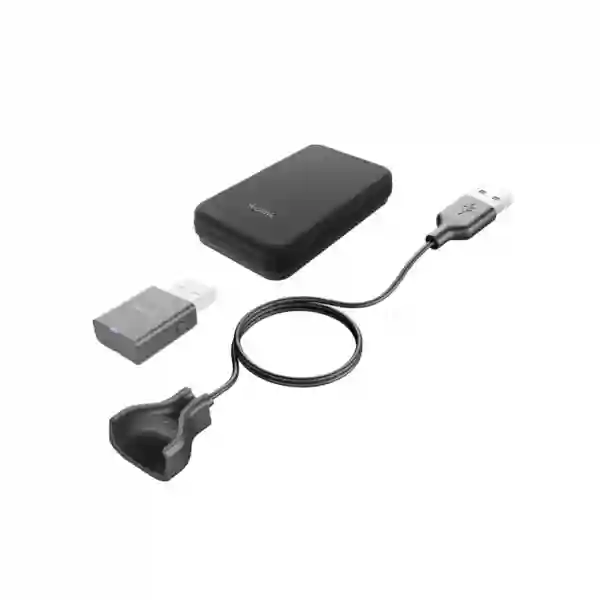
Yealink WH63 WH67 Portable Accessory Kit
The Yealink Portable Accessory Kit for WH63/WH67 is a focused mobility accessory for organizations that already use compatible Yealink DECT headsets and want a simpler way to move between work locations. Yealink positions the kit as a plug-and-play, lightweight answer to the inconvenience of carrying and repeatedly setting up a full headset base. The core idea is practical: keep the headset available for hybrid work while carrying only the compact connection and charging essentials required for portable use.
This kit is specifically intended for the Yealink WH63 and WH67 family of compatible DECT headsets. It is useful when the user wants to leave the full desktop base in one location and carry a compact dongle, charging cable and bag to another workspace.
What is the Yealink WH63 WH67 Portable Accessory Kit?
The Yealink WH63 WH67 Portable Accessory Kit is an accessory bundle created for the compatible Yealink WH63 and WH67 DECT headset environment. The official Yealink product positioning focuses on hybrid work: users may have a desk setup with a headset base, yet need to move the headset between an office, home workspace, project site, hot desk or another computer. Repeatedly unplugging, packing, carrying and reinstalling the complete base can be inconvenient. This accessory kit provides a compact alternative built around the WDD60 DECT dongle, an appropriate charging cable and a carrying bag.
For business buyers in Tanzania, the value is less about adding another complicated device and more about simplifying how an existing headset can travel with the user. A procurement team may use the kit for selected hybrid workers rather than duplicating complete headset stations in every location. An IT team may also prefer a standardized accessory bundle so users know exactly which dongle and cable belong with their compatible WH63 or WH67. Before ordering, the key task is to confirm the headset model, required quantity, intended computer connection and whether the user’s workflow depends on functions that are normally provided by a full workstation base.
Portable connection
The WDD60 DECT dongle provides the portable connection element for compatible use, supporting a lighter travel setup than carrying a complete desktop base.
Portable charging
The included charging cable helps the user recharge the compatible headset away from its primary base, an important requirement for repeat hybrid-work use.
Organized carry
The carry bag keeps the portable components together so users can store and transport them as a simple kit rather than as loose accessories.
Verified kit contents and compatibility
| Item | Purpose | Buyer check |
|---|---|---|
| WDD60 DECT Dongle | Portable DECT connection component for the supported headset use case. | Confirm the intended computer/device connection and compatibility for the deployment. |
| Charging cable for WH63 / WH67 | Provides a portable way to charge the compatible headset. | Plan a suitable powered USB source at the alternate workspace. |
| Carry bag | Keeps the portable accessories organized for transport. | Useful for mobile, hybrid and shared-office users who move frequently. |
| Compatible headset family | Yealink WH63 / WH67 | Check the exact headset label and generation before procurement. |
The accessory kit itself should not be confused with a complete WH63 or WH67 headset package. It is an accessory for customers who already have a compatible headset or are designing a deployment where portable operation is required. It is also different from optional wearing accessories, busylights, electronic hook switch adapters or wireless chargers that may serve other workflow needs. A careful quotation should therefore identify whether the requirement is the portable kit alone, a headset plus the kit, or a broader Yealink communication setup.
Why businesses choose a portable DECT accessory kit
Hybrid work creates a small but persistent equipment problem: people often have professional communication hardware at one desk but need the same call experience at another location. Moving a full base can mean extra cables, power supplies and setup steps. Buying a second complete headset for every user can also create unnecessary duplication when the worker only needs mobility on selected days. The portable kit provides a third approach: keep the primary installation stable while giving the headset user a compact travel set.
This can be especially relevant for sales staff, managers, consultants, project coordinators, support personnel and other users who divide their time between head office, branch offices, home working and customer sites. The accessory is also useful in hot-desk environments where a user may not have a permanently assigned workstation. Because the kit is narrowly focused, procurement teams can allocate it only to the people whose working pattern genuinely requires portability.
Yealink WH63 WH67 Portable Accessory Kit Tanzania
For organizations looking for the Yealink WH63 WH67 Portable Accessory Kit in Tanzania, the most useful starting point is the user’s actual work pattern. A business with employees based in one fixed office may not need a portable accessory for every headset. A company with hybrid schedules, travelling managers, consultants or multi-site teams can have a clearer use case. The kit helps a compatible WH63 or WH67 user carry a smaller connection and charging setup while leaving the main workstation arrangement in place.
Tanzania buyers should verify the exact headset model before placing a quantity order. Product families evolve, and names such as WH63, WH63 E2, WH67 and later Yealink models can appear similar when viewed only from a procurement list. The safe approach is to record the model on the existing headset, determine the number of users who need portability, identify the computers or workspaces where the kit will be used, and then request compatibility confirmation. This reduces the risk of ordering an accessory against an assumption rather than a documented device requirement.
For a business rollout, think beyond the unit count. Decide who owns each kit, how it will be labeled, whether it will remain with the employee or be issued from an IT pool, and what charging points are available at alternate work locations. A simple asset list can record headset model, user, accessory kit, assigned office and replacement status. That level of discipline is useful when equipment moves between locations because portable accessories are easier to misplace than a full desktop base.
FourTeck Tanzania can be approached with the headset model, quantity and intended work scenario for a quotation or compatibility discussion. The broader FourTeck Tanzania IT and communications portfolio is relevant when the headset accessory is part of a wider IP telephony, conferencing, networking or workplace-technology requirement. Keeping the accessory decision connected to the overall communication environment helps buyers avoid isolated purchases that do not match the systems their users rely on.
Best fit
Existing WH63 or WH67 users who regularly move between compatible computer-based workspaces and want to avoid carrying the complete base each time.
Procurement priority
Confirm exact headset model, quantity, user workflow and destination device before purchasing accessories in volume.
Deployment priority
Label and assign the kit, document ownership, test at the alternate workspace and provide users with a simple setup process.
Yealink WH63 WH67 Portable Accessory Kit Dar es Salaam
Dar es Salaam has a large concentration of corporate offices, professional services, logistics operations, financial services, technology teams and distributed business functions. In these environments, headset users may move between headquarters, customer meetings, home working days and shared work areas. The Yealink Portable Accessory Kit for WH63/WH67 can support a practical hybrid-work policy when compatible headsets are already part of the communication setup. Instead of dismantling a full workstation base, the employee can carry the portable components required for the supported use case.
For Dar es Salaam procurement teams, quantity planning should be tied to role rather than a one-kit-per-employee assumption. Start with users who genuinely change locations: account managers, executives, supervisors, project staff, consultants, remote support teams and employees who divide their week between office and home. This can produce a smaller, more defensible accessory count. IT teams can then test a sample unit with the organization’s standard laptop build before expanding the rollout.
The accessory should also be considered in the context of unified communications. A headset user’s experience depends not only on the headset but also on the computer, collaboration client, USB environment, operating-system settings and the quality of the network carrying voice or meeting traffic. A portable accessory solves the physical mobility problem, but it does not replace good endpoint configuration or reliable network connectivity. Organizations with frequent online meetings should therefore combine accessory procurement with sensible laptop, Wi-Fi and internet standards.
When requesting a Dar es Salaam quotation, provide the exact WH63 or WH67 variant, required quantity, whether the users already own the headsets, and whether the kits are for individual assignment or a shared pool. This makes it easier to distinguish the portable kit from a complete headset order and from other Yealink accessories. The objective is a clean, compatible bill of materials rather than a list of similarly named items.
Yealink WH63 WH67 Portable Accessory Kit Arusha
Arusha businesses often include tourism operators, NGOs, professional offices, education organizations, project teams and regional coordination functions where employees may work from more than one location. For a compatible Yealink WH63 or WH67 user, the portable accessory kit can make the headset easier to take between a main desk and another work point. The business case is strongest when the worker already values the DECT headset experience but does not want to transport the complete base and associated desktop setup whenever the work location changes.
A sensible Arusha deployment begins with a compatibility inventory. Record the exact headset model, note the computer types in use, identify users who travel or work remotely, and separate permanent desk users from mobile users. That segmentation prevents accessories from being purchased for people who may never use them. It also helps the IT team decide whether the kit should be assigned permanently or made available as a shared resource for occasional travel.
Organizations with field or project operations should also consider how the accessory will be stored. The included carry bag helps keep the portable components together, but internal labeling remains useful. A company asset label, user name or department reference can reduce confusion when multiple identical kits are in circulation. Users should be instructed to keep the dongle and charging cable together and return shared kits after use.
For quotation planning in Arusha, share the number of compatible headsets already deployed, the number of users who need portable operation and any intended expansion. If the accessory is one part of a larger communications refresh, list the related headset, laptop, IP telephony or conferencing requirements at the same time. This gives the supplier context to review the request as a working system instead of treating each accessory as an isolated purchase.
Yealink WH63 WH67 Portable Accessory Kit Mwanza
Mwanza organizations evaluating the Yealink WH63 WH67 Portable Accessory Kit may include branch offices, trading businesses, service companies, education providers, healthcare administration teams and regional operations. The common requirement is not industry specific: a user has a compatible Yealink DECT headset and needs a more convenient way to work away from the primary base. The kit addresses that portability requirement with the WDD60 dongle, charging cable and carry bag.
Branch environments can benefit from standardized accessories because the same process can be documented across locations. If a head-office user travels to Mwanza, or a Mwanza employee works periodically from another office, an IT department can define how the portable kit is issued, how it is connected, and where it is returned. Standardization is particularly useful when support is centralized and local users need simple instructions that do not depend on an onsite specialist for every move.
The kit should be procured with realistic expectations. It is not a general-purpose Bluetooth adapter and it is not described as a universal accessory for every Yealink headset. Its value depends on matching it to the supported WH63/WH67 environment. Buyers should avoid selecting it solely because the brand name matches another Yealink product. Exact model checking matters, especially in organizations where headsets have been purchased in several phases.
For Mwanza buyers preparing a request, include user count, headset model, current working setup and the reason portability is needed. A short statement such as “ten WH67 users need a travel setup between branch and home” is much more actionable than a generic request for headset accessories. Clear operational detail supports a cleaner quotation and gives the business a better basis for evaluating whether the portable kit fits the requirement.
Yealink WH63 WH67 Portable Accessory Kit Dodoma
Dodoma organizations may have administrative teams, institutions, professional offices, contractors and multi-site operations whose staff regularly move between permanent desks, meetings, remote work and other offices. The Yealink WH63 WH67 Portable Accessory Kit can be useful for compatible headset users in exactly this kind of mixed-location workflow. It reduces the need to pack the complete headset base for every move and creates a simpler portable kit that can travel with the employee.
For structured procurement, distinguish between permanent workstation equipment and mobility accessories. The full headset and base may remain part of the fixed desk standard, while the portable kit is approved for specific mobile roles. This approach gives managers a clear reason for the extra accessory cost and helps IT maintain an accurate inventory. It also prevents a small accessory requirement from turning into duplicate full-headset purchases simply because the user needs a second work location.
Dodoma teams should consider support documentation as part of rollout. A one-page internal note can show which users are eligible, which headset models are supported, how the dongle is stored, how the headset is charged, and who to contact if the kit is lost or not recognized. The most effective accessory deployments are usually the least complicated for the employee; the user should understand what to carry and where to connect it without dismantling the normal office setup.
When requesting a quotation, mention whether the requirement is for new deployment or for existing WH63/WH67 users. If the company has a mixed Yealink estate, provide a model list rather than only the brand. FourTeck can then review the accessory request alongside other communication and IT needs. This is especially useful when a Dodoma rollout forms part of a broader multi-location project.
Hybrid-work deployment guide
A portable accessory has the greatest value when the deployment process is deliberately simple. Start by identifying the supported headset and the employee’s second workspace. Test one kit with the organization’s standard computer image and collaboration applications. Confirm that the user can connect, charge and store the equipment with minimal assistance. Then document the result before purchasing at scale. This sequence avoids solving a hypothetical problem and gives procurement evidence that the accessory matches the real working environment.
For larger rollouts, assign ownership. Each kit can be linked to a user, asset number or department. Keep spares controlled by IT rather than distributing untracked accessories. If a user changes role or leaves the company, recover the dongle, cable and bag as a complete set. Small controls like these protect the investment and keep future support straightforward.
Yealink WH63 WH67 Portable Accessory Kit Uganda
Organizations with operations between Tanzania and Uganda may want consistent communication accessories across both markets. The Yealink WH63 WH67 Portable Accessory Kit can support a shared standard when compatible headsets are already deployed. The advantage of a common accessory policy is operational consistency: IT teams can document one portable setup, specify the same required kit components and reduce variation when employees move between locations.
For Uganda procurement, the same compatibility discipline applies. Confirm the exact headset family and do not assume that every Yealink DECT model uses the same portable accessory. If users are based in Kampala or other cities and need a hybrid-work kit, document the intended workstation, user count and travel pattern. A clear requirement makes it easier to decide whether each user should receive a dedicated kit or whether a controlled pool is sufficient.
Cross-border businesses should also standardize documentation. A simple internal specification can name the Yealink Portable Accessory Kit for WH63/WH67, its primary contents, supported user roles and the internal approval process. This creates a repeatable procurement reference without relying on informal descriptions such as “Yealink travel dongle,” which may lead to incorrect ordering.
For regional communications projects, the FourTeck Uganda communication and IT solutions site can provide market-specific context for Uganda requirements, while the Tanzania team can coordinate the Tanzania portion of the request. Use model numbers and quantities in every enquiry so regional purchasing remains accurate.
Yealink WH63 WH67 Portable Accessory Kit Kampala
Kampala-based offices often combine headquarters functions, customer-facing teams, professional services, support desks and regional coordination. Hybrid employees in these environments may move between office desks, meeting spaces, home offices and temporary workstations. Where a compatible Yealink WH63 or WH67 is already in use, the portable accessory kit can offer a tidy way to carry the core travel components without disturbing the full desktop base.
For IT managers, a pilot is useful before volume purchasing. Choose a representative user who works from two common locations, test the connection and charging workflow, confirm that the user understands how to store the dongle, and collect feedback after several workdays. The purpose of the pilot is not to benchmark headset audio performance but to verify that the portable setup solves the organization’s mobility problem in practice.
Procurement teams should also keep the kit separate from complete headset pricing when comparing quotations. A quote should clearly state whether it contains the accessory kit only, the WH63 or WH67 headset itself, or both. Clear line items reduce confusion during approval and simplify future replacement orders. For larger deployments, ask for model references on the purchase order and receiving documentation.
Kampala buyers with staff travelling to Tanzania can benefit from a common internal equipment standard. When the same model is used across offices, IT support can share documentation and users can move with fewer unfamiliar accessories. The decision should still be based on exact compatibility, not simply geographic standardization.
Yealink WH63 WH67 Portable Accessory Kit Arua
Arua businesses and project organizations may have smaller teams than capital-city offices, which makes accessory planning particularly important. A small number of mobile staff may need portability while most employees remain at fixed desks. The Yealink Portable Accessory Kit for WH63/WH67 allows a company to target those specific users rather than redesigning the entire headset estate.
The practical buying question is simple: which users already have a compatible headset, and how often do they need to work away from the main base? If the answer is occasional travel, a shared kit may be appropriate. If the employee works remotely several days each week, individual assignment may reduce handover friction. The final approach depends on internal asset policy and how frequently users overlap.
For remote or distributed support, label the components and keep a short setup note with the user’s IT documentation. This can be especially valuable when technical support is provided from another city. Rather than troubleshooting an unknown accessory, the support team can refer to a standardized Yealink kit and a known device list.
When obtaining a quote for Arua, avoid ambiguous product descriptions. State “Yealink Portable Accessory Kit for WH63/WH67” and include the current headset model and quantity. That small level of detail helps distinguish the correct accessory from other Yealink dongles, charging products or headset components.
Yealink WH63 WH67 Portable Accessory Kit Mbarara
Mbarara organizations considering hybrid work can use the portable kit as a narrowly defined accessory for supported Yealink headset users. The benefit is strongest when the user needs professional call hardware in more than one workspace but the company does not want the complete base moved repeatedly. The kit keeps the travel components together and supports a cleaner transition between locations.
From an operations perspective, portability is only one part of user readiness. The alternate location also needs dependable internet, appropriate computer permissions and a quiet enough environment for business calls. A portable DECT accessory cannot compensate for poor network performance or an unsupported collaboration application. IT teams should therefore treat the kit as one component in a hybrid-work standard that also covers connectivity, security and endpoint configuration.
For organizations with mixed headset inventory, conduct a simple model audit before purchase. Photograph or record the label of each target headset and group them by model. This takes little time and can prevent costly assumptions. Once compatibility is confirmed, quantity planning can be based on actual mobile roles rather than on total employee headcount.
A quotation request should specify whether the organization requires only the portable kits or additional Yealink headsets as well. If replacement or expansion headsets are needed, list them separately. Clear scope allows procurement reviewers to understand the business purpose and creates a cleaner reference for future orders.
Yealink WH63 WH67 Portable Accessory Kit Gulu
Gulu-based teams may use hybrid or mobile work patterns for project coordination, administration, field support and management. The Yealink Portable Accessory Kit for WH63/WH67 is relevant where a compatible headset already serves as the user’s primary call device but needs to become easier to carry between work locations. The kit reduces the amount of desktop hardware that has to travel and keeps the essential portable components grouped together.
In smaller or remote offices, the support model should be as simple as possible. Standardize the accessory, provide a short user instruction and keep one spare if the business case justifies it. Avoid distributing extra cables or adapters without documentation because accessory sprawl can make support harder rather than easier. A clearly named kit is simpler to troubleshoot than a collection of unrelated items.
For employees who travel frequently, the carry bag is operationally useful because it creates a repeatable packing routine. The user can keep the dongle and charging cable together, reducing the chance that one critical component is left behind. Businesses can reinforce this by adding a small internal asset label or contact detail inside the bag.
Gulu procurement teams should request confirmation against the exact headset version and avoid assuming that accessories are interchangeable across every generation. Include model and quantity on the enquiry, and note whether the users connect primarily through laptops or another supported environment. These details improve the quality of the recommendation and quotation.
Yealink WH63 WH67 Portable Accessory Kit Kenya
Kenya and Tanzania organizations with shared operations may want a consistent headset accessory standard across Nairobi, Dar es Salaam and other locations. The Yealink WH63 WH67 Portable Accessory Kit can be incorporated into that standard for compatible users who move frequently. The same product description and documented use case can be used across offices, helping procurement teams avoid inconsistent local substitutions.
Regional standardization should still leave room for model verification. A company may have purchased different Yealink headset generations at different times. Before placing a cross-border order, collect the exact model information from each office. Once the compatible population is known, determine how many employees actually require the portable kit. This can prevent over-ordering while keeping mobile roles properly equipped.
A cross-border company should also decide whether accessories are purchased locally for each office or coordinated centrally. The right choice depends on internal procurement policy, project timing and support structure. Whichever model is used, keep line-item descriptions consistent and include the headset compatibility reference. This makes receiving and future replacement easier.
Organizations requiring Kenya-specific communication solutions can review the FourTeck Kenya business communication and IT portfolio. For a Tanzania deployment, keep the Tanzania quantity and user requirements clearly separated so each market receives the right procurement guidance.
Yealink WH63 WH67 Portable Accessory Kit UAE
Businesses operating between Tanzania and the UAE often have travelling managers, regional sales teams, technical personnel and multi-office collaboration requirements. A compatible Yealink WH63 or WH67 user may prefer to keep a full base at the primary desk while carrying the portable accessory kit during travel. This can simplify packing and reduce repeated workstation disassembly.
For corporate travel use, create a pre-travel checklist: headset, WDD60 dongle, charging cable, carry bag and the user’s normal laptop power accessories. The point is not to add bureaucracy but to make the setup repeatable. When the user arrives at another office or hotel workspace, the communication kit is complete and easy to account for.
Regional IT teams should test the portable workflow with the organization’s standard collaboration tools and security policies. USB device controls, endpoint protection or restricted user permissions can affect how peripherals behave, so a pilot should be performed on the actual corporate laptop build. Once validated, the process can be documented for other travellers.
For UAE projects, buyers can review the FourTeck UAE technology solutions site. Companies coordinating broader MEA deployments can also reference FourTeck’s regional IT, telecom and infrastructure portfolio when headset accessories form part of a larger communication environment.
Yealink WH63 WH67 Portable Accessory Kit Kuwait
Organizations with Tanzania and Kuwait operations may use similar hybrid-work standards for employees travelling between offices. The portable accessory kit is relevant where compatible Yealink WH63 or WH67 headsets are already deployed and users need a smaller travel configuration. A shared product standard can simplify support, but it should be applied only after exact headset models have been confirmed.
For employees making periodic business trips, the kit can remain in the travel bag while the full desktop base stays installed at the primary office. This reduces setup disruption and can make departure preparation faster. The user should still test the kit before travel and confirm that the destination computer and collaboration software match the organization’s supported configuration.
Procurement teams should keep model and accessory references consistent on purchase orders. Avoid generic lines such as “Yealink adapter,” because those descriptions can create confusion when several Yealink accessories are handled by the same receiving team. Clear naming supports accurate fulfillment and easier support later.
If the requirement spans several countries, prepare a small regional matrix showing country, office, existing headset model, portable-kit quantity and primary user group. This turns a simple accessory purchase into a controlled deployment and helps managers understand exactly why each quantity is requested.
Yealink WH63 WH67 Portable Accessory Kit Ghana
Ghana organizations with regional ties to East Africa can use the Yealink Portable Accessory Kit for WH63/WH67 as part of a standardized communication equipment policy. The ideal user is someone who already has a compatible headset and regularly changes work locations. The kit keeps the portable connection and charging accessories together without requiring the entire base to be moved.
For procurement, start with an installed-base survey. Ask each office to report exact headset models and mobile-user counts. This information is more reliable than estimates based on employee numbers. It also highlights whether the company has different headset generations that may require different accessories, preventing a single part number from being applied too broadly.
The company should define a replacement process for lost dongles or cables. Portable accessories are designed to move, which naturally increases the risk of loss compared with equipment fixed at a desk. A simple policy can state who reports missing components, whether the full kit or individual part is replaced, and how spare stock is controlled.
For Ghana purchasing decisions, focus on verified compatibility and the employee’s real work pattern rather than generic claims about productivity. The accessory is valuable when it solves a defined mobility problem. If the user never leaves the primary workstation, the standard base arrangement may already be sufficient.
Yealink WH63 WH67 Portable Accessory Kit Nigeria
Nigeria-based enterprises often have large sales, service, project and administrative teams spread across multiple offices. For compatible Yealink WH63 or WH67 users who move between locations, the portable accessory kit can be incorporated into a role-based hardware standard. Users with fixed desks can retain the normal setup, while mobile roles receive the portable kit as an approved accessory.
Large organizations benefit from a catalog approach. Give the accessory a clear internal item name, record the manufacturer reference used by procurement, define compatible headset models, and specify who is eligible. This reduces ad-hoc purchasing and prevents users from requesting unrelated dongles when they need a supported portable solution.
Before a wider Nigerian rollout, validate the kit with standard corporate laptops and the main collaboration platform. Device-management policies may differ by organization, so the safest test is always in the actual endpoint environment. Document the result and include a short support note describing normal setup, charging and storage.
Regional buyers should also think about lifecycle. If the company is planning to replace older headset models soon, compare the expected remaining life of the headset estate with the accessory investment. A portable kit can be useful, but procurement should align with the organization’s broader headset roadmap rather than being made in isolation.
Yealink WH63 WH67 Portable Accessory Kit Seychelles
Seychelles businesses with compact offices, hospitality operations, professional services or regional management teams may have employees who divide time between desks, properties, meetings and remote work. Where compatible Yealink WH63 or WH67 headsets are already part of the communications environment, the portable accessory kit can make movement between work locations more convenient without carrying the entire base.
Because teams can be relatively small, quantity planning should be precise. Identify the few roles that genuinely need mobility and assign kits accordingly. This can be more economical and easier to manage than buying portable accessories for every headset user regardless of work pattern. A shared spare may also be useful depending on internal support policy.
For hospitality or multi-property groups, standardization helps when employees rotate between sites. If the same compatible headset and accessory are used, staff can follow a consistent setup process. IT support can then document one known arrangement rather than troubleshooting different accessories at every property.
When requesting a Seychelles quote, provide the exact product name, headset model, user quantity and destination. If the requirement is part of a larger regional order with Tanzania, separate quantities by country while keeping the technical specification consistent. This improves receiving accuracy and gives procurement teams a clear audit trail.
Selection and buying guidance
The most important question is not “Is this a Yealink accessory?” but “Is this the correct accessory for the exact headset and workflow?” Confirm the headset label, determine whether the user needs portable computer-based operation, and verify that the accessory kit is the right route for that environment. If the user mainly needs desk-phone call control, a wireless charger, a replacement wearing accessory or another function, the appropriate Yealink accessory may be different.
For quantity planning, divide users into three groups: fixed desk users, frequent hybrid or travelling users, and occasional mobile users. Frequent users are the strongest candidates for dedicated kits. Occasional users may be served by a shared pool if internal processes allow it. Fixed users may not need the accessory at all. This role-based method is more defensible than purchasing against total headset count.
For commercial comparison, evaluate supplier quotations on the same scope. Ensure one quote is not for the accessory kit while another includes a complete headset. Compare exact product description, manufacturer part reference where provided, quantity, tax treatment, delivery terms and support conditions. Do not infer warranty, availability or delivery time from a generic web listing; request current quotation details for the target country and order quantity.
Compatibility and integration considerations
The portable kit operates within a wider endpoint environment. The headset, WDD60, computer, operating system, collaboration client and company security settings all influence the user’s experience. For that reason, business deployment should include a real-device test rather than rely only on part-name matching. Confirm that the organization’s standard laptop accepts the device and that users can access required call controls in the intended software workflow.
If the company uses several collaboration platforms, test the most important scenarios. A sales employee may use Microsoft Teams internally but join browser meetings with customers; a support user may rely on a softphone; a manager may switch between conferencing applications. The accessory’s purpose is portability, so the final user experience should be validated in the actual communications stack.
For desk-phone-centric users, clarify whether moving away from the base changes any required call-control workflow. The portable kit is not a reason to assume every base feature is reproduced in every scenario. Describe the intended use case when asking for product guidance so compatibility advice can focus on the functions the user actually needs.
For IT managers
Pilot before scale, document the supported headset model, assign asset ownership, test corporate laptops and keep a controlled spare process.
For procurement teams
Use the exact product name, request model confirmation, separate kits from complete headset pricing and compare quotations on consistent scope and terms.
For users
Keep the dongle, cable and bag together, charge before travel, follow the approved setup and report missing components promptly.
Common business use cases
Hybrid employees: A user works in the main office several days each week and from home on other days. The desktop base remains in the office while the portable kit travels with the headset, reducing setup disruption.
Travelling managers: A manager moves between branches or countries and wants to keep a familiar compatible headset available. The portable kit becomes part of the normal laptop travel bag.
Consultants and project staff: A user may spend weeks at a project site and then return to headquarters. A portable connection kit can be easier to manage than repeatedly transporting the full desktop base.
Hot-desk workers: Employees who do not have a permanently assigned desk may need a consistent personal headset setup. The portable accessories can move with the employee while shared desks remain less cluttered.
Regional support teams: Technical or service staff who rotate among offices can carry a known headset accessory configuration. Standardization helps IT provide repeatable setup guidance.
How to prepare a quotation request
A clear enquiry speeds up product matching and reduces back-and-forth. State the product as “Yealink Portable Accessory Kit for WH63/WH67,” list the headset model currently in use, provide the required quantity and describe the work pattern. For example, explain that users need to move between a main office and home workstations, or that travelling staff require a compact connection setup.
Also mention whether you already own the headsets or need complete headset units in the same project. If the order supports several offices, split quantities by location. If there are mixed models, list each model separately. These details allow the quotation to reflect the real requirement and help prevent an accessory-only order from being mistaken for a complete headset purchase.
Quotation checklist
Frequently asked questions
What comes in the Yealink WH63 WH67 Portable Accessory Kit?
The commonly documented kit contents are the WDD60 DECT dongle, a charging cable for WH63/WH67 and a carry bag. The kit is an accessory bundle, not a complete WH63 or WH67 headset package.
Which headsets is the kit designed for?
Yealink identifies the product as the Portable Accessory Kit for WH63/67. Business buyers should still confirm the exact headset generation and intended workflow before volume procurement, particularly where several Yealink headset models exist in the same organization.
Why use the kit instead of carrying the headset base?
The product is intended to make hybrid work more convenient by providing a lightweight portable setup. A user can leave the main base installed at the normal desk and carry the compact portable components to another workspace.
Is this a complete headset?
No. The portable accessory kit is an accessory for compatible WH63/WH67 use. If you need the headset itself, request a quotation that clearly includes the required headset model in addition to any portable kit.
Can a company buy kits only for hybrid users?
Yes, role-based allocation is a practical procurement approach. Fixed-desk users may not need the accessory, while employees who regularly work from multiple locations are stronger candidates. The correct quantity depends on your working policy and asset-management approach.
Should we test one unit before a large rollout?
For business deployment, a pilot is sensible. Test the kit with the organization’s standard laptop, operating environment and collaboration tools, then document the setup before scaling to a larger user group.
How should portable kits be managed?
Assign each kit to a user, department or shared pool; label it; record the accessory in the asset list; and keep the dongle, cable and bag together. This helps prevent loss and makes support easier when many identical kits are deployed.
Can FourTeck help with a wider headset or communications requirement?
Yes. A headset accessory may be only one part of a broader business communication environment that includes IP telephony, conferencing, networking and user endpoints. Provide the full requirement so the accessory can be reviewed in context rather than as an isolated line item.
Decision recap
Choose the Yealink WH63 WH67 Portable Accessory Kit when you have a verified compatible headset and a genuine need to move between work locations without carrying the full base. The kit’s practical value comes from keeping the portable connection, charging and carrying components together. It is particularly suitable for hybrid employees, travellers and shared-office users.
Do not purchase solely on the basis of brand familiarity. Confirm the headset model, the user’s work pattern, the target computer environment and the required quantity. For a business order, document ownership and support expectations before rollout. That combination of compatibility checking and simple asset control creates a cleaner deployment than treating the accessory as an impulse add-on.
Consult FourTeck Tanzania before ordering
If you are planning a Yealink WH63 or WH67 mobility setup, send the exact headset model, user quantity and work scenario with your enquiry. FourTeck can review whether the portable accessory kit matches the requirement and include it in a broader communication or IT quotation where appropriate.
For the strongest result, describe the environment in operational terms: where the user works today, where the headset needs to travel, which computer or collaboration platform is involved, and whether the company already owns the headsets. This information supports accurate product selection and helps avoid mismatched accessories.
Final procurement notes for Tanzania organizations
The portable accessory kit is a small product, but it sits at the intersection of user mobility, endpoint compatibility and IT asset control. Treating those three areas together gives a better purchasing outcome. First, verify that the headset is part of the compatible WH63/WH67 family. Second, confirm that the employee’s work pattern actually requires portability. Third, decide how the kit will be owned, stored and supported. These checks take little time and help prevent unnecessary orders.
For organizations with offices in several Tanzanian cities, use one internal product specification and separate quantities by site. A Dar es Salaam headquarters may require more kits than a smaller branch, while travelling executives may carry their own accessories regardless of home office. A location-by-location count is more accurate than applying one ratio across the entire business.
If the portable kit is being introduced during a broader headset refresh, decide whether older headsets will remain in service long enough to justify new accessories. Conversely, if the existing WH63/WH67 estate is stable and well supported, portable kits may extend the usefulness of that investment by adapting it to newer hybrid-work patterns. The best choice depends on the organization’s lifecycle plan, not just the accessory price.
FourTeck’s role can extend beyond supplying a part number. A clear requirement may include Yealink headsets, IP phones, conferencing devices, network connectivity and user endpoint needs. Presenting the accessory as part of that complete environment makes it easier to identify dependencies, confirm compatibility and build a quotation that reflects how employees actually work.




Reviews
There are no reviews yet.