
Yealink WH67 Tanzania
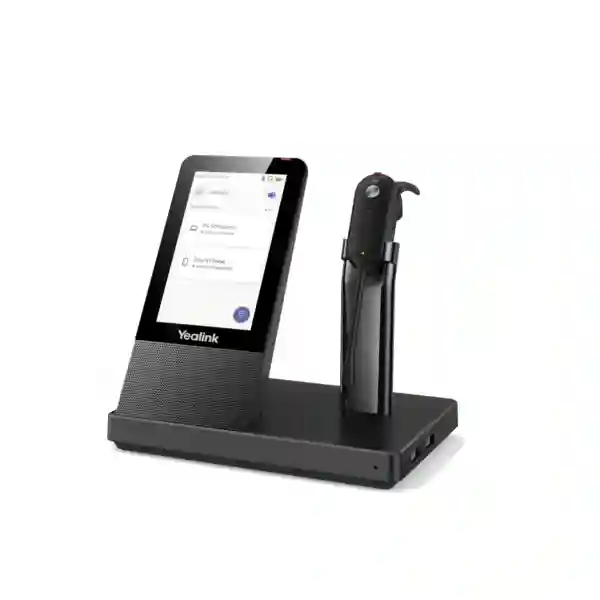
The Yealink WH67 is a premium convertible DECT wireless headset built around an all-in-one UC workstation concept. It combines a lightweight 19 g headset with a desk base that provides a 4.0-inch 480 × 800 capacitive touch screen, Bluetooth connectivity, USB connectivity, an integrated speakerphone, a charging cradle and call-control functions. For businesses in Tanzania, the WH67 is especially relevant when employees handle frequent voice calls but need more freedom than a conventional corded headset can provide. It can support work patterns that move between a PC softphone, a compatible Yealink IP phone and mobile communication while keeping call controls close at hand on the workstation display.
Yealink positions the WH67 for professional unified communications and offers both Teams and UC versions. Verified vendor information highlights up to 120 m / 394 ft DECT wireless range, dual microphones with Acoustic Shield technology, up to 8 hours of talk time in current datasheet material, 54 hours of standby time, a built-in busylight and four wearing approaches using supplied or supported earhook, eartip, headband and neckband options. Actual operating range and battery duration depend on deployment conditions, radio environment, usage and configuration, so business buyers should treat published figures as maximum vendor specifications rather than guaranteed real-world outcomes.
All-in-one workstation
A 4-inch touch base helps centralize call control, device connections and day-to-day communication tasks in one desktop platform.
DECT mobility
Yealink specifies wireless range up to 120 metres, giving users room to move around suitable office environments while staying connected to calls.
Acoustic Shield
A dual-microphone design works with Yealink Acoustic Shield technology to reduce distracting background sound reaching the far end of a conversation.
Flexible wearing
The convertible design supports different wearing preferences, useful when deploying headsets to teams with varied comfort requirements.
Yealink WH67 verified features and specifications
| Product type | Convertible DECT wireless business headset with UC workstation base |
| Base display | 4.0-inch 480 × 800 capacitive touch screen |
| Wireless range | Up to 120 m / 394 ft under vendor-specified conditions |
| Microphones | Dual-microphone headset design with Yealink Acoustic Shield |
| Talk time | Up to 8 hours in current Yealink datasheet material |
| Standby time | 54 hours |
| Connectivity | USB 3.0 and connection to two Bluetooth devices; built-in Bluetooth 4.2 |
| USB hub | Two Type-A USB 3.0 hub ports listed by Yealink |
| Headset weight | 19 g |
| Base weight | 344 g |
| Platform positioning | Teams and UC variants; compatibility should be checked for the exact phone and softphone environment before ordering |
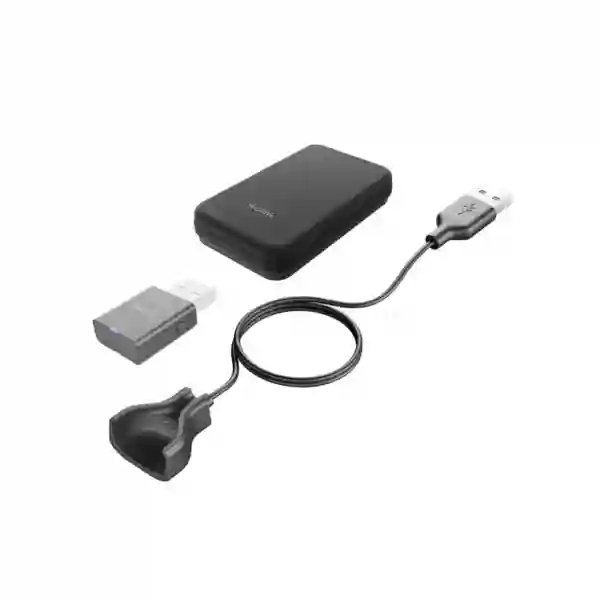
Procurement teams should verify the exact WH67 variant, firmware level, application compatibility and accessory requirements for their deployment. Yealink publishes compatibility information and device-management options, including Yealink USB Connect and Yealink management services. Optional accessories referenced by Yealink include the BLT60 external busylight and WHC60 wireless charging solution. These accessories may be quoted separately and should not be assumed to be included in every package.
What the Yealink WH67 solves for business users
Many office users now receive calls from several systems during the same working day. A sales representative may answer a Teams call on a PC, receive a mobile call from a customer and then speak to an internal colleague through an IP-phone environment. Managing separate wired headsets, handset audio and desktop speakers can create clutter and inconsistent call handling. The WH67 is designed to reduce that fragmentation by bringing headset use, touch-based call control, speakerphone capability and multiple connection paths into a single workstation.
The convertible form factor is also significant. Traditional stereo headsets provide strong isolation but can feel excessive for employees who need to stay aware of people around them. The WH67 uses a lightweight single-ear design with alternative wearing options. That makes it suitable for reception, executive desks, sales teams, customer-care supervisors and other users who need to combine live conversation with awareness of the local workspace. Comfort remains personal, so organizations planning larger rollouts should evaluate the preferred wearing style with representative users before standardizing.
Noise management is another practical consideration. The WH67 does not promise to make every noisy environment silent; instead, its dual-microphone Acoustic Shield system is intended to help reduce background noise transmitted to the other party. This matters in shared offices where the key objective is not simply what the wearer hears, but how clearly customers, partners and colleagues hear the employee speaking. For very loud environments, buyers should still assess acoustic conditions and consider whether a different headset class is more appropriate.
Compatibility, integration and deployment planning
The WH67 is designed around unified communications, but compatibility should be checked at the exact application and phone-model level. Yealink states support for many common softphones and highlights integration with Yealink IP phones. Teams and UC versions are distinct, and the correct version should be selected according to the customer’s primary collaboration environment. A purchasing team should list the desktop operating systems, softphone applications, desk-phone models and mobile-device requirements that each user group actually needs before requesting a quote.
For large deployments, endpoint management also matters. Headsets are often treated as simple peripherals until an organization needs to update firmware, resolve compatibility differences or maintain consistent settings across many users. Yealink provides USB Connect for PC-based configuration and references device-management capabilities for supported environments. IT administrators should determine whether they will manage units individually or as part of a broader Yealink endpoint estate.
Desk layout should be considered before ordering accessories. The workstation includes USB hub functionality and a charging position for the headset, while optional wireless phone charging and external busylight accessories can extend the desktop experience. In spaces where employees hot-desk, installation teams should plan power and USB connectivity so that users do not need to repeatedly reorganize cabling. Where users work with non-Yealink desk phones, compatibility should be validated rather than assumed.
Yealink WH67 Tanzania
For Tanzania-based organizations, the Yealink WH67 fits procurement projects where reliable business voice, mobility around the office and unified-communications integration are more important than simply buying a basic headset. Typical buyers may include banks, professional-services firms, travel businesses, technology teams, universities, healthcare administration, customer-service groups, telecom environments and enterprises standardizing Yealink communications. The product is particularly relevant for employees who spend a large part of the day switching between computer calls, desk-based communications and mobile conversations. Its workstation approach can help create a more consistent user experience without requiring the user to handle several independent audio devices.
A Tanzanian procurement specification should begin with the exact collaboration platform and endpoint estate. If Microsoft Teams is the principal environment, buyers should request the appropriate WH67 Teams version. If the project is broader UC, the UC version may be more appropriate, subject to confirmation against the organization’s softphone and device requirements. For Yealink IP phone users, native integration can simplify the purchasing decision, but the exact phone models and firmware should still be listed in the request for quotation. Organizations using mixed vendor phones should request compatibility validation before purchase.
Office layout is equally important. Yealink advertises up to 120 metres of DECT range, but walls, building materials, radio conditions and other environmental factors can reduce practical distance. Buyers should therefore treat the range as a planning maximum rather than a promise that every floor or building will achieve the same result. In a typical office, the benefit is the ability to step away from the desk for documents, short discussions or routine movement without immediately dropping an active call. Where larger floorplates or complex buildings are involved, a deployment review is worthwhile.
For Tanzania quotations, include the number of users, preferred Teams or UC version, current phone models, PC connection requirements, desired wearing style, need for external busylights, need for wireless phone charging and expected rollout schedule. This produces a more useful commercial response than asking only for a generic headset price. Buyers can also review broader regional technology resources through FourTeck Africa solutions when planning multi-country deployments.
Yealink WH67 Dar es Salaam
Dar es Salaam organizations often manage high volumes of customer, supplier and internal communication across commercial offices, service desks and distributed teams. The Yealink WH67 is well suited to users who need to remain reachable while moving around an office rather than staying physically attached to a desk handset. Sales teams can benefit when they need to check documents or consult colleagues during a call, while customer-service supervisors can use the wireless design to move between workstations without immediately ending a conversation. The headset’s low weight and convertible wearing options can also help organizations accommodate differing user comfort preferences.
For a Dar es Salaam deployment, connectivity mapping should be part of the buying process. List whether staff use Teams, Zoom, 3CX, RingCentral or another supported UC application, whether Yealink IP phones are already installed and whether mobile-device connectivity is required. The workstation’s touchscreen and speakerphone functions can be especially useful at executive or supervisory desks where the user sometimes wants hands-free audio without wearing the headset. The built-in USB hub can also help consolidate peripheral connectivity, though port requirements should be reviewed before rollout.
Open-plan offices require attention to both wireless density and acoustics. The WH67’s Acoustic Shield technology is designed to reduce the background noise transmitted through the microphone, while the built-in busylight indicates when the user is engaged on a call. An optional external BLT60 busylight can make status more visible to colleagues. These features do not replace workspace planning, but they can support more disciplined call behavior where employees sit close together and interruptions can reduce productivity.
A strong quotation request for Dar es Salaam should specify quantity, user roles, current phone models, software platforms, accessory preferences and any requirement to standardize across multiple branches. FourTeck can then assess the product requirement more precisely without assuming local stock, immediate delivery or guaranteed compatibility. For related regional unified-communications purchasing, organizations can also reference FourTeck technology solutions.
Yealink WH67 Mwanza
Businesses in Mwanza evaluating the Yealink WH67 are likely to be looking for more than a standard headset. The product makes the most sense where users handle frequent professional calls, need wireless movement and want a consistent workstation for desktop communications. Managers, sales staff, service coordinators, procurement teams and support personnel can use the DECT connection to remain on calls while accessing nearby files, printers or colleagues. This reduces dependence on holding a handset or remaining next to a PC throughout every conversation.
The WH67 can also be useful where one employee works across multiple communication channels. Its base supports USB connectivity and two Bluetooth devices, while Yealink positions the workstation for PC, mobile and compatible phone scenarios. Before purchasing, Mwanza buyers should document the exact combinations needed at each desk. A user who only works on a laptop may not need the same accessory configuration as a manager who uses a Yealink IP phone, smartphone and collaboration software throughout the day. Proper user segmentation helps avoid overspecifying some desks while underspecifying others.
Battery expectations should be planned realistically. Yealink’s datasheet lists up to eight hours of talk time and 54 hours of standby. Continuous talk, device configuration and operating conditions can influence actual performance, so organizations with exceptionally long call shifts should assess charging routines and whether the WH67’s duty cycle matches the role. The charging stand can encourage users to return the headset to its base between calls, helping maintain readiness during the working day.
When requesting a Mwanza quotation, include the number of headsets, primary UC platform, Teams or UC preference, any existing Yealink phone estate, accessory needs and whether the equipment will be deployed at one location or across several sites. This information helps create a clearer bill of materials and reduces compatibility surprises. For broader East African planning, FourTeck Kenya can be a useful regional reference for organizations operating across neighboring markets.
Yealink WH67 Arusha
Arusha has a broad mix of hospitality, tourism, professional services, education, NGOs, international organizations and growing commercial operations. In these environments, the Yealink WH67 can support staff whose calls are part of a customer or partner experience rather than an occasional office task. Reservation teams, account managers, administrators and coordinators may need to speak clearly while consulting booking systems, documents or colleagues. A wireless headset can make that workflow more fluid by separating the user from a fixed handset without forcing them to rely on a laptop’s built-in microphone and speakers.
The WH67’s dual microphones and Acoustic Shield technology are relevant where background activity is unavoidable. The goal is to improve how the user’s voice is presented to the person at the far end, especially in shared spaces. Buyers should still evaluate whether the actual workplace is quiet, moderately busy or extremely noisy; a convertible single-ear headset is not always the best tool for every acoustic environment. Where user awareness of nearby colleagues matters, however, the lightweight single-ear format can be an advantage.
For organizations operating multilingual or international service desks, consistency is important. Standardizing on a known headset model can simplify user training, replacement planning and device configuration. The WH67 base’s touchscreen allows call and device functions to be presented in a more structured way than a simple charging cradle. Where users have different wearing preferences, the multiple wearing options can support a common platform without forcing everyone into the same physical fit.
Arusha buyers should include device compatibility in the procurement checklist, particularly when existing phone systems have been installed over several years. The model name of every desk phone, the required softphone applications and the operating systems in use should be captured before ordering. A pilot with representative users may be sensible for larger deployments. Regional buyers operating across Tanzania, Kenya and Uganda can also use FourTeck Uganda as a reference point for cross-border technology planning.
Yealink WH67 Dodoma
In Dodoma, the Yealink WH67 can be considered by administrative offices, public-sector environments, professional firms, education organizations and enterprises seeking a more structured unified-communications workstation. The strongest use case is a user whose role involves frequent calls and who benefits from moving around a desk area while remaining connected. The DECT design offers more practical mobility than a wired headset, while the base remains the central point for charging and call management.
For formal procurement processes, technical clarity matters. The requested specification can identify a 4-inch 480 × 800 capacitive touch base, dual microphones, Acoustic Shield, DECT range up to 120 metres under vendor conditions, integrated busylight, Bluetooth 4.2, USB 3.0 connectivity and up to eight hours of vendor-rated talk time. Writing the requirement in terms of actual business needs as well as features helps procurement teams compare alternatives without reducing the decision to a list of numbers.
The WH67 also supports a more consolidated desktop. The base integrates speakerphone functionality and USB hub capability, and optional accessories can add wireless mobile-phone charging or a more visible external busylight. For office redesigns or newly equipped workstations, this can reduce the number of independent devices on the desk. However, optional items should be listed separately in the bill of materials so buyers know exactly what is included in the quoted configuration.
Dodoma organizations should ask for compatibility confirmation if they plan to connect the headset to non-Yealink phones or specialized UC applications. Firmware and software versions can matter in enterprise environments, so the purchase record should capture the intended setup at the time of ordering. For multi-region projects that extend beyond East Africa, FourTeck UAE provides another FourTeck network resource for international procurement discussions.
Yealink WH67 UAE
Organizations in the UAE frequently operate hybrid communications across Microsoft Teams, cloud PBX platforms, desk phones and mobile devices. The Yealink WH67 fits this type of mixed workflow because its UC workstation is designed to connect multiple device types while giving users touch-based call control from the base. For managers, sales professionals, customer-service personnel and front-office teams, the ability to use a lightweight wireless headset while remaining connected to the wider desktop communication environment can simplify day-to-day calling.
UAE buyers often standardize technology across multiple departments or branch offices, so version selection should be deliberate. Yealink offers Teams and UC variants, and the correct part should be aligned with the primary collaboration platform. Procurement teams should avoid treating these versions as interchangeable solely because the hardware appears similar. The expected softphone, IP-phone integration and call-control behavior should be documented before final approval.
The WH67’s DECT wireless range of up to 120 metres is relevant in executive offices, contact centres and professional environments where users need to move between nearby rooms or work areas. High-rise construction, dense radio environments and interior partitioning can affect real-world results, so large projects should validate coverage rather than assume the maximum specification everywhere. The built-in and optional busylight features can also help reduce interruption in dense offices where visual call status is useful.
For UAE projects, buyers should request the required version, quantity, accessory options and device compatibility together. Projects that combine headsets with Yealink phones or broader UC infrastructure are easier to scope when the existing environment is clearly described. For UAE-specific technology sourcing and solution context, visit FourTeck UAE.
Yealink WH67 Uganda
For organizations in Uganda, the Yealink WH67 can support professional voice environments where staff need freedom to move and consistent access to UC tools. It is a more advanced choice than a basic Bluetooth earpiece because it combines a DECT headset with a workstation base, touch display, speakerphone capability and multiple connectivity options. This makes it suitable for users who spend a significant portion of the day on business calls and want one desktop platform to coordinate those conversations.
Ugandan procurement teams should consider whether users are primarily on Microsoft Teams, another UC application or a desk-phone-based system. Teams and UC variants should be matched to the intended environment, and compatibility with existing phones should be validated before ordering. Where Yealink phones are already deployed, the WH67 can be evaluated as part of a more integrated Yealink endpoint strategy. Where phones from several vendors are used, the project should be treated as a compatibility exercise rather than a simple accessory purchase.
The headset is particularly appealing for front-office staff, managers, account teams and support employees who need a lightweight single-ear device. Four wearing approaches give users flexibility, but comfort should still be tested for longer shifts. The manufacturer-rated talk time of up to eight hours may fit a normal working day for many roles, especially when the headset is returned to its charging stand between conversations. Very call-intensive operations should assess the practical usage pattern before standardizing.
Organizations with offices in both Uganda and Tanzania may benefit from standardizing the same headset family across locations, simplifying training, spares and support processes. Cross-border buyers can use FourTeck Uganda alongside FourTeck Tanzania when planning a regional communications rollout.
Yealink WH67 Kampala
Kampala businesses operate busy sales, service, finance, technology and professional environments where communication quality can directly affect customer experience. The Yealink WH67 is designed for users who need more mobility than a traditional desk handset allows while still working from a structured office workstation. Its DECT connection, light convertible headset and call-control base can help users continue conversations while accessing documents, speaking briefly with colleagues or moving within the practical wireless coverage area.
In shared offices, the dual-microphone Acoustic Shield system is an important feature because it focuses on reducing environmental noise transmitted to the far-end caller. This can improve professionalism when several colleagues are speaking nearby. The headset’s built-in busylight also signals call status, and the optional external BLT60 can make that status more visible around the desk. These tools work best when combined with sensible seating, call etiquette and acoustic planning.
Kampala procurement teams should identify whether each user needs PC, mobile and desk-phone connectivity, rather than assuming every employee requires the same setup. Managers and account executives may value multi-device connectivity most, while dedicated contact-centre users may prioritize consistent PC integration and headset comfort. Separating requirements by user role can help control project cost and produce a more appropriate deployment.
A quotation request should state the intended Teams or UC version, number of users, existing phone models, softphone applications and optional accessory requirements. For larger organizations, it is also useful to ask how firmware and configuration will be managed over time. More regional context is available through FourTeck Uganda solutions.
Yealink WH67 Arua
In Arua, organizations considering the Yealink WH67 may be supporting branch operations, administration, NGOs, service teams or businesses that rely increasingly on internet-based collaboration. A professional headset can become important when staff spend long periods on remote meetings, supplier calls or coordination with colleagues in other cities and countries. The WH67 adds value through its DECT mobility, lightweight convertible design and workstation base rather than functioning as a simple consumer wireless headset.
For branch environments, equipment standardization can reduce support complexity. If head-office and branch users share the same Yealink communications platform, using a common headset model can simplify user guidance and replacement planning. The WH67’s touch interface also gives users a clear local control point for calls and connected devices. However, the exact configuration should still be tested against the installed phone and softphone environment, especially where branches use different equipment generations.
Wireless range can be useful in offices where users need to move between adjacent rooms, but the advertised maximum should not be used as a building-wide coverage guarantee. Wall materials, office layout and radio conditions can affect the real distance. A practical deployment plan focuses on the user’s normal movement pattern rather than theoretical maximum range. Likewise, the up-to-eight-hour talk-time specification should be considered in relation to call intensity and charging habits.
Arua buyers should request a quote with the precise quantity, collaboration software, phone models, accessory requirements and delivery destination. For organizations coordinating technology across Uganda, the FourTeck Uganda site provides relevant regional context without making assumptions about local stock or immediate delivery.
Yealink WH67 Mbarara
Mbarara businesses and institutions may use the Yealink WH67 where daily communication extends beyond occasional phone calls and becomes part of the user’s core job. Customer-facing teams, administrative staff, sales professionals and managers can benefit from being able to move away from the desk while maintaining a call. The headset’s 19 g weight and convertible fit make it a different proposition from heavier dual-ear designs, particularly for users who still need awareness of nearby colleagues.
The workstation approach is also useful where desktops are becoming more complex. A single user may have a laptop, IP phone, mobile phone, monitor, webcam and other peripherals. The WH67 base combines call controls, speakerphone functionality and USB hub capability, with optional phone charging available through the appropriate accessory. This does not eliminate every cable, but it can make the communication portion of the desktop more organized.
Before buying, organizations should decide whether they need the Teams or UC version and identify every application that users expect to control from the headset. This is especially important when a business uses more than one calling platform. The user experience can vary according to software support, so exact compatibility should be confirmed using Yealink’s current compatibility resources. IT teams should also consider firmware management for larger deployments.
For a Mbarara project, the request for quotation should include user quantities by role, existing desk-phone models, laptop or desktop requirements, mobile use, accessory choices and any need to standardize with other offices. This gives suppliers enough information to quote the right configuration rather than relying on a product name alone.
Yealink WH67 Gulu
For Gulu-based offices, the Yealink WH67 can be evaluated as a professional communication endpoint for employees who collaborate frequently with teams, customers or partners outside the immediate office. The headset is especially relevant when calls are handled through PCs and IP telephony rather than conventional analogue handsets. Its DECT technology provides wireless movement, while the base acts as the control and charging point for the user’s daily communications.
A key planning issue is whether the workplace needs a convertible single-ear headset or a more isolating dual-ear design. The WH67 keeps one ear more open to the surroundings, which can be useful for supervisors, reception staff and collaborative offices. In extremely noisy spaces, however, organizations should evaluate alternative headset styles before committing to a large order. Comfort and acoustic suitability are both user-specific and should be tested when the rollout is significant.
The dual-mic Acoustic Shield system can help improve the voice transmitted to remote participants, and the integrated busylight can help coworkers recognize when the user is on a call. These features are valuable for maintaining professional communication, but they work best as part of an overall workplace policy that addresses interruptions, seating and meeting etiquette. The optional external busylight can be added where stronger visual signaling is needed.
Gulu procurement teams should prepare a simple technical schedule listing quantity, Teams or UC requirement, desk phones, software applications, PC connectivity and accessory choices. If the organization operates offices across Uganda, standardizing the same configuration can simplify support. For broader regional planning, FourTeck Uganda can be referenced alongside the Tanzania operation.
Yealink WH67 Kenya
Kenyan organizations evaluating the Yealink WH67 may be looking to improve unified communications for customer-facing and hybrid-working teams. The product’s combination of DECT mobility, a 4-inch touchscreen base, speakerphone mode and multi-device connectivity is designed for professional users rather than casual listening. It can fit environments where an employee routinely switches between PC collaboration, desk-phone calls and mobile communication and wants a single headset platform to manage that workflow.
For Nairobi and other commercial centres, open-plan office density is often a practical concern. The WH67’s microphone system is designed to reduce distracting background noise reaching the far end of the call, while the busylight provides a clear visual indication that the wearer is engaged. Organizations with many wireless users should still review RF conditions, desk density and deployment guidance, particularly in large contact or service environments.
Procurement teams should also compare the WH67 with other members of Yealink’s headset range based on actual user needs. The WH67 stands out for its convertible design and workstation base, whereas other models may provide different wearing styles, battery profiles or wireless technologies. A role-based evaluation prevents the organization from buying the same premium configuration for users who may only need a simpler USB headset.
When requesting a Kenya quotation, specify the collaboration platform, phone estate, quantity, user roles and optional accessories. Buyers working across East Africa can coordinate requirements with FourTeck Kenya and FourTeck Tanzania to keep model selection and documentation consistent across countries.
Yealink WH67 Kuwait
In Kuwait, the Yealink WH67 is relevant for enterprises, service companies, professional offices and customer-facing teams adopting unified communications. The all-in-one workstation concept can be useful in workplaces where employees use several communication devices but want one consistent headset. DECT wireless range, a touchscreen base and multi-device support distinguish the WH67 from basic Bluetooth headsets designed primarily for personal mobile use.
Businesses planning a Teams deployment should choose the appropriate Teams version and confirm how headset call control will operate with their desktop environment. UC buyers should likewise document the softphones and desk phones in use. This matters because headset compatibility is more than audio playback; answer, end, mute and status functions can depend on the supported integration. Yealink publishes compatibility resources that should be checked during project planning.
The WH67’s light convertible form can suit executives and staff who prefer a less enclosed headset. In shared offices, the Acoustic Shield microphone system and busylight can improve communication discipline. Optional accessories, including the external busylight and wireless charging solution, should be quoted only where they solve a real workplace requirement. Keeping optional items separate also makes budget approval easier.
Kuwait buyers should request the exact variant, quantity, accessories and compatibility review together. For organizations also operating in the UAE or East Africa, a common configuration can simplify training and support across sites. The FourTeck network can assist with regional product discussions without implying that identical commercial terms or availability apply in every country.
Yealink WH67 Ghana
For Ghanaian businesses, the Yealink WH67 can support modern office communication where employees increasingly work across cloud calling, video collaboration and IP telephony. The product is most appropriate for users who make or receive frequent calls and benefit from moving around their workspace while remaining connected. The 4-inch touch base provides a more complete control environment than a simple headset dock, and the convertible headset helps users maintain awareness of coworkers.
Organizations should begin the selection process by separating user groups. A front-desk employee may value compatibility with an IP phone and a visible busylight, while an account manager may prioritize PC and mobile connections. A supervisor may appreciate speakerphone mode for short hands-free conversations. Mapping these patterns helps determine whether the WH67 is the right model for every user or part of a mixed headset strategy.
The published up-to-120-metre range is useful for planning but should not be interpreted as a fixed distance in all buildings. Office construction, interference and layout influence real performance. The same principle applies to battery figures: Yealink’s up-to-eight-hour talk specification is a maximum rating, so organizations with continuous-call roles should validate the normal shift pattern. Returning the headset to its charging cradle between calls can help maintain availability.
Ghana buyers requesting a commercial proposal should include quantity, Teams or UC choice, existing phone models, softphone applications and accessory needs. Regional procurement teams can use the FourTeck network to keep technical requirements consistent when deploying similar communication tools in multiple African markets.
Yealink WH67 Nigeria
Nigeria’s large enterprise, financial, technology, services and customer-support sectors create many environments where professional headsets are central to daily work. The Yealink WH67 can be considered for employees who need DECT wireless freedom, clear outbound voice and a desktop base that coordinates communication across several devices. Its positioning as a UC workstation makes it particularly relevant to organizations modernizing from traditional handset-centric telephony to software-based collaboration.
Large deployments should be planned by role rather than simply by headcount. Contact-centre users may have different battery and wearing requirements from executives, sales teams or IT support staff. The WH67’s lightweight convertible form is useful for workers who want one ear open to their surroundings, but buyers should compare it with dual-ear alternatives where concentration or acoustic isolation is more important. A pilot group can provide useful feedback before wider standardization.
Integration should be part of the technical evaluation. Yealink offers Teams and UC versions, integrates with Yealink IP phones and supports many popular softphone environments. IT teams should confirm exact application support, firmware and call-control behavior before rollout. For deployments across many desktops, management tools such as Yealink USB Connect can also be considered as part of the support process.
A Nigeria quotation request should specify quantity by location, collaboration platform, phone models, optional accessories and whether the project needs a consistent configuration across branches. Organizations operating in both West and East Africa can also use FourTeck Africa for wider regional technology context.
Yealink WH67 Seychelles
In Seychelles, the Yealink WH67 can be useful for hotels, travel operations, professional offices, financial services, administration and businesses that communicate regularly with international customers and partners. Clear voice pickup and the ability to move within the office can improve call handling for employees who coordinate bookings, suppliers, customer requests or remote teams. The headset’s workstation base gives users direct control over call functions and connected devices while maintaining a dedicated charging position.
Hospitality and service environments often require employees to balance phone conversations with awareness of activity around them. The WH67’s convertible single-ear format can suit that requirement better than a fully enclosed headset for some roles. At the same time, organizations should assess background noise carefully. Acoustic Shield helps reduce unwanted sound transmitted through the microphone, but extremely noisy environments may require a different headset type or additional workspace controls.
For island-based procurement, correct specification is important because replacing an incorrectly selected variant can create unnecessary cost and delay. Buyers should therefore confirm Teams or UC version, software environment, phone compatibility and accessory requirements before placing an order. Optional items such as an external busylight or wireless phone charger should be requested explicitly if needed rather than assumed to be part of the standard package.
A well-prepared Seychelles request for quotation should include quantity, user roles, current communications platform and the exact destinations where the equipment will be deployed. If the organization operates other offices in Tanzania, Kenya, Uganda or the UAE, standardizing a supported configuration can simplify documentation and user training across locations.
Buying guide: choosing the right WH67 configuration
Choose the platform version first. Confirm whether the organization primarily needs the Microsoft Teams version or the UC version. The difference should be decided from the actual collaboration platform and user workflow, not simply from what happens to be available in a particular listing.
Check phones and softphones. Record every Yealink or third-party desk-phone model that needs to work with the headset, together with the PC softphones in use. Compatibility should be validated against current Yealink information before large-scale purchasing.
Segment users. Executives, customer-service agents, reception staff, salespeople and hybrid workers may not all need the same accessories. Standardize where it improves support, but avoid unnecessary extras at desks that will not use them.
Plan accessories deliberately. The BLT60 external busylight and WHC60 wireless charging accessory can add value in appropriate environments, but they should be treated as optional project components unless a supplier explicitly includes them in the quote.
Evaluate the workplace. Wireless range, acoustics, desk space and charging behavior affect user experience. A small pilot is sensible when the project covers many users or several office types.
Yealink WH67 frequently asked questions
Is the Yealink WH67 a Bluetooth headset?
The WH67 is primarily a DECT wireless business headset with a workstation base. The base also has built-in Bluetooth 4.2 and supports connection to two Bluetooth devices according to Yealink specifications.
What is the wireless range of the WH67?
Yealink specifies up to 120 metres / 394 feet of DECT wireless range. Actual range depends on walls, building materials, interference and the local radio environment.
How long does the WH67 battery last?
Current Yealink datasheet material lists up to eight hours of talk time, 54 hours of standby and approximately 2.5 hours of charging time. Real usage can vary.
Does the WH67 work with Microsoft Teams?
Yealink offers a Teams version of the WH67 and also a UC version. Buyers should request the correct version for their intended environment and verify compatibility with their current software.
Can the WH67 connect to a mobile phone?
The workstation includes Bluetooth connectivity and is designed for multi-device scenarios that can include mobile devices. Exact workflow and call-control behavior should be confirmed for the intended device combination.
Does the WH67 include wireless phone charging?
Yealink references a wireless charging solution as an optional accessory. Buyers should not assume it is included unless it is explicitly listed in the supplier’s quoted package.
Is the WH67 suitable for call centres?
It can suit many business calling roles, especially where a lightweight convertible headset and workstation controls are useful. High-volume contact centres should assess wearing preference, call duration, battery routine, wireless density and application compatibility before standardizing.
Quotation checklist
Prepare the quantity, Teams or UC requirement, PC operating systems, softphone applications, desk-phone models, mobile connectivity needs, preferred wearing style, accessory requirements, deployment locations and target rollout window. This helps produce a more accurate configuration and commercial response.
Decision recap
Choose the WH67 when users need a lightweight convertible DECT headset, a 4-inch touch workstation, multiple device connectivity, professional microphone noise reduction and strong Yealink UC integration. Validate exact compatibility and accessories before ordering, especially in mixed-vendor phone environments.
Consult FourTeck about Yealink WH67
A useful WH67 proposal starts with the environment rather than a generic price request. Share your user count, preferred Teams or UC version, current Yealink or third-party phone models, collaboration software and required accessories. FourTeck can then review the requirement for Tanzania or a broader multi-country rollout. No stock, delivery time, authorization status or pricing is assumed on this page; those commercial details should be confirmed in the current quotation.




Reviews
There are no reviews yet.