
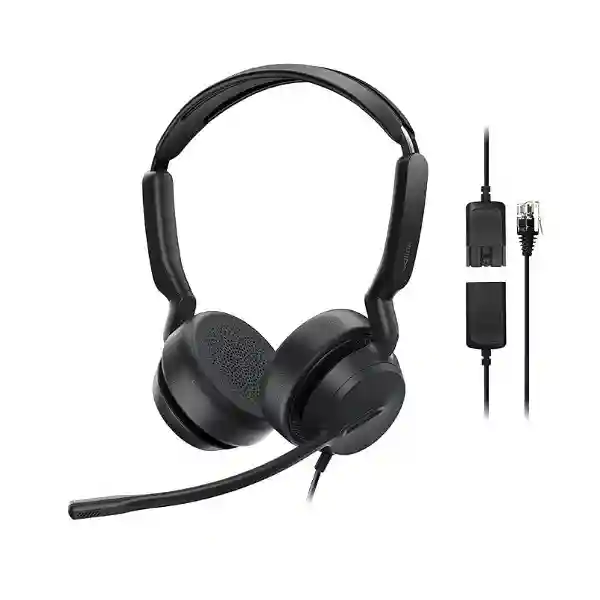
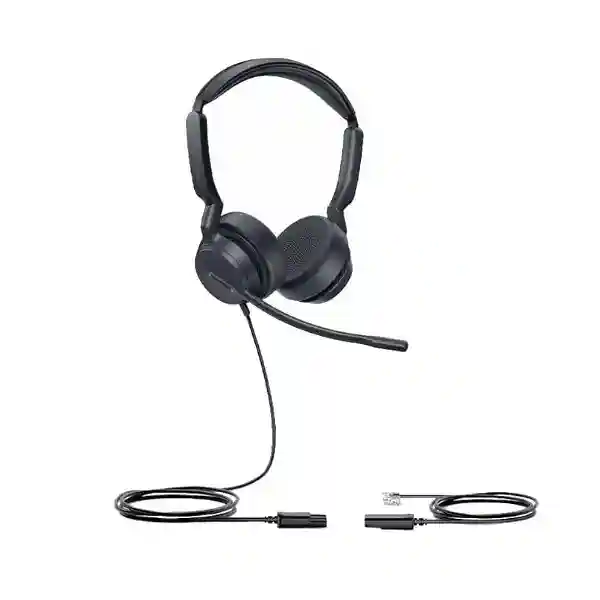
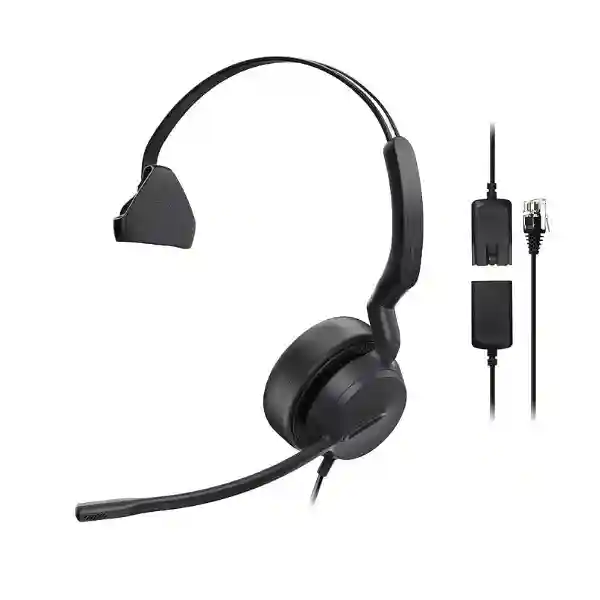
Yealink YHS36 E2 Wired Headset
The Yealink YHS36 E2 is a professional over-the-head analog wired headset created for office users, reception teams, customer-service staff, SOHO professionals and contact-centre agents who work with compatible Yealink desk phones. Its QD-to-RJ9 connection is designed for direct, plug-and-play use with supported Yealink IP phones, while the noise-cancelling microphone, wideband audio, passive noise cancellation and lightweight construction make it practical for frequent business calling. Buyers can choose the YHS36 E2 Mono when situational awareness matters or the YHS36 E2 Dual when stronger listening focus is preferred.
For organisations in Tanzania, the main procurement question is not simply whether a headset has an RJ9 plug. The phone model, user role, required wearing style, deployment quantity and support expectations should all be checked before ordering. FourTeck Tanzania can help businesses evaluate the YHS36 E2 as part of a wider desk-phone or IP-telephony deployment and prepare a quotation based on the exact requirement.
QD to RJ9 connectivity
Designed for direct connection to compatible Yealink desk phones through the supplied QD-to-RJ9 cable.
Noise-cancelling microphone
A unidirectional MEMS microphone helps reduce surrounding noise so the far-end listener can concentrate on the speaker.
Mono and Dual options
Choose a single-ear Mono version for awareness of the room or a two-ear Dual version for greater listening focus.
All-day business use
The on-ear design, soft cushions, adjustable boom and low weight are suited to users who spend significant time on calls.
What the Yealink YHS36 E2 solves
Many desk-phone users need both hands available while speaking with customers, suppliers or colleagues. Holding a handset for repeated or extended conversations can be inconvenient, especially for receptionists, service-desk staff, call handlers and administrators who must type, check records or process requests during a call. The YHS36 E2 converts a compatible Yealink desk phone into a more hands-free working position without introducing wireless pairing or battery management. The QD connector also allows the headset section to be disconnected from the lower cable when the user needs to move away from the desk while leaving the phone-side cable in place.
The product is especially relevant where organisations have standardised on Yealink enterprise IP phones and want an analog wired headset with predictable physical connectivity. Because headset interfaces vary between phone brands and models, compatibility should be checked against the exact deployed phone rather than assumed from the presence of an RJ-style socket. Yealink publishes a supported-phone list for the YHS36 E2 that includes numerous SIP-T, MP and VP models, making this headset a natural option for many Yealink estates.
Verified Yealink YHS36 E2 specifications
| Specification | YHS36 E2 detail |
|---|---|
| Headset type | Analog wired, on-ear, over-the-head headset |
| Connection | QD to RJ9 |
| Versions | YHS36 E2 Mono and YHS36 E2 Dual |
| Weight | Mono 81 g; Dual 129 g |
| Microphone type | MEMS unidirectional microphone |
| Microphone response | 100 Hz–14 kHz, wideband |
| Speaker size | 35 mm |
| Speaker response | 20 Hz–20 kHz, wideband |
| Speaker impedance | 32 ± 4.8 Ω at 1 kHz |
| Speaker power | 10 mW rated, 30 mW maximum |
| Boom adjustment | 300° bendable boom arm |
| Cable lengths | Headset cable 0.9 m; QD-to-RJ9 cable 1.2 m |
| Operating temperature | -10 °C to +50 °C |
These figures are based on Yealink’s current YHS36 E2 product and support documentation. They should not be confused with specifications for the earlier YHS36, which differs in several published measurements.
Compatibility, deployment and buying guidance
Yealink lists broad compatibility with current and recent enterprise desk-phone families, including selected SIP-T88, T87, T85, T77, T74, T73, T58, T57, T54, T53, T48, T46, T44, T43, T42, T34, T33, T31 and T30 series models, plus several MP and VP phones. That does not mean every RJ9-equipped telephone from every manufacturer is automatically supported. Organisations should record the exact phone model at each desk before ordering a fleet of headsets. This simple step reduces the risk of connector, wiring or audio-control mismatches.
For reception, help-desk or busy administrative work, the Mono version can be useful when a user must hear colleagues or visitors while remaining on a call. The Dual version may suit staff who prefer stronger acoustic isolation from ordinary room noise and need to concentrate on the caller. Neither version is a wireless headset, so users who need to walk substantial distances while remaining connected should evaluate a wireless Yealink headset family instead. The YHS36 E2 is strongest where the priority is simplicity, direct desk-phone connection, low maintenance and no charging routine.
For wider telephony planning, review the FourTeck Tanzania technology shop for related business communication categories, the FourTeck Tanzania services page for deployment-oriented requirements, and the FourTeck Tanzania solution approach for integrated IT and telecom planning. These pages help buyers consider the headset alongside IP phones, PBX, network readiness and user roles rather than as an isolated accessory.
Regional availability and procurement guidance
The sections below address common commercial and deployment questions for organisations sourcing the Yealink YHS36 E2 across Tanzania and selected regional markets. They are procurement guidance rather than claims of local stock, guaranteed delivery or local office presence. Buyers should request a current quotation and confirm availability for the required quantity and variant.
Yealink YHS36 E2 Wired Headset Tanzania
Businesses in Tanzania increasingly use IP telephony for reception desks, service teams, administration, sales, finance and branch communication. In those environments, a wired headset can be a practical productivity accessory because it allows the user to type, look up customer details or work with documents while remaining on a call. The Yealink YHS36 E2 fits this requirement particularly well when compatible Yealink desk phones are already deployed. Its QD-to-RJ9 design avoids wireless pairing and charging, while the Mono and Dual versions allow procurement teams to match wearing style to job role. For a receptionist who needs awareness of visitors and nearby colleagues, the Mono version can be easier to live with. For call-intensive teams seated in a busier shared office, the Dual version may provide a more focused listening experience.
A Tanzania quotation request should identify the exact Yealink phone models in use, the required quantity, whether Mono or Dual is preferred, and whether the purchase forms part of a larger phone-system rollout. This is important because a headset deployment is usually connected to the wider voice environment. Network switches may supply PoE to the phones, VLANs may separate voice traffic, and PBX configuration may determine how calls are distributed to users. The headset itself does not change those network functions, but the user experience depends on the whole call path being reliable.
For organisations standardising equipment across several Tanzanian sites, it is sensible to establish a user profile before buying. A small number of headset types can simplify training, spares and support. Verify compatibility against the phone inventory, decide which roles need single-ear or dual-ear listening, then request pricing for the confirmed quantities. FourTeck Tanzania’s contact and quotation page is the appropriate place to submit those details.
Yealink YHS36 E2 Wired Headset Dar es Salaam
Dar es Salaam organisations often operate high-volume front desks, customer-service teams, logistics offices, professional-services firms, hospitality operations and multi-department businesses where telephone communication remains an important daily workflow. For users who handle repeated calls from a fixed desk, the Yealink YHS36 E2 provides a straightforward wired option that can reduce dependence on the handset. The combination of wideband audio, a noise-cancelling microphone and a lightweight on-ear form makes it suitable for staff who spend long periods communicating with customers or colleagues.
Before procurement, map headset users to their desk-phone models. A large office may contain several generations of Yealink phones, and a compatibility check should be completed before standardising the headset across every desk. If most users work in an open office, evaluate whether Mono or Dual better fits the work pattern. Mono can support conversations with colleagues without removing the headset, whereas Dual covers both ears and can help a user concentrate more fully on the call. Where users need to leave their desks frequently while talking, a wireless headset may be the better category; the YHS36 E2 is primarily a fixed-desk solution.
Procurement teams in Dar es Salaam should request a quote with quantity, headset version, phone model list and any target deployment date. Where the headset is part of a broader telephony refresh, it is useful to review the FourTeck Tanzania business technology portfolio, which covers IP phones, IP PBX, switching, structured cabling and related support. Treating the headset as one element in the communication environment helps ensure user accessories, phones and network infrastructure are aligned.
Yealink YHS36 E2 Wired Headset Mwanza
For organisations in Mwanza, the YHS36 E2 can fit offices that want predictable desk-phone audio without managing batteries or Bluetooth connections. This is valuable in operational teams where the headset should remain assigned to a workstation and be ready whenever the phone rings. Customer-care desks, administrative teams, school offices, clinics, finance counters, distributors and service organisations can all benefit from a hands-free call position when staff need to enter information or consult records while speaking.
A sensible buying process starts with an inventory rather than a price list. Record each desk-phone model, identify how many users need headsets, and decide which users require Mono or Dual. Yealink publishes a substantial YHS36 E2 compatibility list, but compatibility should still be tied to the specific deployed model. If users currently experience poor call quality, diagnose the broader voice path as well. A headset will not solve packet loss, overloaded internet links, incorrect QoS, PBX problems or weak SIP connectivity. It can improve the user’s microphone and listening interface, but the network and phone system remain part of the result.
For branch deployments, standardisation can reduce support complexity. Using the same headset and phone combinations across locations makes it easier to maintain spares and user guidance. When requesting a quotation for Mwanza, include the number of workstations, exact phone models, preferred wearing style and whether accessories are being purchased for an existing installation or a new rollout. If the project also includes switching, voice VLANs or cabling, describe that scope in the same enquiry so dependencies can be reviewed together.
Yealink YHS36 E2 Wired Headset Arusha
Arusha businesses in tourism, hospitality, professional services, NGOs, education and administration often rely on clear phone communication between staff, customers and external partners. Where Yealink desk phones are used, the YHS36 E2 gives frequent callers a direct analog headset interface with no charging schedule. This can be attractive for reception and reservations desks, operations coordinators and office staff who want both hands free while talking.
The decision between YHS36 E2 Mono and Dual should follow the environment. In a reception area, situational awareness can be important because the user may need to communicate with people physically present while also answering calls. Mono therefore has a practical role. In a shared back office where users spend long periods on calls and want more acoustic separation, Dual can be preferable. Both versions use the same QD-to-RJ9 concept and share the core microphone and wideband audio design. Weight differs, with the Mono version lighter than the Dual, so wearer preference should be considered for long shifts.
For procurement in Arusha, avoid specifying only “Yealink headset” on the request. State YHS36 E2, the desired Mono or Dual variant, the Yealink desk-phone model and quantity. Also mention whether the business wants spare units, a phased deployment or a telephony upgrade. The FourTeck Tanzania contact page lists Arusha among its contact locations, and the same enquiry route can be used to discuss product selection and quotations without assuming current stock or delivery time.
Yealink YHS36 E2 Wired Headset Dodoma
Dodoma offices that operate central administration, public-facing service points, institutions, professional teams and branch communications may need headsets for staff who handle calls while using a computer or managing documentation. The YHS36 E2 offers a simple physical connection for supported Yealink desk phones and is especially suitable where reliability and low user complexity matter more than wireless mobility. There is no headset battery to monitor, and the direct wired approach can make onboarding easier for teams that want a consistent workstation setup.
The most important pre-purchase task is matching the headset to the deployed phone fleet. Even when an office standardises on Yealink, model generations can differ. Create a short compatibility list from the actual desks, then decide whether all users need the same headset version. Some organisations can reduce cost and improve ergonomics by assigning Mono to users who need room awareness and Dual to staff with more call-intensive roles. Keep a small spare pool if the headsets are operationally important, but base spare quantity on the size of the deployment and support process rather than an arbitrary percentage.
A quotation request for Dodoma should include the deployment scope and any associated telephony work. If new Yealink phones, an IP PBX, PoE switches or structured cabling are also required, combining these items in one requirement can make compatibility review more useful. The headset is a user endpoint, while the underlying phone and network determine registration, call routing and voice quality. A complete request therefore gives procurement and IT teams a clearer bill of materials and fewer surprises during installation.
Yealink YHS36 E2 Wired Headset UAE
Organisations in the UAE often deploy Yealink phones across receptions, offices, contact centres, retail operations and multi-site businesses. The YHS36 E2 is relevant when those teams prefer a wired, desk-based headset with direct QD-to-RJ9 connectivity. It avoids Bluetooth pairing and charging, which can simplify fleet management for fixed workstations. For companies operating between the UAE and East Africa, using consistent phone-and-headset combinations can also make user training and replacement planning easier.
The choice of Mono or Dual should still be tied to the workstation. Front-desk users who communicate with visitors may prefer the open-ear awareness of Mono, while support or sales staff in denser offices may prefer Dual. Check the actual Yealink desk-phone model before ordering, particularly in mixed estates where older and newer devices coexist. Organisations planning a new phone rollout should also confirm whether headset quantity aligns with user roles rather than automatically purchasing one for every extension.
For UAE-focused technology requirements, the wider FourTeck UAE IT and telecom platform provides regional context for business communication, networking and infrastructure projects. Buyers coordinating UAE and Tanzania operations can use common technical standards while still requesting separate regional quotations and availability checks. This approach helps create a consistent end-user experience without making unsupported assumptions about stock, delivery or service coverage in either market.
Yealink YHS36 E2 Wired Headset Uganda
In Uganda, the YHS36 E2 can support organisations that already use Yealink desk phones and want a straightforward wired headset for office calling. Common use cases include reception desks, customer care, branch offices, education administration, logistics coordination and professional services. Because the headset does not depend on a wireless battery, it can be attractive for fixed desks where simplicity and predictable availability are priorities.
Compatibility remains the key procurement check. Yealink supports many enterprise IP phone models, but buyers should confirm the exact installed model rather than assuming universal RJ9 interoperability. The YHS36 E2 is designed around Yealink’s desk-phone ecosystem, and its product value is strongest when that compatibility relationship is preserved. User role should guide the Mono-versus-Dual decision: Mono leaves one ear available for the office environment, while Dual is better suited to focused listening.
For organisations that operate in both Uganda and Tanzania, standardising headset models can simplify spares and training if the phone estate is also compatible. Regional buyers can review the FourTeck Uganda communication solutions site alongside the Tanzania platform when coordinating requirements. Request current pricing and availability with quantity, variant and phone models clearly stated. If the project includes PBX, switching or branch connectivity, include those requirements so the headset choice is evaluated as part of the communication system.
Yealink YHS36 E2 Wired Headset Kampala
Kampala has a broad mix of corporate offices, financial services, NGOs, technology firms, customer-service operations and growing businesses where desk-phone calling remains part of daily work. The YHS36 E2 is designed for users who want a professional headset connected directly to a supported Yealink phone. It can reduce the inconvenience of holding a handset during long or repeated calls and gives users a stable microphone position while they work at a computer.
Procurement teams should consider call intensity, office noise and user movement. Employees who stay at their desks and spend much of the day on calls are strong candidates for a wired model. Employees who frequently move around the office while speaking may need wireless alternatives instead. Among fixed users, Mono is useful for awareness and Dual for stronger concentration. The YHS36 E2’s 300° adjustable boom lets the microphone be positioned for different wear preferences, while the light weight supports extended use.
When preparing a Kampala request, capture the phone model and quantity per department. This is particularly useful in organisations where reception, management and general users have different Yealink phone models. A compatibility matrix prevents incorrect bulk purchasing and gives IT a repeatable standard for future additions. Requesting the headset together with related telephony components can also help ensure that endpoint, phone and network requirements are treated as one system rather than independent purchases.
Yealink YHS36 E2 Wired Headset Arua
For offices and institutions in Arua, a wired headset can be a practical choice when users work from dedicated desks and need reliable access to business calls without managing wireless accessories. The YHS36 E2 suits compatible Yealink desk phones and gives staff a hands-free position for data entry, scheduling, service requests and administrative work. Its direct physical connection also makes it easy to understand operationally: connect to the supported phone, adjust the boom and use the phone’s normal call controls.
The best deployment starts with a small amount of planning. Confirm which users make enough calls to justify a headset, identify the exact phone models and then select Mono or Dual according to the environment. A user who needs to hear coworkers, visitors or announcements may prefer Mono. A user who works primarily on calls may prefer Dual. Where a branch office has only a few headset users, ordering a consistent model for compatible desks can simplify future replacement and reduce the need to keep several accessory types.
Buyers should avoid relying on generic marketplace descriptions that mix the YHS36 E2 with the older YHS36. Current official YHS36 E2 documentation lists specific E2 weights, a 35 mm speaker and a microphone response up to 14 kHz. Using the correct generation matters when comparing quotations. A request should therefore use the exact name “Yealink YHS36 E2” and specify Mono or Dual so suppliers are quoting the intended product.
Yealink YHS36 E2 Wired Headset Mbarara
Mbarara businesses and institutions that rely on phone-based customer communication can use the YHS36 E2 as a simple productivity accessory for compatible Yealink desks. The headset supports a more comfortable work posture during repeated calls, especially when users need both hands for typing or handling records. It also avoids the operational overhead of charging or pairing a wireless headset, making it suitable for shared support desks or users who prefer fixed equipment.
For a small deployment, procurement can be straightforward: confirm the phone model, select Mono or Dual, define quantity and request a quotation. For a larger deployment, add user profiles and spare planning. A call-handling team may be assigned Dual units, reception may receive Mono, and occasional users may continue with handsets. This role-based approach avoids unnecessary accessory purchases while improving comfort for the employees who benefit most.
If voice quality problems already exist, do not assume the headset is the only variable. Check the Yealink phone firmware and configuration, PBX path, network stability, VLAN design and internet or SIP connectivity as applicable. A professional headset can improve microphone placement and listening comfort, but it cannot correct network packet loss or a misconfigured call platform. Treating the YHS36 E2 as one component in the communication chain produces a more reliable outcome.
Yealink YHS36 E2 Wired Headset Gulu
Gulu organisations with fixed office telephony can consider the YHS36 E2 where compatible Yealink phones are in use and staff need a headset for longer or more frequent calls. The wired design keeps the workstation simple and avoids a charging routine, which can be useful in administrative offices, reception areas, branch operations and service desks. The headset’s QD function also lets the wearer disconnect the headset portion from the lower cable without removing the phone-side connection.
A strong purchasing process separates “need a headset” into clear requirements. How many users are call intensive? Do they need to hear the surrounding room? Which phone models are installed? Will the headsets stay assigned to one desk or move between users? Are replacement cushions or spare units part of the lifecycle plan? Answering these questions before the quotation reduces ambiguity and makes the resulting deployment easier to manage.
The YHS36 E2 is an analog wired headset rather than a USB computer headset. If the primary requirement is softphone use on laptops, a USB headset family may be more appropriate. If the primary requirement is Yealink desk-phone calling through a supported RJ9 interface, the YHS36 E2 is aligned with that use case. This distinction is important for procurement because products with similar headband designs can serve very different connection environments.
Yealink YHS36 E2 Wired Headset Kenya
Kenyan businesses that use Yealink desk phones across offices, service teams and branches can use the YHS36 E2 to standardise hands-free calling at fixed workstations. Its value is strongest where a direct wired connection is preferred and users do not need the mobility of a DECT or Bluetooth headset. Because there is no battery cycle, IT teams have one less component to charge, pair or replace during daily operation.
For multi-site organisations, consider standardising around both the phone model and headset model rather than the headset alone. A known combination makes compatibility easier to document and gives help-desk staff a predictable baseline when troubleshooting. It also improves procurement consistency when adding new users. The Mono and Dual variants can still be assigned according to job role, so standardisation does not have to mean one wearing style for everyone.
Regional buyers can review the FourTeck Kenya IT and VoIP platform for broader communication requirements. When requesting the YHS36 E2, state the phone models, quantity, desired version and whether the requirement is for an existing deployment, new branch or complete voice-system rollout. Current price, lead time and availability should always be confirmed at quotation stage instead of assumed from another country’s listing.
Yealink YHS36 E2 Wired Headset Kuwait
Kuwait offices using Yealink desk phones may choose the YHS36 E2 for reception, customer service, administration and other fixed-desk roles where call clarity and hands-free working matter. The headset’s analog design is deliberately uncomplicated. It connects through QD to RJ9, uses no battery and is available in both Mono and Dual formats. That makes it easier to match a device to different job roles without changing the underlying desk-phone platform.
The procurement process should still be compatibility-led. Confirm the exact Yealink phone model and do not assume that any RJ9 port follows the same wiring or feature behavior. If the deployment involves a mix of phone models, validate each group before bulk ordering. For high-call-volume users, evaluate physical comfort and wearing preference alongside technical compatibility. The lighter Mono version and the more enclosed Dual version create different user experiences even though the core connection and microphone technology are shared.
Businesses coordinating Gulf and African branches may benefit from common headset standards where the same Yealink phone environment is used. The FourTeck Kuwait technology site can provide a regional path for Kuwait requirements, while Tanzania enquiries should remain with the Tanzania contact route. This keeps procurement regionally organised while preserving technical consistency across sites.
Yealink YHS36 E2 Wired Headset Ghana
Ghanaian organisations with Yealink desk-phone deployments can consider the YHS36 E2 for staff who spend significant time on voice calls and benefit from a fixed wired headset. Offices, call-handling teams, reception desks, education administration and service organisations can all use headsets to free the user’s hands for computer work or documentation. The YHS36 E2’s noise-cancelling microphone is designed to reduce surrounding noise reaching the far-end listener, while passive noise control helps the wearer focus on the conversation.
Before requesting a quote, decide whether the use case is genuinely desk-phone based. If users mainly call through Teams, Zoom or browser softphones on computers, a USB or certified UC headset may provide a better connection model. If they use compatible Yealink SIP or MP desk phones and want a direct analog headset, the YHS36 E2 is the more relevant category. This connection-based selection prevents organisations from buying a technically good headset that does not match the actual calling device.
For Ghana procurement, include exact model, variant, quantity and phone compatibility details. Regional IT teams can also review the FourTeck Ghana technology platform for country-specific enquiries. Where several offices are involved, document approved phone-and-headset combinations so future purchases remain consistent and support teams know which accessories belong with each endpoint.
Yealink YHS36 E2 Wired Headset Nigeria
Nigeria has many organisations with busy customer-facing, sales and support functions where headsets are part of daily productivity. For businesses standardised on compatible Yealink desk phones, the YHS36 E2 offers a direct wired option that is simple to deploy at fixed workstations. The absence of battery charging can be useful in larger teams because users can begin work without checking headset power, while the quick-disconnect cable makes it easy to separate the worn headset from the phone-side lead.
Large deployments should be planned by role. Contact-centre staff may prefer Dual units for concentrated listening, while supervisors or reception staff may prefer Mono so they can hear the surrounding room. Pilot testing with a small group can help validate comfort and workflow before a larger order, especially where users wear headsets for many hours. At the same time, IT should validate every desk-phone model against the supported list and document the approved combination.
For Nigerian requirements, the FourTeck Nigeria IT services platform provides a regional route for broader technology discussions. Companies that operate in Nigeria and Tanzania can coordinate technical standards while requesting regional quotations independently. This avoids assuming that price, stock or logistics in one market automatically applies to another.
Yealink YHS36 E2 Wired Headset Seychelles
Businesses and institutions in Seychelles may use desk-phone headsets in hospitality, reservations, administration, professional services and operational support. Where compatible Yealink phones are installed, the YHS36 E2 offers a compact wired approach suited to staff who work primarily from one station. The product’s value comes from simplicity: direct QD-to-RJ9 connection, no wireless charging, two wearing-style options and a microphone designed for business calling.
For island procurement, accurate ordering information is especially important because correcting a model mismatch can add unnecessary logistics. Confirm the exact Yealink phone model, whether the user needs Mono or Dual, required quantity and any spare requirement before the purchase is approved. If the headset is being ordered as part of a larger communications project, include phone, PBX and network details in the same planning discussion. This provides a better view of compatibility and supporting infrastructure.
Organisations that manage locations across Seychelles, Tanzania or other African markets can benefit from keeping a documented hardware standard, but that standard should be based on verified interoperability. Do not select the headset only because it appears physically similar to another model. Use the exact YHS36 E2 designation, compare official E2 specifications and confirm current commercial terms at quotation stage.
Why buyers choose a wired Yealink headset
A wired headset is often chosen for predictability. There is no radio pairing, no charging dock and no battery runtime to manage. That can be especially useful in reception areas, shared service desks and other locations where the headset is expected to be ready for use throughout the working day. The trade-off is mobility: the user remains physically connected to the desk-phone environment. Buyers should therefore choose wired or wireless based on workflow rather than assuming one is universally better.
The YHS36 E2 adds the advantage of being designed around Yealink enterprise phones. Compatible Yealink phones can optimise acoustic parameters for the headset, and the product includes ActiveProtection to help safeguard users from acoustic injury. These features make it a stronger fit for a Yealink phone estate than a generic headset selected only by connector appearance.
Related FourTeck resources
Tanzania technology shop
Browse business telephony and infrastructure categories at FourTeck Tanzania Shop when the headset is part of a wider endpoint or voice project.
Tanzania services
Use the services overview when the requirement extends beyond a product purchase into deployment, configuration or integration.
Regional coordination
For cross-border projects, FourTeck’s Africa technology platform provides an additional reference point for multi-market IT and communication planning.
Quotation checklist
To obtain a useful quotation for the Yealink YHS36 E2, provide the following information in one request:
- Required quantity.
- YHS36 E2 Mono, Dual or a mix of both.
- Exact Yealink desk-phone model or models.
- Whether the headsets are for an existing deployment or a new phone rollout.
- Site or city where the equipment will be used.
- Any required deployment, PBX, switching or cabling support.
- Target procurement timing, without assuming guaranteed lead time.
Frequently asked questions
Is the Yealink YHS36 E2 a USB headset?
No. The YHS36 E2 is an analog wired headset that uses a QD-to-RJ9 connection for compatible Yealink desk phones. Buyers who primarily need PC softphone connectivity should evaluate an appropriate USB headset instead.
What is the difference between YHS36 E2 Mono and Dual?
Mono has one earpiece and weighs 81 g, making it suitable when users need to hear the surrounding office. Dual has two earpieces and weighs 129 g, offering a more focused listening experience. Both share the same core QD-to-RJ9 connection concept.
Does the YHS36 E2 have a noise-cancelling microphone?
Yes. Yealink specifies a MEMS unidirectional noise-cancelling microphone intended to reduce surrounding noise reaching the far-end listener.
Will the YHS36 E2 work with every Yealink phone?
Yealink publishes a broad compatibility list, but buyers should confirm the exact phone model before ordering. A mixed phone estate should be checked model by model rather than assuming universal compatibility.
Does the headset need charging?
No. It is a wired analog headset, so there is no headset battery or wireless charging routine.
Can FourTeck quote the YHS36 E2 for multiple branches?
You can submit a multi-site requirement with quantities, phone models and locations. Current pricing, availability and logistics should be confirmed through the quotation process for each relevant market.
Decision recap
Choose the Yealink YHS36 E2 when the requirement is a professional wired headset for a compatible Yealink desk phone, the user works mainly from a fixed desk, and the organisation wants to avoid battery charging or wireless pairing. Choose Mono when room awareness matters and Dual when call focus matters more. Confirm the exact desk-phone model before procurement.
If users need substantial mobility, computer-first softphone connectivity or a wireless user experience, compare other headset families before ordering. Product selection should follow the calling device and workflow, not simply the headset’s appearance.
Talk to FourTeck Tanzania about your headset requirement
Send the model and quantity you need, the Yealink phones already installed and whether you prefer Mono or Dual. FourTeck Tanzania can use that information to discuss compatibility, related telephony requirements and the quotation scope. For larger deployments, include the number of branches or departments so the requirement can be structured clearly.




Reviews
There are no reviews yet.