
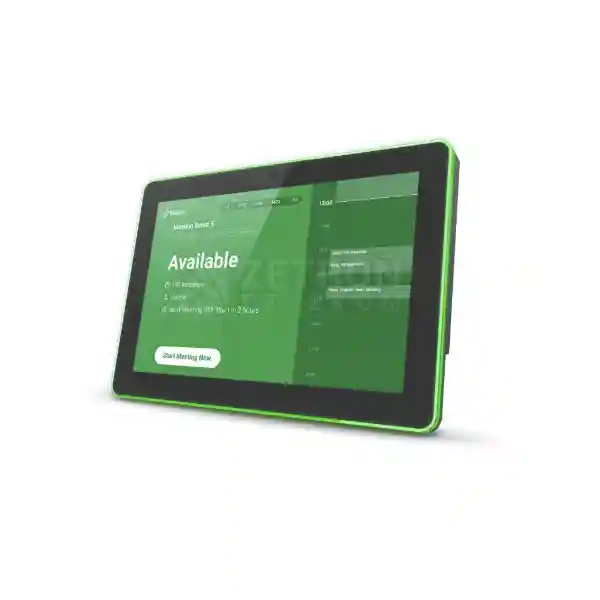
Yeastar Workplace Visitor Management Hardware
Yeastar DS7310 Visitor Screen
The Yeastar DS7310 Visitor Screen is a business-grade 10.1-inch touchscreen endpoint built to streamline front-desk visitor registration and check-in when used with Yeastar Workplace Visitor Management. It is intended for indoor reception environments where organisations want a more structured guest arrival process than paper sign-in sheets, handwritten visitor books or purely manual reception workflows. The device gives guests a clear digital point of interaction while allowing administrators to connect reception activity to the wider Yeastar Workplace visitor process.
For organisations in Tanzania evaluating visitor management technology, the important question is not only whether the screen looks professional. A successful deployment must combine the screen with appropriate Yeastar Workplace licensing, dependable network access, suitable mounting, power planning, guest workflow design, privacy controls and staff procedures. This page explains the DS7310 from that full deployment perspective so procurement, IT, facilities and security teams can evaluate the product with fewer surprises.
A 1280 × 800 interactive display provides a dedicated guest-facing interface for reception and visitor workflows.
Pre-registered guests can present check-in details while walk-in visitors can follow configured registration processes.
Power over Ethernet can reduce visible cabling at reception when the switching infrastructure and cabling design support PoE.
The device is designed to connect with Yeastar Workplace Visitor Management rather than operate as a standalone generic kiosk.
What the Yeastar DS7310 Visitor Screen does
The DS7310 acts as the physical check-in point for a Yeastar Workplace visitor-management deployment. In a configured environment, visitors can interact with the screen rather than relying entirely on a receptionist to enter every guest manually. This can help create a repeatable arrival process, especially in offices where visitor traffic includes customers, vendors, contractors, interview candidates, consultants, delivery personnel or scheduled business guests.
Yeastar documentation describes visitor workflows that can include QR code check-in, visitor codes, host notifications, approval processes, badge-related workflows and visitor logs. The exact experience depends on the Yeastar Workplace plan, visitor licensing, administrative configuration and supporting devices. The DS7310 should therefore be purchased as part of an operational workflow, not as an isolated touchscreen. Before ordering, define how guests will be pre-registered, how walk-ins are handled, which employees receive notifications, whether badges are required and what information the organisation is permitted to collect.
The product can also support a more consistent reception experience. Organisations can configure welcome-screen branding so the visitor sees an intentional business interface instead of an improvised tablet setup. This is useful for headquarters, corporate offices, professional-service firms, shared offices, schools, clinics, hospitality administration areas and other controlled indoor environments where reception is part of the organisation’s security and customer experience.
Verified Yeastar DS7310 technical specifications
| Specification | DS7310 detail |
|---|---|
| Display | 10.1-inch LCD IPS touchscreen |
| Resolution | 1280 × 800 pixels |
| Aspect ratio | 16:10 |
| Camera | Built-in camera for supported visitor and identity workflows |
| QR scanner | Supported on DS7310 visitor-screen configuration |
| Ethernet | 100M/1000M Ethernet |
| Wireless | Wi-Fi 802.11b/g/n and Bluetooth 4.0 |
| Operating system | Android 8.1 |
| Power | Power over Ethernet or DC 12V/1.5A |
| Dimensions | 259.36 × 178.36 × 28 mm |
| Weight | 0.94 kg |
| Environment | Indoor use, 0°C to +40°C operating range |
Specification note: Yeastar has published DS7310 documentation for both room-display and visitor-screen roles. Exact available software functions depend on the selected Yeastar Workplace deployment, licensing, firmware and configuration. Confirm the required workflow before procurement.
Visitor management workflow and business benefits
A receptionist often performs several tasks at the same time: answering calls, receiving deliveries, checking visitor details, locating employees, issuing badges and handling unexpected arrivals. A visitor screen does not eliminate the need for front-desk judgement, but it can move predictable steps into a guided process. Pre-registered guests can identify themselves quickly, while walk-in visitors can follow the organisation’s configured check-in questions. Once the guest has completed the required steps, Yeastar Workplace can support the wider process of notifying the host and maintaining a traceable visit record.
The value is strongest when the process is designed before the hardware is installed. Decide which visitor categories need approval, whether contractors follow different rules from customers, what happens outside normal reception hours, which fields are mandatory, whether a badge must be printed and how long visitor records should be retained under company policy and applicable law. A well-designed workflow helps reception staff use the screen consistently and gives visitors clear instructions.
For organisations that already use managed networks and structured IT operations, the DS7310 can be treated like any other business endpoint. It needs a documented network connection, power source, asset owner, firmware-maintenance process and physical mounting plan. This helps prevent a common problem with reception technology: a device is installed successfully on day one but becomes difficult to support later because nobody documented its port, IP settings, login ownership or application dependency.
Licensing and compatibility checks before ordering
Yeastar’s visitor-screen registration guidance states that Yeastar Workplace Standard or Pro is required for visitor-screen use and that the visitor license must be available before registration. Because plans, commercial terms and feature packaging can change over time, procurement teams should confirm the current Yeastar Workplace subscription and visitor-management licensing required for their intended deployment instead of assuming that the hardware purchase includes every software capability.
If badge printing is part of the process, verify printer compatibility, network placement and label requirements. If access-control integration or facial-recognition workflows are required, confirm the exact Yeastar Workplace plan and supported integration path before making a final bill of materials. The DS7310 can participate in advanced workflows, but those functions should be validated as a solution rather than inferred from the touchscreen alone.
Related FourTeck technology planning
Use the Tanzania technology overview when the visitor-screen project also depends on business networking, switching, Wi-Fi, access control, meeting-room systems or broader site infrastructure.
The shop is useful for procurement teams comparing the supporting products around a DS7310 deployment, including switches, wireless infrastructure, displays and access-control components.
For organisations with East African branches, the Uganda site provides a regional FourTeck reference point for technology projects extending beyond Tanzania.
Multi-country procurement teams can reference the Kenya operation when planning aligned technology standards across neighbouring East African locations.
This regional reference is relevant to groups planning consistent reception, networking and workplace technology across multiple African markets.
Yeastar DS7310 Visitor Screen Tanzania
For organisations in Tanzania, the Yeastar DS7310 Visitor Screen is best evaluated as part of a reception, security and workplace-management process rather than as a simple tablet replacement. Corporate offices, professional-service firms, schools, healthcare administration areas, industrial headquarters, NGOs, financial institutions and growing multi-branch businesses can all have a practical need to know who is arriving, why they are visiting, who they are meeting and whether the appropriate host has been notified. A digital visitor process can make those steps more consistent while creating a better first impression than loose paper forms or handwritten visitor books.
Tanzania deployments should start with infrastructure checks. The DS7310 supports Ethernet and PoE, which can be attractive at a reception desk because a single network cable may carry both data and power when connected to compatible PoE switching. Where Wi-Fi is preferred, coverage and network policy should be assessed at the exact reception location rather than assumed from general office coverage. Reception areas are often near building entrances, glass walls or security desks, and these can have different signal conditions from the main office. If the screen is part of a controlled entry workflow, network stability matters because an unavailable visitor interface can immediately create a queue at the front desk.
Procurement teams in Tanzania should also define the software scope before requesting a quotation. Visitor Screen operation depends on Yeastar Workplace and the appropriate visitor-management licensing. If the organisation wants pre-registration, QR-based check-in, approval steps, badge printing, access-control integration or analytics, each requirement should be listed so the proposed solution can be checked against the current Yeastar plan and supporting hardware. The same applies to mounting: decide whether the unit will be wall mounted, positioned on a suitable stand, integrated into a reception counter or installed near a controlled door.
A useful Tanzania quotation request should include quantity, intended site type, number of reception points, expected visitor volume, preferred mounting position, availability of PoE, network-security requirements, Yeastar Workplace status and any badge or door-access integration. This gives the supplier enough context to avoid quoting only the screen while missing the supporting parts. For organisations with branches in several Tanzanian cities, standardising one documented visitor workflow can simplify staff training, support and later expansion.
Yeastar DS7310 Visitor Screen Dar es Salaam
Dar es Salaam businesses often operate reception environments where visitor traffic can be diverse: customers, suppliers, interview candidates, contractors, consultants, auditors and staff from other branches may all arrive through the same lobby. The Yeastar DS7310 can support a more orderly arrival process by giving guests a dedicated point for visitor interaction while allowing reception teams to work with a consistent Yeastar Workplace workflow. For busy commercial offices, the main value is not novelty; it is reducing repeated manual steps and making guest handling easier to audit and explain.
A Dar es Salaam deployment should consider the physical reception layout. The screen must be visible without obstructing movement, placed where visitors naturally stop before entering controlled office areas and mounted so that QR scanning or touch interaction is comfortable. If the building has a staffed security desk before reception, decide whether visitor registration occurs at security, at the office lobby or in both places. Duplicating processes can frustrate guests, while placing the screen too far inside the office can weaken security. The correct location follows the actual visitor journey.
Network design is equally important. A business tower or shared office environment may have segmented networks, managed Wi-Fi and strict firewall policies. The DS7310 should be assigned to an appropriate network segment and documented like other business endpoints. If PoE is used, confirm switch capacity and cabling before installation. If the screen will share a network with other building systems, ensure that required connectivity is allowed without exposing unrelated internal resources. A visitor terminal should not become an accidental bridge into sensitive business systems.
When requesting a DS7310 quotation for Dar es Salaam, provide the number of lobbies, expected check-in method, visitor-management subscription status, badge-printing requirement, door-control integration need and whether the project includes installation or configuration. This makes comparisons between quotations more meaningful because the buyer can distinguish hardware-only pricing from a complete working visitor-management solution.
Yeastar DS7310 Visitor Screen Mwanza
In Mwanza, the DS7310 can be relevant to administrative offices, educational institutions, healthcare management areas, logistics operations, banks, professional practices and branch facilities that want a more controlled way to receive visitors. A digital visitor screen is especially useful where reception staff need to identify whom a guest is meeting while maintaining an organised record of arrivals. The benefit grows when the organisation already has defined entry rules and wants the same process followed every day rather than relying on individual receptionist habits.
Before deployment, assess whether the reception point has stable wired networking or whether Wi-Fi is the practical option. PoE can simplify the installation if structured cabling already reaches the desk or wall position, while wireless may reduce new cabling in some buildings. However, wireless should not be selected only for convenience. Signal level, congestion, security configuration and reliable internet access should be tested because the visitor screen depends on connectivity to participate in the wider Yeastar Workplace process.
Mwanza buyers should also think through supportability. The device runs as a managed business endpoint and can require firmware maintenance, account administration and troubleshooting over its life. Record the device serial number, switch port or wireless profile, mounting details, assigned administrator and Yeastar Workplace registration. If several branch offices will later receive the same visitor setup, use a consistent naming convention and configuration checklist. Standardisation makes remote assistance and future replacement easier.
For quotation preparation, list the desired visitor flow in plain language: for example, pre-register guests, allow QR check-in, notify the host, print a badge and record check-out. Then identify which of those steps are mandatory and which are optional. This avoids overbuying software features while ensuring that important capabilities are not discovered as missing after the screen has been installed.
Yeastar DS7310 Visitor Screen Arusha
Arusha has a wide range of organisations that receive external guests, from tourism and hospitality administration offices to NGOs, training centres, corporate branches, professional firms and institutions. The Yeastar DS7310 Visitor Screen can provide a consistent digital reception point for such environments when paired with Yeastar Workplace Visitor Management. The screen can help visitors identify themselves through configured check-in steps while helping the host organisation reduce dependence on handwritten logs and ad-hoc phone calls from reception.
The visitor experience should be designed for the actual audience. Organisations receiving international guests may want concise instructions and clear branding; training centres may receive groups; NGOs may have scheduled partner meetings; tourism-related offices may receive vendors and operators throughout the day. Configure questions only when they serve a genuine operational or security purpose. Overly long digital forms can cause a queue just as easily as paper forms, so the best workflow balances information collection with speed.
Physical installation in Arusha should account for reception furniture, wall surfaces, sunlight and cable routes. The DS7310 is intended for indoor use. Its placement should avoid direct exposure to weather or uncontrolled outdoor environments. If mounted on a wall or counter, the height must suit ordinary touch interaction and QR scanning. Where PoE is used, confirm the cable path and switch budget; where DC power is used, keep the power connection secure and tidy so the reception area remains professional.
For organisations with seasonal or event-driven visitor peaks, plan the exception workflow too. What happens when several guests arrive together? How are walk-ins handled? Who assists a visitor who cannot complete self-service check-in? Technology works best when the reception team knows how to intervene quickly. A DS7310 deployment should therefore include staff briefing and a written fallback process, not only mounting and network configuration.
Yeastar DS7310 Visitor Screen Dodoma
Dodoma organisations evaluating digital visitor management may include government-facing contractors, professional offices, institutions, NGOs, education environments and corporate branches that routinely receive scheduled visitors. The Yeastar DS7310 is suitable when the objective is to place a dedicated, managed touchscreen at the reception point and connect guest arrival to Yeastar Workplace. It can support a cleaner and more consistent process for pre-registered visitors while giving reception teams a structured way to handle walk-ins according to company policy.
Security and privacy should be considered at the same time as convenience. Decide which visitor details are truly needed, who can access the records and how long they should be retained. If identification, photos or access-control workflows are involved, the organisation should align the configuration with its internal policy and applicable regulatory obligations. A visitor-management screen should improve accountability without encouraging unnecessary collection of personal information.
From an IT perspective, use a documented network design. The DS7310 supports wired Ethernet and can be powered by PoE, allowing it to fit into managed office-network infrastructure. The network path should be reliable, and administrators should know which VLAN, firewall policy and switch port serve the device. Reception systems are highly visible when they fail, so simple operational monitoring and clear support ownership are valuable. Where Wi-Fi is selected, test reception coverage during normal business hours when the wireless environment is under load.
Procurement teams in Dodoma should request clarity on what is included with the quoted solution: DS7310 hardware, mounting accessories, power method, Yeastar Workplace subscription, visitor licensing, installation, configuration, user training and any printer or door-integration elements. This level of detail makes it easier to compare suppliers and reduces the risk of approving a low hardware price that does not cover the complete operational requirement.
Yeastar DS7310 Visitor Screen UAE
In the UAE, corporate offices, free-zone businesses, professional firms, regional headquarters, hospitality groups and multi-site enterprises often place strong emphasis on reception experience and controlled visitor access. The Yeastar DS7310 can fit environments that want a purpose-built touchscreen linked to a central visitor-management platform rather than a stand-alone sign-in tablet. Its value comes from combining a dedicated guest interface with a defined Yeastar Workplace workflow for registration, host notification and visitor records.
UAE projects frequently involve integration with existing facilities systems. Before selecting the DS7310, document whether visitor registration must connect to door access, badge printing, reception approval or enterprise directory processes. Yeastar Workplace licensing and supported integrations should be checked against those requirements. If the organisation operates multiple offices, consider whether the same workflow can be standardised across sites while still allowing each reception to use site-specific hosts, welcome messages and access policies.
The installation should also reflect the architectural quality of the reception area. Plan cable concealment, mounting height, PoE switch location and network segmentation before the interior fit-out is complete where possible. A clean digital visitor point works best when power and data are designed into the lobby rather than added later with exposed adapters and temporary cables. The DS7310’s Ethernet and PoE support can simplify a professional installation when suitable structured cabling is available.
When seeking a UAE quotation, include exact quantity, office locations, deployment schedule, Yeastar Workplace status, required visitor features, network conditions and any access-control dependencies. Request separate visibility for hardware, subscriptions, configuration and services so the procurement team can understand recurring and one-time costs. Do not assume that an advertised device price represents the full deployed visitor-management solution.
Yeastar DS7310 Visitor Screen Uganda
Ugandan organisations with controlled offices, reception desks and branch facilities can use the Yeastar DS7310 as a dedicated visitor check-in endpoint within Yeastar Workplace. The product is most useful when reception teams need a repeatable process for pre-registered guests and walk-in visitors, and when the organisation wants visitor activity recorded in a structured system rather than scattered across paper books, spreadsheets or informal messages.
For Uganda deployments, network and power planning should be included in the first site discussion. The DS7310 supports PoE, which can pair well with managed switching and UPS-backed network infrastructure. If the PoE switch is protected by backup power, the reception screen may remain available during short utility interruptions, subject to the rest of the internet and network path staying online. This is a more robust design than relying on an exposed local power adapter without considering business continuity.
Organisations with offices in multiple Ugandan cities should define a standard visitor policy before rolling out hardware widely. Decide common fields, host-notification rules, badge expectations, contractor handling and record-retention practices. Then allow limited local variation where site operations genuinely differ. A standard template reduces training effort and makes it easier for central IT or administration teams to support the screens.
A procurement request should specify whether the buyer already has Yeastar Workplace. If not, the quotation should account for the appropriate platform and visitor licensing in addition to the DS7310 device. If the environment already uses Yeastar Workplace for rooms or desks, confirm whether the current plan covers the visitor use case. Clear licensing review at the beginning prevents unexpected subscription discussions after installation.
Yeastar DS7310 Visitor Screen Kampala
Kampala offices can experience high visitor volumes across commercial buildings, NGOs, banks, technology firms, institutions and regional headquarters. The Yeastar DS7310 provides a dedicated touchscreen that can help reception teams move from purely manual guest handling to a more systematic workflow. Visitors can be guided through the configured process while hosts receive notifications through the wider Yeastar Workplace environment, reducing the number of manual calls and messages needed to locate employees.
In a busy Kampala office, speed matters. Avoid designing a check-in questionnaire that asks for information nobody uses. Separate essential security or host-identification data from optional questions. Pre-registration should be encouraged for scheduled meetings because it can shorten arrival time. Walk-in handling should remain simple and should include a clear path to reception assistance when a visitor cannot complete the digital process.
The screen’s network should be managed with the same care as other connected devices. If the building provides shared internet, determine whether the organisation can place the visitor screen on its own controlled network rather than depending on public guest Wi-Fi. PoE over dedicated structured cabling is often attractive where the office controls the switch. Document the port, VLAN and device name so support staff can troubleshoot quickly if connectivity is lost.
When comparing quotations in Kampala, ask whether mounting, cabling, switch-port preparation, Yeastar registration, visitor-workflow configuration and staff handover are included. Hardware-only quotes can look cheaper but may move important work back to the customer. A complete statement of scope makes the true project cost easier to understand and helps ensure the visitor screen is usable immediately after handover.
Yeastar DS7310 Visitor Screen Arua
For organisations in Arua, a digital visitor screen can be valuable where reception operations need more consistency but staff resources are limited. The Yeastar DS7310 gives guests a dedicated interface for the organisation’s configured visitor process and can help front-desk staff avoid repeatedly recording the same information by hand. This can suit branch offices, NGOs, educational facilities, clinics, logistics operations and other premises that receive scheduled and unscheduled visitors.
Arua deployments should pay close attention to connectivity resilience. Because the screen is part of a cloud or server-connected visitor workflow, the organisation should understand what happens when the internet link is unavailable. Reception teams need a documented fallback procedure so guests can still be received safely during an outage. This may be as simple as a controlled manual register and later reconciliation, but the fallback should be planned before the first outage rather than invented at the front desk.
Power design is also relevant. PoE can simplify the screen connection and can be combined with a UPS-backed network switch when appropriate. Confirm that the structured cable run is tested and that the selected switch has sufficient PoE capacity. If DC power is used instead, secure the adapter and cable route so that visitors cannot accidentally disconnect the unit. The device is for indoor use and should be protected from weather and unsuitable temperatures.
When ordering for Arua, define whether configuration will be performed centrally or on site. Multi-branch organisations may prefer a standard build with central Yeastar administration, while a single office may want local staff trained to manage visitors and basic device tasks. Include those expectations in the quotation request so the supplier can distinguish between simple equipment supply and a managed deployment project.
Yeastar DS7310 Visitor Screen Mbarara
Mbarara businesses and institutions can use the Yeastar DS7310 when they want reception to function as a controlled operational point rather than merely an open waiting area. The screen supports Yeastar Workplace visitor processes that can help guests check in, identify their host and follow the organisation’s configured steps. The strongest use cases are sites where management wants consistent procedures, traceable visitor information and a more professional guest experience.
Before installing the hardware, map the reception journey. Determine where a guest enters, whether security staff check identification first, where the visitor waits, when the host is notified and what action grants access to the office. The DS7310 should sit at the correct point in that sequence. Installing the screen simply because there is an empty wall near reception can create confusion if guests have already passed the point where registration is meaningful.
The technical design should cover network addressing, PoE or DC power, internet access and physical mounting. If an access-control system is part of the building, do not assume automatic integration. Confirm the supported Yeastar Workplace integration and the exact access-control platform before procurement. Where badge printing is required, confirm compatible printing arrangements and the same-network requirements described by Yeastar for automatic badge workflows.
A well-prepared Mbarara quotation request includes visitor volumes, number of entrances, current Yeastar software, desired check-in method, host-notification expectations, badge needs and implementation responsibility. This prevents a common procurement mismatch in which one quotation includes configuration and software while another contains only hardware, even though both appear to be offering the same model.
Yeastar DS7310 Visitor Screen Gulu
In Gulu, organisations that receive visitors across offices, programme sites, institutions and branch facilities may benefit from a more formal reception workflow. The Yeastar DS7310 can serve as the visible point where guests interact with Yeastar Workplace Visitor Management. This can reduce dependence on handwritten registers and provide a clearer connection between a visitor’s arrival and the employee or department expecting them.
The project should distinguish between visitor convenience and site security. A fast QR check-in is useful for a pre-registered guest, but sensitive facilities may still require human identity verification or security approval. The screen should support the organisation’s policy, not replace it. Define which visitor types can proceed after self-service check-in and which require reception or security intervention. Contractors, delivery personnel and after-hours visitors may need different handling from scheduled office guests.
For Gulu sites with variable connectivity, test the intended internet path and document an outage procedure. PoE is useful for tidy installation and centralised power, but the reliability of the full chain still depends on cabling, switch, router, internet service and the Yeastar platform. If uninterrupted reception is critical, evaluate backup power and connectivity at the system level instead of focusing only on the screen.
Procurement teams should ask for an implementation plan that identifies who configures Yeastar Workplace, who registers the DS7310, who creates visitor questions, who trains reception staff and who provides post-installation support. Clear ownership turns the touchscreen into an operational system rather than a piece of equipment that depends on one employee remembering how it was set up.
Yeastar DS7310 Visitor Screen Kenya
Kenyan enterprises with modern offices, shared corporate facilities and regional headquarters can use the Yeastar DS7310 to standardise visitor arrival within Yeastar Workplace. The product is particularly relevant when reception is expected to deliver both a professional guest experience and a more auditable security process. Pre-registered visitors can be guided through a faster check-in path, while walk-ins can follow configured questions and approval steps as required by the organisation.
For multi-floor or multi-office environments, decide whether each reception requires its own screen and whether all sites should share one policy. A central Yeastar Workplace administration model can make standardisation easier, but different sites may still need unique welcome text, hosts and visitor rules. Document the common baseline first, then define the exceptions. This prevents each branch from building a separate visitor process that becomes difficult to maintain.
Network engineering should be deliberate. The DS7310’s Ethernet and PoE capabilities allow it to fit structured office networks, and a dedicated or restricted VLAN can help keep visitor endpoints separate from sensitive internal systems. If the device is integrated with access control, involve both IT and physical-security stakeholders so responsibilities are clear. Door permissions, emergency procedures and life-safety rules should never depend on an assumption about what the visitor screen can control.
When seeking a Kenya quotation, compare total solution scope. Ask for the hardware model, required licenses, subscription term, mounting accessories, implementation services, network requirements and support boundaries to be listed separately. This supports better procurement decisions than comparing only the headline price of the touchscreen, especially when different vendors bundle software and services differently.
Yeastar DS7310 Visitor Screen Kuwait
Kuwait offices that prioritise controlled reception and a polished guest journey can consider the Yeastar DS7310 as a dedicated visitor-management endpoint. In corporate headquarters, professional firms, industrial administration buildings and multi-tenant business environments, the screen can help move routine guest registration away from paper forms while linking arrival activity to Yeastar Workplace. This gives reception staff a clearer process for handling scheduled visitors and unexpected walk-ins.
Indoor placement is essential because the DS7310 is specified for indoor operation. In buildings where the first security point is outside the conditioned lobby, install the visitor screen within the suitable indoor reception zone rather than exposing it to heat or outdoor conditions. The 0°C to +40°C operating range should be respected, and mounting should avoid direct sunlight where glare could make the touchscreen difficult to read.
Kuwait projects may also involve access-control and identity requirements. Confirm exactly how the visitor-management process will interact with existing doors, security desks and badges. Yeastar Workplace plan requirements should be checked before finalising the solution, especially where access-control integration or advanced identity functions are expected. The DS7310 has the hardware characteristics to support rich workflows, but the customer should validate the complete supported architecture.
For procurement, request both one-time and recurring cost visibility. The device, mount, network preparation and implementation are typically one-time elements, while Yeastar Workplace licensing may involve subscription terms. Ask suppliers to state assumptions about installation, configuration, training and support. This gives finance and IT teams a clearer view of lifecycle cost and avoids treating the project as a simple display purchase.
Yeastar DS7310 Visitor Screen Ghana
For Ghanaian organisations, the Yeastar DS7310 can help professionalise visitor handling at corporate offices, institutions, service companies, logistics facilities and branch locations. The screen provides a dedicated interface for Yeastar Workplace Visitor Management and can help reception move from a purely manual register toward a more structured process. The greatest operational benefit appears when visitor policy, host notification and security responsibilities are defined before the technology is installed.
A Ghana deployment should begin by identifying the visitor categories that matter to the organisation. Customers, contractors, delivery personnel, interview candidates and scheduled partners may not all need the same questions or approvals. A single long questionnaire for everyone can slow the front desk. Instead, keep the workflow focused on information that helps identify the guest, notify the right host and meet legitimate security or compliance needs.
From a technical perspective, PoE can reduce cable clutter and simplify power distribution where managed switching is available. Where the network switch is protected by a UPS, centralised PoE may also improve short-duration resilience. Network segmentation, firewall policy and device administration should be documented because a reception screen is part of the business network. If Wi-Fi is chosen instead, test signal quality at the exact desk or wall location and use the organisation’s approved wireless security method.
Before ordering in Ghana, confirm Yeastar Workplace licensing, desired number of screens, mounting method, visitor volume, any badge-printing requirement and whether the customer expects installation and configuration. If several offices are involved, ask for a rollout plan that covers pilot testing, standard settings, administrator access and staff training. This reduces the risk of inconsistent branch-by-branch configurations.
Yeastar DS7310 Visitor Screen Nigeria
Nigerian organisations with busy reception areas can use the Yeastar DS7310 to create a more repeatable visitor process across headquarters, branch offices, professional firms, schools, healthcare administration areas, technology companies and industrial facilities. The device acts as a dedicated guest-facing interface for Yeastar Workplace Visitor Management, allowing the organisation to organise check-in around configured rules rather than relying on handwritten logs and repeated calls from reception.
For high-volume sites, capacity planning is less about the screen specification and more about the workflow. Estimate the number of visitors arriving in a typical peak fifteen-minute period. If several groups arrive simultaneously, one screen may create a queue even if each transaction is fast. Large facilities should consider whether multiple reception points or screens are required and whether pre-registration can reduce the time each guest spends at the kiosk. Process design can have a larger impact on waiting time than the hardware itself.
Power and connectivity resilience should be considered as part of the design. The DS7310 supports PoE and wired Ethernet, making it suitable for centralised network infrastructure where switches and routers may already be protected by UPS systems. If internet redundancy is important to the office, understand how the visitor platform behaves during failover and give reception a fallback procedure. A digital check-in system should not become a single point of operational confusion during a network outage.
When requesting a Nigeria quotation, specify whether the project includes one office or a multi-site rollout, the number of reception points, desired visitor features, existing Yeastar Workplace environment, access-control needs and expected implementation support. Ask for clear separation of hardware, licensing, professional services and optional peripherals. This enables procurement teams to compare like-for-like proposals and plan recurring costs.
Yeastar DS7310 Visitor Screen Seychelles
Seychelles organisations in hospitality administration, professional services, government-facing offices, financial services, education and corporate operations may want a visitor solution that looks intentional while remaining manageable by IT. The Yeastar DS7310 offers a dedicated 10.1-inch touchscreen for use with Yeastar Workplace Visitor Management and can support a more structured arrival experience for scheduled guests, service providers and walk-in visitors.
Because many Seychelles businesses place importance on guest experience, the welcome screen should be treated as part of the brand journey. Use concise instructions, appropriate company branding and a workflow that avoids unnecessary questions. The visitor should understand what to do immediately after approaching the screen. Reception staff should also know when to intervene, especially for guests who are not comfortable with digital self-service or who arrive for a purpose not represented in the normal workflow.
The DS7310 is designed for indoor use, so reception placement should remain within an environmentally suitable area. Where buildings are close to outdoor entrances or humid coastal conditions, physical siting should protect the unit from direct exposure. Structured Ethernet with PoE can provide a neat installation, while Wi-Fi may be practical where cabling is difficult. In either case, the network should be secure, documented and tested for reliable access to Yeastar Workplace.
A Seychelles quotation should state whether the organisation needs hardware supply only or a complete deployment. Include licensing, registration, welcome-screen configuration, visitor questionnaires, host notifications, badge or access-control needs, mounting and staff training in the scope discussion. Smaller organisations can benefit from keeping the workflow simple, while larger hospitality or corporate groups may need a standardised configuration that can be repeated across several properties or offices.
Deployment checklist for IT, facilities and procurement teams
1. Confirm the visitor process: define pre-registration, walk-in handling, approvals, host notification, check-out and any badge or door-access requirements.
2. Confirm Yeastar Workplace licensing: verify the current Standard or Pro plan and visitor licensing required for the intended functions.
3. Confirm mounting and location: select an indoor position with suitable visitor flow, readable screen angle and safe access to network and power.
4. Confirm network connectivity: choose Ethernet or approved Wi-Fi, document the VLAN and firewall policy, and test connectivity before handover.
5. Confirm power: validate PoE availability and switch budget or plan the DC power connection, including UPS requirements where appropriate.
6. Confirm peripherals: check badge-printer compatibility, access-control interfaces and any supporting devices before purchase.
7. Confirm ownership: assign responsibility for device administration, firmware, Yeastar Workplace configuration, reception training and fallback procedures.
Frequently asked questions about the Yeastar DS7310 Visitor Screen
Is the Yeastar DS7310 a standalone visitor kiosk?
No. The DS7310 is designed to work with Yeastar Workplace. Visitor-screen deployment requires the appropriate Yeastar Workplace plan and visitor-management licensing. Treat the screen as an endpoint within the Yeastar visitor-management solution, not as an independent generic kiosk.
Can visitors check in with a QR code?
Yes. Yeastar documents QR-based visitor check-in workflows for the visitor-screen solution. Pre-registered guests can use their check-in information, while the configured Yeastar Workplace process can also support walk-in registration.
Does DS7310 support Power over Ethernet?
Yes. Yeastar lists PoE as a supported power option, alongside DC 12V/1.5A. PoE can simplify reception cabling when the Ethernet switch and structured cabling are compatible.
Can the screen notify employees when their guest arrives?
Yeastar Visitor Management supports host-notification workflows. The exact notification experience depends on the configured Yeastar Workplace environment, user setup and selected plan.
Can DS7310 be used for badge printing?
Yeastar documents badge-printing workflows with visitor screens. Automatic printing has specific printer and network requirements, so the printer model and label format should be verified before procurement.
Can the DS7310 integrate with access control?
Yeastar publishes access-control integration as an advanced Workplace capability associated with supported plans and configurations. Confirm the exact access-control system, Yeastar plan and integration method before purchase.
Is the DS7310 suitable for outdoor use?
No. Yeastar specifies the DS7310 for indoor use, with an operating range of 0°C to +40°C. It should be installed in a suitable indoor reception environment.
What should I include in a quotation request?
Include quantity, site location, number of reception points, expected visitor workflow, Yeastar Workplace status, licensing requirements, preferred mounting, PoE availability, badge printing, access-control integration and whether installation, configuration and training are required.
Quotation checklist for Yeastar DS7310 Visitor Screen
To prepare an accurate quotation, specify the number of DS7310 units required, the building and reception layout, whether Ethernet and PoE are available, the Yeastar Workplace plan currently in use, expected visitor-management functions, preferred mounting method and any requirement for badge printing or access-control integration. If the project spans multiple sites, include the number of entrances and whether a common visitor policy should be deployed at every location.
Also state whether the quotation should cover hardware only or a complete service including solution review, configuration, registration, network preparation, installation, testing, documentation and reception-user handover. Clear scope helps procurement compare proposals fairly and reduces last-minute additions during implementation.
Decision recap: who should consider the DS7310?
Choose the Yeastar DS7310 Visitor Screen when your organisation wants a dedicated reception touchscreen that works with Yeastar Workplace Visitor Management, supports QR-driven visitor journeys, can use Ethernet and PoE, and fits a managed indoor office environment. It is especially suitable when visitor experience and security administration need to be more consistent than a paper register can provide.
Do not choose it purely because you need a generic touchscreen. The DS7310 delivers its real value as part of the Yeastar Workplace ecosystem. Confirm licensing, network requirements, mounting, visitor policy and any integrations before placing the order.
Plan your Yeastar DS7310 deployment with FourTeck Tanzania
Share your required quantity, reception layout, current Yeastar Workplace environment, visitor workflow, network details and integration requirements. FourTeck can use those details to prepare a more relevant product and deployment discussion without assuming stock, delivery dates, licensing or integration scope that has not been verified.




Reviews
There are no reviews yet.