
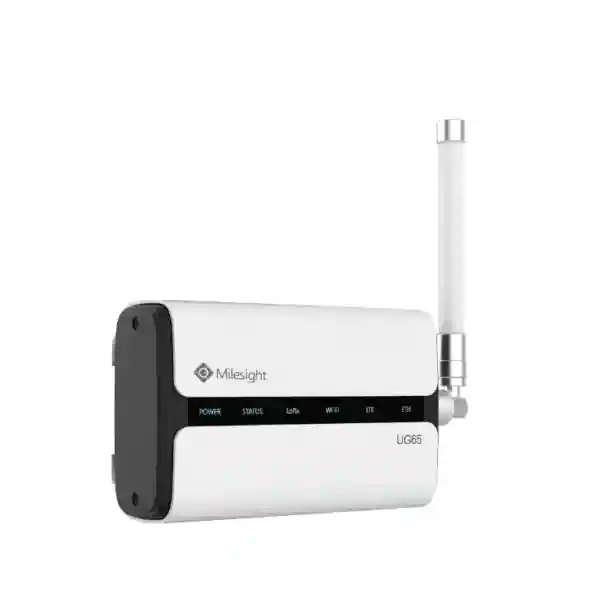
Yeastar Workplace Smart Device Connectivity
Yeastar LoRaWAN Gateway
The Yeastar LoRaWAN Gateway is the smart-device bridge used by Yeastar Workplace to move data between compatible LoRaWAN sensors and the Yeastar Workplace platform. Yeastar documentation identifies the supported gateway as the Milesight UG65, a semi-industrial eight-channel LoRaWAN gateway designed for workplace monitoring scenarios. For organizations in Tanzania planning occupancy sensing, room environmental monitoring, desk intelligence or other supported Yeastar Workplace smart-device workflows, the gateway is a key infrastructure component rather than a standalone accessory.
Receives data from multiple end devices concurrently and supports the workplace sensor traffic required by compatible Yeastar deployments.
A Gigabit RJ45 interface supports 802.3af PoE input, while the documented DC input accepts 9–24 VDC.
The gateway uses an IP65-rated enclosure and can be mounted on a desktop, wall or pole according to site requirements.
The gateway is documented for registration to Yeastar Workplace so supported smart sensors can exchange data with the platform.
What is the Yeastar LoRaWAN Gateway?
In Yeastar Workplace architecture, a LoRaWAN gateway provides the link between compatible smart sensors and the internet-connected Yeastar Workplace server. Sensors communicate with the gateway using LoRaWAN, and the gateway forwards their data through the local network and internet connection. This architecture is useful when a workplace needs low-power wireless sensing across rooms, desks or shared facilities without treating every sensor as a conventional Wi-Fi endpoint.
Yeastar identifies the gateway model as the Milesight UG65. The published specifications include a quad-core 1.5 GHz 64-bit ARM Cortex-A53 processor, 512 MB DDR4 memory, 8 GB eMMC flash, a Semtech SX1302 LoRa chip, eight LoRaWAN channels, Gigabit Ethernet, integrated 2.4 GHz Wi-Fi, PoE input and an IP65-rated enclosure. Yeastar also documents frequency plans including CN470, IN865, EU868, RU864, US915, AU915, KR920 and AS923. The correct regional radio configuration should be confirmed for the intended deployment location before installation.
For procurement teams, the most important question is not simply whether the gateway is technically powerful enough. The deployment should confirm which Yeastar Workplace features are required, which sensors will be installed, how many floors or coverage zones are involved, where Ethernet and power are available, whether PoE is preferred, and how the gateway will reach the Yeastar Workplace service. These decisions influence gateway quantity, mounting position and the supporting network design.
Verified technical specifications
| Area | Verified specification |
|---|---|
| Processor | Quad-core 1.5 GHz, 64-bit ARM Cortex-A53 |
| Memory / storage | 512 MB DDR4 RAM / 8 GB eMMC |
| LoRaWAN channels | 8 channels |
| LoRa chipset | Semtech SX1302 |
| Frequency plans | CN470 / IN865 / EU868 / RU864 / US915 / AU915 / KR920 / AS923 |
| Sensitivity | -140 dBm sensitivity at 292 bps |
| Maximum output power | 27 dBm |
| Ethernet | 1 × RJ45, 10/100/1000 Base-T, PoE PD support |
| Wi-Fi | IEEE 802.11 b/g/n, 2.4 GHz |
| Power | 9–24 VDC or 802.3af PoE input; documented consumption ≤4.2 W |
| Enclosure | IP65 |
| Dimensions | 180 × 110 × 56.5 mm |
| Mounting | Desktop, wall or pole mounting |
| Operating temperature | -40°C to +70°C |
Specifications are based on Yeastar Workplace documentation for the UG65 gateway. Frequency configuration, firmware, included accessories and compatibility should be rechecked against the deployment requirement at quotation and installation time.
Compatible workplace scenarios
Yeastar documentation shows the LoRaWAN gateway being used with workplace devices including people-counting sensors, room-comfort sensors, desk-occupancy sensors, E-Ink desk screens and smart wall switches, depending on the Yeastar Workplace plan and supported device version. The gateway therefore fits projects where organizations want room utilization data, environmental readings, desk availability or other smart-workplace functions to reach one management platform.
Deployment considerations
Yeastar installation guidance recommends placing the UG65 near the center of connected sensors, avoiding obstruction by large metal objects, keeping it away from high-current areas and providing open space for radio transmission. One gateway per floor is presented as a recommended approach in the installation guidance, but final quantity should be determined from the building layout, floor construction, sensor density, expected coverage and site testing.
Buying guidance for Tanzania organizations
A useful quotation request should identify the number of sites, number of floors, approximate floor area, planned Yeastar Workplace sensors, desired workplace features, network topology, PoE availability and internet connectivity. If the organization already uses managed switching, the gateway can often be placed on an appropriate VLAN with controlled internet access. If PoE is unavailable at the selected mounting point, the documented DC power option may simplify installation, provided power can be routed safely.
FourTeck Tanzania’s business technology shop guidance emphasizes checking compatibility, capacity, infrastructure, management and lifecycle before ordering. For projects combining the gateway with switching, Wi-Fi, security or workplace technology, the FourTeck Tanzania services overview provides a broader planning context for coordinated deployment.
Yeastar LoRaWAN Gateway Tanzania
Organizations evaluating a Yeastar LoRaWAN Gateway in Tanzania are usually trying to solve a practical smart-workplace problem: moving occupancy, people-counting, environmental or other supported sensor data from physical spaces into Yeastar Workplace without making every sensor dependent on conventional Wi-Fi. The UG65 gateway provides that bridge. Its eight-channel LoRaWAN radio, Ethernet backhaul, Wi-Fi capability and PoE option make it adaptable to offices, administrative buildings, training facilities and other workplaces where smart-device coverage must be planned around real rooms and floor layouts.
Tanzania deployments should begin with a site map rather than a device count alone. Identify each room or desk zone where supported Yeastar sensors will be installed, the floor construction, concentrations of metal or electrical equipment, and available network outlets. Yeastar installation guidance recommends central gateway positioning relative to sensors and avoiding large metal obstructions or high-current areas. In a multi-floor building, the recommended one-gateway-per-floor approach is a sensible starting point for planning, but signal behavior and sensor density should guide the final design.
Procurement teams should also confirm the radio-frequency plan and any applicable local regulatory requirements before final configuration. The hardware supports several global LoRaWAN frequency plans, but hardware capability does not replace country-specific deployment checks. Include the required Yeastar Workplace plan, supported sensor models, firmware expectations, PoE or DC powering method, Ethernet path and mounting accessories in the quotation brief. For projects that also need network preparation, FourTeck Tanzania can evaluate the gateway as part of the wider LAN and workplace infrastructure rather than as an isolated box.
Yeastar LoRaWAN Gateway Dar es Salaam
For businesses in Dar es Salaam, a Yeastar LoRaWAN Gateway can support smart-workplace projects in headquarters, professional offices, shared workspaces, hospitality administration areas, education facilities and multi-tenant commercial environments. The city’s varied building types mean gateway placement should be engineered around the actual property. Open-plan offices, concrete partitions, glass meeting rooms, elevator cores, equipment rooms and dense metal furniture can all affect how a low-power wireless sensor network behaves. A central mounting point with reliable Ethernet backhaul is generally preferable to choosing a location simply because a spare network port is available.
Dar es Salaam buyers often need a quotation that joins smart workplace devices to the existing IT environment. That should include an assessment of PoE capacity on the access switch, the VLAN or network segment assigned to the gateway, outbound internet connectivity to Yeastar Workplace, UPS protection for the network path and the location of sensors on each floor. The UG65’s documented PoE support can simplify mounting because one Ethernet cable can provide both network and power, while its DC option remains useful where PoE is not available.
A good procurement request should avoid vague statements such as “one gateway for the office.” Instead, provide floor plans or approximate areas, sensor quantities, room names, desired functions and any constraints on cabling or mounting. This enables a more realistic recommendation and makes future expansion easier to plan. If the same project includes business switching, Wi-Fi or IP telephony, those shared infrastructure dependencies can be reviewed together so the workplace gateway does not compete with other critical systems for poorly planned network capacity or power.
Yeastar LoRaWAN Gateway Mwanza
A Yeastar LoRaWAN Gateway deployment in Mwanza may be relevant for organizations modernizing offices, regional branches, campuses or facilities where workspace utilization and environmental visibility need to be centralized. The advantage of LoRaWAN in this context is that supported low-power sensors communicate to a dedicated gateway rather than requiring each sensor to become a traditional Wi-Fi client. The gateway then uses its network connection to forward information to Yeastar Workplace, providing a clear separation between sensor radio traffic and the organization’s normal user wireless network.
Site preparation matters. Before ordering, map the rooms and floors in which sensors will operate, confirm whether the intended UG65 mounting point has Ethernet, and decide between PoE and DC power. Check the route from the gateway to the internet and confirm that network security policies permit the required Yeastar Workplace communication. In buildings with substantial reinforced construction or large metal structures, treat published coverage figures as reference values rather than guaranteed site performance. Physical conditions can shorten or reshape useful radio coverage.
For Mwanza procurement teams, the quotation should state whether the gateway is part of a new Yeastar Workplace deployment or an expansion of an existing installation. Existing customers should document current firmware, sensor types, previous gateway locations and any known coverage gaps. New customers should define the workplace use case first: room occupancy, people counting, desk monitoring or supported environmental sensing. Clear requirements allow the gateway quantity, sensor mix, switching requirement and installation scope to be assessed as one operational system rather than several disconnected purchases.
Yeastar LoRaWAN Gateway Arusha
Organizations in Arusha looking for a Yeastar LoRaWAN Gateway may include offices, tourism and hospitality administration teams, NGOs, educational institutions, professional services firms and multi-building organizations that want better visibility into workplace use. The gateway itself is only one layer of the design. The business value comes from linking supported sensors to Yeastar Workplace so administrators can use the resulting occupancy, environmental or workspace information as part of daily facilities and room-management decisions.
Arusha sites can vary significantly in floor plan and construction. For that reason, gateway placement should be based on sensor location and radio conditions rather than convenience. Yeastar recommends a central position relative to connected sensors and warns against large metal obstructions and high-current areas. Where a building has separate wings, thick walls or detached structures, a single central gateway may not be the best design even if theoretical coverage appears sufficient. Planning should consider practical paths through walls and floors and the availability of Ethernet at suitable mounting points.
A procurement-ready specification should list the intended Yeastar Workplace plan, sensor models, sensor quantities, gateway count under consideration, expected mounting type, PoE or DC power choice, internet connectivity and whether network configuration services are required. If the project must integrate with a wider smart-office or communications upgrade, it is useful to document switching, wireless and meeting-room requirements at the same time. That approach helps avoid duplicate cabling work and gives the IT team a clearer support model after the system is commissioned.
Yeastar LoRaWAN Gateway Dodoma
The Yeastar LoRaWAN Gateway can be considered in Dodoma for offices, institutions, project facilities and administrative environments deploying supported Yeastar Workplace sensors. The UG65 acts as a bridge between the LoRaWAN sensor network and the Yeastar Workplace server. Because the gateway is infrastructure, not simply an endpoint, its location affects the reliability of every supported sensor associated with it. A sensible design places gateway planning early in the project, before cabling and sensor mounting are finalized.
For Dodoma projects, power and connectivity planning should be explicit. The UG65 supports 802.3af PoE and a 9–24 VDC input, which gives installers flexibility. Where the access switch and network rack are UPS-backed, PoE can help maintain both gateway power and network connectivity through short electrical interruptions, subject to the customer’s UPS design. If DC power is used, both the gateway power source and the Ethernet path should be reviewed so that resilience is not weakened by an overlooked local adapter or unmanaged switch.
Before requesting a quotation, document the number of floors, approximate floor areas, number and type of supported sensors, room names, network closet locations and any planned building changes. Clarify whether the gateway needs wall or pole mounting and whether an external antenna option is being considered. Frequency-plan suitability should be confirmed for the deployment location. Buyers should also distinguish between verified UG65 capabilities and project-specific outcomes; actual radio performance depends on the environment, so site testing remains more valuable than relying on one headline distance figure.
Yeastar LoRaWAN Gateway UAE
For organizations with operations in the UAE, the Yeastar LoRaWAN Gateway can support the same Yeastar Workplace smart-device architecture used in other markets while allowing regional IT teams to standardize monitoring and workplace-management practices. The UG65’s multi-frequency hardware platform is designed for global deployments, but the permitted frequency plan must be confirmed for the UAE before configuration. This is especially important for companies that source identical gateway hardware for several countries and might otherwise assume one radio configuration applies everywhere.
Commercial buildings in the UAE often include dense concrete, large glazed areas, raised floors, metal ceilings and extensive building services. Those conditions make placement planning more important than a simple range claim. The gateway should be positioned around sensor coverage and should maintain reliable Ethernet or approved Wi-Fi backhaul to the Yeastar Workplace service. PoE can reduce local power adapters at ceiling or wall locations and may align well with enterprise switching standards where the customer already manages network power centrally.
For cross-border procurement, standardize the information captured for every site: floor count, sensor inventory, gateway serial numbers, firmware levels, mounting points, switch ports, VLANs, power method and responsible support contact. This makes replacement and troubleshooting easier later. Customers coordinating Tanzania and UAE technology projects can also use the broader FourTeck regional network for related infrastructure discussions, while keeping the Yeastar Workplace design grounded in official model and compatibility information rather than assuming that every LoRaWAN gateway is interchangeable with the supported UG65 workflow.
Yeastar LoRaWAN Gateway Uganda
Businesses and institutions considering a Yeastar LoRaWAN Gateway in Uganda can use the UG65 as the connectivity layer between supported Yeastar Workplace sensors and the Yeastar Workplace platform. This can be relevant where an organization wants centralized room-usage information, people-counting data, environmental readings or supported desk-status workflows without adding large numbers of conventional Wi-Fi sensor endpoints. The gateway receives LoRaWAN traffic and forwards the data through the network and internet connection.
Uganda deployments should confirm the correct LoRaWAN frequency plan and local requirements before the gateway is commissioned. The published UG65 hardware supports several regional plans, but the final configuration needs to match the country and sensor ecosystem. At site level, document wall materials, floor layout, sensor locations, switching infrastructure and the proposed gateway position. Yeastar recommends central placement relative to sensors, avoiding large metal objects and high-current areas and providing sufficient open space for signal transmission.
For organizations operating across East Africa, consistent design documentation can simplify multi-country support. Use the same naming pattern for gateways and sensors, record serial numbers and firmware, and document switch ports and VLANs. The FourTeck Uganda technology site provides a regional point of reference for related communications and networking requirements. Procurement should still verify the exact Yeastar Workplace requirement, supported sensor models and deployment scope before ordering gateway quantities.
Yeastar LoRaWAN Gateway Kampala
Kampala organizations deploying modern meeting-room and workspace technology can use the Yeastar LoRaWAN Gateway as part of a broader workplace management design. Typical questions should start with the operational objective: Is the business trying to detect room occupancy, collect people-counting data, monitor room comfort, support desk occupancy information or combine several supported smart devices? Once the use case is clear, the gateway can be sized and located around the sensor network rather than purchased as a generic networking accessory.
In a multi-storey Kampala office, a per-floor planning approach is useful because floor slabs, lift cores, service areas and partitions can affect radio propagation. Yeastar’s installation guidance recommends one gateway per floor as a starting recommendation and central positioning relative to the sensors. Actual requirement depends on the building. Ethernet and PoE availability at the selected location should be checked early. If the gateway must be moved after a radio survey, a flexible cabling plan can save significant rework.
A well-prepared Kampala quotation should include Yeastar Workplace plan details, sensor models and quantities, approximate room dimensions, number of floors, network topology, PoE capability, internet access and mounting preferences. If the organization already uses structured network segmentation, include the intended VLAN and firewall policy for the gateway. This gives the IT and facilities teams a shared deployment record and makes later expansion easier when new meeting rooms, desk zones or sensor types are introduced.
Yeastar LoRaWAN Gateway Arua
For an organization in Arua, the decision to deploy a Yeastar LoRaWAN Gateway should be tied to a defined Yeastar Workplace smart-device requirement. A gateway is most valuable when there is a clear sensor workflow behind it. Before procurement, list the rooms, desks or operational spaces that will use supported sensors and define what administrators need to see in Yeastar Workplace. This prevents a project from focusing on gateway specifications while overlooking the workplace outcomes the gateway is meant to enable.
Connectivity planning can be particularly important where the site has limited network outlets or where the best radio position is not close to a rack. The UG65 supports PoE, making it possible to deliver power and Ethernet over one cable from a compatible switch. Where PoE is not available, the documented DC input provides another option. The complete path from sensor to gateway, gateway to LAN and LAN to internet should be checked so that a weak link is not mistaken later for a LoRaWAN problem.
Arua buyers should ask for the gateway, required mounting accessories and deployment services to be described separately in the quotation. If sensors are included, list them by model and quantity. Confirm the target frequency plan and firmware requirements before installation. For organizations with branch sites elsewhere in Uganda, document each gateway consistently so regional IT teams can compare configurations, identify replacements and maintain a clear inventory over time.
Yeastar LoRaWAN Gateway Mbarara
The Yeastar LoRaWAN Gateway can support Mbarara workplaces that want to connect supported Yeastar smart sensors without depending on dense Wi-Fi coverage for every sensing device. The UG65’s role is to aggregate low-power LoRaWAN sensor communication and pass the resulting data to Yeastar Workplace over the organization’s network connection. That makes gateway placement, Ethernet availability and internet reliability part of the same design conversation as sensor location.
For a Mbarara office or institutional site, start by marking sensor locations on a floor plan and identifying walls, equipment areas and other potential radio obstacles. Yeastar advises central gateway placement and avoiding large metal obstructions and high-current areas. If several floors are involved, plan coverage per floor first rather than assuming a single gateway will penetrate the entire building. A site survey or staged commissioning can validate whether the initial design provides reliable sensor communication in the intended rooms.
Procurement teams should also capture the network requirements. Decide whether PoE will be used, identify the switch and port, verify that the switch has available power budget, and document any VLAN or firewall configuration. If the business expects to add sensors later, include growth in the placement plan so that expansion does not require redesigning the entire gateway layout. A structured bill of materials and configuration record will also help when replacement hardware or firmware maintenance is required.
Yeastar LoRaWAN Gateway Gulu
A Yeastar LoRaWAN Gateway deployment in Gulu can fit organizations adopting room, desk or environment sensing through Yeastar Workplace. The technology is best viewed as part of a complete workflow: supported sensors collect data, LoRaWAN carries that data to the UG65 gateway, the local network provides backhaul, and Yeastar Workplace presents or uses the information according to the enabled feature. Every layer should be included in project testing, because sensor communication issues can originate from placement, radio conditions, switching, internet access or platform configuration.
Before installation, choose the mounting location around coverage rather than visual convenience. The UG65 can be deployed on a desktop, wall or pole, and PoE can simplify cable management. In buildings with long corridors, separate wings or substantial structural barriers, test whether the proposed gateway position reaches the intended sensors consistently. Treat vendor coverage figures as planning references; they cannot predict the effect of every wall, metallic object or site-specific source of interference.
Gulu procurement requests should state whether installation and network configuration are required in addition to product supply. Include the Yeastar Workplace account or plan context, sensor list, approximate floor plan, gateway quantity under consideration, intended power method and any restrictions on drilling or mounting. This level of detail helps the solution remain maintainable after handover and creates a stronger basis for future expansion to additional rooms or buildings.
Yeastar LoRaWAN Gateway Kenya
Kenya organizations using or evaluating Yeastar Workplace can consider the UG65 gateway for supported smart-sensor connectivity. The gateway provides eight LoRaWAN channels, Ethernet and Wi-Fi networking, PoE input and an industrial-style IP65 enclosure. Those characteristics make it adaptable to different office installation points, but the correct frequency plan and device compatibility must be verified for the Kenyan deployment rather than assumed from a configuration used in another country.
For offices in Nairobi or other Kenyan cities, begin with the floor plan and desired workplace features. A meeting-room project that uses people counting has different sensor placement considerations from a desk-occupancy project covering many individual workstations. The gateway count should therefore follow the sensor layout. Yeastar’s guidance to place the gateway centrally and avoid large metal objects provides a practical starting point, while real site testing should confirm the result after installation.
Multi-country procurement teams can improve support by keeping Kenya and Tanzania deployments documented in the same format: serial number, firmware, radio plan, gateway name, location, switch port, VLAN, power method and associated sensor groups. The FourTeck Kenya technology site is available for broader regional IT and networking requirements. The Yeastar gateway quotation should still remain model-specific and should distinguish the UG65 from Yeastar’s telephony gateway families, which serve different purposes.
Yeastar LoRaWAN Gateway Kuwait
For a Kuwait smart-workplace project, the Yeastar LoRaWAN Gateway can act as the dedicated bridge between supported workplace sensors and Yeastar Workplace. Procurement should confirm the frequency plan permitted and required for the deployment before the device is configured. The UG65 hardware supports multiple regional LoRaWAN plans, making it suitable for a global product family, but regulatory and sensor compatibility checks remain country-specific tasks.
Indoor commercial properties can include reinforced concrete, metal services, equipment rooms and dense office partitions that change radio propagation. A site plan should therefore show sensor groups and likely gateway positions before cabling work begins. The gateway’s PoE capability is useful when the selected position is away from convenient AC outlets, provided the switch supports the necessary standard and has sufficient power budget. Where DC is preferred, the cable path and local power protection should be included in the installation scope.
Organizations operating both Kuwait and East African offices may want one standard Yeastar Workplace architecture across regions. Standardize documentation and operational procedures, but do not copy radio settings blindly between countries. Record the selected frequency plan, firmware, gateway serial number and associated sensor inventory for each site. This gives IT teams a clean baseline for maintenance and makes it easier to determine whether a later issue relates to hardware, radio coverage, local networking or Yeastar Workplace configuration.
Yeastar LoRaWAN Gateway Ghana
Ghana organizations planning Yeastar Workplace sensor deployments can use the UG65 LoRaWAN gateway to connect supported low-power devices to the Yeastar Workplace server. The gateway is not a substitute for Yeastar Workplace itself; it is the field connectivity component that receives LoRaWAN sensor data and forwards it over the local network. That distinction matters for procurement because gateway hardware, sensor hardware, the Yeastar Workplace plan and installation services can have separate requirements.
A Ghana deployment should validate the correct radio-frequency plan before commissioning and should map gateway locations against the intended sensor coverage. The UG65 is designed for flexible mounting and includes both PoE and DC power options, allowing the installer to choose locations that make sense for radio coverage rather than only for convenient power. Where offices span multiple floors or wings, a distributed gateway design may be easier to maintain and troubleshoot than attempting to stretch one gateway beyond a sensible coverage zone.
If the project is part of a wider regional rollout, document naming, firmware, VLANs, switch ports, mounting positions and sensor assignments consistently. This makes troubleshooting and replacement more predictable. Buyers can also reference the FourTeck regional network for related networking and communications discussions, while ensuring the Yeastar gateway itself is specified against official Yeastar Workplace compatibility information and the actual Ghana site conditions.
Yeastar LoRaWAN Gateway Nigeria
For Nigerian businesses implementing smart workplace technology, the Yeastar LoRaWAN Gateway can provide the radio-to-network bridge required by supported Yeastar Workplace sensors. The UG65 platform is built around a quad-core processor and Semtech SX1302 LoRa technology and supports eight LoRaWAN channels. The practical benefit is a dedicated low-power sensor communication layer that can cover workplace devices without adding each sensor to the normal employee Wi-Fi environment.
Nigeria projects should begin with regulatory and frequency-plan confirmation, followed by site planning. Buildings with large floor plates, metal partitions, server rooms or heavy electrical infrastructure can require more careful gateway placement. Yeastar recommends locating the gateway centrally relative to sensors and away from large metal objects and high-current areas. A physical survey and commissioning test should verify that all intended sensors maintain reliable communication before the installation is considered complete.
For corporate groups with Nigerian branches, use a standardized deployment worksheet that records gateway serial number, firmware, frequency plan, location, network address, switch port, VLAN and sensor assignments. This is more valuable than a generic product list because it supports future service and change management. If the project also includes firewall, switching, Wi-Fi or unified communications upgrades, coordinate the gateway network path with those systems so that security policy and PoE capacity are intentional rather than added after devices are installed.
Yeastar LoRaWAN Gateway Seychelles
The Yeastar LoRaWAN Gateway can support Seychelles organizations that want to deploy Yeastar Workplace smart sensors in offices, hospitality administration areas or other managed workspaces. Because island sites may include dispersed buildings or facilities separated by outdoor space, the gateway plan should be based on actual building groups rather than assuming one device can serve an entire property. The UG65 can be wall or pole mounted and carries an IP65 enclosure rating, but installation exposure and mounting details should still be reviewed for the specific site.
Before procurement, identify which supported sensors will communicate through each gateway and verify the radio-frequency plan appropriate to the Seychelles deployment. The gateway’s PoE support can be useful where Ethernet infrastructure reaches an optimal radio position, while the DC input provides an alternative where PoE is unavailable. Network connectivity to Yeastar Workplace, firewall rules and the reliability of the internet backhaul should be assessed alongside the LoRaWAN coverage.
For hospitality or multi-building operations, consider documenting gateway coverage zones by building and floor. This makes it easier to associate sensors with the correct gateway and isolate faults later. The published UG65 specifications include robust environmental limits, but operational design should still account for local mounting conditions, cable protection, power resilience and access for maintenance. A quotation should clearly separate hardware supply, sensor quantities, gateway mounting, network configuration and any onsite commissioning so the project scope is understood before implementation.
Related FourTeck resources
A LoRaWAN gateway depends on reliable IP networking, power and system integration. The FourTeck Tanzania Shop helps buyers frame product selection around compatibility, capacity and infrastructure. The FourTeck Tanzania Services page explains how networking, communications, security and workplace technology can be planned together.
Organizations with multi-country requirements can also review the FourTeck Uganda, FourTeck Kenya and FourTeck Africa technology sites when coordinating broader regional network and workplace requirements. These links provide context for related IT infrastructure; the Yeastar LoRaWAN Gateway specification on this page remains tied to the official UG65 documentation used by Yeastar Workplace.
Quotation checklist
State whether the environment uses Standard, Pro or another applicable current plan and which smart-device functions are required.
List each supported sensor or smart device so gateway placement and capacity can be reviewed.
Provide floor count, approximate dimensions and room names to support a realistic coverage plan.
Confirm the appropriate local LoRaWAN frequency plan and regulatory requirements for each country.
Choose 802.3af PoE or documented DC input and confirm the supporting power design.
Identify switch port, VLAN, firewall policy and internet path used to reach Yeastar Workplace.
Frequently asked questions
Which model is the Yeastar LoRaWAN Gateway?
Yeastar Workplace documentation identifies the supported LoRaWAN gateway as the Milesight UG65. Yeastar also refers to it as the Smart Device Gateway in its resources. Compatibility should always be confirmed against the current Yeastar Workplace documentation and firmware requirements.
What does the gateway do in Yeastar Workplace?
It receives LoRaWAN data from supported smart sensors or devices and forwards that information over the network to the Yeastar Workplace server. It is therefore the bridge between the low-power sensor layer and the IP-connected workplace platform.
Can the UG65 be powered by PoE?
Yes. Yeastar documents one Gigabit RJ45 Ethernet port with PoE PD support and 802.3af PoE input. A 9–24 VDC input is also documented.
How many gateways are needed for an office?
There is no universal number. Yeastar installation guidance recommends one gateway per floor as a planning approach, but final quantity depends on floor area, walls, metal obstacles, sensor density and site-specific radio conditions. A coverage plan and commissioning test are recommended.
Does the gateway support multiple LoRaWAN regions?
The published hardware specification includes CN470, IN865, EU868, RU864, US915, AU915, KR920 and AS923 frequency plans. The correct plan must be selected according to the deployment country, compatible sensors and local regulatory requirements.
Is it suitable for outdoor mounting?
The UG65 has an IP65-rated enclosure and Yeastar describes it as a semi-industrial gateway with desktop, wall or pole mounting options. The final mounting method should still consider site exposure, cabling, connector protection, maintenance access and applicable installation practices.
Decision recap
Choose the Yeastar LoRaWAN Gateway when the project is based on Yeastar Workplace and requires the supported UG65 gateway to connect compatible smart sensors. Validate the workplace plan, sensor compatibility, radio-frequency plan, coverage design, Ethernet path and power method before ordering. For multi-floor sites, plan gateway coverage by floor and test the finished installation rather than relying only on headline range values.
For procurement, ask for a quotation that separates gateway hardware, sensors, mounting accessories, network preparation, configuration and commissioning. This produces a clearer comparison between proposals and reduces the chance that required infrastructure is discovered only after products arrive.
Consultation panel
Share your site country, floor count, sensor list, intended Yeastar Workplace features, network topology and preferred power method. FourTeck can use that information to structure a more useful product and deployment quotation without assuming unsupported stock, delivery, office-location or authorization claims.




Reviews
There are no reviews yet.