
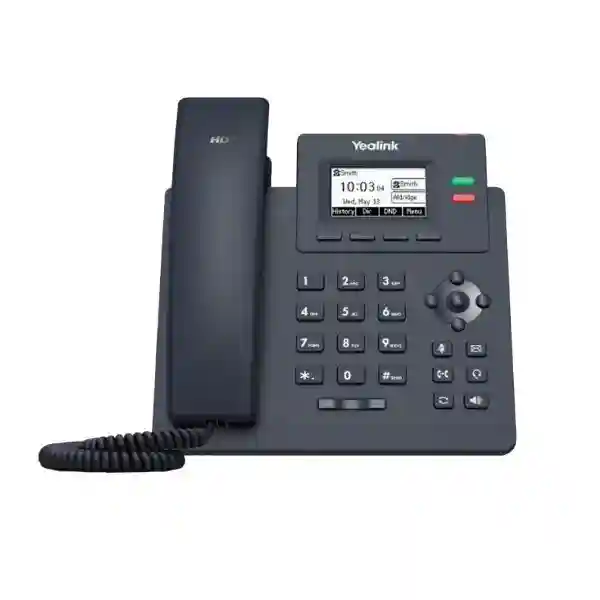
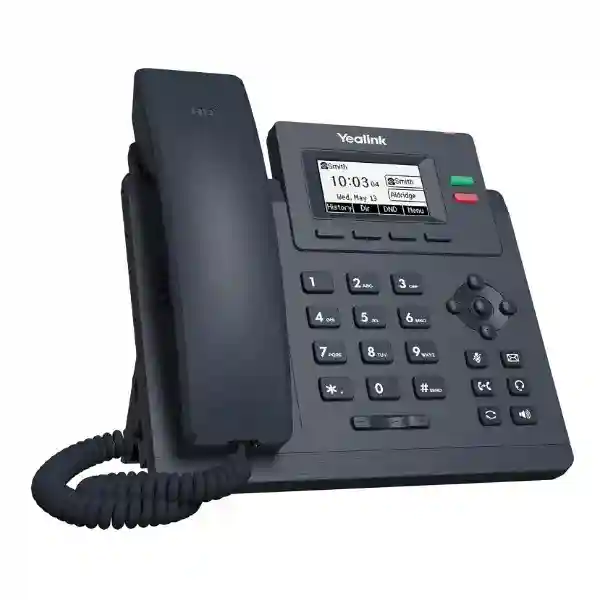
Yealink SIP-T31
The Yealink SIP-T31 is an entry-level two-line IP phone built for organizations that want straightforward SIP calling, clear audio, familiar physical keys and manageable deployment at individual desks or across larger fleets. Yealink specifies a 2.3-inch 132×64-pixel graphical LCD with backlight, two VoIP accounts, local 5-way conferencing, HD voice, Smart Noise Filtering and two 10/100 Mbps Ethernet interfaces. Those capabilities make the phone relevant for general office users, branch staff, shared work areas, service teams and other extensions where dependable daily calling matters more than a large color display or advanced wireless features.
Choose the SIP-T31 when you need a simple two-account SIP endpoint with Fast Ethernet, backlit display and standard business calling features.
If your deployment specifically requires Power over Ethernet or Gigabit Ethernet, compare the T31P or T31G rather than assuming those functions are included in the base T31.
Two VoIP accounts support common extension and line-assignment requirements for standard business users.
Yealink HD handset and speaker audio combine with Smart Noise Filtering to improve everyday conversations.
Local five-way audio conferencing gives users a practical way to bring several participants into one call.
Two RJ45 10/100 Mbps Ethernet ports support network and optional PC pass-through connectivity.
What the Yealink SIP-T31 solves
A business desk phone is valuable when it makes routine communication simpler rather than adding another layer of complexity. The SIP-T31 targets that requirement. It gives staff dedicated keys for transfer, message, headset, redial, mute and hands-free speakerphone, plus line keys, navigation controls and a backlit monochrome display. Users can handle call hold, transfer, forward, waiting, do-not-disturb, redial, auto-answer and other familiar functions without depending on a computer for every interaction.
For IT teams, the value comes from standard SIP support and provisioning options. Yealink documents configuration through the phone or browser, plus auto-provisioning over FTP, TFTP, HTTP and HTTPS, PnP and TR-069. In larger deployments, repeatable provisioning can reduce manual configuration effort and help keep extension settings consistent. The phone also supports Yealink device-management platforms, making it relevant for organizations that want a more centralized operational approach.
The model is best understood as the base member of the T31 family rather than as an interchangeable label for every T31 variant. The SIP-T31 itself uses two 10/100 Mbps Ethernet ports. Yealink’s T3 family comparison assigns PoE to the T31P and T31G, and Gigabit Ethernet to the T31G. That distinction matters during procurement because choosing a model on name similarity alone can lead to a mismatch with switch power, cabling or endpoint-throughput expectations.
Verified Yealink SIP-T31 features
Display and controls
2.3-inch 132×64 graphical LCD with backlight, two LED line keys, six dedicated feature keys, five navigation keys, volume controls and call/message indicators.
Audio
HD handset and HD speaker, Smart Noise Filtering, G.722 wideband codec support, several narrowband codecs and a full-duplex hands-free speakerphone with acoustic echo cancellation.
Directories and call handling
Local phonebook up to 1,000 entries, XML/LDAP remote phonebook support, smart dialing, call history, BLF, BLA, hot desking, voicemail, call park and call pickup support where the connected platform provides the related service.
Network and security
SIP v1/v2, static or DHCP addressing, IPv6, LLDP/CDP/DHCP VLAN, QoS tagging, SRTP, TLS 1.3, HTTPS certificate management, AES256 configuration-file encryption, digest authentication, OpenVPN, IEEE 802.1X, ICE and secure boot.
Technical specification snapshot
| VoIP accounts | Up to 2 |
| Display | 2.3-inch 132×64 graphical LCD with backlight |
| Ethernet | 2 × RJ45 10/100 Mbps |
| Headset | 1 × RJ9 headset port; EHS wireless-headset support |
| Conference calling | Local 5-way conferencing |
| Provisioning | Browser, phone and auto-provisioning; FTP/TFTP/HTTP/HTTPS, PnP and TR-069 |
| Power | External Yealink AC adapter: 100–240 V input, DC 5 V/600 mA output; adapter listed by Yealink as optional |
| Mounting | Two-angle stand and wall-mountable design |
Procurement note: confirm package contents, adapter requirement, firmware compatibility and PBX/SIP-service interoperability for the intended deployment before ordering. Features dependent on a PBX, SIP service or management platform require support from that environment.
SIP-T31 versus T31P and T31G
The naming of the T31 family can create confusion during purchasing. The base SIP-T31, T31P and T31G share the same basic two-line, backlit-display positioning, but their network and power capabilities are not identical. Yealink’s family comparison shows the T31P and T31G with Power over Ethernet, while the T31G adds Gigabit Ethernet. The base T31 should therefore be chosen when external power and Fast Ethernet are suitable. If the network design is built around PoE-only desks, the T31P or T31G may be more appropriate. If a workstation is expected to pass high-bandwidth data through the phone’s PC port, Gigabit capability may also influence the decision.
This is not a question of one model being universally better. A small office with dedicated computer cabling and available power sockets may have no practical need for PoE or Gigabit pass-through. A large managed office may prefer PoE to reduce adapters and centralize power through UPS-backed switches. The correct choice depends on the endpoint layout, switching design, user workload, power strategy and budget. FourTeck can help compare the options as part of a broader business technology procurement plan rather than treating the handset as an isolated purchase.
PBX, SIP trunk and network compatibility planning
The SIP-T31 supports SIP standards and a broad set of common phone-system functions, but a successful deployment still depends on the surrounding voice platform. Before purchase, confirm that the intended PBX or hosted SIP provider supports the registration method, codecs, transport settings, voicemail behavior, BLF implementation, call transfer method and any other feature the organization considers essential. Features such as centralized recording, visual voicemail, executive-assistant workflows or directory integration depend on the connected system and should not be assumed from the handset specification alone.
Voice quality also depends on the LAN and WAN. A phone can support HD voice and still deliver a poor user experience if the network has congestion, packet loss, unstable internet or incorrect Quality of Service. For multi-phone deployments, consider a voice VLAN, sensible QoS policy, managed switching and a consistent addressing and provisioning strategy. If a separate PC shares the phone’s second Ethernet port, account for the Fast-Ethernet limitation of the T31 when assessing the desktop’s network requirements.
For organizations planning broader telephony changes, FourTeck Tanzania’s IT and communication services overview explains how endpoint selection can be combined with network, PBX, cabling and support planning. Buyers comparing regional deployment approaches can also review the specialist FourTeck IP phone resource for broader desk-phone and IP-telephony context.
Who should consider the Yealink SIP-T31?
The SIP-T31 is well suited to user profiles that need reliable calling and core PBX functions without requiring a color touchscreen, built-in Wi‑Fi or a large number of programmable line keys. Standard office extensions, finance desks, administration teams, branch-office users, reception overflow positions, hotel back-office staff, classrooms, clinics, service counters and shared operational desks can all fit this profile when two SIP accounts are sufficient.
It can also make sense in fleet standardization projects where an organization wants a straightforward baseline phone for most users and higher-tier endpoints only for roles that need more line appearances, expansion modules, wireless connectivity or richer displays. This tiered approach can reduce unnecessary endpoint cost while keeping the experience consistent enough for users and support teams.
The model is less suitable when the project requires native Gigabit pass-through, base-model PoE, a color screen, large numbers of physical programmable keys or advanced integrated wireless functions. Identifying those requirements before quotation is more useful than selecting a phone only by price. FourTeck’s Tanzania technology solutions overview places IP phones in the wider context of switching, cabling, internet, firewall and PBX dependencies that affect real-world deployment.
Yealink SIP-T31 Tanzania
Businesses searching for the Yealink SIP-T31 in Tanzania are often replacing analog extensions, standardizing a mixed IP-phone estate or building a new SIP-based office communication system. The phone’s strongest fit is a standard business user who needs two SIP accounts, clear everyday calling, familiar physical controls and a compact desk device. For Tanzanian deployments, purchasing should begin with the existing PBX or hosted SIP environment, the quantity of extensions, available network ports and the preferred power approach. Because the base T31 does not inherit PoE simply from the family name, it is important to determine whether each desk has access to an adapter or whether a PoE-capable variant is required instead.
A multi-floor office or branch network should also consider voice VLANs, managed switching and QoS. Internet quality matters particularly when calls traverse a SIP trunk or hosted platform. Bandwidth alone is not the full measure; latency, jitter and packet loss influence audio continuity. Where the business depends heavily on voice, resilient internet design, UPS protection for switching and routers, and documented PBX settings can improve service continuity. The SIP-T31’s provisioning functions become valuable when many phones are deployed because administrators can use a standardized configuration rather than programming every handset independently.
For quotation preparation in Tanzania, provide the number of phones, PBX or SIP-provider details, whether adapters are required, headset needs, switch model, VLAN requirements and any special functions such as BLF, hot desking, call recording or directory integration. That information helps distinguish a simple handset supply from a complete voice deployment and reduces the chance of discovering missing infrastructure during installation.
Yealink SIP-T31 Dar es Salaam
Organizations in Dar es Salaam commonly need desk phones for headquarters, professional offices, logistics teams, hospitality properties, clinics, retail administration and customer-service environments. In these settings, the SIP-T31 can serve as a standardized endpoint for users who spend part of the day on calls but do not require a premium executive device. The backlit display, dedicated call-control keys, speakerphone and headset port make the phone familiar for daily office use, while two SIP accounts allow practical line or extension arrangements depending on the PBX configuration.
For new offices, it is worth designing the voice network at the same time as switching and structured cabling. Each desk needs a suitable network path, and the base T31’s external power requirement should be considered before furniture installation or cable management is finalized. Where a PC shares the second Ethernet port, the 10/100 Mbps interface can be adequate for ordinary office applications but should be checked against the workstation’s throughput needs. Users handling large local files or other high-bandwidth workloads may benefit from separate data cabling or a Gigabit-capable phone model.
Dar es Salaam procurement teams should request exact model confirmation because T31, T31P and T31G names are visually similar in quotations but differ in power and Ethernet capability. A useful quote should state handset quantity, included or optional power accessories, headset requirements, PBX configuration scope and whether installation, provisioning and testing are included. This turns a product purchase into a clear deployment plan and makes comparison between quotations more meaningful.
Yealink SIP-T31 Mwanza
For businesses in Mwanza, the Yealink SIP-T31 can be considered for branch offices, trading companies, education environments, hospitality operations and administrative teams that need a dependable SIP extension. The practical decision is not simply whether the phone can register to a PBX; it is whether the whole site is ready for consistent voice service. A branch with modest user numbers may still experience call problems if the internet circuit is unstable, the LAN is heavily congested or voice traffic competes with backups and cloud synchronization without sensible QoS.
The SIP-T31’s Fast-Ethernet interfaces suit many standard office desks, especially where computers have separate switch connections. If the phone is expected to sit inline between the LAN and a PC, the workstation workload should be reviewed. The base model also relies on external power rather than the PoE capability associated with T31P and T31G. In an office where centralized UPS-backed PoE is a design priority, choosing the correct variant at the quotation stage can simplify cable and power management later.
Mwanza buyers planning several extensions should provide an extension list, department names, call-flow expectations and any special user roles. Reception and supervisors may need different endpoints from standard staff. A mixed-model deployment can sometimes be more efficient than forcing one handset onto every role. For the SIP-T31 users, centralized provisioning, clear labeling and documented network settings make later moves, replacements and troubleshooting much easier.
Yealink SIP-T31 Arusha
Arusha organizations often operate across hospitality, tourism, professional services, education, development projects and regional administration. The SIP-T31 can fit front-office support positions, back-office desks, reservations administration, finance teams and shared work areas where two SIP accounts and core call handling are sufficient. Its local five-way conferencing can help small teams bring several callers together without depending on a separate conference service for every discussion, although PBX and carrier policies still determine how external call legs are handled.
In hospitality or multi-building environments, voice planning should account for the network topology. Phones may sit on access switches spread across floors or buildings, and consistent VLANs, DHCP options, DNS, gateway settings and QoS can simplify deployment. Where phones are managed centrally, provisioning templates should be tested on a small group before a broad rollout. The SIP-T31 supports multiple common provisioning methods, which can help standardize firmware, account details and feature behavior when the management process is designed carefully.
For procurement in Arusha, define whether the requirement is handset-only replacement or part of a PBX refresh. A handset-only purchase assumes the network and SIP platform are already compatible and correctly configured. A broader project may need switches, cabling, internet review, PBX setup, SIP trunk coordination, user training and documentation. Stating that scope in the request for quotation prevents a low equipment price from hiding missing implementation work.
Yealink SIP-T31 Dodoma
In Dodoma, the Yealink SIP-T31 is relevant to offices, institutions, project teams, service organizations and branch operations that need a straightforward SIP desktop endpoint. The phone’s two-account architecture suits many standard extensions, while the backlit screen and physical keys can be easier for frequent callers than relying entirely on a softphone. For shared administrative spaces, features such as call transfer, hold, DND, voicemail access and headset support can improve day-to-day call handling when the PBX exposes the corresponding functions.
Deployment planning should pay attention to power continuity. A SIP phone is only one part of the path: switches, routers, firewall, PBX or internet service must also remain available. If continuity during short power interruptions matters, review UPS support for the network core and decide whether external phone adapters are acceptable at desks. Organizations that prefer centrally protected PoE should compare the T31P or T31G rather than ordering the base model and discovering the power difference after installation.
A Dodoma quotation request should also mention whether the phones need local directories, LDAP access, BLF, hot desking or remote provisioning. These requirements influence the configuration plan and sometimes the endpoint choice. A short pilot with representative users can validate call flows, audio, directory behavior and provisioning before larger quantities are deployed, giving procurement and IT teams greater confidence that the selected profile fits daily operations.
Yealink SIP-T31 UAE
Organizations comparing the Yealink SIP-T31 for UAE offices often have more mature structured cabling and PoE switching, which makes model selection particularly important. The base SIP-T31 provides Fast Ethernet and external power support, whereas the related T31P and T31G variants add PoE, with the T31G also providing Gigabit Ethernet. For a business that already standardizes on PoE access switching, buying the correct variant can reduce desktop adapters and simplify UPS-backed power. For smaller offices with available sockets and modest data needs, the base T31 may still be entirely practical.
The handset supports standard SIP functions and security mechanisms including SRTP, TLS 1.3, HTTPS certificate management, 802.1X and encrypted configuration files. Those capabilities are useful, but security depends on the complete voice architecture. Credentials, PBX configuration, firewall policy, provisioning-server controls and firmware management all need suitable practices. A secure-capable endpoint cannot compensate for weak passwords or exposed services elsewhere in the environment.
For regional businesses with offices in Tanzania and the UAE, using a consistent endpoint family can simplify training and template management while still allowing different models by site. The aim should be a common operational standard, not identical hardware regardless of local infrastructure. FourTeck’s regional network can help frame cross-border requirements while keeping model selection tied to each site’s switching, power and connectivity design.
Yealink SIP-T31 Uganda
For Uganda deployments, the SIP-T31 can serve as a cost-conscious standard endpoint for offices and branches where two SIP accounts and core call features are adequate. The purchasing process should start with PBX compatibility and network readiness. If the organization uses hosted SIP, confirm how extensions authenticate, whether NAT traversal is needed and which codecs and transport methods the provider expects. If an on-premises PBX is used, confirm provisioning, firmware and feature interoperability before rolling out a large quantity.
Branch connectivity deserves attention because voice traffic is sensitive to packet loss and jitter. A site with enough nominal bandwidth can still sound poor during congestion. Managed switches, voice VLANs, QoS and disciplined internet usage can improve predictability. For remote branches, support teams should also consider how they will reach phones for troubleshooting and how configuration backups or templates will be maintained.
Organizations operating in both Uganda and Tanzania may benefit from shared naming conventions, extension templates and handset standards while allowing different access-switch designs by location. A common support model can reduce training overhead and make replacement units easier to prepare. Before purchase, however, confirm the exact T31 variant: PoE and Gigabit needs should be decided from the site architecture, not from assumptions about the model family.
Yealink SIP-T31 Kampala
Kampala offices searching for the Yealink SIP-T31 may be building new extensions, replacing older SIP phones or standardizing multiple departments on one entry-level handset. The phone is especially suitable for users who need basic PBX features and clear voice but not a premium screen or many programmable keys. A two-account limit is generally sufficient for standard users, while reception or high-call-volume supervisory roles may require a higher-tier endpoint with more line appearances and faster access to monitored extensions.
Network design is a major part of the deployment. If the phone and a PC share one wall outlet, remember that the SIP-T31 uses 10/100 Mbps Ethernet. That may be adequate for common office tasks, but it should be tested against the actual workstation requirements. If every desk is connected to a PoE access switch and power adapters are undesirable, compare the PoE-enabled T31P or T31G. Making this distinction early avoids redesigning power arrangements after the phones arrive.
A Kampala quotation should specify whether configuration is required, whether the PBX already exists, which SIP provider or trunk is in use, and whether headsets will be deployed. Also identify any compliance, recording or user-permission requirements that depend on the PBX. The handset supports many enterprise-style functions, but the platform must deliver and authorize them. A compatibility check prevents the feature list from being mistaken for a guarantee that every function works identically on every PBX.
Yealink SIP-T31 Arua
For an Arua branch or distributed organization, the SIP-T31 can be useful where the priority is a manageable desk endpoint rather than feature-heavy hardware. Remote locations benefit from phones that can be provisioned consistently, because configuration changes and replacements are easier when the support team does not have to rebuild every handset manually. Yealink supports several auto-provisioning mechanisms on the T31, giving administrators options to integrate phone configuration into an existing management process.
Connectivity resilience is often more important than raw endpoint capability. If calls depend on an internet-based SIP service, document the primary WAN, failover plan and firewall behavior. A secondary link may help business continuity, but failover should be tested because IP addresses, NAT state and SIP registration behavior can change when the path switches. QoS should also be applied where the network supports it so large data transfers do not unnecessarily interfere with active calls.
Power strategy matters too. The base SIP-T31 expects external power, so a remote branch should consider how phones remain powered during short outages and whether adapters are included in the chosen supply package. If the site already has UPS-backed PoE switching, a T31P or T31G may be operationally cleaner. The best quotation is therefore the one that matches the handset model to the branch infrastructure rather than only offering the lowest unit price.
Yealink SIP-T31 Mbarara
Mbarara businesses can use the Yealink SIP-T31 for administration, sales support, finance, reception overflow and other roles that need regular voice access without high-end endpoint features. The model’s physical keypad, dedicated call controls and backlit display make it suitable for users who prefer a traditional business-phone workflow. Two SIP accounts can support practical multi-line arrangements, although the actual appearance of lines, shared calls and PBX functions depends on the connected system.
When several phones are installed together, give the voice network a repeatable structure. Use documented extension numbers, consistent device names, a planned IP or DHCP strategy and, where appropriate, a voice VLAN. Keep provisioning credentials controlled and avoid exposing phone administration interfaces unnecessarily. The SIP-T31 supports encrypted signaling and media mechanisms, but those protections are only effective when the PBX and network are configured to use them.
A Mbarara procurement request should separate mandatory requirements from preferences. Mandatory items may include compatibility with an existing PBX, headset usage, adapter supply, local directory behavior or a particular call-flow function. Preferences might include handset color consistency or mounting angle. This distinction helps suppliers recommend the correct T31-family variant and prevents a small feature assumption from creating delays during deployment.
Yealink SIP-T31 Gulu
In Gulu, the Yealink SIP-T31 can fit offices, institutions, education facilities and branch operations where users need reliable SIP calling with a modest feature set. For a small site, a few phones may register directly to a hosted service or central PBX. For a larger operation, the phones may be part of a structured voice VLAN with centralized provisioning. Either way, the deployment should be tested under real network conditions rather than assuming that successful registration alone proves call quality.
The T31 supports G.722 wideband audio and Yealink’s Smart Noise Filtering, but the call path still determines the end-to-end codec and perceived quality. If the carrier or remote endpoint negotiates a narrowband codec, the conversation will not become wideband simply because one handset supports it. Similarly, network impairment can override endpoint quality. Measuring latency, jitter and loss during busy periods is useful when users report inconsistent audio.
For remote support, maintain a record of each phone’s extension, MAC address, location, firmware and user assignment. That inventory helps when moving or replacing devices. If external adapters are used, include them in the spare strategy. If centrally powered phones are preferred, select a PoE-enabled T31 variant. These operational details are small compared with the headline specification, but they often determine how easy the phone estate is to maintain after installation.
Yealink SIP-T31 Kenya
Kenya buyers comparing the Yealink SIP-T31 are likely to see multiple T31 variants and different bundle configurations. The most important first step is exact model confirmation. The base T31 provides two 10/100 Mbps Ethernet interfaces and uses external power, while the T31P and T31G add PoE and the T31G adds Gigabit networking. Pricing should therefore be compared on a like-for-like basis, including adapter, headset and deployment requirements rather than assuming every listing describes the same hardware.
For Nairobi headquarters or distributed Kenyan branches, centralized provisioning can reduce configuration inconsistency. A standard template can define SIP server details, codecs, VLAN behavior, time settings and key assignments. Sensitive credentials should be protected, and provisioning services should be secured rather than left broadly accessible. The T31 supports HTTPS-based provisioning and additional security functions that can be incorporated into a controlled deployment process.
Cross-border organizations operating in Kenya and Tanzania may prefer a common Yealink family so users and support staff see a familiar interface. Standardization is useful when it is deliberate: assign the T31 to normal users, then choose higher-tier models only where roles need more keys, faster networking or additional features. That approach balances user requirements with procurement efficiency and avoids over-specifying every desk.
Yealink SIP-T31 Kuwait
For Kuwait offices, the SIP-T31 offers a simple entry-level endpoint for users who need standard SIP telephony. Its feature set is practical for administrative users, branch staff and common work areas, but network and power design should be checked before bulk purchase. Modern office networks often rely heavily on PoE, so the base T31’s external-power approach may or may not match the site standard. A T31P or T31G can be considered where PoE is mandatory.
The phone’s security capabilities include SRTP, TLS 1.3, HTTPS certificate management, encrypted configuration files and 802.1X support. These are useful building blocks for organizations with formal security requirements, but implementation should be validated with the PBX and network. For example, TLS signaling requires certificates and compatible server configuration; SRTP requires compatible media negotiation; 802.1X requires network authentication infrastructure. Security features should therefore be treated as part of an architecture rather than checkboxes used in isolation.
A Kuwait quotation request should include the PBX platform, switch model, number of endpoints, preferred power method, required headsets, and whether phones connect PCs through the second Ethernet port. If the business handles high-throughput desktop applications, the Fast-Ethernet limit should be considered before choosing the base T31 as an inline device. This simple pre-order check can avoid an otherwise unnecessary replacement project.
Yealink SIP-T31 Ghana
Ghana organizations can consider the Yealink SIP-T31 when they need a standardized two-line SIP phone for routine business communication. The model is particularly relevant to extension users who need transfer, hold, forwarding, voicemail access, speakerphone and headset operation but do not need a color screen or extensive programmable keys. Its local phonebook supports up to 1,000 entries, while XML and LDAP remote-directory support can help organizations integrate larger contact sources when the PBX or directory environment is compatible.
For distributed deployments, administrators should decide how phones will receive configuration and firmware updates. Manual configuration can work for a few devices, but it becomes inefficient as the fleet grows. Yealink supports browser and phone configuration plus multiple auto-provisioning methods. A controlled provisioning workflow can make extension replacement quicker and reduce variation between sites, especially when combined with a device inventory and standard template management.
Power and connectivity remain key procurement questions. The base T31 is not the PoE member of the family, and its Ethernet ports are Fast Ethernet. Those facts should be explicit in the bill of materials. If desks rely on PoE or need Gigabit pass-through, move to the appropriate variant rather than compensating after purchase. This is a good example of why model-level verification matters more than relying on a broad T31-series description.
Yealink SIP-T31 Nigeria
Nigeria buyers evaluating the Yealink SIP-T31 may be planning anything from a small office PBX to a multi-branch voice estate. The handset fits best as a standard-user endpoint, with two SIP accounts, a backlit graphical display, HD audio functions and common call controls. In a larger organization, receptionists, contact-center supervisors or executives may need more capable models while the SIP-T31 covers general users. This role-based endpoint strategy can keep the overall system efficient without reducing usability for employees whose requirements are straightforward.
WAN design matters for branch telephony. If the central PBX sits in another city or country, every call may depend on the inter-site link. IT teams should understand the traffic path, QoS behavior, firewall rules and failover design. If the SIP service is internet-hosted, test how registrations recover when WAN links change. The phone’s call-server redundancy and network features can support resilient designs, but the PBX and provider must be configured coherently with them.
Before ordering, procurement should ask for the exact model code, power accessories, warranty terms from the supplier, installation scope and configuration responsibility. Do not infer stock, delivery time or authorization status from a generic product listing. A written deployment scope that distinguishes handset supply from PBX, network and support services is the most reliable basis for commercial comparison.
Yealink SIP-T31 Seychelles
Seychelles businesses in hospitality, professional services, administration and multi-site operations can use the Yealink SIP-T31 as a straightforward fixed desk extension when the network and PBX requirements align. Hotels and service environments may value a predictable physical handset for back-office staff who need quick access to hold, transfer, redial and speakerphone functions. The phone can also be wall mounted, which may be useful in operational areas where desk space is limited, subject to suitable installation accessories and layout.
Island and multi-site deployments benefit from careful spare and support planning. A standardized endpoint reduces the number of different accessories and configuration methods the IT team must maintain. Keeping a small number of correctly prepared replacement phones can reduce disruption if a handset fails, but the exact spare quantity should reflect the organization’s own risk tolerance and supply arrangements rather than a generic rule.
For cloud or remote PBX use, internet resilience is particularly important because endpoint functionality depends on the network path. Voice should be considered alongside guest Wi‑Fi, cloud applications and other bandwidth-heavy services. Managed switching and QoS can help locally, while appropriate WAN redundancy can improve continuity. Confirm the base T31’s external power and Fast-Ethernet characteristics before deployment so the chosen model fits both the room layout and the network design.
Deployment and configuration checklist
Before ordering
Confirm exact T31 variant, quantity, PBX or SIP provider, power method, adapter requirement, headset requirement, PC pass-through needs, network speed expectations and wall-mounting needs.
Before installation
Prepare extension assignments, VLAN and DHCP settings, QoS policy, DNS and time services, firewall rules, provisioning method, administrator credentials and firmware policy.
During testing
Validate inbound and outbound calls, transfer, hold, voicemail, caller ID, conference behavior, emergency dialing policy, directory access, headset operation and call quality under normal network load.
After handover
Record extension, user, location, MAC address and firmware, retain approved configuration templates, control administrator access and document the process for moves, adds, changes and replacement phones.
Quotation checklist for Yealink SIP-T31
A useful quotation request is specific enough for the supplier to confirm the correct model and deployment assumptions. Include the required number of handsets, the exact site or sites, PBX brand and version if already installed, SIP provider if applicable, required extension count, whether users need one or two accounts, and whether special features such as BLF, hot desking, LDAP, recording or centralized management are mandatory.
Also state whether desks have ordinary power sockets, whether the switching environment provides PoE, and whether each PC will connect through the phone or directly to the network. These details determine whether the base T31 is the right choice or whether a T31P/T31G should be considered. Specify any headsets, wall mounting, spare units, installation, configuration, user training or documentation required as separate line items so commercial comparison remains clear.
For Tanzania enquiries, use the verified FourTeck Tanzania contact page to provide the quantity and technical context. A quotation based on complete requirements is more useful than a unit price that leaves power, compatibility or implementation undefined.
Frequently asked questions
Does the Yealink SIP-T31 support two SIP accounts?
Yes. Yealink lists two VoIP accounts for the SIP-T31. Actual line behavior and PBX features still depend on the connected SIP platform.
Does the base SIP-T31 support PoE?
No. Yealink’s T3 family comparison assigns PoE to the T31P and T31G. The base T31 uses an external power adapter specification. Confirm whether an adapter is included in the exact supply package.
Is the SIP-T31 Gigabit Ethernet?
No. The SIP-T31 has two 10/100 Mbps Ethernet ports. Yealink identifies Gigabit Ethernet on the T31G variant.
Can the Yealink SIP-T31 be centrally provisioned?
Yes. Yealink documents auto-provisioning with FTP, TFTP, HTTP and HTTPS, PnP and TR-069, along with browser and phone configuration. The management method should be selected and secured according to the organization’s environment.
Does it support a headset?
Yes. The phone includes an RJ9 headset port and Yealink lists EHS wireless-headset support. Confirm headset and adapter compatibility before purchase.
Can it make conference calls?
Yes. Yealink specifies local five-way conferencing. External call behavior, carrier limits and PBX policies may still affect how conference calls are established.
Which codec supports HD voice?
Yealink lists G.722 wideband codec support along with multiple narrowband codecs. End-to-end call quality depends on codec negotiation across the complete call path.
Is the SIP-T31 suitable for a reception desk?
It can work for light reception duties, but high-volume receptionists often need more programmable keys or line appearances than the T31 provides. Compare the user’s call-handling workload before choosing one model for every role.
Decision recap
Choose the Yealink SIP-T31 when the requirement is a practical, entry-level two-line SIP phone with a backlit monochrome display, HD voice, Smart Noise Filtering, local five-way conferencing, headset support and centralized provisioning capability. It is a strong fit for standard users who do not need built-in PoE, Gigabit Ethernet or a premium color interface.
Before purchase, verify the exact variant, PBX compatibility, adapter requirements, switching architecture and PC pass-through expectations. Those checks are more important than comparing headline price alone. The right endpoint is the one that fits the voice platform, network and user role without unnecessary complexity.
Plan your Yealink SIP-T31 deployment with FourTeck
A phone quotation is most useful when it includes the environment in which the phone will operate. Share your handset quantity, PBX or SIP service, switch and power method, user roles, headset requirements and whether configuration or installation is required. FourTeck can then help align the handset choice with the broader voice and network requirement without assuming features that belong to another T31 variant.
For related equipment, browse the FourTeck Tanzania technology shop and use the contact option below for a product-specific quotation.




Reviews
There are no reviews yet.