
Yealink WH64 Tanzania
The Yealink WH64 is built for organisations that need a business headset able to move between desk-phone, computer and mobile workflows without forcing users into a single wireless technology. Yealink combines DECT and Bluetooth in the WH64 family, adds Acoustic Shield Technology 2.0 with a three-MEMS-microphone array, an integrated busylight, all-day wearing design and mono or dual versions. For businesses in Tanzania, that combination can be useful for reception teams, contact-centre staff, sales teams, managers, hybrid workers and other users who spend a large part of the day on voice or collaboration calls.
Choose the WH64 when you want professional DECT range at the desk plus Bluetooth flexibility, strong microphone noise filtering and practical call controls. Confirm the exact Mono/Dual and UC/Teams variant, the host devices and any required phone accessories before ordering.
What is the Yealink WH64?
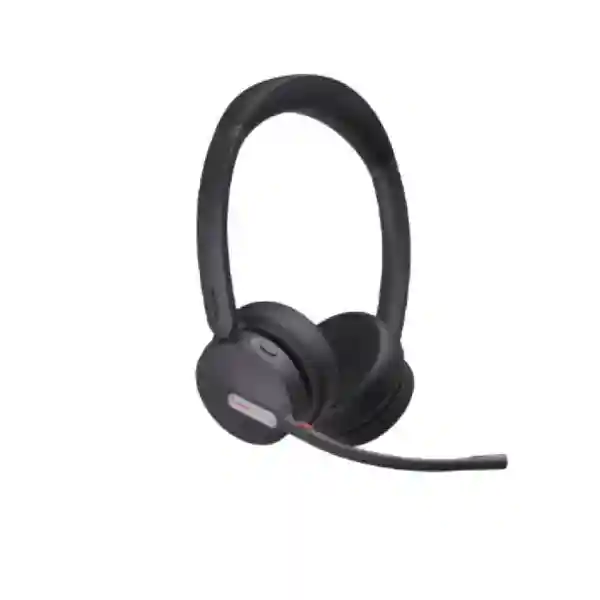
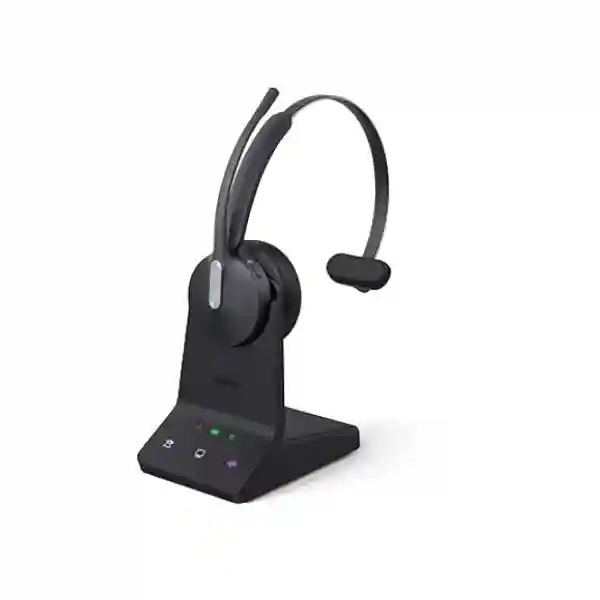
The Yealink WH64 is a wireless business headset family designed for professional calling. Yealink positions the WH64 around hybrid DECT and Bluetooth connectivity, allowing organisations to combine the stable, long-range characteristics of DECT with the convenience of Bluetooth for mobile-device use. Depending on the exact WH64 version, deployment can involve a base or a DECT dongle, and buyers should therefore verify the precise variant rather than assuming every WH64 package contains the same accessories. The family is offered in Mono and Dual configurations, giving organisations a choice between a single-ear design for users who need stronger awareness of colleagues and a dual-ear design for users who prefer more acoustic focus during calls.
For procurement teams, the important point is that the WH64 is not simply a consumer Bluetooth headset. It is designed around business communications, with features such as multi-device connectivity, call-control functions, a visible busylight and integration with mainstream unified-communications environments. This makes it relevant where employees repeatedly switch between softphone calls, meetings, IP telephony and mobile communications. Fourteck Tanzania can help buyers translate those capabilities into a practical deployment plan, especially when the headset will be used alongside existing Yealink phones, third-party IP phones, USB-connected computers or mixed UC environments.
Yealink WH64 key verified features
The WH64 integrates DECT and Bluetooth technologies. This supports business users who need professional wireless operation at the workstation while also maintaining flexible mobile-device connectivity.
Yealink specifies Acoustic Shield Technology 2.0 with three MEMS microphones to reduce distracting background sound reaching the far-end listener and improve voice clarity in active offices.
Mono and Dual versions allow the headset style to be selected around user preference, workplace awareness and concentration needs rather than forcing the same form factor on every employee.
The visible busylight indicates call status and can help reduce unnecessary interruptions when a colleague is already speaking with a customer, partner or team member.
Yealink publishes up to 14 hours of DECT talk time for Mono and up to 16 hours for Dual, while Bluetooth talk time reaches up to 26 hours for Mono and up to 32 hours for Dual.
Users can answer, end or reject calls, change volume and mute the microphone. The boom arm can also be raised to mute and lowered to unmute, supporting fast call handling.
Yealink WH64 technical specifications
| Wireless technologies | DECT and Bluetooth 5.2 on the established WH64 platform; exact variant should be confirmed at quotation stage. |
| DECT range | Up to 150 m / 492 ft according to Yealink documentation for the standard WH64/WH64 Hybrid generation. |
| Bluetooth range | Up to 50 m / 164 ft under supported conditions. |
| Microphones | Three MEMS microphones with Acoustic Shield Technology 2.0. |
| Speaker | 30 mm speaker; published frequency range 20 Hz–20 kHz. |
| Talk time | DECT: up to 14 h Mono / 16 h Dual. Bluetooth: up to 26 h Mono / 32 h Dual. |
| Standby time | Up to 157 h Mono / 195 h Dual. |
| Charging time | Approximately 1.5 hours at the published 5 V / 1.2 A charging specification. |
| Headset weight | Approximately 92 g Mono and 151 g Dual. |
| Management | Yealink USB Connect on PC and Yealink Management Cloud Service are listed management options for supported deployments. |
Specifications and package contents can vary between WH64 generations, regional radio versions, Teams/UC editions and workstation/hybrid packages. Confirm the exact part number, supplied base or dongle, cables, charging accessories and IP-phone compatibility before procurement.
Where the WH64 fits in a business environment
The strongest use case for the WH64 is a user whose workday involves frequent calls and more than one communications device. A reception or customer-service user may spend hours on an IP phone and softphone. A sales manager may alternate between a laptop collaboration client and a mobile phone. A supervisor may need to walk away from the desk while remaining available. In those situations, headset selection affects more than comfort: it influences how quickly users answer calls, whether they remain intelligible in a noisy office and how often they need to stop working to reconnect devices.
For wider communication projects, review Fourteck Tanzania’s IT and telecom services to understand how headsets, IP phones, PBX platforms and collaboration systems can be considered together. Organisations sourcing multiple device categories can also use the Fourteck Tanzania technology shop as a starting point for broader procurement planning.
How to choose the right Yealink WH64 configuration
Mono or Dual?
Choose Mono when the user needs to remain aware of colleagues, visitors or surrounding activity. Choose Dual when the user spends long periods on calls and benefits from stronger acoustic focus. Procurement teams often mix both styles according to job role rather than standardising blindly.
UC or Teams?
Confirm the collaboration platform used by each user. Microsoft Teams-oriented variants can provide dedicated Teams integration, while UC variants may suit organisations that work across other communications clients. The exact certification and call-control behaviour should be checked against the intended platform.
Computer, phone or both?
List every device the headset must serve: Windows or macOS computer, Yealink IP phone, third-party IP phone and mobile device. This is especially important when remote answer/end control is required from an IP phone because an additional compatible adapter may be necessary.
Compatibility and deployment planning
A headset purchase becomes much easier when the compatibility check is performed before quantity is confirmed. Start with the exact handset and computer models, the collaboration applications in use and the desired call-control features. USB connectivity may be straightforward on a computer, but desk-phone integration can depend on the phone model and on whether the user needs remote electronic hook-switch control. If the deployment includes several phone models, test each model or verify it against current Yealink compatibility information instead of assuming that one successful pairing guarantees every device in the estate will behave identically.
For offices using VoIP, the headset is only one part of the communication chain. The user experience also depends on the IP phone, PBX or cloud calling platform, network quality, available USB ports and workstation policy. If users complain about intermittent calls, poor audio or dropped sessions, it is useful to separate endpoint issues from LAN, WAN, Wi-Fi or application issues. Fourteck’s Tanzania sales and product-guidance team can use details such as phone model, operating system, meeting platform, quantity and user role to narrow the correct WH64 option.
Organisations planning a broader refresh can combine headset decisions with IP-phone and PBX requirements. Fourteck Tanzania’s business technology overview explains how voice, networking, conferencing and workplace systems fit together so the headset is treated as part of a usable communications environment rather than an isolated accessory.
Regional procurement and deployment guidance
Yealink WH64 Tanzania
For organisations searching for the Yealink WH64 in Tanzania, the purchasing decision should begin with the working pattern of the people who will use the headset. A receptionist, customer-service agent, branch manager and mobile sales employee may all want wireless audio, but they may not need the same configuration. The Mono version is often easier for roles that require awareness of nearby colleagues or walk-in visitors, while the Dual version can be more suitable when concentration on remote callers is the priority. Businesses should also decide whether the headset will connect mainly to computers, to IP phones, to mobile devices or to a combination of these endpoints. This determines whether the standard package is enough or whether desk-phone accessories and compatibility checks are required.
Tanzanian buyers should request a quotation using the exact WH64 variant and quantity whenever possible, but it is equally useful to include the communication environment. List the Yealink or third-party phone models, the UC platform, the computer operating system and whether users need remote call answering from the headset. For teams that spend extended time on calls, include the expected shift length and preference for single-ear versus dual-ear operation. Those details make it easier to avoid mismatched accessories and reduce the chance that a deployment works for laptop calls but fails to provide the required controls on desk phones.
For larger deployments in Tanzania, standardisation is valuable. Organisations can define one approved Mono profile for reception or supervisory roles and one Dual profile for call-intensive users, then document pairing, charging and firmware procedures. Because the WH64 can support professional DECT operation and Bluetooth mobility, it can fit mixed office and hybrid work patterns without making every user rely on consumer Bluetooth headsets. Fourteck Tanzania can assist with product selection, compatibility review and quotation preparation without assuming stock, delivery time or service scope until those details are confirmed for the actual order.
Yealink WH64 Dar es Salaam
Businesses in Dar es Salaam commonly operate fast-moving communication environments such as corporate offices, professional services, hospitality administration, logistics, sales operations and customer-support teams. In these environments, the WH64 can be considered when employees need to move away from a fixed workstation without immediately dropping their ability to participate in a call. The published DECT range gives users room to move within a suitable office environment, while Bluetooth is available for mobile-device workflows. Actual range depends on walls, building structure, radio conditions and device placement, so procurement teams should treat manufacturer maximums as planning figures rather than guaranteed distance through every office.
A practical Dar es Salaam deployment can begin with a pilot group. Select several representative users, connect the WH64 to the computers, IP phones and applications they really use, and validate call control, microphone performance and charging habits. This is especially useful in open-plan offices where background conversation, air-conditioning and nearby meetings can affect how callers perceive audio quality. Acoustic Shield Technology 2.0 is designed to reduce background sound reaching the far end, but the headset still benefits from sensible microphone positioning and appropriate workspace design.
When requesting pricing in Dar es Salaam, include the quantity, Mono or Dual preference, Teams or general UC requirement, IP-phone models and whether charging stands or electronic hook-switch accessories are needed. Buyers who are refreshing a full telephony environment should also document extension count, PBX platform and switch/PoE readiness for the phones themselves. The headset does not replace the need for a well-designed voice network, but it can improve the daily ergonomics of a correctly configured communication system.
Yealink WH64 Mwanza
For organisations in Mwanza, the Yealink WH64 can support office users who need clear calling while balancing desk-based work with movement between departments. Examples may include branch administration, customer care, purchasing, sales coordination and management teams that move between desks, meeting spaces and nearby work areas. The headset’s combination of DECT and Bluetooth gives IT teams a way to support both workstation-focused communication and mobile-device calling without issuing two separate headsets to every employee.
Procurement should focus on compatibility and lifecycle rather than headline range alone. Verify whether each user has a USB-equipped computer, an IP phone or both. If the deployment uses third-party IP phones, confirm the supported connection and any required adapter for remote answer/end operation. If mobile phones are part of the workflow, check how users will pair and switch devices and provide a short operating guide. Standardised setup instructions can reduce support calls caused by users selecting the wrong audio device in Teams, Zoom, a browser softphone or another application.
Mwanza buyers can also improve quotation accuracy by separating must-have features from optional accessories. The core requirement may be a Dual UC headset for computer calling, while another department may need Mono models with IP-phone integration. A third group may benefit from charging stands because headsets are frequently removed between calls. Giving these profiles to the supplier creates a clearer bill of materials and makes future additions easier. Fourteck can review those user groups and prepare a model-specific quotation once the precise WH64 package, quantity and compatibility requirements are known.
Yealink WH64 Arusha
Arusha organisations in tourism administration, professional services, NGOs, education, regional operations and general business can use professional headsets to make voice and video collaboration less dependent on fixed desk posture. The WH64 is particularly relevant where users divide time between online meetings, softphone calls and mobile conversations. The busylight can also help in shared offices by giving colleagues a visual signal that a user is already engaged, which is a small feature that can matter in compact workspaces with frequent interruptions.
When selecting WH64 headsets in Arusha, consider the acoustic environment. A Dual headset may be preferred in a lively shared workspace, while a Mono model can make more sense for staff who need to hear visitors or colleagues. The microphone system is designed to filter distracting background noise for the far-end listener, but it should not be treated as a substitute for reasonable office acoustics. Very noisy environments may still require changes to seating, call zones or room layout if users must conduct long customer conversations.
For a smooth rollout, IT teams should document firmware management, approved UC applications, pairing steps and charging expectations. Yealink provides management tools that can help supported devices fit into a more controlled endpoint environment. Buyers should also confirm whether the selected version is the base-based WH64, WH64 Hybrid or another current package because accessories and connectivity details can differ. Fourteck can help turn a user list into a practical quotation that separates headset quantity, optional charging accessories and any phone-integration components instead of bundling assumptions into the purchase.
Yealink WH64 Dodoma
In Dodoma, the Yealink WH64 can suit government-related administration, professional offices, education, project teams and businesses that rely on frequent inter-office and external calls. Wireless headsets can improve daily call handling when users need to consult documents, access another workstation or coordinate with nearby colleagues while remaining connected. The WH64’s hybrid wireless approach makes it more flexible than a headset designed only for one device class, particularly for employees who use both a computer collaboration platform and a mobile phone.
A good procurement process starts with an endpoint inventory. Record the desktop or laptop type, available USB connection, desk-phone model, operating system and collaboration software for each user group. Then decide whether users need headset buttons to control calls on the IP phone or whether audio-only integration is sufficient. That distinction can affect accessory requirements. For organisations purchasing many units, testing one or two representative configurations before broad rollout can identify policy or software issues early, such as blocked USB devices, outdated phone firmware or conflicting audio-device defaults.
Dodoma buyers should also compare the WH64 against their actual work pattern rather than against consumer headset marketing. The value is strongest when business-grade wireless range, long talk time, visible busy status and predictable call controls materially reduce friction during the day. If staff only make occasional calls at a fixed desk, a simpler wired headset could be adequate. Fourteck can help evaluate this fit, prepare the required quantity and define what information is needed before a quotation is finalised.
Yealink WH64 UAE
For UAE businesses, the Yealink WH64 fits a market where hybrid work, cloud collaboration, multi-site offices and IP telephony are common across corporate, hospitality, professional-services and customer-facing environments. Buyers may be coordinating deployments across Dubai, Abu Dhabi or other emirates while also supporting regional branches. In that context, the ability to standardise on one professional headset family with Mono and Dual options can simplify user training and procurement, provided the exact UC, Teams and IP-phone compatibility requirements are documented.
The UAE purchase specification should state whether users primarily work with Microsoft Teams, another UC client, Yealink desk phones, third-party IP phones or mobile devices. Where users need to answer desk-phone calls remotely from the headset, verify the appropriate electronic hook-switch accessory and supported phone model. For hot-desking and flexible seating, also define whether headsets are personally assigned or shared. Personal assignment generally simplifies pairing, hygiene and charging responsibility, while shared devices require a clearer process for cleaning and reconfiguration.
Customers coordinating UAE and Tanzania requirements can refer to Fourteck UAE for regional IT and telecom projects while keeping the same technical checklist for WH64 procurement. The goal is consistent configuration: approved model, software platform, desk-phone compatibility, accessories and user training. Availability, pricing and delivery should be confirmed at the time of enquiry rather than assumed from another country’s project.
Yealink WH64 Uganda
Ugandan organisations considering the Yealink WH64 may be upgrading from wired headsets, consumer Bluetooth devices or handset-only calling. The business case should focus on user mobility, call volume and the number of devices each employee must manage. In branch offices and service teams, being able to step away from a desk while remaining on a call can make communication less restrictive. Bluetooth support also helps users incorporate mobile-phone conversations into the same headset workflow rather than maintaining a separate earpiece.
Before purchasing, identify the IP PBX or cloud calling service, the exact phone models and the collaboration software used on PCs. This reduces the risk of ordering the correct headset but missing a required adapter or expecting unsupported phone controls. For organisations with many users, separate roles into profiles: Mono for users who need environmental awareness, Dual for call-intensive roles, and charging-stand options for staff who frequently dock the headset between calls.
Regional customers can explore Fourteck Uganda for wider communication and IT requirements. For cross-border organisations, aligning the WH64 configuration between Uganda and Tanzania can make spares, user training and documentation simpler. Pricing, stock and delivery terms should still be confirmed separately for each order because commercial conditions can change.
Yealink WH64 Kampala
Kampala offices often combine fast-paced sales, customer service, financial operations, professional services and regional management, making headset usability a practical productivity consideration. The WH64 can be useful where employees need to move between laptop meetings, VoIP calls and mobile calls during the same day. The integrated busylight helps signal active calls in shared offices, while the microphone array is designed to keep the user’s voice clearer for remote participants despite nearby conversation.
IT teams should test the headset in the actual Kampala office environment before a large roll-out when possible. Check DECT coverage through the walls and floors users typically cross, verify Bluetooth behaviour with company mobiles and confirm call-control functions with the deployed softphone and desk phone. The maximum published wireless distances are achieved under favourable conditions and should not be interpreted as guaranteed through reinforced walls, multiple floors or dense radio environments.
A quotation request should list the number of users, the split between Mono and Dual, preferred UC or Teams editions, desk-phone models and optional charging requirements. For a branch that is also refreshing IP phones, switches or PBX infrastructure, combine these requirements in one communication plan so the user endpoint and network assumptions are reviewed together. This is more useful than selecting the headset in isolation and discovering integration constraints after delivery.
Yealink WH64 Arua
For businesses and project offices in Arua, a professional wireless headset can be valuable when staff collaborate with remote colleagues, suppliers, customers or headquarters from a smaller branch environment. The WH64’s ability to combine business DECT connectivity with Bluetooth means a user can work with a PC or supported IP-phone setup while retaining the option to pair a mobile device. This can reduce the number of separate headsets required for a mixed communication workflow.
The buying process should remain practical. Confirm how many people make enough calls to justify a wireless professional headset, which of them need one-ear awareness and which would benefit from a dual-ear design. Then identify the device connections. A user who only takes computer calls may need a different package emphasis from a receptionist who requires an IP phone and remote call control. Accessories should therefore be specified user by user instead of automatically duplicated across the order.
For ongoing support, keep a record of each headset model, assigned user, firmware level and paired devices. Simple documentation matters in branch environments because it allows remote IT teams to diagnose whether an issue relates to the headset, the computer, the phone or the network. If several locations use the WH64, standard instructions for pairing, muting, charging and switching audio devices can make user onboarding considerably easier.
Yealink WH64 Mbarara
Mbarara organisations evaluating the Yealink WH64 should consider whether wireless mobility will improve real daily work. Staff who handle frequent customer calls, online meetings or coordination with remote branches often benefit more from a professional headset than users who make only occasional calls. The WH64 can support this higher-use group with long talk-time specifications, an integrated busy indicator and a microphone system designed to reduce background noise heard by the remote party.
When preparing a purchase list, include the exact collaboration platforms and IP phones. If the organisation is changing PBX or phone hardware at the same time, finalise the communication architecture before ordering accessories in volume. Compatibility can depend on more than the headset model alone, especially when electronic hook-switch control is required. A small pilot can verify the intended call-control behaviour and establish a repeatable configuration for the rest of the users.
Mbarara deployments can also benefit from a simple charging policy. Wireless devices create avoidable frustration when employees leave them uncharged or move chargers between desks. Personally assigned charging points or approved stands can reduce this problem. For shared environments, add hygiene and reset procedures. These operational details are minor compared with the headline specifications, but they often determine whether a headset rollout remains convenient after the first few weeks.
Yealink WH64 Gulu
For organisations in Gulu, the WH64 can support branch communication where employees depend on voice and video collaboration with teams in other cities or countries. DECT gives a professional wireless path around the workstation, while Bluetooth can support mobile use. This is useful for staff whose responsibilities include both office-based calls and mobile coordination. The Mono and Dual versions let organisations match the headset to the user rather than purchasing a single style for every role.
The most important technical step is to validate the whole call path. A headset can have an excellent microphone and still deliver a poor experience if the computer is overloaded, the network is congested or the softphone is using the wrong audio device. During deployment, confirm the operating-system audio settings, the UC application device selection and the user’s microphone position. If desk phones are included, verify the exact phone model and any required accessory before scaling the deployment.
For procurement, request pricing against a clearly defined bill of materials. State whether the quote should include Mono, Dual, Teams, UC, charging stands or phone adapters. Avoid using a generic description such as “WH64 headset” for a multi-user project because different packages can lead to different commercial and operational outcomes. A more detailed request also makes it easier to compare quotations from the same technical baseline.
Yealink WH64 Kenya
Kenyan organisations can consider the Yealink WH64 for contact centres, professional offices, hybrid teams, branch operations and executives who switch between multiple communication devices. In Nairobi and other business centres, the relevant buying question is not simply whether a headset is wireless but whether it can support the specific phone, computer and UC applications used by the business. The WH64’s DECT and Bluetooth combination is designed for that multi-device business context.
A deployment plan should define the user profiles, target platform and management approach. For Microsoft Teams-heavy environments, confirm the correct certified edition. For mixed UC applications, confirm the general UC variant and required controls. If IP phones are part of the workflow, check whether the user only needs audio or expects remote answer/end from the headset, as this can change accessory requirements. For large offices, test real wireless coverage rather than relying only on the maximum published range.
Cross-border customers can use Fourteck Kenya for regional communication and IT enquiries. Companies that operate both in Kenya and Tanzania may benefit from standardising the same WH64 variant and accessories across branches, provided each location’s phones and UC platforms are compatible. Standardisation can simplify spares and training, but availability, pricing and commercial terms still need current confirmation for each project.
Yealink WH64 Kuwait
Kuwait businesses with office, retail administration, professional-services and customer-support teams may use the Yealink WH64 when users need professional call quality with freedom to move. Air-conditioned indoor offices can still be acoustically busy because of nearby conversations, open-plan seating and meeting traffic. The WH64’s three-microphone arrangement and Acoustic Shield technology are intended to reduce unwanted background sound reaching the person on the other end of the call.
For procurement in Kuwait, confirm the correct regional product version and radio requirements along with the UC or Teams variant. Do not assume a unit sourced for another market is automatically the right regulatory or packaging version. The quote should list the exact part number where available, quantity, headset style, host devices and optional accessories. If users connect through IP phones, include the phone manufacturer and model so desk-phone integration can be checked before ordering.
Where teams operate across Kuwait, UAE and East Africa, a single headset standard can simplify onboarding, but the standard should be defined as a complete profile rather than a product name alone. Record the approved variant, cable or dongle requirements, charging method, collaboration platform and supported desk phones. That level of documentation reduces surprises when local teams order replacements or add new users months after the initial deployment.
Yealink WH64 Ghana
Ghanaian organisations looking for a professional wireless communications headset can evaluate the WH64 for customer care, sales, administration and hybrid work. The combination of DECT and Bluetooth is most useful where employees use more than one endpoint and need reliable mobility during calls. Mono and Dual versions allow a business to preserve awareness for front-desk roles while giving call-intensive users a more focused listening experience.
Before requesting a Ghana quotation, prepare a short device matrix. List computer operating systems, softphones, collaboration applications, IP-phone models and company mobiles. Then identify which functions are mandatory: audio only, headset answer/end, mute synchronisation, Teams button behaviour or mobile switching. These details help ensure that the quoted package matches actual workflow instead of relying on a generic interpretation of compatibility.
Regional customers can visit Fourteck Ghana for broader technology enquiries. For businesses with teams in Ghana and Tanzania, using a common headset family can simplify user training, but the final configuration should be validated against each branch’s phone and software environment. Commercial details such as price, stock and delivery should always be checked with the relevant regional sales team at the time of purchase.
Yealink WH64 Nigeria
Nigeria has many large, distributed and call-heavy business environments where professional headsets form part of the communications infrastructure rather than a personal accessory. The Yealink WH64 can be evaluated for customer service, financial services, technology teams, sales desks, support operations and hybrid employees who need to move between PC, desk-phone and mobile workflows. Its DECT and Bluetooth design provides flexibility without requiring separate devices for every call source.
For larger Nigerian deployments, pilot testing is especially useful. Select users from different departments, test the exact softphones and desk phones, measure practical wireless coverage inside the building and gather comfort feedback from long-call users. This helps determine the correct Mono/Dual split and avoids purchasing hundreds of identical units for roles with different needs. Management teams should also define how firmware, replacement ear cushions and device assignments will be handled during the lifecycle.
Customers can use Fourteck Nigeria for regional IT requirements. For multinational organisations operating in Nigeria and Tanzania, a standard WH64 profile can support consistent communication practices, but country-specific sourcing, stock and delivery should be confirmed at quotation time. The technical standard should describe the exact variant, UC platform, phone compatibility and accessory set so branches do not accidentally order different packages under the same WH64 name.
Yealink WH64 Seychelles
Seychelles businesses in hospitality administration, travel, professional services, government-related operations and distributed corporate teams may require dependable communications with customers and international colleagues. A professional wireless headset such as the WH64 can help employees work across online meetings, VoIP calling and mobile conversations while retaining freedom of movement around a suitable office workspace. This is particularly relevant to roles that spend many hours coordinating bookings, operations, suppliers or remote teams.
Procurement teams should consider logistics and compatibility together. Because island-market sourcing can make replacement delays more disruptive, it can be sensible to standardise on a known variant and maintain an appropriate spare strategy after confirming organisational policy. However, the quantity of spares should be based on actual deployment size and replacement requirements rather than a generic percentage. The selected headset should also be checked against the company’s computers, UC software and any desk phones before a broader order is placed.
For hospitality and service teams, comfort and microphone performance can be just as important as wireless range. Users may spend long periods speaking with guests, travel partners or head offices, so the Mono/Dual choice should reflect both concentration and environmental awareness. A clear user guide covering pairing, charging, mute control and application audio settings can reduce common support issues and help employees receive the intended benefit from the headset.
Business use cases for the Yealink WH64
Reception and front office
Mono can help staff keep one ear available for visitors while handling telephone or computer calls. Confirm phone integration if users need remote answer/end controls.
Customer service
Dual models can support concentration during longer queues, while Acoustic Shield 2.0 is useful where surrounding conversation would otherwise reach the customer.
Hybrid workers
Users who alternate between office and remote work can benefit from combining DECT-oriented professional calling with Bluetooth mobility and multi-device operation.
Sales and management
The WH64 can reduce friction for users who regularly switch among softphone, meeting application and mobile conversations throughout a busy day.
Quotation checklist
To receive a useful Yealink WH64 quotation, include the information below. This allows the supplier to identify the required variant and prevents optional accessories from being confused with standard package contents.
Decision recap
The Yealink WH64 is a strong candidate when a business needs a purpose-built wireless communications headset rather than a general consumer headset. Its defining value is the combination of DECT and Bluetooth, supported by a three-microphone Acoustic Shield 2.0 system, practical call controls, integrated busylight and long battery specifications. The family offers Mono and Dual choices so different roles can balance awareness and focus.
The correct buying decision still depends on the exact environment. Confirm the WH64 variant, Teams or UC requirement, IP-phone compatibility, required adapters, computer connections and user preference before ordering. For larger projects, pilot the configuration with representative users, document the approved setup and then scale. That approach is more reliable than choosing by model name alone.
Yealink WH64 FAQs
Does the Yealink WH64 support both DECT and Bluetooth?
Yes. Yealink designed the WH64 family around DECT and Bluetooth connectivity. This allows professional workstation use alongside Bluetooth mobile-device workflows. The exact connection method depends on the specific WH64 package.
What is the wireless range of the Yealink WH64?
Yealink publishes up to 150 metres / 492 feet for DECT and up to 50 metres / 164 feet for Bluetooth on the established WH64 Hybrid platform. Real indoor range varies with walls, floors, interference and device placement.
How long does the WH64 battery last?
Published talk time reaches up to 14 hours for Mono and 16 hours for Dual in DECT mode. In Bluetooth mode, published talk time reaches up to 26 hours for Mono and 32 hours for Dual. Actual battery endurance depends on use and operating conditions.
Is the Yealink WH64 suitable for noisy offices?
It is designed for professional office calling and uses Acoustic Shield Technology 2.0 with three MEMS microphones to reduce background sound transmitted to the far end. Very noisy workplaces should still be evaluated with a practical user test.
Should I choose WH64 Mono or Dual?
Mono is useful when the user needs to hear colleagues and nearby activity. Dual is often preferred for sustained calling where acoustic focus is more important. Many organisations use both according to job role.
Does the WH64 work with Microsoft Teams?
Yealink offers Teams-oriented WH64 variants as well as UC variants. Confirm the exact part number and the required Teams call-control behaviour before purchase.
Can the WH64 connect to an IP phone?
The WH64 is designed to integrate with IP-phone and UC environments, but compatibility and remote call-control support vary by phone model and configuration. Verify the exact phone and any required adapter before ordering.
Where can I request Yealink WH64 pricing in Tanzania?
Use the Fourteck Tanzania contact page and include the required quantity, Mono/Dual choice, UC platform, phone models and any accessory requirements. Pricing and availability should be confirmed for the current quotation rather than assumed.
Talk to Fourteck about the Yealink WH64
If you already know the required configuration, send the exact WH64 variant and quantity. If you are still comparing options, send the phone models, collaboration platform, number of users and main calling workflow. Fourteck can use that information to help define the headset configuration and quotation scope. For information about the company and its broader approach, see About Fourteck Tanzania.




Reviews
There are no reviews yet.