
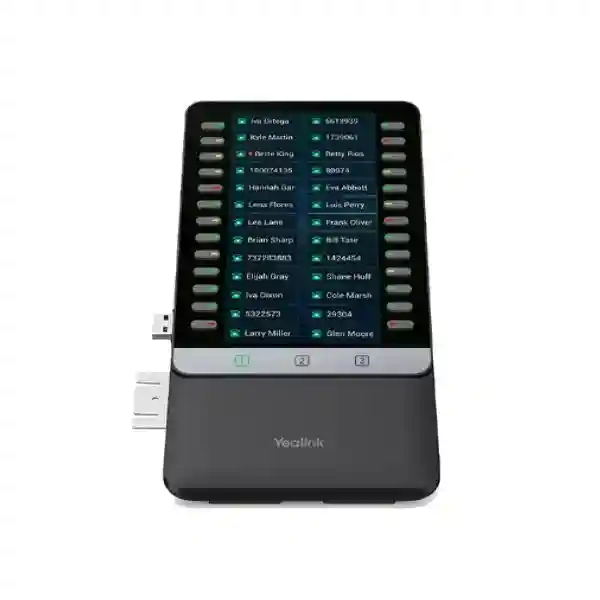
Yealink Desk Phone Expansion for Reception and Call Control
Yealink EXP55 Expansion Module
The Yealink EXP55 is a color-screen expansion module designed for compatible Yealink T7X/T8X business IP phones. It expands the number of visible and programmable call-control keys available to busy users, helping receptionists, executive assistants, contact-center personnel and departmental coordinators monitor extensions and reach frequently used functions without navigating through multiple phone menus.
Quick answer: EXP55 provides a 5.5-inch 480×960 color display, 26 physical DSS keys per page, three display pages and up to 78 programmable functions.
Compatible T7X/T8X phones can support up to three modules. Where more than one module is used, Yealink specifies an additional 5V/2A power adapter.
5.5-inch Color Screen
The 480×960 color LCD presents line labels, feature icons and status information in a clear, business-friendly format.
78 Programmable Positions
Three pages of 26 physical DSS keys allow up to 78 programmable functions on one EXP55 module.
Up to Three Modules
Supported Yealink T7X/T8X phones can use as many as three EXP55 modules for large extension-monitoring requirements.
Role-Based Call Control
The module suits roles that depend on BLF, speed dial, transfer, call park, pickup and related programmable call features.
What the Yealink EXP55 Expansion Module Solves
A standard desk phone can be sufficient for users who place and receive a modest number of calls. Reception desks, switchboard-style positions and high-activity administrative roles have different needs. These users often watch several colleagues at once, transfer calls repeatedly, park and retrieve calls, reach departments through speed dial and need visible status rather than relying on memory. The EXP55 addresses that workflow by extending the programmable key surface of a compatible Yealink phone.
Each module presents 26 physical DSS keys on a screen page and supports three pages. This means a single module can expose up to 78 programmed functions while keeping the primary phone available for the active conversation. Dual-color LEDs beside the keys help provide status feedback for configured functions, which can be especially useful where BLF or shared-line behavior is supported by the phone and PBX configuration.
The most important buying question is not simply whether an expansion module has enough buttons. Confirm the exact Yealink phone model, the intended PBX or hosted voice platform, the required programmable functions, the number of monitored extensions and whether one, two or three modules are planned. This avoids purchasing a console that is physically compatible but not aligned with the desired call workflow.
Verified Yealink EXP55 Specifications
| Display | 5.5-inch color LCD, 480 × 960 pixels, backlight |
| DSS keys | 26 physical keys per page with dual-color LEDs |
| Pages | Three pages, providing up to 78 programmable functions per module |
| Page controls | Three independent page-control keys with illuminated LED indication |
| Expansion | Up to three EXP55 modules on compatible Yealink T7X/T8X phones |
| Power note | For two or three modules, Yealink specifies an external 5V/2A adapter, purchased separately |
| Stand | Two adjustable installation angles |
| USB | USB 2.0 compatible port for data input/output and supported phone extensions |
| Dimensions | 124.0 mm × 137.5 mm × 42.6 mm |
| Typical use | Reception, administration, executive assistance, call centers and other high-volume call-handling positions |
Compatibility, Configuration and Deployment Guidance
Yealink identifies the EXP55 as an expansion module for supported T7X and T8X series IP phones. Compatibility changes by phone generation, so buyers should verify the exact host-phone model rather than assume that every Yealink phone accepts the module. Yealink’s current compatibility information includes supported T7-series and T8-series models, while older T5-series models generally use the EXP50 rather than the EXP55. This distinction matters during refresh projects where a business may have a mixture of phone generations.
The EXP55 connects directly to the compatible host phone. Yealink’s quick-start documentation describes inserting the USB-A connection from the EXP55 into the phone and securing the module with the supplied screw. Additional EXP55 units can be connected in sequence. Up to three are supported on compatible T7X/T8X phones, and Yealink states that installations with more than one expansion module require an additional 5V/2A power adapter connected to one of the modules.
After physical installation, individual keys can be assigned through the phone interface. The exact list of available functions depends on the phone firmware and telephony environment, but Yealink documents common roles such as BLF, speed dial, shared line, call forwarding, transfer, call park, pickup, conferencing and other programmable actions. For projects using centralized provisioning, it is sensible to define key templates before deployment so users receive consistent layouts and support teams have a predictable reference.
For broader voice projects, review FourTeck Tanzania’s business technology solutions overview for the wider relationship between IP phones, PoE switching, networks and unified communications. A reception console works best when the phone, PBX, VLAN, QoS policy and extension numbering plan are designed together rather than treated as separate purchases.
Who Should Choose the Yealink EXP55?
Reception Desks
Receptionists who regularly monitor extensions and transfer calls can use the expanded key field to reduce menu navigation and keep frequently used destinations visible.
Executive Assistants
Assistants handling several executives, shared lines or priority contacts can map repeat actions and monitored lines to a dedicated surface beside the phone.
Contact-Center Supervisors
Supervisors with selected BLF, queue-related or speed-dial needs may benefit from fast status awareness and direct access to common destinations.
Department Coordinators
Administrative teams can create role-based key layouts for internal departments, branch contacts, pickup groups and routine call-handling actions.
Yealink EXP55 Expansion Module Tanzania
For organizations sourcing the Yealink EXP55 Expansion Module in Tanzania, the buying decision usually starts with the reception or call-handling requirement rather than the accessory itself. A company may be replacing an older switchboard console, extending a new Yealink T7X/T8X deployment or standardizing front-desk call handling across several offices. In each case, confirm the exact host-phone model, PBX platform, number of monitored extensions and the functions that should appear on the console. This creates a clear bill of materials and prevents compatibility assumptions.
Tanzanian businesses with distributed teams can use the EXP55 as part of a structured IP telephony design in which receptionists see frequently used extensions, branch contacts and service points at a glance. The module itself does not create a PBX feature; it exposes functions supported by the host phone and voice system. Therefore BLF behavior, shared-line status, call pickup and transfer workflows should be validated against the SIP platform and provisioning template. Where dozens of keys are needed, the three-page layout keeps one module compact while still allowing up to 78 programmed positions.
Infrastructure matters as well. The compatible IP phone depends on a stable LAN, suitable switching, DHCP or static addressing as appropriate, correct voice VLAN policy and enough network resilience for business calling. If PoE is used for the phone, verify the overall switch power budget for all connected endpoints. When more than one EXP55 is attached, follow Yealink’s requirement for the additional 5V/2A adapter. In environments with UPS-backed switching and PBX infrastructure, planning phone power and network continuity together can help maintain essential calling during brief utility interruptions.
For a Tanzania quotation, provide the phone model, number of EXP55 modules required, quantity of workstations, PBX or hosted voice platform and any desired key functions. FourTeck’s verified Tanzania contact page can be used to submit the requirement and discuss compatibility, quantities and related telephony components before procurement.
Yealink EXP55 Expansion Module Dar es Salaam
Dar es Salaam organizations often operate busy reception points where incoming calls must be routed quickly to departments, managers, sales teams, support desks and branch contacts. In that environment the Yealink EXP55 can make a compatible Yealink desk phone more efficient by placing up to 78 programmable functions across three pages directly beside the handset. This is particularly useful where the reception user repeatedly checks extension status or moves calls among a predictable group of people.
Before purchasing an EXP55 for a Dar es Salaam office, identify the exact desk phone that will host the module. Current Yealink compatibility information associates the EXP55 with selected T7X and T8X series phones, and not every Yealink model uses the same expansion accessory. A mixed fleet deserves extra attention: older T5-series desk phones commonly use the EXP50 instead. Confirming the model from the phone label or administration interface is a simple step that prevents the wrong accessory from being ordered.
A reception deployment should also be planned around call flow. List the extensions or departments that need BLF monitoring, identify speed-dial destinations and decide whether keys will be used for pickup, transfer, parking or shared-line functions. Mapping those requirements to pages before configuration helps avoid a random layout that becomes difficult for users to remember. Organizations with multiple receptionists may standardize identical key templates so staff can move between desks without learning a different console each time.
Dar es Salaam buyers can also review the broader FourTeck approach to IP phones and network integration through the Tanzania website. For regional organizations that operate in East Africa, a consistent Yealink configuration can be extended across offices while still adapting extension plans and trunk arrangements to each site. Procurement teams should include quantities, existing phone models and PBX information in the quote request so that the EXP55 is evaluated as part of the actual call-handling environment.
Yealink EXP55 Expansion Module Mwanza
Businesses in Mwanza that run a centralized reception or administrative telephone position can use the Yealink EXP55 to make repetitive call actions more visible and easier to reach. A receptionist in a trading, hospitality, logistics, healthcare, education or professional-services environment may need direct keys for departments, branch staff and frequently contacted external numbers. Instead of searching through directories for each interaction, relevant functions can be assigned to the module’s DSS keys according to the workflow supported by the phone and PBX.
The 5.5-inch color screen presents three pages, each aligned to 26 physical keys with dual-color LEDs. This gives one module up to 78 programmable positions without requiring a very wide desk accessory. The page-control keys let users move between groups. One practical design is to dedicate the first page to the people and teams used most often, the second page to secondary or branch contacts and the third to special call functions. The best layout depends on how calls enter and leave the business, so planning should precede configuration.
For Mwanza sites, telephony reliability also depends on the surrounding network. The expansion module works through the compatible desk phone, so correct switch configuration, voice VLANs, PBX registration, DHCP or addressing, DNS where needed and stable connectivity remain essential. Where the phone system is hosted off-site, internet quality and failover strategy can be as important as the endpoint itself. A backup circuit does not automatically protect voice unless routing, firewall policies and DNS behavior are designed for failover.
When requesting pricing, include the host-phone model and whether one, two or three EXP55 units are planned at each position. Yealink states that more than one module requires an additional 5V/2A adapter connected to a module. Include this in the bill of materials rather than discovering the need during installation. A clear quantity list also helps decide whether spare units or standardized receptionist configurations should be included in a multi-site procurement.
Yealink EXP55 Expansion Module Arusha
Arusha offices in hospitality, travel, professional services, education and other customer-facing sectors may place significant responsibility on front-desk staff. Where incoming calls must be distributed to reservations, operations, finance, management, service teams or branch contacts, a compatible Yealink phone with the EXP55 can provide a larger, more deliberate call-control surface. The value is not merely the number of buttons; it is the ability to organize common actions so that high-frequency call handling becomes consistent.
A good Arusha deployment begins by identifying roles. A hotel or travel business may prioritize reservations, reception, transport and management contacts. A professional office may prioritize partners, departments and pickup groups. A school or institution may prioritize administration, admissions, security and finance. The same EXP55 hardware can serve these different environments because the keys are programmable, but the underlying functions must be supported by the host phone and PBX. Document the intended key map before rollout and keep a copy with the site handover information.
Physical setup is straightforward when compatibility is confirmed. Yealink’s guidance describes the module connecting to the phone and being secured with the supplied hardware. The stand provides two adjustable angles. For users who work at the phone for long periods, desk placement should keep the EXP55 within easy reach without forcing wrist rotation or blocking other devices. If multiple modules are installed, allow enough desk width and include the Yealink-specified additional 5V/2A power adapter.
Organizations planning broader IP telephony can use the expansion module as one component in a standardized endpoint strategy. Define receptionist phones, general user phones, manager phones, conference devices and headsets as separate user profiles. This reduces overspecification while making sure call-intensive roles receive the right controls. For Arusha procurement, share the host phone models, PBX, desired key count and quantities so the quote can account for compatible accessories and power requirements.
Yealink EXP55 Expansion Module Dodoma
In Dodoma, the Yealink EXP55 can suit organizations that want structured call handling for reception desks, administrative offices and departmental coordination points. Government-related offices, professional services, institutions and private businesses may all have scenarios where a single user receives calls on behalf of several teams. The expansion module keeps programmable destinations and functions visible beside a compatible Yealink T7X/T8X phone, helping the user avoid repeated navigation through on-screen directories.
The module’s three-page design is useful where key priorities differ during the day. Page one can contain primary extensions and management contacts, page two can hold secondary teams and branch numbers, and page three can be reserved for call-management features. This is only an example; the final map should reflect the actual PBX configuration. Where BLF is used, confirm that the SIP platform, licenses and provisioning support the desired monitoring behavior. The EXP55 itself displays and triggers configured functions but does not add unsupported PBX capabilities.
Dodoma deployments should also account for infrastructure continuity. A reception phone cannot provide reliable service if the access switch, PBX appliance, firewall or upstream connectivity is unstable. A business voice design may therefore include UPS protection, PoE planning, VLAN separation and monitoring of the internet service when the PBX is cloud based. These measures are separate from the EXP55 specification but influence the real user experience more than an accessory choice alone.
For procurement, confirm whether the installation will use one module or daisy-chain two or three. Yealink allows up to three EXP55 modules on supported T7X/T8X phones and requires an additional 5V/2A adapter when more than one module is installed. Include mounting space, cable organization and power in the desk plan. For a quotation, provide the exact phone model, EXP55 quantity, number of reception positions and PBX platform so compatibility and accessories can be checked before order placement.
Yealink EXP55 Expansion Module UAE
Companies with operations in the UAE often use centralized reception and shared-service models where one front desk handles calls for multiple departments, business units or locations. In such environments the Yealink EXP55 can provide an efficient programmable console beside a compatible T7X/T8X phone. The module’s 26 physical keys per page and three-page layout make it possible to organize up to 78 functions without moving to a large traditional switchboard.
For UAE deployments, compatibility should be evaluated alongside the organization’s PBX and SIP service. Hosted voice, on-premises IP PBX and cloud collaboration platforms can expose different programmable capabilities to the phone. A key marked for BLF, call park or shared line only behaves correctly when the platform and provisioning support that feature. Before bulk deployment, test a representative phone and module with the production configuration and verify LED state, call transfer behavior, page layout and any centralized provisioning templates.
Businesses operating across the UAE and East Africa can benefit from standard endpoint profiles. A reception template can keep the same organizational logic even if extension numbers differ by country. Document the key map, firmware baseline and provisioning method for each site. This makes it easier for support teams to compare behavior when troubleshooting and simplifies new-office deployment. Regional buyers can also explore FourTeck UAE technology solutions when coordinating projects that include phones, networks and related business infrastructure.
When two or three EXP55 modules are attached, plan the Yealink 5V/2A power requirement and sufficient desk area. For a procurement request, include the exact host-phone model, number of modules per user, total quantity, PBX platform and key functions. This provides enough information to distinguish a straightforward accessory purchase from a broader receptionist or enterprise voice configuration requirement.
Yealink EXP55 Expansion Module Uganda
Ugandan organizations deploying Yealink business phones may use the EXP55 where selected users need more direct access to extensions and call-control features than a standard desk phone provides. Receptionists, administrators and operations coordinators commonly benefit because their work involves repeated transfers, presence checking and communication with many colleagues. The module adds a dedicated 5.5-inch color screen and a bank of DSS keys while preserving the main phone display for the active call.
The first planning step is to validate the host phone. Yealink’s current documentation positions the EXP55 for compatible T7X and T8X phones. Older families may use different expansion modules, so a business upgrading only the receptionist accessory should check the exact phone model rather than buying by brand alone. For a new installation, it can be more efficient to standardize both the host phone and expansion module to simplify firmware management and spares.
Uganda projects with multiple branches should coordinate numbering, BLF subscriptions and call-routing policy at the PBX level. A branch receptionist may only need local staff on the first page, while a national service desk may need contacts across several sites. The three pages can be organized by function, geography or business unit. Whatever structure is chosen, label and document it so replacement phones can be provisioned consistently and users do not have to rebuild settings manually after maintenance.
Organizations with requirements spanning Uganda and Tanzania can refer to FourTeck Uganda for regional technology context while using the Tanzania FourTeck enquiry path for Tanzania-specific procurement. Include the phone model, quantity, number of EXP55 modules per desk and PBX platform in any quote request, particularly when several modules require the additional Yealink power adapter.
Yealink EXP55 Expansion Module Kampala
Kampala businesses with busy front desks, shared service centers and administrative teams may need to monitor far more contacts than can be comfortably shown on a standard desk phone. The Yealink EXP55 addresses this requirement with 26 physical DSS keys aligned to each display page and three pages for up to 78 configured functions. This allows a receptionist to group high-priority extensions, department contacts and call-management controls in a predictable layout.
A practical Kampala deployment should consider how the user actually works. If most calls go to ten departments, placing those targets on the first page is more efficient than filling the first page alphabetically. High-volume positions may keep management and emergency contacts visible, while less-used extensions move to the second or third page. The module’s programmable nature supports this role-based approach, but the desired functions still depend on what the host phone and PBX provide.
For installations with centralized provisioning, create a template that can be applied to replacement devices. Record phone firmware, line registration, key types and target values. This reduces recovery time if hardware is moved or replaced. If a user needs more than one EXP55, plan for the physical width and Yealink’s power guidance. More than one module requires an additional 5V/2A adapter, and supported T7X/T8X phones can accept up to three modules.
Network design remains important in Kampala offices that use cloud PBX or SIP trunks. Voice VLANs, QoS where appropriate, secure firewall rules and dependable connectivity contribute to call quality. The EXP55 improves endpoint usability but cannot compensate for an unstable voice path. Procurement teams should therefore present the accessory requirement together with the existing phone and voice platform so the quotation reflects compatibility and the complete operational context.
Yealink EXP55 Expansion Module Arua
In Arua, the Yealink EXP55 can support business reception and administrative positions that need a straightforward way to reach many internal users. The module is especially relevant when a phone operator repeatedly handles transfers or needs visual access to a defined list of extensions. By adding programmable keys beside the compatible host phone, the user can organize destinations around the real call flow instead of relying only on directory search.
Smaller branch locations should be careful not to overbuy. If a receptionist monitors only a few extensions, the programmable keys on the host phone itself may be sufficient. The EXP55 becomes more valuable as the number of contacts and repetitive actions grows. Its three pages allow up to 78 programmed positions, so one module can handle a substantial list without the cost or desk space of multiple units. A needs assessment should count frequently used keys, not simply total employees.
For Arua branches connected to a central PBX, confirm how remote extensions are presented and whether BLF subscriptions are supported across the WAN or hosted platform. Network instability can affect presence indication and call quality even when the phone and module are configured correctly. Where internet access is critical to the voice service, organizations may consider resilient connectivity, but any failover design should be tested with the PBX provider and firewall configuration rather than assumed to work automatically.
When requesting the EXP55, record the exact Yealink host-phone model. This is particularly important for mixed-generation phone fleets because different Yealink series use different expansion modules. Include the quantity of modules, whether more than one module will be attached to any phone and the PBX platform. For multi-module installations, include the required external Yealink 5V/2A power adapter in the procurement plan.
Yealink EXP55 Expansion Module Mbarara
Mbarara organizations with centralized incoming-call handling can use the Yealink EXP55 to turn a compatible T7X/T8X phone into a more practical receptionist workstation. Instead of expecting users to remember extension numbers or search a directory while a caller is waiting, frequently used destinations can be assigned to physical DSS keys. The associated color display gives room for labels and function icons, while dual-color LEDs support status feedback for applicable features.
The biggest productivity gain comes from designing the key layout intentionally. A healthcare, education, trading or services organization might place critical operational contacts on the first page, administrative departments on the second and lower-frequency or special features on the third. Because there are 26 keys on each page, the console can be organized in logical blocks. User training should explain the page-change controls and any call-park or transfer sequence so the accessory becomes part of the workflow rather than an unused display.
For Mbarara branches, consider how the endpoint is supported after installation. Store the configuration centrally where possible, document phone and module assignments and keep the receptionist layout with the site records. If a phone is replaced, technicians can restore the intended key map without reconstructing it from memory. This matters more as deployments grow across several offices.
Before ordering, confirm compatibility with the exact host model and identify the number of EXP55 modules per phone. One module may be enough for many reception positions because it provides 78 programmable functions across three pages. If two or three modules are required, Yealink specifies an additional 5V/2A power adapter. Including that adapter and desk-space planning in the quotation avoids installation delays.
Yealink EXP55 Expansion Module Gulu
For Gulu offices, institutions and service organizations, the Yealink EXP55 offers a practical method for extending the direct-key capacity of supported Yealink business phones. Front-desk users commonly face a different workload from general staff: they may handle nearly every inbound call, identify whether colleagues are available, transfer callers to several departments and contact external service numbers repeatedly. A programmable expansion console can make those repetitive actions easier to see and faster to execute.
The EXP55 uses a 5.5-inch 480×960 color display and shows three pages of DSS keys. Each page aligns to 26 physical keys, giving a single module up to 78 positions. Three dedicated page buttons make it possible to move between groups. For Gulu deployments, a sensible layout might separate operational teams, administration and management. Another organization might instead separate local contacts, branch contacts and call functions. The module is flexible enough to support either approach when the PBX and host phone expose the required features.
Telephone accessories should still be considered within the network environment. If the PBX is remote or cloud based, reliable WAN connectivity, DNS, firewall policy and switch availability are important. If the phone is powered by PoE, the access switch and UPS strategy influence uptime. The EXP55 itself does not replace these design needs, but it can improve the human interface once the voice service is stable.
Gulu buyers should provide the precise host-phone model with the quote request because Yealink expansion modules are not interchangeable across every phone generation. Also state whether more than one EXP55 is required. Supported T7X/T8X phones can use up to three, and Yealink specifies a 5V/2A external adapter for installations with two or three modules. Capturing these details at quotation stage supports a cleaner deployment.
Yealink EXP55 Expansion Module Kenya
Kenyan businesses standardizing Yealink telephony can use the EXP55 for receptionists and other users who need a larger programmable key field than the host phone provides. The accessory is most useful when staff repeatedly monitor colleagues or perform the same transfer, park, pickup and speed-dial actions throughout the day. The 5.5-inch color screen, three pages and 26 physical keys per page create a compact control surface without forcing users to rely entirely on software directories.
Procurement teams should begin with compatibility. The current EXP55 generation is intended for supported Yealink T7X and T8X phones. If a Kenyan organization has older T5-series handsets, those may instead use the EXP50. Mixed fleets are common after phased upgrades, so list the exact phone model at each receptionist position. This allows the correct accessory to be paired with each endpoint and helps plan any future replacement standard.
For multi-site organizations, create a consistent receptionist design that can be repeated between Nairobi, Mombasa, Kisumu or regional branches while still allowing site-specific extension numbers. Standardized page logic can make training easier: for example, page one for high-frequency extensions, page two for branch or department groups and page three for call-management functions. The key names and PBX programming should be documented as part of the site handover.
Customers coordinating Kenya and Tanzania procurement can review FourTeck Kenya for Kenya-focused technology requirements. For an EXP55 quotation, specify host-phone models, modules per phone, total quantity and PBX platform. If two or three modules are planned on a single supported phone, include Yealink’s required external 5V/2A adapter and verify that the workstation has adequate physical space.
Yealink EXP55 Expansion Module Kuwait
Kuwait businesses with professional reception, shared administration or high call volumes can deploy the Yealink EXP55 alongside compatible T7X/T8X IP phones to increase the number of directly accessible functions. It is a useful accessory where users need immediate visual access to staff, departments and call controls rather than opening menus during every customer interaction. The 5.5-inch color screen supports labels and icons, and its physical DSS keys create a tactile workflow that can be easier for frequent operators.
A single EXP55 offers 26 keys per page and three pages, allowing up to 78 programmed positions. This capacity is often sufficient for one receptionist even in a medium-sized office. Additional modules should only be added when there is a clear requirement for more simultaneously organized keys. Supported host phones can accept up to three EXP55 units, and Yealink specifies an extra 5V/2A power adapter when more than one module is connected.
For Kuwait deployments using SIP trunks or hosted communications, validate the exact phone firmware and platform feature set. BLF, shared-line behavior, call park and pickup can vary by PBX configuration. A small pilot is useful before a large rollout: configure the reception profile, verify LED states, test transfers and busy conditions, then clone the proven design through centralized provisioning where available. This makes the expansion module part of a repeatable telephony standard instead of a one-off accessory.
Regional procurement teams should include both user and infrastructure requirements. Alongside the EXP55 quantity, record the compatible phone model, headset needs, switch or PoE design, PBX platform and any multi-site extension monitoring. This helps ensure the quote reflects a working receptionist position rather than simply the module. When organizations operate across the Gulf and Africa, documenting a common configuration baseline simplifies support across countries.
Yealink EXP55 Expansion Module Ghana
Ghanaian organizations that handle significant call traffic at reception can use the Yealink EXP55 to add a dedicated bank of programmable keys to compatible Yealink T7X/T8X phones. The module is suited to roles where staff repeatedly route customers to sales, finance, service, management or branch teams and benefit from a visible list of destinations. Its color display supports clear labels, while 26 physical DSS keys on each page provide quick access to configured functions.
The three-page arrangement supports up to 78 functions on one module. This makes it possible to organize a large number of extensions without buying several accessories. Ghana deployments should map keys around the user’s routine. The first page can contain the most frequently used colleagues and departments; later pages can hold less common destinations, branch contacts or call-management functions. Where BLF is required, confirm that the PBX and phone provisioning permit the intended subscriptions and status display.
For businesses with several offices, keep the console plan as part of the voice documentation. A replacement receptionist should be able to understand the page structure quickly, and a replacement phone should be configurable from a stored template. This is especially important when different offices use similar department names or when central support teams administer several sites remotely. Consistent naming and extension planning can reduce mistakes during call transfers.
Before procurement, verify the exact Yealink phone model because older series may need a different expansion module. State how many EXP55 units will connect to each phone. If two or three modules are used, Yealink requires an additional 5V/2A adapter. Include total quantities and PBX platform in the quotation request so hardware compatibility, required accessories and the intended call workflow can be reviewed together.
Yealink EXP55 Expansion Module Nigeria
Nigeria’s large offices, customer-service teams and multi-site businesses can have demanding reception environments where one user needs rapid access to many internal contacts. The Yealink EXP55 can extend a supported T7X/T8X desk phone with a color-screen key console that organizes up to 78 programmable functions across three pages. This is useful for receptionists, executive assistants and coordinators who spend much of the day monitoring extension status or transferring calls.
Scale makes configuration discipline important. A business with dozens or hundreds of extensions should not simply place every user on the module. Identify the contacts that a particular receptionist needs most often and group keys logically. Senior management, departments, service desks, security or branches can each occupy clearly labeled areas. Less frequent contacts can remain in the phone directory. This keeps the EXP55 focused on speed and visibility rather than turning it into another long directory.
For Nigerian organizations with multiple branches, centralized provisioning can help keep layouts consistent and reduce manual rework. Test one phone and expansion module against the production PBX, then document the verified key types and values. If BLF subscriptions are numerous, confirm the PBX and network can support the signaling load. Voice quality and presence information still depend on reliable connectivity, firewall behavior and correct SIP configuration.
Procurement should list the exact host-phone model, the number of EXP55 units for each position, total quantity and any external adapters required. Yealink permits up to three modules on compatible T7X/T8X phones and specifies an additional 5V/2A adapter when more than one module is connected. Including these details early helps prevent partial shipments that cannot be installed as planned.
Yealink EXP55 Expansion Module Seychelles
Seychelles organizations in hospitality, tourism, professional services and administration can use the Yealink EXP55 where reception teams need efficient access to room, department, office or management contacts. The device extends compatible Yealink T7X/T8X phones with a 5.5-inch color screen and physical DSS keys, giving the operator a dedicated surface for frequently used call functions while the host phone continues to handle the active conversation.
Hospitality environments are a good example of why layout planning matters. A hotel front desk may prioritize reservations, housekeeping, security, management and operational contacts differently from a corporate receptionist. The EXP55 can accommodate either workflow, but the PBX must expose the required functions. Before rollout, list the exact actions users need, decide which page should contain each group and test the configuration under realistic calling conditions, including busy extensions, unanswered calls and transfers.
Island and multi-property organizations may also value standardization because support resources can be distributed. Keep the phone model, firmware, expansion-key map and PBX provisioning template documented. If a phone or module is replaced, the support team can restore a known configuration rather than build the receptionist layout from scratch. This also helps when staff move between properties or desks.
For a Seychelles quote, provide the exact host-phone model and determine whether one EXP55 is enough. One module provides up to 78 programmable positions, which covers many reception requirements. If the job needs two or three modules, include the external 5V/2A adapter specified by Yealink and make sure the desk design has adequate space. Where the voice platform is cloud based, include network and internet resilience in the overall deployment discussion.
Selection and Buying Guidance
Choose the EXP55 when a supported Yealink T7X/T8X user needs more direct programmable keys than the host phone can comfortably provide. Count the actual high-frequency keys required, check whether those functions are supported by the PBX, and verify the exact phone model. Do not assume that an older Yealink phone uses the same module. For users who only need a small number of speed dials, the host phone may already be sufficient. For receptionists who need dozens of BLF or transfer destinations, the EXP55 can provide a much more efficient operating surface.
Plan one module first unless there is evidence that more are needed. With up to 78 functions on one EXP55, many organizations can avoid unnecessary desk clutter. When two or three modules are justified, account for the additional 5V/2A adapter and physical workstation width. Where standardized deployment matters, test and document a reference build before ordering at scale.
The EXP55 is not a replacement for a PBX, SIP service or good network design. It is an endpoint accessory that makes supported features easier to access. A successful purchase therefore combines hardware compatibility with call-flow design, provisioning and user training.
Related FourTeck Resources
Review the wider relationship between IP phones, PBX, switching, cabling and business IT infrastructure.
Contact FourTeck TanzaniaSubmit the EXP55 quantity, compatible host-phone model, PBX platform and desired call-control requirements for quotation guidance.
FourTeck UgandaUseful for organizations coordinating endpoint and telephony requirements between Tanzania and Uganda.
FourTeck KenyaUseful for regional procurement teams aligning Yealink and wider IT requirements across East African operations.
FourTeck UAERegional technology reference for organizations coordinating communications and infrastructure projects with UAE offices.
Yealink EXP55 FAQs
How many programmable keys does the Yealink EXP55 provide?
The EXP55 provides 26 physical DSS keys per page and three pages, giving up to 78 programmable functions on one module.
Can I connect more than one EXP55?
Yes. Compatible Yealink T7X/T8X phones can support up to three EXP55 modules. Yealink states that using more than one expansion module requires an additional 5V/2A power adapter.
Is the EXP55 compatible with every Yealink phone?
No. Compatibility depends on the exact phone model. Current Yealink information associates EXP55 with supported T7X and T8X phones. Other series may use a different expansion module, so verify the host phone before ordering.
What functions can be assigned to EXP55 keys?
Available options depend on the host phone and PBX configuration. Yealink documents functions such as BLF, speed dial, call forwarding, transfer, call park, call pickup, shared-line-related functions and other programmable features.
Who benefits most from an EXP55?
Receptionists, executive assistants, administrative coordinators and call-intensive users benefit most when they routinely monitor or contact many extensions and need faster access than a standard phone key layout provides.
What information should I provide for an EXP55 quotation?
Provide the exact Yealink phone model, number of EXP55 modules required per phone, total quantity, PBX or hosted voice platform and the key functions you expect to use. Mention whether the purchase is part of a new phone rollout or an expansion of an existing system.
Quotation Checklist
✓ Exact Yealink host-phone model
✓ Number of reception or admin positions
✓ EXP55 modules required per phone
✓ PBX or hosted voice platform
✓ Required BLF, speed dial or transfer functions
✓ External adapter requirement for multiple modules
✓ Headset requirements
✓ New deployment or existing-system expansion
Decision Recap
The Yealink EXP55 Expansion Module is a strong fit when a compatible T7X/T8X user needs a larger, visible set of programmable call-control keys. Its 5.5-inch color screen, 26 physical keys per page, three pages and support for up to three modules give reception and administrative teams room to organize their most important telephony actions. The module is most valuable when paired with a documented call-flow design rather than added without planning.
Before ordering, verify the phone model, PBX feature support and desired key count. If more than one module will be installed, include the Yealink-specified 5V/2A power adapter. For multi-site deployments, standardize page logic and centralize provisioning where possible so reception users receive a predictable experience across offices.
Plan Your Yealink EXP55 Deployment
Share your Yealink phone model, PBX platform, quantity and receptionist requirements with FourTeck Tanzania. The most useful quote starts with the actual call workflow so the module count, compatibility and related accessories can be reviewed together.




Reviews
There are no reviews yet.