
Yealink USB QD Trainer Cable Tanzania
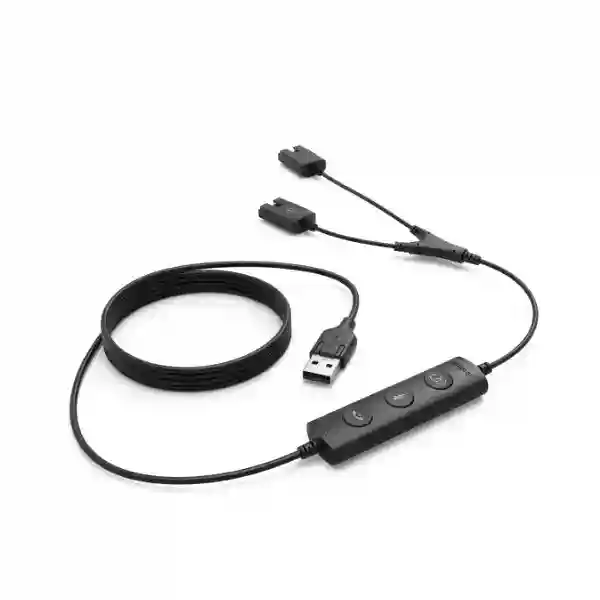
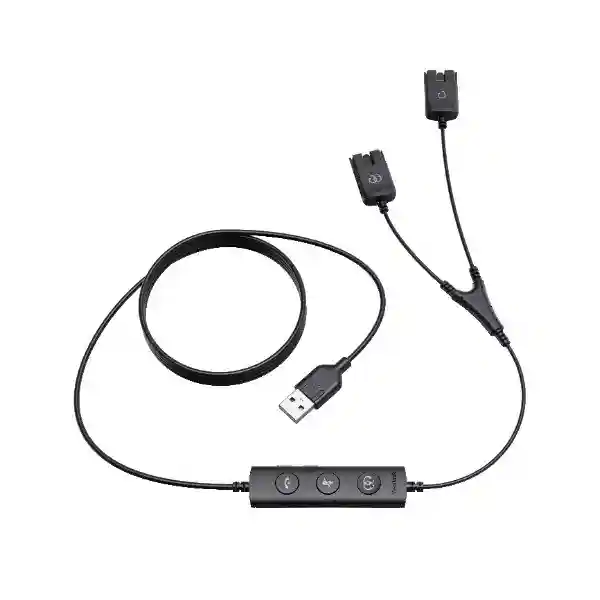
The Yealink USB QD Trainer Cable, officially styled by Yealink as the USB/QD Trainer Cable, is a purpose-built Y-type cable for contact-center coaching and monitored calling with compatible Yealink Quick Disconnect headsets. It allows two Yealink YHS-series QD headsets to connect to a single PC through one USB-A interface, giving an agent and a supervisor access to the same call path. That makes it especially relevant for live coaching, new-agent onboarding, quality observation, side-by-side training and structured call-handling practice.
For businesses evaluating this accessory in Tanzania, the most important purchasing questions are compatibility, user roles, PC interface, training workflow and quantity. Yealink documentation identifies YHS34 and YHS36 as supported wired QD headset families for this cable. The cable includes inline call-control functions and can also operate as a QD-to-USB adapter when only the longer headset side is used. Fourteck can help procurement teams match the trainer cable with suitable Yealink headsets and broader business-telephony requirements before a quotation is prepared.
Use it to place an agent and trainer on the same PC-based call, or use the longer QD branch as a single-headset QD-to-USB adapter.
Connect two compatible Yealink QD headsets to a single PC so the agent and supervisor can participate in the same call workflow.
The longer headset branch can be used on its own so the cable functions as a QD-to-USB adapter for a supported Yealink headset.
The PC side uses a USB Type-A connector, which should be matched to the workstation or laptop ports used at the training desk.
Official Yealink material identifies two QD ports intended for YHS34 and YHS36 wired headsets.
What the Yealink USB QD Trainer Cable does
A contact-center trainer often needs to hear the same customer conversation as the agent without introducing a second computer, second softphone session or improvised audio splitter. The Yealink USB QD Trainer Cable addresses that specific workflow. One USB-A connection goes to the PC, while the Y-side provides two Quick Disconnect headset connections. In a typical coaching setup the agent uses the longer side and the trainer uses the shorter side. Yealink’s quick-start guidance shows the trainee able to listen and talk while the trainer can initially listen with the trainer microphone muted, then join the conversation when required.
The cable is not simply a passive physical splitter. Its inline controls provide practical call-management functions including answer/end call, mute and volume adjustment according to Yealink’s product documentation. This matters in busy training environments because the supervisor does not need a separate desk-phone interface just to monitor and participate. The same accessory can then be repurposed for a single QD headset by leaving the shorter trainer branch unused and connecting the headset to the longer branch.
For procurement, this dual-purpose design can simplify standardization where teams already use Yealink YHS34 or YHS36 headsets. Before purchase, organizations should confirm that the intended PC has a usable USB-A port, that the headsets are the compatible Yealink QD models, and that the softphone or calling application in use supports the required call workflow. The cable does not replace PBX, softphone, call-recording or workforce-management software; it is the physical headset interface that makes side-by-side monitoring easier.
Verified technical specifications
| Product type | USB/QD Y-type trainer cable for Yealink YHS series |
| PC connection | 1 × USB Type-A |
| Headset connections | 2 × Yealink Quick Disconnect ports |
| Documented headset support | Yealink YHS34 and YHS36 |
| Cable length | 2 metres total |
| USB to inline control | 1.8 metres |
| Inline control to QD head | 0.2 metres |
| Cable weight | 48 grams |
| Controls | Call control, mute and volume adjustment |
| Package content | USB/QD Trainer Cable and quick-start guide |
Buying guidance for call centers and training teams
The best way to specify a trainer cable is to start with the workflow rather than the accessory itself. Identify how many supervisors train simultaneously, how many permanent coaching desks exist, whether coaching moves between desks, and which Yealink QD headsets are already deployed. A team with one training station may need only one cable, while a large onboarding program may require a standardized quantity that corresponds to training-seat count rather than total agent count.
Also confirm the endpoint. This Yealink accessory connects to a PC over USB-A. If your organization is standardizing newer laptops that expose only USB-C ports, discuss the workstation interface before ordering so the complete setup is planned correctly. For organizations using desk phones rather than PC softphones, confirm the intended coaching architecture separately because a USB trainer cable is designed around a PC-connected workflow.
Related Fourteck resources
Yealink USB QD Trainer Cable Tanzania
For Tanzania-based contact centers, customer-care desks, service organizations, banks, insurers, travel operators, utilities, business-process teams and internal help desks, the Yealink USB QD Trainer Cable is most valuable when live call coaching is part of the operating model. A supervisor can listen to the same conversation as the agent from the same PC connection, which is useful during onboarding, script practice, quality evaluation and the transition from classroom training to live customer interactions. The accessory is especially logical for organizations that already standardize Yealink YHS34 or YHS36 QD headsets because it extends those headsets into a structured trainer-and-agent setup without requiring a separate headset platform.
When preparing a Tanzania quotation, buyers should specify the number of training positions rather than simply the number of headsets. A large contact center may have hundreds of agents but only a smaller group of coaching stations. Conversely, an organization with frequent recruitment cycles may benefit from several mobile trainer kits that can be moved between desks. The 2-metre cable length gives practical desk reach, while the USB-A connection should be checked against the PCs in use. Newer compact laptops increasingly depend on USB-C, so workstation port availability can affect the bill of materials even though the trainer cable itself remains USB-A.
Operational policy is also relevant. The trainer cable enables listening and participation, but it does not define whether calls may be monitored, recorded or reviewed. Each employer should align training practices with its internal policies, customer commitments and applicable requirements. In technical terms, the cable should be treated as one component in the wider voice environment: the PC, softphone, headset, network, SIP or unified-communications platform, and quality-management process all influence the user experience.
Fourteck Tanzania can help businesses evaluate the trainer cable alongside related IP telephony and collaboration needs rather than treating it as an isolated item. For a useful quotation, provide the headset models already in use, the number of trainer positions, PC connector type, preferred quantity and the software calling environment. That information makes it easier to confirm whether the Yealink USB QD Trainer Cable is the appropriate accessory and whether any additional components should be included.
Yealink USB QD Trainer Cable Dar es Salaam
Businesses in Dar es Salaam often manage high-volume customer interactions from headquarters, sales offices, logistics operations, financial-service teams and outsourced service desks. In these environments, agent quality can depend on how quickly supervisors can hear live conversations and intervene when necessary. The Yealink USB QD Trainer Cable provides a simple hardware path for a coach and agent to share a PC-based call through two compatible Yealink QD headsets. It is therefore relevant to onboarding rooms, customer-care departments and quality teams that want a repeatable training setup without dedicating a second calling endpoint to every coaching session.
For a Dar es Salaam office, desk layout deserves attention. Training areas may use bench seating, compact cubicles or shared hot desks. Because the official cable length is 2 metres, managers should consider where the PC sits, whether a docking station is involved and how cable routing will avoid tangles across neighboring workstations. The shorter trainer branch and longer agent branch are intentional parts of the design, so the cable should be positioned according to the roles at the desk rather than extended casually with unverified adapters.
Procurement teams should also confirm the exact headset estate before ordering. Yealink documents the cable for YHS34 and YHS36 QD headsets. If a department uses a mix of USB headsets, wireless headsets and QD models, only the appropriate QD positions should be counted. This prevents over-ordering and reduces compatibility surprises after delivery. The PC interface is USB Type-A, another point worth checking when laptop fleets have been refreshed or standardized around USB-C docks.
For organizations operating multiple Dar es Salaam branches, training kits can be standardized by documenting the cable, headset model, PC interface, softphone settings and coaching procedure as one workstation profile. That makes it easier for IT and training teams to reproduce the same setup in new departments. A quote request should therefore include location count, number of simultaneous coaching sessions and existing Yealink headset models, allowing the accessory quantity to be based on real operational demand rather than guesswork.
Yealink USB QD Trainer Cable Mwanza
In Mwanza, the Yealink USB QD Trainer Cable can support organizations that run customer-support, reservation, dispatch, service-desk or centralized business-phone functions from PC workstations. The main advantage is not extra audio power or network functionality; it is the ability to place two compatible QD headsets on one USB-connected call path. That gives an experienced supervisor a practical way to sit with a trainee, listen to real interactions and participate when coaching needs to move from observation to active assistance.
This is especially useful where training resources must be flexible. A growing service team may not have a permanently dedicated training room. Because the trainer cable can be connected and disconnected easily, a coaching station can be created at an available desk as long as the PC, calling software and supported Yealink YHS headset are ready. Yealink also describes the accessory as suitable for hot-desking scenarios, which aligns with organizations that rotate staff through shared workstations or temporary onboarding positions.
Before sourcing the cable for a Mwanza deployment, document the endpoint standard. If the workstation uses USB-A directly, connection is straightforward. If the site relies on USB-C-only notebooks, the overall connection path should be reviewed rather than assuming any adapter will behave identically with call-control features. Likewise, confirm whether the headset is YHS34 or YHS36 and whether two headsets are required for each training session. The trainer cable itself does not add call recording or analytics, so quality-management software remains a separate decision where those functions are needed.
Organizations with branches around the Lake Zone may benefit from a small standardized training kit that travels with supervisors: compatible Yealink headsets, the trainer cable and documented softphone settings. This can improve consistency when staff are trained at different sites. For procurement, provide Fourteck with the expected number of simultaneous trainer-agent pairs, headset models and PC types. Those details support a cleaner bill of materials and help distinguish a training-cable requirement from broader headset, IP phone or PBX needs.
Yealink USB QD Trainer Cable Arusha
Arusha businesses in tourism, hospitality, travel coordination, education, professional services and customer support often rely on clear telephone conversations with customers, partners and international contacts. When new employees are being trained on reservation calls, support scripts or service procedures, a shared listening setup can be more effective than reviewing a conversation only after the fact. The Yealink USB QD Trainer Cable allows two supported Yealink Quick Disconnect headsets to share one PC connection, giving the trainer a direct view of how the agent handles the interaction.
A practical Arusha deployment should begin by identifying which users genuinely need supervised calling. Front-line teams may need ongoing coaching, while back-office staff may never use a trainer cable. Mapping the requirement by role usually produces a better quantity estimate than buying one cable per headset. The trainer cable is light and simple enough to move between desks, but frequent movement is easier when headsets, workstation ports and softphone profiles are standardized. The documented support for YHS34 and YHS36 headsets should be used as the compatibility baseline.
The accessory’s QD-to-USB adapter function can also help in flexible offices. When no supervisor is connected, the longer side can support a single compatible QD headset as a USB-connected headset path. That does not mean every use case requires the Y-configuration all the time. A training department can therefore get more value from the same accessory across coaching sessions and ordinary single-user desk use, subject to the supported hardware configuration.
For Arusha procurement, include information about existing Yealink headset models, PC connector types and the business calling platform. If the requirement is part of a larger office communications refresh, it may be more efficient to evaluate headsets, trainer cables, IP phones, PBX or unified communications, network readiness and user training together. The goal should be a repeatable call-handling environment where supervisors can coach effectively without creating inconsistent desk setups across teams.
Yealink USB QD Trainer Cable Dodoma
Organizations in Dodoma that operate public-facing help desks, administrative contact points, service teams or centralized call handling can use the Yealink USB QD Trainer Cable to make live coaching more structured. The cable links two supported Yealink QD headsets to a single PC, enabling a trainer to hear the same call as the agent. This is useful during induction, process changes, script updates and quality-improvement programs where supervisors need to observe how staff respond in real time rather than relying only on written assessments.
Government-related offices, education institutions, NGOs and private companies may all have different call-governance requirements, so the hardware should be introduced with an internal operating procedure. The accessory enables shared listening and participation, but management still needs to define when monitoring is permitted, how customers are informed where applicable, and how supervisors should take over or assist. A documented coaching process can make the technology more useful because staff understand the difference between training, escalation and normal call handling.
Technical checks are straightforward but important. Yealink documents 2 × QD ports for YHS34/YHS36 wired headsets and one USB Type-A connection to the PC. If the organization has a mixed fleet, inventory the actual headset connectors before placing an order. A USB headset that already terminates directly in USB is not the same as a QD headset, and a cable should not be selected based only on the brand name. Likewise, USB-C-only PCs may require a separate connectivity decision.
For multi-department Dodoma deployments, procurement teams can standardize the accessory by defining one approved training-station bundle. That bundle might include two compatible headsets, one trainer cable, a specified PC port arrangement and documented softphone settings. This approach makes support easier because every coaching desk follows the same design. When requesting a quotation, include simultaneous training-seat count, current headset models and whether the requirement is standalone or part of a wider VoIP or contact-center project.
Yealink USB QD Trainer Cable UAE
For regional businesses with operations in the UAE, the Yealink USB QD Trainer Cable can support contact-center coaching across customer service, real estate, hospitality, healthcare administration, logistics, finance and shared-service teams. The core workflow remains simple: two compatible Yealink Quick Disconnect headsets connect to one PC through USB-A, allowing an agent and supervisor to share the same live call. This can be valuable where supervisors regularly observe new hires, audit service quality or support complex customer conversations without moving the call to a separate device.
UAE organizations often standardize endpoint hardware across multiple departments or countries, which makes compatibility documentation important. If Yealink YHS34 or YHS36 headsets are already in use, the trainer cable can fit into that standard. If the organization has moved heavily toward wireless, USB-C or platform-certified headsets, buyers should verify whether the USB/QD trainer model is still the right accessory rather than purchasing it simply because Yealink is an approved vendor. The cable’s USB-A PC connector also deserves attention in newer laptop environments.
Large regional enterprises may want to include trainer cables in a controlled spare-and-training pool instead of assigning one permanently to every agent. That approach can reduce unnecessary accessories while keeping enough equipment available for onboarding waves and refresher coaching. The 2-metre cable length should be considered in desk design, especially in dense call-center seating where cable management affects comfort and housekeeping.
For a UAE-linked procurement requirement coordinated with Tanzania, the useful specification is not just product quantity. Include the headset models, training-seat count, PC interface, call application and whether the same kit needs to be standardized across branches. Fourteck’s broader regional technology network can help procurement teams keep communications requirements consistent across markets while still verifying each site’s actual endpoint environment before ordering.
Yealink USB QD Trainer Cable Uganda
Businesses operating across Uganda can use the Yealink USB QD Trainer Cable as a focused coaching accessory where customer calls are handled from PC-based softphones with compatible Yealink QD headsets. Its value is clearest in teams that need supervisors to monitor agents live during onboarding or quality sessions. The agent and trainer connect their headsets to the two QD branches, while a single USB-A connection links the setup to the PC. This avoids the need to create a second call session simply so a supervisor can hear the interaction.
For countrywide organizations, it is worth distinguishing central training sites from ordinary branch offices. A main customer-care center may justify several trainer cables because multiple coaching sessions can occur at the same time. Smaller branches may need only one shared kit or none at all. Procurement should therefore be based on concurrent training demand. The supported YHS34/YHS36 headset families should be verified at every intended location because branches can accumulate mixed headset models over time.
The accessory also supports a useful fallback role as a QD-to-USB adapter for one headset when the trainer side is not in use. This can make shared equipment pools more practical, especially where a team alternates between normal agent work and scheduled coaching. However, the cable does not replace the PBX, softphone or recording platform. Network quality, SIP configuration and application behavior remain part of the wider call experience.
For organizations coordinating Tanzania and Uganda technology procurement, consistency can simplify support. Using the same supported Yealink headset families, training cable and workstation profile across branches can reduce troubleshooting variation. Buyers can also review Fourteck Uganda communication solutions for related regional voice and IT planning. When requesting a quote, include the city locations, number of simultaneous trainer positions and existing headset inventory so quantities can be aligned to actual usage.
Yealink USB QD Trainer Cable Kampala
Kampala has a broad mix of customer-service operations, corporate headquarters, financial institutions, technology teams, delivery platforms, healthcare administrators and support desks where live call quality can directly affect customer experience. The Yealink USB QD Trainer Cable is designed for one very specific part of that environment: allowing a supervisor and agent to share a call from one PC using two compatible Yealink Quick Disconnect headsets. It can be useful during new-hire nesting, escalation coaching and side-by-side quality reviews.
A Kampala contact center should decide whether coaching happens at dedicated supervisor desks or at the agent’s normal workstation. In a dedicated training room, cables can be permanently routed and labeled. In a hot-desk environment, a portable kit may be preferable so the trainer cable, two headsets and any required workstation adapter move together. Yealink describes the cable as suitable for hot desking, and its connect/disconnect model supports that flexible approach.
Compatibility control becomes more important as organizations expand. The official specification lists YHS34 and YHS36 QD headsets, two QD connections and one USB Type-A PC connection. Procurement teams should not assume that every Yealink headset uses the same connector or that a newer USB-C model will attach directly. A quick inventory of headset part numbers and computer ports can prevent ordering errors, especially in businesses that have upgraded laptops in phases.
Where Kampala teams use formal quality programs, the trainer cable can complement but not replace recording, analytics, scorecards or workforce-management systems. Think of it as the physical side-by-side coaching interface. A strong implementation combines the cable with a clear training process, the correct Yealink headsets and stable calling software. For quotations, specify how many trainers work concurrently, whether equipment is shared, and whether the organization is standardizing the same setup across other Ugandan cities or neighboring countries.
Yealink USB QD Trainer Cable Arua
In Arua, the Yealink USB QD Trainer Cable can be relevant to branch operations, support desks, NGO administration, customer-service functions and organizations that need to coach staff on PC-based calls without building a large dedicated contact-center environment. Because the accessory combines two QD headset connections into one USB-A PC interface, it can turn an ordinary supported workstation into a practical supervisor-and-trainee coaching position.
For smaller teams, the ability to move the trainer cable between desks may be more useful than permanent installation. A supervisor can schedule coaching sessions and bring the cable to the user who needs support. To make that process predictable, the organization should standardize compatible Yealink YHS34 or YHS36 headsets and keep the softphone configuration consistent. If headsets differ between desks, the trainer may arrive with the correct cable but find that the local headset connector does not match.
The QD-to-USB adapter function adds flexibility when the second headset is not needed. A single supported QD headset can use the longer side of the cable for USB connection to the computer. This can be useful for temporary workstations, but IT teams should still document how the inline controls behave with the chosen calling application. The presence of call-control buttons does not guarantee identical behavior across every software environment, so deployment testing remains sensible.
When planning an Arua order, consider spare strategy as well as active training positions. A branch may prefer one working cable plus a shared spare rather than purchasing for every user. Regional organizations should also decide whether training hardware is supplied centrally or procured by each branch. Providing Fourteck with existing headset models, PC port types and expected training-seat count creates a clearer quotation and helps determine whether the requirement is purely an accessory purchase or part of a broader communications standardization project.
Yealink USB QD Trainer Cable Mbarara
Mbarara organizations that depend on telephone support, booking, sales or internal help-desk functions can use the Yealink USB QD Trainer Cable to make hands-on coaching easier. The cable’s two QD headset connectors allow a trainee and supervisor to hear the same PC-based call, while the supervisor can remain in a listening role or participate when necessary. This is particularly useful where employee development happens on the job and supervisors need immediate context rather than waiting for post-call review.
A good small or mid-sized deployment starts with counting coaching sessions, not employees. If only one supervisor trains at a time, one or two cables may cover many users through scheduled sharing. If several team leaders coach simultaneously, each active training pair needs its own appropriate setup. This simple sizing principle helps keep the purchase proportional to the operational need and reduces unused accessories sitting in drawers.
The hardware standard should also be written down. Yealink’s specification identifies YHS34/YHS36 QD wired headsets, a USB Type-A PC connector and a 2-metre total cable. That information should appear in the internal asset record so future buyers can distinguish the trainer cable from unrelated USB headset cables. If Mbarara sites receive laptops without USB-A ports, the IT team should review connectivity before deployment rather than discovering the issue during a live training session.
For organizations with teams spread between Mbarara, Kampala and other locations, a common coaching kit can improve support. Supervisors can follow the same physical connection steps, training staff can create one set of instructions, and IT teams can troubleshoot a familiar configuration. A quotation request should mention whether the cable will be paired with existing YHS headsets or whether complete headset-and-cable kits are required. That distinction affects both compatibility checks and the final bill of materials.
Yealink USB QD Trainer Cable Gulu
For Gulu businesses and institutions, the Yealink USB QD Trainer Cable can support practical voice training without requiring a complex training-room build. It is suited to PC-based calling environments where an agent uses a compatible Yealink QD headset and a supervisor needs to listen to the same call. The second headset connection makes side-by-side coaching possible, while the USB-A end keeps the physical setup centered on one workstation.
This can be useful for organizations introducing a new service process, opening a support function or training staff who have not previously worked with formal call scripts. A supervisor can observe tone, questioning technique and process adherence while the conversation is happening. If intervention is needed, the trainer can join according to the supported trainer workflow. Hardware alone does not create good coaching, but it removes a common technical barrier by giving both participants access to the same audio session.
For Gulu deployments, simplicity matters. Keep the training kit labeled and stored together, verify YHS34/YHS36 compatibility, and confirm that the target PC has USB-A. The 2-metre cable length is suitable for normal desk use, but the desk should still be arranged so neither user pulls on the QD connectors while moving. In shared offices, routing the cable away from walkways and drawer edges can reduce accidental disconnection.
Procurement teams should also separate training requirements from wider telephony requirements. If the organization needs call queues, recording, IVR, reporting or branch connectivity, those are functions of the broader communications platform rather than the trainer cable. The cable solves the local headset-sharing problem. For an accurate quote, specify the number of Gulu training positions, whether headsets are already owned, and whether the same standard will be rolled out in other locations. This allows the accessory to be sized as part of a deliberate user workflow.
Yealink USB QD Trainer Cable Kenya
Kenyan organizations with call centers, customer-success teams, shared services, financial operations, travel desks and support functions can use the Yealink USB QD Trainer Cable for structured agent coaching when their calling environment is PC based. Two compatible Yealink QD headsets can connect to one workstation, enabling the supervisor to monitor the same conversation as the agent. This is useful for live onboarding, new-product scripts, escalation practice and quality sessions where hearing the customer context in real time is important.
For multi-site Kenyan businesses, standardization is often more valuable than the accessory price itself. If Nairobi, Mombasa, Kisumu or branch offices all use different headset models, training hardware becomes harder to support. Establishing a supported Yealink QD headset standard and documenting the USB/QD trainer cable as the approved coaching accessory can reduce uncertainty when supervisors move between sites. The official compatibility baseline is YHS34 and YHS36, and the PC interface is USB Type-A.
Quantity planning should consider recruitment cycles. A company may need extra trainer cables during seasonal onboarding, then fewer during steady-state operations. Because the cable can also function as a single-headset QD-to-USB adapter, shared units do not necessarily become useless outside training periods. Even so, purchasing should be linked to real workstation and headset requirements rather than speculative stock.
Organizations coordinating Tanzania and Kenya can use a common bill-of-materials template that lists headset model, trainer cable, PC connector and calling application. This improves regional procurement consistency while allowing local sites to confirm actual need. If the trainer cable is part of a wider communications project, review IP telephony, network quality, softphone deployment and user training together. The accessory works best when the surrounding call environment is already stable and documented.
Yealink USB QD Trainer Cable Kuwait
In Kuwait, the Yealink USB QD Trainer Cable can support customer-service and business-process teams that use PC softphones with compatible Yealink QD headsets. It gives a trainer and agent a shared audio path from one USB-A connection, making it suitable for side-by-side coaching, new-hire training and supervised customer interactions. Organizations in retail, services, logistics, property, finance and support operations can use the accessory where live call observation is part of the training process.
Workspace design is an important practical consideration in dense service centers. The cable is 2 metres in total, with the USB-to-inline-control section making up most of that length. Trainers and agents should be positioned so the QD branches are not under tension. Permanent training desks can route the cable cleanly, while flexible teams may prefer portable kits. Either way, labeling the trainer cable helps staff distinguish it from ordinary single-headset USB cables.
Compatibility should be checked before regional standardization. Yealink identifies YHS34 and YHS36 as the supported wired QD headset families in the datasheet. If a Kuwait office uses a different Yealink headset generation, wireless model or direct-USB headset, the correct accessory may differ. The PC side also uses USB Type-A, so laptop and dock standards matter. These checks are simple, but they prevent a common procurement error: assuming that all accessories from one headset brand are interchangeable.
For organizations with operations in Kuwait and East Africa, the trainer cable can be included in a regional voice-accessory standard where the endpoint design is genuinely the same. Procurement teams should document the required quantity by simultaneous training sessions, not total headcount, and should state whether existing YHS headsets will be reused. This gives suppliers a clearer basis for quotation and helps IT teams support the same coaching workflow across countries without introducing unnecessary variations.
Yealink USB QD Trainer Cable Ghana
Ghanaian contact centers, service desks and customer-facing teams can use the Yealink USB QD Trainer Cable to support live coaching when calls are handled from a PC. The accessory connects two compatible Yealink QD headsets to one USB-A port, giving both the trainee and supervisor access to the same call. This can shorten the feedback loop during onboarding because the trainer hears exactly what the agent hears and can participate when the coaching process requires it.
For Accra-based headquarters or distributed branches, it is useful to treat the trainer cable as part of a controlled headset ecosystem. The official Yealink documentation specifies YHS34/YHS36 compatibility, so headset inventory should be checked before ordering. Teams that have migrated some users to direct-USB or wireless headsets may need different coaching accessories for those positions. A standard asset list that records connector type can save time during future procurement.
The cable’s ability to operate as a QD-to-USB adapter also gives training departments more flexibility. A unit can support normal single-user work between coaching sessions by using the longer QD branch. This can be useful when a business wants to avoid equipment that has only one narrow purpose. Still, each deployment should be tested with the actual softphone or unified-communications application used by the company, particularly where call-control behavior is important to the workflow.
Ghana procurement teams should request quotations with enough context to confirm fit: current Yealink headset models, number of simultaneous trainer-agent pairs, PC USB interface and whether the requirement is a standalone accessory purchase or part of a new contact-center setup. For regional groups with Tanzania operations, using a consistent bill of materials can simplify support, but only when the local workstation and headset standards are genuinely aligned. The best outcome is a repeatable coaching station that staff can set up quickly and use confidently.
Yealink USB QD Trainer Cable Nigeria
Nigeria has large customer-service, banking, fintech, telecom, logistics, retail and business-process teams where agent coaching is often a continuous operational requirement. The Yealink USB QD Trainer Cable provides a straightforward physical method for a trainer to share a PC-based call with an agent using two compatible Yealink QD headsets. That makes it suitable for nesting periods after formal training, side-by-side quality reviews and live assistance when an inexperienced agent handles a difficult customer interaction.
In larger Nigerian contact centers, accessory management should be planned at scale. Instead of issuing a trainer cable to every employee, businesses can allocate cables to team leaders or designated coaching bays. The right quantity depends on how many sessions occur at the same time. This approach keeps the asset pool controlled and makes it easier to inspect cables, replace damaged units and maintain consistent workstation setups.
Technical compatibility is equally important. The Yealink datasheet lists two QD ports for YHS34/YHS36 headsets, one USB Type-A connection to the PC, a 2-metre cable length and inline call, mute and volume controls. Those details should be included in the internal procurement specification. Organizations with mixed USB-C, wireless and QD headsets should not order based on brand alone. Each headset family may require a different connection strategy.
For companies coordinating Nigerian and Tanzanian operations, a shared communication standard can reduce support overhead if both markets use the same endpoint design. Training documentation can show one cable layout, one headset family and one set of softphone checks. Before quotation, provide the number of trainer positions, current headset inventory and workstation port standard. If the project also needs call recording, queue management, analytics or reporting, include those requirements separately because they are handled by the broader telephony or contact-center platform, not by the trainer cable itself.
Yealink USB QD Trainer Cable Seychelles
In Seychelles, organizations in hospitality, travel, financial services, public administration and customer support may have smaller teams than major mainland contact centers, but live call coaching can still be important. The Yealink USB QD Trainer Cable is well suited to compact training arrangements because it allows two compatible QD headsets to share one PC-based call without adding a second computer. A supervisor can listen to an agent during reservations, guest-support, service-desk or administrative calls and participate when the training process requires it.
For a smaller island operation, versatile accessories can be especially useful because organizations may prefer to hold a limited, standardized set of spares. The Yealink cable can also function as a single-headset QD-to-USB adapter when the trainer branch is not needed. That secondary use means a cable kept for coaching can still support an ordinary workstation scenario with a compatible YHS headset.
Procurement should nevertheless remain precise. Yealink identifies YHS34 and YHS36 as compatible wired QD headsets, and the PC connection is USB Type-A. A hotel or office that has already shifted to USB-C-only notebooks should account for that interface difference in its endpoint design. Similarly, wireless Yealink headsets do not become compatible simply because they share the same brand. Confirm the exact headset model before ordering.
Seychelles-based teams can keep training simple by storing the cable with the two headsets, labeling the trainer and agent sides and documenting the softphone setup. If the business has related operations in East Africa, the same kit can be standardized where compatible hardware is used. A quotation request should state whether one shared trainer cable is sufficient or whether several departments coach simultaneously. That information helps balance availability with sensible stock levels and avoids turning a specialized accessory into unnecessary inventory.
Compatibility and deployment checklist
Verify that the intended headsets are Yealink YHS34 or YHS36 QD models rather than a direct-USB or wireless headset.
The trainer cable terminates in USB Type-A at the computer side. Review the laptop or dock standard used at coaching desks.
Order around the number of simultaneous trainer-agent pairs rather than total staff headcount.
Validate call-control behavior with the organization’s actual softphone or UC application before large-scale rollout.
Frequently asked questions
What is the Yealink USB QD Trainer Cable used for?
It is designed for call-center and office training scenarios where two compatible Yealink QD headsets need to connect to one PC so an agent and supervisor can share the same call. It can also be used as a QD-to-USB adapter for one supported headset.
Which Yealink headsets are compatible?
Yealink’s datasheet specifies two QD ports for Yealink YHS34 and YHS36 wired headsets. Buyers should confirm the exact headset model before ordering because not every Yealink headset uses the same connector.
Does the cable connect to USB-C?
The documented PC connector is USB Type-A. If the intended computer provides only USB-C, review the workstation connection design before purchase instead of assuming direct compatibility.
Can the trainer speak on the call?
Yealink’s training workflow supports a trainer listening while muted and then joining the conversation when required. This makes the accessory suitable for both observation and active coaching.
How long is the cable?
The official datasheet lists a 2-metre total cable length, including 1.8 metres from USB to the inline control and 0.2 metres from the inline control to the QD head section.
Does it include call controls?
Yealink lists call control, mute and volume adjustment among the cable’s functions. Organizations should test behavior with the actual softphone application used in their environment.
Is this a call-recording device?
No. It is a headset training and connection accessory. Recording, analytics, queue reporting and workforce-management functions belong to the calling or contact-center platform.
What information should I provide for a quotation?
Provide the number of simultaneous training positions, existing Yealink headset models, PC connector type, calling application and whether you need cable-only quantities or complete headset-and-cable training kits.
Quotation checklist
A useful Yealink USB QD Trainer Cable quotation should be based on a small set of verified deployment details. This prevents compatibility mistakes and helps procurement compare like-for-like quantities.
✓ Number of simultaneous training desks
✓ Existing Yealink headset model numbers
✓ PC or laptop USB port type
✓ Softphone or UC platform in use
✓ Cable-only or complete headset kit requirement
✓ Cities and branches included in the rollout
✓ Expected spare quantity
✓ Any wider IP telephony requirements
Decision recap
Choose the Yealink USB QD Trainer Cable when the requirement is specifically to connect two compatible Yealink YHS34/YHS36 QD headsets to one USB-A-equipped PC for live training or monitored calling. Its strongest use cases are contact-center onboarding, supervisor observation, call-quality coaching and flexible hot-desk training positions. The same cable can provide QD-to-USB connectivity for a single supported headset when the trainer branch is not being used.
Do not select it merely because the organization uses Yealink. Confirm the headset connector and workstation port first. If the requirement also includes wireless mobility, call recording, analytics, queue design, PBX functions or platform integration, those should be specified separately. A well-scoped order combines the right cable quantity with verified headset compatibility and a clearly documented coaching workflow.
Consult Fourteck about your Yealink training setup
If you are planning call-center coaching desks in Tanzania or coordinating a multi-country headset standard, share the headset models, PC types and number of simultaneous trainer positions. Fourteck can help turn that information into a practical quotation and identify whether the request is limited to the USB/QD Trainer Cable or should include related communication hardware.




Reviews
There are no reviews yet.