
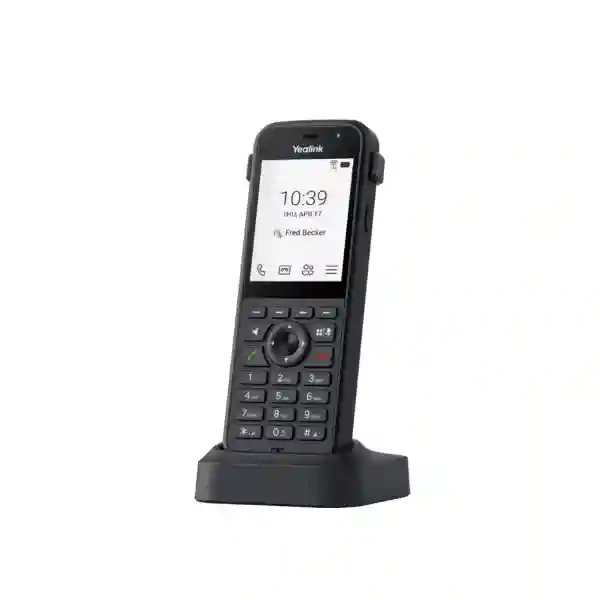
Yealink MP66W Teams Cordless Phone
The Yealink MP66W is a Microsoft Teams-certified rugged cordless Wi-Fi handset designed for organisations whose users need to communicate while moving through warehouses, healthcare environments, retail floors, manufacturing areas, education campuses, transport facilities and other operational spaces. Instead of tying the user to a desk phone, the MP66W brings native Microsoft Teams calling and meeting functions into a compact enterprise handset that can travel with the worker. For Tanzanian businesses adopting Teams Phone, the value is straightforward: mobile staff can stay reachable on the collaboration platform the organisation already manages, while IT teams gain a purpose-built device with enterprise Wi-Fi, security and central-management capabilities.
What is the Yealink MP66W?
The MP66W is an enterprise portable Microsoft Teams phone that uses Wi-Fi rather than a traditional wired Ethernet connection. Yealink positions it for frontline and mobile work, and Microsoft lists the model among Teams-enabled devices for wireless Teams Phone use. The handset runs on Android 15 through the Microsoft Device Ecosystem Platform foundation and is designed to provide a native Teams experience for calls, meetings, presence, voicemail and common call-control functions. It therefore serves a different operational role from a conventional desk phone: the user can move between work areas while remaining connected to the organisation’s Teams telephony environment, subject to suitable enterprise Wi-Fi coverage and roaming design.
The hardware is purpose-built for more demanding use than a normal office handset. Yealink specifies an IP67 protection rating, resistance to drops up to 1.8 metres, antibacterial materials and resistance to chemical cleaning. The phone has a 2.8-inch 240 × 320 colour non-touch display, a physical keypad, programmable action controls, speakerphone support and a USB Type-C interface. Those characteristics make it relevant to operational staff who need buttons they can use quickly, a compact display for Teams information and a chassis that can tolerate everyday movement and handling.
Rugged mobility
IP67 protection, 1.8-metre drop resistance, chemical-cleaning resistance and an antibacterial design suit working environments where a standard desk handset may be impractical.
Native Teams calling
Users can access Teams Phone calling, meetings, call controls, presence, voicemail and related functions on a dedicated enterprise handset without relying on a personal smartphone.
Enterprise wireless
Tri-band 2.4 GHz, 5 GHz and 6 GHz Wi-Fi 6E capability is paired with 802.11k/v/r roaming support. Yealink notes that 6 GHz functionality is coming soon, so deployment planning should confirm current firmware and regulatory availability.
Clearer voice
Optima HD audio, AI noise cancellation, Acoustic Shield, dual-microphone noise reduction and a full-duplex hands-free speakerphone are designed to improve intelligibility in active workplaces.
Verified Yealink MP66W technical highlights
| Platform | Android 15 / Microsoft Device Ecosystem Platform, native Microsoft Teams experience |
| Display | 2.8-inch 240 × 320 TFT colour non-touch screen |
| Wireless LAN | IEEE 802.11a/b/g/n/ac/ax; tri-band 2.4 GHz / 5 GHz / 6 GHz Wi-Fi 6E capability; 802.11k/r/v roaming |
| Bluetooth | Bluetooth 5.3 for compatible headsets |
| Durability | IP67, drop resistance up to 1.8 metres, antibacterial design, chemical-cleaning resistant |
| Battery | 3000mAh rechargeable lithium-ion; up to 8 hours talk time and 80 hours standby under laboratory conditions |
| Audio | HD voice, Acoustic Shield, AI noise cancellation, dual-mic noise cancellation, full-duplex speakerphone with AEC, HAC handset |
| Interfaces | USB Type-C for charging, headset and YubiKey; charging-dock connector |
Deployment and integration planning
A cordless Teams handset is only as effective as the wireless network underneath it. Before purchasing MP66W units, organisations should map where staff will walk, confirm Wi-Fi coverage through corridors, stores, warehouses, clinical areas or production zones, and verify that roaming between access points is configured correctly. The handset supports 802.11k, 802.11r and 802.11v roaming, but those capabilities need a compatible and correctly designed WLAN to deliver their full benefit. Voice-over-Wi-Fi also requires attention to signal strength, channel planning, interference, QoS and the number of concurrent devices.
Teams administration is another part of the design. Yealink documents support for Microsoft device management as well as Yealink device-management platforms and auto-provisioning. IT teams should decide how phones will be enrolled, assigned, updated, monitored and reset. Microsoft Teams Admin Center provisioning is relevant to the model, enabling administrators to add device MAC addresses and perform remote provisioning workflows. For larger rollouts, the management plan matters just as much as the handset count because inconsistent firmware, wireless settings or user assignment can create avoidable support work.
Who should consider the MP66W?
The strongest fit is an organisation already committed to Microsoft Teams Phone that has employees who spend much of the day away from a fixed desk. A hospital may need supervisors, facilities teams or support personnel to remain reachable while moving across departments. A manufacturer may have production, quality or maintenance staff who need a shared or assigned Teams endpoint on the plant floor. Retail operations can use mobile Teams handsets for floor supervisors and stock personnel. Warehouses can give dispatch, receiving and inventory teams a communications device designed for frequent movement. Schools and campuses may use the handset for facilities, administration or security functions where desk phones are impractical.
The MP66W is not automatically the right choice for every Teams user. Office employees who work at a fixed desk may prefer a larger Yealink MP-series desk phone with a bigger display. Users who already carry managed smartphones may find the Teams mobile application sufficient. The business case for MP66W becomes stronger when the organisation wants a dedicated corporate voice endpoint, physical keypad controls, ruggedisation, repeatable device management and Wi-Fi-based mobility within managed premises.
Yealink MP66W Teams Cordless Phone Tanzania
For organisations in Tanzania, the Yealink MP66W offers a practical route to extend Microsoft Teams Phone beyond desks and meeting rooms. Businesses increasingly operate across mixed spaces: offices connect to stores, warehouses, workshops, service counters and operational floors, yet the people working in those areas still need to participate in the same corporate communications environment. The MP66W addresses this gap by providing native Teams calling on a purpose-built Wi-Fi handset. A Tanzanian deployment should begin with the work pattern rather than the product count. Identify which employees move continuously, which areas they traverse, how often they make or receive calls, whether they need hands-free Bluetooth headsets, and whether shared-device or individually assigned usage is preferred.
Wireless design is especially important. A handset can roam only across the coverage that has been engineered for it. Site surveys, access-point placement, interference analysis and channel planning should therefore be considered before mass deployment. Organisations using older Wi-Fi infrastructure should check whether their access points, controller and security policies support the relevant standards. The MP66W supports 2.4 GHz, 5 GHz and 6 GHz capability, but Yealink currently notes that 6 GHz functionality is coming soon. That means the buying decision should not assume immediate 6 GHz operation without confirming current firmware and local regulatory support. The 5 GHz band may remain the practical voice band in many current installations.
Procurement teams in Tanzania should also check Microsoft Teams Phone licensing, user assignment, device-management policy, charging requirements and replacement-battery strategy. The handset includes a cradle and rechargeable battery, and its laboratory ratings are up to eight hours of talk and eighty hours of standby. Actual endurance will vary with usage, wireless conditions, display activity and other factors. For quotation preparation, specify the number of handsets, preferred deployment sites, existing Wi-Fi brand and model, Teams tenancy status, expected user type and any required headsets or charging accessories. FourTeck Tanzania can use that context to focus the discussion on compatibility and deployment rather than simply quoting a handset in isolation.
Yealink MP66W Teams Cordless Phone Dar es Salaam
Dar es Salaam organisations often combine office staff with operational employees who move between reception areas, technical rooms, storage zones, customer-facing spaces and logistics points. In those environments, a fixed Teams desk phone may serve administrators but not the staff whose work takes place around the site. The MP66W can provide a dedicated native Teams endpoint for supervisors, facilities personnel, warehouse teams, retail-floor managers and service staff, provided the organisation has dependable enterprise Wi-Fi. The correct purchasing question is therefore not simply how many phones are required; it is how many mobile roles need persistent Teams reachability and whether the wireless network can support voice quality throughout their movement paths.
A Dar es Salaam deployment should map high-traffic and high-noise areas. Warehouses and workshops may contain shelving, equipment and building materials that affect radio propagation. Hotels, campuses and larger offices may span multiple floors and require careful access-point handoff. The MP66W’s support for 802.11k/r/v roaming is relevant here because it is intended to help calls continue as the user moves between wireless cells, but client capability must be matched with properly configured infrastructure. Teams voice should be tested during real walking routes rather than only at stationary desks. Where background noise is significant, Yealink’s AI noise cancellation, Acoustic Shield and dual-microphone noise reduction can help improve clarity, although no audio technology substitutes for a realistic onsite test.
When requesting a Dar es Salaam quotation, include quantity, site type, floor count, existing access points, approximate user density, Teams Phone licensing status and whether devices will be assigned to named users or common areas. Consider charging positions at shift-change locations and whether spare batteries are operationally useful. The IP67 rating and 1.8-metre drop resistance improve suitability for active workplaces, while chemical-cleaning resistance can be useful where devices are regularly sanitised. A deployment review can also identify whether fixed Teams desk phones, meeting-room systems or headsets should be combined with MP66W handsets to create a complete communications environment rather than a single-device solution.
Yealink MP66W Teams Cordless Phone Mwanza
Businesses in Mwanza evaluating Microsoft Teams telephony may need to support users who are not continuously seated at a workstation. Distribution facilities, healthcare sites, education campuses, retail operations and service organisations can all have staff who move between rooms, stock areas, counters and outdoor-adjacent work zones. The Yealink MP66W is designed for this mobile pattern. It keeps the Teams Phone interface on a dedicated corporate handset and uses the organisation’s Wi-Fi network for connectivity. For IT teams, this can create a more controlled alternative to relying on personal smartphones when the role needs a rugged shared or managed voice endpoint.
Before specifying quantities, Mwanza buyers should review Wi-Fi coverage and operational workflow. A conventional data network may perform acceptably for laptops while still having weak transitions for real-time voice. Voice traffic is less tolerant of packet loss, latency and roaming interruptions, so testing should include calls while users move along the actual routes they will follow. The MP66W supports enterprise Wi-Fi security methods including WPA2/WPA3 options and 802.1X, which can help it fit managed corporate wireless environments. Network teams should confirm authentication design, certificates where applicable, DHCP, VLAN policy and internet reachability to Microsoft services before rollout.
Battery and device care should also be part of procurement. Yealink rates the 3000mAh battery for up to eight hours of talk time and up to eighty hours of standby under laboratory conditions. Busy shifts, weak Wi-Fi coverage and frequent screen use can affect real-world endurance, so charging procedures should match the working day. Organisations can place charging cradles where handsets are issued or returned, document responsibility for each device and use central management for configuration and updates. A quotation request should state the handset count, use case, Teams environment, Wi-Fi infrastructure and any headset requirement. This allows the discussion to include deployment readiness instead of treating the MP66W as an isolated hardware purchase.
Yealink MP66W Teams Cordless Phone Arusha
In Arusha, the MP66W can suit hospitality, tourism-support operations, education, healthcare, retail and other businesses that have mobile employees working within a managed site. The key advantage is not simply that the handset is cordless; it is that the phone is built around Microsoft Teams. A user can remain within the organisation’s Teams calling environment while moving through work areas, and administrators can apply enterprise device-management processes instead of supporting an assortment of personal handsets. For organisations standardising on Microsoft 365 collaboration, that consistency can simplify the user experience and operational support model.
Hospitality and campus-style environments should pay close attention to roaming. Buildings may include guest areas, offices, corridors, service rooms, courtyards and back-of-house spaces, each with different radio conditions. The MP66W supports 802.11k, 802.11r and 802.11v roaming, but access points must be designed and configured to provide appropriate overlap and handoff. A pre-deployment survey should identify dead zones, congested channels and areas where users regularly experience weak signal. Testing should include Teams calls while walking between those zones. The phone’s rugged design, chemical-cleaning resistance and IP67 rating may also be useful for shared operational devices, particularly where equipment is handled by multiple shifts.
For procurement in Arusha, businesses should define who will use the phones and how they will be managed. Named users may require individual Teams sign-in and policy assignment, while shared operational phones can involve different account and access considerations. IT teams should confirm Microsoft licensing and security requirements before devices are distributed. The USB Type-C interface, charging cradle, Bluetooth 5.3 headset support and physical keys help the handset adapt to different roles. When requesting pricing, include quantity, current WLAN platform, Teams licensing status, expected working areas and whether rugged mobility is the primary requirement. This gives the supplier enough context to identify possible network or accessory dependencies before purchase.
Yealink MP66W Teams Cordless Phone Dodoma
Dodoma organisations planning Teams Phone deployments may include government-related offices, education institutions, professional services, healthcare sites, warehouses and multi-building facilities. Many such environments have a mix of desk-based and mobile roles. The MP66W is intended for the latter: employees who need a dedicated Teams voice device while walking through the workplace. It can complement rather than replace conventional Teams desk phones. A reception user may need a larger fixed phone with line keys and a broad display, while facilities, security, stores or technical teams may benefit from a rugged cordless handset that follows them around the site.
The Wi-Fi layer must be evaluated as part of the phone project. Because the MP66W operates over wireless LAN, call reliability depends on RF coverage, authentication, roaming and internet connectivity. Dodoma sites with older access points or organically expanded networks should avoid assuming that general web browsing performance proves readiness for voice. A voice-focused test should measure coverage throughout corridors, stairwells, stores, service spaces and other movement routes. The handset can use Wi-Fi 6E-capable radios and supports fast-roaming standards, while enterprise security support allows integration with managed WLANs. Current 6 GHz readiness should be verified because Yealink indicates that the 6 GHz function is coming soon.
Administrative planning is equally important. Organisations should decide how handsets will be enrolled, how firmware will be updated, who owns the device, what happens at shift changes and how lost or damaged units are handled. Teams Admin Center provisioning and Yealink management options can support repeatable deployment. For a meaningful quotation, provide the expected user count, number of sites, Wi-Fi platform, charging arrangement, Teams Phone licensing status and any need for Bluetooth headsets or spare batteries. This information helps establish whether the MP66W is being purchased as a simple device addition or as part of a broader Teams voice and wireless modernisation project.
Yealink MP66W Teams Cordless Phone UAE
For organisations in the UAE, the MP66W is relevant to large offices, logistics operations, hospitality, healthcare, retail, manufacturing and service environments where Microsoft Teams has become a primary communications platform. The handset gives frontline personnel a corporate Teams endpoint without requiring them to remain at a desk. Warehouses can use it for supervisors who move between receiving, storage and dispatch areas; hotels can consider it for operational teams; hospitals can evaluate it for non-clinical support and facilities functions; and industrial environments can use its rugged form factor where a consumer device would be less suitable.
Enterprise WLAN design is central in dense UAE facilities. Modern sites may already have Wi-Fi 6 or Wi-Fi 6E networks, but the radio specification alone does not guarantee voice continuity. Access-point density, channel utilisation, roaming configuration and RF obstacles still determine the user experience. The MP66W supports tri-band Wi-Fi 6E capability and 802.11k/r/v roaming. Yealink states that 6 GHz operation is coming soon, so procurement teams should verify current regional and firmware support rather than buying solely for that band. Bluetooth 5.3 headset connectivity can be useful for staff who need hands-free calling while working.
Companies comparing options across the UAE can also review FourTeck’s broader regional technology resources at FourTeck integrated IT and telecom solutions. The purpose of this link is to help buyers place the MP66W within a wider communications, networking and infrastructure project rather than viewing it only as a handset. For quotations, include quantity, branch locations, Teams tenancy and licensing, WLAN platform and management requirements. Large deployments should also establish standard firmware, device naming, user assignment and replacement procedures before rollout so that operations remain consistent as the fleet grows.
Yealink MP66W Teams Cordless Phone Uganda
Ugandan organisations using Microsoft Teams can consider the MP66W where staff mobility inside offices, warehouses, campuses, clinics or commercial facilities is a day-to-day requirement. The phone brings native Teams calling onto a rugged enterprise handset, reducing dependence on fixed desk devices for roles that constantly move. This is particularly useful when an organisation wants corporate ownership, consistent device controls and a physical keypad rather than asking every employee to use a personal smartphone. The MP66W’s IP67 construction, 1.8-metre drop resistance and cleaning-resistant materials support frequent handling in operational settings.
A successful Uganda rollout should be planned jointly by the collaboration and networking teams. Teams administrators need to confirm licensing, policies, user accounts and provisioning. Network administrators need to ensure the WLAN supports voice traffic and fast roaming in the required areas. The MP66W supports 802.11k/r/v and enterprise Wi-Fi security. A site that has acceptable signal at desks but poor overlap in corridors may still create call interruptions for mobile users. Walk-testing is therefore a valuable part of deployment validation. It is also sensible to test device behaviour during busy network periods rather than only during quiet hours.
Buyers who need Uganda-specific project context can review FourTeck Uganda IT, networking and telecom solutions for related regional infrastructure planning. That resource is relevant because a wireless Teams handset depends on the quality of the underlying network and may be part of a wider voice modernisation project. When requesting an MP66W quotation, include the number of handsets, site type, current access-point platform, Teams Phone readiness and expected working hours. This enables a more useful discussion about charging, headsets, roaming, management and deployment rather than a price-only comparison.
Yealink MP66W Teams Cordless Phone Kampala
Kampala businesses often operate in multi-floor offices, retail sites, warehouses, clinics and mixed commercial spaces where some employees spend little time at a fixed workstation. For those roles, the MP66W can extend the organisation’s Microsoft Teams Phone environment across the premises. The handset is especially relevant where management wants to keep business calling on a dedicated device rather than mixing work and personal use on employee smartphones. Physical buttons, a colour display, speakerphone, Bluetooth headset support and a rugged case make it a practical communications endpoint for active users.
The main technical prerequisite is dependable enterprise Wi-Fi. In a multi-floor Kampala site, users may cross between access points many times during a call. The MP66W supports fast roaming standards, but the network must provide sufficient overlap and compatible configuration. IT teams should identify weak areas near stairwells, lifts, storerooms and building edges because these locations are often missed in desk-focused surveys. Authentication should also be tested. If the organisation uses enterprise 802.1X security, certificates and identity policy need to be prepared before handsets are issued at scale.
Operational management should cover charging, device assignment, firmware updates and incident handling. The phone’s 3000mAh battery is rated by Yealink for up to eight hours of talk time and eighty hours of standby in laboratory conditions, but real-world shifts vary. High calling volume or poor RF conditions can increase power consumption. Companies should therefore test endurance with their own workloads and position charging cradles in sensible handover areas. A Kampala quotation request becomes more accurate when it includes quantity, site layout, Wi-Fi platform, number of shifts, Teams licensing status and headset requirements. Those details help identify whether network optimisation or accessory planning should be included in the project scope.
Yealink MP66W Teams Cordless Phone Arua
For organisations in Arua, the Yealink MP66W can be considered when Teams-based communications need to reach mobile personnel within a managed workplace. Rather than placing more fixed handsets around a site, an organisation can assign rugged Wi-Fi Teams phones to users who move between operational areas. The approach can be useful for supervisors, stores personnel, facilities teams, administrative support and other roles that benefit from direct calling while away from a desk. The device supports Teams call controls and meetings, giving users a familiar service on a dedicated handset.
Infrastructure readiness should be assessed carefully before procurement. Wi-Fi voice requires continuous coverage with low packet loss and manageable interference. Sites that have expanded their wireless network gradually may have uneven signal levels or access points using overlapping channels. The MP66W’s roaming support can help client mobility, but cannot correct dead zones or poor RF design. A practical evaluation should include walking calls, testing at room edges and confirming operation where users actually spend time. If the organisation uses several buildings, determine whether the WLAN and internet path are consistent across all areas where the handset is expected to function.
Arua buyers should also consider how the phone will be administered. Central management can help standardise configuration and firmware across multiple devices. Teams administrators can plan provisioning, user assignment and access policies, while local operations teams define charging and physical custody. The IP67 and drop-resistant design lowers exposure to everyday environmental risks but does not remove the need for device-management procedures. When seeking a quotation, provide handset quantity, usage roles, Wi-Fi details, Teams Phone licensing status, charging requirements and expected site coverage. This gives the project team enough information to determine whether the requirement is simply device supply or whether wireless validation and configuration should be included as part of the deployment.
Yealink MP66W Teams Cordless Phone Mbarara
Mbarara organisations using Microsoft Teams may have operational staff in healthcare, education, distribution, hospitality or commercial facilities who need reliable voice access while moving. The MP66W is designed around this requirement. It is a dedicated wireless Teams Phone rather than a general-purpose smartphone, providing physical keys, a non-touch colour screen and a rugged enclosure. This can be useful for workforces where communication must remain simple and task focused. Managers can maintain a clearer separation between business communications and personal devices while users still participate in Teams calls and related telephony functions.
The handset should be assessed as part of the WLAN environment. Buildings with thick walls, shelving, equipment or multiple floors can affect Wi-Fi behaviour. A data connection that works for messaging may not be adequate for continuous voice. The MP66W supports multiple Wi-Fi standards, 802.11k/r/v roaming and enterprise security, giving network teams useful capabilities for a managed deployment. However, organisations should still validate coverage and handoff performance in the actual site. Test calls should move through the busiest work paths and include areas where signal quality is likely to be lower.
Procurement teams should also identify any accessories and management needs at the beginning. Bluetooth 5.3 allows compatible wireless headsets for users who need hands-free operation. USB Type-C and the charging cradle provide charging options, while the swappable 3000mAh battery supports shift-based planning. The quoted quantity should reflect both assigned users and any operational spares the organisation decides to maintain. A complete Mbarara enquiry should include Teams licensing status, expected number of phones, WLAN model, operating hours and the environments in which devices will be used. This makes it easier to confirm whether the MP66W is the right cordless Teams option and to identify any required network preparation before deployment.
Yealink MP66W Teams Cordless Phone Gulu
In Gulu, organisations considering Teams Phone can use the MP66W to serve roles that move between offices, stores, workshops, classrooms, clinical support areas or service points. The device is particularly relevant when staff need a company-controlled voice endpoint throughout the site but do not need a full smartphone. Its Teams certification means the user experience is designed around Microsoft’s communications environment, while the physical handset format is familiar to staff accustomed to conventional cordless or mobile phones.
Planning should focus on wireless reliability and operational fit. The MP66W can connect on 2.4 GHz and 5 GHz, with Wi-Fi 6E capability and 6 GHz noted by Yealink as coming soon. Organisations should base current deployment on the bands and firmware support actually available rather than future capability alone. In many sites, 5 GHz may offer useful capacity for voice while 2.4 GHz provides broader reach, but network design should be based on survey results rather than a universal rule. Roaming settings, authentication and QoS should be tested with the handset before broad distribution.
The rugged characteristics can be attractive for shared devices. IP67 protection, 1.8-metre drop resistance and resistance to chemical cleaning support environments where equipment is passed between users or used near dust and routine cleaning processes. The organisation should still define who charges, checks and stores each phone. Device-management platforms can help IT teams monitor and standardise configuration, but physical procedures remain important. For Gulu quotations, include device quantity, number of work areas, Teams Phone licensing, current Wi-Fi equipment and whether headsets are required. A small pilot can be valuable for larger sites because it allows real users to test roaming, audio and battery performance before a full fleet is ordered.
Yealink MP66W Teams Cordless Phone Kenya
Kenyan enterprises with established Microsoft 365 and Teams environments can use the MP66W to extend corporate telephony to frontline and mobile staff. Logistics, manufacturing, retail, healthcare, hospitality and education are natural use cases because employees in these sectors often move through large premises. The device provides native Teams calling in a rugged Wi-Fi handset and can therefore become part of a broader strategy to unify desk users, meeting rooms and operational teams on one communications platform.
For larger Kenyan sites, wireless architecture is the key design variable. High-density warehouses or campuses can have many access points, and the challenge becomes maintaining stable voice while the handset roams. The MP66W supports the 802.11k/r/v family of roaming features, but network settings must be coordinated with client behaviour. Organisations should validate signal levels, handoff thresholds, channel usage and security settings. If the WLAN is due for an upgrade, it may be sensible to plan the handset rollout alongside Wi-Fi improvement rather than introduce a voice-critical application onto an unstable network.
Businesses comparing regional support options can visit FourTeck Kenya IT and communications solutions. The page is relevant to organisations that want to assess the handset in the context of networking, telephony and broader infrastructure. For procurement, create a device schedule that lists users or departments, expected call volume, shift length, charging points and headset needs. Confirm Teams Phone licences and management policies before shipment. The MP66W’s central-management options can simplify larger fleets, while its rugged body helps reduce exposure to normal workplace knocks and environmental handling. A quotation with this background is more useful than a unit-price request because it can reveal integration requirements early in the buying process.
Yealink MP66W Teams Cordless Phone Kuwait
In Kuwait, the MP66W can serve organisations that rely on Microsoft Teams but need voice mobility in warehouses, healthcare facilities, retail operations, hotels, education campuses and service environments. A dedicated Wi-Fi Teams handset can reduce the gap between office collaboration and frontline work. Users remain reachable through corporate Teams calling while moving around the premises, and the company can manage the endpoint as part of its device estate. This can be preferable to personal smartphones for roles where security, ownership, physical robustness and standardised controls matter.
Network readiness is essential. Modern buildings may have strong Wi-Fi in offices but weaker coverage in back-of-house or storage areas. These are precisely the locations where a cordless operational phone may be most valuable. Site testing should therefore focus on user routes rather than only meeting rooms and desks. The MP66W supports Wi-Fi 6E-capable hardware, multiple security modes and fast roaming. Yealink’s current product information notes that the 6 GHz function is coming soon, so buyers should confirm firmware and local availability before treating that band as a deployment dependency.
Kuwait procurement teams should also evaluate charging and lifecycle management. The handset’s laboratory battery figures are useful for planning but should be validated under local usage. Teams administration, firmware updating and account assignment should be standardised before fleet expansion. If devices are shared, cleaning and shift-handover procedures should be documented. Bluetooth headset support may be useful for staff who need both hands free while communicating. A complete quotation request should specify quantity, Wi-Fi platform, Teams licensing, expected working zones and accessories. This allows the project to address the full operating model rather than treating the MP66W as a stand-alone cordless phone.
Yealink MP66W Teams Cordless Phone Ghana
Ghanaian organisations modernising voice around Microsoft Teams can consider the MP66W for employees whose work is mobile within a site. The device combines the familiar physical form of a cordless handset with native Teams functionality, making it suitable for staff who need quick access to calling without carrying a laptop or remaining at a desk. Warehousing, education, hospitality, healthcare and retail can all create this requirement. The rugged specification also provides extra confidence in environments where phones are more likely to be dropped, exposed to dust or cleaned frequently.
The deployment should start with an RF and workflow review. Determine where calls begin, where users walk, where they spend the most time and which areas currently experience weak Wi-Fi. The MP66W’s 802.11k/r/v roaming support can contribute to smoother handoffs, but the access points and network policies must be configured appropriately. Security teams should confirm WPA2/WPA3 or enterprise authentication requirements, while collaboration administrators confirm Teams Phone licensing and policies. These tasks can be completed in parallel so that the first pilot devices enter a prepared environment.
Operationally, consider whether each handset is assigned to one employee or pooled by a shift. Individual assignment can simplify accountability, while shared use may be more economical for role-based functions. Either approach needs a defined sign-in, charging and update process. The 3000mAh battery and cradle support routine charging, and Bluetooth 5.3 can support compatible headsets. Ghana buyers requesting prices should provide device count, site size, current Wi-Fi infrastructure, user model and accessory requirements. That information helps determine whether the main need is hardware supply, configuration support or a combined Teams Phone and WLAN readiness project.
Yealink MP66W Teams Cordless Phone Nigeria
For organisations in Nigeria, the MP66W can help extend Microsoft Teams Phone into mobile operational roles across offices, logistics centres, manufacturing sites, retail estates, hospitals and campuses. Large organisations often have a split communications environment: office employees use Teams on PCs and desk phones, while operational teams rely on separate mobile phones, radios or legacy cordless systems. A Teams-certified Wi-Fi handset offers a path to bring some of those users into the same collaboration platform where the business case, wireless coverage and licensing support it.
Scale makes planning important. A large warehouse or campus may require dozens or hundreds of handsets, but purchasing the full quantity before validating RF behaviour would create unnecessary risk. A pilot can test roaming, call quality, battery endurance, headset pairing and management. The MP66W supports Wi-Fi 6E-capable hardware and 802.11k/r/v roaming, while enterprise security options allow integration with managed wireless networks. IT teams should confirm current 6 GHz availability because Yealink identifies the feature as coming soon. The deployment should be designed around supported current functionality first.
Organisations working across Africa can also review FourTeck Africa technology solutions for broader regional project context. This is useful where the MP66W is one component of a multi-site communications or networking standard. Procurement documentation should list device counts per site, Teams licensing, user roles, access-point platform, security method, charging locations and support ownership. For large fleets, spare units and battery policy may also be considered. Clear scope information makes quotation comparison more meaningful because vendors can price against the same assumptions rather than quoting only the handset and leaving deployment dependencies undefined.
Yealink MP66W Teams Cordless Phone Seychelles
In Seychelles, hotels, resorts, healthcare facilities, education sites, offices and service organisations may need mobile staff to remain reachable while moving around a property. The MP66W can fit organisations that already use Microsoft Teams and want a dedicated corporate handset for those workers. Unlike a standard consumer smartphone, it is designed specifically around Teams calling and enterprise administration, with a rugged IP67 enclosure, physical controls and integrated Wi-Fi roaming support. This makes it relevant to operational teams that need a focused communications device rather than a multipurpose personal endpoint.
Property layout should guide the deployment. Hospitality sites can have guest rooms, open areas, service corridors and external structures, each producing different Wi-Fi conditions. The phone will only maintain useful voice service where enterprise WLAN coverage exists, so a survey should trace the actual movement paths of staff. Roaming tests should include transitions between buildings or floors when they are part of the expected use case. The MP66W supports 802.11k/r/v, but network design still determines the quality of handoffs. Outdoor or remote areas without managed Wi-Fi should not be assumed to have coverage simply because the handset is cordless.
Seychelles buyers should define device ownership, charging points and user access before purchase. The charging cradle can be positioned in staff areas where phones begin and end shifts, while Bluetooth 5.3 headset support can help users who need hands-free communication. The IP67 and chemical-cleaning-resistant design may be valuable for shared equipment in hospitality and facilities operations. A quotation request should include number of properties, handset quantity, Teams Phone readiness, WLAN infrastructure and key coverage areas. For a multi-property organisation, a small controlled deployment at one representative site can provide real-world evidence on roaming and battery use before the standard is expanded.
Buying checklist for Yealink MP66W
Related FourTeck resources
For a Tanzania-based requirement, start with the FourTeck Tanzania IT, telecom and infrastructure overview. It explains how IP phones and collaboration equipment relate to networking, Wi-Fi, firewalls, servers and other business infrastructure. That relationship is particularly relevant to MP66W because the handset depends on enterprise wireless connectivity and Microsoft cloud services. For regional projects, the Kenya, Uganda and Africa FourTeck resources linked in the location sections can help organisations consider a consistent architecture across multiple countries.
If your requirement is ready for commercial discussion, the FourTeck Tanzania contact and quotation page provides the enquiry path for product selection, compatibility questions and pricing. Include the exact model name Yealink MP66W, desired quantity, deployment city, user roles, current Wi-Fi platform and Teams Phone status. Those details allow the sales and technical discussion to focus on fit, compatibility and implementation rather than repeatedly collecting basic scope information.
Frequently asked questions
Is the Yealink MP66W certified for Microsoft Teams?
Yes. Yealink identifies the MP66W as a Microsoft Teams-certified cordless rugged handset, and Microsoft lists the MP66W among Teams-enabled phone devices for wireless frontline mobility.
Does the MP66W use DECT?
No. The MP66W is a Wi-Fi-based Teams handset. It connects through enterprise wireless LAN rather than a DECT base system, so WLAN coverage, roaming and security configuration are important deployment considerations.
Does it support Wi-Fi 6E?
The hardware is specified for tri-band 2.4 GHz, 5 GHz and 6 GHz Wi-Fi 6E capability. Yealink’s current documentation notes that 6 GHz functionality is coming soon, so buyers should confirm current firmware and regional support before depending on 6 GHz operation.
How rugged is the Yealink MP66W?
Yealink specifies IP67 protection against dust and water exposure, drop resistance up to 1.8 metres, an antibacterial design and resistance to chemical cleaning. These characteristics are intended for demanding mobile workplace use.
How long does the battery last?
Yealink states up to eight hours of talk time and up to eighty hours of standby from the 3000mAh rechargeable battery under laboratory conditions. Real-world results depend on calling patterns, Wi-Fi conditions, settings and usage.
Can the MP66W roam between access points?
Yes. It supports IEEE 802.11k, 802.11r and 802.11v roaming technologies. Smooth real-world roaming still depends on a compatible WLAN with suitable access-point placement, configuration and coverage overlap.
Can administrators manage the phone centrally?
Yes. Yealink lists Microsoft device management and Yealink device-management platforms among the management options, and the model can participate in Teams Admin Center provisioning workflows.
What information should I provide for a quotation?
Provide the exact MP66W model requirement, quantity, city or site, user roles, current wireless platform, Teams Phone licensing status, expected shift length, headset needs and whether the phones will be individually assigned or shared. For larger deployments, a floor plan or Wi-Fi design summary can also be useful.
Decision recap
Choose the Yealink MP66W when you need a dedicated Microsoft Teams handset for users who move around a managed workplace, and when ruggedness, enterprise Wi-Fi, physical controls and central management are more important than a conventional desk-phone form factor. Before purchase, verify Teams licensing, WLAN coverage and roaming, device-management processes, charging arrangements and current firmware support. For fixed desk workers, compare a standard Yealink Teams desk phone. For mobile operational teams working inside strong enterprise Wi-Fi coverage, the MP66W is a purpose-built option worth evaluating.
Consult FourTeck Tanzania
A useful MP66W quotation starts with context. Tell us how many users need cordless Teams calling, where they move, which Wi-Fi platform is installed, whether Teams Phone is already licensed and what accessories or management requirements are expected. FourTeck Tanzania can then discuss product selection, compatibility and the wider network considerations that influence deployment success.




Reviews
There are no reviews yet.