
Yealink MP54 E2 Teams Phone Tanzania
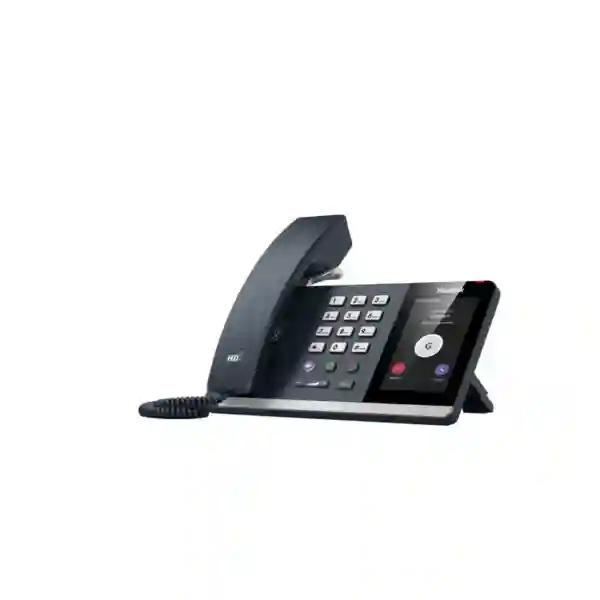
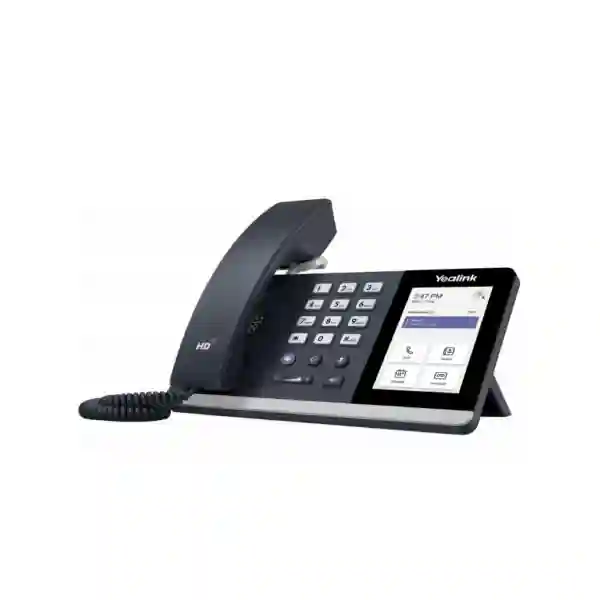
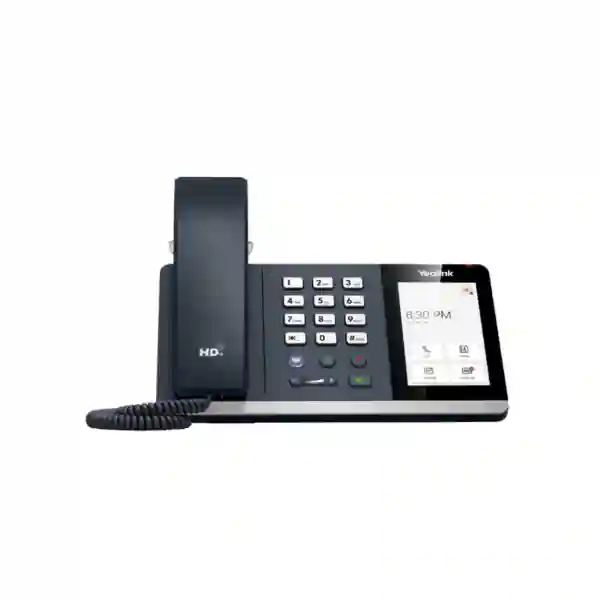
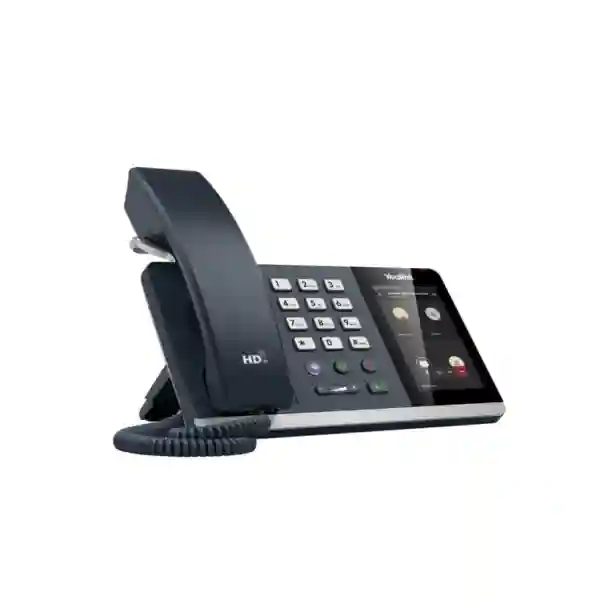
The Yealink MP54 E2 Teams Phone is designed for organizations that want a dedicated Microsoft Teams calling endpoint without moving every user to a premium executive phone. Yealink positions the MP54 E2 as an entry-level Microsoft Teams phone for general office workers, front desks and common-area scenarios. Its compact 4-inch capacitive touch display gives users a familiar Teams-oriented interface, while the dedicated Teams button provides direct access to core collaboration functions. For Tanzanian businesses standardizing voice communications around Microsoft 365 and Teams Phone, the MP54 E2 can provide a consistent desktop experience across reception counters, administration desks, shared workspaces and everyday office roles.
The E2 generation combines Android 15 with Microsoft Device Ecosystem Platform, Yealink Optima HD Voice, AI Noise Cancellation, a hearing-aid-compatible magnetic handset, built-in Bluetooth 5.2, built-in dual-band 2.4 GHz/5 GHz Wi-Fi, dual-port Gigabit Ethernet, IEEE 802.3af PoE support, USB Type-A connectivity and Teams/SIP hybrid mode. These capabilities make the device relevant to organizations that need a manageable, wired-or-wireless Teams desk phone that can fit into mixed office environments. FourTeck can help customers prepare a procurement brief covering handset quantities, network readiness, PoE availability, Teams licensing, headset requirements, user roles and deployment priorities before requesting a quotation.
Microsoft Teams desk experience
The MP54 E2 is built to place Microsoft Teams calling and meeting controls on a dedicated desk endpoint. It supports common call functions such as hold, mute, transfer, forward, visual voicemail, synchronized call logs, meeting controls, hot desking and common-area-phone use. This makes it suitable where a physical handset remains important for staff productivity, shared telephone access or customer-facing desks.
Business audio clarity
Yealink equips the MP54 E2 with HD handset and speaker audio, AI Noise Cancellation, full-duplex hands-free operation with acoustic echo cancellation and support for business voice codecs including SILK and G.722. The goal is to keep conversations understandable in busy office settings, reception areas and shared work zones where background activity can make voice calls harder to follow.
Flexible network placement
Dual-port Gigabit Ethernet and IEEE 802.3af PoE support allow the phone to integrate into structured office networks, while built-in dual-band Wi-Fi gives deployment teams another connection option where cabling plans differ. Bluetooth 5.2 and USB headset support also make the phone easier to adapt for users who prefer hands-free or wireless audio accessories.
Verified Yealink MP54 E2 technical highlights
| Area | MP54 E2 capability |
|---|---|
| Display | 4-inch 480 × 800 capacitive touch screen with five-point multi-touch surface |
| Platform | Android 15 with Microsoft Device Ecosystem Platform |
| Audio | HD handset and speaker, AI Noise Cancellation, full-duplex speakerphone with AEC |
| Ethernet | Dual-port Gigabit Ethernet |
| Power | IEEE 802.3af PoE Class 3; optional external adapter supported |
| Wireless | Built-in dual-band 2.4 GHz/5 GHz Wi-Fi and Bluetooth 5.2 |
| USB | 1 × USB Type-A port supporting USB headsets and flash drive functions |
| Network/security | IPv4/IPv6, DHCP/static addressing, TLS, HTTPS certificate management, IEEE 802.1X, WPA2/WPA3 and encrypted configuration files |
| Management | Browser/phone/auto-provisioning plus Microsoft and Yealink device management platforms |
| Operating modes | Microsoft Teams with Teams/SIP hybrid mode support |
Who should consider the Yealink MP54 E2?
The MP54 E2 is strongest where a business wants a dedicated desk phone for mainstream users rather than a large-screen executive endpoint. Typical roles include reception assistants, administrative staff, finance and operations users, shared desks, branch counters, customer-service positions and employees who spend much of the day handling voice calls but do not require a larger premium display. It is also relevant for common areas where a consistent Teams sign-in, hot-desking or shared-phone workflow is needed.
Selection should be based on the operating environment rather than screen size alone. Procurement teams should confirm whether every target seat has Ethernet, whether PoE is available from the access switch, whether Wi-Fi will be permitted for desk endpoints, whether users require USB or Bluetooth headsets, and whether the Teams tenant is configured for the desired calling scenario. Where devices will be shared, administrators should also define sign-in policy, common-area licensing, emergency calling requirements, VLAN design, certificate policy and device-management ownership before rollout.
Deployment and integration planning
A successful Teams phone deployment normally starts with Microsoft 365 and network readiness rather than handset delivery. Businesses should identify which users need direct numbers, call queues, auto attendants, shared calling or common-area access and then map those functions to the appropriate Microsoft Teams Phone licensing and tenant configuration. The MP54 E2 is a desk endpoint; it does not replace the need for the organization to prepare calling plans, operator connectivity, direct routing or other PSTN connectivity as applicable to the chosen Microsoft Teams architecture.
On the LAN side, the device supports dual-port Gigabit Ethernet and PoE, so a workstation can be connected through the phone where that design is appropriate. Network teams should validate PoE budgets, switch-port configuration, voice VLAN policy, DHCP, DNS, Internet access, certificates, firewall rules and quality-of-service priorities. Where Wi-Fi is preferred, built-in dual-band wireless connectivity can reduce dependence on a dedicated Ethernet run, but organizations should still verify signal quality, authentication method, roaming behavior and enterprise wireless policy before adopting Wi-Fi broadly for voice endpoints.
Headset strategy is another practical consideration. The USB Type-A interface can support USB headsets, while Bluetooth 5.2 enables compatible wireless headset workflows. Organizations buying for reception teams or frequent callers should compare headset comfort, microphone isolation, charging routines and desk mobility with the phone itself. For open-plan offices, AI Noise Cancellation and proper headset selection can work together to improve caller experience.
Yealink MP54 E2 Teams Phone Tanzania
For Tanzanian organizations adopting Microsoft Teams as a central collaboration platform, the Yealink MP54 E2 can serve as a practical physical phone for users who still benefit from a traditional handset and a dedicated calling device. Tanzania deployments often span a mixture of head offices, branches, front desks, shared service points and hybrid work arrangements, so the main buying question is not simply whether the phone works with Teams, but how it fits into the broader communication environment. The MP54 E2 supports that type of planning with Ethernet, PoE, Wi-Fi, Bluetooth and USB connectivity, giving IT teams options when office layouts and endpoint requirements vary from site to site.
A Tanzania procurement plan should start with role mapping. Reception and administrative teams may value a physical handset, clear speakerphone audio, visual voicemail, transfer controls and quick access to Teams functions. Common areas may benefit from a shared-phone configuration, while ordinary office users may prefer a dedicated device that keeps calling available even when a laptop is closed or being used for another task. Where companies have multiple branches, centralized Microsoft and Yealink management capabilities can help administrators standardize configuration, firmware and support processes instead of treating every phone as a standalone appliance.
Network readiness is equally important. Businesses should confirm PoE switch capacity, LAN addressing, Internet resilience, VLAN design and quality-of-service settings before a large rollout. Where Ethernet is unavailable or inconvenient, built-in dual-band Wi-Fi provides an alternative, but voice traffic still depends on stable wireless coverage. Organizations should also review Teams Phone licensing, PSTN connectivity, emergency calling policy and number assignment. FourTeck can support the quotation stage by helping buyers define the number of devices, target user groups, headset requirements, power method and deployment environment. For broader East African purchasing discussions, customers can also review FourTeck Kenya solutions and FourTeck Uganda solutions when coordinating multi-country standards.
Yealink MP54 E2 Teams Phone Dar es Salaam
Dar es Salaam businesses frequently combine customer-facing functions, corporate administration, professional services, logistics operations and multi-department offices in the same communications environment. The Yealink MP54 E2 is well suited to desks where dependable Teams calling is more important than a premium display. A front office can use its dedicated handset and speakerphone for everyday call handling, while operations teams can benefit from Teams presence, synchronized call history, transfer and hold functions. The 4-inch touch interface is large enough for routine Teams navigation while keeping the physical footprint compact for crowded counters and standard office desks.
For a Dar es Salaam deployment, infrastructure planning should take account of each floor or branch network. PoE is usually the cleanest powering method where compatible switches are available, because it reduces the need for separate power adapters at every desk. Dual-port Gigabit Ethernet can also simplify cable planning when a workstation and phone share a desk position. Built-in Wi-Fi is useful in areas where structured cabling is limited, but organizations should assess RF coverage, authentication policy and congestion before relying on wireless voice at scale. Bluetooth and USB headset support are particularly relevant for receptionists, inside-sales teams and service desks handling repeated calls through the day.
Buyers should ask for a quotation that distinguishes the phone hardware from licensing and telephony service components. Microsoft Teams Phone features can depend on tenant licensing and chosen PSTN connectivity, so procurement teams should document whether users need direct inward dialing, call queues, auto attendants, shared calling or common-area operation. A clear bill of requirements should also state whether power adapters are needed, since Yealink lists the external AC adapter as optional. For organizations that also operate in the Gulf, FourTeck UAE can be a useful regional reference point when standardizing communications procurement across offices.
Yealink MP54 E2 Teams Phone Mwanza
In Mwanza, the Yealink MP54 E2 can fit organizations that need professional Teams calling across branch offices, healthcare administration, education, finance, hospitality, trading operations and customer-service environments. The device is especially relevant where users prefer the familiarity of a handset but the organization is moving call control into Microsoft Teams. Instead of depending only on laptops and mobile clients, selected desks can retain a permanent voice endpoint with a consistent interface, dedicated Teams access and full-duplex speakerphone capability.
For branch deployment, IT teams should consider how devices will be provisioned and supported remotely. Yealink supports browser, phone and auto-provisioning workflows together with Microsoft and Yealink device management platforms. That matters when technical administrators are not physically present at every branch. Standardizing on a known configuration can reduce differences between sites and make it easier to manage firmware, troubleshoot logs and apply policy. Network teams should also decide whether the phone sits on a dedicated voice VLAN, how 802.1X will be used if required, and how HTTPS and certificate policies align with the wider security environment.
Mwanza buyers preparing a purchase request should include the user count, expected call volumes, switch and PoE details, headset preferences, Teams tenant status and intended calling architecture. If a deployment includes areas with weak or inconsistent cabling, built-in Wi-Fi may offer useful flexibility, but coverage should be tested where the phone will actually sit. For call-intensive staff, Bluetooth 5.2 and USB headset support can improve movement and ergonomics. The strongest procurement decision is one that combines the phone with verified network, licensing and support requirements rather than purchasing handsets before the communications design has been finalized.
Yealink MP54 E2 Teams Phone Arusha
Arusha organizations in tourism, professional services, NGOs, education, public administration and branch-based businesses often need straightforward communications that can be managed consistently across teams. The Yealink MP54 E2 provides a Microsoft Teams-oriented desk experience for employees who handle regular voice calls, shared reception duties or customer enquiries. Its combination of a touch display, HD voice, AI Noise Cancellation and physical handset makes it a practical middle ground between software-only calling and more expensive executive endpoints.
When selecting the MP54 E2 for Arusha, the buying team should evaluate how each user works. A reception desk may prioritize transfer, hold, speakerphone and headset capabilities. A shared office may require hot desking or common-area configuration. A back-office user may simply need reliable Teams calling with presence and synchronized call records. Matching user roles to device functions prevents overbuying and helps reserve premium devices for users who genuinely need larger screens or advanced executive features.
Deployment planning should include PoE availability, Ethernet cabling, Wi-Fi coverage, QoS and Internet resilience. The device supports dual-port Gigabit Ethernet and wireless connectivity, so it can adapt to different workspace layouts, but every connection method still needs sound network design. Teams licensing and PSTN integration should be checked separately from the handset itself. Organizations with regional sites can use the MP54 E2 as part of a broader endpoint standard, with centralized management and documented settings improving consistency between locations. A quotation request should state device quantities, power requirements, preferred headset type and whether deployment guidance is required, enabling a more accurate proposal.
Yealink MP54 E2 Teams Phone Dodoma
Dodoma offices seeking a dedicated Microsoft Teams phone for administrative desks, reception areas, departmental users and shared spaces can consider the Yealink MP54 E2 as an entry-level business endpoint. It retains the physical advantages of a desk phone while presenting the Microsoft Teams calling environment on a 4-inch capacitive display. The combination can be useful where users prefer direct access to a handset, speakerphone and Teams controls without keeping a PC audio session active throughout the day.
Public-sector offices, associations, institutions and private enterprises should approach deployment with clear policy. Shared phones need account and sign-in decisions, while individual users require suitable Teams Phone licensing and number assignment. Emergency calling, call queues, auto attendants and PSTN connectivity must be defined at the tenant level. The MP54 E2 supports device-side functions, but the overall user experience still depends on how Microsoft Teams has been configured for the organization.
From an infrastructure perspective, dual-port Gigabit Ethernet and PoE support make the device easy to fit into many structured networks. Security teams can also account for IPv4/IPv6, TLS, HTTPS certificate management and 802.1X support when building endpoint policies. Where wired ports are limited, built-in Wi-Fi can create placement flexibility, though wireless voice should be validated for signal quality and stability. Dodoma procurement teams should request quotes based on exact seat counts, location types, PoE status, headset requirements and planned rollout phases. This produces a more useful commercial response than requesting a unit price without describing the environment in which the devices will operate.
Yealink MP54 E2 Teams Phone UAE
Organizations in the UAE that operate Microsoft Teams Phone environments may use the Yealink MP54 E2 for mainstream office users, reception areas, shared desks and common spaces. The device is particularly relevant to multi-site businesses that want to apply the same Teams endpoint model in regional offices while keeping deployment and management procedures consistent. Its Ethernet, PoE, Wi-Fi, Bluetooth and USB capabilities offer flexibility across modern office layouts, while Android 15 and Microsoft Device Ecosystem Platform provide a current software foundation for the Teams experience.
UAE buyers should coordinate the handset decision with the organization’s Microsoft licensing, PSTN connectivity and corporate network policies. Direct Routing, Operator Connect or other approved connectivity approaches may be part of the solution depending on the tenant and telecom design, but these services should be treated separately from the physical phone. Network teams should validate VLANs, QoS, PoE budgets and certificate policies before deployment, especially in offices with tightly controlled access networks. Where flexible seating is common, hot desking and centralized device management can become more important than the hardware itself.
Procurement teams operating between the UAE and East Africa may value a consistent endpoint standard because it simplifies training, support documentation and spare-device planning. The MP54 E2 can cover entry-level Teams desk requirements, while other Yealink models can be reserved for executives or specialized roles. For broader UAE infrastructure and IT requirements, buyers can explore FourTeck IT services in the UAE alongside device procurement discussions.
Yealink MP54 E2 Teams Phone Uganda
Ugandan organizations standardizing communications on Microsoft Teams can use the Yealink MP54 E2 for office workers, shared service desks and front-office functions that need a permanent desk endpoint. The hardware provides a familiar handset experience together with Teams call controls, presence integration and a dedicated Teams button. Built-in Bluetooth and Wi-Fi distinguish the E2 model from older approaches that may depend on separate dongles, which can simplify procurement and reduce the number of accessories required for common deployments.
For organizations with Kampala headquarters and up-country branches, centralized management is an important planning factor. Microsoft and Yealink device-management support can help technical teams standardize configuration and monitor device fleets. Branches should still be assessed individually for network quality, switch power, Internet resilience and user needs. A site with limited PoE may require optional power adapters, while a site with limited cabling may make greater use of Wi-Fi. Headset choices should also match job roles, particularly for service desks and contact-heavy departments.
A procurement request should identify whether devices are assigned to individual users, shared through hot-desking or configured as common-area phones. Teams licensing and PSTN arrangements depend on that use case. Organizations can review FourTeck Uganda for regional technology requirements while coordinating a consistent Microsoft Teams endpoint strategy across East African offices.
Yealink MP54 E2 Teams Phone Kampala
Kampala offices often combine customer-facing desks, sales teams, finance departments, service operations and administrative staff who may all use Teams differently. The MP54 E2 can be deployed selectively where a physical phone improves call handling, particularly for employees who transfer calls frequently, work with headsets or need a stable desk endpoint independent of their computer. Its 4-inch touch display provides the Teams-oriented interface without the space or cost associated with larger executive-class devices.
For dense office environments, IT teams should validate voice VLAN configuration, PoE switch capacity and quality-of-service policies. Full-duplex speakerphone performance and AI Noise Cancellation can improve everyday calling, but network quality remains essential for consistent Teams voice. Bluetooth 5.2 and USB headset connectivity add flexibility for users who need hands-free operation. Where departments move between desks, hot-desking support can be incorporated into the Teams design, subject to licensing and organizational policy.
Kampala buyers should request a solution-oriented quotation rather than hardware alone. Useful information includes the number of phones, expected user roles, whether the site has PoE, whether Wi-Fi will be used, what headset type is preferred, and how Microsoft Teams calling is currently configured. This allows the proposed bill of materials to reflect practical installation needs and avoids surprises such as missing power adapters or unplanned headset accessories.
Yealink MP54 E2 Teams Phone Arua
Arua organizations looking to connect branch offices or customer-service points to a Microsoft Teams calling environment can consider the Yealink MP54 E2 where a compact, manageable desk phone is more suitable than relying entirely on laptops. The physical handset is valuable for reception and administrative roles, while speakerphone and headset options support different work styles. Because the phone includes both Ethernet and Wi-Fi, deployment teams can choose the connection method that best fits each workspace rather than being restricted to one approach.
Branch reliability should be assessed carefully. Microsoft Teams calling depends on stable IP connectivity, so Internet quality, local LAN design, DNS and traffic prioritization should be reviewed before installing large numbers of devices. PoE can simplify desk setup if compatible switches are already in place; otherwise the optional power-adapter requirement should be included in the purchase plan. Administrators should also document how phones will be provisioned and updated from a central location, reducing the need for manual changes at every branch.
For Arua procurement, the most useful request for quotation will specify the exact number of user and shared phones, network conditions, headset preferences and Teams licensing status. If the organization has branches elsewhere in Uganda, applying a standard device profile can simplify support and user training. The MP54 E2’s management options, security features and mainstream Teams feature set make it a practical candidate for that standardization process.
Yealink MP54 E2 Teams Phone Mbarara
Mbarara businesses and institutions can use the Yealink MP54 E2 to provide selected staff with a dedicated Microsoft Teams phone while maintaining a consistent digital workplace strategy. The device is a strong fit for employees who need regular calling but do not require the larger displays associated with premium models. Reception desks, departmental administrators, branch managers and shared workspaces can all benefit from having a fixed endpoint that remains available even when computers are occupied with other tasks.
The key deployment decision is how the phone connects and receives power. Dual-port Gigabit Ethernet with PoE can keep installations neat in offices with managed switches, while built-in Wi-Fi enables additional placement flexibility. Teams voice performance should still be supported by reliable Internet connectivity and appropriate QoS. Bluetooth and USB interfaces make headset adoption straightforward for roles that require frequent or private calls. Security teams can also integrate 802.1X, TLS and HTTPS certificate controls into their endpoint standards where those policies are in use.
Before purchasing, Mbarara customers should verify Microsoft Teams Phone licensing, PSTN connectivity and user-account design. Shared devices may need common-area planning, while individual desks may require direct number assignment and organizational calling policies. Providing these details during quotation helps ensure that the phone, power method and accessories are aligned with the actual deployment instead of being treated as isolated hardware.
Yealink MP54 E2 Teams Phone Gulu
In Gulu, organizations modernizing branch communications can use the Yealink MP54 E2 to give employees and shared areas a dedicated Microsoft Teams calling endpoint. This is useful where staff require a physical handset for regular business calls but the organization wants presence, voicemail, meeting controls and centralized collaboration to remain within Teams. The device supports standard call actions such as hold, mute, transfer and forward, together with visual voicemail and synchronized call logs.
Deployment teams should look at branch network characteristics before ordering. PoE availability can reduce the number of power supplies needed, while dual-port Gigabit Ethernet can make desk cabling more efficient. Wi-Fi may be useful for temporary or difficult-to-cable positions, although voice quality still depends on wireless signal stability. Businesses should also plan how devices will be managed and updated remotely, particularly where local IT resources are limited. The MP54 E2 supports Microsoft and Yealink management platforms that can contribute to a standardized support process.
A Gulu quotation request should specify the intended roles for each phone, any common-area use, headset requirements and the state of the Teams tenant. Separating the hardware requirement from licensing, calling plans and telecom connectivity produces a clearer procurement process. It also helps the customer identify whether additional network, switch or accessory work is required before deployment begins.
Yealink MP54 E2 Teams Phone Kenya
Kenyan organizations using Microsoft Teams across corporate offices, branch locations and service desks can consider the Yealink MP54 E2 as an entry-level certified-style Teams endpoint for routine business calling. It is intended for general office users, front desks and common areas, which makes it relevant to organizations that want to reserve premium models for executives while giving mainstream users a consistent Teams phone. The 4-inch touch screen, dedicated Teams button and physical handset support quick adoption among users familiar with traditional desk phones.
For Kenyan deployments, centralized device management can be particularly valuable where organizations operate in Nairobi and multiple regional branches. IT teams can define provisioning standards, network policies and support procedures once and apply them across locations. PoE and dual-port Ethernet simplify many desk installations, while built-in Wi-Fi gives flexibility where structured cabling is not practical. Bluetooth and USB headset options also support call-intensive teams such as customer service, telesales and reception.
Procurement should include a review of Microsoft Teams Phone licensing, number assignment and PSTN integration. The handset itself provides the endpoint experience, but overall calling functionality depends on the tenant and telecom design. Buyers coordinating regional standards can visit FourTeck Kenya for related solutions and use the same hardware-selection criteria when planning deployments across Tanzania, Kenya and Uganda.
Yealink MP54 E2 Teams Phone Kuwait
Kuwait-based businesses that use Microsoft Teams Phone can deploy the Yealink MP54 E2 at mainstream office desks, shared workspaces and reception points where users need dependable voice calling with a physical handset. The entry-level positioning is useful for large deployments because organizations can standardize routine users on a consistent device while assigning higher-tier phones only to roles that require larger displays or advanced executive functions.
The device’s built-in Wi-Fi and Bluetooth, Gigabit Ethernet, PoE and USB headset support give IT teams flexibility when fitting phones into contemporary workplaces. Before rollout, network teams should validate switch power, voice VLAN settings, Internet quality and security policies. Administrators should also confirm how Microsoft Teams devices are enrolled, monitored and updated. Central management can be important for organizations with multiple floors, sites or remote support teams.
Kuwait procurement teams should clarify the distinction between endpoint hardware, Microsoft licensing and PSTN service. A complete request should state device quantities, user roles, power requirements, headset needs and whether phones are personal, shared or common-area devices. Customers coordinating wider regional projects can review FourTeck Kuwait when aligning communication infrastructure and endpoint purchasing.
Yealink MP54 E2 Teams Phone Ghana
Ghanaian businesses moving calling workflows into Microsoft Teams may use the Yealink MP54 E2 for users who still need a permanent desk phone. Front desks, administrative teams, customer-care personnel and shared office positions can gain direct access to Teams calling without depending solely on laptop audio. The combination of a physical handset, touch display, speakerphone and headset options supports a broad range of everyday voice tasks.
Multi-site organizations should focus on repeatable deployment. A standardized configuration for network settings, provisioning, security and Teams sign-in can reduce support complexity when phones are spread across offices. PoE can simplify installation where supported by access switches, while Wi-Fi can help in areas where Ethernet is unavailable. Bluetooth and USB connectivity are useful when staff need more freedom of movement or privacy during calls.
A Ghana quotation should identify how many phones are required, where they will be installed, whether each desk has PoE, and whether accessories such as headsets or optional adapters are needed. It should also describe the Microsoft Teams Phone environment, including whether the deployment uses shared phones, individual user numbers, call queues or other tenant features. Defining these factors early reduces procurement ambiguity and helps ensure the device is matched to the correct operational role.
Yealink MP54 E2 Teams Phone Nigeria
Nigerian enterprises, professional firms, service providers and multi-branch organizations can use the Yealink MP54 E2 as a dedicated Teams desk endpoint for everyday office calling. The phone is particularly relevant where organizations want Microsoft Teams to be the main collaboration platform but still have teams that prefer or require traditional handset ergonomics. Its compact form, 4-inch touch display and physical call controls suit standard desks, counters and shared positions.
For larger Nigerian deployments, resilience and standardization should drive the architecture. Teams voice depends on stable network and Internet performance, so organizations should validate ISP design, LAN quality, QoS and power resilience alongside the phone purchase. PoE can reduce power-cable clutter and centralize power through network infrastructure. Wi-Fi offers useful deployment flexibility, but business voice should only be placed on wireless after signal strength and network policy have been validated for each area.
Procurement teams should also classify users. Front-office staff may need headsets and frequent transfer controls, common areas may require shared configurations, and standard office users may need only individual calling and voicemail. Licensing, number assignment and PSTN integration should be scoped with the Teams environment. This role-based approach allows the MP54 E2 to be used where its entry-level feature set is appropriate while avoiding both under-specification and unnecessary premium spending.
Yealink MP54 E2 Teams Phone Seychelles
Seychelles organizations that rely on Microsoft Teams for communication across offices, hospitality operations, professional services or distributed teams can use the Yealink MP54 E2 where a fixed business phone remains valuable. Reception desks and administrative users can benefit from a physical handset and familiar call controls, while Teams presence and voicemail keep the endpoint connected to the wider collaboration environment. The compact design also suits counters and smaller work areas where a large-screen phone would be unnecessary.
Island and multi-site environments make infrastructure planning important. The device supports Ethernet with PoE as well as built-in Wi-Fi, allowing deployment teams to choose the best connection method for each location. Reliable voice performance still depends on LAN and Internet stability, so connectivity assessment should be part of the project. Bluetooth and USB headset support can improve usability for staff handling guest calls, reservations, customer enquiries or back-office coordination.
When requesting a quote in Seychelles, buyers should provide the quantity, intended user roles, power approach, headset requirements and Teams configuration. They should also state whether devices will be shared or assigned individually and whether deployment is for one office or multiple locations. Clear scoping helps separate the physical handset requirement from Microsoft licensing and telecom services, producing a more accurate plan for implementation and ongoing support.
Buying guidance: MP54 E2 versus a higher-tier Teams phone
Choose the MP54 E2 when the user needs reliable Teams calling, a physical handset, touch navigation, Wi-Fi, Bluetooth, PoE and headset connectivity but does not require a large premium screen. Consider a higher-tier Yealink Teams phone for executives, power users or workflows where a larger display materially improves the experience. A common strategy is to standardize mainstream users on the MP54 E2 and deploy premium models selectively, reducing unnecessary device spend while preserving a consistent Teams ecosystem.
Do not compare phones only by purchase price. Include headset requirements, power adapters, network switching, licensing, management, deployment labor and expected support model. A lower-cost handset can become expensive if it requires unexpected infrastructure changes, while a slightly better-integrated device can reduce operational effort over its lifecycle. The MP54 E2’s built-in Wi-Fi and Bluetooth, PoE support and centralized management options are therefore relevant to total deployment planning, not merely convenience features.
Quotation checklist for Yealink MP54 E2
For a useful quotation, prepare the total number of phones, deployment locations, user roles, Teams tenant status, Microsoft Teams Phone licensing status, PSTN connectivity approach, PoE availability, number of required power adapters, Ethernet or Wi-Fi preference, headset requirements, common-area or hot-desking needs, desired rollout schedule and any centralized management requirements. This information helps align the bill of materials with the actual environment and reduces the chance of missing accessories or infrastructure dependencies.
Frequently asked questions
Is the Yealink MP54 E2 designed for Microsoft Teams?
Yes. Yealink positions the MP54 E2 as an entry-level Microsoft Teams phone for office workers, front desks and common areas. It includes a dedicated Teams button and supports Microsoft device-management workflows.
Does the MP54 E2 support Wi-Fi and Bluetooth without extra dongles?
Yes. The MP54 E2 specification lists built-in dual-band 2.4 GHz/5 GHz Wi-Fi and built-in Bluetooth 5.2.
Can the Yealink MP54 E2 be powered by PoE?
Yes. It supports IEEE 802.3af Power over Ethernet, Class 3. An external Yealink AC adapter is also supported as an optional power method.
Can I connect a headset?
Yes. The device includes a USB Type-A port for USB headsets, a dedicated RJ9 headset port and Bluetooth 5.2 for compatible wireless headset use.
Does the phone support SIP as well as Teams?
Yealink lists Teams and SIP hybrid mode support, which can be useful in organizations that need flexibility between Microsoft Teams and SIP-oriented calling environments. The exact deployment should be validated against the organization’s configuration and licensing.
What should I verify before ordering the MP54 E2?
Confirm the number of users, Microsoft Teams Phone licensing, PSTN connectivity, PoE availability, network readiness, Wi-Fi policy, headset requirements, power-adapter needs and whether phones will be assigned to individuals, hot desks or common areas.
Decision recap
The Yealink MP54 E2 is a strong fit for organizations that want an entry-level Microsoft Teams desk phone with a physical handset, touch screen, current Android platform, built-in wireless connectivity, Gigabit Ethernet, PoE, USB headset support and centralized management. It is most appropriate for standard office users, reception functions and common areas rather than users who need large executive displays. The purchasing decision should be made together with Teams licensing, PSTN design, network readiness, power strategy and accessory requirements.
Talk to FourTeck about your Teams phone rollout
Share your user count, office locations, Teams environment, PoE availability and headset needs to build a more accurate Yealink MP54 E2 procurement plan. FourTeck can use that information to structure a quotation around the correct number of devices and accessories rather than treating the phone as an isolated line item.




Reviews
There are no reviews yet.