
Yealink MeetingBoard Pro 75 Zoom Rooms System
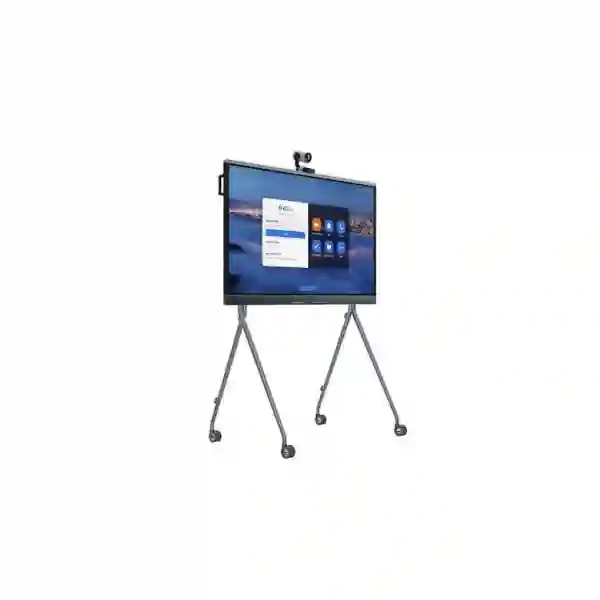
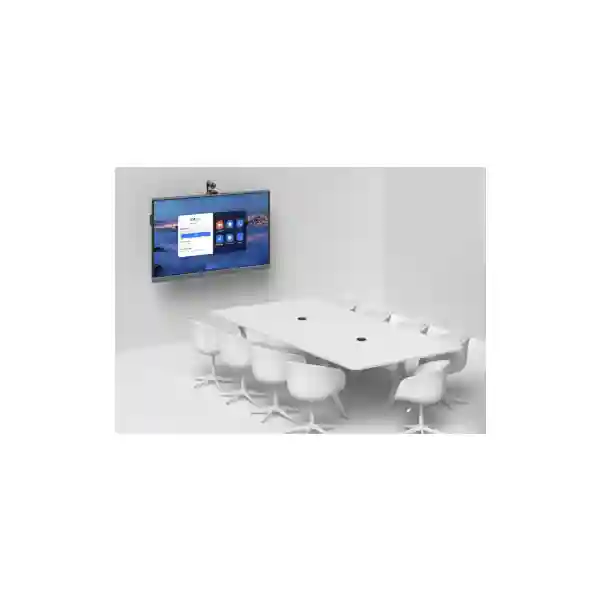
The Yealink MeetingBoard Pro 75 Zoom Rooms System is an all-in-one collaboration board built for organisations that want a cleaner, easier-to-manage meeting room. It combines a 75-inch 4K anti-glare multi-touch display, triple 50MP camera architecture, intelligent camera framing, integrated speakers, a 16-MEMS microphone array, content sharing and collaborative whiteboarding in one device. For medium-size meeting spaces, Yealink positions the 75-inch model for approximately 6–12 participants, making it especially relevant to boardrooms, management rooms, project spaces, training rooms and shared collaboration areas where clear visual communication matters.
What the Yealink MeetingBoard Pro 75 brings to a Zoom Room
A conventional video room often grows into a collection of separate devices: display, camera, microphones, speakers, room computer, cabling, content-sharing hardware and whiteboard. The MeetingBoard Pro 75 consolidates the principal meeting functions into a single integrated platform. That simplification can make room planning more straightforward because the organisation can begin with one primary collaboration endpoint and then add accessories only where the room layout or workflow calls for them.
For Zoom-focused teams, the value is not only that Zoom is supported natively, but that the underlying room hardware is designed as an integrated audio, video and touch experience. The display is 3840 × 2160, uses an anti-glare panel and supports 20-point infrared touch. The built-in camera system uses three 50MP sensors with a wide-angle view, electronic pan and tilt and digital zoom. Yealink also provides AI-oriented views such as Auto Framing, Speaker Tracking, IntelliFocus and Video Fence, allowing meeting participants to be presented more deliberately than with a fixed single-camera view.
Audio is equally important. The MeetingBoard Pro platform uses a 16-MEMS microphone array and Yealink specifies up to 12 metres of full-duplex pickup, alongside noise suppression, echo cancellation, reverberation cancellation, beamforming and automatic gain control. Those capabilities are particularly useful in rooms where participants sit at different distances from the display or where a conventional tabletop microphone would create additional cabling and clutter.
Professional video
Triple 50MP camera architecture, up to 4K video output, autofocus, HDR/WDR functions, wide-angle coverage and AI framing are designed to keep remote participants connected to the room conversation.
Room-scale audio
The 16-MEMS array, stereo speakers and full-duplex processing help support natural discussion without asking every participant to crowd around a tabletop device.
Interactive collaboration
Multi-touch whiteboarding, four-level stylus input, palm rejection, shapes, notes and content sharing let participants move from conversation to visual work without changing tools.
Flexible deployment
Wall-mount, wall-stand and floor-stand approaches allow the 75-inch board to fit permanent conference rooms, executive spaces or movable collaboration zones.
Verified technical highlights
| Display | 75-inch anti-glare LCD, 3840 × 2160, 60 Hz, 400 cd/m², 178° viewing angle |
| Touch | Infrared touch, 20 touch points, ±1 mm accuracy, four-level stylus |
| Camera | Built-in triple 50MP camera system, wide-angle HFOV 98.2°, 8× digital zoom, up to 4K output |
| AI views | Auto Framing, Speaker Tracking, picture-in-picture, IntelliFocus and Video Fence |
| Microphones | 16 MEMS microphone array with up to 12 m full-duplex pickup |
| Wireless | Wi-Fi 6, dual-band 2.4/5 GHz, 2×2 MIMO; Bluetooth 5.1 |
| Networking | 2 × 10/100/1000 Mbps Ethernet, IPv4/IPv6, DHCP/static IP, VLAN and QoS functions |
| Management | Web/device/touch configuration, Yealink management options and Zoom Device Management support |
Buying and deployment guidance
When planning a MeetingBoard Pro 75 deployment, begin with the room rather than the device. Confirm typical and maximum participant count, seating distance, camera sightlines, display visibility, acoustic conditions, available wall structure, power and network points, and whether users expect the board to stay fixed or move between collaboration areas. Yealink positions the 75-inch version for medium rooms and approximately 6–12 people, but room geometry matters as much as headcount.
Also confirm whether the project is intended to operate primarily as a native Zoom Room, whether users need regular laptop-driven BYOD meetings, whether a dedicated touch controller is preferred, and whether extended audio or optical zoom is needed. Optional Yealink accessories include the CTP25 touch panel, VCM35 or VCM36-W microphones, CM20 ceiling microphone, CS10 ceiling speaker, MB-12X Pro optical zoom camera module, floor stands and sharing accessories. Accessory selection should be based on the actual room requirement rather than added automatically.
Yealink MeetingBoard Pro 75 Zoom Rooms System Tanzania
For organisations evaluating the Yealink MeetingBoard Pro 75 Zoom Rooms System in Tanzania, the main procurement question is usually how to standardise hybrid collaboration without overcomplicating meeting rooms. The 75-inch format is useful for medium boardrooms, management spaces, project rooms and training areas where a conventional display-plus-camera design may result in several separate devices. By integrating the display, cameras, microphones, speakers and digital whiteboard, the MeetingBoard Pro can become the centre of a Zoom-enabled room while keeping cabling and room hardware comparatively contained.
A Tanzania deployment should be planned around the office network, internet quality, room acoustics, power protection and mounting method. Teams should consider whether Ethernet can be provided at the board position, whether the conference VLAN and QoS policy are already defined, and whether the room needs to support guest laptops as well as the organisation’s normal Zoom workflow. Wi-Fi 6 is available, but a wired business network is often preferable for a permanent room where predictable performance is important. The MeetingBoard Pro supports enterprise-oriented controls including VLAN, 802.1X and secure web management, which can help IT teams fit the room into existing network policies.
Room design should also account for the 75-inch viewing area and the board’s camera position. A medium room with 6–12 participants should be checked for comfortable sightlines from the farthest seats, and strong backlighting should be managed where practical. The built-in triple camera design, wide field of view and AI framing features are intended to improve participant visibility, but good room lighting still matters. For longer rooms, specialised layouts or executive boardrooms, the optional MB-12X Pro optical camera module may be relevant after a proper assessment.
FourTeck Tanzania can be approached for requirement discussion, product selection and quotation preparation. Before requesting a quote, provide the room dimensions, participant capacity, preferred mounting approach, intended Zoom Room usage, existing network connection, and any need for expansion microphones, room control or movable stands. This gives the sales and technical conversation enough detail to distinguish a simple board deployment from a more complete collaboration-room project. For broader workplace technology planning, visit FourTeck Tanzania business technology solutions, which covers conferencing alongside networking, communications and integrated IT infrastructure.
Yealink MeetingBoard Pro 75 Zoom Rooms System Dar es Salaam
Dar es Salaam businesses often operate with distributed management teams, customer-facing departments and regional relationships that make dependable video collaboration important. A MeetingBoard Pro 75 deployment can suit corporate meeting rooms, professional-services offices, hospitality administration, education management, project organisations and enterprise branches where teams need a shared visual workspace as well as video calling. The 75-inch screen gives participants a larger canvas for Zoom meetings, dashboards, shared documents and digital whiteboarding without requiring a separate presentation display.
For a Dar es Salaam conference room, planning should focus on the complete meeting path: local audio clarity, camera coverage, display visibility, LAN access and internet connectivity. The integrated microphone array reduces dependency on loose tabletop peripherals, but room acoustics still influence perceived quality. Hard floors, glass partitions and untreated walls may create reverberation, so the room should be assessed rather than assuming electronic processing can solve every acoustic issue. Where ceiling or extended microphones are appropriate, Yealink provides expansion options that can be considered during design.
IT administrators should decide how the room will be managed before deployment. Native Zoom usage may be paired with Zoom Device Management, while local web/device configuration remains useful for setup and maintenance. Network teams should reserve appropriate addressing, confirm DHCP or static-IP policy, decide whether a dedicated meeting VLAN is required and apply QoS consistently with the organisation’s voice and video strategy. If the MeetingBoard is intended for high-importance executive meetings, use a stable wired LAN connection and suitable power protection rather than treating the room like an ad-hoc consumer video setup.
Procurement teams in Dar es Salaam should request a quotation that clearly identifies the board, selected mounting hardware and any optional accessories instead of comparing only a headline unit price. A wall-mounted executive room, a movable training environment and a collaboration area with additional microphones are three different configurations even when the same MeetingBoard Pro 75 is used. Include installation expectations and room readiness in the commercial scope so responsibilities are clear before procurement.
Yealink MeetingBoard Pro 75 Zoom Rooms System Mwanza
In Mwanza, the MeetingBoard Pro 75 can support organisations that need a professional meeting environment without dedicating a rack of separate collaboration hardware to every room. Regional offices, engineering and project teams, education organisations, healthcare administration, financial services and multi-branch businesses can use the board as a common surface for Zoom meetings, presentations and live whiteboard work. Because the display, camera, audio system and touch interface are integrated, the room can be easier for everyday users to understand than a collection of independently controlled devices.
A practical Mwanza deployment begins by matching the 75-inch screen to the room. Yealink associates this size with medium rooms and roughly 6–12 participants. Confirm table depth, seating arrangement and the furthest viewing distance. For a wide rectangular room, verify that the 98.2-degree horizontal field of view will include the intended seating positions. For a deeper space, evaluate whether an optional optical zoom camera module or different room layout would produce a better result than simply relying on digital zoom.
Connectivity planning is especially important for offices where conference traffic shares links with everyday business systems. Zoom video quality depends on the wider LAN and WAN environment, so the MeetingBoard should be part of the network design rather than treated as an isolated appliance. Review switching capacity, cable quality, internet resilience, wireless coverage if Wi-Fi will be used and security policy. The device supports gigabit Ethernet, Wi-Fi 6, VLAN features, 802.1X and secure management options, giving administrators several ways to align the room with enterprise practice.
When requesting a Mwanza quotation, identify whether the organisation wants a fixed conference-room asset or a movable collaboration board. Floor stands can be useful where different departments share a training or project area, while wall mounting gives a cleaner permanent appearance. Also state whether users need laptop sharing, dedicated touch control, extra microphones or extended camera reach. A requirements-led quotation is more useful than ordering the display first and discovering later that the room needs additional accessories.
Yealink MeetingBoard Pro 75 Zoom Rooms System Arusha
Arusha organisations often collaborate with partners, headquarters, field teams and international stakeholders, creating a strong use case for a consistent professional Zoom Room. The Yealink MeetingBoard Pro 75 can function as a shared collaboration surface where participants join scheduled video meetings, review presentations, annotate ideas and work visually on the same 4K touch display. The large 75-inch panel is particularly useful when remote participant video and shared content need to remain readable to everyone around a medium meeting table.
For hospitality groups, NGOs, tour and travel administration, professional offices, education organisations and project teams in Arusha, ease of use can be as important as raw specification. An integrated device reduces the number of components staff must identify before starting a call. Motion-based wake-up, integrated microphones and speakers, native meeting-platform support and touch interaction can create a more consistent room experience. This helps when the room is shared across departments and cannot depend on one technically confident user to set up every meeting.
Installation should still be treated as a small systems project. Confirm wall suitability and service access if the board will be fixed. If a floor stand is planned, verify movement routes, cable safety and where the unit will be powered and networked in each expected position. The MeetingBoard Pro supports wired and wireless content-sharing methods, but security policy should determine which options are enabled. Guest presentation workflows should be documented so external participants know how to share without IT assistance while keeping the organisation’s network standards intact.
Before procurement in Arusha, document the normal meeting profile: number of participants, remote sites, type of shared material, need for whiteboarding, room lighting and whether users frequently bring their own laptops. If the organisation already standardises Zoom, specify the desired Zoom Room licence and account workflow separately from the physical hardware purchase. This avoids confusing platform licensing with the capabilities of the device itself and makes deployment planning clearer.
Yealink MeetingBoard Pro 75 Zoom Rooms System Dodoma
For organisations in Dodoma, the Yealink MeetingBoard Pro 75 provides a structured way to modernise meeting spaces used for management briefings, inter-office coordination, project reviews, training and remote stakeholder discussions. The system can reduce the usual divide between “video conference room” and “presentation room” because the same device handles camera, audio, display, content sharing and interactive whiteboard tasks. That can be particularly useful where rooms serve several departments and must support both local discussion and remote participation.
The 75-inch model should be selected with room dimensions in mind rather than simply because it is the middle size in the MeetingBoard Pro range. Yealink positions it for medium spaces and approximately 6–12 people. Meeting planners should confirm that all participants can see shared spreadsheets and presentation text comfortably, that the integrated camera has an unobstructed view, and that the mounting height supports both seated viewing and standing whiteboard use. If users will write frequently, leave enough open floor area in front of the board.
For IT teams in Dodoma, deployment should include network, security and administration decisions. The device supports gigabit Ethernet, dual-band Wi-Fi 6 and common enterprise network controls. A dedicated collaboration VLAN may be appropriate in some organisations, while others can place the room on an existing managed corporate network. What matters is that addressing, DNS, internet access, firewall policy and quality-of-service treatment are considered before the installation date. A pre-installation network check prevents many avoidable commissioning delays.
A quotation request should separate essential hardware from optional room enhancements. The base requirement may be the MeetingBoard Pro 75 plus suitable mounting. Other spaces may benefit from a CTP25 controller, VCM36-W wireless microphones, ceiling audio or the MB-12X Pro camera module. State what problem each accessory is expected to solve. This keeps the procurement decision transparent and makes it easier to compare configurations on functionality rather than on an incomplete device list.
Yealink MeetingBoard Pro 75 Zoom Rooms System UAE
The Yealink MeetingBoard Pro 75 Zoom Rooms System is relevant to UAE organisations standardising hybrid meeting rooms across offices, executive floors, customer centres and project environments. The all-in-one approach is particularly useful where facilities and IT teams want a visually clean room with fewer visible devices. A single 75-inch collaboration board can replace the usual combination of display, camera, microphone array, speakers and separate digital whiteboard while retaining the option to expand with Yealink room accessories when a larger or more demanding space requires them.
In UAE deployments, organisations commonly have strong expectations around room appearance, management consistency and interoperability. The MeetingBoard Pro supports native Zoom as well as other operating modes, so it can be considered in environments where Zoom Rooms are the primary platform but guest-meeting flexibility also matters. The triple 50MP camera system, AI framing functions and 12-metre full-duplex audio specification help address medium-room coverage, while the 4K touch display supports both formal presentations and spontaneous collaboration.
IT teams should include identity, network segmentation, firmware management and room-account administration in the deployment plan. Avoid judging the project only by the display specification. A reliable meeting room depends on structured cabling, switching, internet path, power protection and platform configuration. If multiple UAE rooms are being rolled out, standardise the mounting position, room naming, network policy and accessory set as far as practical so support teams do not inherit several slightly different designs.
For broader UAE IT and collaboration requirements, the FourTeck UAE technology portfolio can provide regional context for integrated business infrastructure. When seeking a MeetingBoard Pro 75 quotation, specify room count, intended Zoom Rooms use, participant capacity and whether the requirement includes installation, movable stands, room controllers or extra AV coverage.
Yealink MeetingBoard Pro 75 Zoom Rooms System Uganda
Uganda organisations evaluating the MeetingBoard Pro 75 can use it as a standardised collaboration endpoint for management rooms, training spaces and multi-branch coordination. The 75-inch display is large enough for shared content and remote participant layouts in medium rooms, while touch and stylus support make the same device useful for planning workshops and live annotation. Because Zoom support is native, organisations already invested in Zoom can create a room experience that feels different from simply connecting a laptop to a television and webcam.
For Uganda deployments, attention should be given to network readiness and room continuity. The MeetingBoard Pro can connect over gigabit Ethernet or Wi-Fi 6, but a permanent Zoom Room should be designed around the most stable available business connection. If internet links are shared with other high-volume applications, capacity and traffic policy should be reviewed. The system supports VLAN and QoS functions that can fit into a managed enterprise network, but those features should be aligned with the switching and firewall design already in place.
Physical installation choices influence usability. A wall-mounted board can create a clean conference-room design; a floor stand can serve training rooms or multi-use collaboration areas. Where participants sit beyond the comfortable range of the built-in audio/camera arrangement, optional microphones or an optical zoom camera should be evaluated on room geometry. Do not add peripherals simply because they are available: define the seating plan and meeting style first, then select accessories that solve a specific coverage problem.
For region-specific technology context, organisations can also review FourTeck Uganda business communication and IT solutions. A useful quotation request should include room dimensions, attendee count, mounting preference, Zoom platform requirement, network readiness and any desired sharing or audio extensions.
Yealink MeetingBoard Pro 75 Zoom Rooms System Kampala
Kampala businesses can use the MeetingBoard Pro 75 to bring a more consistent Zoom experience to conference rooms where users currently assemble meetings from laptops, USB cameras and presentation screens. The integrated design is useful for offices with frequent client calls, board meetings, project updates and regional management discussions. Instead of reconnecting room components for each session, users have one large touch surface with built-in AV and whiteboard functions.
A Kampala project should assess user behaviour as closely as technical requirements. If staff frequently invite outside participants, guest-join and content-sharing procedures should be documented. If several departments use the room, simple operating instructions should be displayed or included in onboarding. If executives expect one-touch scheduled meetings, Zoom Room account configuration and calendar integration should be part of the project scope rather than treated as post-installation tasks.
The board’s 75-inch 4K display supports detailed shared content, but designers should remember that screen size does not eliminate poor seating. Avoid placing the farthest seats at extreme angles, and position the camera so foreground participants do not block colleagues. The wide-angle camera can cover broad seating, while IntelliFocus and speaker-oriented views can help remote viewers follow active discussion. In rooms with unusual depth, consider whether optional optical camera extension is justified.
Commercially, compare complete room configurations rather than nominal device pricing. Include the correct stand or wall-mount approach, any touch controller, additional audio, cabling, network preparation and installation expectations. This makes quotations easier to evaluate and reduces the risk of receiving a technically attractive board without the practical items required to put the room into service.
Yealink MeetingBoard Pro 75 Zoom Rooms System Arua
For organisations in Arua that coordinate teams across locations, an integrated meeting board can offer a more structured collaboration environment than ad-hoc laptop conferencing. The MeetingBoard Pro 75 combines the visual scale needed for group meetings with built-in cameras, microphones and speakers, allowing a room to operate as a shared business resource rather than a collection of personal devices. Whiteboarding also adds value for training, planning and operational discussions where teams need to capture ideas while remote colleagues remain part of the session.
Connectivity should be treated as a design input. The platform can use wired Ethernet or Wi-Fi 6, yet the best choice depends on the office. For a fixed conference room, wired connectivity is usually easier to monitor and isolate from day-to-day wireless variability. If redundancy is important, the wider site internet architecture should be reviewed separately; the MeetingBoard itself cannot compensate for an unstable WAN. Network readiness, firewall policy and available bandwidth should therefore be confirmed before installation.
The 75-inch model is aimed at medium rooms, so smaller spaces may be better suited to another size while larger rooms may demand additional AV coverage. In Arua, this sizing discipline is important when technology must serve for several years. Selecting a board only because it is available can result in a screen that overwhelms the room or a camera/audio system that does not match the seating plan. Measure the room, sketch the table position and identify typical participant count first.
Procurement documentation should also separate the Zoom service requirement from the Yealink hardware requirement. Confirm who supplies and administers the Zoom Room licence, how the room account is created and who owns ongoing device management. Clear ownership makes support easier when the system moves from project stage into daily use.
Yealink MeetingBoard Pro 75 Zoom Rooms System Mbarara
The MeetingBoard Pro 75 can suit Mbarara organisations that need a professional collaboration space for management, training, multi-site coordination or external meetings. Its all-in-one design helps reduce the room setup burden: camera, microphone array, speakers and interactive display are already part of the platform. This is useful where different users book the same room and the organisation wants the experience to be repeatable without repeatedly connecting cables and troubleshooting USB devices.
Whiteboarding is a practical differentiator. The multi-touch display supports multiple points of touch, stylus interaction and palm rejection, helping teams brainstorm, annotate and structure ideas on the screen. For training or project work, that can make remote sessions more participatory than a conventional video call. However, organisations should confirm how whiteboard content will be stored or shared within their chosen meeting workflow so that collaboration does not end when the room session closes.
From an infrastructure perspective, power, mounting and network access should all be prepared at the desired board position. The 75-inch device is substantial collaboration hardware, so wall installation must use an appropriate mounting solution and suitable structure. A mobile floor stand creates flexibility but also changes cable management and physical safety considerations. Where movement is expected, define safe parking positions and make sure power and network access are available where the board is normally used.
For quotation preparation in Mbarara, include the number of rooms, dimensions, user capacity and any need for extra microphones, controllers or camera reach. Ask for the solution to be listed as a complete configuration so decision-makers can understand what is essential, what is optional and what may be added later as meeting-room requirements evolve.
Yealink MeetingBoard Pro 75 Zoom Rooms System Gulu
Gulu organisations considering a dedicated Zoom Room can use the MeetingBoard Pro 75 to create a central collaboration environment for team meetings, remote training, programme reviews and stakeholder sessions. The integrated 4K display and touch surface give the room a clear focal point, while the built-in camera and audio subsystems reduce dependence on personal laptops. That can improve meeting consistency in shared rooms where staff have different devices and levels of technical experience.
For remote collaboration, user experience depends on both local room quality and the external network path. The board provides enterprise networking and secure management options, but site internet performance must still be appropriate for video meetings. Organisations should review peak usage patterns, internet resilience, switch ports and cable routes before commissioning. If meetings are mission-critical, consider the broader connectivity strategy rather than assuming a premium endpoint alone guarantees the result.
Camera intelligence can be valuable when several people participate actively. Auto Framing can adjust composition as participants enter or leave, Speaker Tracking can help remote viewers identify the active speaker, and IntelliFocus can create more focused views. Video Fence is intended to help limit framing to a defined meeting zone. These functions are useful in open or multi-purpose spaces, but room boundaries, seating and lighting should still be planned to support the intended experience.
A Gulu procurement request should specify whether the device is for a fixed boardroom, training room or adaptable shared area. Include desired mounting, typical user count, Zoom account approach and accessory needs. That level of detail helps distinguish a complete deployable room from a simple hardware-only purchase and supports a more meaningful commercial comparison.
Yealink MeetingBoard Pro 75 Zoom Rooms System Kenya
In Kenya, the MeetingBoard Pro 75 fits organisations seeking a standard collaboration platform across head offices, branches, training centres and client-facing rooms. A 75-inch touch display can handle both remote participant views and detailed business content, while the integrated audio and camera design keeps the room visually cleaner than a multi-component installation. Organisations already standardising Zoom can use native platform support as the basis for a repeatable meeting-room template.
Kenya deployments should pay attention to rollout consistency when more than one room is involved. Define a reference design: board height, network connection, naming convention, Zoom Room configuration, cable routing and accessory policy. A standard room template reduces support effort and makes user training easier. Where different room sizes exist, maintain the same operating workflow while adapting screen size or optional AV extension to the space.
The MeetingBoard Pro 75 supports Ethernet, Wi-Fi 6, Bluetooth and multiple content-sharing approaches, giving organisations flexibility. Yet every enabled method should have a purpose. Security-conscious IT teams may choose to restrict unmanaged sharing paths or isolate room devices on a dedicated network. Facilities teams should ensure the board can be serviced without removing permanent furniture, and power protection should match the business importance of the room.
For local context on conferencing and adjacent infrastructure, see FourTeck Kenya video conferencing and business IT solutions. When requesting pricing, include room count, seating, mounting, expected conferencing platform, content-sharing requirements and any desired microphone or camera extensions rather than asking only for the board model.
Yealink MeetingBoard Pro 75 Zoom Rooms System Kuwait
Kuwait organisations can deploy the MeetingBoard Pro 75 in executive rooms, medium conference rooms, project spaces and learning environments where one integrated collaboration surface is preferable to a conventional collection of AV components. The board combines a 4K anti-glare display, multi-touch whiteboarding, camera intelligence and room-scale audio, making it suitable for meetings that move between live discussion, shared presentations and visual planning.
In modern offices with high-quality interiors, the compact all-in-one design can reduce visible device clutter. A wall-mounted installation can create a clean architectural result, while floor-stand options are useful for flexible work areas. Physical appearance, however, should not replace technical planning. Confirm network and power points before furniture is finalised, leave suitable service clearance and ensure users can approach the board comfortably when whiteboarding.
The integrated 16-MEMS microphone array and 12-metre pickup specification can cover many medium-room scenarios, but acoustic finishes affect the real experience. If a room has heavy reverberation or an unusual table shape, test the design and consider optional microphones or ceiling audio. Similarly, the triple-camera system provides broad and detailed coverage, but deep rooms may justify the optional MB-12X Pro optical module.
For purchasing, ask for a configuration that clearly distinguishes the base MeetingBoard Pro 75 from mounting, controllers and AV expansion. Also confirm the organisation’s Zoom Room licensing and administration separately. This avoids assuming that platform subscriptions are automatically included with room hardware and helps the project move cleanly from procurement into commissioning.
Yealink MeetingBoard Pro 75 Zoom Rooms System Ghana
Ghana businesses can use the MeetingBoard Pro 75 to establish a dedicated room experience for Zoom-based hybrid work. The system is well matched to management meetings, remote customer sessions, distributed project teams and training because it combines the functions that would otherwise be spread across several AV products. The interactive display also makes the room useful between video calls, supporting local brainstorming and presentation work.
For Ghana deployments, make sure the room design reflects actual meeting behaviour. A financial or professional-services boardroom may prioritise executive framing and clean wall integration. A training room may benefit from a mobile stand and frequent whiteboarding. A project environment may need additional content inputs or extended microphones. The same MeetingBoard Pro 75 can fit these scenarios, but accessories and installation details should be selected around the workflow.
Network planning should cover video traffic, secure device management and ongoing support. Ethernet is available for permanent deployments, while Wi-Fi 6 provides flexibility where suitable. Administrators can use VLAN, 802.1X and encrypted management functions as part of corporate policy. Zoom Device Management can also support central administration in Zoom-centric environments, which is particularly useful when several rooms must be maintained consistently.
For Ghana-specific IT solution context, visit FourTeck Ghana business technology solutions. A useful commercial request should identify room dimensions, expected participants, mounting preference, Zoom usage and additional microphone/camera requirements so the quoted configuration can be assessed on complete-room suitability.
Yealink MeetingBoard Pro 75 Zoom Rooms System Nigeria
Nigeria enterprises with distributed offices and hybrid teams can use the MeetingBoard Pro 75 as a standard collaboration endpoint for medium meeting rooms. The large 4K display gives local participants enough screen area for shared business content, while integrated cameras, microphones and speakers create a purpose-built room rather than relying on whatever laptop happens to be connected. This is especially useful for organisations that want a recognisable room experience across several sites.
Rollout planning should include platform ownership and device lifecycle. Decide who manages Zoom Room accounts, firmware, network access and room support. Standardise naming and room configuration where possible. If the system will be deployed in several cities or offices, document an installation template so wall height, cable paths, network settings and accessory choices remain consistent. This reduces variation and can make troubleshooting easier for central IT teams.
The built-in AI video functions can help large hybrid discussions feel more personal by changing the composition according to participants and speakers. The 16-microphone array and full-duplex processing are designed to support natural two-way conversation, while the touch whiteboard gives teams a shared surface for planning. For rooms beyond the normal medium-room profile, optional audio and camera extensions should be evaluated instead of stretching the base configuration beyond its intended use.
Organisations can review FourTeck Nigeria IT solution coverage for broader regional technology context. For a MeetingBoard Pro quotation, provide the number of rooms, intended use, seating capacity, platform requirements and any installation or accessory expectations so suppliers can quote comparable complete configurations.
Yealink MeetingBoard Pro 75 Zoom Rooms System Seychelles
In Seychelles, the MeetingBoard Pro 75 can support hospitality administration, professional services, government and enterprise teams that collaborate with regional and international stakeholders. An integrated Zoom Room is particularly useful where meetings need to start reliably without assembling webcams, speakerphones and presentation adapters. The 75-inch touch surface also supports internal planning sessions and training, making the room valuable even when no external call is active.
Sites should plan the system around room function. An executive room may emphasise wall integration and a clean appearance, while a hotel training space may need mobility. A multi-purpose operations room may value whiteboarding and fast content sharing. Matching the hardware to these use cases helps avoid unnecessary accessories and provides a clearer basis for comparing investment options.
Network stability remains essential. The board supports enterprise wired and wireless connectivity, but the full meeting path includes the local LAN, gateway, firewall and internet service. Where video collaboration is business-critical, organisations should evaluate whether the wider connectivity architecture has sufficient resilience. Security policy should also define the network segment, credentials, allowed services and administrative access for the room device.
Before requesting a Seychelles quotation, provide room measurements, usual attendee count, mounting preference, expected Zoom workflow and content-sharing needs. If remote participants need close visual detail from a deep room, ask whether optical camera expansion is appropriate. If participants sit far from the board or room acoustics are challenging, discuss microphone or ceiling-audio options. A structured room brief leads to a more useful proposal than a model-only price request.
Compatibility, accessories and expansion planning
The MeetingBoard Pro is designed as an expandable platform rather than a closed one-box appliance. Yealink lists optional wired and wireless microphones, ceiling microphones and speakers, the CTP25 control panel, movable stands, wired/wireless sharing accessories and the MB-12X Pro optical zoom camera module. This allows the same core device to serve several room types, but compatibility should always be confirmed against the exact planned configuration and current vendor documentation before ordering.
For Zoom Rooms specifically, decide whether the built-in touch surface will be the primary room control interface or whether users would benefit from a separate tabletop controller. Executive rooms sometimes prefer a dedicated controller so participants can manage the call without reaching the display. Training spaces may prioritise direct board interaction instead. Likewise, additional microphones are most valuable when seating extends beyond normal pickup geometry; they are not automatically required simply because the room is important.
Content sharing can be wired or wireless depending on the workflow and accessories used. Organisations should define how employees and guests are expected to present. A predictable process reduces support calls and avoids last-minute cable searching. For high-security environments, choose sharing methods that align with endpoint and network policy instead of enabling every possible option.
Quotation checklist for the Yealink MeetingBoard Pro 75
Room details: room dimensions, table shape, seating count, furthest participant position, wall construction, lighting conditions and acoustic considerations.
Platform details: confirm Zoom Rooms as the primary platform, room-account ownership, calendar integration and device-management responsibility.
Infrastructure: available Ethernet, Wi-Fi policy, internet connection, VLAN/QoS design, power location and UPS or surge-protection requirements.
Accessories: wall/floor stand, CTP25 control panel, microphone extension, ceiling audio, MB-12X Pro camera, sharing accessories or other room-specific requirements.
Frequently asked questions
Is the Yealink MeetingBoard Pro 75 suitable for Zoom Rooms?
Yes. Yealink lists native Zoom support for MeetingBoard Pro and provides a dedicated Zoom Rooms appliance positioning for the platform. Organisations should still plan the Zoom Room account, licensing, calendar integration and device-management workflow as part of the overall deployment.
What room size is the MeetingBoard Pro 75 designed for?
Yealink positions the 75-inch model for medium rooms and approximately 6–12 people. Actual suitability depends on the room shape, viewing distance, seating geometry and whether optional camera or microphone expansion is required.
Does it include a camera, microphones and speakers?
Yes. The MeetingBoard Pro integrates a triple 50MP camera system, a 16-MEMS microphone array and stereo speakers as part of the all-in-one design.
Can the MeetingBoard Pro 75 be wall mounted or mobile?
Yealink supports wall-mount, wall-stand and floor-stand installation approaches. The correct mounting accessory should be selected for the 75-inch model and the room structure.
Can extra microphones or cameras be added?
Yes. Yealink lists optional wired and wireless microphones, ceiling audio and the MB-12X Pro optical zoom camera module among supported expansion options. Selection should be based on the room layout and current compatibility guidance.
What information should I provide for a quotation?
Provide the room dimensions, typical participant count, preferred mounting method, desired Zoom Rooms workflow, network readiness and any requirement for controllers, extra microphones, optical camera extension or installation support. This allows the quotation to reflect a complete room rather than only the display hardware.
Decision recap
Choose the Yealink MeetingBoard Pro 75 when the requirement is a medium-room, all-in-one collaboration board with native Zoom support, a 75-inch 4K interactive display, strong integrated camera and audio capability, and room to expand with Yealink accessories. The platform is especially attractive when an organisation values a clean installation and wants to reduce the number of separate AV components users must manage.
Before ordering, validate room size, mounting, network readiness, platform licensing and accessory needs. A well-planned MeetingBoard deployment is not simply a screen purchase; it is a meeting-room system that combines AV, collaboration software, network services and everyday user workflow.
Plan your MeetingBoard Pro 75 deployment with FourTeck Tanzania
FourTeck Tanzania accepts enquiries for video and audio conferencing, product selection, project discussions and quotation preparation. Share your room dimensions, seating capacity, collaboration platform and installation preference so the requirement can be discussed around the actual meeting environment.
A detailed request helps identify whether the core board is sufficient or whether the room should also include a controller, movable stand, microphone extension, optical camera or other infrastructure. It also gives IT teams an opportunity to align the conferencing system with networking, security and workplace technology already in use.




Reviews
There are no reviews yet.