
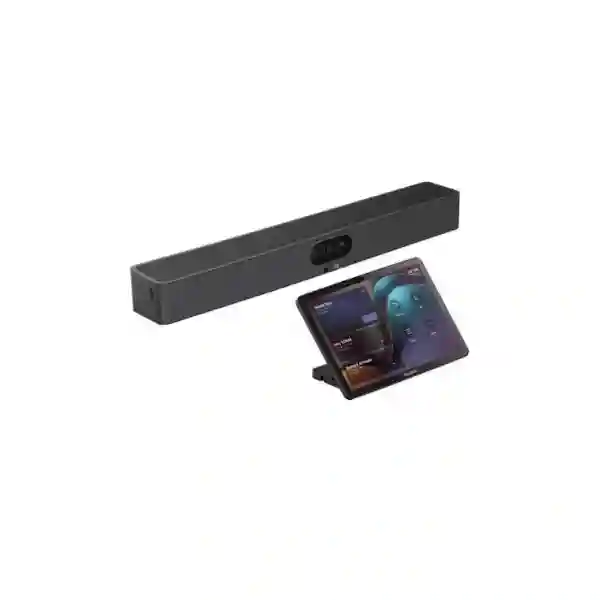
Yealink MeetingBar A25 Zoom Rooms System
The Yealink MeetingBar A25 is a compact all-in-one room collaboration system built for focus rooms and huddle spaces that need professional video and audio without a collection of separate room devices. Yealink specifies Android 13, a triple-camera architecture using three 8MP sensors, a 151° horizontal field of view from the ultra-wide camera, two tele cameras for closer participant views, an integrated 8-MEMS microphone array, a 10W loudspeaker and intelligent meeting features including Auto Framing, Speaker Tracking, IntelliFocus, Picture-in-Picture, Video Fence and Zoom Smart Gallery support.
For buyers in Tanzania, the practical value is not simply the camera resolution. A successful Zoom Room also depends on the room dimensions, seating geometry, display size, mounting position, network quality, acoustic conditions, content-sharing workflow and device-management policy. FourTeck Tanzania can help turn those requirements into a deployment plan and quotation rather than treating the A25 as an isolated box.
Best considered for focus and huddle rooms where a single video bar can cover the camera, microphone and speaker roles.
Zoom Rooms support is combined with BYOD flexibility for organisations that occasionally need third-party meeting applications from a laptop.
Before ordering, confirm room size, display plan, controller choice, network path, mounting and expected content-sharing method.
What the Yealink MeetingBar A25 provides
Yealink positions the MeetingBar A25 as an all-in-one video collaboration bar for focus rooms. Its visual system combines one ultra-wide camera and two tele cameras. The ultra-wide lens is specified with a 182° diagonal field of view and 151° horizontal field of view, while each tele camera has a 93.5° diagonal and 84.4° horizontal field of view. The three cameras use 8MP image sensors, and the device supports up to 3840 × 2160 resolution at 30 frames per second. An electric privacy cover provides a visible privacy mechanism when the room is not in active use.
The audio subsystem is designed to avoid adding separate table microphones in the type of room for which the A25 is intended. Yealink specifies eight built-in MEMS microphones with a 5-metre pickup distance and a 3.5-metre high-quality pickup distance, plus a built-in 10W speaker. Audio processing includes full duplex, acoustic echo cancellation, automatic gain control and AI-enhanced noise suppression. Expansion microphones are not supported, so room sizing matters: if the seating plan pushes participants beyond the practical pickup envelope, a different room system may be a better choice.
The A25 runs Android 13 and supports remote administration through Yealink management services as well as Zoom Device Management. This helps IT teams standardise firmware, configuration and monitoring across multiple rooms. For network connectivity the A25 includes gigabit Ethernet, dual-band Wi‑Fi 6 and Bluetooth 5.1. The device also exposes USB, Yealink VCH, HDMI-out, 3.5mm line-out, power, security-lock and reset connections, giving installers several ways to build a clean room setup.
Triple-camera coverage
The combination of one ultra-wide and two tele cameras is intended to keep close participants in frame while also delivering tighter views when intelligent framing modes are active. This is useful in compact rooms where people may sit close to the display and camera bar.
Zoom Rooms intelligence
Zoom Smart Gallery is supported on the MeetingBar A25, alongside Yealink camera functions such as Auto Framing, Speaker Tracking, IntelliFocus, Picture-in-Picture and Video Fence. Feature availability can depend on operating mode and platform.
Flexible sharing
The platform supports USB-C content sharing and, in supported configurations, wireless options including WPP30 or PA20, AirPlay, Miracast, Teams Cast and YeaCast. For Zoom, Yealink lists content sharing up to 1080p30.
BYOD capability
In General Mode, the A25 can operate as room audio and video peripherals for a connected computer. This gives businesses a fallback path for meetings that do not use the room’s native collaboration platform.
Verified technical highlights
| Operating system | Android 13; Microsoft Device Ecosystem Platform compatibility for supported environments |
| Camera system | 3 × 8MP cameras; 1 ultra-wide + 2 tele cameras; up to 4K30 lens resolution |
| Ultra-wide field of view | 182° diagonal, 151° horizontal, 81° vertical |
| Microphones | 8 MEMS microphones; 5 m pickup, 3.5 m high-quality pickup |
| Speaker | Built-in 10W speaker; forward-facing |
| Networking | 10/100/1000 Ethernet, Wi‑Fi 6 dual-band, Bluetooth 5.1, IPv4/IPv6 |
| Room management | Yealink web portal, YDMP/YMCS, Zoom Device Management and supported Microsoft management tools |
| Dimensions | 570 × 80 × 65 mm |
Planning a Zoom Room around the A25
The most important buying decision is whether the A25 fits the physical room. In a compact focus room, a 151° horizontal view can be valuable because participants may sit close to the display wall and ordinary cameras can struggle to include people at the near edges of the table. Camera placement still matters. Mounting the bar too high can create an unnatural downward view, while mounting it too low can make eye contact feel awkward. The display, seating height and camera location should therefore be considered together.
Audio is equally important. The published 5-metre microphone pickup distance is a useful upper design reference, but good room audio also depends on reverberation, HVAC noise, glass surfaces and where people sit. A room that is physically long or acoustically difficult may require a solution that supports additional microphones. Since Yealink specifies that the A25 does not support expansion microphones, buyers should verify the room rather than assuming that every small boardroom is an appropriate fit.
For network planning, Yealink lists a bandwidth requirement of 10 Mbps or more for its stated resolution context. Actual Zoom meeting traffic varies with participant count, layout, network conditions and platform behaviour, so the room should be placed on stable business connectivity with appropriate firewall policy, DNS and Quality of Service practices where the wider network requires them. For organisations standardising several rooms, centralized device management can reduce the effort required to keep firmware and configuration aligned.
Related FourTeck Tanzania solutions
A meeting bar is only one part of a usable collaboration room. FourTeck Tanzania’s integrated IT and collaboration portfolio provides the broader context for displays, networking, room infrastructure and support. For organisations evaluating the A25 as part of a larger project, the FourTeck Tanzania services page is relevant when installation, configuration, documentation or multi-system planning is required.
Business video rooms also depend on reliable LAN and wireless infrastructure. Buyers considering multiple Zoom Rooms, guest presentation workflows or wireless BYOD should include switching, Wi‑Fi and internet capacity in the project scope. For cross-border organisations, FourTeck’s Uganda technology presence and Kenya technology presence can be useful reference points when standardising collaboration requirements across East African operations.
Yealink MeetingBar A25 Zoom Rooms System Tanzania
For organisations buying the Yealink MeetingBar A25 in Tanzania, the strongest use case is a compact meeting space that needs a consistent Zoom Rooms experience without dedicating separate computers, cameras, microphones and speakers to every room. A procurement team should begin with the room rather than the model number. Note the room dimensions, seating capacity, table shape, display size, mounting surface, preferred controller, presentation workflow and available network connection. These details show whether the published 151° horizontal camera coverage and 5-metre microphone pickup distance make the A25 a natural fit or whether a larger-room architecture should be considered.
Tanzania deployments can include headquarters meeting rooms, branch collaboration spaces, management offices, project rooms, training breakout spaces and executive focus rooms. In each case, the target should be repeatability: users should be able to enter, start or join a Zoom meeting, share content and leave the room ready for the next team. The A25’s Android platform and Zoom Device Management support can help IT teams avoid treating each room as a manually maintained computer. Ethernet remains a sensible choice where stable structured cabling is available, while Wi‑Fi 6 offers installation flexibility when the wireless design is strong enough for real-time collaboration.
A quotation request should therefore describe more than quantity. Include room photos or dimensions, required display count, wall or TV mounting preference, controller expectations, whether laptop BYOD is needed, and whether installation or configuration is part of the requirement. FourTeck Tanzania can use that information to distinguish a simple product supply request from a complete room deployment. Buyers should also confirm current platform licensing, software requirements and desired management model because those items can change independently from the hardware itself.
Yealink MeetingBar A25 Zoom Rooms System Dar es Salaam
Dar es Salaam businesses often operate fast-moving meeting environments where executive teams, sales groups, regional offices, project managers and external partners need dependable hybrid collaboration. The A25 is especially relevant for smaller rooms where users sit close to the display and a conventional narrow camera can leave near-side participants outside the frame. Its ultra-wide camera, combined with tele cameras and intelligent framing, is designed to keep conversations visually useful without asking users to manually pan or zoom during every session.
For a Dar es Salaam office, deployment planning should cover both room design and network behaviour. Check whether the meeting space uses a dedicated wired connection, enterprise Wi‑Fi or a shared network that also carries voice, CCTV and general internet traffic. If Zoom meetings are business critical, avoid relying on an unmanaged or congested wireless environment simply because the bar supports Wi‑Fi 6. The room should also be reviewed for strong backlighting, reflective glass, loud air-conditioning and hard surfaces that can affect participant comfort and audio quality. Proper display height, seating distance and cable routing contribute as much to usability as the headline camera specifications.
When requesting the Yealink MeetingBar A25 for Dar es Salaam, list the number of rooms and whether each space is similar. Standard rooms can be easier to support when they share display sizes, mounting methods, controllers and naming conventions. If the office already has Zoom Rooms, include existing licensing and administrator requirements. If it does not, treat the first room as a design template and define how users will reserve, join, present and request support. FourTeck can then prepare a more useful commercial response than a hardware-only quotation.
Yealink MeetingBar A25 Zoom Rooms System Mwanza
For Mwanza organisations connecting operational teams with colleagues, suppliers, customers or management in other cities, a dedicated Zoom Room can reduce the friction created by ad-hoc laptop meetings. The Yealink MeetingBar A25 brings camera, microphone, speaker and Android room functionality into a single endpoint, which can simplify smaller collaboration spaces where desk space and cable management are important. Its published camera coverage is particularly useful when a short table places attendees near the display wall.
A Mwanza buyer should assess internet reliability and local network design before focusing on accessories. Video collaboration needs consistent latency, packet delivery and upstream performance. A room with excellent hardware can still produce a poor meeting experience if the access point is overloaded, the WAN path is unstable or background traffic competes aggressively with live video. Where Ethernet is practical, a wired link to the A25 can provide a predictable foundation. Where wireless is required, the Wi‑Fi environment should be validated for signal strength, interference and user density rather than assumed to be sufficient.
The room itself should be checked for microphone pickup and viewing comfort. Yealink lists five metres of microphone pickup, but participants should ideally remain comfortably within the high-quality pickup area and avoid sitting behind noise sources. Because external expansion microphones are not supported, long tables or flexible furniture layouts deserve special attention. A quotation request for Mwanza should identify room dimensions, seating count, display requirement, whether the A25 will be wall-mounted or display-mounted, and whether Zoom Rooms is the primary platform or BYOD meetings are also expected.
Yealink MeetingBar A25 Zoom Rooms System Arusha
Arusha organisations in tourism, professional services, NGOs, education, project management and regional administration may need compact rooms that can connect local teams with international participants without rebuilding the room around a full AV rack. The Yealink MeetingBar A25 is designed for this type of focus-room deployment. Native room operation can make joining scheduled meetings more consistent than asking every user to connect a personal laptop, select a camera and microphone, and troubleshoot cables at the start of a call.
The A25’s Zoom-oriented functions are useful where remote participants need to see individuals rather than one distant group image. Smart Gallery support, intelligent framing and the combination of ultra-wide and tele cameras can provide a more engaging visual experience in supported Zoom Rooms configurations. However, the room should not be oversized simply because the camera has a wide field of view. Microphone pickup, speaker coverage and viewing distance remain practical constraints. If the room is longer than the A25’s intended focus-room category, a system with expandable audio may be more appropriate.
For Arusha procurement, define who will manage the room after installation. Centralized device management is valuable when IT support is responsible for several meeting spaces or multiple sites. Include the expected network policy, naming convention, firmware management approach and administrator ownership. Also confirm whether users need wired USB-C sharing, wireless presentation, or BYOD from third-party meeting applications. A clear workflow makes training easier and prevents a technically capable room from becoming confusing to occasional users.
Yealink MeetingBar A25 Zoom Rooms System Dodoma
In Dodoma, the Yealink MeetingBar A25 can suit compact departmental, management and project rooms where remote participation is now a normal part of business communication. Its integrated design reduces the number of separate AV components that must be mounted, powered and supported. For organisations that prefer standardised room technology, using the same meeting bar across several similarly sized rooms can simplify user training and help IT teams maintain a consistent experience.
Before specifying the A25, map the room. Measure from the display wall to the furthest seat, note whether people sit unusually close to the camera and identify any side seats that need to remain visible. The 151° horizontal ultra-wide view is intended to capture participants who would otherwise fall outside a conventional frame. Then check audio conditions. Hard walls, tiled floors and glass can increase reverberation, while air-conditioning and corridor noise can reduce speech clarity. The A25 includes AI-enhanced noise suppression and full-duplex audio processing, but good room design is still preferable to relying on processing to correct every acoustic problem.
Dodoma buyers should also decide whether the room is dedicated to Zoom Rooms or must frequently host meetings from other platforms. BYOD capability gives users a path to connect a computer and use the A25 as room peripherals, but the cable route and user instructions should be designed so that switching modes is straightforward. When asking FourTeck for a quote, provide quantities, room types, display details, preferred controller, installation requirements and the expected meeting platforms.
Yealink MeetingBar A25 Zoom Rooms System UAE
For organisations with operations in both Tanzania and the UAE, standardising selected room types on the same collaboration platform can simplify user experience across regions. The Yealink MeetingBar A25 is suited to small focus and huddle rooms where teams want a native Zoom Rooms endpoint with compact installation, intelligent framing and optional BYOD. A common room design can define the same display size, mounting height, controller, network policy and user instructions at multiple offices, reducing the need for employees to learn different workflows at every site.
Cross-regional standardisation should not ignore room differences. A meeting room in a large UAE office may have different dimensions, furniture, acoustic finishes and wireless density from a room in Tanzania. The A25 should therefore be validated against each space rather than applied blindly. Its 5-metre microphone pickup specification is especially important because the device does not support expansion microphones. If a UAE room has a longer conference table, more seats or a larger display wall, another Yealink MeetingBar model may offer a better system fit.
For procurement teams coordinating across countries, prepare one technical baseline and then note local variations. Include Zoom licensing ownership, network security standards, device naming, firmware control, display specification, cable standards and required mounting accessories. FourTeck’s wider regional network can help businesses keep the commercial and technical conversation aligned while still treating each room as an individual deployment environment. Availability, pricing, delivery and local service scope should be confirmed at quotation stage rather than assumed from another market.
Yealink MeetingBar A25 Zoom Rooms System Uganda
Ugandan organisations considering the Yealink MeetingBar A25 can use the same selection logic as Tanzania buyers: start with room size, seating, audio conditions and meeting workflow. The A25’s all-in-one format is most compelling when a room needs a permanent collaboration experience but does not justify a larger modular AV system. The built-in camera, eight-microphone array and loudspeaker reduce device count, while Android room operation can make scheduled meetings faster to join than a laptop-centric setup.
For multi-site organisations, the management model deserves early attention. Yealink supports its own device management platforms and Zoom Device Management, which can help administrators maintain devices without visiting each room for routine configuration. Stable remote management still depends on network reachability, correct firewall policy and administrator ownership. Before rollout, document who controls Zoom Rooms accounts, who approves firmware updates, and how support teams will identify each endpoint if an incident is reported.
Uganda procurement teams should also define the content-sharing method. Some users may prefer native wireless sharing, while others need a simple USB-C cable or BYOD connection. Each choice affects accessories, cable routing and user instructions. Where Tanzania and Uganda branches collaborate frequently, keeping room controls consistent can reduce meeting delays. FourTeck can help translate these requirements into a room bill of materials and deployment scope, with commercial details confirmed for the relevant market.
Yealink MeetingBar A25 Zoom Rooms System Kampala
Kampala offices often need meeting technology that works for both internal collaboration and calls with regional or international stakeholders. In a small dedicated Zoom Room, the MeetingBar A25 can reduce setup steps by keeping the room camera, microphone and speaker available as a permanent system. Users are not required to rebuild the meeting chain from a laptop every time, and IT can manage the endpoint as a room device rather than as an employee-owned computer.
For Kampala deployments, network consistency should be treated as part of the room design. The A25 includes gigabit Ethernet and Wi‑Fi 6, but supporting real-time video means the surrounding LAN and WAN path should be stable. If the meeting room sits in a dense office wireless environment, Ethernet may be preferable. If wireless is necessary, test the actual room for coverage and congestion. Security teams may also require separate VLANs, access controls or device registration before the bar can reach cloud services.
The purchasing specification should also state whether the room requires a touch controller such as the supported CTP25 package, a remote control, wireless presentation accessories or only the standard bar and cabling. The more clearly the workflow is defined, the easier it is to compare quotes and avoid missing components. Buyers should request current commercial terms rather than infer them from online listings because regional price, stock and logistics can change.
Yealink MeetingBar A25 Zoom Rooms System Arua
For an Arua branch, project office or compact management room, the A25 can provide a standardised video endpoint that connects local participants with colleagues in larger offices without requiring a complex installed AV system. The wide camera coverage is useful where space is limited and seating is close to the display. Intelligent framing features can help remote attendees follow the discussion while allowing people in the room to focus on the conversation rather than camera operation.
Connectivity planning is particularly important for any branch deployment. The room system should be assessed together with the available internet service, firewall, switching and Wi‑Fi. If bandwidth is shared with business applications, cloud backups or large file transfers, meeting quality can vary unless the network is managed appropriately. Ethernet is often the most predictable connection for a permanent room endpoint. Where Wi‑Fi is used, signal quality and roaming behaviour should be checked at the exact mounting location.
Supportability also matters when the room is away from the main IT team. Centralized management and documented cabling can make remote support easier. Label the endpoint, record its room name, network information, display model and accessories, and keep a simple user guide in the room. A quotation for Arua should specify whether installation is required and whether local staff will mount the system themselves. This avoids confusing product supply with a complete room deployment.
Yealink MeetingBar A25 Zoom Rooms System Mbarara
Mbarara businesses, institutions and branch operations may use the MeetingBar A25 to create a repeatable small-room collaboration environment. The main advantage is integration: camera, microphone, speaker and Android meeting platform are combined into one bar, reducing the number of devices that users must understand. This can be especially useful in rooms shared by many departments, where meetings need to start quickly and the technology should not depend on one employee’s laptop configuration.
Room suitability should be checked carefully. The triple-camera design provides broad visual coverage, but audio reach is finite and expansion microphones are not supported. A long table may therefore look fine on camera while placing distant speakers beyond the most comfortable pickup area. Check the furthest seat, room acoustics and speaker listening level before standardising on the model. If the room is too large, choosing a system designed for expandable audio can be more effective than trying to force a focus-room product into a medium-room role.
For procurement, include the intended Zoom Rooms setup, display size, controller preference, cabling path and BYOD requirement. If the room will frequently switch between Zoom and other platforms, user instructions should explain how the native mode and laptop mode differ. FourTeck can help evaluate the requirement and prepare the commercial scope around the room rather than only quoting the bar itself.
Yealink MeetingBar A25 Zoom Rooms System Gulu
A Gulu office that needs regular hybrid meetings can benefit from a dedicated room endpoint because it removes many of the variables associated with user laptops. The Yealink MeetingBar A25 is intended for compact focus spaces, and its integrated Android platform, wide camera system and built-in audio make it suitable for rooms where simplicity is more important than extensive AV customization. The device can remain associated with the room and managed by IT as a shared collaboration asset.
For a branch environment, resilience comes from planning. Confirm the power arrangement for the display, meeting bar and network equipment, and consider how short interruptions affect the room. Keep cables secured and labelled so a support call can be handled without guessing which connection belongs to which device. If the A25 is placed on Wi‑Fi, document the SSID and authentication method and ensure the access point provides strong coverage at the actual device position. For a permanent room, wired Ethernet can reduce unnecessary wireless variables.
When collecting quotes for Gulu, compare complete deployment scope rather than only headline device price. One offer may include mounting, controller, cables and configuration while another may contain only the base hardware. Ask for a clear bill of materials and state whether Zoom Rooms licensing is already available. This makes commercial comparisons more meaningful and reduces the risk of discovering missing accessories after the project begins.
Yealink MeetingBar A25 Zoom Rooms System Kenya
Kenyan organisations with offices in Tanzania or other East African markets may want the same Zoom Rooms experience across locations. The MeetingBar A25 can be a practical standard for smaller rooms when the seating distance and audio requirements fit its focus-room design. Standardisation can reduce training because employees encounter the same controls, sharing options and camera behaviour when travelling between branches.
A regional standard should include more than the bar model. Define display size, mounting approach, room naming, touch-controller policy, content-sharing method and network security requirements. This produces a repeatable room template while leaving room for local adjustments. For example, one office may have strong wired cabling while another relies more heavily on enterprise wireless. One site may have acoustically treated rooms while another has reflective glass walls. The A25 should be validated against each environment before quantity procurement.
IT teams should also define centralized ownership. Zoom Device Management can support room administration, but organisations should decide who controls credentials, updates and remote support. If BYOD is permitted, document when users should switch away from the native room experience and how the computer connects. FourTeck’s Kenya and Tanzania web presence can help regional buyers keep product selection and room-design discussions aligned, while current price, stock and delivery conditions should always be confirmed in the relevant market quotation.
Yealink MeetingBar A25 Zoom Rooms System Kuwait
For companies linking Tanzania operations with Kuwait, the MeetingBar A25 can support a common collaboration standard for executive focus rooms, departmental huddle spaces and project offices. Its compact all-in-one architecture helps organisations avoid a different collection of USB devices in each room. Native room operation can also support more consistent meeting start times because users interact with a shared room endpoint instead of configuring their own computers.
Cross-border deployments should consider network and security policy differences. One office may require wired endpoints on a dedicated collaboration VLAN, while another may permit Wi‑Fi. Firewall policy, DNS, cloud access and device-management rules should be documented in advance. If the company uses a standard Zoom tenant, room naming and administrative permissions can be planned centrally. Where different business units manage their own tenants, the project scope should state which team owns activation and ongoing account administration.
Hardware selection still depends on physical room dimensions. The A25’s broad camera angle does not remove the need to check audio reach or display visibility. Because expansion microphones are unsupported, oversized rooms should be evaluated for a more suitable Yealink platform. Procurement teams can use FourTeck’s regional sites to coordinate a common specification, but should request market-specific quotes for commercial terms and accessories rather than assuming one country’s offer applies elsewhere.
Yealink MeetingBar A25 Zoom Rooms System Ghana
In Ghana, the A25 can fit organisations that want a professional small-room Zoom experience with limited device complexity. An integrated video bar is useful when a room needs permanent collaboration capability but the business does not want to maintain a dedicated mini-PC, separate USB camera, table microphone and speakerphone. Fewer components can simplify mounting, cable management and user instructions, provided the room dimensions remain within the product’s intended focus-room use.
For companies standardising across Africa, it is useful to define a minimum room specification: maximum table length, typical participant count, supported display sizes, minimum network performance, approved mounting positions and preferred content-sharing method. The A25 can then be selected only where the room meets that template. Larger spaces can use another system rather than forcing a single model into every meeting room. This approach gives IT teams consistency without sacrificing fit.
A Ghana quotation request should identify whether the organisation already owns Zoom Rooms licenses, whether a CTP25 touch panel is required, and whether wireless presentation accessories are part of the desired workflow. If users frequently join non-Zoom meetings, include BYOD in the requirement and plan the user experience around the laptop connection. Commercial details such as price, availability and delivery should be confirmed when the quote is prepared.
Yealink MeetingBar A25 Zoom Rooms System Nigeria
Nigerian businesses operating distributed teams can use dedicated Zoom Rooms to reduce meeting friction between headquarters, branches and international partners. The A25 is designed for smaller focus spaces where broad camera coverage and integrated audio are more valuable than extensive modular expansion. Its three-camera architecture can improve participant framing in close seating arrangements, while native room software gives employees a predictable way to join scheduled calls.
For reliable deployment, assess the local network before installation. Video collaboration can expose weaknesses that ordinary web browsing does not reveal, including unstable upload performance, Wi‑Fi contention and firewall rules that interfere with real-time traffic. Permanent room systems benefit from carefully designed connectivity. If the network supports centralized monitoring, include the A25 in asset and support documentation so IT teams can quickly identify a room, firmware state and connection method.
Procurement teams should request a complete scope. Clarify whether the requirement includes only the MeetingBar A25, an A25 package with controller, mounting accessories, display, installation, configuration or user handover. Also state whether the room is expected to support third-party meeting platforms through BYOD. FourTeck’s regional network can assist customers comparing requirements across multiple African offices, but specific commercial commitments should remain tied to a written quotation for the relevant destination.
Yealink MeetingBar A25 Zoom Rooms System Seychelles
For Seychelles organisations in hospitality, corporate services, administration and professional sectors, a compact room system can be useful where meeting spaces must remain clean and easy for non-technical users. The MeetingBar A25 integrates the main collaboration functions into one device and supports Zoom Rooms as well as BYOD, allowing a room to serve both scheduled Zoom meetings and occasional third-party calls when required.
Room design should consider both aesthetics and performance. A wall-mounted or display-mounted bar can keep tables free of loose USB devices, but the camera should still be close enough to eye level for natural conversation. Large windows and strong daylight can affect video, so display and seating orientation matter. Audio should also be checked in rooms with hard surfaces. The A25’s built-in processing and microphone array are designed for small collaboration spaces, but the absence of expansion-microphone support makes correct room sizing essential.
For island procurement, prepare a clear list of the required hardware and accessories before commercial discussions. Include power requirements, mounting preference, controller, cables, content-sharing workflow and whether installation is expected. This helps avoid incomplete comparisons between suppliers. Availability and logistics should be confirmed for the actual project date, since those conditions can change. If the organisation operates rooms in Tanzania as well, a shared configuration standard can make remote support easier across both locations.
Buying and quotation checklist
Dimensions, seating count, table shape, display wall, furthest participant distance and any acoustic challenges.
Confirm Zoom Rooms as the primary platform and identify whether BYOD for Teams, Webex or other applications is required.
State display quantity and size, wall or TV mounting, and whether a supported touch controller or remote is expected.
Provide Ethernet or Wi‑Fi preference, VLAN/security constraints, and who will administer Zoom Rooms and endpoint updates.
Frequently asked questions
Is the Yealink MeetingBar A25 suitable for Zoom Rooms?
Yes. Yealink lists Zoom Rooms among the native meeting-platform options for the MeetingBar A25 and supports Zoom Device Management. Smart Gallery is listed as a Zoom Rooms-only intelligent camera feature.
What room size is the A25 intended for?
Yealink positions the A25 for focus and huddle rooms. Room suitability should be confirmed from actual dimensions, seating geometry and acoustics. The microphone pickup specification is 5 metres, with 3.5 metres identified as the high-quality pickup distance.
Can expansion microphones be added?
No. Yealink’s A25 datasheet states that expansion microphones are not supported. If a room needs microphones beyond the bar’s built-in pickup range, consider a different room solution rather than assuming an external microphone can be added later.
Can users join meetings from other platforms?
The A25 supports BYOD. In General Mode, it can act as camera and audio peripherals for a connected computer running third-party meeting applications. The room should be configured and documented so users understand how to switch between native operation and BYOD.
Does the A25 support wireless networking?
Yes. Yealink specifies dual-band Wi‑Fi 6 with 2×2 MIMO in addition to a gigabit Ethernet port. For permanent meeting rooms, choose the connection method based on actual network stability and security policy.
What should be included in a quotation request?
Provide the exact product name, quantity, room dimensions, seating count, display requirement, mounting preference, controller requirement, network type, Zoom Rooms status, BYOD requirement and whether installation or configuration is needed. This allows a supplier to quote the correct package instead of an incomplete base unit.
Decision recap
Choose the Yealink MeetingBar A25 when you are designing a focus or huddle room that benefits from a very wide camera view, intelligent Zoom Rooms framing, integrated audio, Android room operation and optional BYOD. Reconsider the model when the room requires expansion microphones, a larger audio footprint or a more modular AV design. The right buying decision is therefore based on room fit and workflow, not only on a feature checklist.
For a useful quotation, give FourTeck Tanzania the room and workflow information described above. Current pricing, stock, logistics, licensing and installation scope can then be confirmed against the actual requirement rather than assumed.
Plan your Yealink A25 Zoom Room with FourTeck Tanzania
A small meeting room can still become frustrating when the display, camera height, microphone reach, network and sharing workflow are planned separately. Send FourTeck the room dimensions, expected participants, preferred Zoom Rooms setup and required accessories. The team can use that information to discuss an appropriate A25 configuration, related infrastructure and quotation scope. For direct enquiries, use the verified FourTeck Tanzania contact page.




Reviews
There are no reviews yet.