
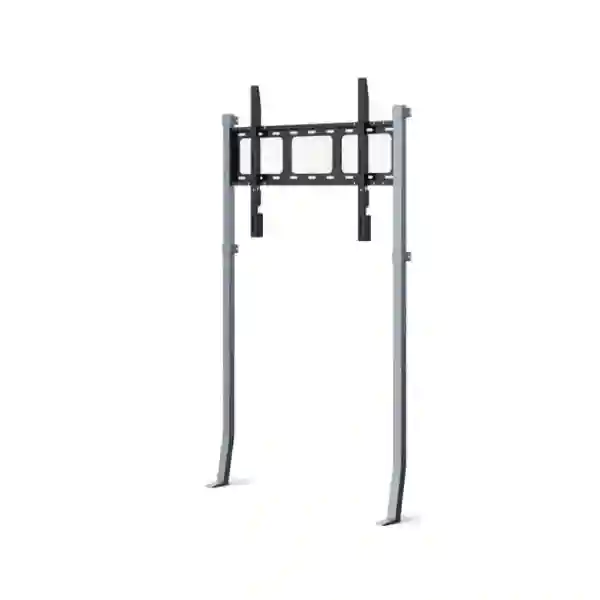
Yealink MB-WallStand-650W Tanzania
The Yealink MB-WallStand-650W is a reinforced wall stand developed for the MeetingBoard 65 Pro. Unlike a conventional wall bracket that depends almost entirely on wall structure, this stand-supported design transfers part of the system weight to the floor. That practical difference is important in collaboration rooms where drywall, partition construction, wooden wall sections or other surfaces may have limited load-bearing capacity. For organisations in Tanzania planning a MeetingBoard 65 Pro installation, the MB-WallStand-650W can provide a cleaner path to a secure, professional deployment while keeping the display positioned close to the wall.
Verified product facts
Product: MB-WallStand-650W
Primary positioning: Wall stand for MeetingBoard 65 Pro
Dimensions: 992 × 127 × 1547 mm
Weight: 12.7 kg
Yealink part number: 3311075
Stand-supported structure
Yealink designed the MB-WallStand-650W so the floor carries part of the installed system load. This reduces the amount of force that must be carried only by the wall and can make the accessory suitable for a wider range of meeting-room construction types.
Optimised for MeetingBoard
The official product is positioned for MeetingBoard 65 Pro, and Yealink compatibility information also lists the accessory as optional for MeetingBoard 65 and MeetingBoard 65C EDLA. Compatibility should be confirmed against the exact display model before procurement.
Installation flexibility
The stand is particularly relevant where a conventional wall-only mount is undesirable because of the wall construction. The final installation still needs appropriate site assessment, anchoring, clear floor space, cable routing and safe placement.
What is the Yealink MB-WallStand-650W?
The MB-WallStand-650W is a purpose-built accessory intended to support wall-adjacent deployment of Yealink’s 65-inch MeetingBoard family, with primary product positioning around the MeetingBoard 65 Pro. The engineering concept is straightforward: instead of asking the wall to bear the entire load through a traditional mount, the stand-supported arrangement carries part of the load down to the floor. This can help when the room has lightweight partitions, drywall, wooden wall sections or other surfaces where load capacity requires careful consideration.
For a business buyer, the practical value is not only mechanical. Meeting-room equipment must be installed at a sensible viewing height, aligned with seating, positioned for camera framing, and coordinated with power and network connectivity. A mounting choice therefore affects the room experience as much as it affects the physical installation. The MB-WallStand-650W gives design teams another option when a mobile floor stand is not desired but a conventional wall mount may not be the best match for the wall structure.
FourTeck Tanzania can help buyers evaluate the accessory within the wider collaboration-room requirement. The product should be selected together with the exact MeetingBoard model, wall construction, room dimensions, seating plan, cable path and service access needs. For a broader view of collaboration-room planning, see the FourTeck Tanzania services page, which outlines integrated technology planning, installation and support considerations.
Key features and buyer benefits
Reduced wall loading
The reinforced stand architecture transfers part of the device weight to the floor. This can reduce dependence on the wall alone and provides a practical alternative in rooms where structural loading needs closer attention.
Purpose-built fit
A purpose-designed accessory is easier to assess than an improvised third-party mounting approach because the manufacturer publishes the intended compatibility and physical characteristics of the stand.
Meeting-room aesthetics
Wall-adjacent placement can preserve a clean front-of-room appearance while avoiding the larger visual footprint often associated with fully mobile carts. Actual appearance depends on room layout and cable treatment.
Wider deployment options
The accessory can be useful for offices, training rooms, executive meeting rooms and collaboration spaces where the desired display position is fixed but the wall is not ideal for carrying the full system load.
Technical specification summary
| Model | MB-WallStand-650W |
| Primary application | Wall stand for MeetingBoard 65 Pro |
| Dimensions | 992 mm × 127 mm × 1547 mm |
| Weight | 12.7 kg |
| Part number | 3311075 |
| Official compatibility references | MeetingBoard 65 Pro; also listed as optional for MeetingBoard 65 and MeetingBoard 65C EDLA |
Specifications and compatibility should be rechecked against the current Yealink documentation at the time of purchase, especially when projects involve a specific MeetingBoard hardware generation or regional bundle.
Planning a successful MeetingBoard installation
Mounting hardware is one part of a complete meeting-room deployment. Before choosing the MB-WallStand-650W, confirm the exact MeetingBoard model, wall construction, floor level, desired screen height, sight lines from every seat, camera framing, available power, network connectivity, cable entry points and the maintenance path around the unit. The stand reduces wall loading, but it does not remove the need for sound installation practice or site-specific fixing decisions.
Cable management deserves particular attention. The room may need mains power, Ethernet, accessory connections and possibly links to external room devices. Cables should be routed so they are protected from foot traffic, do not interfere with stand alignment and remain serviceable. If the room is being refurbished, agreeing the cable route before finishing walls and furniture can produce a cleaner result.
For broader meeting-room procurement, FourTeck Tanzania also covers conferencing, networking, Wi-Fi, commercial displays and supporting infrastructure. The FourTeck Tanzania technology overview explains how collaboration systems relate to the network, room audio, displays and other business infrastructure.
Yealink MB-WallStand-650W Tanzania
For organisations in Tanzania, the MB-WallStand-650W is most useful when a MeetingBoard 65 Pro is planned for a fixed collaboration space but the wall itself requires a more cautious mounting strategy. Modern offices frequently use gypsum partitions, framed construction, decorative wall panels or mixed materials that cannot be treated like reinforced concrete. Because the Yealink wall stand transfers part of the system weight to the floor, it can give project teams another deployment option while preserving a close-to-wall front-of-room layout. The accessory should still be evaluated against the actual room rather than selected only from photographs or model numbers.
A Tanzania procurement request should identify the MeetingBoard model already owned or being purchased, the quantity of rooms, the wall construction and the preferred screen position. Including room dimensions and a basic photo of the front wall can help clarify whether the stand is a sensible fit. For new office projects, it is also worth coordinating the stand with electrical work, network outlets and furniture placement. The best time to decide cable routes is before the room is fully finished, because collaboration equipment can otherwise leave visible surface cabling or require rework after installation.
Business buyers should also distinguish between a mounting accessory and a complete conferencing system. The MB-WallStand-650W does not itself provide video, audio or meeting-platform functionality; it supports deployment of compatible MeetingBoard hardware. The MeetingBoard platform, network connectivity, account configuration and room operating requirements remain separate decisions. When requesting a quotation, indicate whether you need the stand only, the MeetingBoard 65 Pro plus stand, or a complete room package including network preparation, installation and commissioning.
FourTeck Tanzania can use that information to frame a more useful procurement discussion. Buyers comparing local supply options should ask for model-level confirmation rather than accepting a generic description such as “wall stand for 65-inch display.” The manufacturer-specific model matters because dimensions, loading, fixing method and compatibility can differ significantly between display families. If the project includes multiple offices, standardising one approved installation approach can also simplify documentation and future room rollouts.
Yealink MB-WallStand-650W Dar es Salaam
Dar es Salaam organisations often build meeting spaces inside commercial offices where internal walls may use lightweight partitions, architectural cladding or mixed construction. In that environment, a stand-supported wall solution can be attractive because it offers the visual effect of a fixed front-of-room installation while reducing reliance on wall loading alone. The MB-WallStand-650W is therefore relevant for boardrooms, project rooms, executive offices, training spaces and hybrid meeting rooms built around the MeetingBoard 65 Pro.
For a Dar es Salaam site, room survey information should include the front-wall material, floor finish, skirting profile, available power sockets, data outlet location and the desired relationship between display height and seating. A wall stand sits close to both the floor and the wall, so details that are easy to ignore on paper—raised skirting, cable trunking, floor transitions or decorative panels—can influence the final result. When the room has glass partitions, special care is needed because glass should not be treated as a normal structural wall without an engineered mounting plan.
Procurement teams can also use the mounting decision to improve room consistency. If several conference rooms use the same MeetingBoard generation, documenting standard mounting heights, cable routes and room clearances can make later additions easier to plan. If some rooms have strong masonry walls and others have partitions, the MB-WallStand-650W can be evaluated selectively rather than applied to every space by default.
When asking FourTeck for a quotation, include whether the deployment is a new installation or a retrofit. Retrofit rooms may have existing screens, brackets, power points or furniture that affect what can be retained. New rooms provide more freedom to position services neatly. In both cases, specifying the exact model as “Yealink MB-WallStand-650W” avoids confusion with MB-WallMount-650, MB-WallStand-650 or the larger 860-series accessories.
Yealink MB-WallStand-650W Mwanza
Businesses and institutions in Mwanza planning dedicated hybrid meeting rooms can consider the MB-WallStand-650W when the chosen MeetingBoard 65 Pro location needs a stable, near-wall presentation but the wall construction does not invite a conventional heavy wall-mount approach. The accessory is particularly relevant when a room was not originally designed around large collaboration displays and is being upgraded from a television, projector or basic conferencing arrangement.
A retrofit should begin with measurements. The 65-inch collaboration display must be visible to everyone at the table, and its camera should not be placed so high or low that remote participants see an unnatural angle. The stand dimensions also need to be considered against skirting, floor clearance and furniture. Meeting tables, credenzas and cable boxes should not obstruct the stand or prevent maintenance access. If the room includes whiteboards or presentation surfaces, the front wall should be planned as a complete working area rather than treating the display as an isolated object.
Network reliability is another practical part of the deployment. A MeetingBoard collaboration room depends on stable connectivity and appropriate access to the selected meeting platform. If the room is far from existing network points, it may be better to extend structured cabling before installation than to rely on an improvised connection. Power protection can also be considered where power quality is a concern, but the correct approach depends on the overall system design and site requirements.
For Mwanza procurement, send the exact MeetingBoard model, room count and expected installation scope with the enquiry. If the need is only the MB-WallStand-650W accessory, say so clearly. If a complete room is required, include conferencing platform preferences, participant count and room dimensions. This distinction helps prevent an accessory quotation from being mistaken for a complete conferencing solution and makes the commercial response easier to compare.
Yealink MB-WallStand-650W Arusha
Arusha meeting spaces range from corporate offices and professional-service rooms to training, education and hospitality environments. When a MeetingBoard 65 Pro needs to be positioned against a wall in a room with partition construction, the MB-WallStand-650W provides a manufacturer-designed alternative that moves part of the supported weight down to the floor. This can be useful where a building operator wants to minimise stress on the wall without moving to a fully mobile presentation cart.
Room usage should shape the mounting choice. A boardroom used every day benefits from a fixed and repeatable screen position, while a multipurpose event room may value mobility more. The MB-WallStand-650W is intended for a wall-adjacent installation, so buyers should decide whether that fixed placement suits the operational use before procurement. A location that looks ideal when the room is empty may become inconvenient once chairs, tables, doors and presentation zones are considered.
Arusha buyers should also verify the exact Yealink hardware generation. The “650W” naming can be confused with other MeetingBoard mounting products, but compatibility is model-specific. Yealink lists the MB-WallStand-650W as optional for MeetingBoard 65 Pro and also references compatibility with MeetingBoard 65 and MeetingBoard 65C EDLA. It is not the same accessory as the larger MB-WallStand-860W used for 75/86-inch Pro models.
When preparing an enquiry, include photographs of the front wall if possible, note whether the wall is masonry, drywall or another construction, and state whether cable installation is already complete. For a room still under construction, early coordination can hide cabling more effectively and set outlets at the right position. For an existing room, the goal may instead be to minimise disruption and reuse safe infrastructure where appropriate.
Yealink MB-WallStand-650W Dodoma
In Dodoma, organisations developing government, administrative, education and enterprise meeting spaces may need collaboration systems that are simple to operate and physically well integrated into the room. The MB-WallStand-650W supports that physical layer for compatible 65-inch Yealink MeetingBoard systems by combining wall-adjacent positioning with floor-supported load distribution. The benefit is most relevant when the preferred display wall has limited load-bearing capacity or when project teams want an installation alternative to a conventional bracket.
A meeting-room mounting decision should be documented as part of the overall room design. Record the final display height, stand location, network outlet, power outlet and service clearances. This information helps when the room is handed over to facilities or IT teams and provides a reference if equipment is moved later. Good documentation is especially useful across multi-room deployments where consistency reduces troubleshooting and future planning effort.
For procurement, avoid assuming that every 65-inch display stand is interchangeable. The MB-WallStand-650W is designed around specific Yealink equipment and has published physical dimensions and compatibility references. A third-party mount may use a different mechanical approach. If an alternative is being considered, compare compatibility, loading method, installation requirements, serviceability and manufacturer support rather than price alone.
A quotation request from Dodoma should identify the room type, exact MeetingBoard model, quantity, whether the wall stand is required only or as part of a full collaboration deployment, and any installation constraints. FourTeck Tanzania’s contact and quotation page provides guidance on the room and project information that helps turn a product enquiry into a more useful technical response.
Yealink MB-WallStand-650W UAE
UAE meeting-room projects often combine high-quality interior finishes with fast-changing office layouts. Decorative wall systems, glass partitions and lightweight construction can create situations where a collaboration display needs a mounting approach that respects both aesthetics and structural limitations. The MB-WallStand-650W can be relevant in these projects because the stand-supported design transfers part of the MeetingBoard load to the floor while keeping the system close to the wall.
For a UAE fit-out, coordination with the interior contractor is essential. The stand should be considered before final wall finishing, skirting, floor channels and power/data points are closed. If the room is already complete, photographs and measurements help determine whether the stand can sit flush enough to achieve the intended look. Cable routes should be planned to avoid visible loose wiring around premium meeting-room finishes.
The accessory is not a universal 65-inch display stand. Buyers should confirm the exact MeetingBoard model and use the Yealink compatibility list as the reference point. The MB-WallStand-650W is distinct from the MB-WallMount-650 and from the 860-series wall stand. Using the exact model code in procurement documents reduces the chance of receiving a mechanically different accessory.
For broader UAE technology projects, FourTeck’s regional network can support the conversation around meeting rooms, networking and related infrastructure. Visit FourTeck UAE for regional technology requirements. When comparing project options, separate hardware cost, mounting, installation labour, network readiness and room integration so the total scope remains clear.
Yealink MB-WallStand-650W Uganda
Ugandan organisations adopting dedicated collaboration rooms can use the MB-WallStand-650W when a compatible MeetingBoard 65-inch system needs fixed positioning but the wall should not bear the complete system load. This can matter in leased offices, renovated interiors and partitioned rooms where altering the wall structure may be undesirable or where mounting capacity needs closer evaluation.
Before purchase, identify whether the requirement is for MeetingBoard 65 Pro, the earlier MeetingBoard 65 or MeetingBoard 65C EDLA, because Yealink’s compatibility references distinguish products across the family. Buyers should not infer compatibility from screen size alone. The physical mounting interface, stand geometry and intended weight path matter. Confirming these details before shipping is much easier than correcting a mismatch after delivery.
A good installation brief should also describe the room use. A small executive room may prioritise clean appearance and simple daily operation, while a training room may need wider viewing angles and more flexible furniture. In either case, the display position affects camera framing and user comfort. The screen should be neither too high nor too low for the normal seating arrangement, and the stand should not interfere with doors, walkways or service access.
For Uganda-specific technology enquiries, the FourTeck Uganda site can provide a regional starting point. Include quantity, exact MeetingBoard model, room dimensions, wall construction and whether installation is included in the desired scope. This helps differentiate a straightforward accessory purchase from a complete meeting-room project.
Yealink MB-WallStand-650W Kampala
Kampala offices frequently operate in commercial properties where tenants inherit existing partitions, finishes and services. When upgrading one of those spaces into a modern hybrid meeting room, the MB-WallStand-650W can provide a useful middle ground between a conventional wall bracket and a free-standing mobile cart. The floor-supported structure reduces the wall’s share of the load while retaining a front-of-room position.
Retrofit planning should begin with the exact wall and floor conditions. A partition may contain studs or reinforcement in some areas and not others. Raised floors, thick skirting or existing floor boxes can affect how a stand sits. The installation should therefore be based on a physical assessment rather than assuming that all office partitions behave the same way. The accessory broadens installation flexibility, but it does not eliminate the need for appropriate anchoring and safe placement.
Kampala procurement teams should also consider whether they are standardising rooms. If five rooms will use the same MeetingBoard platform, a standard mounting height, documented cable route and consistent stand choice can make support easier. If only one room has a lightweight wall, the MB-WallStand-650W might be used selectively while other rooms use another approved mount. The goal is consistent user experience, not identical hardware where the physical environments differ.
When requesting pricing, ask for the exact MB-WallStand-650W model and state whether it is needed with or without MeetingBoard 65 Pro hardware. Provide the desired project timeline but avoid assuming stock or lead time until it is confirmed in the quotation. This keeps the procurement record accurate and makes it easier to compare equivalent offers.
Yealink MB-WallStand-650W Arua
For organisations in Arua building or upgrading a video-collaboration room, the MB-WallStand-650W offers a manufacturer-specific mounting option for compatible Yealink MeetingBoard 65-inch systems. Its main advantage is mechanical rather than electronic: part of the installed load is directed to the floor, reducing the wall’s responsibility compared with a purely wall-mounted arrangement.
This feature can be valuable when a room uses partitions or when the existing wall construction is uncertain. However, buyers should treat the stand as one component in the room plan. The room still needs reliable power, network connectivity, suitable lighting, acceptable acoustics and enough viewing distance. A correctly mounted MeetingBoard cannot compensate for a poor network connection or a room where remote participants struggle to hear people at the far end of the table.
Logistics and installation preparation should be coordinated before the equipment arrives. Measure door widths and access routes where relevant, clear the intended wall area, and ensure furniture can be moved if required. Keep the stand and MeetingBoard model information together in the project record so technicians can verify the right components during installation. Where multiple accessories are supplied, labelling each room’s equipment can reduce mix-ups.
An Arua quotation request should state quantity, exact MeetingBoard model, desired stand model and whether on-site installation, cable preparation or commissioning is expected. If the installation environment is unusual, include photographs. This gives the supplier better information for confirming fit and avoids the assumption that the accessory alone defines the complete technical scope.
Yealink MB-WallStand-650W Mbarara
Mbarara businesses, education providers and professional organisations can consider the MB-WallStand-650W for collaboration spaces where the MeetingBoard 65 Pro should appear permanently installed but the wall needs a load-sharing mounting strategy. The stand supports a neat, wall-adjacent arrangement without turning the display into a mobile room asset.
Selection should begin with room purpose. If the display will remain in one boardroom, fixed placement can help users know exactly where to look and how the room is arranged every time. If the same display must serve several rooms, a mobile cart may be operationally more suitable. The MB-WallStand-650W therefore makes the most sense where the location is expected to remain stable and where the floor-supported design addresses a real wall-loading concern.
When the room is being renovated, coordinate the stand with painters, carpenters, electricians and network installers. A few centimetres of unplanned skirting or a power socket behind a structural section can create avoidable installation complications. Establish the display centreline, outlet positions and cable path before final finishes. If the room is already complete, a careful site check can identify what needs to be adapted without unnecessary work.
For procurement, request model confirmation in writing. The Yealink family includes several wall and floor accessories with similar names, so the full code MB-WallStand-650W should appear in the quotation. Also identify the MeetingBoard model that the stand will support. This simple step reduces ambiguity for purchasing teams and technicians alike.
Yealink MB-WallStand-650W Gulu
Gulu organisations planning hybrid training, administration or management rooms may use the MB-WallStand-650W to support a MeetingBoard 65 Pro close to a wall while transferring part of the load to the floor. This makes the accessory worth considering where a room’s wall construction is not ideal for a conventional mount or where reducing wall stress is part of the installation design.
The room should be assessed from the participants’ point of view. Screen visibility from the side seats, camera angle, glare from windows and the distance between users and the display all influence the final experience. The physical mount sets the display position, so getting that position right is important. Marking the proposed screen outline on the wall before installation can help stakeholders validate the height and alignment before equipment is fixed.
Maintenance access is another consideration. A professional installation should allow authorised technicians to reach required connections without dismantling unrelated room elements. Cables should be identified and protected. If power protection or network equipment is located elsewhere in the room, document the connections so future support teams understand the path.
For Gulu buyers, the commercial request should separate the accessory, MeetingBoard hardware and services. This makes the quotation easier to audit and helps identify what is included. If the room requires additional microphones, networking changes or furniture work, those elements should be specified separately rather than assumed to be part of the wall stand.
Yealink MB-WallStand-650W Kenya
Kenyan organisations deploying Yealink MeetingBoard collaboration rooms can consider the MB-WallStand-650W when they need a fixed front-of-room installation with reduced dependence on wall-only loading. This can be particularly relevant in modern office fit-outs that use modular partitions or decorative wall systems rather than thick structural walls.
A Kenyan project should verify the exact MeetingBoard model, room dimensions and wall construction before procurement. Because Yealink publishes the MB-WallStand-650W for specific MeetingBoard models, screen size alone is not an adequate compatibility test. Buyers should also distinguish it from the MB-WallMount-650 and the 860-series accessories. The similar naming reflects related product families, not interchangeability.
For multi-branch organisations, mounting standards can become part of the room template. A documented standard may include display height, stand model, network outlet placement, power outlet placement, cable labelling and room controller position. Standardisation can reduce design effort for future sites while still allowing exceptions where building conditions require a different approach.
Regional buyers can visit FourTeck Kenya for Kenya-focused technology requirements. When submitting an enquiry, include quantities, exact model codes and whether the request is product-only or includes installation. Clear scope makes quotations easier to compare and reduces the risk that one proposal includes services that another excludes.
Yealink MB-WallStand-650W Kuwait
Kuwait office projects often place strong emphasis on presentation quality, coordinated interiors and reliable meeting-room operation. The Yealink MB-WallStand-650W can support those goals where a MeetingBoard 65 Pro needs a clean wall-adjacent installation but the construction of the wall makes a load-sharing stand preferable to a conventional wall-only bracket.
Interior coordination is particularly important in finished boardrooms. Stone cladding, timber panels, decorative surfaces and concealed services should not be drilled or altered without understanding what sits behind them. The stand-supported design changes the load path, but installation still requires proper assessment and fastening. A room drawing or site photo can help establish whether the intended display position has enough clear floor and wall space.
Kuwait buyers should also plan thermal and service conditions around the MeetingBoard itself. Avoid placing the display where direct sunlight, strong glare or obstructed ventilation could affect user experience. The mount should support the manufacturer’s intended orientation and allow appropriate access for connections. If an architect or audiovisual consultant is involved, the exact stand model can be included in drawings and equipment schedules so all trades work from the same reference.
A complete quotation should identify the accessory separately from the MeetingBoard and any installation or commissioning services. This gives procurement teams a transparent view of the bill of materials and makes later replacement or expansion easier to manage. Where several rooms are involved, include a room-by-room schedule instead of one undifferentiated quantity.
Yealink MB-WallStand-650W Ghana
Ghanaian companies and institutions moving toward dedicated video-collaboration rooms may need mounting hardware that fits modern partitioned office environments. The MB-WallStand-650W addresses that physical requirement by supporting compatible Yealink MeetingBoard 65-inch systems while transferring part of the load to the floor. It can therefore be evaluated for rooms where a standard wall bracket would place too much dependence on the wall itself.
The best buying process starts with compatibility rather than availability. Confirm the exact MeetingBoard model first, then verify the accessory. Once compatibility is established, review room constraints: wall material, floor finish, furniture, cable routes, screen height and user sight lines. This sequence prevents a common procurement mistake where a stand is purchased because it physically looks suitable without checking whether it is intended for the exact display.
For organisations standardising conferencing across several offices, the wall stand can be documented as one approved mounting option rather than the only option. A strong masonry boardroom may use a manufacturer wall mount, while a partitioned room may use MB-WallStand-650W. Both rooms can still deliver a consistent MeetingBoard user experience if display height, networking and room operation are standardised.
Commercial enquiries should state whether pricing is needed for one stand, multiple stands, or complete MeetingBoard room packages. Include installation location and timing requirements as planning inputs, but do not assume stock, delivery or on-site coverage until formally confirmed. This keeps purchasing decisions based on documented scope instead of informal expectations.
Yealink MB-WallStand-650W Nigeria
Nigeria’s enterprise, financial, professional-service and education sectors use a wide range of meeting-room formats, from compact executive rooms to large collaboration areas. For rooms built around the MeetingBoard 65 Pro, the MB-WallStand-650W provides a manufacturer-designed mounting option that distributes part of the load to the floor. This can be useful in office fit-outs where walls are lightweight, decorative or otherwise unsuitable for carrying the full load through a standard bracket.
Site preparation should include power and data reliability. The stand solves a mounting problem, not a connectivity problem. The MeetingBoard still depends on the network and meeting platform, so IT teams should verify that the room has appropriate Ethernet or wireless connectivity, internet quality and security configuration. Where the room is mission-critical, network design and power protection may deserve the same attention as the display hardware.
From a facilities perspective, the floor-supported design means the floor area immediately in front of the installation needs to be suitable and remain clear. Furniture should not force users to push the stand or obstruct access. If the room layout may change frequently, evaluate whether a fixed wall stand remains the best operational choice or whether another Yealink mounting solution is more appropriate.
Procurement teams should insist on exact model references in quotations and purchase orders. “Yealink wall stand” is not precise enough because the portfolio includes multiple sizes and generations. Specify MB-WallStand-650W and the MeetingBoard model it will serve. This reduces receiving errors and gives installers a clearer equipment schedule.
Yealink MB-WallStand-650W Seychelles
Seychelles organisations that rely on video collaboration for regional management, professional services, hospitality administration or public-sector coordination may need meeting rooms that are both dependable and visually tidy. The MB-WallStand-650W is relevant where a MeetingBoard 65 Pro should be positioned close to a wall but the wall should not carry the complete load by itself.
Because island deployments can make replacement logistics more consequential, correct model selection at the purchasing stage is especially important. Verify the exact MeetingBoard model, stand model and required installation accessories before shipment. Pack lists and quotations should use the full MB-WallStand-650W code rather than a generic description. If several rooms are being fitted, a room schedule can help ensure every location receives the correct components.
Environmental and room-design considerations should also be reviewed. Avoid positions where direct sunlight creates glare on the display, and consider air conditioning, cable routing and maintenance access. The stand should not be placed where cleaning equipment, trolleys or normal foot traffic can repeatedly contact it. A professional front-of-room layout should make the technology feel integrated into the room rather than placed as an afterthought.
For quotation planning, include the desired quantity, the MeetingBoard model, destination, project stage and whether assistance is needed only for product sourcing or for broader room design and deployment. Keeping these items explicit helps suppliers assess the request accurately and helps the buyer compare like-for-like proposals without assuming unstated services.
Compatibility and model-selection guidance
Yealink’s compatibility information identifies the MB-WallStand-650W as an optional accessory for MeetingBoard 65 Pro. The same compatibility list also references it as optional for MeetingBoard 65 and MeetingBoard 65C EDLA. The 75-inch and 86-inch Pro systems use different wall-stand options, so the “650W” and “860W” model codes must not be treated as interchangeable.
If you already own a MeetingBoard, obtain the exact model from the device label, procurement record or management interface before ordering the stand. If the MeetingBoard and stand are being purchased together, list both exact models on the quotation request. Where a project uses a mix of MeetingBoard generations across rooms, create a room-by-room equipment list. This is a simple way to prevent accessories from being assigned to the wrong display during installation.
Do not rely only on VESA size or nominal display size when choosing a manufacturer-specific mounting solution. Compatibility can involve bracket geometry, weight distribution, cable clearance and mechanical attachment details that are not obvious from headline dimensions. Official compatibility information should remain the primary reference.
Quotation checklist
To request a useful quotation for the Yealink MB-WallStand-650W, include the exact MeetingBoard model, required quantity, installation city or country, room dimensions, wall construction, preferred installation date and whether the request covers supply only or supply plus installation. If possible, include a photograph of the proposed wall area and note any skirting, floor trunking or existing brackets.
Frequently asked questions
What is the MB-WallStand-650W used for?
It is a Yealink wall stand designed primarily for MeetingBoard 65 Pro. Its reinforced, floor-supported structure transfers part of the system load to the floor, reducing the load carried by the wall and broadening possible installation environments.
Can it be used on drywall or partition walls?
Yealink specifically positions the design as useful for wall types with limited load-bearing capacity, including drywall, partition walls and wooden walls. The actual site still needs proper assessment and safe installation because wall construction and fixing conditions vary.
What are the dimensions and weight?
Yealink lists dimensions of 992 mm × 127 mm × 1547 mm and a stand weight of 12.7 kg.
Is MB-WallStand-650W the same as MB-WallMount-650?
No. They are different Yealink mounting accessories with different physical designs. The MB-WallStand-650W uses a stand-supported approach, while the MB-WallMount-650 is a wall-mount bracket.
Does the wall stand include the MeetingBoard?
The MB-WallStand-650W is a mounting accessory. A quotation should state clearly whether it covers the stand only or a package that also includes the MeetingBoard and installation services.
What information should I provide for a quotation?
Provide the exact MeetingBoard model, quantity, installation location, room size, wall type, floor conditions, desired mounting position and whether you need supply only or installation. Photographs of the proposed installation area can also be useful.
Decision recap
Choose the Yealink MB-WallStand-650W when you have a compatible MeetingBoard 65-inch model, want a wall-adjacent installation and need a mounting design that sends part of the system load to the floor. Confirm compatibility first, then evaluate wall construction, floor space, cable routes and room ergonomics.
If the display needs to move between rooms, another stand type may be more appropriate. If the wall is structurally suitable and a conventional wall mount is preferred, compare the official Yealink wall-mount option instead. The correct choice depends on the site and operating requirement, not only appearance.
Talk to FourTeck Tanzania
FourTeck Tanzania can help frame the enquiry around the exact MeetingBoard model, room environment and installation scope. This is particularly useful when the project includes more than the stand itself, such as a full meeting-room system, networking changes, display integration or installation planning.
Use the product code MB-WallStand-650W in your request and include room details so the discussion can focus on fit, compatibility and a clear bill of materials.




Reviews
There are no reviews yet.