
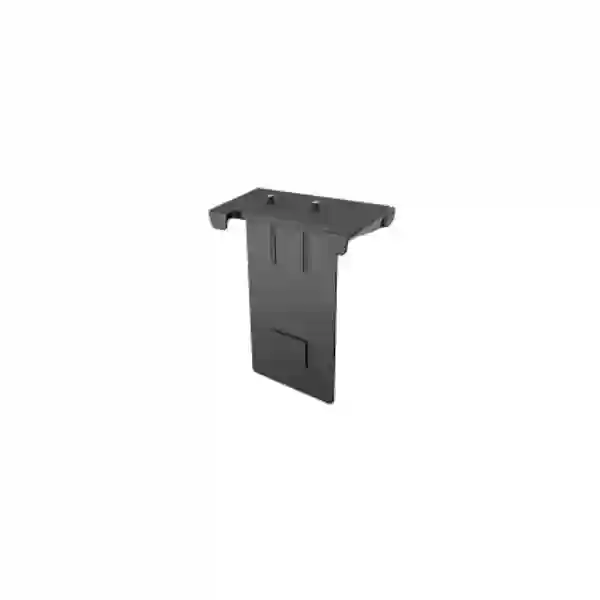
Yealink TV-Clip Mount Tanzania
The Yealink TV-Clip Mount is designed to mount compatible Yealink video-collaboration equipment directly in relation to a meeting-room display, creating a cleaner and more integrated installation. Yealink currently identifies the TV-Clip Mount as a mount for SmartVision 40 and MeetingBar A40, while its mounting compatibility information also shows the accessory within selected MeetingBar deployment options. For procurement teams in Tanzania, the main buying question is therefore not simply whether a clip mount is available, but whether the exact display, conferencing device and intended position form a supported combination.
FourTeck Tanzania can help customers review the room layout, screen arrangement, model compatibility, device quantity and installation plan before a quotation is prepared. This is especially useful for meeting rooms being standardized across several offices, where a small mounting component can determine camera height, cable visibility, service access and the overall finish of the room.
MeetingBar A40 support
SmartVision 40 support
Quick buying answer
Choose the Yealink TV-Clip Mount when your supported Yealink room system needs to be positioned with the display and you want a compact mounting method rather than a separate tabletop arrangement. Confirm the exact Yealink endpoint, the display installation, screen edge profile, intended top or bottom positioning, cable paths and service clearance before purchase.
For A40 projects, Yealink documentation lists the TV-Clip Mount with the MeetingBar A40 package and also presents alternative mounting accessories for certain installation styles. That makes the room design and required final position important parts of the purchasing decision.
What is the Yealink TV-Clip Mount?
The Yealink TV-Clip Mount is a mechanical deployment accessory in Yealink’s meeting-room ecosystem. Its job is straightforward but important: it provides a way to secure a compatible Yealink collaboration device at the television or display area so the camera and audio bar can sit in a practical position relative to the screen. Unlike an electronic accessory, it does not add network, audio, video or software functionality by itself. Its value comes from improving physical placement, creating a more organized room and supporting a repeatable installation approach when the correct device and display are used together.
Yealink’s current room-system accessory catalog explicitly describes the TV-Clip Mount for SmartVision 40 and MeetingBar A40. The MeetingBar A40 datasheet lists the mount as part of the package, and Yealink’s design examples identify part number 330100057001 for the TV-Clip Mount in A40-based rooms. Yealink also publishes broader compatibility information for mounting brackets, so buyers should always verify the exact endpoint generation and mounting method instead of assuming that every Yealink video bar shares the same mechanical interface.
This matters because mounting accessories can look visually similar while differing in geometry, screw positions, allowed orientation, display clearance and supported endpoint weight. If a project is using MeetingBar A40 or SmartVision 40, the Yealink TV-Clip Mount can form part of a professional display-centered installation. If the project involves A25, A20, A30, A50 or another Yealink product, the correct mounting choice should be checked against the current Yealink compatibility list before the order is finalized.
Why businesses choose a display-mounted video bar
Cleaner room layout
Mounting the collaboration bar at the display helps keep the primary meeting technology concentrated in one visual zone. This can reduce furniture dependence and improve the overall appearance of huddle rooms, small conference rooms and executive meeting spaces.
Better camera relationship
A camera positioned close to the display helps remote participants appear more naturally aligned with the place local users are looking. Exact eye-line quality depends on screen height, room seating and whether the device is mounted above or below the display.
Simpler standardization
For organizations deploying several similar rooms, a defined mounting method can make installation templates easier to document. Procurement teams can specify the approved display, conferencing bar, bracket, cable arrangement and mounting height as one room standard.
Serviceable deployment
A properly planned mount can keep the conferencing device accessible for inspection, cleaning, cabling and future replacement. The installation should still preserve ventilation, connector access and the display manufacturer’s mechanical requirements.
Verified compatibility and procurement guidance
| Product / context | Yealink-published relationship | Buying note |
|---|---|---|
| MeetingBar A40 | TV-Clip Mount listed in A40 package and mounting documentation. | Confirm whether the project already includes the mount before ordering an additional unit. |
| SmartVision 40 | Yealink accessory catalog identifies TV-Clip Mount for SmartVision 40. | Verify display geometry and intended placement with the room design. |
| MeetingBar A20 | Yealink compatibility material shows TV Mount support and historic documentation references TV-Clip Mount installation. | Confirm the exact hardware revision and current accessory guidance before purchase. |
| Other Yealink models | Mount choice varies by model. | Do not assume mechanical interchangeability; match the mount to the endpoint. |
The practical procurement lesson is simple: the Yealink TV-Clip Mount should be bought as part of a defined room configuration. A buyer should know the exact Yealink endpoint, whether a mount is already bundled, the quantity of rooms, display model or physical screen profile, mounting location, cable route and installation responsibility. This prevents duplicate accessory purchases and reduces the chance of discovering on installation day that a different bracket family is required.
Installation planning before ordering
1. Confirm the Yealink endpoint
Record the exact model number and room-system bundle. The A40 can be supplied in packages where the TV-Clip Mount is already included, so accessory counting should be done against the actual bill of materials rather than by room count alone.
2. Review the display and wall condition
The television or commercial display, its thickness, rear profile, wall bracket, ventilation path and available clearance can influence whether a clip-style mounting approach is practical. The screen should also remain serviceable after the collaboration bar is installed.
3. Plan camera height and seating
The final camera position should make sense for the people in the room. Screen height, table depth and seating distance affect perceived eye line. A mechanically correct installation can still feel unnatural if the display is mounted too high or the camera is far above participants’ line of sight.
4. Protect cable access
HDMI, network, power and any peripheral cables should have enough bend radius and slack to avoid connector strain. Where the display uses a slim wall bracket, check that cables do not become trapped or force the screen away from the wall.
5. Decide who installs and validates
For multi-room rollouts, document the mounting position, fasteners, cable routing and test process. A repeatable method reduces room-to-room variation and gives IT teams a clearer reference when future support is needed.
6. Check included accessories
Before placing a separate mount order, compare the current Yealink bundle contents with the intended room design. Avoiding duplicate accessories keeps the quotation cleaner and makes project quantities easier to reconcile.
Related FourTeck resources for a complete meeting-room project
A TV clip mount is only one part of a functioning collaboration room. Buyers can use the FourTeck Tanzania technology shop to review broader business IT and conferencing procurement guidance, while the FourTeck Tanzania services page explains how installation, configuration and integrated project work can be approached. Organizations operating across East Africa can also reference FourTeck Kenya and FourTeck Uganda for regional requirements. For UAE-linked procurement or wider group projects, FourTeck UAE provides another approved regional route within the FourTeck network.
Regional procurement and deployment guidance
The following sections address how the Yealink TV-Clip Mount may be evaluated in different markets. They do not imply local stock, guaranteed delivery, an office presence or a specific service commitment. Buyers should request a quotation and confirm availability, logistics, taxes, installation scope and compatibility for the exact project.
Yealink TV-Clip Mount Tanzania
For Tanzania-based organizations, the Yealink TV-Clip Mount is most relevant when a MeetingBar A40 or SmartVision 40 deployment is being integrated directly with a meeting-room display. The accessory should be treated as part of the room’s physical architecture, not as an isolated low-value item. In many projects, the mount determines where the camera sits, how close it is to the display, whether the installation looks coordinated and how easily technicians can reach the bar and its cables later. Procurement teams therefore benefit from ordering the mount together with the room endpoint, display details and installation scope rather than adding it as an afterthought.
A Tanzania quotation request should identify the exact Yealink system, the number of rooms, whether each room already has a display, approximate screen size, wall-mount style and whether the conferencing bar will be placed above or below the screen. Where MeetingBar A40 is being purchased as a package, the buyer should ask whether the TV-Clip Mount is already included in that bundle. This one check can prevent duplicate procurement. If the organization already owns A40 units and is changing from tabletop or wall-mounted deployment to display-mounted deployment, the existing accessories and room geometry should be reviewed before a new mount is ordered.
Tanzania projects can also benefit from standard room templates. A company with offices, training spaces or branch meeting rooms can define a preferred display height, bar position, cable exit route, conferencing platform and approved mounting method. Standardization makes installations more predictable and gives internal IT teams a clearer baseline for support. It also helps procurement compare like-for-like room costs because the accessory set is known in advance.
Before confirming the Yealink TV-Clip Mount in Tanzania, check the exact model compatibility, display profile, available clearance, cable routing and final camera angle. Include photographs or a simple room sketch when the display is already installed. The objective is not merely to attach the device to a screen; it is to create a stable, serviceable and visually coherent room where the camera is positioned logically for the people using it.
Yealink TV-Clip Mount Dar es Salaam
Businesses in Dar es Salaam often deploy collaboration rooms in corporate offices, professional-service firms, hotels, training centers, project offices and multi-branch headquarters. In these environments, the physical finish of the meeting room can matter almost as much as the conferencing technology. The Yealink TV-Clip Mount provides a way to keep a compatible video bar visually connected to the display, which can reduce the need for a separate shelf or table position and create a more deliberate room layout.
For a Dar es Salaam installation, start with the existing display. If the television is mounted very close to the wall, the installer should confirm that the added conferencing bar and its cabling will not interfere with the screen bracket or create pressure on connectors. If the screen is on an articulating arm, movement should be assessed so that the bar does not collide with the wall or surrounding furniture. In executive meeting rooms, screen height and camera eye line deserve particular attention because a mount can be mechanically correct while still placing the camera too high for natural interaction.
Procurement teams should also distinguish between an accessory-only requirement and a full meeting-room refresh. If the project involves new screens, network cabling, wireless presentation, microphones or room controllers, the mount belongs within a larger bill of materials. This makes it easier to check that power, network, HDMI paths and controller locations are coordinated. For several rooms, provide a room list showing display size, Yealink device model and quantity required. That is more useful than requesting an undifferentiated number of mounts.
When asking for a Yealink TV-Clip Mount quotation in Dar es Salaam, include the endpoint model, number of rooms, whether the endpoint is already owned, current display arrangement and the desired mounting position. Availability and project timing should be confirmed at quotation stage. A careful accessory check can save installation time and keep the final conferencing setup cleaner, easier to maintain and more consistent across the workplace.
Yealink TV-Clip Mount Mwanza
In Mwanza, the Yealink TV-Clip Mount can support organizations that are building or upgrading video-enabled meeting spaces without wanting extra furniture for the collaboration bar. Offices, education facilities, healthcare administration, hospitality operations and regional business teams may use compact meeting rooms where wall and table space are limited. Mounting a compatible Yealink video bar at the display can make better use of the available room footprint and create a more integrated front-of-room design.
The main decision is compatibility. Buyers should confirm whether the room uses MeetingBar A40, SmartVision 40 or another Yealink endpoint, because Yealink’s mount families are not universal. If the room uses A40, check the original package contents first; the TV-Clip Mount may already be part of the supplied hardware. For an existing room where the mount has been misplaced, damaged or never deployed, the replacement requirement should be matched to the device and display before ordering.
Physical conditions also matter. Meeting-room displays may be mounted to solid walls, partition walls, cabinets or mobile stands, and each arrangement changes the amount of rear clearance and the way cables can be dressed. The clip mount should not be used to compensate for an unstable display installation. The screen itself must be securely installed according to its bracket and wall requirements. After the mount is fitted, technicians should verify that the conferencing bar is stable, centered appropriately and accessible for cleaning or cable changes.
For Mwanza procurement, send a simple room inventory with the Yealink model, display type, approximate screen size and preferred camera position. If a site is standardizing multiple rooms, use one pilot room to validate the layout before purchasing mounts for every space. This approach reduces the risk of discovering differences in display depth, wall position or furniture layout only after the accessories have already been delivered.
Yealink TV-Clip Mount Arusha
Arusha organizations may require professional video collaboration for tourism management, hospitality, NGOs, regional offices, training environments and conference facilities. The Yealink TV-Clip Mount is useful where a compatible Yealink bar needs to sit at the meeting-room display in a compact, organized arrangement. This can be particularly relevant in rooms where tables are frequently rearranged or where the front wall should remain clean and uncluttered.
A display-mounted bar should be planned together with the viewing and seating layout. If participants sit close to a large screen, camera height becomes sensitive because mounting the bar too far above eye level can make remote users feel as though they are looking down into the room. If the display is mounted lower, a bottom position may be worth evaluating when supported by the applicable mounting method. The final decision should be based on the Yealink endpoint, screen arrangement and room design rather than aesthetics alone.
For hotels or multipurpose rooms in Arusha, serviceability is especially important. Staff may need to reset equipment, inspect connections or change room layouts between events. The video bar should remain accessible enough for routine support without requiring the entire display to be removed. Cable routing should also be protected from repeated handling. When a room is used by different groups, clear labeling and a standard startup procedure can complement the physical mount and make the conferencing system easier to operate.
Before requesting the Yealink TV-Clip Mount in Arusha, state the exact endpoint model, room count, display setup and whether installation assistance is part of the requirement. For several similar rooms, photographs and dimensions from one representative room can help guide the initial review, but final fit should still be checked against each room’s physical conditions. The goal is a stable, clean and supportable installation rather than simply adding another accessory to the equipment list.
Yealink TV-Clip Mount Dodoma
In Dodoma, meeting-room technology may be deployed for government-related offices, administration, education, corporate branches and professional organizations that need reliable hybrid collaboration. The Yealink TV-Clip Mount can help create a defined front-of-room arrangement for supported Yealink video bars, keeping the device visually aligned with the screen and reducing dependence on table space. For formal meeting rooms, this can support a cleaner presentation and more consistent camera position.
Procurement should begin with the room standard. If several meeting rooms are being fitted, list each room’s capacity, display size, Yealink endpoint and preferred mounting method. A small six-person room may use a different screen height and furniture arrangement from a larger boardroom. The same mount can therefore produce different camera angles depending on the room. Pilot installation is useful where the organization wants to replicate the same design across multiple spaces.
Compatibility checks are essential because Yealink supports different brackets for different device families. For MeetingBar A40, the TV-Clip Mount appears in current Yealink package and installation information. For other products, alternative mounts may be required. The device serial generation or bundle should be noted if the equipment has been in use for some time, and existing accessories should be checked before replacements are ordered.
A Dodoma quotation request should also specify whether the display is already wall mounted, whether cabling is concealed, and whether the conferencing bar must be installed above or below the screen. If the room is new, coordinate the mount decision with power and data outlet positions before final wall finishing. Small choices made early can avoid visible cables and later rework. Availability, delivery scope and installation should be confirmed during the quotation process for the actual site and project schedule.
Yealink TV-Clip Mount UAE
For UAE organizations, the Yealink TV-Clip Mount is relevant to businesses standardizing modern Teams, Zoom or multipurpose meeting spaces around Yealink room systems. Commercial offices often place a premium on clean interiors, concealed cabling and repeatable room designs, so a compatible display-mounted video bar can be preferable to a loose tabletop arrangement. The mount should be selected as part of the complete room bill of materials, especially where AV contractors, fit-out teams and IT teams share responsibility for delivery.
The project team should confirm the Yealink endpoint, the exact display, wall bracket type and the screen’s installed height. If the room uses MeetingBar A40, review whether the TV-Clip Mount is already included in the package. If SmartVision 40 is being deployed, confirm the chosen physical arrangement against the current accessory guidance. When a display is installed on a low-profile wall mount, check cable clearance before walls are closed or decorative panels are finished.
UAE multi-site organizations may also coordinate room standards with offices in Africa. A consistent Yealink configuration can simplify user training and support, but mechanical conditions may still vary by country because display models, wall construction and furniture differ. Use the room standard as a template rather than assuming every physical site is identical. Record the approved mount, screen height, camera position and cable path in handover documentation.
For procurement, include quantities by room type and identify whether accessories are bundled or separately required. This makes it easier to compare quotations and prevents double counting. Confirm current availability, pricing, logistics and installation scope for the UAE project rather than relying on a past room bill of materials, because product bundles and supported accessory combinations can change over time.
Yealink TV-Clip Mount Uganda
Uganda-based companies can use the Yealink TV-Clip Mount when a supported Yealink collaboration bar needs to be mounted directly with the display. This is useful for organizations that want a professional front-of-room arrangement without dedicating table or cabinet space to the video bar. The accessory is especially relevant when meeting rooms are being standardized across offices and the IT team wants a known physical method that can be documented and repeated.
Before ordering, identify whether the endpoint is MeetingBar A40, SmartVision 40 or another Yealink system. For A40, check the supplied package before adding a separate mount line item. Yealink offers multiple mounting accessories across its portfolio, so an accessory suitable for one video bar should not be assumed to fit another. If the organization is replacing an older Yealink room system while keeping the same display, the mount should be reviewed as part of the migration rather than automatically reused.
For multi-branch deployment in Uganda, procurement teams can create a room matrix with location, room capacity, display model, Yealink model, mounting method and installation status. This makes accessory requirements visible before ordering and supports phased rollout. If some rooms use mobile display stands while others use wall-mounted screens, separate the configurations because cable movement and mechanical clearance may differ significantly.
A quotation request should include the intended deployment location, quantity and whether installation services are required. Confirm availability and logistics at the time of purchase. If the video bar will be mounted in an existing room, photographs of the screen installation can help identify obvious constraints, but measurements and current vendor compatibility guidance should still form the basis of the final decision.
Yealink TV-Clip Mount Kampala
In Kampala, organizations frequently use video collaboration for regional management, financial services, technology teams, education, NGOs, professional firms and multi-site operations. A compatible Yealink TV-Clip Mount can help keep a MeetingBar or SmartVision installation integrated with the meeting-room display, improving the visual organization of the room and freeing table space for users, laptops and documents.
The mounting accessory should be planned during room design rather than after the conferencing system arrives. If the screen will be installed on a decorative wall, glass partition, movable stand or recessed panel, the project team should verify the available space and cable route in advance. A recessed display can look attractive but leave insufficient clearance for the conferencing bar or connectors. Similarly, a very slim television bracket can make cable management difficult if the bar’s wiring is expected to pass behind the screen.
For Kampala offices with multiple meeting rooms, assign room types such as huddle, small, medium and boardroom, then standardize equipment by type. The TV-Clip Mount may be appropriate in rooms using A40 or SmartVision 40, while other rooms may require different Yealink brackets. This approach avoids trying to force one accessory into every space and gives installers a clearer room-by-room specification.
When requesting the Yealink TV-Clip Mount in Kampala, provide the exact endpoint, quantity, display details and required mounting orientation. Ask whether the mount is already included with the device package. Availability, price and installation scope should be confirmed in the current quotation. A small amount of planning at procurement stage helps reduce rework and contributes to a room that is easier for both users and support teams.
Yealink TV-Clip Mount Arua
For organizations in Arua, remote collaboration can reduce the need for frequent travel between regional locations, making dependable meeting-room design valuable even in smaller offices. The Yealink TV-Clip Mount can support this goal by giving a compatible video bar a defined position at the display rather than occupying a desk, credenza or temporary shelf. This helps turn a television and conferencing endpoint into a more permanent room system.
Because regional sites may have different room layouts from headquarters, avoid copying a mounting decision without checking the local display and furniture. A bar that sits comfortably under a screen in one office may conflict with a cabinet, whiteboard or power outlet in another. Measure the front wall, note screen height and identify how cables reach power and network. If the display is already mounted, confirm that the bracket can safely remain in place with the planned conferencing arrangement.
Compatibility remains the first technical check. MeetingBar A40 and SmartVision 40 are current products associated with the TV-Clip Mount in Yealink documentation, but other models use different mounting choices. If equipment has been transferred from another branch, verify the model name rather than relying on appearance. Include any existing brackets in the site inventory so procurement can determine whether a new accessory is actually required.
For Arua purchasing, consolidate accessory requests with the main collaboration project where possible. A complete request describing the conferencing endpoint, display, cabling, required mount and installation location gives suppliers a clearer basis for quotation. Confirm transport, availability and any on-site service requirement for the actual project schedule. The best outcome is a room that looks intentional, remains easy to support and uses only the accessories genuinely required.
Yealink TV-Clip Mount Mbarara
Mbarara businesses, institutions and regional offices can consider the Yealink TV-Clip Mount when they want a compatible collaboration bar mounted at the display rather than placed on furniture. This is particularly useful for compact meeting rooms where front-of-room space is limited and the organization wants a neat installation that remains consistent with the screen and conferencing experience.
The decision should begin with the endpoint model. Yealink identifies TV-Clip Mount use around specific room-system products, including MeetingBar A40 and SmartVision 40. If the room uses a different Yealink bar or camera, compare the current mounting options before ordering. For A40 packages, verify whether the mount is already included. Procurement teams often focus on the main endpoint and overlook included accessories, which can lead to unnecessary duplicate purchases.
Installation planning should also consider user experience. The display height should allow comfortable viewing, and the bar position should keep the camera reasonably aligned with participants. If the room table is long and narrow, camera height and angle can influence how participants at the far end are perceived. Mounting should also keep microphones and speakers unobstructed according to the endpoint design, and no decorative element should block the camera field of view.
When seeking a Yealink TV-Clip Mount quotation in Mbarara, state how many rooms are involved, whether the displays are already installed, and whether the requirement is accessory supply only or a wider meeting-room deployment. Include photos where helpful and confirm the current compatibility information before final approval. A room-by-room bill of materials gives buyers better control over quantities and makes handover easier for internal IT staff.
Yealink TV-Clip Mount Gulu
For Gulu organizations, a well-planned video meeting room can support coordination with headquarters, customers, partners and distributed teams. The Yealink TV-Clip Mount can be a useful physical accessory where a supported Yealink video bar needs to be positioned directly with the display. The result can be a more permanent and organized room setup than placing the conferencing endpoint on a temporary table or shelf.
Before ordering, verify the exact Yealink product. MeetingBar A40 and SmartVision 40 have clear current references to the TV-Clip Mount, while other Yealink endpoints may use different mounting kits. If a project includes older hardware, consult the compatibility information for that specific generation. The physical fit should be treated with the same care as network or platform compatibility because an incorrect mount can stop installation even when the conferencing device itself is fully functional.
For a new Gulu room, decide the screen position before finalizing power and data outlets. The video bar’s cables should reach their destinations without tight bends, visible loops or strain. If a cable conduit is being installed, make sure it has sufficient capacity for the planned connections. Where the screen is mounted on a movable cart, verify that both the display and attached conferencing equipment remain stable during movement and that cables have appropriate slack.
A practical quotation request will include endpoint model, display details, room quantity, mounting preference and target deployment date. Availability and delivery arrangements should be confirmed for the real project. If several rooms are involved, validate one representative installation first when possible. This helps establish a repeatable standard and gives installers a clear reference for the remaining rooms.
Yealink TV-Clip Mount Kenya
Kenya-based enterprises often operate multi-room offices where collaboration hardware must be deployed consistently and supported by central IT teams. The Yealink TV-Clip Mount can contribute to that standardization when compatible endpoints such as MeetingBar A40 or SmartVision 40 are mounted at the display. A clean front-of-room installation can make the space easier to understand for users because the screen and conferencing bar appear as one system rather than unrelated pieces of equipment.
For procurement, distinguish between room-system bundles and standalone accessories. If A40 is being purchased new, verify the exact package contents before adding additional TV-Clip Mount units. If the mount is needed for an existing deployment, record the endpoint model and check whether the current display arrangement is compatible with the intended clip mounting method. Alternative Yealink mounts may be more appropriate for certain display or endpoint configurations.
Multi-site companies can create a standard meeting-room bill of materials that includes endpoint, screen, mount, controller, cabling and network requirements. However, each physical room still needs validation. Nairobi headquarters, coastal branches and regional offices may use different display brands or wall structures, so the mechanical installation should not be assumed from a single prototype. A short pre-installation checklist can capture screen height, wall type, rear clearance and available outlets.
When requesting a Yealink TV-Clip Mount in Kenya, share quantities by room type and specify whether installation is required. Confirm price, availability and logistics in the current quotation. For organizations also operating in Tanzania or Uganda, align the naming and documentation of room standards across countries so IT teams can recognize the same approved configuration while still adapting it to the physical site.
Yealink TV-Clip Mount Kuwait
In Kuwait, the Yealink TV-Clip Mount can be used in compatible professional meeting-room deployments where a clean, display-centered video bar installation is preferred. Corporate offices, engineering firms, project teams and executive spaces often need rooms that look finished and remain easy for users to operate. Positioning the collaboration bar with the screen can support that objective when the endpoint and display are suitable for the mount.
The project should be coordinated with interior and AV works. Decorative wall panels, recessed televisions and low-profile display brackets can reduce the free space available for conferencing hardware. Before final fit-out, check the screen location, mount clearance and cable routes. If the room uses MeetingBar A40, compare the ordered bundle with Yealink’s current package list so the project does not purchase duplicate TV-Clip Mount accessories.
Kuwait offices that standardize rooms across floors or sites should document the approved screen height and bar position. This is particularly useful when different contractors perform installation. A drawing or photo from the pilot room can help, but the installer should still verify each wall and display. Service access should be maintained so the bar can be inspected, replaced or recabled without damaging finished surfaces.
For a Kuwait quotation, provide the exact Yealink device, quantity, display type and mounting objective. Confirm whether the TV-Clip Mount is supplied with the endpoint package or required separately. Ask for current availability and delivery information for the project timeline. Treat the accessory as a defined part of the room architecture and include it in handover documents, asset lists and installation standards where appropriate.
Yealink TV-Clip Mount Ghana
Ghanaian organizations planning hybrid meeting spaces can consider the Yealink TV-Clip Mount when a supported Yealink room device should be mounted at the display. For offices where meeting rooms are shared throughout the day, a fixed and tidy equipment position can reduce accidental movement and keep the camera consistently aimed at the seating area. The accessory is therefore most useful as part of a planned room deployment rather than as an isolated purchase.
Compatibility should be checked first. Yealink’s current accessory information identifies the TV-Clip Mount with SmartVision 40 and MeetingBar A40. Other Yealink systems may use different mounting kits or have built-in arrangements. If a Ghana project uses mixed generations of Yealink equipment, prepare a room-by-room list instead of ordering one mount type in bulk. This prevents mechanical mismatches and helps procurement understand which accessories are already included.
Installation planning should cover screen height, wall bracket, rear clearance, cable reach and camera angle. In rooms with large displays, the bar may need to be positioned carefully so the camera remains at a reasonable height. If the display is on a mobile stand, confirm stability and cable movement. For wall-mounted screens, check that the mount and cables do not interfere with ventilation or the television’s service access.
When asking for a Yealink TV-Clip Mount quotation in Ghana, include endpoint model, room quantity, display arrangement and whether installation support is needed. Confirm price, stock status and delivery scope at quotation time. For businesses with branches in other African markets, a standard room template can simplify technology support, provided the physical installation is validated locally before rollout.
Yealink TV-Clip Mount Nigeria
Nigeria’s large corporate and multi-site market creates a strong need for repeatable meeting-room standards. The Yealink TV-Clip Mount can support that approach where compatible Yealink video bars are installed at the display. By keeping the video bar in a fixed relationship with the screen, organizations can create consistent room layouts and reduce the possibility of equipment being moved or repositioned between meetings.
For nationwide or multi-city deployment, build a detailed bill of materials for each room archetype. Identify the Yealink endpoint, display, mounting method, controller, cables and network requirements. If MeetingBar A40 is part of the standard, verify whether the TV-Clip Mount already ships in the chosen package. If SmartVision 40 is being used, confirm the current supported mount arrangement. Do not assume that a mount used with one Yealink bar will fit another model.
Physical site differences can be significant. A headquarters boardroom may have a recessed commercial display, while a branch office may use a standard television on a wall bracket. The mount decision should accommodate those differences. Camera height, rear clearance and service access should be checked before bulk accessories are ordered. A pilot room is especially valuable for large rollouts because it gives procurement and installers a tested reference design.
For a Yealink TV-Clip Mount quotation in Nigeria, provide quantities by configuration rather than one total number. Confirm current availability, logistics and installation responsibilities. If multiple contractors are involved, include mounting details in the implementation document so each site follows the same validated standard. The accessory is inexpensive compared with the complete room, but it can still determine whether the final installation is clean, usable and supportable.
Yealink TV-Clip Mount Seychelles
In Seychelles, collaboration rooms may be used by hospitality groups, financial organizations, government-related teams, professional services and regional operations that coordinate with offices abroad. The Yealink TV-Clip Mount can support compact, polished meeting-room installations where a compatible video bar needs to sit at the display. This is useful in spaces where floor and furniture area is limited or where a tidy front-of-room appearance is important.
Because island logistics can make installation rework inconvenient, compatibility should be checked carefully before the accessory is ordered. Confirm whether the room uses MeetingBar A40, SmartVision 40 or another Yealink endpoint, and check whether the required mount is already included in the original package. Record the display brand and model where possible, together with its wall bracket and installed height.
For hotel or guest-facing environments, discreet cabling and serviceability deserve extra attention. The conferencing bar should not obstruct the screen or create a visually awkward installation. At the same time, technicians should still be able to reach connectors for maintenance. If the screen is mounted within millwork or a decorative wall feature, provide dimensions and photographs during planning because a clip-style mount may need additional clearance around the display edge.
A Seychelles quotation request should include exact Yealink model, quantity, room type, display arrangement and desired installation schedule. Confirm delivery terms, current availability and whether technical installation is part of the scope. For multi-property groups, standardize the room design where practical but validate each property’s display and wall conditions before final accessory quantities are approved.
How to choose between Yealink mounting options
Yealink offers several mounting approaches across its collaboration portfolio, including wall brackets, display or TV mounts, tabletop mounts and model-specific accessory kits. The correct option depends on the exact endpoint and room. The TV-Clip Mount is attractive when the supported device should sit closely with the display, but it is not automatically the best choice for every installation.
Choose a display-oriented mount when the room layout benefits from having the bar visually aligned with the screen, the screen installation provides adequate clearance, and camera height can remain comfortable. Consider a wall-mount method when the endpoint should be positioned independently of the display or the television geometry makes clip mounting impractical. A tabletop mount may suit rooms where the screen cannot accept the intended mounting arrangement, where furniture already provides the correct camera height, or where the organization expects to reconfigure the room frequently.
For A40, Yealink documentation also references other mounting accessories, so procurement should not choose by product name alone. Compare the room design, installation location and official compatibility list. A good mounting decision balances mechanical support, camera eye line, visual finish, cable access and future serviceability.
Frequently asked questions
What is the Yealink TV-Clip Mount used for?
It is a physical mounting accessory used to position compatible Yealink collaboration hardware at a television or display. Yealink currently lists it for SmartVision 40 and MeetingBar A40, with additional references in selected MeetingBar deployment documentation.
Does the Yealink TV-Clip Mount fit MeetingBar A40?
Yes. Yealink’s current A40 documentation lists the TV-Clip Mount as part of the MeetingBar A40 package and includes it among the supported installation methods. Buyers should still check whether the mount is already included in the specific A40 bundle being purchased.
Is the TV-Clip Mount compatible with SmartVision 40?
Yealink’s current room-system accessory catalog identifies the TV-Clip Mount for SmartVision 40. The final installation should still be checked against the display and room layout.
Can I use this mount with every Yealink video bar?
No. Yealink uses different mounting accessories across different MeetingBar and camera models. Always match the mount to the exact endpoint and current Yealink compatibility information.
Do I need to buy the TV-Clip Mount separately with MeetingBar A40?
Not necessarily. Yealink’s A40 datasheet lists the TV-Clip Mount in the package contents. Confirm the exact local bundle and quotation before ordering an extra mount.
What information should I send for a quotation?
Provide the Yealink endpoint model, number of rooms, quantity required, display make and model if known, screen size, current mounting arrangement, intended top or bottom placement and whether installation is required. Photos or room drawings can help for existing spaces.
Does the mount affect video quality?
The mount does not process video. However, physical placement can influence how natural the camera angle feels. A well-positioned camera near the display can support better eye-line perception, while a poorly placed camera may look down on or up at participants.
Can the TV-Clip Mount be used on a mobile display stand?
The endpoint and display configuration should be assessed before use on a mobile stand. The complete assembly must remain mechanically stable, cable movement must be controlled and the display stand must be suitable for the added equipment. Confirm the planned arrangement before deployment.
Quotation checklist
For the clearest quotation, provide the following project information:
- Exact Yealink endpoint model and current bundle
- Number of meeting rooms and required mount quantity
- Display brand/model and approximate screen size
- Existing wall mount, stand or furniture arrangement
- Desired camera location above or below the display
- Whether cabling and installation are part of the requirement
- Project location and target deployment schedule
Decision recap
The Yealink TV-Clip Mount is a practical accessory for compatible Yealink room systems when the goal is a compact, display-aligned installation. The strongest current compatibility references are MeetingBar A40 and SmartVision 40, and A40 buyers should verify whether the mount is already bundled.
Choose it only after checking the exact endpoint, display geometry, mounting position, cable route and room eye line. For multi-room deployments, validate one standard configuration and document it before scaling the purchase.
Consultation panel: turn the accessory into a complete room plan
If you are buying the Yealink TV-Clip Mount as part of a larger room deployment, include the MeetingBar or SmartVision model, display, controller, network connection, cabling and installation requirement in the same enquiry. This helps the quotation reflect the real room configuration rather than treating the mount as a disconnected spare part. FourTeck can use those details to discuss compatibility and the supporting requirements that should be checked before installation.




Reviews
There are no reviews yet.