
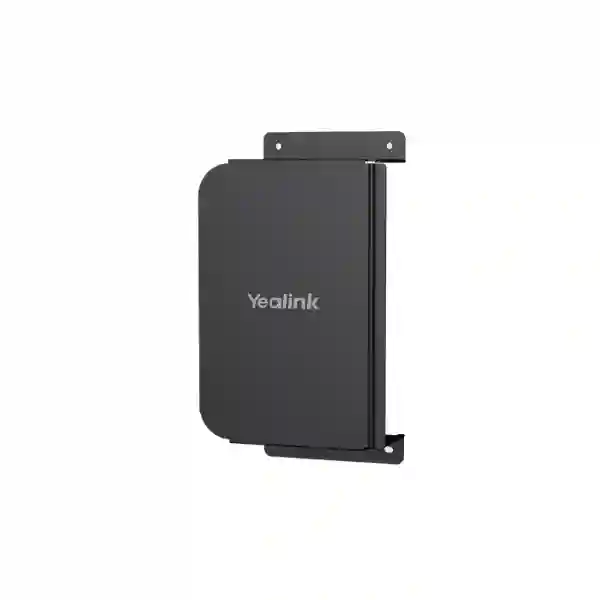
Yealink MCore-WallMount-01 Tanzania
The Yealink MCore-WallMount-01 is Yealink’s mini wall mount for the MCore Series, intended for professional meeting-room deployments where compatible MCore compute hardware needs a planned mounting position. Yealink’s current mount compatibility documentation identifies MCore-WallMount-01 with MCore, MCore Pro and MCore Lite, while MCore 4 uses a different MCore4-WallMount. That distinction is important for procurement teams, system integrators and IT administrators because the accessory should be matched to the exact MCore generation rather than selected only from a broad “MCore” description. Fourteck Tanzania can help buyers review the model, room-system bill of materials, display position, cable route and installation context before quotation.
What is the Yealink MCore-WallMount-01?
The MCore-WallMount-01 is a purpose-specific mounting accessory in Yealink’s room-system ecosystem. Yealink describes it as a mini wall mount for the MCore Series. Its role is physical deployment: it provides a designated method for mounting compatible MCore hardware rather than leaving the compute device without a planned location. For a finished Microsoft Teams Rooms or other Yealink room-system deployment, the quality of the installation often depends on details that are not visible in a feature comparison. Compute placement, ventilation clearance, service access, display mounting, cable path and the relationship between the room controller, camera, microphones and screens should all be considered before the installer fixes hardware in place.
The most important buying check is compatibility. Yealink’s current compatibility table lists MCore-WallMount-01 with MCore, MCore Pro and MCore Lite. It separately lists MCore4-WallMount for MCore 4. Buyers replacing an older bracket, expanding an existing room or preparing a new Yealink meeting-room bill of materials should therefore provide the exact compute model. This avoids ordering a mount based on a similar product name while overlooking a generational change. Fourteck can review the requested part as one item within the broader room design, including the display, camera, controller and cable-management requirements.
Verified role
Yealink identifies MCore-WallMount-01 as a mini wall mount for the MCore Series.
Verified compatibility
The current Yealink mount table associates this bracket with MCore, MCore Pro and MCore Lite.
Important distinction
MCore 4 is listed with a different mount, so buyers should confirm the exact compute generation before ordering.
Why mounting matters in a meeting-room project
A meeting room is easier to support when every component has a defined installation position. The compute unit should be accessible to authorised technicians, protected from accidental movement and arranged so cables can be identified without dismantling unrelated parts of the room. A dedicated bracket can contribute to a more intentional installation by giving the MCore device a planned physical location. The mount itself does not determine room performance, but it can support a deployment where serviceability and cable organisation have been considered from the start.
Before installation, confirm the wall or mounting surface, clearance around the device, cable bend radius, access to connectors and the route from the compute unit to displays and peripherals. The mounting surface and fixings should be assessed by the installer for the actual construction type. Avoid assumptions about fixing hardware, wall load or suitability for a particular surface unless those details are confirmed in the supplied installation documentation. Buyers should also consider whether the room is being designed for one display or multiple displays, where the touch controller is positioned, and whether future servicing can be completed without disturbing other AV equipment.
Compatibility and procurement checklist
| Item to verify | Why it matters |
|---|---|
| Exact MCore model | MCore-WallMount-01 is listed for MCore, MCore Pro and MCore Lite; MCore 4 uses another mount. |
| Room-system bill of materials | Confirms the bracket is being ordered with the correct compute unit and surrounding devices. |
| Mounting location | Affects connector access, cable route and serviceability. |
| Wall construction | Determines the installer’s choice of suitable fixing method for the actual site. |
| Maintenance access | Technicians should be able to reach the compute hardware without unnecessary disruption. |
Related Fourteck resources
For broader room planning, review the Fourteck Tanzania technology solutions overview, which explains how collaboration systems connect with displays, networks and supporting infrastructure. The Fourteck Tanzania business technology shop helps buyers frame conferencing purchases around compatibility and installation dependencies. For projects requiring implementation planning, the Fourteck Tanzania services page covers technology deployment and lifecycle considerations. Buyers comparing broader Yealink room systems can also review Fourteck Yealink video conferencing solutions. For supplier background and regional solution context, see About Fourteck Tanzania.
Yealink MCore-WallMount-01 Tanzania
Organizations in Tanzania looking for the Yealink MCore-WallMount-01 are usually solving a practical deployment issue rather than shopping for a stand-alone technology feature. The mount belongs within a meeting-room design where the exact MCore compute model, the display arrangement and the cable path are already known or are being planned. For Tanzania projects, procurement teams should first confirm whether the room uses MCore, MCore Pro or MCore Lite, because Yealink lists those models with MCore-WallMount-01. If the deployment uses MCore 4, a different mounting accessory is identified by Yealink. This model check is the fastest way to reduce ordering errors.
A Tanzania quotation should include the accessory quantity, the exact room-system model, the number of rooms and any other Yealink components being purchased. This allows the mount to be evaluated as part of the full installation rather than as an isolated line item. In corporate offices, training rooms, boardrooms and hybrid collaboration spaces, installers also need to consider where the compute device will be placed in relation to the display, controller and camera. Cable length and connector access can influence whether a proposed location is sensible even when the bracket itself is compatible.
For projects spread across multiple offices, it is useful to standardize the room bill of materials and document which mount is used in each room type. A small room, executive room and large boardroom may use different Yealink systems even within the same organization. Procurement teams can reduce confusion by naming the compute unit and mount together in the approved equipment list. Fourteck Tanzania can assist with product selection and quotation preparation when customers provide room type, platform, installed equipment and intended deployment. Availability, lead time and warranty should be confirmed in the current quotation rather than assumed from a general product page.
Yealink MCore-WallMount-01 Dar es Salaam
For Dar es Salaam offices, the Yealink MCore-WallMount-01 is relevant when a Yealink MCore-series compute unit needs a defined mounting position in a meeting room. The city’s corporate, professional-services, hospitality, education and enterprise environments often use meeting rooms as shared infrastructure, so installation quality matters beyond the first day. A room that looks neat but makes the compute unit difficult to service can create avoidable disruption later. Buyers should plan the bracket position with access to connectors, display cabling and room peripherals in mind.
Before requesting a quote in Dar es Salaam, identify the exact MCore model. Yealink lists MCore, MCore Pro and MCore Lite with MCore-WallMount-01, while MCore 4 has a separate mounting accessory. If the room is being upgraded, do not assume the existing bracket should transfer to a newer compute generation. Document the model printed on the existing device or provide the system bill of materials. This is particularly important where several rooms were installed at different times and may not share identical hardware.
For a new Dar es Salaam conference-room project, include the display count, meeting platform, preferred location for the compute hardware, room controller and other peripherals in the enquiry. The bracket does not replace broader room planning: power, network connectivity, ventilation, display placement and cable management still need attention. If the project has multiple rooms, grouping them into room standards can make procurement and support easier. Fourteck can help review the accessory within the full solution and prepare a quotation based on the exact quantity and system context. Stock and delivery timing should be confirmed at the point of quotation because project schedules and supplier availability can change.
Yealink MCore-WallMount-01 Mwanza
Mwanza businesses planning hybrid meeting spaces can use the Yealink MCore-WallMount-01 as part of a structured installation for compatible MCore hardware. The accessory is most useful when the installer has already decided where the compute unit belongs and wants a repeatable mounting approach. In branch offices, project rooms and management meeting spaces, equipment is often installed alongside displays and network connections in limited areas. A clear physical layout helps future technicians understand how the room is assembled and where to access the compute device.
The first procurement question for Mwanza is compatibility, not price. Yealink’s mount compatibility information associates MCore-WallMount-01 with MCore, MCore Pro and MCore Lite. A buyer with MCore 4 should not treat the accessory as interchangeable because Yealink lists a different MCore4-WallMount for that generation. When the room system was purchased as a bundle, reviewing the original configuration or current model label can prevent a mismatch. If the buyer is uncertain, the exact compute model should be supplied with the quotation request.
Installation planning should then consider the wall surface, connector access, cable routing and whether the mounted device can be reached for service. The physical fixing method should be selected for the actual site construction by the installer rather than guessed from online descriptions. For organizations with remote IT support, clear documentation of the mount location and cable labels can reduce troubleshooting time. Fourteck can assist Mwanza customers with the product enquiry when the exact room model, quantity and installation context are known. Buyers should request current commercial terms, availability and any package details in the quotation rather than relying on assumptions from another market.
Yealink MCore-WallMount-01 Arusha
Arusha organizations using Yealink collaboration systems may need MCore-WallMount-01 when the room contains a compatible MCore-series mini PC and the installation calls for wall mounting. Hotels, professional offices, education environments, NGOs and project teams can all have different room layouts, so the bracket should be considered together with the physical room design. A wall-mounted compute location can be useful when desks and credenzas need to remain free of infrastructure, but the final position must still allow safe access to cables and maintenance points.
Model identification is essential. Yealink currently maps MCore-WallMount-01 to MCore, MCore Pro and MCore Lite. MCore 4 is listed with MCore4-WallMount instead. Arusha buyers replacing a damaged mount or standardizing rooms should therefore match the bracket to the compute unit, not simply to the Yealink brand or the general MCore family name. For mixed estates, it is sensible to keep an asset list showing which room has which compute generation and accessory.
When requesting a quotation, provide the quantity, room count and whether the requirement is for a new deployment, replacement or expansion. If other meeting-room components are being ordered, include those part numbers so the overall bill of materials can be checked. The installation team should also review wall construction, display placement, nearby power and data connections and the route of cables between devices. Fourteck can help Arusha customers evaluate the purchase in the context of the larger room system. Current pricing, availability, delivery and warranty terms should be confirmed through the quotation because these commercial factors can vary by supply situation and project date.
Yealink MCore-WallMount-01 Dodoma
For Dodoma meeting rooms, the Yealink MCore-WallMount-01 can support a cleaner equipment layout when the compute device is one of the Yealink models officially associated with this accessory. Government-related offices, administrative departments, training rooms and private organizations often benefit from standardized meeting-room designs because support teams may manage several spaces with similar expectations. A documented mounting position can make it easier to identify the compute device, trace connections and perform planned maintenance without searching through furniture or temporary cable arrangements.
The key technical check remains the MCore generation. Yealink lists MCore, MCore Pro and MCore Lite with MCore-WallMount-01, while MCore 4 uses a different mount. Dodoma buyers should include the compute model in purchase requests and internal approvals. If the request originates from a facilities team rather than IT, the meeting-room system owner should verify the model before the accessory is ordered. This small step helps prevent an apparently minor accessory mismatch from delaying installation.
A practical Dodoma deployment plan also considers the mounting surface and service route. The installer should select appropriate fixing methods for the actual wall construction and follow current Yealink installation guidance supplied with the product. Cable routing should not create excessive tension or block connector access. If the room uses multiple displays, the compute location should be coordinated with the display cabling and room controller connections. Fourteck can support the quotation process when customers specify model, quantity, room type and project schedule. Any claims about local stock, lead time or warranty should be based on the current offer, so buyers should request these terms explicitly.
Yealink MCore-WallMount-01 UAE
UAE buyers often deploy Yealink room systems across offices, boardrooms and multi-site corporate environments where standardized installation is important. The MCore-WallMount-01 fits this procurement pattern as a specific mounting accessory for compatible MCore hardware. Rather than treating the wall mount as a generic bracket, system integrators should tie it to the exact compute unit in the room design. Yealink identifies MCore, MCore Pro and MCore Lite with this model, while MCore 4 is associated with MCore4-WallMount.
For UAE projects, the quotation request should identify whether the accessory is required for a new Microsoft Teams Rooms deployment, a retrofit or a replacement. New rooms benefit from coordinated planning between AV, IT and interior fit-out teams because display mounting, cable containment, power outlets and network points are often finalized before commissioning. If the MCore position is decided late, the installation may require avoidable changes to cable routes or access panels. Including the mount in the initial bill of materials helps the project team assign space for the compute hardware.
Multi-room UAE projects should use consistent room naming and asset records. The bracket can then be listed together with the relevant MCore model for each room type, reducing confusion between generations. For upgrades, existing rooms should be surveyed rather than assumed identical. Fourteck can help review Yealink room-system requirements and prepare a commercial quotation that reflects the selected components. Buyers should confirm current availability, warranty and delivery timing in the quote, especially when project milestones depend on coordinated installation with displays, furniture or fit-out contractors.
Yealink MCore-WallMount-01 Uganda
Uganda organizations sourcing the Yealink MCore-WallMount-01 should approach the purchase as part of a meeting-room system rather than as an isolated hardware accessory. The mount is intended for compatible MCore-series compute devices, and Yealink’s current compatibility guidance names MCore, MCore Pro and MCore Lite. MCore 4 is shown with another mount, so exact model identification should be completed before the order is approved. This is particularly relevant when a customer has several Yealink rooms installed in different years.
For Uganda deployments, installers may need to coordinate the compute location with display cabling, network connection and room-controller routes. A wall-mount position should be chosen for access and maintainability, not only appearance. The team should check the construction of the wall, the available service space and whether connectors remain reachable after installation. The fixing method should suit the actual site conditions and follow the product documentation. If a room is still at design stage, including the MCore mounting position on the AV drawing can help prevent last-minute placement decisions.
Procurement teams can improve quote accuracy by listing room quantity, MCore model, related Yealink devices and the installation city. If the accessory is a replacement, photographs of the existing setup and the compute model can help identify the requirement. Fourteck’s regional network can support Yealink conferencing enquiries, but commercial terms such as availability, warranty and delivery should always be confirmed in the specific quote. For organizations standardizing hybrid meeting rooms across Uganda, maintaining a consistent room bill of materials can simplify spares planning and future support.
Yealink MCore-WallMount-01 Kampala
Kampala has a wide mix of corporate offices, financial services, international organizations, professional firms and education facilities that rely on hybrid meetings. Where Yealink MCore-series systems are used, MCore-WallMount-01 can be relevant to the physical installation of the compatible compute unit. Its value is practical: it gives the deployment team a dedicated mounting accessory rather than relying on an improvised placement. This can help a room remain organized when the display, controller and AV peripherals all compete for installation space.
Before ordering in Kampala, verify the exact compute model. Yealink currently associates MCore-WallMount-01 with MCore, MCore Pro and MCore Lite. MCore 4 uses a different model of mount. If the room system is already installed, confirm the compute label instead of relying only on the meeting-room bundle name because system bundles can change over time. In larger organizations, IT asset records should include the compute generation to make future accessory replacement easier.
For a new Kampala room, plan the mounting point in relation to display cables, network ports and technician access. Avoid placing the compute unit where routine service requires removing a display or disturbing decorative finishes unless the room design specifically provides for that access. The installer should select fixings appropriate to the wall type and follow the latest installation instructions. Fourteck can review the exact Yealink requirement and prepare a quote based on the number of rooms and components. Customers should request current information for price, availability and delivery because these factors are commercial and can change independently of the product’s technical compatibility.
Yealink MCore-WallMount-01 Arua
Arua customers planning professional video-conferencing rooms can consider the Yealink MCore-WallMount-01 when their room system uses a compatible MCore compute device. In regional offices, meeting-room equipment is often expected to operate with limited day-to-day intervention, making a tidy and documented installation valuable. A dedicated wall mount can support this goal by giving the compute hardware a defined location that can be referenced in support notes and room documentation.
Compatibility should be confirmed before any commercial decision. Yealink’s current mounting table identifies MCore-WallMount-01 for MCore, MCore Pro and MCore Lite. The MCore 4 generation is shown with a different wall mount. Arua buyers should therefore provide the exact model when requesting a quote, especially if the accessory is being sourced separately from the original meeting-room package. If several rooms have different hardware generations, each room should be checked individually rather than assuming one mount fits all.
The deployment plan should also review wall construction, access to the MCore connectors, network and power position and the path of cables to displays and room peripherals. Site installers should determine the suitable fixing approach for the actual surface and follow manufacturer guidance. For remote-support scenarios, cable labels and a simple room diagram can be useful additions to the installation handover. Fourteck can help Arua customers evaluate the accessory in the context of the full conferencing system. Quantity, current availability, delivery arrangement and warranty terms should be confirmed in the project quotation rather than inferred from general online listings.
Yealink MCore-WallMount-01 Mbarara
Mbarara organizations that are deploying or maintaining Yealink meeting-room systems may require the MCore-WallMount-01 to position compatible MCore compute hardware on a wall. The accessory should be selected with the same care as any other room-system component because a small mismatch can interrupt an installation schedule. Yealink lists this specific model for MCore, MCore Pro and MCore Lite, while MCore 4 is paired with another mount. Buyers should make the compute model part of the purchase description.
In a Mbarara branch office or training environment, the physical room may have fewer concealed pathways than a purpose-built boardroom. That makes early cable planning important. The compute position should have practical access to display connections, the local network and other required peripherals without forcing cables across walkways or creating hard-to-service routes. A mounting decision should also respect ventilation and access recommendations in the current product documentation. Fixings need to be suitable for the actual wall construction and should be selected by the installer.
When asking Fourteck for a quotation, include the exact MCore model, quantity, room type and whether the project is new, an upgrade or a repair. If the existing setup is uncertain, provide model information from the device and a description of the current mounting arrangement. Buyers can also request a review of related Yealink room-system components so the accessory is checked against the wider bill of materials. Availability and delivery timing can vary, so these should be confirmed for the specific Mbarara project rather than assumed from another location or previous purchase.
Yealink MCore-WallMount-01 Gulu
For Gulu offices and institutions, the Yealink MCore-WallMount-01 can be specified when a compatible MCore compute device needs a planned wall-mounted location within a conference-room installation. The bracket is not a conferencing endpoint by itself; it is supporting hardware that should be included in the room design and procurement list. The main benefit of planning it early is that the AV and IT teams can reserve appropriate space and cable routes before the room is commissioned.
Gulu buyers should verify the MCore generation because Yealink distinguishes between mounting accessories. MCore-WallMount-01 is listed with MCore, MCore Pro and MCore Lite. MCore 4 is listed with MCore4-WallMount. This makes the exact device model the decisive compatibility detail. If the project involves a replacement, the safest procurement method is to identify the existing compute unit directly and compare it with the current Yealink compatibility documentation.
Installation planning should consider the mounting surface, service clearance, connector access and path to the room displays and controller. If support may be delivered by different technicians over the life of the room, the final handover should record where the compute unit is mounted and how cables are labelled. This reduces time spent tracing components during troubleshooting. Fourteck can help prepare a quote for Gulu customers when quantity, room-system model and required accessories are provided. Pricing, stock position, warranty and logistics should be confirmed in the current quotation, ensuring the procurement decision reflects real project conditions rather than assumptions.
Yealink MCore-WallMount-01 Kenya
Kenya businesses with Yealink room systems may use MCore-WallMount-01 as the designated mount for compatible MCore compute hardware. In Nairobi and other business centers, multi-room collaboration projects often require consistent equipment standards so IT teams can support many rooms efficiently. The mount can be incorporated into that standard, but only after the compute generation is confirmed. Yealink’s current compatibility table associates this accessory with MCore, MCore Pro and MCore Lite, while MCore 4 uses a separate wall mount.
For Kenya projects, it is useful to document a complete room type: display arrangement, camera, microphones, touch controller, compute model, mount and required cabling. This prevents procurement from treating accessories as optional afterthoughts. If an installation contractor knows the intended MCore position early, cable containment and power planning can be coordinated before finishing work is complete. Service access should be retained so routine troubleshooting does not require unnecessary disassembly of the room.
A quotation request should state whether the mount is for a new room, a replacement part or a retrofit. Existing rooms may contain older MCore generations, and similar-looking meeting spaces can have different hardware because they were deployed at different times. Fourteck can help review the required Yealink accessory and associated room-system components. Commercial details such as current price, availability, warranty and delivery should be confirmed for the exact Kenya order. Buyers comparing suppliers should compare not only unit cost but also whether the quoted part number is correct for the installed compute device and whether any additional room accessories are required.
Yealink MCore-WallMount-01 Kuwait
Kuwait organizations implementing Yealink conference rooms can include MCore-WallMount-01 where the selected compute hardware is MCore, MCore Pro or MCore Lite. The accessory belongs to the physical deployment layer of the room and should be planned alongside the display mount, cable routes and technician access. In offices where meeting rooms are part of a premium fit-out, concealing technology can be desirable, but equipment should not be made inaccessible merely for appearance. A good design balances presentation with serviceability.
The most important technical distinction is the compute generation. Yealink does not list MCore 4 with MCore-WallMount-01; it identifies a different mount for that platform. Kuwait buyers should therefore include the exact MCore model on internal requests and supplier quotations. When upgrading a room, check whether the compute device is also being replaced, because the old bracket should not automatically be assumed compatible with the new hardware.
Site planning should consider the wall type, the route to the display and room-controller connections, the need for ventilation and the way the compute unit can be reached after the room is complete. The installation team should use fixing methods appropriate to the construction and follow Yealink’s current instructions. Fourteck can assist with component selection and quotation review when customers provide room quantity and the exact MCore hardware. For Kuwait procurement, ask for confirmed commercial terms, lead time and warranty in the quotation. This is especially important where the accessory is needed to complete a larger installation schedule with other AV and fit-out activities.
Yealink MCore-WallMount-01 Ghana
Ghana customers sourcing the Yealink MCore-WallMount-01 should use the official compatibility relationship as the foundation of the purchase. Yealink currently lists this wall mount for MCore, MCore Pro and MCore Lite. It lists MCore 4 with another wall mount, so buyers should not rely on the family name alone. The exact compute model is the critical detail to provide when requesting pricing or approving the accessory for a meeting-room deployment.
For Ghana offices, especially those standardizing video-conferencing rooms across departments or branches, a repeatable physical installation can make support easier. The compute unit should have a documented location, cables should be labelled and the room design should preserve access for authorized technicians. If the mount is positioned behind or near a display, check whether the display can remain in place during normal service. The cable path to the touch controller, camera and network connection should be understood before the bracket location is fixed.
The mounting surface itself must be assessed at the site. Appropriate fixings depend on the wall construction, and installers should follow manufacturer documentation and local installation practices. When requesting a Fourteck quote for Ghana, provide the number of rooms, exact MCore model and any related Yealink components. If it is a replacement request, include the existing part number if available. Current stock, price, delivery and warranty are commercial details that should be confirmed for the transaction. A precise quote based on the correct model is more valuable than a generic accessory price that may not match the installed room system.
Yealink MCore-WallMount-01 Nigeria
Nigeria enterprises, banks, professional firms, education providers and distributed organizations often manage meeting spaces across several locations. When Yealink MCore-series room systems are part of that environment, MCore-WallMount-01 can be included as a standard mounting accessory for compatible compute units. The accessory should be specified in the room bill of materials so installers and procurement teams know the intended mounting method before installation day.
Compatibility must be explicit. Yealink’s current documentation maps MCore-WallMount-01 to MCore, MCore Pro and MCore Lite, while MCore 4 has a separate mount. Nigerian organizations with rooms installed over multiple years may have a mixed estate. A central asset register can record the compute generation and mount in each room, making future replacements and upgrades more controlled. When requesting a quote, provide the exact model rather than only the conference-room solution name.
For installation, review the wall surface, power and data position, cable route and access to connectors. The compute location should remain serviceable after displays, furniture and decorative finishes are complete. If the project is large, agreeing a standard room drawing can help contractors reproduce the installation consistently. Fourteck can support Nigerian buyers with product selection and quotation preparation across the wider regional network. Commercial information such as availability, price, warranty and logistics should be verified at the time of purchase. Buyers should also confirm whether any additional mounting or cabling accessories are required for the complete room rather than assuming the MCore bracket covers every physical installation need.
Yealink MCore-WallMount-01 Seychelles
Seychelles businesses, resorts, service organizations and administrative offices that use Yealink room systems may need the MCore-WallMount-01 to create a defined installation position for compatible MCore compute hardware. In environments where technology must integrate cleanly with finished interiors, mounting decisions should be made early. The accessory can be part of that plan, but it should not be selected until the compute generation is confirmed.
Yealink identifies MCore-WallMount-01 for MCore, MCore Pro and MCore Lite. MCore 4 is shown with a different wall mount. Seychelles buyers therefore need to verify the exact MCore device, particularly when replacing a part in an existing meeting room or purchasing accessories separately from the original system. A photograph of the model label or original bill of materials can help eliminate uncertainty before quotation.
Installation conditions should be reviewed locally. Wall construction, humidity exposure in the specific indoor environment, cable routing and service access all affect how the room should be installed, even though the mount’s basic compatibility remains the same. Technicians should use appropriate fixings and follow the current Yealink documentation. For projects where replacement parts may need to be sourced from outside the islands, accurate part-number confirmation is especially useful because a wrong accessory can add avoidable logistics delays. Fourteck can help Seychelles customers prepare a precise enquiry including quantity, model and room-system context. Current availability, delivery timing and warranty should be confirmed in the quotation so project planning is based on verified commercial information.
Installation and selection guidance
Treat the MCore-WallMount-01 as one line in a complete installation plan. Confirm the compute generation, then decide where the device should live, how technicians will reach it and how cables will arrive and leave. Avoid positioning that puts unnecessary strain on connectors. Check that the final arrangement does not block ventilation openings or create a service task that requires moving unrelated equipment. Use current manufacturer installation instructions and site-appropriate fixings. For a retrofit, survey the existing room before assuming that the new bracket can use the same holes or location as an older accessory.
For procurement, write the exact part name “Yealink MCore-WallMount-01” and the matching MCore model on the purchase request. Include the quantity and room reference. If the organization uses standardized room types, add the mount to the approved bill of materials so future projects do not omit it. If the accessory is being purchased for spares, make sure the organization actually has compatible MCore generations in service. This level of documentation is especially valuable for multi-site environments where different vendors or local technicians may support the rooms over time.
Quotation checklist
State MCore, MCore Pro or MCore Lite and avoid generic “MCore” wording when possible.
Specify how many brackets and how many meeting rooms are involved.
Say whether this is a new room, upgrade, replacement or spare requirement.
Provide the intended mount location and any relevant display or cable-planning constraints.
Frequently asked questions
What is Yealink MCore-WallMount-01?
Yealink describes it as a mini wall mount for the MCore Series. It is a physical deployment accessory for compatible MCore compute hardware.
Which MCore models are listed as compatible?
Yealink’s current mount compatibility list associates MCore-WallMount-01 with MCore, MCore Pro and MCore Lite.
Is MCore-WallMount-01 the mount for MCore 4?
No. Yealink’s current compatibility list identifies MCore 4 with MCore4-WallMount rather than MCore-WallMount-01. Always confirm the exact compute generation.
What should I provide for a quote?
Provide the exact MCore model, quantity, number of rooms, project location and whether the requirement is new installation, replacement or spare. Related Yealink room-system details are also useful.
Does the mount determine the fixing method for every wall?
The final fixing method depends on the actual mounting surface and current manufacturer instructions. The installer should assess the wall construction and use suitable hardware for the site.
Decision recap
Choose Yealink MCore-WallMount-01 when the project uses a compatible MCore, MCore Pro or MCore Lite compute device and the room design calls for a dedicated wall-mount solution. Do not assume it is correct for MCore 4. Confirm the exact compute generation, mounting location, cable path and service-access requirement before ordering. A precise part-number check is especially important for mixed estates and upgrade projects.
Talk to Fourteck about your Yealink room requirement
Send the exact MCore model, number of rooms, preferred installation location and any related Yealink meeting-room components. Fourteck can use that information to review the accessory requirement and prepare a more useful quotation. For complete meeting-room projects, also include room dimensions, seating arrangement, display count and preferred collaboration platform so the accessory is considered within the wider solution.




Reviews
There are no reviews yet.