
FOURTECK TANZANIA · MANAGED ACCESS SWITCHING
Cisco Catalyst C1300-8P-E-2G Network Switch
A compact access switch for a carefully sized business network
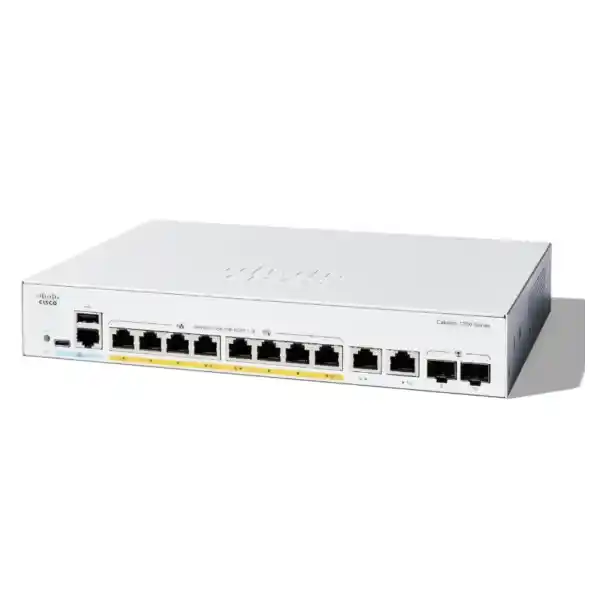
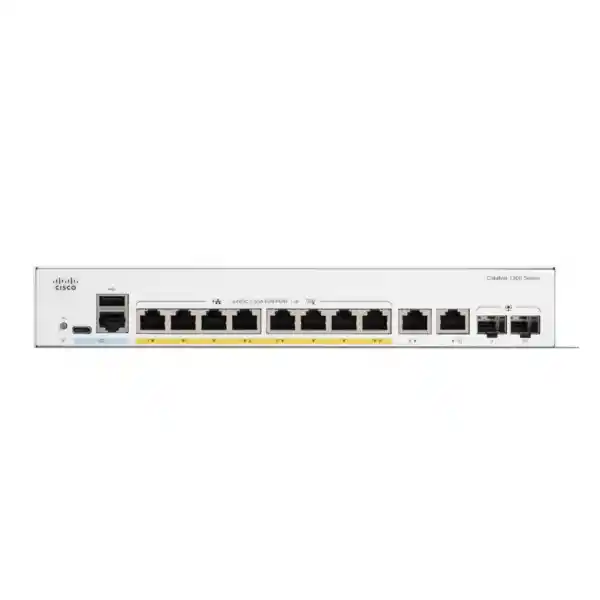
The Cisco Catalyst C1300-8P-E-2G Network Switch gives a small office or branch a managed connection point for wired devices and compatible powered endpoints. It combines eight 10/100/1000 PoE+ access ports with two Gigabit copper/SFP combo uplinks. For Tanzania buyers, the key selection question is whether the connected equipment fits the shared power budget and the available Gigabit connections. Request a quotation with your endpoint list, expected power demand and preferred uplink medium.
This model suits a network where the number of connections is modest but the administrator still needs control over device groups, traffic treatment and access. A small deployment can contain several different services: business computers, telephones, wireless access points, printers and surveillance equipment. Planning their connections together helps avoid buying a switch that has enough sockets but insufficient power, an unsuitable uplink or too little room for the next change.
Start with the operating requirement rather than the port count alone. Decide which devices need power through Ethernet, which applications must remain reachable during an interruption, and who will maintain the configuration. The following buying and deployment guidance explains how to turn those requirements into a practical specification. Endpoint quantities and wattages used in examples are illustrative planning assumptions, not compatibility assurances or tested device combinations.
Verified hardware at a glance
| Selection point | Specification |
|---|---|
| Access connections | 8 × 10/100/1000 RJ-45 ports with IEEE 802.3af PoE / 802.3at PoE+ support |
| Power available to endpoints | 67W shared PoE budget; up to 30W per PoE+ port within the total budget |
| Uplink connections | 2 × Gigabit RJ-45/SFP combo ports; one medium active per combo pair |
| Total logical Ethernet ports | 10 Gigabit Ethernet ports |
| Switching capacity | 20 Gbps |
| Forwarding rate | 14.88 million packets per second, measured with 64-byte packets |
| Power arrangement | External supply; AC input specification 100–240V, 50–60Hz |
| Cooling and installation | Fanless; rack-mountable |
| Important expansion limits | Gigabit uplinks; this model is not in Cisco’s supported hardware-stacking model list |
The figures describe the switch hardware, not an internet service or an application performance guarantee. A workstation accessing a remote server also depends on the router, firewall, service connection and destination system. Likewise, the forwarding-rate measurement uses a defined packet size and should not be interpreted as a promised file-transfer speed. Match the complete network path to the business application before deciding that a faster switch alone will solve a performance problem.
Work out the PoE requirement before choosing the switch
Power over Ethernet can simplify placement because a compatible endpoint receives data and electrical power over the same copper connection. That is useful when a telephone, ceiling access point or camera would otherwise need a separate power outlet nearby. The design still needs an accurate power schedule. Record each endpoint’s exact model, required PoE standard and maximum input requirement, then establish the allocation needed at the switch, including the applicable cable-loss allowance.
The individual-port capability and the total supply limit answer different questions. A port can support an endpoint that needs more power than a basic telephone, while the switch as a whole must still support all the connected equipment together. Do not multiply the highest individual-port figure by every access port and assume that much power is available. A collection of low-demand devices may fit comfortably; fewer demanding devices can exhaust the budget.
Build a schedule with columns for location, endpoint model, quantity, power class, planned switch allocation and service priority. Use the endpoint manufacturer’s documentation and the intended operating mode. An access point with extra radios enabled may have different requirements from a reduced-function mode. A camera may need additional power for illumination or accessories. A telephone with an expansion module may differ from the base unit. Buying decisions should reflect the final equipment configuration.
As a simple arithmetic example, four hypothetical endpoints each allocated 7W and one allocated 18W require 46W in total. That leaves 21W against the stated budget before any further allowance that the endpoint specifications or installation require. This example explains the calculation only. It does not establish that a particular phone or access point uses those values, or that five arbitrary devices will operate correctly when connected.
Contrast that with three hypothetical devices each requiring a 25W switch allocation: their combined demand is 75W. There may be spare physical ports, yet this arrangement exceeds the available total. Reducing the number of connected powered devices, choosing suitable lower-demand equipment, or selecting a switch with a larger power supply are possible design responses. Do not plan around reducing a device’s allocation unless its manufacturer documents the resulting operating mode and you accept any limitations.
Cisco’s port-management tools provide power status, allocation information and configurable priorities. Use these to confirm the installed design and identify which services matter most. Priority settings allocate a limited resource; they do not increase the supply capacity. Leave sensible room for additions, review actual allocation after commissioning, and update the power schedule whenever an endpoint changes. A small spare port reserve is useful only when there is also enough power for the equipment you expect to add.
Understand the two combo uplinks
Each combo pair represents one logical uplink with a choice of copper or SFP connectivity. Activating the SFP side disables the corresponding shared RJ-45 side. This matters when drawing the network diagram: the connector arrangement does not provide four independent uplink connections. Choose the required medium for each logical interface and record that choice on the port map so installers and support staff count connections consistently.
For a nearby router or another switch in the same cabinet, a suitable copper patch connection may keep the installation simple. For an existing fibre route, start by identifying the installed fibre type, connector arrangement and far-end interface. An SFP is only one part of that path. The two ends need compatible operating characteristics, and the patch leads and permanent cabling must match the intended optical design.
Do not select an optic solely because it fits mechanically into an SFP slot. Verify the exact transceiver against Cisco’s applicable compatibility information, the switch software and the remote equipment. Check the planned fibre distance and optical budget rather than assuming every fibre module reaches the same distance. Request the required transceivers and patch leads explicitly in the quotation; their presence should never be inferred from the availability of SFP sockets.
Consider aggregate traffic as well as connector type. Several users reaching a server elsewhere, wireless clients using cloud applications and cameras sending recordings upstream may share the same path. Review their likely simultaneous load and decide where servers and recording equipment will connect. When the application calls for a faster backbone connection, specify that requirement early and evaluate an appropriate platform instead of expecting a module change to upgrade the interface speed.
Where this model can fit
Small office with mixed devices
A small office can use a managed access switch to organize business computers, printing and a limited number of powered endpoints. Begin with a seat and equipment inventory, including devices that are easy to overlook, such as meeting-room systems or a local backup appliance. Identify the router connection separately. The useful size of the installation depends on both the ports occupied today and the spare capacity needed during the next equipment refresh.
Branch with business telephony
A branch may need a few compatible IP phones alongside ordinary data connections. Check the phone models, power requirements, provisioning process and voice network design. A working electrical connection does not establish compatibility with the telephone platform. Include call-control reachability, addressing, name resolution and the upstream path in acceptance testing. If a desk shares a cable through a phone’s PC connection, verify that phone’s own Ethernet and VLAN behaviour.
A limited wireless access layer
A few access points may be practical when their documented power and wired-interface requirements match the design. Do not use the number of switch ports to determine wireless coverage or client capacity. Plan access-point positions around the building, expected users and applications. Review whether the chosen radios need higher power or a faster wired connection to provide their intended features, then select switching that meets those requirements.
A small surveillance segment
A limited camera group can benefit from centralized power and a defined path to its recorder. Review the camera power requirements in the conditions expected on site, along with video bitrate, recording destination and retention design. Recorders, storage systems and remote viewers create different traffic paths. A camera installation should be evaluated as a complete system, including cabling and recording continuity, rather than as a simple count of available PoE sockets.
These are deployment examples, not fixed capacity ratings. The right design depends on exact equipment and operating requirements. A branch with several high-demand access points can need more power than an office containing more basic telephones. Similarly, a modest device count can generate substantial upstream traffic. Use the application inventory and power schedule to decide whether this model provides adequate headroom.
Separate device groups with a deliberate VLAN plan
VLAN support lets an administrator organize a shared physical switch into defined network groups. For example, a business may want staff devices, telephones and surveillance equipment assigned to separate networks. Establish the purpose of each group before configuration begins. A short table showing the group name, VLAN identifier, IP subnet and gateway makes the design easier to review and reduces ambiguity when the switch connects to an existing network.
Define how each connection carries traffic. An ordinary endpoint may use an untagged access connection, while an access point or upstream switch may need to carry several tagged networks. Cisco documents VLAN membership and port settings in its administration guide. The settings must agree at both ends. A mismatch can leave a device powered and physically connected while preventing it from obtaining the right address or reaching its intended service.
Keep the management path explicit. Decide which administrator devices should reach the switch and how access will remain available during changes. For wireless deployments, match each SSID’s network assignment to the wired design. For telephony, coordinate the voice network with the phone and call-control requirements. Test actual endpoints in each group rather than assuming a successful connection on one port proves the entire configuration.
Segmentation also needs a traffic policy. Describe which groups may reach one another, where routing takes place and where access rules are enforced. A separate VLAN does not, by itself, describe every permitted communication path. Document expected service access, including address assignment, name resolution, updates and monitoring. Keeping those dependencies visible makes later troubleshooting more precise and helps avoid opening unnecessary access simply to make an application work.
Give voice and other time-sensitive traffic a clear policy
Cisco documents Quality of Service controls for classifying and prioritizing traffic on the platform. Their practical purpose is to decide how traffic is treated when resources become busy. A voice conversation has different tolerance for delay from a background file transfer. Start by identifying the applications that need preferential treatment and the point where congestion is most likely, then apply a policy that is consistent with the rest of the network.
Do not trust every traffic marking automatically. Establish which devices or upstream interfaces are allowed to identify priority traffic and how other packets should be handled. An uncontrolled policy can allow ordinary traffic to compete with the service the business intended to protect. Keep the initial configuration understandable, confirm the selected mode against the installed software, and maintain a written explanation of why each important traffic class exists.
Test with a representative workload. For telephony, include normal calls while other users perform the transfers expected during working hours. For video meetings, include actual meeting-room equipment and the intended external service. Observe where performance changes rather than assuming that every interruption originates at the switch. An overloaded internet connection or a remote application issue needs attention at the relevant part of the path.
Useful acceptance criteria should be understandable to the people using the network. Agree which business activities must remain usable together and identify the expected busy period. Record test conditions so a later engineer can repeat them. Prioritization can improve handling under contention, but it cannot create additional upstream bandwidth. If demand consistently exceeds the path available, revisit capacity and application placement as part of the design.
Use management controls that match the support team
The Catalyst 1300 platform offers an on-box web interface and a command-line interface. This gives administrators different ways to inspect and configure the switch, but the organization still needs an agreed support method. Decide who owns the configuration, which accounts are authorized and how changes are recorded. A small installation benefits from the same clarity of ownership as a larger network, especially when staff or service providers change.
For an office supported mainly by a general IT administrator, readable port descriptions and a current connection schedule can be more useful than a complicated initial configuration. Name interfaces after their destinations or roles. Record the switch management address, cabinet location and upstream connection in the organization’s network documentation. Store credentials through the organization’s approved process and make sure an authorized replacement administrator can obtain access when needed.
Cisco’s administration documentation distinguishes the running configuration from the startup configuration and provides file operations for maintaining configuration files. Include a deliberate save and backup step in the change process. A setting that appears correct during a live session should also be checked for persistence through an agreed restart test. Keep a known working backup before substantial changes and describe how the previous configuration would be restored.
Software maintenance needs its own routine. Before an upgrade, review the applicable Cisco release notes, supported upgrade path and any issue relevant to the installed configuration. Choose a maintenance window, preserve the current settings and define a recovery approach. Afterward, confirm management access and the business services that use the switch. Record the resulting version and configuration date rather than relying on an engineer’s memory of the work.
Protect administrative access and the connected network
Cisco documents HTTPS, SSH and management-access controls, as well as options for port authentication and RADIUS integration. Select the controls that the organization can operate reliably. Restrict administration to the intended management path and authorized users, and review any services that are enabled. Physical access also matters: an exposed patch panel or reset button can affect the network regardless of how carefully remote access has been configured.
For organizations using centralized network admission, verify the authentication server, endpoint support and policy design before enabling enforcement. A device that cannot participate in the intended authentication method needs an approved handling policy. Test representative equipment and the relevant failure conditions. Introducing authentication across every port at once, without a working recovery route, can turn a manageable deployment into an avoidable service interruption.
Access control lists can implement defined permit and deny rules. Begin with a plain-language communication matrix: which source group needs which destination service, and for what business reason? Translate the approved requirements into the appropriate rules and test both allowed and blocked paths. Include management, monitoring and infrastructure dependencies. The rule set should remain understandable enough for another administrator to maintain without reconstructing its purpose from packet captures.
Keep the security boundary clear in the overall design. Internet inspection, remote-access policy and application protection may require dedicated systems elsewhere in the network. Confirm which device is responsible for each control and maintain consistent policy across those devices. The switch’s access features are useful components, but security outcomes depend on configuration, endpoint condition, account management and ongoing review as well as the selected hardware.
Plan cabling, mounting and power continuity together
Inspect the intended installation location before finalizing the equipment list. There must be room for the switch, its external power supply, patch leads and any fibre components without straining connectors. Provide ventilation according to the applicable installation instructions. Keep equipment accessible for authorized maintenance and arrange cabling so that tracing one connection does not require disturbing several others. A tidy installation makes a small network easier to support.
Check existing copper runs rather than assuming every wall outlet is suitable because it previously carried a connection. Cisco specifies Category 5e or better for Gigabit copper operation. Confirm cable condition, termination quality and the suitability of the complete channel for the planned power and data use. Intermittent faults often require examination of patch leads, permanent cabling and endpoints together. Keep test records where they can be found during future maintenance.
The external supply needs a secure, practical position and the correct mains connection for the supplied equipment. Confirm the power adapter and cord arrangement in the quotation. Prevent the adapter’s weight or an unsupported cable from pulling on the switch connection. Ask for the required mounting hardware explicitly when the installation depends on rack placement, and confirm the delivered package contents before the installation date.
If the network must continue during a mains interruption, size backup power for the actual supported system. Include the switch supply and the powered endpoints it serves, then add the router, firewall, recorder or other equipment required for the intended service. A powered telephone is of limited use if its call-control path is unavailable. Set a target runtime, verify it under a representative load and document what should shut down first when capacity becomes limited.
Consider the operating environment as part of the purchase decision. Heat, dust, moisture and accidental access can affect where network equipment should be installed. Assess the actual site rather than assuming every office cabinet offers the same conditions. Where a deployment requires outdoor or industrial environmental protection, establish that requirement separately and choose equipment and enclosures designed for it. Installation planning should preserve the manufacturer’s stated operating conditions throughout normal use.
Commission the installation against business requirements
-
Prepare before the change
Create the device inventory, power schedule, port map and network diagram. Confirm upstream access, addressing and the configuration needed by each connected service. Record the current working arrangement if this is a replacement. Choose an installation window that allows meaningful testing and provide a recovery plan for any service that cannot remain unavailable while a fault is investigated.
-
Verify the hardware and basic access
Check the delivered model against the quotation and record the equipment identifiers used for asset management. Establish authorized management access and the agreed software baseline. Confirm link operation with suitable test equipment or a known working endpoint. Resolve basic power, cabling or access problems before adding the full configuration, so later faults are easier to isolate.
-
Apply the planned network configuration
Create the required device groups, interface assignments and upstream settings. Add descriptive names and apply the agreed management and traffic policies. Work from the reviewed design rather than inventing settings while connecting equipment. Where a change could remove remote access, maintain an appropriate local recovery method and confirm reachability after each significant stage.
-
Connect endpoints and test their services
Check the power allocation and operational state of each powered device. Confirm that every endpoint obtains the expected network settings and reaches its required services. Test realistic combinations of activity, including calls, printing, wireless use or recording as applicable. Record the results by endpoint and location so the handover identifies exactly what was validated.
-
Save, document and hand over
Save the final configuration, retain a backup and update the diagrams to match the installed arrangement. Confirm the agreed recovery behaviour and configuration persistence. Give the responsible administrator the asset record, management details, port schedule, software information and test results. Record any outstanding item with a clear owner, rather than treating an incomplete service as an unexplained exception.
Acceptance should follow the business requirement, not just the presence of link lights. A successful test explains what was connected, which service worked and under what conditions. If the installation is phased, distinguish completed tests from equipment that has not yet arrived. This makes the handover useful to both the buyer and the next person supporting the network.
Monitor changes and keep capacity visible
Cisco documents SNMP management and notification capabilities for the platform. If the organization uses a monitoring system, define the information it actually needs and configure access accordingly. Link status, interface activity and device health can help establish a baseline. Select meaningful alerts and assign someone to respond; a notification that no one owns provides little operational value.
Review power allocation when an endpoint is replaced, moved or configured with additional features. Update the connection schedule at the same time. Track the upstream path during realistic busy periods and compare the results with the experience reported by users. Measurements taken while the office is empty may miss the condition that causes a recurring problem.
Changes should have a short record describing purpose, affected ports, date and recovery approach. Keep the previous working configuration and verify that the current documentation matches the installed arrangement. Review administrator access when responsibilities change. These habits reduce dependence on one person and make it easier to decide when additional capacity is needed, instead of discovering the limit during a rushed expansion.
Choose the right size before requesting a quotation
This compact model is most useful when the planned endpoints, power allocation and upstream traffic fit the design with room for normal changes. If the equipment schedule is already close to a limit, ask for a comparison with a more suitable alternative before ordering. The comparison should address the actual constraint: additional access connections, a larger PoE supply, faster uplinks or a different resilience requirement.
Be precise when requesting a larger or more capable switch. More ports do not automatically provide the power standard required by a demanding endpoint. A larger power budget does not automatically provide a faster uplink. Likewise, several independent switches do not automatically behave as a hardware stack. State the feature that is required and verify it for the exact proposed model, rather than relying on a family name or a shortened sales description.
For a replacement, include the existing model and its configuration requirements. Review cable locations, interface assignments, tagged networks, management addressing and dependencies on the current upstream device. Check any necessary changes to optics or mounting before scheduling the swap. An old configuration is useful evidence of the existing design, but it should be reviewed and translated for the destination platform rather than assumed to transfer unchanged.
A complete quotation should identify the switch, required power arrangement, any optics or patch leads, mounting needs and requested configuration work. Ask for current commercial details for the Tanzania order, including price, availability and applicable support and warranty terms. Those details should be confirmed in the actual offer. Keep a clear distinction between the manufacturer’s published product capabilities and the services or accessories included in the purchase.
Frequently asked buying questions
Can all eight access ports power devices at the same time?
They can be used for compatible powered endpoints when each device meets the port requirements and the combined allocation fits the shared budget. The endpoint mix determines feasibility. Submit exact device models and power requirements for review, rather than assuming that the same maximum output is available simultaneously from every port.
Are the RJ-45 and SFP sockets in a combo pair independent?
No. They are two medium options for one logical interface. Plan one active connection for each combo pair and document the selected medium. Count the logical interfaces when preparing a network diagram or checking whether there are enough upstream connections for the intended topology.
Will any PoE camera or wireless access point work?
Compatibility must be checked for the exact endpoint. Review its power standard, maximum requirement, Ethernet speed and any feature restrictions associated with reduced power. Equipment requiring a different power method or greater capacity needs an appropriate design. The device category alone is insufficient to establish compatibility.
Does connecting fibre make the uplink faster?
The installed interface determines the supported link rate. Fibre selection addresses the required physical connection and distance; it does not change the switch port into a higher-speed interface. Check the remote device, compatible optics and the complete fibre path before including modules in the order.
Can this switch replace a router or firewall?
Assign responsibilities according to the network design. Routing, internet connectivity, security inspection and remote access have different requirements. Confirm which system provides each service and verify the exact features needed before changing the architecture. A switch purchase should not remove a required network function without a replacement plan.
How much spare capacity should I allow?
There is no single percentage suitable for every office. List the likely additions over the planning period and reserve the ports, power and upstream capacity they require. Consider temporary equipment used during moves or maintenance. A written growth scenario is more useful than an arbitrary margin with no connection to expected changes.
What should I provide for a Tanzania quotation?
Send the required quantity, installation environment, endpoint inventory, power schedule and preferred uplink medium. Include existing network details and any accessories or configuration work required. Request confirmation of the exact supplied model, commercial terms and package contents so that the offer can be checked against the intended deployment.
Request a Cisco switch quotation for your Tanzania project
Share your endpoint list and network requirements with FourTeck Tanzania to request a quotation for the Cisco Catalyst C1300-8P-E-2G. Include the number of devices requiring Ethernet power, their exact models and the planned upstream connection. If the switch will replace existing equipment, include its model and the functions that must be retained.
Ask for the switch and required accessories to be itemized, along with any requested configuration or installation work. Confirm price, availability, supplied power components and applicable support terms in the quotation. With a reviewed device schedule and a clear connection plan, you can assess the proposed equipment against the services your business needs to operate.
Request a quotation with your device and power schedule.




Reviews
There are no reviews yet.