
FOURTECK TANZANIA · MANAGED ACCESS SWITCHING
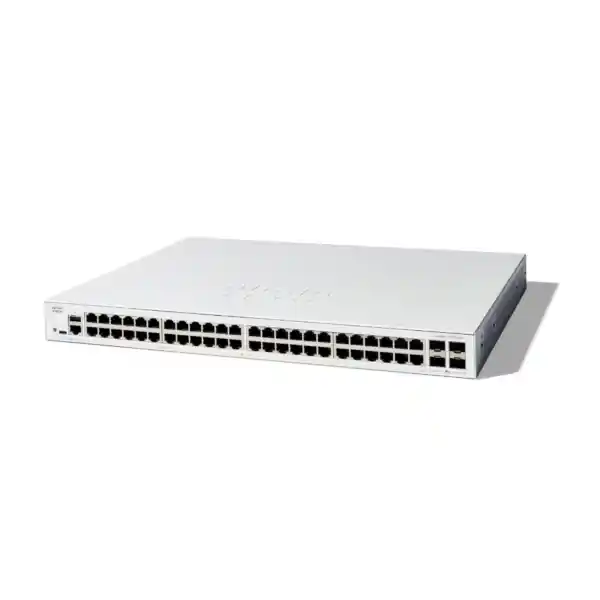
Cisco Catalyst C1300X-48T-4X Network Switch
A 48-port access switch for a clearly defined network
Choose the Cisco Catalyst C1300X-48T-4X Network Switch when your Tanzania business needs a dense bank of wired Gigabit connections, faster links toward the rest of the network, and managed control over traffic. This model suits a wiring cabinet serving computers, printers and other independently powered Ethernet equipment. Start a quotation with FourTeck Tanzania by sharing your endpoint count, uplink destination and whether any connected devices need power through their network cables.
The most useful buying distinction is the role of each connection. The copper ports serve everyday access devices, while the front uplink slots connect the switch to upstream equipment or participate in a supported stack design. Purchasing the correct cables and modules matters as much as choosing the chassis. A quotation should identify the complete connection at both ends, rather than leave the optical or direct-attach components for the installation team to resolve later.
This product page focuses on selecting and planning the exact data-only model. It is suitable for buyers comparing managed access switches, administrators expanding a cabinet, and project teams preparing a bill of materials. The deployment guidance below describes checks to make for your own network; it does not imply that a particular accessory, implementation service or support agreement is included in the hardware price.
Verified hardware at a glance
| Specification | C1300X-48T-4X |
|---|---|
| Manufacturer and series | Cisco Catalyst 1300X |
| Exact model | C1300X-48T-4X |
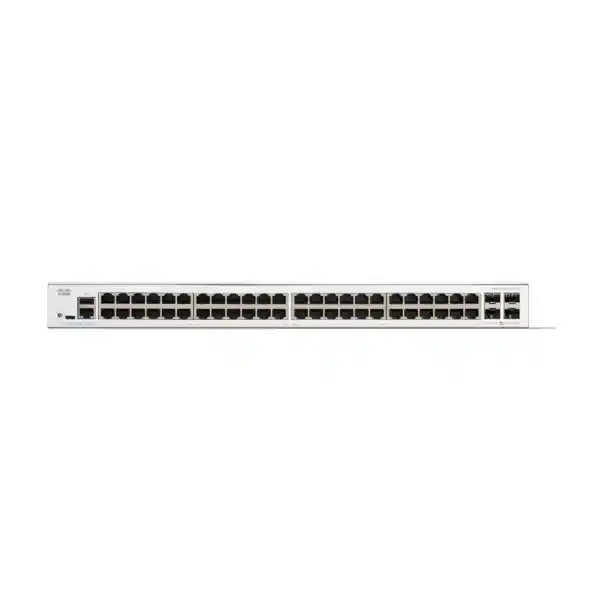
| Copper access connections | 48 × 10/100/1000 Ethernet ports |
| Front uplink slots | 4 × SFP28; 10G uplink operation, with 25G reserved for stacking |
| Power over Ethernet | Non-PoE model |
| Switching capacity | 176 Gbps |
| Forwarding rate | 130.95 million packets per second with 64-byte packets |
| Chassis dimensions, W × D × H | 444.3 × 270 × 43.94 mm |
| Unit weight | 3.6 kg |
| Power input | Internal supply, 100–240 V AC, 50–60 Hz |
Treat the capacity and forwarding figures as manufacturer specifications for the switch, rather than a forecast for an individual application. Actual transfers depend on endpoint interfaces, the selected uplink, the traffic pattern and other devices along the path. A file server with a slower network connection will still constrain a transfer even when the access switch has unused switching capacity.
The chassis dimensions help with cabinet selection, but they are not the total space needed for a completed installation. Allow room for cable bends, the power connection, mounting hardware and safe servicing. Record cabinet depth and access restrictions before ordering so that the installation does not depend on tightly folded cables or an inaccessible rear connection.
Check the endpoint power requirement first
The T model is intended for data connectivity without supplying PoE to attached devices. A desktop computer or printer with its own power connection is a straightforward candidate. A camera, telephone or wireless access point that expects power from the switch requires a separate, compatible power arrangement or a different switch selection. Count powered endpoints explicitly before approving the model.
Create a small endpoint schedule with four columns: equipment type, quantity, required link speed and power source. This catches a common procurement mistake in mixed offices: a port count may be correct while the power design is incomplete. For example, an access point with an available Ethernet connection still cannot start if its only intended power source was a PoE port that the selected chassis does not provide.
Separate injectors can be appropriate in a deliberately designed installation, but assess their cost, outlet requirements, placement and backup power together. Include them in the inventory and label their connections. For a large number of powered endpoints, compare a suitable PoE switch against the total installation rather than assuming that multiple standalone injectors will be the easier solution.
An existing telephone or camera network also needs a restart plan. If its present switch provides PoE, moving those cables to a data-only switch changes how those endpoints receive power. Confirm the power arrangement for every affected device before scheduling the cutover. Treat network connectivity and electrical power as separate acceptance checks.
Plan the copper port count around real connections
Begin with a patch-panel inventory instead of estimating from employee numbers. A person may use more than one wired device, while some wall outlets may be inactive. Printers, meeting-room equipment, building systems and spare desks can add connections that are easy to overlook. Mark which outlets must be active on day one and which are intended for future expansion.
Leave an explicit growth allowance based on the organisation’s plans. A cabinet that starts with every usable access connection occupied offers little room for temporary equipment, troubleshooting or an additional department. The right reserve depends on expected changes; a new office floor and a stable small branch should not automatically use the same expansion assumption.
Check the permanent cabling and patch leads before attributing a slow link to the switch. Gigabit operation requires a suitable complete copper channel. Damaged pairs, poor terminations or an endpoint configured for a lower speed can limit the connection. During commissioning, record negotiated speed and error counters alongside the outlet label, so the physical installation has a measurable baseline.
Each access connection remains a Gigabit connection at its maximum rated copper speed. Faster upstream links do not turn the desktop-facing ports into multigigabit ports. If specific workstations need more than a Gigabit connection, identify them before selecting the access platform and compare an appropriate higher-speed model for those positions.
Choose uplink media for the complete route
The four front slots should be planned against a named upstream port and a known cable route. Record the interface type at the other end, the distance, the available fibre or direct-attach path, and the required operating speed. The SFP28 form factor alone does not establish module compatibility or authorise general 25G uplink operation on this switch.
For fibre, confirm whether the installed cable is single-mode or multimode, the connector presentation, the patch-panel arrangement and the optical requirements of both ends. An apparently spare fibre path may contain unsuitable patch leads or an undocumented intermediate connection. Include the entire route in the design and arrange testing when its condition is uncertain.
For short cabinet connections, a supported direct-attach option may simplify the bill of materials, but its exact part number and length still require compatibility review. Cable stiffness and routing can matter in a crowded cabinet. Do not choose a length solely from the distance between front panels; include the intended cable-management path and service access.
Allocate slots to uplinks and stacking before purchasing accessories. A design that uses front slots for stack links has fewer of those slots available for other roles. Keep a port allocation drawing with the quotation so that everyone understands which connections are for upstream traffic and which join stack members. Do not assume that all advertised interfaces can perform every proposed role simultaneously.
Understand what a faster uplink changes
A faster upstream connection can help when many access devices need to reach servers or other network segments at the same time. The benefit depends on where traffic actually travels. Transfers between local endpoints, backups to a central system and internet access can have very different bottlenecks. Review utilisation over representative working periods before deciding how much upstream capacity to allocate.
Use a simple example during planning: a cabinet with many Gigabit endpoints can generate more simultaneous demand than one uplink can carry. This does not automatically make the design unsuitable, because most office connections are not continuously saturated. It does mean that a busy backup window or a shared storage workload deserves closer analysis than a basic email-and-browser office.
Link aggregation is available through the platform’s port-channel functions. It requires a compatible arrangement at both ends and a deliberate configuration. Multiple member links can distribute traffic across the group, but one flow should not be assumed to receive the sum of every member’s line rate. Check the workload and the load-balancing behaviour before using an aggregate figure in a purchasing justification.
Separate internet speed from internal capacity. Replacing an access switch does not increase the contracted bandwidth of a WAN circuit or remove congestion in a firewall. If users report slow cloud applications, collect evidence from the access link, uplink, firewall and service connection. The quotation should solve the identified constraint rather than treat a larger port count as a universal performance upgrade.
Use VLANs to make network roles explicit
The platform supports VLAN configuration, allowing the administrator to organise separate broadcast domains. A practical design can distinguish business devices, guest access, voice equipment and infrastructure management. Choose divisions that match actual operational or access needs. Creating a separate VLAN for every small team can add complexity without producing a clear benefit.
Write down the intended communication between groups before enabling routing. A guest device may need internet access but no path to an accounts server; a printer may need to accept traffic from staff networks while remaining inaccessible to visitors. These are policy decisions that should be agreed with the organisation, then translated into the appropriate routing and filtering configuration.
Check access-port membership and uplink tagging together. An endpoint connected to the right physical socket can still be placed in the wrong logical network if the port profile is incorrect. A trunk can also omit a required VLAN even when both switch interfaces show a healthy physical link. Label the intended role in the configuration and verify it with a representative endpoint.
Plan the management network with the same care as user connectivity. Identify which administrators can reach the switch, where their management tools run, and how access will work during a routing fault. The goal is a maintainable network where staff can diagnose an issue without opening management interfaces to every user segment.
Decide where routing and security policy belong
The 1300X platform provides Layer 3 functions, and Cisco documents OSPF support for this series. This can be useful when a deployment needs routed network segments or participation in an existing routing design. It is a design option to evaluate, rather than a requirement for every installation. A small site may be easier to operate with a simpler routing arrangement.
If the switch becomes a gateway between internal networks, review what traffic will travel directly through it and what traffic must pass through the firewall. Moving a gateway can alter inspection paths and access policy. The network diagram should show the actual forwarding path, particularly for sensitive applications and networks with restricted access requirements.
An OSPF deployment needs agreement on neighbouring devices, addressing, areas and route advertisement. Test the expected route selection and the effect of a failed path in a controlled environment. Use a specific acceptance objective, such as continued reachability to a named application after a planned link interruption, rather than an unsupported promise of seamless failover.
Access control lists can filter traffic according to the supported configuration, but their ordering, attachment point and default action need review. Test both permitted and prohibited communication. A successful connection test alone does not show that unwanted paths are blocked. Keep a policy record that explains the purpose of each rule and who can approve future changes.
Build a stack only when it serves the design
Front-panel stacking can simplify the operation of multiple compatible switches as a managed system. It is useful to consider when a cabinet needs expansion and the administrator wants a coordinated configuration. Decide whether a stack or independently managed switches better fits the maintenance model before ordering interconnects. A larger logical system also creates a shared operational scope that the support team must understand.
Confirm stack compatibility, software alignment, link selection and topology against the documentation for the intended release and exact member models. Do not assume that another Cisco switch can join because it shares a brand name or a similar front panel. A proposed mixture of platforms should receive an explicit compatibility check before it becomes part of the bill of materials.
Document the planned member identities, cable endpoints and reserved uplink roles. Place labels at both ends of each stack cable so that a replacement task does not require tracing an unmarked bundle. Keep the physical layout understandable to someone who did not perform the original installation. This is especially useful when a cabinet is maintained by several people.
Test the maintenance operations that matter to the organisation: saving configuration, identifying a failed member, replacing a cable and recovering management access. Schedule disruptive tests within an agreed window. Stacking should be selected for a documented operational benefit; it should not be presented as a guarantee that every component failure will be invisible to every application.
Set traffic priorities around applications
Cisco provides QoS controls for classification and queue mapping on the 1300X platform. These can help an administrator apply a consistent traffic policy where congestion occurs. Start by identifying latency-sensitive applications, expected traffic markings and the trust boundary. A priority policy is easier to assess when it refers to an actual business service.
For an office using real-time calling, examine the complete path between the endpoint and the calling system. A policy on one access switch cannot control congestion on every other device or provider link. Check the upstream configuration and test during normal busy periods. Record whether the problem is delay, loss or a capacity limit before adjusting priorities.
Avoid treating every important application as the highest priority. If all traffic receives the same preferential treatment, the configuration has little useful distinction. Agree a small, understandable set of classes and document the intended behaviour when the uplink is busy. Include large transfers and backups in the assessment because their timing may be easier to change than the network design.
Use measured results when reviewing the configuration. Compare application experience and relevant interface statistics before and after a controlled change. Retain a rollback option and an explanation of the selected values. This keeps the policy maintainable when the organisation changes its applications, replaces endpoints or moves services between local servers and the cloud.
Protect access without disrupting legitimate devices
Security planning should begin with an inventory of device types and ownership. Employee computers, printers, visitors and specialist equipment may require different admission methods. The platform includes managed access controls, but the correct implementation depends on what the endpoints support and how the organisation handles identity. Agree the operating process before enforcing a restrictive policy across every port.
Where 802.1X is planned, include the authentication infrastructure, endpoint configuration and exception handling in the project. An unattended printer and a managed laptop may not fit the same onboarding procedure. Test representative devices and decide how failed authentication will be investigated. A procurement request should mention identity integration when it is a requirement, so it is considered alongside hardware selection.
Controls such as DHCP snooping and dynamic ARP inspection require a correct understanding of trusted paths and address assignment. Introduce them through a reviewed configuration rather than enabling them without preparation. Static-address devices deserve particular attention during testing. Keep a list of exceptions with an owner and a reason so temporary workarounds do not become undocumented permanent access.
Restrict management access to approved administrators and use an agreed credential process. Remove unnecessary access paths, retain configuration backups securely and review administrative access when staff responsibilities change. Network security remains an ongoing operating responsibility. Purchasing a managed switch provides configuration capabilities; the organisation still needs to define and maintain the policy those capabilities enforce.
Make management and configuration recovery practical
The switch offers a browser-based management interface and a CLI, with Cisco Business Dashboard support described for the series. Select the management approach that fits the team’s skills and the wider environment. A local interface can serve a single cabinet, while a broader management workflow may be useful when multiple locations require consistent oversight. Confirm management deployment requirements before committing to a design.
Record a baseline configuration before moving production devices. Include the management address, administrator access method, VLAN plan, uplink allocation and relevant routing settings. Store the record where authorised support staff can retrieve it during an outage. Keep credentials in the organisation’s approved secure system rather than in a general handover document.
Distinguish an applied change from a saved configuration. As part of commissioning, verify that the intended settings survive an approved restart and that the backup reflects the accepted configuration. This is a practical acceptance activity, not an invitation to restart a live production system without planning. Coordinate the test with the people who depend on the connected equipment.
Plan recovery around realistic access. If remote management depends on the very uplink under investigation, decide how a technician will reach the device locally. Confirm available console equipment, cabinet access and escalation contacts before the installation is considered complete. The value of a recovery plan is that it remains usable when normal network access is unavailable.
Prepare the cabinet and backup power
Inspect the intended location before equipment arrives. Check mounting space, airflow, electrical outlets, cable-management access and the ability to identify connections without moving unrelated equipment. A tidy cabinet helps routine support because a technician can find the relevant port and inspect its cable without disturbing neighbouring services. Include patch-panel and power-distribution layout in the installation plan.
This model uses an internal AC power supply. Confirm the supplied power lead and its suitability for the site’s power distribution arrangement in the quotation. If continuity during an outage is required, size the backup system for the complete network path. Keeping only the access switch running may not preserve service if the firewall, upstream switch or necessary endpoint loses power.
Select a location suitable for active network equipment and verify the current environmental requirements against the manufacturer’s installation guidance. Avoid assuming that an enclosed wall cabinet has enough ventilation merely because the chassis fits inside it. Consider the heat from all installed devices and whether future expansion will change the conditions.
Leave service access around the installed equipment and keep cable tension off the ports. Maintain an equipment list with serial numbers and cabinet positions, separate from any public-facing documentation. This helps with asset control, fault reporting and replacement planning. Confirm who owns the cabinet keys and who can authorise physical changes after handover.
Common business deployment scenarios
Office floor with many wired desks: this model is worth evaluating when the main requirement is managed Gigabit connectivity for independently powered equipment. Map desk outlets and shared devices to the available access ports, then choose the uplink based on application demand. Include spare connections for moves and temporary equipment rather than designing only around the first seating plan.
Branch office with local applications: compare the location of servers, the firewall role and the internet connection before deciding where routing should occur. Keep the branch support process simple enough for the available team. A well-documented configuration with a clear recovery path may provide more operational value than enabling every supported feature at the outset.
Campus administration or training room: use the endpoint inventory to distinguish computers, shared printers and any powered network devices. Consider whether sessions create concentrated traffic, such as many users accessing the same local resource simultaneously. Schedule updates and backups with those usage patterns in mind, and identify which services must remain available during maintenance.
Mixed wired and wireless environment: assess the switch role separately from the access-point power and speed requirements. A network may use this chassis for data-only connections while another correctly selected platform serves powered access points. Compare the complete design on its merits. Do not assume that one access model has to serve every equipment type in the building.
Replace an existing switch with a controlled cutover
Capture the existing port map before removing cables. Record outlet labels, connected device roles, VLAN membership, uplink media, aggregation settings and any special configuration. Photographs can help with physical tracing, but they do not replace a logical configuration record. Resolve unidentified connections before the maintenance window wherever possible.
Compare functions rather than copying configuration text blindly. A familiar command or feature name on another platform does not guarantee identical syntax or behaviour. Translate the required outcome into the supported configuration for this series and review the intended software release. Test specialist functions in advance when they are necessary for business operation.
Use staged acceptance during the move. First establish controlled management access, then validate upstream connectivity and one representative endpoint per required network. Move additional groups only after the basic paths behave as expected. Keep the original equipment and a documented rollback decision available until the agreed acceptance point, rather than assuming that a green link light proves the migration is complete.
For a lifecycle-led replacement project, review FourTeck Tanzania’s Catalyst 2960-X replacement guidance alongside the exact requirements of your installed equipment. This product should be evaluated on its own capabilities; it should not be assumed to be the manufacturer-designated replacement for every older Catalyst model.
Specify the quotation as a complete bill of materials
Provide the exact chassis model and quantity, followed by a description of each required upstream connection. State whether the switch will operate independently or join a planned compatible stack. Include the model and interface details of the equipment at the far end. This gives the quotation reviewer enough information to check the proposed media and avoid an incomplete hardware-only comparison.
Separate the chassis, modules, cables, mounting items and any requested professional work into identifiable lines. Confirm what comes with the proposed supply rather than assuming that every photographed accessory is included. If configuration, migration or handover assistance is required, describe the expected tasks and ask for that scope to be confirmed independently of the switch.
For Tanzania procurement, request current pricing in the quotation and confirm the applicable commercial terms before placing an order. Ask for stock position, lead time, delivery arrangements and warranty or support terms in writing for the specific offer. These details can vary with the supply route and should not be inferred from a generic product description.
Compare quotations on the same assumptions. A lower chassis price may omit the connection accessories or operating scope included elsewhere. Record required acceptance activities, support responsibilities and any dependency that must be supplied by the customer. The objective is a purchase that can be installed as planned, with clear ownership of the remaining work.
Acceptance checks before everyday use
Use an agreed checklist with named owners. Confirm that the delivered model matches the quotation, the equipment is mounted securely, and each required connection is identified. Verify negotiated speeds and inspect the relevant interface counters. Check that the physical layout matches the documented plan before the cabinet is closed.
Test application access from representative endpoints in each network role. Include addressing, name resolution, access to required local resources and internet reachability where appropriate. Test restricted paths as well as allowed ones. A guest endpoint should receive the intended service while remaining outside any business network that the approved policy excludes.
If aggregation, routing or stacking forms part of the accepted design, validate its operational state and the planned maintenance behaviour. Do not perform failure tests casually on a live network. Agree the interruption, expected result and rollback action in advance, then record what happened. Investigate differences between the expected and observed behaviour before signing off.
Complete handover with a saved configuration, a usable backup, a port map and a short operating record. Include the procedure for reporting faults, locating support information and requesting a configuration change. Assign responsibility for reviewing software guidance and scheduling future maintenance. This gives the business an operating network with an accountable support process.
Frequently asked buying questions
Does this model supply power to IP phones or cameras?
No. This is the non-PoE version. A device that depends on Ethernet-delivered power needs a suitable separate power arrangement or a correctly selected PoE switch. List powered endpoints before requesting the quotation so that their requirements are assessed with the rest of the design.
Can the SFP28 slots be used as ordinary 25G uplinks?
Cisco specifies 10G uplink operation for this model, with 25G available for stacking only. Do not buy it on the assumption that SFP28 means unrestricted 25G connectivity. Confirm the intended uplink or stack role and compatible media for each planned connection.
Will it increase the speed of my internet service?
It may help address a local switching bottleneck, but it does not change the capacity of your service contract. Evaluate the access network, uplink, firewall and internet connection separately. Use utilisation and application tests to establish which part of the path needs attention.
Is it suitable for computers requiring 2.5G or faster copper links?
Its copper access ports are rated up to Gigabit Ethernet. A device requiring a faster copper connection needs an appropriate alternative access interface. Decide from the endpoint requirement rather than assuming that faster uplinks also increase the maximum speed of the desktop-facing ports.
Are optical modules and stacking cables included?
Confirm the contents of the specific quotation. Do not assume accessories are included with the chassis. Supply the far-end interface, route length and intended topology so that compatible modules or cables can be listed as part of a complete bill of materials.
Can I copy a configuration from my current Cisco switch?
Review and translate the required functions for this platform and software release. Similar branding does not establish identical syntax, feature behaviour or stacking compatibility. Retain the old configuration as a reference and validate the proposed replacement settings before moving production connections.
How should I select the routing arrangement?
Start with the required communication between networks and the traffic that must pass through the firewall. Determine who will operate the routing design and how faults will be diagnosed. Enable the functions the deployment needs, with a documented policy and controlled acceptance tests.
What information should I send for a Tanzania quotation?
Send the model, quantity, active endpoint count, powered-device requirements, upstream equipment details and intended cable distances. Add cabinet constraints, any migration requirement and the preferred commercial scope. Ask for current price, supply details and support terms to be confirmed for your specific request.
Request a C1300X-48T-4X quotation for Tanzania
Share your port schedule, uplink details and any requirement for stacking with FourTeck Tanzania. Ask for a quotation covering the exact switch, verified connection accessories and any separately agreed implementation scope. If you are replacing an existing installation, include its current model and the functions that must be retained.
Before authorising the purchase, confirm the endpoint power plan, media compatibility, cabinet suitability and acceptance responsibilities. Request current commercial terms for the specific supply. A clear equipment schedule and a documented network role make it easier to select the right hardware and prepare an installation the operating team can support.




Reviews
There are no reviews yet.