
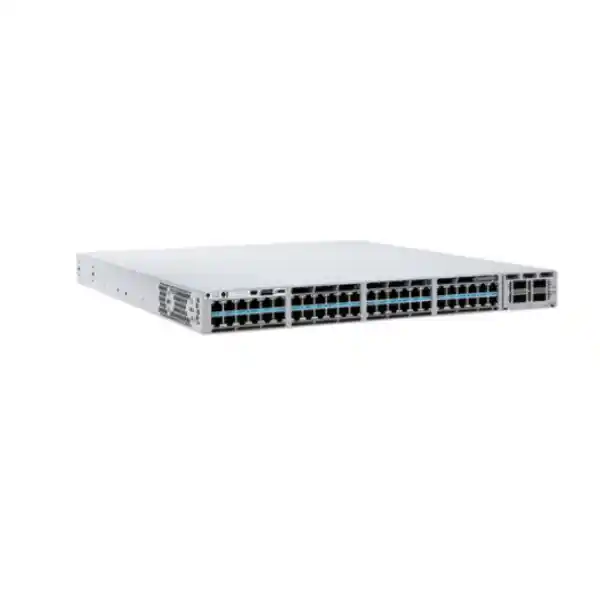
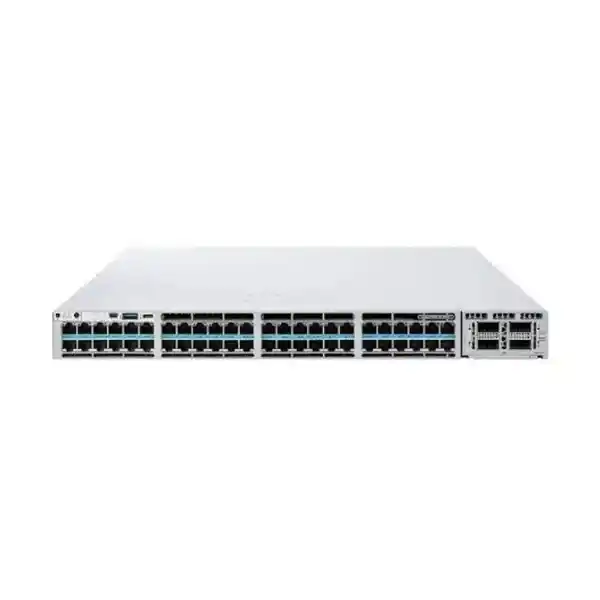
Cisco Catalyst 9300X Series • Enterprise access switching
Cisco Catalyst C9300X-48TX 48-Port 10G Multigigabit Network Switch
The Cisco Catalyst C9300X-48TX is designed for organizations that need dense, high-speed copper access without Power over Ethernet. It provides 48 data-only multigigabit ports supporting 100 Mbps, 1, 2.5, 5 and 10 Gigabit Ethernet, a modular uplink slot, StackWise-1T stacking, and a platform architecture built for secure enterprise campus and branch networks. For Tanzanian businesses modernizing high-density user, server, wireless-backhaul or aggregation-adjacent access layers, it offers a practical path beyond conventional 1G switching while preserving copper connectivity.
Data-only / no PoE
StackWise-1T
Modular uplinks up to 100G
Who should consider the C9300X-48TX?
This model is best suited to network teams that specifically want high port density and high copper speed but do not need the switch itself to power endpoints. Typical use cases include enterprise access layers where powered devices are handled by separate PoE switches, high-performance desktop or workstation segments, server and appliance connectivity over 10GBASE-T, network laboratories, campus distribution-edge designs, media and engineering environments, and sites that are migrating from 1G to multigigabit copper in phases. Because every front-panel data port can negotiate multiple speeds, existing lower-speed Ethernet devices can coexist with new 2.5G, 5G and 10G endpoints without forcing an all-at-once refresh.
It is not the correct choice when the same access switch must directly power Wi-Fi access points, IP phones, cameras, badge readers or other PoE devices. In those deployments, a PoE-capable Catalyst 9300X model such as the 48HX family may be more appropriate. That distinction matters during procurement: the 48TX is a data-only platform. Buyers should therefore map endpoint power requirements before selecting the chassis, rather than assuming that all 48-port Catalyst 9300X models provide UPOE+.
Key specifications at a glance
| Model | Cisco Catalyst C9300X-48TX |
|---|---|
| Access ports | 48 × multigigabit copper data ports |
| Port speeds | 100M / 1G / 2.5G / 5G / 10G Ethernet |
| PoE | No — data only |
| Uplinks | Modular; module selected separately |
| Stacking | StackWise-1T with Catalyst 9300X; mixed C9300/C9300X stacks operate at supported lower stack bandwidth |
| Switching capacity | 1,760 Gbps standalone; 2,760 Gbps with stacking |
| Forwarding rate | 1309 Mpps standalone; 2232 Mpps with stacking |
| Memory | 16 GB DRAM; 16 GB flash |
| Packet buffer | 32 MB for the 48-port 10G multigigabit platform class |
| Default power supply | 715W AC |
| Dimensions | 1.73 × 17.5 × 19 in. (4.4 × 44.5 × 48.3 cm), chassis dimensions |
| Weight | Approx. 14.6 lb (6.62 kg) with fan FRUs and default power supply |
48 multigigabit copper ports for phased network upgrades
The defining feature of the C9300X-48TX is its density: all 48 access ports support multigigabit Ethernet up to 10 Gbps. That gives a network architect considerably more freedom than a traditional 48-port 1G access switch. A site can keep standard 1G desktops on the same switch as 2.5G or 5G endpoints, while reserving 10GBASE-T for bandwidth-intensive systems. This can simplify migration projects because cabling, endpoint readiness and application demand rarely change at the same time across an entire building.
In practical terms, the switch is useful when the access layer must stop being the bottleneck. Modern workstations, virtualization hosts, storage-adjacent appliances, content-production systems and high-throughput wireless infrastructure can exceed 1G quickly. The 48TX allows the edge to scale without immediately replacing every copper connection with fiber. Actual achievable speed still depends on the endpoint NIC, cable category and quality, link distance, installation condition and negotiated settings. A 10G-capable switch port cannot make an older endpoint or unsuitable cable run operate at 10G.
For Tanzania deployments, that makes pre-installation cabling assessment important. Before purchasing large quantities of 10GBASE-T access ports, verify the existing structured cabling, patch panels, patch leads and rack practices against the required Ethernet speed and distance. This is especially relevant in older office buildings where the switch refresh may move faster than the passive cabling refresh.
High-capacity forwarding for dense access
Cisco specifies 1.76 Tbps of switching capacity and 1309 Mpps of forwarding performance for the C9300X-48TX in standalone operation. With stacking, Cisco lists 2.76 Tbps switching capacity and 2232 Mpps forwarding rate. These figures help distinguish the model from ordinary 1G access switches: it is engineered to support a much higher aggregate traffic profile, including simultaneous multigigabit endpoint activity and high-speed uplinks.
Performance numbers should be interpreted in the context of a complete design. User traffic patterns, oversubscription, uplink selection, VLAN and routing architecture, security features, application policy and the bandwidth available upstream all influence the result. A 48-port access switch populated with 10G endpoints can theoretically present a very large edge-side demand, so uplink planning matters as much as front-panel port speed. The modular uplink architecture is therefore a central part of the platform rather than a minor accessory decision.
The 32 MB packet buffer associated with the 48-port 10G multigigabit Catalyst 9300X class can also help absorb short bursts, but buffering is not a substitute for correct capacity engineering. Networks supporting backup windows, large engineering files, media workflows, east-west application traffic or high concurrency should be sized using measured utilization and growth expectations.
Modular uplink choices: design the northbound capacity you actually need
The C9300X-48TX uses a modular uplink design. The default switch configuration does not include the uplink network module, so the module must be selected as part of the design and order. Cisco lists Catalyst 9300X modules that provide eight multigigabit copper uplinks, eight 25G/10G/1G SFP28 ports, two 100G/40G ports, or four 100G/40G ports. The four-port 100G/40G C9300X-NM-4C is specifically listed by Cisco as compatible with the C9300X-48TX, among selected 9300X models.
8 × 10G/1G multigigabit copper
8 × 25G/10G/1G SFP28
2 × 100G/40G
4 × 100G/40G
Choosing among these modules depends on the upstream topology. A pair of high-speed fiber links may be suitable for a resilient distribution design, while a denser SFP28 option can support multiple 10G or 25G connections. The copper module may be useful where the upstream handoff remains copper. Optics, cables, breakout behavior, supported transceivers and software requirements should be validated against the exact network module and Cisco compatibility guidance before ordering.
Because the uplink choice can materially affect total project cost and rack connectivity, buyers should avoid treating “C9300X-48TX” as a complete bill of materials by itself. The chassis, uplink module, optics or DACs, stacking accessories, power redundancy choice, license tier and support coverage all need to be aligned to the intended topology.
StackWise-1T for resilient, high-density campus access
Catalyst 9300X switches support Cisco StackWise-1T, allowing up to eight compatible switches to operate as a single logical stack at up to 1 Tbps of stacking bandwidth when built as a Catalyst 9300X stack under Cisco’s supported rules. A stack reduces day-to-day operational complexity because multiple physical units can be managed through a common control and management plane. It also supports designs in which access links and uplinks are distributed across different stack members for resilience.
Cisco also documents mixed stacking between Catalyst 9300X and Catalyst 9300 modular-uplink models, with the mixed stack operating at the supported StackWise-480 rate and requiring compatible license levels. This can help in phased migrations where an organization already owns Catalyst 9300 switches and wants to add newer 9300X capacity. It should not be assumed, however, that every mix of model, software release, license and feature is valid. Mixed-stack design should be checked against current Cisco compatibility and release documentation before implementation.
For branch offices or smaller campuses, a two-member stack may provide an effective balance between redundancy and cost. Larger campus access blocks can scale further, but physical stack cabling, rack placement, power feeds, failure domains and uplink diversity should be designed deliberately. A stack is a resiliency and operations tool, not a replacement for broader campus architecture planning.
Power architecture and hardware serviceability
Cisco ships the C9300X-48TX with a 715W AC power supply by default. The Catalyst 9300 Series supports dual redundant power supplies: one power supply is included as standard, while a second can be ordered initially or added later. The platform also uses field-replaceable fans. These characteristics are valuable in business-critical access networks because power and cooling components can be designed with greater resilience than on many fixed, non-modular access switches.
The 48TX is a data-only model, so the 715W supply is not a PoE budget for endpoint devices. That distinction can reduce confusion during electrical planning. The switch consumes power for the system itself, its installed network module and active interfaces, while attached endpoints require their own power source or a separate PoE-capable network device. Cisco publishes detailed power-consumption tables for different configurations; actual draw varies by port activity, speed, uplink module and operating conditions.
In Tanzania, rack power design should also consider the quality and continuity of the site electrical supply. Where business operations require high availability, network equipment is commonly paired with suitable UPS capacity, surge protection, grounding and—in larger facilities—generator or other backup arrangements. The correct design depends on site conditions and should be completed by qualified infrastructure personnel rather than inferred solely from the switch’s power-supply rating.
Important: this model does not provide PoE
The C9300X-48TX should not be purchased on the assumption that it can directly power wireless access points, phones, cameras or other IEEE PoE endpoints. Cisco describes this model as “data only.” If your access-layer design requires 90W UPOE+ or other PoE functionality, select an appropriate PoE-capable Catalyst model and size the power budget for the actual endpoint load.
The 48TX can still participate in a wider campus design that includes PoE switches. For example, it may serve high-speed data-only users, server-room copper devices or aggregation-adjacent workloads while neighboring access switches handle powered edge devices. Separating these roles can be useful when only part of a building requires PoE and the remaining ports need high multigigabit density.
Security architecture for modern enterprise networks
Catalyst 9300X is built on Cisco’s UADP 2.0sec architecture, which adds hardware capabilities for high-speed cryptography. Cisco documents line-rate IPsec support up to 100 Gbps on Catalyst 9300X platforms, designed for use cases such as secure site-to-site, site-to-cloud and edge connectivity. The platform also supports MACsec link encryption, with Cisco documenting 128-bit and 256-bit AES options subject to feature and license requirements.
Security begins before traffic encryption. Cisco’s trustworthy-systems capabilities include signed software images, Secure Boot and Trust Anchor technology intended to provide assurance around platform and software authenticity. In a procurement process, these platform-level protections are relevant for organizations that treat the access layer as part of their security boundary rather than as simple unmanaged connectivity.
The switch family also supports features such as Flexible NetFlow, Encrypted Traffic Analytics, segmentation technologies and policy enforcement. Some capabilities depend on the selected Cisco software package, subscriptions, controller architecture and exact IOS XE release. Buyers should therefore define the security outcomes required—such as encrypted links, role-based segmentation, flow visibility or SD-Access—before finalizing the license and management stack.
For IPsec in particular, Cisco notes that the high-security encryption capability may require an HSEC entitlement or key in applicable configurations. This should be validated during solution design and ordering. The hardware capability alone does not guarantee that every encrypted-WAN feature is enabled in every license or regulatory context.
Visibility, telemetry and operational insight
Dense high-speed access creates an operational challenge: more traffic is useful only if the network team can understand what is happening. Catalyst 9300X supports hardware-based Flexible NetFlow, model-driven telemetry and modern management interfaces that can feed monitoring and assurance workflows. Cisco specifies up to 128,000 Flexible NetFlow entries for the 48-port 10G multigigabit Catalyst 9300X class, giving administrators a strong foundation for traffic visibility and capacity analysis.
The platform supports telemetry using modern mechanisms including gRPC and gNMI, allowing integration with monitoring systems that consume structured operational data. This can help network teams move beyond periodic manual CLI checks toward continuous observability. The practical value is clearer fault isolation, trend analysis and evidence for upgrade decisions. For example, utilization data can show whether 1G users truly need multigigabit access, whether specific uplinks are oversubscribed or whether a backup process is creating recurring congestion.
Visibility features should be planned with the management platform and license package. Encrypted Traffic Analytics and advanced application-awareness capabilities can have specific dependencies. The procurement question should therefore be broader than “does the switch support NetFlow?” It should include where telemetry will be collected, who will operate it, how long data will be retained, and which operational or security decisions the organization expects to make from that data.
Layer 2 and Layer 3 scalability
Cisco’s current Catalyst 9300X performance table lists 32,000 MAC addresses, up to 39,000 IPv4 routes in the stated profile, 19,500 IPv6 routing entries, 8,000 multicast routes, 4,000 QoS scale entries and 8,000 ACL scale entries for the modular-uplink 9300X class. It also supports up to 4,094 VLAN IDs, 1,000 switched virtual interfaces and jumbo frames up to 9,198 bytes. These figures show that the platform is designed for far more than basic unmanaged edge switching.
The actual feature scale available in a live deployment can depend on the chosen SDM template, software release, feature combination and topology. A large route table, heavy ACL use and extensive policy features all consume finite hardware resources. Network architects should size for the intended design rather than simply comparing the largest number in a data sheet.
For many enterprise access deployments, the switch will perform a mixture of Layer 2 access, local Layer 3 gateway functions, dynamic routing toward distribution or core layers, QoS and security policy. The 9300X platform supports this converged role, but the chosen software tier matters. Cisco lists Network Essentials and Network Advantage orderable variants, along with Meraki-managed variants, and the feature set differs by license and management model.
Routing and segmentation options
The Catalyst 9300 family supports static and dynamic routing, IPv4 and IPv6, multicast and enterprise segmentation features. Cisco documents a base set of routing capabilities with Network Essentials and broader advanced routing with Network Advantage, including protocols used in larger routed campus networks. This allows the C9300X-48TX to fit either a conventional Layer 2 access model or a more routed access design, depending on organizational standards.
For organizations redesigning a campus, routed access can reduce the size of Layer 2 failure domains and simplify certain convergence scenarios, while traditional Layer 2 access may remain appropriate where operational practices and application requirements favor it. The hardware is flexible enough to support either approach; the better choice depends on architecture, staff experience, controller strategy, redundancy design and migration constraints.
Segmentation is equally important. VLANs, ACLs and Cisco policy technologies can isolate user groups, business functions, guest networks, operational technology and sensitive services. When planning segmentation, define the identity source, policy enforcement point, logging requirements and exception process. A switch with powerful segmentation functions still needs a coherent policy model to deliver a secure and maintainable network.
Designed for high-speed wireless backhaul—without powering the access point
Cisco positions the C9300X-48TX for high-speed Wi-Fi 6 and Wi-Fi 6E access environments because its multigigabit ports can provide more than 1 Gbps of wired backhaul per connected device. This is useful where access points or wireless gateways are powered separately, or where the 48TX is used elsewhere in the path rather than as the direct PoE access switch.
Wireless throughput does not automatically equal the Ethernet port’s nominal speed. Radio design, channel width, client capability, interference, controller architecture, application mix and upstream bandwidth all affect actual performance. Still, multigigabit switching removes the 1G ceiling that can otherwise constrain newer wireless deployments. The 2.5G and 5G intermediate rates are particularly useful in environments where cabling or endpoint capabilities do not justify 10G on every link.
If the switch must directly power the access points, the 48TX is not the correct model. A PoE-capable Catalyst 9300X should be evaluated instead, with careful calculation of per-port power, total PoE budget and power-supply redundancy. This is one of the most important model-selection checks because the 48TX and 48HX may look similar in port count and speed while serving different physical-layer power requirements.
Software, licensing and management choices
Cisco lists C9300X-48TX ordering variants with Network Essentials, Network Advantage, and Meraki cloud-management options. The base model name therefore does not fully specify the software rights or management experience. A buyer should decide whether the deployment will be managed primarily through traditional Catalyst IOS XE workflows, Cisco’s campus management architecture, or an orderable Meraki cloud-management variant, and then select the appropriate product number and subscription package.
Network Essentials is intended for a defined set of enterprise access functions, while Network Advantage adds broader routing and advanced capabilities. Some analytics, security, automation and assurance functions can also depend on add-on subscriptions or controller services. Because Cisco licensing evolves over time, final entitlement selection should be confirmed against the current Cisco ordering guide for the exact purchase date rather than copied from an older bill of materials.
This page therefore treats C9300X-48TX as the hardware platform, not as a promise that every feature is enabled by default. During quotation, specify the required routing protocols, segmentation model, security functions, management platform, telemetry features and support term. That requirements-first approach reduces the risk of receiving correct hardware with the wrong software entitlement.
Physical installation and rack planning
The C9300X-48TX is a 1RU switch. Cisco lists chassis dimensions of approximately 1.73 × 17.5 × 19 inches (4.4 × 44.5 × 48.3 cm) and a weight of about 14.6 lb (6.62 kg) with fan field-replaceable units and the default power supply. Rack depth must account not only for the chassis but also for power-supply projection, cable bend radius, uplink optics or DACs, stack cables and front/rear service clearance.
Cisco specifies an operating range that depends on altitude, with published guidance up to 45°C at lower elevations and reduced maximum temperature at higher altitude. Equipment rooms should therefore be designed around controlled temperature, humidity, dust management and airflow. A switch that is within nominal environmental limits can still suffer operational problems when hot exhaust is recirculated, rack doors restrict airflow, filters clog or cable bundles obstruct ventilation.
Before installation, confirm rack rails or mounting hardware, earthing, power outlet type, PDU capacity, UPS runtime and network cable labeling. For stack deployments, position members so that the required StackWise cable lengths are practical and do not create unnecessary service complexity. Good physical implementation makes later troubleshooting, replacement and expansion significantly easier.
Tanzania deployment considerations
A high-performance switch does not remove the need for site-specific infrastructure planning. For deployments in Tanzania, buyers should evaluate the quality of the building’s structured cabling, power stability, cooling, rack space, upstream WAN or internet capacity and the availability of trained support resources. These factors can have more impact on user experience than a raw switching specification viewed in isolation.
If the switch is being introduced as part of a branch, campus or data-center-edge refresh, document which links will actually operate at 10G, which will remain at 1G or 2.5G, and which upstream connections require 25G, 40G or 100G. Also define redundancy requirements. A business-critical site may justify dual power supplies, dual upstream paths and stacked access switches, while a smaller office may prefer a simpler single-switch design with cold-spare or next-business-day support arrangements.
Where connectivity to cloud applications or remote sites is a major driver, do not confuse LAN switching capacity with WAN bandwidth. The C9300X-48TX can forward local traffic at very high speed, but application performance to remote services still depends on the WAN circuit, provider routing, latency, packet loss, firewall capacity and cloud-region placement. Those dependencies should be measured during planning.
No local price, stock status, delivery time, warranty term, regulatory approval or service coverage is assumed here. These commercial details should be confirmed for the exact quotation and deployment location.
How the C9300X-48TX compares with nearby model choices
The closest decision is often between the C9300X-48TX and a PoE-capable 9300X copper model. The 48TX provides 48 high-speed multigigabit data ports with a 715W default power supply and no endpoint power. The 48HX provides 48 high-speed multigigabit ports with Cisco UPOE+ and therefore targets environments where the same switch must deliver both network connectivity and substantial power to attached devices. If your endpoint inventory includes many powered access points, cameras or collaboration devices, that difference is fundamental.
The C9300X-48HXN is another alternative where a mix of 5G and 10G multigigabit PoE ports is more cost-appropriate than 10G capability on every port. Fiber-oriented C9300X-12Y and C9300X-24Y models serve a different role again, using SFP28 interfaces rather than copper access ports. Traditional C9300 models may be adequate where 1G access and lower stack bandwidth meet requirements.
The right comparison therefore begins with four questions: Do endpoints need PoE? How many ports genuinely need more than 1G? What uplink speed will the distribution layer support? Is StackWise-1T required? Answering these first narrows the Cisco Catalyst family much more effectively than comparing model numbers alone.
Common deployment scenarios
High-performance office floor
Use multigigabit access for engineering workstations, content teams and power users while allowing ordinary desktops to remain at 1G on the same switch.
Server-room copper access
Connect appliances or servers with 10GBASE-T interfaces where fiber conversion is unnecessary or existing copper connectivity is preferred.
Campus refresh
Introduce 9300X stacking and faster uplinks while keeping compatibility with a mix of endpoint speeds during a phased migration.
Network lab or test environment
Provide flexible 100M-to-10G copper ports for devices under test, with enterprise switching, routing, telemetry and security features available as required.
Data-only wireless backhaul
Carry multigigabit traffic for wireless infrastructure that receives power from another source; use a PoE-capable switch if direct endpoint powering is required.
Secure branch or edge
Use Catalyst 9300X hardware capabilities for high-performance access, telemetry and supported encryption architectures, subject to software and entitlement design.
Migration from older Catalyst access switches
Organizations replacing older Catalyst 2960, 3650, 3750 or 3850 generations often focus first on port count because a 48-port switch appears to be a direct substitute. The C9300X-48TX introduces additional design decisions: multigigabit copper on every port, much higher switching performance, StackWise-1T capability, modular uplinks up to 100G and modern IOS XE security and telemetry features. A successful migration should use those capabilities deliberately rather than reproduce the old configuration unchanged.
Start by inventorying VLANs, trunks, spanning-tree roles, port channels, routing protocols, ACLs, QoS, authentication, DHCP features, monitoring, NTP, syslog and management access. Identify obsolete settings rather than migrating them automatically. Then map each requirement to the target IOS XE release and selected license tier. Where a stack is being replaced, verify stack topology, member numbering, uplink distribution and maintenance procedures.
Endpoint readiness should be reviewed at the same time. A switch refresh is an opportunity to discover which devices can use 2.5G, 5G or 10G, which require PoE, and which should remain on lower-speed access ports. This prevents paying for capacity that the rest of the network cannot use and helps identify cabling segments that require remediation before higher speeds are enabled.
Procurement checklist before requesting a quote
A complete C9300X-48TX solution normally requires more than the chassis name. Before requesting a quotation, confirm the access-port requirement, uplink topology, license level, management model, stacking design, power redundancy and support expectations. This makes the quotation easier to compare and reduces the chance that essential modules or accessories are omitted.
- Confirm that 48 data-only multigigabit copper ports are required and that PoE is not needed on these ports.
- Choose the uplink module based on 10G, 25G, 40G or 100G requirements, and identify the required optics or direct-attach cables.
- Decide whether the switch will run standalone or in a StackWise-1T stack, and specify stack cables if needed.
- Choose the correct Cisco software and management option for the required routing, security, automation and operational features.
- Decide whether a second power supply is required for hardware redundancy and verify rack PDU and UPS capacity.
- Validate structured cabling for the intended multigigabit and 10GBASE-T link speeds.
- Confirm software release compatibility with upstream switches, controllers, identity services and monitoring platforms.
- Define the required support term and service level rather than assuming it is included with the base hardware.
- Request confirmation of current local price, availability, lead time and commercial terms for Tanzania at quotation stage.
Uplink sizing example: why the module matters
Consider a 48-port switch where only twelve users initially have 10G-capable workstations, twenty users operate at 2.5G, and the remainder stay at 1G. The edge-side theoretical demand already exceeds what a pair of 10G uplinks can carry if many users transmit simultaneously. In normal office traffic, not every endpoint runs at line rate at once, so oversubscription is expected—but the correct oversubscription ratio depends on application behavior.
A design supporting ordinary productivity traffic may work well with moderate oversubscription. A media-production environment, virtualization cluster or engineering team moving multi-gigabyte files may require much more northbound capacity. This is where 25G, 40G or 100G modular uplinks become valuable. They allow the access layer to grow without replacing the entire switch when demand increases.
The best method is to measure current traffic, estimate growth, identify simultaneous high-bandwidth workflows, then select an uplink design with room for failure conditions. If two uplinks are normally load-sharing but one must carry all traffic during maintenance or a fault, size the surviving path accordingly. The same principle applies to stack uplinks: resilience must be evaluated during degraded operation, not only under normal conditions.
Operational resilience and software lifecycle planning
Cisco IOS XE provides the software foundation for Catalyst 9300X. Cisco documents software patching capabilities intended to address selected critical defects and security issues between full maintenance releases, and the platform supports enterprise resiliency functions including stateful switchover behavior in supported stacked designs. These features can reduce operational disruption, but they do not eliminate the need for a defined maintenance process.
Network teams should standardize on approved IOS XE releases, read release notes before upgrades, validate feature dependencies, back up configurations, and maintain rollback procedures. Where the switch is part of authentication, voice, wireless or routed campus infrastructure, testing should include those dependent systems. A maintenance window should consider stack behavior, spanning tree or routing convergence, application tolerance and the effect of upstream redundancy.
Lifecycle planning also includes entitlement tracking and hardware support. Record serial numbers, software subscriptions, support contracts and end-of-support milestones in the organization’s asset system. This turns the switch from a one-time purchase into a managed infrastructure asset and makes future renewals, replacements and audits considerably easier.
Frequently asked questions
Does the Cisco C9300X-48TX provide PoE?
No. Cisco lists the C9300X-48TX as a data-only model. It does not provide PoE/UPOE+ to connected endpoints. Choose a PoE-capable 9300X model if the switch must power access points, phones, cameras or other devices.
How fast are the 48 access ports?
Each access port is multigigabit copper and can operate at supported rates of 100 Mbps, 1 Gbps, 2.5 Gbps, 5 Gbps or 10 Gbps. The actual negotiated rate depends on the connected device and cabling.
Are uplink ports built into the chassis?
The platform uses a modular uplink slot. Cisco lists optional modules for multigigabit copper, 25G/10G/1G SFP28, and 40G/100G connectivity. The uplink module is a design and ordering choice rather than something to assume is included with the base chassis.
Can the C9300X-48TX be stacked?
Yes. Catalyst 9300X supports StackWise-1T, with up to eight supported members in a 9300X stack. Cisco also documents mixed stacking with compatible Catalyst 9300 models at the supported lower stack bandwidth and matching license level.
What is the switching capacity?
Cisco specifies 1,760 Gbps switching capacity and 1309 Mpps forwarding for the C9300X-48TX in standalone operation, with higher listed figures when stacking is included.
What power supply comes with the switch?
Cisco lists a 715W AC default power supply for the C9300X-48TX. Catalyst 9300 Series switches support dual redundant power supplies, so a second supply can be added for redundancy when the design requires it.
Does it support 100G uplinks?
Yes, with the appropriate Catalyst 9300X network module. Cisco lists two-port and four-port 40G/100G module options, with model-specific compatibility that should be checked before ordering.
Can it be used for Layer 3 routing?
Yes. Catalyst 9300 supports enterprise Layer 3 functions, but the exact routing protocols and advanced features available depend on the software license and IOS XE release. Confirm requirements against the selected Network Essentials, Network Advantage or other orderable management variant.
Is the C9300X-48TX appropriate for Wi-Fi 6 or Wi-Fi 6E networks?
Its multigigabit interfaces can support high-speed wired backhaul for modern wireless infrastructure, but this particular model does not power access points. If direct PoE is required, select a PoE-capable model.
What should be confirmed before buying in Tanzania?
Confirm the exact license variant, uplink module, optics or cables, stack accessories, secondary power supply requirement, support term, cabling readiness, current price, stock or lead time and delivery terms. These commercial and deployment details vary by quotation and should not be inferred from the chassis model alone.
Why this switch can make sense for a long-life access design
Access switches are often kept in service for many years, so choosing only for today’s 1G endpoint mix can create an early bottleneck. The C9300X-48TX addresses that risk by giving every copper access port a path to 10G and by supporting modular uplinks that can scale into 25G, 40G and 100G designs. This does not mean every port needs to run at 10G now. The value is that the same platform can support a mixed-speed environment while faster endpoints are introduced gradually.
The architecture also gives network teams room to mature their operations. A deployment may begin with straightforward VLANs and routing, then later adopt deeper telemetry, stronger segmentation, controller-based automation or encrypted connectivity. The hardware platform supports a broad enterprise feature set, although software licensing and design dependencies must be planned separately.
That flexibility is most valuable when matched to a real roadmap. If a site will remain 1G, needs PoE on nearly every port and has no plan for high-speed uplinks, another Catalyst model may offer a better cost fit. If the requirement is dense, data-only multigigabit access with strong stacking, security and uplink headroom, the C9300X-48TX is a compelling candidate.
Sizing the solution beyond the switch
A production network solution should be sized as an end-to-end system. At the access layer, confirm port count, endpoint speed and PoE requirements. At the uplink layer, confirm aggregate bandwidth and redundancy. At the distribution or core, confirm available interfaces, routing scale and link aggregation. At the WAN or internet edge, verify whether remote application traffic can use the capacity the LAN provides. Finally, check the management and security stack so operational data from the switch has somewhere useful to go.
This is especially important when an organization buys the C9300X-48TX to solve a performance issue. If the real bottleneck is an overloaded WAN link, slow storage array, firewall throughput limit or poor Wi-Fi radio design, changing the access switch alone may not improve the application. Baseline measurements should therefore be captured before the upgrade and compared after implementation.
Good solution design also makes commercial comparisons clearer. Two quotations for “the same switch” can differ because one includes the uplink module, redundant power, transceivers, stack cables, licenses and support while the other lists only the chassis. A bill-of-materials comparison should normalize those components before price is used as the deciding factor.
Request a Cisco C9300X-48TX solution quote for Tanzania
For an accurate quotation, provide the number of switches required, preferred software or management model, uplink speed, whether stacking is needed, power-redundancy requirements, and the type and quantity of optics or cables. If you are replacing an existing Cisco access layer, include the current model numbers and a brief description of the topology so the proposed bill of materials can be checked for fit.
FourTeck Tanzania can then prepare a solution-oriented quote based on the requested configuration. Current pricing, stock, lead time, delivery terms, warranty and support coverage should be confirmed in the quotation rather than assumed from generic product information.




Reviews
There are no reviews yet.