
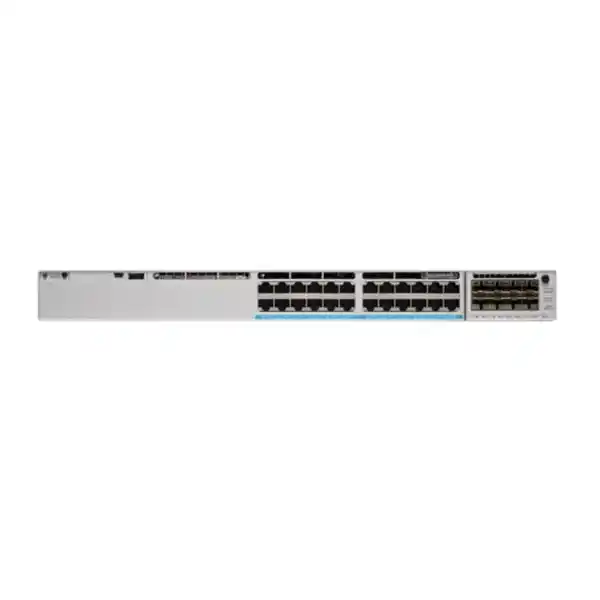
Cisco UPOE up to 60W per port
StackWise-480
Modular uplinks
Enterprise access switching with higher-power edge connectivity
The Cisco Catalyst C9300-24U is designed for enterprise access networks that need dependable Gigabit Ethernet, substantial Power over Ethernet capability, resilient stacking and a modular uplink path. It is particularly relevant when a 24-port access layer must connect and power a mixed set of business endpoints while remaining part of a larger, centrally managed switching architecture. For organizations in Tanzania, the key purchasing question is not simply whether the switch has enough ports. The design should also account for the power draw of connected devices, the required uplink speeds, redundancy expectations, license level, optics, stacking accessories and rack power capacity. This page explains those choices so that the quoted configuration can match the intended deployment instead of treating the switch as a generic 24-port unit.
What the C9300-24U is — and who it fits
The C9300-24U is part of Cisco’s Catalyst 9300 family, Cisco’s stackable enterprise access switching platform. This specific model provides 24 copper downlink ports operating at 10/100/1000 Mbps and supports Cisco Universal Power over Ethernet, commonly written as UPOE. Cisco positions the model as a 60W PoE option, giving network designers more endpoint power headroom than a conventional PoE+ access switch. The switch is based on Cisco’s UADP 2.0 architecture and uses field-replaceable modular uplinks, allowing the access layer to be connected to distribution or core infrastructure at speeds chosen for the network design rather than fixed at purchase.
This makes the platform a strong fit for offices, campuses, education environments, healthcare facilities, hospitality networks, enterprise branches and other sites where wired users and powered endpoints share the same access layer. Typical endpoint categories can include Wi-Fi access points, IP telephony devices, surveillance cameras, badge readers, digital signage, thin clients or building-automation equipment. Whether a particular endpoint should be powered by this switch depends on its Ethernet standard, power class, cabling and actual power requirement. A correct bill of materials should therefore be built from an endpoint inventory rather than from the maximum 60W port figure alone.
The model is especially useful when the network requires stacking and uplink flexibility. Cisco documents StackWise-480 for the C9300 modular-uplink family, enabling up to eight supported switches to operate as a stack using dedicated stacking connections. StackPower can also be used as part of a power-resilience design. These capabilities help organizations build an access layer that can grow from a single switch to a more resilient stack while retaining a consistent operational model.
Key specifications at a glance
| Model | Cisco Catalyst C9300-24U |
|---|---|
| Access ports | 24 × 10/100/1000 Mbps copper RJ-45 |
| Power over Ethernet | Cisco UPOE, up to 60W per port subject to endpoint class and total available PoE budget |
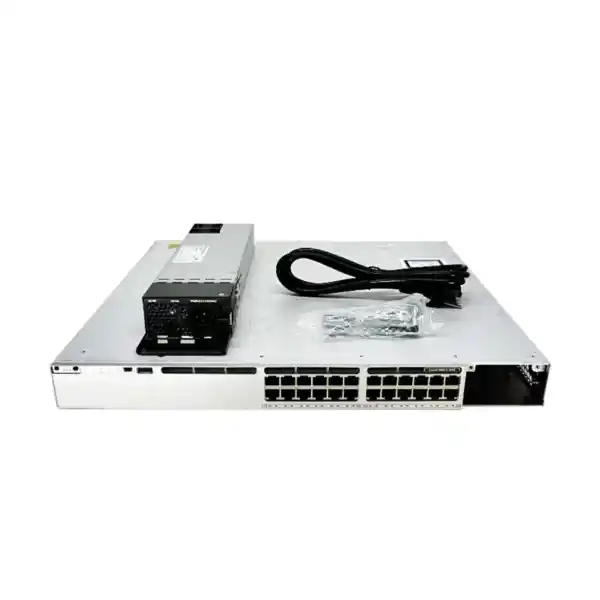
| Default AC power supply | 1100W AC |
| Available PoE with default primary PSU | 830W |
| Uplink architecture | Modular; network module is selected separately |
| Stacking | StackWise-480; up to eight supported switches in a stack |
| Switching capacity | 208 Gbps standalone; 688 Gbps with stacking |
| Forwarding rate | 154.76 Mpps standalone; 511.90 Mpps with stacking |
| Dimensions with default PSU | 4.4 × 44.5 × 48.8 cm (H × W × D) |
| Weight with default PSU | 7.54 kg |
Specifications above describe the C9300-24U hardware family. The final orderable part number and licensed capabilities depend on the selected Cisco bundle and software entitlement. Always confirm the complete Cisco configuration before procurement.
Why 60W UPOE changes the access-layer design
A major reason to choose the C9300-24U over a data-only or standard PoE+ model is its ability to deliver more power to compatible powered devices. Cisco describes the C9300-24U as a 60W UPOE model. That higher per-port capability is useful when the access layer includes devices whose requirements exceed the familiar PoE+ range, or when the organization wants more flexibility for future endpoint refreshes. However, “60W per port” should not be interpreted as meaning that a switch with its default power supply can simultaneously deliver 60W to all 24 ports. Twenty-four ports at 60W would equal 1440W of endpoint power, which is above the documented 830W available PoE budget provided by the standard 1100W primary supply.
Power planning should therefore be treated as a simple engineering exercise. First list every powered endpoint and its expected maximum or allocated draw. Then group devices by criticality and by whether they require PoE, PoE+, or higher UPOE power. Add realistic headroom for changes, replacement devices and boot-time behavior. Compare that total with the available PoE budget of the proposed power-supply configuration. Cisco documents additional power-supply combinations that can raise the available budget, including configurations capable of reaching the 24-port platform’s 1440W total endpoint ceiling. The secondary supply can also contribute to redundancy or power capacity depending on the configuration.
This distinction matters during procurement because two quotes for the same base switch model may not provide the same operational outcome. One quote may include only the default 1100W supply, while another may include a second supply, higher-output options, StackPower accessories or other components. A cheaper bill of materials that cannot support the actual endpoint load is not a complete solution. Conversely, over-sizing power without an endpoint requirement can increase cost unnecessarily.
For a Tanzania deployment, the same planning should include rack power, UPS capacity and expected backup duration. The switch can consolidate power delivery to many edge devices, which simplifies endpoint cabling but makes the access switch and its upstream power source more important to service continuity. A resilient design considers both network redundancy and electrical continuity instead of treating PoE as an isolated feature.
Modular uplinks: select the network module for the real topology
The C9300-24U does not force a single fixed uplink choice. Cisco documents a modular uplink design for the C9300 family, and the default switch configuration does not include the network module. This is useful because a 24-port access switch connected to a small distribution layer may have very different uplink needs from a heavily utilized campus stack. The module should be selected according to upstream switch capability, oversubscription targets, fiber plant, optic type, link distance, resilience method and expected growth.
Four 1G uplink interfaces for environments where Gigabit fiber or copper-based transceiver connectivity is sufficient.
Four multigigabit uplink interfaces where compatible copper multigigabit connectivity is required.
Eight 10G/1G uplink interfaces, useful for higher-bandwidth aggregation and flexible link designs.
Two 40G uplink interfaces for designs that need higher-capacity connections to supported upstream infrastructure.
Two 25G/10G/1G uplink interfaces for a flexible migration path where 25G aggregation is appropriate.
The uplink module and the optical transceivers are separate design decisions. A module may support the desired interface speed, but the correct optic still depends on fiber type, distance, connectorization and compatibility with both ends of the link. The cabling plan should be reviewed before the order is finalized. This is particularly important when an existing building already has multimode or single-mode fiber installed, because the most appropriate module and transceiver combination can depend on that physical plant.
When multiple access switches are stacked, uplink design should also consider the stack as a whole. The objective is not simply to attach every switch independently if the architecture can make better use of aggregated links, port channels and resilient paths. Final topology depends on the organization’s switching design and Cisco software features enabled by the selected license.
StackWise-480 for a scalable access layer
Cisco documents StackWise-480 for Catalyst 9300 modular-uplink models, providing 480 Gbps of back-panel stacking bandwidth and support for stacks of up to eight compatible switches. Stacking is valuable when multiple access switches are installed in the same wiring closet or rack because it can simplify management and allow the group to operate as a coordinated switching system. Rather than treating each switch as an isolated device, an appropriately designed stack can provide a common operational model with high-speed inter-switch connectivity.
For a growing organization, stacking provides a practical capacity path. A site can begin with a smaller number of access ports and add switches as new floors, departments or endpoint groups come online, subject to supported stack and licensing rules. The design should reserve rack space, stacking cables and suitable power. It should also account for maintenance practices: cable routing behind the rack should not make it difficult to replace a power supply, fan or stack member.
Stacking does not eliminate the need to design uplink resilience. The distribution architecture should still consider how the stack connects upstream, which links are aggregated, what happens during a link or device failure, and how maintenance is performed. Cisco lists the C9300-24U at 208 Gbps switching capacity and 154.76 Mpps forwarding when evaluated as the individual platform, and 688 Gbps switching capacity with 511.90 Mpps forwarding in the published “with stacking” specification. Those figures help network teams compare the platform with alternatives, but they do not replace application traffic analysis or topology planning.
If stacking is planned from day one, include the required StackWise cables and verify stack-member compatibility and software alignment before installation. A quote that contains only the switches but omits stacking accessories will not deliver a complete StackWise deployment.
StackPower and power-supply resilience
The Catalyst 9300 platform supports StackPower, which allows compatible switches to participate in a power-stacking design using Cisco StackPower cabling. The practical benefit is that power can be planned at the stack level rather than considering every switch only as an isolated unit. This can improve resilience or make better use of installed power resources, depending on the chosen design. StackPower is a design feature, not a substitute for calculating the endpoint load, UPS capacity or the number and rating of installed power supplies.
Cisco also supports dual redundant power supplies in the Catalyst 9300 family. The C9300-24U ships with one power supply by default, and a second supported supply can be added. Organizations that require higher service continuity should decide whether the second supply is being purchased primarily for redundancy, additional PoE budget, or both. The answer affects how the power feeds should be distributed. For genuine electrical resilience, redundant supplies are normally connected to independent supported power paths where the facility design permits, instead of placing both on the same single point of failure.
A complete implementation plan should also include the UPS. The switch itself consumes power, and the PoE load can be substantial when many endpoints are powered. Backup-runtime calculations should therefore use the expected total draw of the network equipment and powered endpoints, not the switch chassis consumption alone. Higher-power wireless access points or cameras can materially change runtime. The UPS should also have appropriate output capacity, electrical compatibility and battery condition for the intended load.
These details are important procurement questions because an enterprise switch can be technically correct while the surrounding power design remains incomplete. FourTeck Tanzania can quote the switch as part of a configuration, but the final power architecture should be validated against the endpoint list, rack power, upstream electrical design and desired resilience level.
Enterprise performance without confusing access speed and uplink speed
The 24 downlink ports on the C9300-24U are Gigabit Ethernet copper interfaces, not multigigabit access ports. This distinction is important when comparing similar Cisco model numbers. The switch is well suited to large numbers of conventional 1G endpoints, including many office devices, phones, cameras and other Ethernet-connected systems. If the requirement includes 2.5G, 5G or 10G speeds directly to access-layer endpoints, the C9300-24UX or another multigigabit model should be evaluated instead.
The modular uplink architecture is separate from the downlink speed. Even though users connect at up to 1G on the C9300-24U access ports, the switch can use higher-speed uplinks such as 10G, 25G or 40G with the appropriate supported network module. That allows traffic from many access ports to be aggregated efficiently toward the distribution layer. The required uplink bandwidth depends on user behavior, application mix, local server traffic, wireless backhaul, surveillance traffic and whether multiple links are bundled for capacity and redundancy.
Cisco publishes 208 Gbps switching capacity and 154.76 Mpps forwarding rate for the C9300-24U. Those values provide a useful platform-level reference when comparing enterprise access switches. In practical network sizing, however, performance is also affected by topology, features, packet sizes, uplink selection, policy, traffic patterns and the rest of the network. A sound design therefore starts with the application and endpoint requirement and then validates that the selected platform, modules and software capabilities meet it.
For organizations replacing older 10/100/1000 access switches, the C9300-24U can provide a familiar Gigabit edge with a more modern stackable architecture and higher PoE capability. For greenfield high-density Wi-Fi deployments where access points require multigigabit wired backhaul, compare it carefully against multigigabit Catalyst options before ordering.
Security, segmentation and automation considerations
Cisco positions the Catalyst 9300 family as an enterprise platform for secure access, segmentation, automation and policy-based networking. Current Cisco documentation for the family references capabilities such as Encrypted Traffic Analytics, AES-256 MACsec support, Trustworthy systems and integration with Cisco SD-Access. These are platform-level capabilities and should not be assumed to be active in every quoted configuration. Availability can depend on software release, license level, network architecture, controller or management platform and the features configured elsewhere in the environment.
From a buyer’s perspective, the important step is to define the operational requirement before choosing the license. A network that only needs standard enterprise access functions may have different entitlement needs from one that is being integrated into a broader intent-based campus design. Likewise, an organization planning advanced segmentation or automation should confirm every dependency rather than assuming that the base hardware alone supplies the entire solution.
Access-layer security also depends on configuration discipline. VLAN architecture, authentication, switch-port policy, management-plane protection, logging, software maintenance, secure administration and change control all contribute to the security outcome. Replacing an unmanaged or aging switch with a Catalyst platform creates more capability, but that capability must be configured and operated correctly.
For procurement, identify whether the organization intends on-premises management, a Cisco enterprise management workflow, or a Meraki cloud-management experience supported by an applicable orderable variant. Cisco currently lists C9300-24U bundles associated with Network Essentials, Network Advantage and Meraki Advanced or Enterprise options. The final bill of materials should use the exact part number that matches the intended operational model.
C9300-24U ordering variants: why the suffix matters
“C9300-24U” identifies the hardware model family, but Cisco publishes orderable variants with suffixes that represent different software or management bundles. Current Cisco ordering information includes C9300-24U-E with Network Essentials, C9300-24U-A with Network Advantage, and C9300-24U-M with a Meraki Enterprise or Advanced management option. The hardware description remains a 24-port 1G copper Catalyst 9300 with UPOE and modular uplinks, but the entitlement and management experience are not interchangeable details.
This is why the base product name should not be treated as the complete purchasing SKU. The correct suffix should follow the customer’s network design, required Cisco capabilities, management architecture and subscription or licensing plan. Where an existing Catalyst environment already uses a defined software tier, matching that standard may reduce operational inconsistency. Where the organization is migrating to a different management model, the licensing choice should be reviewed as part of the migration plan rather than after the hardware arrives.
The listing therefore does not invent a retailer SKU or assume a license-specific part number. When requesting a quote, provide the intended license tier if known. If it is not known, provide the required features and management method so the configuration can be reviewed before the order is placed.
How the C9300-24U compares with nearby Catalyst 9300 choices
| Model | Access-port focus | PoE class | Best fit |
|---|---|---|---|
| C9300-24T | 24 × 1G copper | Data only | Wired endpoints that do not need switch-supplied power |
| C9300-24P | 24 × 1G copper | PoE+ | Conventional powered endpoint deployments that do not need 60W UPOE |
| C9300-24U | 24 × 1G copper | UPOE, up to 60W per port | Higher-power Gigabit access with modular uplinks and StackWise-480 |
| C9300-24UX | 24 × multigigabit copper up to 10G | UPOE, up to 60W per port | Endpoints that need both higher power and multigigabit wired speeds |
| C9300-24H | 24 × 1G copper | UPOE+, up to 90W per port | 1G access where compatible endpoints require still higher per-port power |
The closest comparison is often between the C9300-24P and C9300-24U. If every powered endpoint fits comfortably within a PoE+ design and future requirements are unlikely to exceed it, the 24P may be sufficient. If the network includes higher-power endpoints or wants additional PoE headroom while keeping 1G access ports, the 24U is the more appropriate model. If endpoint bandwidth above 1G is part of the requirement, the 24UX should be considered. If devices require up to 90W and only 1G access is needed, the 24H is the closer match.
Practical deployment scenarios
Enterprise floor access
Use the 24 Gigabit ports for desks, phones, printers and other business devices, while a selected higher-speed uplink module connects the floor to distribution. UPOE capacity provides flexibility for mixed powered endpoints.
Wireless access layer
Power compatible access points from the switch and use resilient uplinks toward the campus core. Verify that each access point’s wired interface is appropriate for a 1G downlink; multigigabit AP backhaul may justify a different Catalyst model.
IP surveillance and security
Provide data and power for compatible cameras and security endpoints. Calculate aggregate PoE draw and uplink bandwidth, especially for continuous video traffic, rather than sizing only from port count.
Converged branch infrastructure
Combine user devices, IP telephony, wireless and selected IoT endpoints on an enterprise access platform, using segmentation and policy appropriate to the organization’s network architecture.
Stacked wiring closet
Deploy multiple C9300 switches with StackWise-480 when a single cabinet needs more ports, centralized stack management and resilient access-layer design. Include stack cables and power planning in the bill of materials.
Technology refresh
Replace aging access switches with a current Catalyst 9300 architecture while retaining 1G copper at the edge. Review existing optics, rack depth, UPS capacity, VLAN design and software standards before migration.
Network sizing: start with endpoints, not with the switch label
A successful access-switch purchase begins with an inventory. Count wired devices, but also record their interface speed, power requirement, criticality and expected growth. A location with 18 endpoints might appear to fit comfortably within a 24-port switch, yet six spare ports can disappear quickly when new access points, phones, cameras, printers or building systems are added. In another location, 24 ports may be more than enough, but the PoE load rather than port count may become the limiting factor.
For each powered device, identify its negotiated or required PoE standard and maximum power. Use the manufacturer’s endpoint documentation rather than a guess based on device category. Two wireless access points can look similar but have different power and Ethernet requirements. The same is true of PTZ cameras, video endpoints and industrial devices. Sum the expected power allocation and compare it with the switch’s available PoE budget under the exact proposed power-supply configuration.
Next, estimate traffic. Desktop user traffic may be bursty, while video surveillance can generate sustained streams. Wireless AP uplinks can aggregate many clients. Backup or imaging operations may create short periods of much higher utilization. These patterns influence whether 1G, multiple 10G, 25G or 40G uplinks are appropriate. The C9300-24U provides the modularity to choose among several uplink modules, but the right choice still comes from the traffic model and upstream compatibility.
Finally, plan resilience. Decide whether one switch failure can be tolerated, whether the site requires a stack, whether dual power supplies are justified, and whether upstream paths should be redundant. Include spare capacity for planned growth. This method produces a more dependable specification than selecting a model solely because it has 24 ports and UPOE.
Rack, cooling and cabling checks before installation
Cisco lists the C9300-24U at 4.4 cm high and 44.5 cm wide, which is the familiar 1RU enterprise-switch form factor. Depth requires more attention. Cisco lists the chassis at 40.9 cm deep, but the dimension with the default 1100W power supply is 48.8 cm. The documented weight with the default power supply is 7.54 kg. These values should be checked against the actual cabinet, especially when the rack also needs rear clearance for power cords, stack cables, uplink fiber and cable-management hardware.
A rack that is physically deep enough can still be difficult to service if rear cabling is tightly packed. Leave access for power-supply replacement and ensure cables are supported so they do not place unnecessary strain on connectors. StackWise and StackPower cabling also occupies rear space. If several switches are stacked, plan the vertical order and cable lengths before mounting the equipment.
Copper access cabling should be tested and documented. Cisco lists RJ-45 connectors and four-pair Cat 5e UTP for 1000BASE-T. Existing cabling quality still matters in real installations, particularly in older buildings or where patching has changed repeatedly. Fiber uplinks require the correct transceiver, connector type and fiber specification for the chosen distance and speed. Do not assume that an existing optic is supported simply because it has the same physical connector.
Cooling should be evaluated at cabinet level. Switches, power supplies, UPS systems and nearby equipment all contribute heat. Keep airflow paths clear and avoid installing the switch in an enclosure that cannot maintain an appropriate operating environment. Where power quality is a concern, use a correctly sized UPS and approved electrical design rather than relying on the switch power supplies alone.
Migration planning from an older access switch
A switch replacement is more than a physical swap. Before migration, document VLANs, trunking, port descriptions, voice settings, authentication, spanning-tree behavior, link aggregation, monitoring, management addresses and any device-specific exceptions. Old access switches often contain years of incremental configuration. Moving only the obvious VLAN assignments can leave behind critical details that affect phones, cameras, printers or building systems.
The migration window should include verification steps. Test uplink connectivity, management access, endpoint addressing, voice registration, wireless AP operation, camera streams and any authentication flows. Confirm that powered devices receive the expected PoE class and that the total power budget remains within limits. If the new switch is part of a stack, validate stack membership, software consistency and uplink behavior before moving all production ports.
The software and licensing plan should be established before cutover. A new Catalyst 9300 should be integrated into the organization’s chosen Cisco management and software lifecycle practices. The exact process depends on the license bundle, current environment and approved software release. Back up the intended configuration and maintain a rollback plan appropriate to the business impact of the migration.
Where the legacy network uses fixed uplink speeds, migration can be an opportunity to increase aggregation capacity. Because the C9300-24U uses modular uplinks, select the new module and optics to match the target architecture rather than automatically reproducing the old connection. That can provide a cleaner path for future growth without changing the access switch again.
What should be included in a complete quote?
The switch chassis is only one line in a complete enterprise access solution. A useful quote should clearly identify the exact Cisco orderable variant, software or management entitlement, uplink network module, optical transceivers or DACs where required, primary and optional secondary power supplies, stacking components, StackPower components if used, rack accessories and any other required licenses or subscriptions. Items should be explicit rather than hidden behind a generic “C9300-24U” description.
For a standalone access switch, the bill of materials may be relatively simple. For a stacked deployment, the quote should show how many stack members are planned and which stack cables are required. For a high-PoE deployment, it should show the selected power-supply arrangement and how that arrangement relates to the expected endpoint load. If resilient power is a requirement, the quote should distinguish capacity from redundancy.
Optics deserve similar attention. Specify uplink speed, media type, distance and connector requirements. If the upstream switch already exists, provide its model and intended port type so compatibility can be checked. If fiber is already installed, provide whether it is single-mode or multimode and the approximate link length. These details prevent a common situation in which the switch arrives but the network cannot be connected because the wrong uplink component was ordered.
FourTeck Tanzania does not need a guessed SKU to begin this discussion. The base model and requirements are enough to scope the configuration, but the final purchase should use the exact validated part numbers for the selected bundle and accessories.
Buyer checklist for the Cisco Catalyst C9300-24U
Frequently asked questions
Does the C9300-24U provide PoE on all 24 ports?
Yes, the model is a 24-port Cisco UPOE switch. Individual ports can support up to 60W for compatible powered devices, but total simultaneous power is limited by the installed power-supply configuration. With the default 1100W AC primary supply, Cisco documents 830W of available PoE power. The endpoint design must stay within the total budget.
Can it deliver 60W on all 24 ports at the same time?
Not with only the default 1100W primary power supply. Twenty-four ports at 60W would require 1440W of endpoint power. Cisco documents higher-output and secondary power-supply combinations that can raise the available budget to the platform’s 1440W port-limit ceiling. The exact configuration should be designed around the real endpoint load and resilience requirement.
Are the 24 user ports multigigabit?
No. The C9300-24U provides 10/100/1000 Mbps copper access ports. If connected devices require 2.5G, 5G or 10G at the access layer, evaluate a multigigabit model such as the C9300-24UX or another suitable Catalyst option.
Does the switch include uplink ports by default?
The C9300 uses modular uplinks, and Cisco states that the default switch configuration does not include the network module. The correct module should be selected with the switch order. Options for the C9300 family include 1G, multigigabit, 10G, 25G and 40G module choices.
Which uplink module should I choose?
Choose according to the upstream switch, traffic volume, optic or cable type, fiber distance and resilience design. A small branch may be adequately served by lower-speed uplinks, while a stacked access layer carrying wireless or video traffic may justify higher-capacity links. Compatibility should be verified before purchase.
How many C9300 switches can be stacked?
Cisco documents StackWise-480 for C9300 modular-uplink models and supports up to eight compatible switches in a StackWise-480 configuration using dedicated stack connections. Confirm model, license and software compatibility for the intended stack.
What is StackPower?
StackPower is Cisco’s power-stacking technology for supported Catalyst switches. It allows compatible stack members to participate in a shared power architecture using dedicated StackPower cables. It can support power-resilience and capacity goals, but the design still requires correct power-supply sizing and facility-level electrical planning.
What is the switching capacity of the C9300-24U?
Cisco lists 208 Gbps switching capacity and 154.76 Mpps forwarding rate for the C9300-24U, with published “with stacking” values of 688 Gbps and 511.90 Mpps respectively. These are platform specifications and should be considered alongside the actual topology and features being used.
What license should I order?
That depends on the required features and management model. Cisco currently lists C9300-24U-E for Network Essentials, C9300-24U-A for Network Advantage, and C9300-24U-M for Meraki Enterprise or Advanced management. The exact bundle should be confirmed against the organization’s technical requirements before procurement.
Is this a good switch for Wi-Fi access points?
It can be, particularly where access points need higher PoE power but only require a 1G wired interface. If access points require multigigabit Ethernet for their wired backhaul, a multigigabit Catalyst model is a better fit. Always check the AP’s Ethernet and PoE specifications.
Can the C9300-24U be used for IP cameras?
Yes, provided the cameras use compatible Ethernet and PoE standards. For surveillance deployments, calculate both total PoE draw and sustained uplink bandwidth. High-resolution, high-frame-rate or continuously recording camera systems can make uplink sizing as important as port count.
What should I provide when requesting a quote in Tanzania?
Provide the number of switches, endpoint count, approximate PoE requirements, preferred license tier if known, uplink speed, fiber or copper media, optic distance, stacking requirement, secondary power-supply requirement and any existing upstream switch details. This information helps build a technically complete bill of materials without guessing at accessories or licensing.
Request a C9300-24U configuration for your Tanzania network
Use the Cisco Catalyst C9300-24U when your access layer needs 24 Gigabit copper ports, up to 60W UPOE per compatible endpoint, modular uplinks and StackWise-480 growth. Before ordering, confirm the license variant, uplink module, optics, total PoE load, secondary power supply and stack accessories. These choices determine whether the delivered configuration is ready for the intended network rather than simply matching the base chassis name.
Request a quote from FourTeck Tanzania with your port, power, uplink and stacking requirements.




Reviews
There are no reviews yet.