
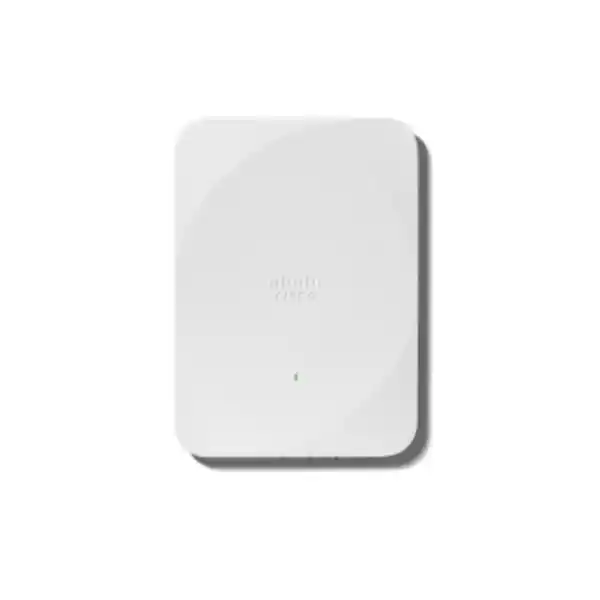
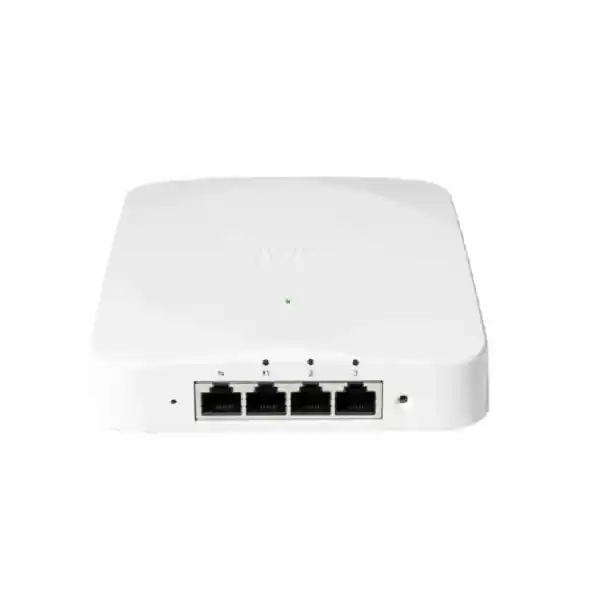
Cisco Wireless CW9172H Wi-Fi 7 Wall-Plate Access Point
The Cisco Wireless CW9172H is built for indoor spaces where one device must deliver modern Wi-Fi and useful wired connectivity at the room edge. Its wall-plate form factor, tri-band Wi-Fi 7 radios, 2.5 GbE uplink, three local Gigabit Ethernet LAN ports, integrated IoT radio, and choice of Cisco Catalyst or Meraki management make it particularly relevant to hospitality rooms, student accommodation, clinics, retail rooms, satellite offices, serviced apartments, and similar distributed environments.
For a Tanzania deployment, the practical buying decision is not only “is this Wi-Fi 7?” but also whether your switching, PoE budget, cabling, management platform, client mix, mounting position, and permitted radio bands are aligned with the design. The CW9172H can operate its 2.4 GHz, 5 GHz, and 6 GHz client-serving radios at 2×2:2 with suitable power, but 6 GHz availability remains country- and software-dependent and must be verified for the intended deployment.
Projects that want a compact wall-mounted AP plus nearby wired ports for room devices, with a path to Wi-Fi 7 and flexible cloud or on-premises operations.
What the CW9172H solves
Many indoor wireless projects have two separate requirements: dependable Wi-Fi for user devices and Ethernet connectivity for fixed equipment. In a hotel room that may mean guest Wi-Fi plus an IP television, desk phone, room controller, or wired workstation. In a clinic it may mean wireless coverage for staff devices alongside a wired endpoint. In a branch office it may mean employee Wi-Fi plus a local printer, phone, or compact desk setup. Installing a ceiling AP and then adding a separate edge switch can work, but it increases equipment count, cabling complexity, wall-space requirements, and support points.
The CW9172H approaches that problem as a wall-plate access point with local LAN connectivity. Cisco provides one 100M/1G/2.5G multigigabit uplink, three 100M/1G LAN ports, one passthrough port, and a management console port. One of the LAN ports can supply PoE-out when the access point receives sufficient 802.3bt Class 5 input power. That combination can simplify a room-edge design because the AP becomes both the wireless access layer and a convenient connection point for selected wired devices.
This does not mean the CW9172H replaces every access switch or fits every density profile. It is designed for low-to-moderate density environments and room-oriented deployments. High-density auditoriums, very large open halls, outdoor areas, or designs requiring directional antennas may call for a different Cisco access point. The value of the CW9172H is strongest when its wall-plate placement, local Ethernet ports, and management flexibility match the physical layout and operational model of the site.
Key specifications at a glance
| Product | Cisco Wireless CW9172H indoor wall-plate access point |
|---|---|
| Wireless standard | Wi-Fi 7 / IEEE 802.11be, with interoperability for supported earlier Wi-Fi generations |
| Client-serving radios | 2.4 GHz, 5 GHz and 6 GHz; 2×2:2 on each band in tri-band operation |
| Maximum advertised PHY data rate | Up to 9 Gbps aggregate PHY rate under the specified Wi-Fi 7 radio configuration; actual throughput is lower and depends on clients, channels, interference, power, configuration and regulatory limits |
| Uplink | 1 × 100M/1G/2.5G RJ-45 multigigabit Ethernet |
| Local LAN | 3 × 100M/1G Ethernet LAN ports; LAN port 1 supports PoE-out with appropriate input power |
| PoE input | 802.3af, 802.3at or 802.3bt Class 5, with capability varying by input power |
| PoE-out | Up to 15.4 W on LAN port 1 when powered by 802.3bt Class 5 |
| IoT / scanning | Dedicated scanning/auxiliary radio plus integrated IoT radio supporting Bluetooth Low Energy and 802.15.4-related use cases |
| Management choices | Cisco Catalyst 9800-based deployment or Meraki cloud-based deployment, subject to the selected software, subscription and architecture |
| Dimensions | Approximately 13 × 18 × 2.6 cm without mounting brackets |
| Weight | Approximately 572 g |
Wi-Fi 7 capabilities and what they mean in practice
The CW9172H is an IEEE 802.11be Wi-Fi 7 access point. Cisco specifies Wi-Fi 7 support on its 2.4 GHz, 5 GHz, and 6 GHz client-serving radios, each using a 2×2:2 configuration in tri-band operation. Wi-Fi 7 introduces capabilities designed to improve efficiency, use wider spectrum where permitted, and support more responsive wireless service. On the CW9172H, Cisco lists features including 4096-QAM, Multi-Link Operation, preamble puncturing, uplink and downlink OFDMA, Target Wake Time, BSS coloring, WPA3, and channel widths up to 320 MHz in the 6 GHz band where that operation is allowed and supported.
These features should be understood as tools available to the WLAN design rather than a guarantee that every client will immediately obtain Wi-Fi 7 performance. Client capability matters. A Wi-Fi 5 or Wi-Fi 6 device will associate using the capabilities it supports, while Wi-Fi 7 features require compatible clients and suitable network configuration. Channel width also has to be chosen for the real RF environment. A very wide channel may increase peak PHY rate in a clean spectrum environment, but narrower channels can be more appropriate where there are many neighbouring access points, interference sources, or limited reusable spectrum.
Cisco specifies an aggregate PHY data rate up to 9 Gbps for the CW9172H in its tri-band Wi-Fi 7 configuration. That figure is a physical-layer capability, not an application throughput promise. Real user throughput is affected by protocol overhead, client antenna count, signal-to-noise ratio, channel width, contention, backhaul speed, internet capacity, controller policies, encryption, roaming, and the number and behaviour of connected devices. For planning, the more useful question is whether the AP, uplink, switching and internet path are balanced for the expected workload rather than whether a single headline rate can be reached.
The inclusion of a 2.5 GbE uplink is therefore meaningful. In a busy room-edge or small-site deployment, a multigigabit wired path gives the access point more upstream capacity than a 1 GbE uplink. To benefit from that, the connected switch port must support the required multigigabit speed, the cable plant must be suitable, and the switch must provide the intended PoE standard. Cisco recommends appropriate Ethernet cabling for multigigabit operation; checking existing cable runs before rollout can prevent a Wi-Fi upgrade from being limited by the wired edge.
Why the wall-plate format matters
The CW9172H is not simply a smaller ceiling AP. Its physical design is aimed at room-centric deployments. A wall location can place the radio closer to the users and devices inside a room while also making Ethernet ports accessible to equipment that would otherwise need a separate network outlet or small switch. This is especially useful in environments where each room or unit has a predictable set of connected devices.
Guest Wi-Fi can share the room edge with wired devices such as an IPTV endpoint or desk phone.
Wireless service and local wired ports can be delivered within an individual room or unit.
A compact AP can support mobile devices while providing Ethernet to selected fixed endpoints.
The wall-plate design can serve a small work area without placing a separate desktop switch beside every user.
Placement still requires RF design. Furniture, masonry, reinforced walls, mirrored surfaces, neighbouring rooms, and mounting height all affect propagation. A wall-plate AP should not be assumed to cover an entire floor just because it supports Wi-Fi 7. In many hospitality or residential layouts, a room-by-room or small-zone design is used to control signal strength, roaming boundaries and channel reuse. A site survey and capacity plan remain important when the environment is large, unusually dense, or constructed with RF-attenuating materials.
Wired connectivity: more than an access point radio
The wired interface set is one of the main reasons to select the CW9172H instead of a conventional ceiling-focused model. The AP uses a 100M/1G/2.5G RJ-45 uplink and provides three local LAN ports that negotiate up to 1 Gbps. Cisco also includes a passthrough port and an RJ-45 console interface. In practical terms, the local LAN ports can extend connectivity to wired devices without adding another unmanaged switch in the room.
Typical endpoints could include an IP telephone, television, workstation, printer, room controller, camera, or another Ethernet device, provided the network design and security policy allow it. On a Catalyst 9800 deployment, Cisco documents Remote LAN functionality for the CW9172H, allowing wired ports to be mapped into controlled network policy rather than treated as an unrelated local switch. The exact configuration should be planned together with VLANs, authentication, segmentation, quality of service, and the security requirements of each endpoint type.
LAN port 1 can also provide up to 15.4 W of PoE-out, but only when the CW9172H itself receives 802.3bt Class 5 input power. This can be useful for a compatible low-power device, but it should be budgeted carefully. The access switch must have enough PoE capacity at the port and across the switch, and the connected endpoint must fit within the available PoE-out power class. A camera or phone should not be assumed compatible based only on having an RJ-45 connector.
The 2.5 GbE uplink also makes the upstream switch selection important. If the AP is connected to a 1 GbE-only switch port, it can still operate at a negotiated supported rate, but the wired uplink becomes a lower-capacity boundary. When modernizing a site for Wi-Fi 7, check whether the existing access switch supports multigigabit Ethernet, the required PoE mode, VLAN and policy functions, and sufficient uplink capacity toward the core or internet edge.
Power modes: choose the switch before you install
PoE is a critical design variable for the CW9172H because available functions change with the input standard. Cisco documents three power levels: 802.3af, 802.3at PoE+, and 802.3bt Class 5. The access point is most capable when the switch can provide the higher power required by the intended feature set. A procurement list should therefore pair the AP with a confirmed switch-port capability rather than treating PoE as a single interchangeable feature.
| Input power | 2.4 GHz | 5 GHz | 6 GHz | Uplink capability | PoE-out |
|---|---|---|---|---|---|
| 802.3af | Reduced | Disabled | Disabled | 1 GbE | No |
| 802.3at PoE+ | 2×2 | 2×2 | 2×2 | 2.5 GbE | No |
| 802.3bt Class 5 | 2×2 | 2×2 | 2×2 | 2.5 GbE | Up to 15.4 W |
With 802.3at PoE+, Cisco specifies full 2×2 operation across the three client-serving bands and a 2.5 GbE link, but PoE-out is not available. With 802.3bt Class 5, the same tri-band radio configuration is available and LAN port 1 can supply up to 15.4 W PoE-out. With basic 802.3af input, capability is substantially reduced: the AP falls back to a limited 2.4 GHz configuration, the 5 GHz and 6 GHz client-serving radios are disabled, the uplink is limited to 1 GbE, and PoE-out is unavailable.
For most new Wi-Fi 7 deployments, designing around 802.3at or 802.3bt is therefore more appropriate than relying on legacy 802.3af. Choose 802.3bt when the room design specifically needs PoE-out from the AP or when the deployment standard calls for the highest supported input mode. Also check the switch’s total PoE budget across all ports; a switch that can provide 802.3bt on one port may not have enough aggregate power to run a full building of wall-plate APs and attached powered devices without careful sizing.
Cloud or on-premises management
Cisco positions the 9172 Series as part of its global-use access point portfolio. The CW9172H can be deployed in a Cisco Catalyst management model using Catalyst 9800 wireless controllers or in a Meraki cloud-based management model. That provides more architectural flexibility than choosing different physical hardware for cloud and controller environments, but the management model, software release, subscription and onboarding process still need to be planned before rollout.
For Catalyst-managed deployments, Cisco lists the CW9172H as supported from Cisco IOS XE 17.17.1 and later, subject to the supported controller and feature matrix. Catalyst environments can integrate with tools and services such as Catalyst Center, Cisco Spaces and Cisco Identity Services Engine where the relevant architecture and licensing are in place. This suits organisations that already operate Cisco wireless controllers, use central network policy, or need to integrate the AP into an established campus or branch management stack.
The Meraki option is attractive when cloud-based operations, remote visibility and a Meraki-oriented network model are preferred. The AP hardware should still be matched to the intended Meraki management mode, entitlement and deployment process. A mixed or migration environment should be designed deliberately so that operational ownership, monitoring, firmware policy, authentication, RF settings and support responsibilities are clear.
Cisco states that Wi-Fi 7 access points including the 9172 Series require a Cisco Networking Subscription using either Cisco Wireless Essentials or Cisco Wireless Advantage. Buyers should therefore budget for the required subscription instead of viewing the AP as hardware-only. The correct subscription tier depends on the features and management model required. Licensing should be confirmed for the exact bill of materials before purchase, especially for multi-site deployments where renewal dates and entitlement consistency matter operationally.
Security, visibility and IoT readiness
A modern access point is part of the security boundary as well as the radio network. Cisco lists WPA3 support for the CW9172H alongside enterprise authentication capabilities and hardware-rooted trust features in the 9172 platform. The data sheet references image signing, Secure Boot and Cisco Trust Anchor technologies, which are designed to help protect the integrity of the platform. Wireless security policy should still be implemented through the chosen controller or cloud architecture with appropriate authentication, segmentation and access control.
The AP also includes a dedicated scanning or auxiliary radio. Separating scanning functions from the primary client-serving radios can support continuous visibility and RF monitoring without relying only on time sliced client radios. In a managed Cisco environment, this can contribute to troubleshooting, optimisation and security workflows. The business value is less about adding another radio for marketing and more about preserving visibility into the wireless environment while the client-serving radios continue handling user traffic.
For smart-space use cases, Cisco includes a dedicated IoT radio supporting Bluetooth Low Energy and 802.15.4-related capabilities. The installation documentation also references technologies such as Zigbee and Thread. These features can be useful in hospitality, healthcare, retail and building environments where sensors, beacons or room-automation devices form part of the wider connectivity design. However, actual application support depends on the software platform, integration and endpoint ecosystem, so IoT compatibility should be validated against the intended solution rather than inferred from the presence of the radio alone.
In environments handling sensitive data, security design should consider more than wireless encryption. Plan identity, VLAN or policy segmentation, guest isolation, device onboarding, wired LAN-port security, management-plane access, logging, software lifecycle, administrator roles, and incident response. A wall-plate AP may sit physically closer to end users than a ceiling AP, so physical mounting and access to exposed ports also deserve attention in hotels, dormitories, public spaces and shared offices.
6 GHz and Tanzania deployment planning
The CW9172H hardware includes a 6 GHz client-serving radio, but that does not mean 6 GHz operation should be assumed in every country or software state. Cisco explicitly notes that in countries where 6 GHz use is not permitted, or where current software support is not available, the 6 GHz radio is disabled. Cisco’s global-use AP process applies country-specific regulatory information during deployment. For a Tanzania project, current local regulatory availability and Cisco product approval should be checked at the time of design and deployment.
This distinction matters because a Wi-Fi 7 design can still deliver value even when a specific band is unavailable, but the RF plan, expected capacity and client strategy may change. Do not purchase a tri-band AP on the assumption that a 6 GHz channel plan used in another country can simply be copied into Tanzania. Regulatory rules can differ by country and can change over time. The final radio configuration should follow the country information applied by Cisco’s supported workflow and any relevant local requirements.
Before rollout, confirm the device software release, management platform, permitted channels and transmit parameters, and the capabilities of the client estate. Many existing laptops, phones and IoT devices may still use 2.4 GHz or 5 GHz even after a Wi-Fi 7 upgrade. Keeping those bands well designed remains essential. The 2.4 GHz band may be important for legacy and IoT equipment, while 5 GHz often carries a large share of enterprise client traffic. A balanced design should therefore optimise all supported bands rather than treating 6 GHz as the only objective.
Tanzania deployments should also account for practical infrastructure conditions: stable switching power, UPS strategy where continuity matters, suitable structured cabling, internet or WAN resilience, controller or cloud reachability, and environmental temperature. Cisco lists the CW9172H as an indoor device with an operating temperature specification of 0 to 40°C. Install it in an indoor location that remains within the documented environment and avoid treating it as an outdoor or weather-exposed access point.
Common deployment scenarios
Hotel and lodge guest rooms
Use a room-oriented AP where Wi-Fi coverage needs to be close to guests and wired ports are needed for devices such as IPTV, phones or room systems. The wall-plate format can reduce the need for a separate small switch, while central management keeps policy consistent across rooms.
Student residences
Provide wireless connectivity within individual rooms while retaining Ethernet for desktops, consoles, phones or institution-managed endpoints. The design should use channel planning and power control to manage many adjacent rooms and avoid unnecessary co-channel interference.
Clinics and treatment rooms
Support staff mobility while giving fixed devices a wired path where appropriate. Security segmentation, authentication, application requirements and medical-device compatibility should be reviewed separately; the AP should not be assumed to certify or validate connected clinical equipment.
Retail and service locations
A compact AP can support customer or staff Wi-Fi and local wired equipment in a small store, counter area or service room. POS and business systems should remain segmented according to the organisation’s security policy, and internet resilience should match transaction requirements.
Branch and satellite offices
Use the AP for a small work zone that needs both modern Wi-Fi and nearby Ethernet ports. The 2.5 GbE uplink is especially useful when the upstream switch supports multigigabit Ethernet and the site has enough WAN or local application traffic to justify the additional edge capacity.
Serviced apartments and multi-dwelling units
A per-unit or small-zone wall-plate model can combine resident Wi-Fi with wired ports. RF isolation, tenant segmentation, support boundaries and physical access should be planned carefully so that one unit cannot affect or access another unit’s network resources.
Design and installation checklist
A successful CW9172H rollout depends on the surrounding network. The following checks help convert the product specification into a deployment that works as intended.
Decide whether the AP will use Cisco Catalyst 9800 management or the Meraki cloud stack. Verify the supported release, onboarding method and required subscription before ordering.
Use at least PoE+ when full tri-band operation and the 2.5 GbE uplink are required. Use 802.3bt Class 5 when PoE-out is needed. Check the total switch power budget.
Confirm multigigabit support if you want a 2.5 GbE uplink. Verify VLANs, authentication, RLAN policy and upstream bandwidth for the intended wired and wireless services.
Inspect cable category, length, terminations and test results. A Wi-Fi 7 AP connected through weak or damaged cabling can negotiate below the planned wired speed.
Consider capacity, neighbouring APs, channel reuse, client capability, walls and room construction. Strong signal everywhere is not the same as an efficient multi-AP design.
Do not assume 6 GHz is enabled because the hardware supports it. Confirm current Cisco product approval, country configuration and regulatory availability for Tanzania.
List every device expected on the three LAN ports and document its VLAN, security profile, speed, PoE need and support ownership.
Install indoors within Cisco’s documented operating limits, with sensible airflow and protection from moisture, weather exposure and physical damage.
CW9172H versus a conventional ceiling access point
A ceiling AP is often the default for offices, classrooms and open spaces because the mounting position can distribute radio energy across a broad area and keep the hardware away from users. The CW9172H serves a different design pattern. Its wall-plate form factor and local LAN ports are useful where the network is delivered at room level or where fixed devices sit close to the AP.
Choose the CW9172H when the room-edge wired ports materially simplify the design, when wall mounting aligns with the coverage model, or when hospitality and multi-dwelling use cases are central. Consider another AP when you need external antennas, directional coverage, outdoor protection, a ceiling-oriented pattern, higher-density radio configurations, or a different port layout. The fact that two models both support Wi-Fi 7 does not make them interchangeable.
Within the Cisco 9172 family, the CW9172I is a more conventional indoor AP and can support a different radio configuration in certain modes, whereas the CW9172H is specifically built around the wall-plate use case with three local LAN ports. The correct choice should come from the floor plan, expected clients and wired endpoint requirements. For hotels or residences, the CW9172H can be compelling because those wired ports directly address devices already located in the room.
For procurement, compare the complete solution cost instead of only the AP unit. Include switch port type, PoE capacity, subscription, mounting accessories, cabling remediation, controller or cloud operations, installation, testing and support. A wall-plate AP may reduce the need for some room-edge hardware, but the savings depend on the existing building design and the number of wired devices per room.
Performance expectations and client compatibility
Cisco states that the CW9172H interoperates with leading 802.11be, 802.11ax and 802.11ac clients, which supports phased upgrades rather than requiring every endpoint to be replaced at once. In a real network, older devices will continue to use the radio features they understand. Newer Wi-Fi 7 clients can take advantage of additional 802.11be capabilities where the operating band, software and configuration permit them.
This mixed-client reality is important for Tanzania businesses upgrading existing networks. A hotel may install Wi-Fi 7 access points while guests arrive with a wide range of phone and laptop generations. A branch may have new employee laptops but older printers, handheld terminals or IoT sensors. The WLAN should therefore be tested with representative client devices, not only a single high-end Wi-Fi 7 test laptop.
Capacity planning should also distinguish connection count from useful application performance. Cisco’s deployment guidance lists support for up to 256 clients per radio, but that is not a recommendation to place 256 busy users on every radio. Voice, video, cloud applications, backups and guest traffic consume very different airtime. The right AP quantity comes from expected concurrency, application demand, RF conditions and service-level objectives, not from a maximum association figure.
For latency-sensitive applications, minimise avoidable contention and upstream bottlenecks. Use appropriate channel widths, avoid oversubscribing the switch uplinks, maintain healthy signal quality, and keep WAN paths stable. Wi-Fi 7 can improve the available wireless toolset, but poor RF placement or a congested internet circuit can still dominate the user experience. End-to-end design remains more important than the generation label on the AP.
Buyer questions to resolve before ordering
A short technical discovery can prevent most avoidable procurement errors. Before finalising the bill of materials, answer the following questions for the actual site:
- Will the CW9172H be managed by Cisco Catalyst 9800 or by the Meraki cloud stack?
- Which Cisco Wireless Essentials or Advantage subscription is required for the planned features?
- Does each access-switch port support 2.5 GbE, and does the existing cable plant support the negotiated multigigabit speed?
- Will the AP receive 802.3at PoE+ or 802.3bt Class 5 power? Is PoE-out required for any attached room device?
- How many wired endpoints will use the three LAN ports, and how should each one be segmented and authenticated?
- Has the current 6 GHz regulatory and product-approval status been verified for Tanzania at the planned deployment date?
- What client types and application loads are expected in each room or coverage zone?
- Is wall mounting suitable for RF coverage, physical access, aesthetics and serviceability?
- Does the switch have enough aggregate PoE capacity for all APs and any downstream PoE-powered devices?
- Are controller, WAN, cloud reachability, monitoring, software lifecycle and support processes ready for the new AP generation?
Frequently asked questions
Is the Cisco CW9172H a Wi-Fi 7 access point?
Yes. Cisco identifies the CW9172H as an 802.11be Wi-Fi 7 access point with tri-band, tri-concurrent client-serving radios across 2.4 GHz, 5 GHz and 6 GHz, using 2×2:2 on each band in its tri-band configuration. The exact features available to a client depend on the client device, software, radio configuration and local regulatory conditions.
Does the CW9172H have Ethernet ports for room devices?
Yes. In addition to its 2.5 GbE-capable uplink, the CW9172H includes three local Ethernet LAN ports that support up to 1 Gbps. This is a major reason to choose the wall-plate model for hospitality rooms, residences and small work areas. Network policy should be configured so those wired endpoints are placed into the correct VLAN or Remote LAN service.
Can the CW9172H power another device?
LAN port 1 can provide up to 15.4 W PoE-out when the access point itself is powered by an 802.3bt Class 5 source. PoE-out is not available when the AP is powered only by 802.3at PoE+. Verify both the upstream switch power budget and the downstream device requirement before relying on this feature.
Will it run fully on standard 802.3af PoE?
No. Cisco documents a degraded mode on 802.3af input. The AP is limited to a reduced 2.4 GHz configuration, the 5 GHz and 6 GHz client-serving radios are disabled, the uplink is limited to 1 GbE, and PoE-out is unavailable. For a new deployment intended to use the CW9172H’s Wi-Fi 7 capabilities, PoE+ or 802.3bt should be planned.
Does it require a Cisco subscription?
Cisco states that its Wi-Fi 7 access points, including the 9172 Series, require a Cisco Networking Subscription using either Cisco Wireless Essentials or Cisco Wireless Advantage. The appropriate tier depends on the desired features and management model, so the entitlement should be included in the project bill of materials.
Can the same AP be used with Cisco Catalyst or Meraki?
The CW9172H is part of Cisco’s global-use AP portfolio and is designed for either Cisco Catalyst 9800-based management or the Meraki cloud-based stack. The deployment must be onboarded into the intended management mode with the supported software and licensing. It should not be treated as unmanaged standalone Wi-Fi hardware.
Is 6 GHz guaranteed to work in Tanzania?
Do not assume that. The AP contains a 6 GHz radio, but Cisco states that 6 GHz is disabled where the band is not permitted or where current software support is unavailable. Current country-specific regulatory availability and Cisco product approval should be verified for Tanzania when the deployment is planned.
Is this model suitable for outdoor use?
No. The CW9172H is an indoor-rated wall-plate access point. Cisco lists an operating temperature range of 0 to 40°C for the model. Outdoor, weather-exposed or specialised industrial installations should use hardware designed and approved for those environmental conditions.
Is the 9 Gbps figure the internet speed users will receive?
No. Cisco’s up-to-9-Gbps figure is an aggregate PHY data-rate specification under a defined Wi-Fi 7 radio configuration. Actual application throughput is lower and depends on client capability, radio conditions, channel widths, protocol overhead, contention, wired uplink, controller policy and internet or WAN capacity. Use it as a platform capability figure, not a guaranteed user speed.
Plan the CW9172H as a complete network solution
The Cisco Wireless CW9172H is a strong fit when a project needs Wi-Fi 7, a compact wall-plate format, multigigabit uplink capacity, and local Ethernet ports in the same room. Its value is maximised when the surrounding design is equally ready: compatible PoE switching, tested cabling, the correct Cisco subscription, an intentional Catalyst or Meraki management model, suitable RF placement, and verified regulatory settings for the country of deployment.
For Tanzania projects, prepare the floor plan, expected number of rooms or access points, switch models, PoE budget, client mix, required wired endpoints, and preferred management platform before requesting a quotation. That information makes it easier to validate whether the CW9172H is the correct access point and to build an accurate bill of materials without assuming unsupported local availability, pricing or radio operation.




Reviews
There are no reviews yet.