
Hanwha Vision • Professional IP video recording
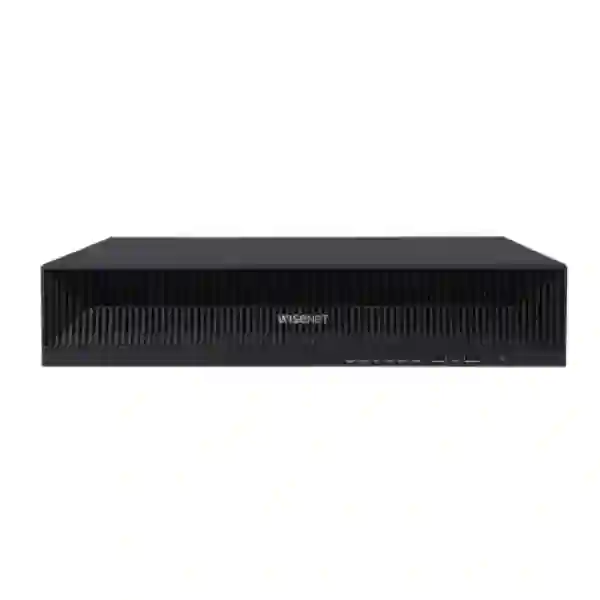
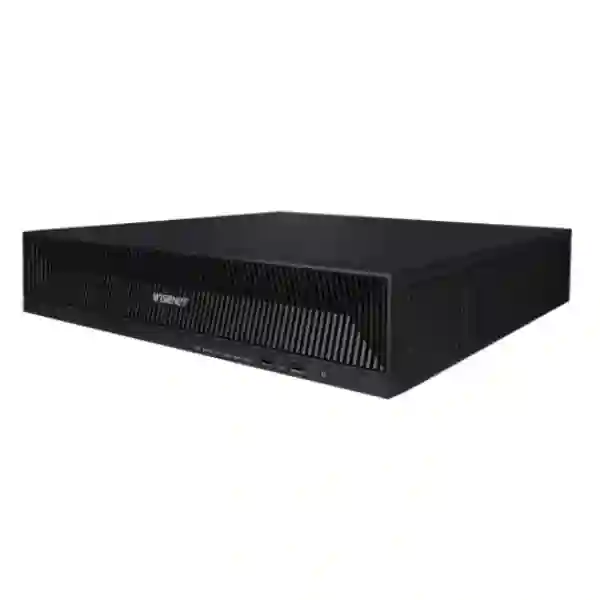
Hanwha XRN-1620B2 16-Channel Network Video Recorder
Plan a 16-camera surveillance system around verified recording capacity, sensible storage retention and practical evidence workflows. This Hanwha Vision NVR combines support for up to 32MP camera input, 140 Mbps incoming recording bandwidth and eight internal SATA drive positions. For buyers in Tanzania, the important next step is matching those capabilities to the site rather than assuming a recorder alone guarantees a complete working CCTV solution.
Verified technical overview
| Channels | Up to 16 IP cameras |
|---|---|
| Maximum camera resolution | Up to 32MP |
| Recording throughput | Maximum 140 Mbps |
| Playback bandwidth | Maximum 32 Mbps |
| Video compression | H.265 / H.264 / MJPEG |
| Storage hardware | 8 SATA bays; up to 80TB with supported drives |
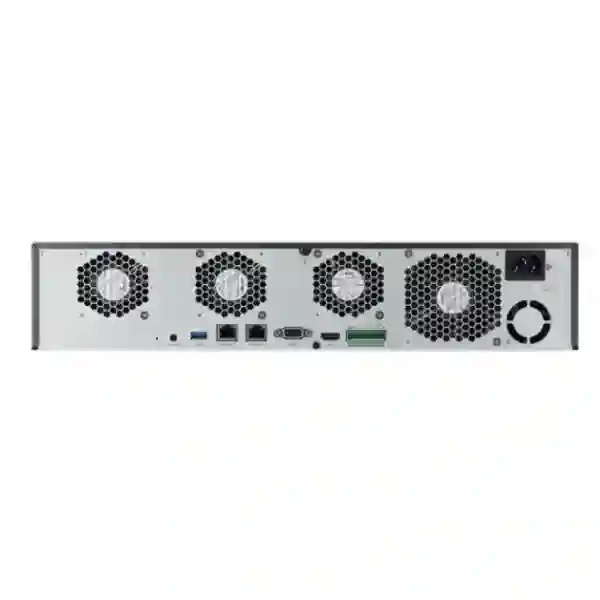
| Network interfaces | 2 × RJ-45 Gigabit Ethernet |
| Display outputs | HDMI (up to 3840 × 2160 at 30 Hz) and VGA |
| Camera protocols | SUNAPI and ONVIF |
| Power input | 100–240 VAC, 50/60 Hz |
| Operating environment | 0°C to 40°C; 20–85% RH |
| Advanced functions | AI metadata search with compatible cameras; ARB; N+1 failover |
Published limits apply to compatible configurations. Hard drives, camera power equipment and local commercial terms must be confirmed for the exact quotation.
A clear fit for a 16-camera surveillance system
The XRN-1620B2 is a network video recorder, or NVR, intended to receive video streams from IP surveillance cameras, retain footage on supported hard disks and make live or recorded images available to authorised users. Its maximum of 16 camera channels makes it relevant to a business with a defined group of entrances, corridors, perimeter positions, storage areas and customer-facing spaces. It can also replace an older recorder when the camera count and compatibility assessment support the move. The useful buying question is not simply whether sixteen cameras can connect, but whether the chosen cameras, recording profiles, retention period and network are suitable for the workload.
For a Tanzania project, begin with a camera schedule that names each view, why that view is needed and what evidence would be useful after an incident. Determine whether every proposed view requires continuous recording or whether some areas can use scheduled or event-based recording. The number of physical camera locations, resolution choices and retention goals should shape the recorder and disk configuration together. Request an equipment quotation only after those items are documented; the recorder model alone cannot tell a buyer how many days of usable footage the finished system will retain.
The core capabilities, explained in practical terms
Hanwha Vision rates this unit for up to 16 network camera inputs, individual camera resolutions up to 32 megapixels and a maximum incoming recording bandwidth of 140 Mbps. It supports H.265, H.264 and MJPEG video streams, provides eight internal SATA drive slots with a stated aggregate maximum of 80TB using supported drives, and offers HDMI and VGA monitor outputs. The two RJ-45 Gigabit Ethernet interfaces support network planning, while ONVIF and Hanwha SUNAPI are listed among the camera and integration protocols. Its embedded operating system is Linux.
Those numbers define ceilings rather than a promise that every demanding camera configuration will operate simultaneously at every possible frame rate. In particular, 32MP is a supported camera resolution, 140 Mbps is a total incoming recording limit, and 80TB is a maximum nominal internal drive configuration. They measure different things. Review the complete camera bitrate schedule against bandwidth, check drive compatibility before buying disks, and test the intended live display arrangement. A credible system design separates the recorder specification from network capacity, storage endurance and user workflow rather than treating the largest published number as an everyday operating target.
Understanding sixteen channels before choosing cameras
One channel represents one registered network camera stream source in the recorder plan, not a guaranteed field of view or an unlimited number of sensors. A business may need separate views for a doorway, a loading dock, a cash-handling position and the outer boundary, even when those areas are physically close together. Conversely, a carefully chosen lens may cover an area adequately without adding another channel. Build a numbered camera matrix that connects each proposed device with its location, purpose, expected image quality, recording schedule and network connection. Reserve channels for real operational needs rather than filling all sixteen positions by default.
Where the project is near the channel limit, account for future changes before committing. A new store room, additional gate or compliance-driven camera requirement may make a 16-channel system too restrictive later. Confirm the installation plan with the security team and the people who will search footage. A camera pointed at a scene can still fail the investigation requirement if faces, transactions or vehicle details are too small to interpret. Channel quantity matters, but lens selection, scene lighting, placement and the response process matter as much.
Recording bandwidth and why headroom matters
The published maximum recording bandwidth is 140 Mbps. This is the total incoming recording budget to assess across connected cameras, not a per-camera allowance. A simple planning method is to estimate the expected continuous or peak bitrate of each active recording stream and add the estimates together. Because scenes with motion, rain, changing light or fine detail may produce higher bitrates under variable-rate encoding, a design operating continuously at the maximum leaves little room for changes. Review measured streams where possible and reserve practical headroom for unexpected scene complexity and future adjustments.
For example, a camera configured for high detail in a busy exterior scene may consume more bandwidth than a similar model aimed at a quiet indoor corridor. Video codec, resolution, frame rate, scene content and compression settings all affect the actual stream. Do not choose bitrate settings from pixel count alone. Coordinate recorder bandwidth with the uplink capacity of camera switches, the separation of CCTV traffic from office applications and the performance of any remote viewing connection. A slow remote internet link does not automatically reduce local recording quality, but poor local network design can interrupt the path that carries footage to the NVR.
Storage capacity and realistic retention
The recorder has eight SATA drive positions and Hanwha lists a maximum internal capacity of 80TB, with supported drive capacities of up to 10TB per bay in the referenced specifications. This is a hardware capacity limit, not a statement that eight disks are included with every product offer. Buyers should confirm the supplied drive population and verify individual hard-drive models against Hanwha Vision compatibility guidance. Actual recording space may differ from labelled raw capacity because of formatting, reserved capacity, storage configuration and operating overhead. The retention period must be calculated from the usable space and the real recording workload.
Storage planning begins with total average incoming bitrate and how many hours per day cameras are recorded. As an illustrative calculation, a continuously recorded 1 Mbps stream produces about 10.8 GB per day before filesystem overhead; actual recordings can differ because bitrates fluctuate and settings vary. The team should model a typical day, a busy day and the desired number of retained days. Include any legal, insurer, employer or site policy requirements without assuming that one universal retention duration applies to all businesses. Request a retention worksheet showing camera-by-camera bitrate assumptions, total usable disk capacity, recording schedules and the margin left for future changes.
Compression choices without sacrificing useful evidence
H.265, H.264 and MJPEG are supported recording codecs. Their purpose is to encode video for storage and transport, but they do not make every camera produce the same image quality or storage demand. H.265 may reduce bandwidth and file size compared with older encoding under suitable conditions, yet results depend on the actual camera, scene and profile. H.264 remains relevant when interoperability or an established workflow requires it. MJPEG is another supported format, although its storage requirements may be much less attractive for continuous multi-camera recording. Test rather than assume which format produces the right balance.
Quality decisions should start with evidence requirements. A reception overview, a rear service entrance and a goods dispatch counter may need different frame rates, exposures or detail levels. Select codec and bitrate alongside camera resolution, lighting and motion. Make test exports under day and night conditions and view them on the equipment that the security team will really use. If a proposed compression change reduces the ability to identify relevant activity, the storage saving may not be worthwhile. Record profile settings in the system handover so future administrators can understand why each camera was configured that way.
Choosing compatible IP cameras
The recorder lists ONVIF and SUNAPI support, making it a candidate for installations with compatible network cameras. Nevertheless, ONVIF support is not a blanket guarantee that every camera feature from every brand will work. Basic streaming, motion events, audio, remote configuration, analytics metadata and PTZ commands can have different compatibility requirements. The exact camera model, firmware, ONVIF profile, encoder configuration and desired feature should be validated before ordering. An older camera may provide a picture but not the specialised search or event functions the buyer expects.
Ask for a compatibility matrix that records the proposed camera model, firmware revision, codec, resolution, frame rate, expected bitrate, event support and whether its specific analytics can be used in the intended software. Hanwha’s native SUNAPI integration can be valuable in an appropriately matched Hanwha system; interoperability should still be tested rather than presumed. For mixed-brand upgrades, connect representative cameras during commissioning and perform an actual recording, playback, export and alert test. A system counts as suitable when the functions important to the buyer work reliably, not merely when the NVR displays a live picture.
AI-assisted search: a conditional benefit
Hanwha identifies AI metadata search support when the XRN-1620B2 is working with compatible Wisenet or Hanwha AI cameras. This means the search capability depends on the camera and its supported metadata, not on a claim that the NVR independently adds AI analytics to ordinary cameras. Where the camera, firmware and integration support object attributes, those attributes may help an authorised reviewer narrow down footage more efficiently. Confirm which attributes and filters are actually available for the selected camera before promising a search outcome to a customer or investigator.
A useful scenario is an investigator who knows an approximate time and wants to reduce the time spent reviewing a long recording. Metadata-assisted searching may help locate candidate events, but results must be checked against the original video and operational context. Analytic detection can be affected by lighting, occlusion, camera angle and scene conditions. Treat the feature as a review aid, not proof of identity, guilt or a guaranteed detection rate. For projects depending heavily on analytics, request a practical demonstration using the specific camera and search workflow, including the process for exporting the underlying footage.
Finding, playing and exporting recordings
A recorder must help people locate evidence after an alarm or report. Hanwha lists search by date and time, event list, text search and smart search, together with playback controls and bookmark management. The unit also specifies up to 32 Mbps of playback bandwidth, which is a separate published limit from its maximum recording bandwidth. The number of users and simultaneous viewing patterns should be considered during design. An office with frequent live viewing, investigations and exports may have different needs from a small site where footage is checked occasionally.
Before acceptance, ask an operator who did not install the system to find a known test event, review the preceding period and export a clip. Verify that time and date are correct, camera labels are meaningful and the exported file can be opened with the approved playback method. Test whether still images or clips retain enough detail to support the intended investigation. Define who can search, copy and disclose video, and document where exported files are stored. An effective evidence workflow is repeatable under pressure and does not rely on a single technician remembering a series of obscure menu steps.
Two network interfaces and sensible topology
The XRN-1620B2 has two RJ-45 Gigabit Ethernet connections. Hanwha’s first-time setup guidance distinguishes Network 1 and Network 2, and explains that the interfaces must not be configured on the same IP subnet. It also warns that leaving an unwanted DHCP server active on a connection to an existing router or business LAN can cause address conflicts. This makes network planning a commissioning task rather than something to improvise once cables are installed. Have the network administrator approve the IP address scheme, switching arrangement and management access.
In a typical professional design, the camera network is separated logically or physically from general office devices, while approved operator access is provided through a controlled path. Document every camera address, NVR address, switch uplink and permitted viewing station. Test what happens when the office network is busy and what happens when one uplink disconnects. Segmentation can simplify troubleshooting and reduce the exposure of CCTV devices, but its exact implementation depends on the site’s topology. Avoid making the recorder directly reachable from the public internet simply because remote access is requested; use an approved secure access method that matches the organisation’s IT policy.
Camera power, switches and cable planning
The published XRN-1620B2 interface list shows two Gigabit RJ-45 network ports, not a bank of sixteen built-in PoE camera ports. Do not assume this model provides direct PoE power to all sixteen cameras. A deployment normally needs a compatible camera power arrangement, frequently a separate PoE switch or suitable external supplies, selected according to the actual camera specifications. Evaluate the total PoE budget, individual port power class, cable length, switch cooling and uplink capacity. A motorised PTZ or a camera with additional heaters may require more power than a compact fixed camera.
Create a physical network diagram before ordering. It should show camera runs, the switch or switches, any fibre links, the recorder, viewing stations, racks and UPS connections. Verify that outdoor cable routes and termination hardware match the site environment, and protect exposed paths according to the project’s electrical and lightning-risk assessment. Separate cable labels from camera names where necessary so replacements are traceable. During commissioning, disconnect and restore one camera at a time to confirm that the installer can locate faults without taking the whole surveillance system out of service.
Local monitor outputs and operator viewing
The NVR provides HDMI and VGA outputs. Hanwha specifies an HDMI output supporting up to 3840 by 2160 at 30 Hz, with a VGA output for full-HD-class monitoring. Its documented local viewing modes distinguish full-HD dual-monitor operation from UHD HDMI single-monitor operation. The number of panes and displayed frame rate depend on the chosen display mode and resolution. Therefore, support for a 32MP input does not mean a 32MP feed is shown at full resolution in every live-view tile on every monitor at once.
Design the operator workstation around the actual task. A security desk may need a persistent multi-camera overview, while an incident reviewer needs one or two larger views for detail. Match the display size, distance and layout to the number of cameras routinely observed. Test the intended layout with the real mix of resolutions, especially if high-resolution cameras are prominent. Confirm whether local display and remote viewing users can perform the necessary tasks at the same time. A recorder can preserve a detailed high-resolution recording even when a split-screen live view shows a lower-detail representation, so teach operators how to move from overview to recorded evidence.
Recording modes and event response
The model supports normal, scheduled and event-related recording options, including pre-event and post-event handling in the published feature list. Events may be generated by alarm inputs, video loss and suitable camera events such as motion or analytics. Available responses include notifications and specified outputs or commands, subject to correct configuration. Those capabilities make the recorder useful when a site needs more than a passive archive, but any event-response workflow should be designed around actual operational staffing and the reliability of the triggering device.
For instance, a warehouse might record perimeter cameras continuously but give supervisors a filtered list of selected alerts. A busy shop may prefer continuous evidence at cash points rather than depending exclusively on motion detection. Establish what happens when an alarm is generated outside staffed hours, which events should send notifications and who is authorised to respond. Test false alarms, missed detections and network interruptions before handover. Event-based recording can conserve storage in some scenes, but it is not automatically a safer substitute for continuous recording. Use the retention and evidentiary needs of each area to decide the mode.
Reliability, ARB and failover
Hanwha lists Automatic Recovery Backup, abbreviated ARB, and N+1 failover support for this recorder. They are distinct concepts. ARB is designed to help recover camera footage recorded on a compatible camera’s local storage during certain interruptions between that camera and the NVR, when the required settings and supported devices are in place. The camera, recording media, time synchronisation and reserved recovery space all matter. Do not assume that ARB protects every unsupported camera, all outage types or a camera that has lost both power and recording capability.
N+1 failover is a broader redundancy design involving correctly configured compatible recording equipment and a suitable architecture; it is not the same as having a second network port or eight disk slots. The business should specify whether the concern is disk failure, recorder outage, network outage, loss of electricity or evidence preservation, because each risk calls for different controls. Verify the exact implementation requirements with current Hanwha guidance. Build failure testing into commissioning, document any recovery limitations and make sure ordinary backup procedures still exist. Reliability is the result of the whole system, not a single feature label.
Cybersecurity and administrator controls
Surveillance systems carry potentially sensitive footage and should be treated as managed IT assets. Hanwha lists features including user access logs, IP filtering, 802.1X support, certificates and signed firmware. These can contribute to a stronger security design, but protection still depends on the settings chosen by the installer and the organisation’s wider network controls. Create separate named accounts where the system and operations allow, assign only necessary permissions and avoid sharing an administrator password among all users. Replace default credentials and maintain a documented process for reviewing access when staff roles change.
Remote viewing must be considered separately from local recording. Confirm which connections are needed, who can authorise access and how a lost device or departing employee is handled. Review the current supported firmware for the installed unit and schedule maintenance in a controlled window. Exported video should be stored securely and disclosed only through an approved process. A security team should be able to explain where recordings live, when they are overwritten, which people can copy them and what happens when an audit is requested. These operational rules give the NVR’s technical controls a meaningful purpose.
Installation and commissioning sequence
A disciplined setup starts before power is applied. Check the recorder model and accessories, select supported surveillance-rated hard drives, prepare network addressing, document the cameras and confirm the environmental and power arrangements. Hanwha’s setup guidance describes a first-start wizard covering language, networking, account creation, camera credentials, time settings, display configuration, camera discovery and final connection information. Follow the current manual for the exact firmware and installation rather than copying settings from a different NVR. In particular, coordinate the two network interfaces with the existing DHCP environment.
Once the cameras appear, test more than live pictures. Verify the expected resolution and recording codec for every channel, review incoming bitrates, check recording schedules and exercise each relevant alarm. Confirm the displayed time against an approved time source and the location’s actual timezone. Run an overnight or otherwise representative recording test, then check for gaps. Export evidence from several camera types. Simulate a permitted link interruption and verify whether the selected recovery features work as designed. Finally, give the customer an as-built diagram, camera list, supported-disk list, configuration summary, user-access plan and maintenance checklist. The system is ready when ordinary authorised staff can use it reliably.
Tanzania deployment considerations
For a site in Tanzania, deployment planning should reflect the physical installation rather than relying on assumed city-wide conditions. A recorder intended for an office, shop, industrial room or distribution facility needs an appropriate protected location with secure access, clean power and ventilation. Hanwha specifies an operating temperature range of 0°C to 40°C and relative humidity of 20% to 85%. A cabinet exposed to direct sun, a dusty storeroom or an unventilated network closet may not stay within the required conditions even if the surrounding building seems comfortable.
Electrical continuity should be planned for the recorder, camera switches, routers and any other components required to keep video flowing. A UPS attached only to the NVR cannot preserve camera video if the camera power source fails first. Assess power quality, surge protection and controlled shutdown arrangements with a qualified installer. Confirm local supply voltage and grounding at the actual premises; the NVR’s published input rating is 100 to 240 VAC, 50/60 Hz, but this does not replace a site electrical survey. Do not infer local stock, installation coverage, warranty terms or regulatory approval from a global product datasheet. Ask for those commercial details in the specific quotation.
Business environments where the model may suit
In a retail setting, sixteen channels can be allocated among entrances, point-of-sale surroundings, aisles and storage approaches, subject to the store’s floor plan and privacy rules. An office may focus on doors, reception, car parks and sensitive access points rather than filming employees indiscriminately. A warehouse may value fixed views of gates, loading bays, stock movement paths and perimeter approaches, with recordings that can be reviewed by date and time after a delivery dispute. For each application, camera position and evidentiary detail should be decided by a site assessment.
This recorder may also suit a school administration area, a hospitality back-of-house environment or a smaller industrial facility where a 16-camera IP system matches the requirement. Suitability is not established by the industry name alone. Check whether there are long cable runs, difficult nighttime scenes, many active remote viewers, demanding analytics or a high retention requirement. Those factors can change camera choice, network topology and disk sizing. If the business is likely to require significantly more than sixteen cameras, evaluate a larger or distributed recording architecture before installation rather than waiting until every channel is occupied.
Evidence handling, privacy and retention policy
A surveillance system should have a documented purpose for each monitored area. Before installation, the organisation should decide who may view footage, why it may be reviewed, how long it should be retained and when it may be disclosed. Applicable legal and organisational requirements vary by setting; buyers should obtain appropriate local advice rather than treating a generic camera retention period as a legal requirement. Avoid positioning cameras where an unnecessary intrusion into personal privacy would result. Clear notices and internal policies may be needed depending on the organisation and use case.
When an event occurs, authorised staff need a reliable procedure for preserving the relevant time window before normal recordings overwrite it. Record the camera name, time range, incident reference, operator and any transfer of evidence. Check that timestamps and timezones make sense and that the export is playable without silently changing the underlying record. Use an approved secure location for copies and restrict access to those with a legitimate need. These procedures are not extra product features: they are the management decisions that turn the recorder’s search and export functions into a defensible business process.
Questions to settle before requesting a quote
A useful purchase conversation starts with the number of cameras now and in the next planning period. Provide the manufacturer and model for each camera, desired video resolution, approximate frame rate, codec preference and recording schedule. Explain how long footage must remain available and identify any cameras requiring compatible AI metadata, audio or PTZ control. Ask whether existing switches can support the new bandwidth and power load. Share the network layout, rack dimensions, intended monitor arrangement and whether the installation has sufficient protected power and cooling.
The quotation should identify the recorder model, hard drives and their verified compatibility, any switches or UPS equipment, accessories, installation labour if offered and the commissioning deliverables. Request a written statement about what is included and excluded. Specifically clarify whether disks come fitted, whether camera licenses or integration components are required for the chosen ecosystem, and what support arrangements apply in Tanzania. A useful quote separates hardware, professional services and optional protection features. That makes it easier to compare like-for-like systems and prevents a low initial equipment price from hiding the cost of achieving the required retention and reliability.
When to choose another recording approach
The XRN-1620B2 should not be the automatic choice for every surveillance project. A site with a small number of basic cameras and minimal retention may not need eight drive bays. A site with more than sixteen cameras, unusually high total recording bitrates or many concurrent operators may need a larger recorder, multiple recorders or a different video-management architecture. A project requiring AI searches from existing non-AI cameras should not assume that this model adds those camera-side capabilities. Mixed-brand installations should be reviewed against the exact features required, not only ONVIF connectivity.
Another reason to evaluate alternatives is resilience. If continuous recording through multiple device failures is essential, the complete design may require redundant networking, power, supported recording failover and documented operations. If the buyer mainly needs remote surveillance across disconnected sites, centralised management and telecommunications constraints may dominate the decision. Describe the business outcome first, then compare technical solutions against the same camera matrix, bandwidth assumptions, usable storage, security responsibilities and maintenance plan. A correctly sized system is more valuable than a specification sheet with unused features or untested promises.
A practical acceptance and maintenance plan
Before sign-off, make a short list of tests that can be repeated by the customer’s personnel. For each camera, verify a live picture, a recorded clip, correct time, correct camera name, expected scene detail and an approved export method. Inspect the storage status and calculate the retention actually being achieved. Check whether alarms work, whether authorised users can search the correct channels and whether access restrictions prevent unauthorised actions. Confirm the UPS-backed devices remain online through the permitted power test, and verify that the recorder starts and resumes recording after an orderly restoration.
Maintenance should include periodic drive-health checks, review of recorded coverage, user account review, verified firmware maintenance and inspection of network and power components. Hanwha’s support guidance describes checking storage health information through the recorder interface and advises regular checks and backups for critical data. Keep contact and escalation procedures current, but avoid treating any unverified service response as guaranteed. If the site changes a camera, switch, recording profile or storage disk, update the as-built record and repeat the relevant acceptance tests. Good surveillance operations are measurable: evidence can be found, recording gaps are noticed and the system’s limitations are known before a serious incident.
Frequently asked questions
Does the Hanwha XRN-1620B2 record 16 IP cameras?
Yes. Hanwha Vision specifies a maximum of 16 network camera channels. Whether a proposed group of sixteen cameras will meet performance and interoperability requirements depends on the combined bitrates, camera profiles, supported protocols and selected functions. Check the full camera schedule before purchasing.
Does 32MP support mean every camera will display at 32MP?
No. The published 32MP figure describes supported input and recording resolution, subject to codec and playback conditions. Local monitor decoding and split-screen views have separate limits. Evaluate the real camera mix, recording quality and monitor display mode rather than assuming a full-resolution live tile for every channel.
How much storage can this NVR hold?
Hanwha lists eight SATA drive bays with maximum supported internal capacity of 80TB using eligible drives under the published specifications. That number is not the same as usable retained footage or a guarantee that disks are supplied. Confirm disk compatibility and calculate retention from measured or appropriately estimated bitrates.
How long can it keep recordings?
There is no fixed retention period attached to the recorder model. Days of footage depend on installed usable disk space, camera count, bitrate, recording hours, scene complexity and any storage configuration overhead. Request a written calculation based on the chosen cameras and an acceptance check against actual recordings.
Does it have sixteen built-in PoE camera ports?
The manufacturer’s published interface list identifies two Gigabit Ethernet ports rather than sixteen camera PoE ports. Plan a separate, correctly sized camera power arrangement, such as compatible PoE switching, unless the final verified equipment bundle explicitly supplies another method. Include the camera switches in any power-continuity plan.
Can I use cameras from another manufacturer?
The NVR supports ONVIF and SUNAPI, but the exact integration depends on camera model, firmware, protocol implementation and desired functions. Verify video, audio, events, PTZ and metadata separately. A camera showing a live image does not establish that all its advanced features are available in the recorder.
Does the recorder itself create AI object detection?
Hanwha describes AI metadata search with compatible AI cameras. That should not be interpreted as a promise that ordinary cameras gain native AI object detection from the recorder alone. Ask for the supported camera and metadata combination and a demonstration of the intended search function.
What is the difference between ARB and N+1 failover?
ARB can help recover recordings held on compatible camera storage after certain interruptions, when properly configured. N+1 failover relates to a wider supported recorder redundancy design. Neither should be treated as universal protection against every disk, network or power failure. Specify the risk that needs protection and test the chosen solution.
Can staff view footage on a monitor and remotely?
The recorder provides HDMI and VGA display outputs, plus network viewing capabilities listed by Hanwha. Practical simultaneous operations depend on the selected viewing mode, bandwidth, supported clients and user limits. Test real operator tasks and restrict access using the site’s approved security policy.
What should a Tanzania buyer confirm before ordering?
Confirm the exact XRN-1620B2 model, camera compatibility, installed disks, retention target, PoE switching, network design, UPS coverage, ventilation, commercial inclusions and acceptance tests. Request verified local pricing, stock position, warranty arrangements and delivery scope from the supplier rather than assuming terms from product data published for another region.
Request a configuration-based quotation
For the Hanwha XRN-1620B2, share the planned camera count, each camera model, the target retention period and any AI search, PTZ or remote-access requirements. Ask for confirmation of compatible drives, external camera power, network equipment, UPS provisions, commissioning tests and the precise items included in the local offer.
Contact FourTeck Tanzania to request a product and system quotation.




Reviews
There are no reviews yet.