
HANWHA VISION · TANZANIA PRODUCT GUIDE
Hanwha XRN-3220B4-30 | 32-Channel 30TB NVR
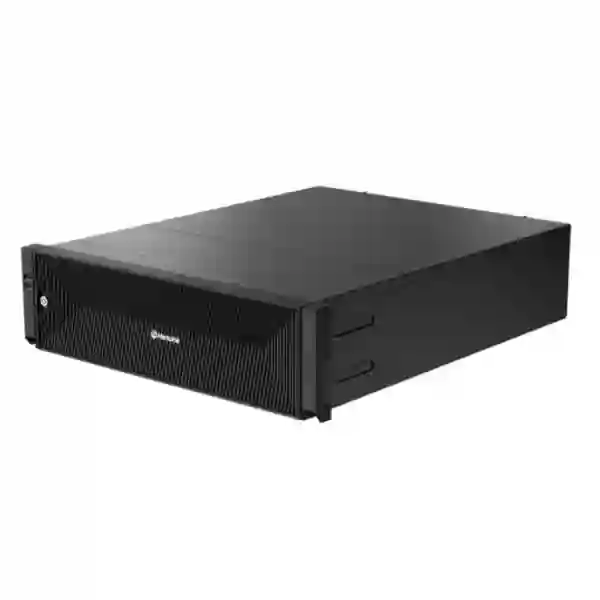
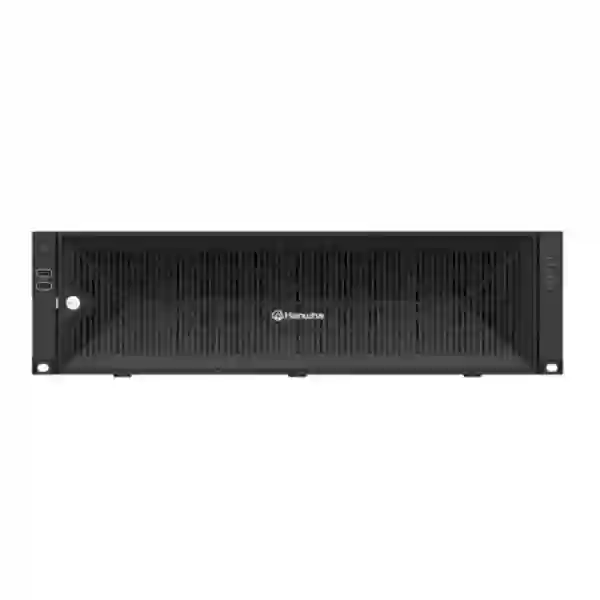
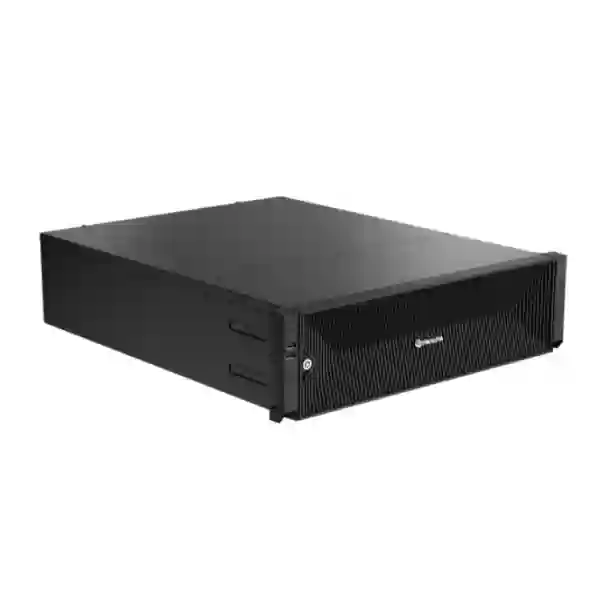
The Hanwha XRN-3220B4-30 is a 32-channel network video recorder built on Hanwha Vision’s XRN-3220B4 platform for demanding IP camera recording applications. Hanwha’s product lineup identifies the exact -30 suffix as a 30TB variant; the installed disk count, disk models and usable capacity must be confirmed in the Tanzania quotation. The recorder supports camera resolutions up to 32MP, H.265, H.264 and MJPEG compression, sixteen SATA bays, RAID 5/6 and two HDMI monitor outputs. It provides recording bandwidth up to 300Mbps in normal mode or up to 520Mbps in specified distributed and RAID modes. ONVIF and SUNAPI connectivity, dynamic viewing layouts, event search, compatible-camera AI search and TPM-based security features support practical surveillance operations. Buyers should evaluate actual camera bitrates, days of retention, RAID overhead, power protection, network design and evidence export before choosing storage capacity. The 160TB maximum refers to supported raw non-RAID expansion, not the default delivered configuration. Ask FourTeck Tanzania for a current, itemised quotation showing drives, accessories, compatibility, supply terms and any available commissioning or support services. Pricing, availability and warranty are not assumed.
Feature summary
- 32-camera input ceiling, with resolution support to 32MP
- Mode-dependent recording performance up to 520Mbps
- Sixteen internal drive bays with RAID 5/6 capability
- Dual HDMI, event search, dynamic layouts and virtual channels
- ONVIF, SUNAPI, supported viewers and compatible AI-camera search
- TPM security hardware and signed firmware support
Verified platform specifications
The storage variant designation is 30TB. The installed disks and usable capacity of the individual Tanzania offer still require confirmation. Figures below are published platform limits, not guaranteed performance for every possible configuration.
| Camera inputs | Up to 32 IP channels |
|---|---|
| Maximum camera resolution | 32MP |
| Compression | H.265, H.264, MJPEG |
| Recording bandwidth | Up to 300Mbps normal; 520Mbps distributed and specified RAID modes |
| Playback bandwidth | Up to 200Mbps |
| Storage | 16 SATA bays; up to 160TB non-RAID using compatible 10TB drives |
| Protection | RAID 5/6; TPM; signed firmware |
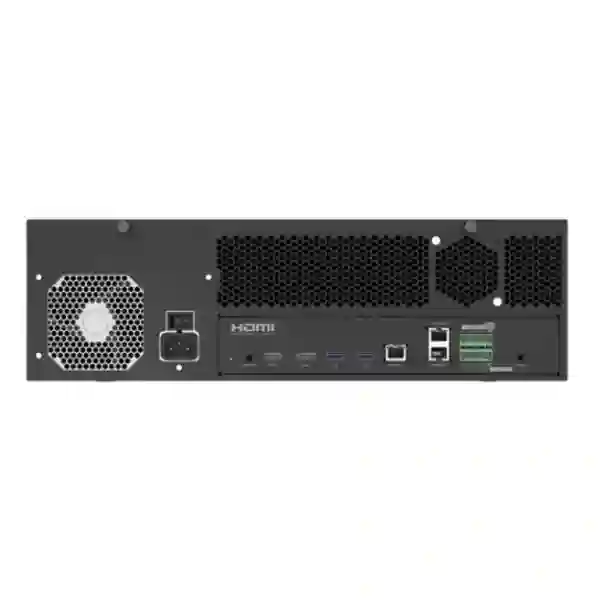
| Interfaces | 3 x 1Gbps Ethernet; 2 HDMI; 8 alarm inputs; 4 alarm outputs |
| Network camera protocols | SUNAPI, ONVIF |
| Electrical | 100–240VAC, 50/60Hz; max 265W with 16 HDDs |
| Chassis | 440 × 132 × 571.1mm; approx. 14kg without disks |
| Environmental | 0–40°C; 20–85% relative humidity |
Understanding the product and the buyer’s job
A network video recorder is the operational centre of an IP camera system. It must receive the right video streams, retain them for an agreed period and let authorised people find a relevant incident. The XRN-3220B4-30 supports up to thirty-two network camera channels, a scale relevant to larger single-site projects or a carefully designed part of a multisite operation. The true requirement is not simply the highest channel number; it is dependable evidence retrieval under realistic operating conditions.
Security managers should define the events they need to investigate. IT teams should specify network segmentation, bandwidth and remote access. Facilities managers should arrange suitable rack space, power protection and maintenance access. Procurement teams need an itemised offer that identifies the recorder and its supplied drives. Bring those requirements together before choosing the appliance. A product that fits the camera count but fails retention or playback expectations is not a sound purchase.
Practical check: Confirm the camera inventory, target recording days, critical incident types and who will administer the recorder before approving the design.
What the 30TB model designation means
Hanwha’s lineup includes the precise model XRN-3220B4-30 and describes a 30TB storage variant. That information distinguishes the suffix from the general XRN-3220B4 platform, which can be listed without drives in other markets. It does not prove the number or manufacturer of hard disks fitted to a particular unit offered in Tanzania. Drive population, RAID settings, software overhead and usable video capacity must be specified separately.
A quotation should identify each supplied drive’s model and capacity, confirm that it is supported by the recorder and describe the configured storage groups. Ask whether 30TB refers to raw installed capacity rather than capacity available after redundancy. Without this distinction, two offers can appear identical while delivering very different retention periods. Avoid relying on an overseas retailer’s disk bundle as evidence of the configuration supplied locally.
Practical check: Require written drive details and a capacity report at handover; do not infer usable retention from the model suffix alone.
Camera input count and recording resolution
The NVR platform accepts a maximum of 32 IP camera channels and supports resolutions up to 32MP. That makes it suitable for a mix of ordinary overview cameras and selected high-detail cameras, subject to the capacity of the actual system. However, support for a 32MP input is not a promise that thirty-two such streams can be decoded on local monitors at their maximum possible frame rates simultaneously.
Select each camera for its evidence objective. An entrance may need facial detail, while a yard may prioritise wide coverage and a service corridor may need reliable recognition of movement. Field of view, lens choice, mounting position, lighting and available pixel density all matter. Set the required image quality first, estimate video bitrates next and then calculate the recorder load. Merely choosing the largest sensor is not a substitute for scene design.
Practical check: Create a channel-by-channel schedule listing camera model, location, recording resolution, frame rate and purpose.
Recording performance and operating modes
Hanwha specifies recording bandwidth up to 300Mbps in normal recording mode and up to 520Mbps in distributed mode. It also documents up to 520Mbps under stated RAID operating conditions. These are different operating modes, so it is inaccurate to present 520Mbps as a universal sustained recording ceiling for every deployment. The chosen mode and actual camera configuration must be part of system design.
For illustration, thirty-two cameras averaging 4Mbps contribute about 128Mbps of recording video before engineering allowances. That number is only a starting point, because scene movement, quality settings and other streams can affect workload. Design with headroom and test peak scenes. Remote viewing, event handling, disk operations and exports introduce additional considerations. The recorder’s recording, transmission and playback specifications should be considered separately rather than merged into a single vague speed claim.
Practical check: Ask the supplier to state the configured recording mode, estimated total bitrate and remaining bandwidth margin.
H.265, H.264 and MJPEG recording
This platform supports H.265, H.264 and MJPEG compression. Codec choice affects storage, network traffic, camera compatibility and playback workflows. Efficient H.265 can be useful for long-term recording where supported, but its actual storage advantage depends on the scene, camera profile and selected quality level. Avoid simplistic guarantees that one encoding choice always reduces the file size by a fixed percentage.
Some mixed-camera systems still benefit from H.264 compatibility, particularly when older viewing software must be used. MJPEG can be relevant for specialised equipment but may consume more transport and storage resources. Verify that every camera and viewer supports the selected encoding profile. When separate main and substreams are available, configure them deliberately so the recorded evidence remains detailed while multichannel viewing stays responsive. Test exported files on approved independent devices.
Practical check: Document the codec, expected bitrate and playback compatibility for each camera class before installation.
Turning disk size into actual recording days
Storage duration depends on the number of streams, average bitrate, recording hours and effective capacity after configuration. At a continuous average of 1Mbps, one stream consumes roughly 10.8GB per day before overhead. Thirty-two cameras averaging 4Mbps therefore create approximately 1.38TB per day. A theoretical fully usable 30TB could cover around twenty-one days at that rate, but RAID, file systems, reserves and variable bitrates can reduce that estimate.
A useful retention plan specifies what must be recorded continuously and which channels may use events or schedules. Motion recording can conserve disk space in some circumstances, but poorly configured triggers can also miss important evidence. Where retention is a contractual or policy requirement, ask for a written calculation and verify it through live disk monitoring after commissioning. Retention figures without underlying assumptions are not reliable purchasing criteria.
Practical check: Request a worksheet stating raw capacity, RAID-adjusted space, average daily data and the minimum required retention period.
Sixteen SATA bays and storage expansion
The XRN-3220B4 chassis contains sixteen SATA drive bays. Hanwha’s published specification supports up to 10TB per compatible HDD and up to 160TB of raw non-RAID internal storage. That value is a maximum planning figure, not a statement that every product variant includes sixteen disks. Specific HDD models should be chosen from current compatibility information rather than merely matching a capacity and connector.
Future expansion may be necessary when the camera count grows, image profiles improve or the organisation needs longer historical footage. Free bays can provide room for growth, but an existing array must not be altered by an improvised disk addition. Confirm approved combinations, firmware requirements, array grouping and service implications. A documented expansion plan protects recording continuity and avoids unexpected purchases after the first deployment.
Practical check: Check the initial number of installed disks, available bays, supported replacement drives and permitted future array changes.
RAID 5/6 and the cost of fault protection
The recorder supports RAID 5 and RAID 6 subject to the manufacturer’s layout and disk requirements. Both use capacity for parity, so the available space is smaller than the raw sum of drive labels. A hypothetical RAID 5 array of three supported 10TB drives would yield about 20TB of nominal capacity before other overhead, if that disk arrangement is permitted and configured. This illustration does not establish the actual bundle or its chosen array.
RAID helps tolerate specified drive failures; it does not protect every incident affecting video evidence. Deletion, corruption, physical damage and theft can still compromise the appliance. Disk rebuilds take time and can place sustained load on remaining disks. Decide whether the business values additional recording days or stronger drive-failure tolerance, and document the separate process for exporting or backing up important clips outside the recorder.
Practical check: Have the integrator name the RAID level, disk count, effective capacity and procedure for failure and rebuild.
Hard-drive health and hot swapping
Hanwha lists hot-swap capability in RAID mode for the platform. That is useful to service teams, but it is not an invitation to remove or rearrange drives during normal operation. Identify a failed disk from health information, confirm the array state and use the correct compatible replacement. Removing a healthy member of an already degraded array can jeopardise footage that could otherwise have been recovered.
The organisation should have a fault-response process covering alerts, service authorisation, spare availability and post-rebuild verification. Keep a record of when a disk stopped working and whether any channels experienced gaps. Staff who only need to view video should not be given unrestricted physical or administrative access to storage. A drive maintenance procedure is part of preserving evidence, not merely a hardware housekeeping task.
Practical check: Agree on a named disk-failure response owner and approved replacement process before the recorder enters service.
Dual HDMI monitoring and flexible layouts
The recorder includes two HDMI display outputs. Hanwha specifies up to 3840 by 2160 at 30Hz on HDMI 1 and 1920 by 1080 at 60Hz on HDMI 2. Dynamic layouts and virtual channel views support arrangements that prioritise important footage. A control desk may keep an entrance or alarm view prominent while presenting nearby supporting cameras in smaller tiles.
The number of streams that can be decoded smoothly depends on their resolution, codec and frame rate. A high-resolution feed takes more decoding resources than a simple overview stream. Design the operator experience around useful view groups, not merely the theoretical maximum number of tiles. Name cameras consistently and test the chosen monitors, cabling and workstation controls. Operators should be able to recognise an event and move immediately to the relevant recording.
Practical check: Demonstrate the intended live-view mosaics with the actual camera settings, especially the most demanding high-resolution views.
Playback bandwidth and simultaneous review
Hanwha specifies up to 200Mbps playback bandwidth and supports several search and playback workflows. This is separate from the maximum recording bandwidth. People may need to investigate an incident while normal recording continues, and concurrent local or remote viewing demands should be considered in the acceptance plan. A high number of camera inputs does not automatically imply unlimited simultaneous playback.
Define how many operators will review video at once, which camera combinations they will use and what export demands are expected. Test seeking, bookmarks and transfer of a selected clip rather than evaluating only a smooth live image. The workflow should support answering a concrete question, such as which vehicle passed an entrance at a stated time, with clear timestamps and records of authorised access.
Practical check: Run an investigation rehearsal with the actual number of planned viewers and the required evidence export method.
Event-driven recording and alarms
The NVR offers normal, scheduled and event-based recording modes, including relevant pre-event and post-event settings. Supported triggers include camera events, video loss and alarm inputs, while actions can include notifications, alarm outputs and supported PTZ commands. Each automation should serve a defined operational response. An alert that nobody is responsible for investigating does little to improve safety.
Prioritise events such as a protected entry opening outside normal hours, a camera disconnecting or a critical area alarm. Test false positives in daytime, nighttime and busy conditions. Configure thresholds, notification recipients and escalation paths carefully so operators do not become overwhelmed by irrelevant messages. Recording policy and alert policy are connected but not identical: some high-priority areas should continue recording even without an alarm.
Practical check: Prepare an event matrix identifying the trigger, required response, responsible staff and recording policy for each alarm.
AI object attribute search and camera compatibility
Hanwha’s AI object attribute search is associated with compatible Hanwha AI cameras. The model should not be described as automatically creating rich analytics metadata from any camera connected through ONVIF. Which attributes can be searched depends on the camera model, software versions and detection configuration. Buyers who expect advanced investigation filters should confirm the complete compatibility chain.
A useful trial starts with a real question, such as locating a particular type of movement in a monitored zone. Test the proposed AI camera under representative lighting and visibility conditions, and inspect the original footage behind the search results. Occlusion, camera angle and crowding can affect what the analytics identify. AI is a tool for narrowing investigation work, not an infallible statement about a person’s identity or intent.
Practical check: Require a written AI compatibility schedule and an on-site demonstration of the specific search filters being promised.
ONVIF, SUNAPI and mixed-brand camera systems
The published recorder supports ONVIF and Hanwha’s SUNAPI protocols. These are important integration capabilities, but protocol support does not guarantee every third-party camera function will be available. Video, audio, PTZ, alarms, motion events and analytics may rely on different implementations. A camera that displays live footage can still fail to supply an event needed for the agreed security workflow.
Before migrating a mixed-brand estate, document each model, firmware, protocol settings and required features. Trial a representative sample of cameras, including the oldest and most complex. Check primary and secondary streams, time synchronisation and all essential event rules. Keep a record of working settings for future firmware maintenance. Avoid making an all-camera compatibility promise based solely on an ONVIF logo.
Practical check: Have the supplier sign off the precise camera models and functions essential to the project, not just their live video.
Ethernet interfaces and network segmentation
The unit provides three 1Gbps RJ-45 Ethernet connections. The surrounding network must still be sized for aggregate camera traffic, uplinks, authorised viewers and administrative access. The existence of multiple sockets does not guarantee that arbitrary aggregation or failover schemes are supported. Follow Hanwha’s intended port configuration and the site’s tested network architecture.
Consider separating video traffic from general office use with appropriately designed network segmentation and controlled routes. Plan stable addressing, time service, DNS where required, firewall policy and maintenance access. Test what happens when a camera network link or upstream connection fails. Local recording and remote viewing can have different failure behaviours, so the network diagram must show both. Keep switch capacity, cable condition and power continuity in the design.
Practical check: Request a network drawing with camera switch uplinks, recorder ports, management access and remote-viewing paths.
Remote viewing on phones and workstations
Supported Wisenet viewing tools and mobile features can let authorised managers review video without standing at the NVR. Hanwha also describes assisted P2P or QR-code setup for compatible access workflows. These features should be configured only after security review. Convenience does not remove the need for individual accounts, appropriate user rights and secure endpoint devices.
Confirm client software versions, allowed concurrent sessions, the remote network route and whether a viewer requires live access or playback access. Test the expected number of users during an event, including any export operations. Avoid unnecessary exposure of management services over the public internet. Remove accounts when personnel change role, and maintain a record of who is authorised to access footage.
Practical check: Approve the remote-access method, permitted devices and operator permissions before activating mobile connectivity.
TPM, signed firmware and system hardening
The manufacturer describes an integrated Trusted Platform Module, signed firmware and other access-security controls. These help create a more trustworthy platform, but they cannot protect a badly administered surveillance network by themselves. Unchanged default credentials, overly broad permissions and insecure cameras can undermine recorder security. Protect physical access to the appliance as carefully as access to its software.
Use current supported firmware, distinct accounts and appropriately restricted management interfaces. Review system logs and keep protected configuration backups. Establish a process for approving software updates and checking that recording, alerts and camera connections still work afterward. If external investigators may receive footage, define the retention and transfer rules separately from technical access controls.
Practical check: Require a secure commissioning baseline, an access-rights register and a named administrator responsible for updates.
Rack size, ventilation and heat
The chassis is approximately 440mm wide, 132mm high and 571.1mm deep, weighing around 14kg without hard disks. Confirm sufficient rack depth, rails or shelving, cable clearance and safe service access. A cabinet can accommodate the metal enclosure yet still lack the room needed for cables and hot air to move. The sixteen-drive layout also makes mechanical planning especially important.
Hanwha states an operating range of 0 to 40 degrees Celsius and 20 to 85 percent relative humidity. Measure conditions where the recorder will actually sit rather than relying on the ambient room temperature. Consider dust, adjacent switches, UPS heat and sustained disk activity. A serviceable cabinet should allow technicians to identify the right drive or connection without disturbing the rest of the system.
Practical check: Check rack load, usable depth, ventilation, actual equipment temperature and accessible cabling before delivery.
Power supply and UPS design
The specified power input is 100–240VAC, 50/60Hz. Hanwha states a maximum consumption of about 265W with sixteen drives. UPS design must consider the entire camera path: recorder, network switches, PoE camera supplies, routers and any essential monitoring workstation. Keeping only the recorder alive does not help if all the connected cameras lose power.
Specify the backup-time objective and calculate the supported electrical load. Consider grounding, surge protection and planned recovery following a prolonged interruption. Do not promise continuous recording merely because a UPS is installed; verify the actual supported runtime and system behaviour through an approved test. Maintain documentation of the power arrangement so future equipment additions are evaluated before overloading the backup system.
Practical check: Include cameras and network equipment in the power assessment and rehearse controlled recovery after an outage.
Planning the full system beyond the NVR
This is a network video recorder rather than a complete CCTV package. The published interface does not show a bank of built-in PoE camera ports, so compatible switching or separate power arrangements are required. Cameras, lenses, mounts, cable routes, racks, monitors, UPS units and commissioning labour may each be separate items. A product-only quote is not a finished installation design.
Integrations with access control, analytics, other viewers or monitoring software may also require their own compatibility checks. A feature advertised at the camera level does not necessarily carry through a third-party recording system unchanged. The best proposal lists all components, explains their relationship and names who is responsible for configuration and testing. That prevents unexpected omissions during installation.
Practical check: Ask for an itemised bill of materials identifying what is included, what is optional and what must be sourced separately.
Office and commercial property applications
A larger office or mixed-use building may need recording across entries, reception, corridors, vehicle access and shared operational zones. A 32-channel NVR can provide central administration where the camera and bandwidth plan fits. Different areas may require different frame rates or recording schedules. A critical doorway may need more evidential detail than a broad corridor overview.
Design camera placement and retention policies around realistic incidents: unauthorised entry, a disputed delivery, damage or a safety event. Keep viewing permissions appropriate to staff responsibilities. Having spare channels should not drive unnecessary surveillance, especially in sensitive areas. The appropriate legal and organisational review of camera locations is separate from the technical capability of the recorder.
Practical check: Define the exact purpose and retention rule for each monitored zone, then test whether staff can find a sample incident.
Warehouse, hospitality and institutional use cases
A warehouse might prioritise loading bays, inventory movement and perimeter approaches. A hospitality business might require reliable event review for public entrances and service areas. An institutional site may have special privacy, safeguarding or procedural constraints. These examples show why a recording plan must be specific; the same recorder may serve different goals with different cameras and policies.
Work backwards from the investigation question for each location. Establish whether an overview image is enough or whether detailed recognition is needed. Decide who can access live views and recordings, and whether an incident has an escalation route outside normal working hours. Include realistic lighting, camera mounting and operator training in acceptance testing. The NVR itself cannot compensate for unsuitable site coverage.
Practical check: Require a zone-based camera plan that states the expected evidence result and the authorised review role.
Migrating from an existing NVR
A replacement project begins with the existing camera list, network details, required integrations and historical footage that must be preserved. Do not assume old HDDs can be inserted into the new recorder while retaining their contents. Different file systems, firmware and RAID arrangements may make such a move impossible or destructive. Export essential clips through the original system before any physical change.
Test representative cameras on the new platform, verify clocks and stream profiles, simulate alerts and ensure the footage can be searched and exported. Use a staged cutover or rollback plan if continuity matters. Confirm staff account permissions before opening routine access. A migration is complete when evidence workflows work reliably, not merely when images first appear on the new monitor.
Practical check: Document historical export, camera transition, validation tests and final sign-off as separate project stages.
Incident export and chain of custody
Footage may be required for internal investigations, insurance discussions or authorised legal processes. Decide who can request an export, who approves it and how the selected camera and time range are documented. Hanwha provides local and network export features, but the chosen format should be tested on the recipient’s authorised computer. Timestamps, playback method and file integrity matter.
Avoid uncontrolled sharing from personal accounts or devices. Keep a record of transfers and preserve a suitable original copy where policy requires it. Limit access to sensitive material and follow applicable privacy and disclosure obligations. A recorder can make export technically possible, but it does not grant permission to release recorded images. Staff should be trained to distinguish an informal request from an approved evidence workflow.
Practical check: Rehearse one complete evidence request, from incident search through authorised export and independent playback.
Maintenance and equipment health checks
A professional recording system needs routine checks for camera disconnections, storage warnings, failed alerts, inaccurate clocks and unexpected network changes. Front-panel indicators and logs are useful only if someone reviews and responds to them. A camera showing a live image today does not prove that every required interval has been stored correctly over the last month.
Establish maintenance ownership and a secure record of firmware versions, supported configuration backups and service activity. Before updates, examine manufacturer release information and schedule an appropriate maintenance window. Afterward, verify recordings, alerts, viewing permissions and export functions. Drive-failure or firmware changes should not be improvised by operators who have not been trained for those tasks.
Practical check: Include a health-check timetable, escalation contacts and secure configuration handover in the maintenance agreement.
Tanzania site and procurement factors
Specify the real site rather than assuming identical infrastructure across Tanzania. A controlled equipment room, a remote operating property and an industrial installation may need different network, cooling and backup-power decisions. A site survey should determine rack space, electrical protection, camera cabling, usable uplinks and remote viewing requirements. Do not invent a local connectivity or climate promise for every customer.
Ask the supplier to confirm actual availability, selling price, tax treatment, delivery terms, warranty and any installation or commissioning service. A manufacturer specification does not establish the stock or support terms of the Tanzania listing. If regulatory or organisational compliance requirements apply, obtain the relevant evidence for the actual transaction. Avoid borrowing approvals or commercial claims from other countries without checking their relevance.
Practical check: Request a written FourTeck Tanzania quotation for the exact variant and named services rather than relying on a generic web price.
Commissioning and acceptance testing
Match the delivered model, drive inventory and accessories to the order. Record the asset details securely, verify compatible disk configuration and test every planned camera at the selected recording profile. Check the actual retention calculation, the time service, event rules and user permissions. Test both HDMI outputs and any approved remote viewing clients that the business will use.
Run controlled scenarios for camera loss, event alerting, incident search and file export. If RAID, failover or backup functions are part of the purchased design, test the actual implementation through manufacturer-approved procedures. The acceptance report should record successful checks, unresolved defects and the person responsible for correction. Staff need usable operating instructions after installation rather than being left with only a login and a live-view screen.
Practical check: Keep a signed acceptance checklist with recording, recovery, playback and security tests, not only a photograph of the hardware.
Request a configured quotation
To assess the Hanwha XRN-3220B4-30 accurately, share the camera count and models, expected resolution and frame rate, required recording hours, target days of retention and desired RAID protection. State how many people will use local monitors, remote viewing and exports. These inputs let the recorder’s published capacity be evaluated against a real operating workload instead of a generic list of maximum specifications.
Ask FourTeck Tanzania to identify the included drives, raw and usable storage, compatibility assumptions, installation accessories and any available commissioning or support. The product features above are based on Hanwha’s published platform information and variant designation, not a promise of local inventory or commercial terms. A clear itemised quotation and tested design offer the best basis for procurement and future maintenance.
Practical check: Contact FourTeck Tanzania for an exact-model, configuration-specific offer before purchasing equipment.
Frequently asked questions
Is the XRN-3220B4-30 a 32-channel NVR?
Yes. Hanwha identifies the model in its 32-channel recorder family. Input-channel count is only one planning limit; the actual recording mode, total bitrate and supported camera profiles must also be considered. A qualified integrator should confirm the proposed camera list and test it during commissioning.
Does the model come with 30TB?
The -30 variant is identified as a 30TB model in manufacturer materials. The hard-drive quantities, exact models, whether they are installed and the usable capacity in a specific Tanzania offer remain subject to confirmation. RAID overhead can reduce video storage below the raw number stated in a model designation.
How many hard drives fit in the recorder?
The XRN-3220B4 platform has sixteen SATA drive bays. Hanwha specifies up to 10TB per compatible drive and up to 160TB raw non-RAID capacity. Those are hardware limits, not a claim that all drives are supplied or that every drive sold by a retailer is supported.
What is its recording bandwidth?
The published specification is up to 300Mbps in normal mode and up to 520Mbps in distributed or defined RAID modes. Recording mode must be selected appropriately. A project should calculate the sum of actual camera bitrates and leave headroom rather than assuming every mode supports the highest number.
Does RAID 5/6 mean recordings cannot be lost?
No. RAID 5 and RAID 6 can protect against specific disk failures when properly configured, but not against every hardware, software, security or site incident. They also reduce usable storage. Maintain independent protection for critical exported clips and verify the supported array layout before installation.
Can it record 32MP cameras?
Yes. The platform supports camera resolutions up to 32MP, with additional decoding and frame-rate limitations. Full-resolution recording, simultaneous multiview decoding and playback are different workloads. A purchase decision should test the intended camera combination instead of assuming the headline camera resolution applies without trade-offs.
Does the recorder supply PoE power to cameras?
The published product interface does not list integrated PoE camera outputs. Plan suitable external PoE switching or other compatible camera power equipment. Include those devices in the UPS and network design so that the NVR can still receive video during the interruptions for which backup power is required.
Can it use ONVIF third-party cameras?
ONVIF and SUNAPI support is specified. However, exact interoperability varies by camera model and firmware, especially for analytics, audio, alarms and PTZ. Verify all essential functions with the actual proposed cameras before claiming complete compatibility. A live image alone is not a full integration test.
Is AI search available on every channel?
AI object attribute search depends on supported Hanwha AI cameras and their metadata. It should not be represented as universally available with any ordinary IP camera. Ask to see a demonstration of the required search function with the same camera models and viewing conditions intended for the project.
How many days will a 30TB arrangement record?
There is no universal duration. For example, thirty-two continuous 4Mbps streams produce roughly 1.38TB per day. Fully available 30TB would theoretically represent about twenty-one days, before the effects of RAID, overhead and actual bitrate variation. A supplier must calculate retention for the proposed configured system.
Can two local monitors be attached?
Yes. Two HDMI interfaces are provided with specified maximum output formats. Dynamic layouts support flexible monitoring. Practical multiview performance depends on the resolutions and decoding load of the selected camera streams, so the desired screen arrangement should be demonstrated during acceptance testing.
Is mobile viewing supported?
Hanwha lists relevant Wisenet mobile and viewer capabilities, including assisted setup options. Secure access requires separate network and user-permission planning. Confirm the applicable firmware and client versions, supported concurrent sessions and organisational requirements before activating remote access from phones or workstations.
Can I migrate recordings from an old NVR by moving disks?
Do not assume that is safe or supported. Disk formats, RAID layouts and recording file systems can differ. Export important historical clips through the old recorder and verify them before decommissioning it. Treat camera migration and historical evidence preservation as separate planned workstreams.
Are price, stock and warranty confirmed for Tanzania?
No commercial terms are established by the manufacturer’s technical specifications. Request a written, current offer from FourTeck Tanzania identifying the exact variant, supplied drives, price, delivery conditions, warranty and any service. This content does not promise a particular stock level or installation coverage.
Ask for a configured XRN-3220B4-30 quotation
Share your camera list, required recording quality, retention target, preferred RAID protection, network and power environment, and operator needs. Request a written breakdown of the installed drives, usable storage, compatibility and any included services. Confirm price, stock, taxes, delivery and warranty directly with FourTeck Tanzania rather than assuming commercial terms from the model number.
Request an itemised FourTeck Tanzania compatibility review and quote.




Reviews
There are no reviews yet.