
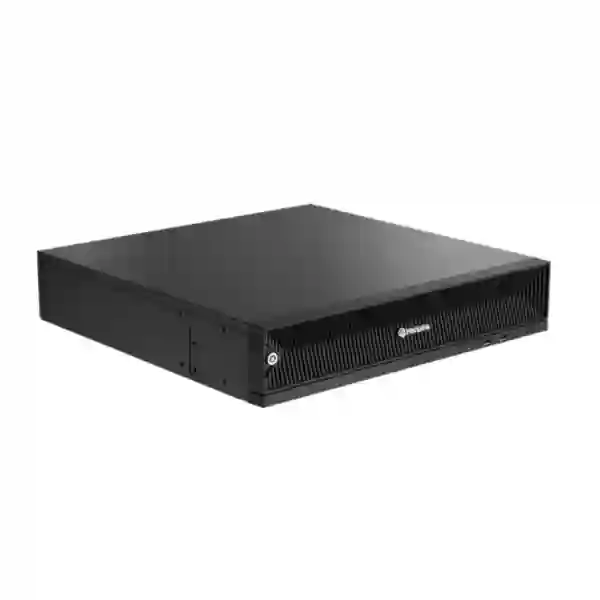
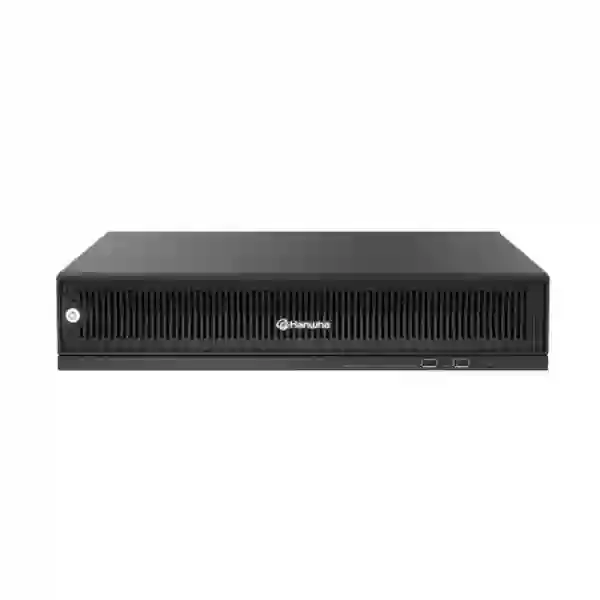
Hanwha XRN-6420RB2-60: 64-Channel 60TB NVR
Plan an enterprise-scale IP camera recording system around the actual workload, storage protection and usable retention—not only the headline disk figure. This Hanwha recorder configuration pairs broad camera support with RAID-capable storage and flexible monitoring.
For Tanzania project quotations, confirm the installed drives, RAID layout, camera profile budget and commercial terms before ordering.
At a glance: the buying decision
The Hanwha XRN-6420RB2-60 is worth evaluating when a site needs a single recorder for many compatible IP cameras and an explicitly planned disk-protection strategy. Its catalogued 60TB configuration is a nominal drive total, not a published guarantee of footage retention or usable RAID space. Buyers should validate the full camera schedule, the intended recording mode and the security procedures that will surround the hardware.
This page sets out the verified recorder-family capabilities and the questions a competent supplier should answer for a Tanzania project. It does not assume a local selling price, stock status, warranty, service area or installation package.
Technical specification and configuration checklist
| Attribute | Verified family specification or buying qualification |
|---|---|
| Exact model | Hanwha Vision XRN-6420RB2-60 |
| Recorder category | Network video recorder (NVR), Intel 12th-generation processor family |
| Camera channels | Up to 64 IP cameras |
| Camera input resolution | Up to 32MP, subject to profile and decoding limits |
| Nominal HDD configuration | 60TB identified for the -60 variant in Hanwha’s product catalogue; confirm supplied drives |
| Drive bays | 8 SATA bays; up to 10TB per bay; 80TB chassis maximum in non-RAID mode |
| Storage protection | RAID 5/6 with compatible disk configuration |
| Recording bandwidth | Up to 300Mbps normal; up to 520Mbps distributed and stated RAID modes |
| Playback bandwidth | Up to 200Mbps |
| Compression | H.265 / H.264 / MJPEG |
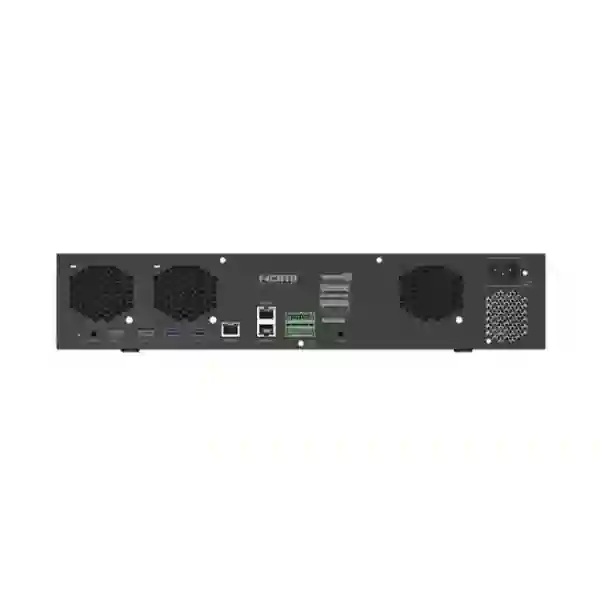
| Connectivity | 3 × gigabit Ethernet; 2 × HDMI; alarm input/output; USB |
| Management | Wisenet Viewer, Wisenet mobile, web viewer and supported integration options |
| AI search | Compatible Hanwha AI camera metadata required |
| Electrical | 100–240VAC, 50/60Hz; maximum 162W with eight HDDs per family specification |
| Environment | 0–40°C operating temperature; 20–85% relative humidity |
Specifications are from Hanwha Vision’s XRN-6420RB2 family documentation and model-specific product catalogue. Final operating limits and equipment contents must be verified for the exact quoted configuration.
What the 60TB designation means
The Hanwha XRN-6420RB2-60 is a 64-channel network video recorder configuration identified in Hanwha Vision’s 2026 product materials with 60TB of hard-disk capacity. This is a useful starting point for procurement because the disk capacity is part of the named configuration rather than a storage quantity that a buyer should assume from the chassis alone. The recorder family itself supports eight SATA hard-drive bays, each supporting drives of up to 10TB according to the manufacturer specification. The broader chassis ceiling is therefore different from the capacity associated with this particular configuration.
Treat 60TB as nominal installed drive capacity, not 60TB of guaranteed footage space. Formatting, recording allocation, RAID parity, system overhead, and the chosen configuration change the space available for video. Ask for an itemised configuration showing the actual installed drive count and size, the intended disk array, and the expected usable capacity before approving a purchase. Exact disk contents and supply terms for a Tanzania order should be confirmed in the quotation, rather than assumed from a catalogued international model suffix.
Who should consider this 64-channel recorder
This system is relevant when an organisation needs to manage a sizeable group of compatible network cameras from one recording location. Examples include a warehouse with separate loading, perimeter and office cameras; a multi-building institutional site; a commercial property with shared security operations; or a production facility requiring consistent recording across many zones. The attraction is not simply the largest number on the specification sheet. It is the ability to combine a broad camera count with central playback, defined user permissions, event handling and local display options.
Sites with only a handful of cameras may not need a recorder of this scale. Conversely, a site nearing the 64-channel ceiling may benefit from planning a multi-recorder architecture or a management system rather than filling every available input immediately. Include anticipated extensions, higher-resolution replacements and maintenance windows in the design. The right purchasing question is whether one recorder provides enough channel capacity, recording throughput, protected storage and operational flexibility for the actual camera plan.
Camera count versus recording performance
Support for up to 64 network-camera inputs does not mean that every combination of 64 high-resolution streams will work at every frame rate. Stream bitrate, codec, scene movement, compression settings and frame rate all contribute to the load. Hanwha lists normal recording at up to 300Mbps and distributed mode at up to 520Mbps for this recorder family; its RAID mode specifications also identify higher throughput under stated conditions. These are mode-specific figures that should be read together with the configuration and firmware documentation.
For a reliable design, create a camera schedule showing each model, resolution, recording frame rate, expected average and peak bitrate, audio requirement, and whether recording is continuous or event-driven. Add the streams before choosing a recording mode. Leave room for night scenes, fast movement and later changes, because actual bitrate is rarely a single unchanging value. A sensible camera count stays inside the channel limit and the relevant bandwidth limit simultaneously, rather than relying on either specification in isolation.
Why 32MP support needs context
The manufacturer’s family specification lists network camera resolutions up to 32 megapixels. That provides room for selected high-detail cameras where a wide scene must be recorded or investigated. However, a 32MP capability is not a statement that sixty-four 32MP feeds can all be displayed locally at full frame rate. Display decoding limits are separate from input and recording specifications, and they differ with codec, frame rate and how many channels appear simultaneously.
Hanwha’s published examples include 32MP at 15 frames per second with H.265 and 12MP at 30 frames per second with H.265 for the relevant decoding cases. These examples are engineering boundaries, not blanket deployment promises. When designing a monitoring wall, distinguish the full-resolution recording profile from the lower-bitrate live-view profile. Test the busiest scene layout, selected cameras and output resolution before committing a control-room design. Recording quality, live-view smoothness and investigation playback should each be evaluated separately.
H.265, H.264 and MJPEG recording choices
The recorder family supports H.265, H.264 and MJPEG. Codec selection influences network load, storage consumption and the capabilities available from each camera. H.265 can be an attractive choice for supported cameras where efficient compression matters, but the result depends on scene detail, encoder implementation, image settings and integration. H.264 may be preferable for a mixed fleet or an application that requires a particular compatible workflow. MJPEG is a supported option but may use substantially more bandwidth in many practical settings.
Do not size the installation using a generic percentage saving assigned to H.265. Instead, examine recorded sample streams from representative cameras at their intended settings. Check what happens when lighting changes, when a busy vehicle entrance fills the frame or when the scene becomes noisy. Use those real measurements in a storage estimate. Compression is an engineering control rather than an excuse to under-provision disks or network infrastructure, especially when a defined retention period matters to the organisation.
Calculate retention before deciding the array
A 60TB drive configuration may sound generous, yet retention depends on how quickly video is written. For example, an illustrative combined 100Mbps continuous recording load equals about 1.08TB per day before filesystem and other overhead. At 200Mbps, the same simplified calculation approaches 2.16TB per day. These are planning examples, not published recording-day guarantees for this model. A site using event-only capture may record much less than a site capturing every camera around the clock.
Start with the required number of retention days and work backwards. Multiply realistic average total bitrate by recording hours, then account for usable disk capacity after the selected RAID arrangement, drive overhead and operating reserve. Verify the result against the actual recorder and camera configuration. If a security policy requires footage for a fixed period, document the result in the acceptance test. A storage purchase should be judged by achievable, verified retention, not solely by the sum of drive labels.
RAID 5 and RAID 6 explained for buyers
The XRN-6420RB2 family supports RAID 5 and RAID 6, subject to the manufacturer’s drive and array requirements. RAID uses disk capacity for redundancy, so part of the nominal installed total is not available for footage. RAID 5 is designed to withstand failure of one disk within an appropriately configured array. RAID 6 provides additional fault tolerance by accommodating failure of two disks in an appropriately configured array, at the cost of further usable capacity.
Neither RAID level replaces an independent backup or sound incident-export procedure. A recorder can still be affected by power events, accidental deletion, site damage, configuration errors or failures outside the disk array. Confirm the disk count, allowed topology, usable capacity and rebuild procedure with the specific equipment and firmware. Make sure maintenance staff know how a degraded array appears, which disks are replaceable, and what actions require approval. Redundancy protects availability in certain faults; it does not make video retention unlimited.
Use the eight drive bays thoughtfully
The recorder provides eight SATA bays and the manufacturer describes hot-swap storage capability. For the named 60TB configuration, ask whether all supplied drives are populated, which bays remain unused and whether future changes are supported under the selected RAID scheme. A vacant bay is not automatically a simple expansion promise: array expansion, approved drive models and maintenance procedures need to be checked in the product documentation for the exact software release.
Disciplined storage management includes identifying every drive by bay, recording its health at commissioning and establishing a replacement process. Large surveillance installations can write continuously for extended periods, so drive suitability and stable operating conditions matter. Keep an inventory of installed disk serial numbers in the organisation’s private asset record, not in public web content. If a spare drive is required for operational resilience, specify it as a separate procurement requirement. Confirm that any planned disk upgrade is compatible before changing a production recorder.
What distributed recording changes
The manufacturer’s specification distinguishes normal recording, distributed recording and RAID-related throughput modes. This matters because the headline up-to-520Mbps recording figure should not be interpreted as the unrestricted capacity of every operating mode. Design documents should identify the mode that will actually be enabled and compare their expected input load against that mode’s limits. A camera schedule with only the aggregate channel count is not sufficient for this check.
Ask the system integrator to demonstrate a sustained multi-camera recording test with the intended mode, disk arrangement and camera profiles. Observe disk activity, recorded frame continuity, stream reconnection and system alerts during the test. Capture a short period that represents the highest expected activity, not just quiet daytime video. If the proposed installation relies on the higher mode-specific bandwidth, document the conditions required for it. This gives procurement staff a defensible basis for accepting the design and avoids confusing a maximum figure with guaranteed performance in every configuration.
The network architecture around the recorder
The product specification lists three gigabit RJ-45 Ethernet interfaces. These interfaces do not remove the need for a correctly designed switching and routing environment. Network topology determines how camera traffic reaches the recorder, how remote viewing is provided and how failures affect the installation. For larger systems, a structured camera network with defined addressing, monitored switches and controlled administrative access is generally easier to support than an improvised collection of unmanaged connections.
Check cable lengths, camera power methods, switch uplinks, network segmentation and internet exposure as separate design questions. The recorder’s Ethernet ports are not a published integrated PoE camera-switch feature, so camera power must be planned independently through suitable switches or other approved sources. A single overloaded uplink can affect recording even when the recorder itself has unused processing capacity. Document the logical and physical network layout, switch credentials, addressing plan and responsibility for maintenance. Plan how technicians will troubleshoot cameras without disrupting the whole security operation.
Camera compatibility and mixed fleets
Hanwha lists SUNAPI and ONVIF support for network camera integration. These standards and interfaces are valuable when a site contains different camera types, but they do not make every third-party feature universally available. Basic video might work while advanced events, analytics metadata, camera setup or particular audio functions do not. Hanwha camera models may offer deeper integration through supported native interfaces than a third-party camera that exposes only a subset of ONVIF functions.
Before replacing an existing recorder, build a compatibility schedule with each camera’s manufacturer, model, firmware, resolution, stream configuration and required event features. Test representative third-party cameras before migration. Check discovery, recording, motion events, time synchronisation, playback and reconnection after a power interruption. If advanced features are essential, request documented compatibility for the exact pairing. This is especially important when the recorder is intended to retain an existing camera estate while adding newer cameras, because an assumption about compatibility can create unexpected replacement costs.
AI search depends on suitable cameras
Hanwha identifies object-attribute AI search as a feature when the recorder is used with compatible Hanwha AI cameras. That distinction should guide buying decisions. The presence of an AI search menu does not mean an ordinary camera suddenly gains the ability to generate all object metadata. The camera model, its analytics features, firmware and the supported search workflow determine what investigators can actually filter and retrieve.
For an organisation that wants to locate people, vehicles or specified object attributes faster, define the investigation questions first. Which entrances matter? Which camera angles yield useful objects? How accurately must timestamps match across the site? Then test a real search task using a shortlisted compatible AI camera. Record which attributes are available and how results link to stored footage. Explain to security operators that AI-derived results are investigative aids and may miss or misclassify events. Search performance should not replace careful camera positioning, privacy controls or conventional review procedures.
Two local display outputs and control-room use
The recorder lists two HDMI outputs: HDMI 1 up to 3840 by 2160 at 30Hz and HDMI 2 up to 1920 by 1080 at 60Hz. It also supports dynamic layouts and virtual-channel views. This can help a team dedicate one screen to a wider situational overview while arranging a second for focused monitoring, subject to the device’s supported display configurations and decoding limits.
Plan the control-room layout around human attention, not only around the number of camera thumbnails technically available. A wall of tiny feeds can make important details difficult to see. Group cameras by entrances, perimeter sectors, storage zones and response priorities, and set clear rules for when operators enlarge a view. Test live operation with the actual monitor sizes and viewing distance. The display resolution on a specification sheet is not a substitute for an ergonomic control-room design. Include cabling, display mounts and a secure operator location in the complete project scope.
Events, alerts and response procedures
The platform supports schedule-based and event-based recording modes, along with triggers such as camera events, alarm inputs, video loss and user-defined actions where supported. Published event actions include functions such as email, event push, preset control, alarm outputs and local notifications. These capabilities are most useful when a customer has already defined who receives an alert and what the recipient should do next.
Begin with a small number of high-priority events. For example, a camera-offline alarm may need technical escalation, while a critical perimeter event could require immediate operator review. Define thresholds, active hours, recipient roles and escalation steps. Test events during commissioning and periodically afterwards, especially following network or camera changes. Avoid enabling every possible alert without a response policy; excessive low-value messages create alarm fatigue. Event handling should support an accountable security process, and important incidents should still have a documented retention and evidence-handling procedure.
Playback, exports and evidence quality
The manufacturer specifies playback bandwidth up to 200Mbps and supports multiple search modes, including time-based, event-based and smart-search functions where applicable. This enables investigation teams to review recorded material, but the quality of an evidence workflow depends on more than a playback button. Timestamps, camera identification, user privileges and the export procedure all influence whether a clip is understandable and useful.
Create an incident workflow before a serious event occurs. It should identify who may search footage, who may export it, where authorised copies are stored, and how an audit trail is maintained. Test the required export format on the organisation’s normal review workstation. Retain the original recording and document transfers when chain of custody is important. A network recorder is an operational tool; organisational procedures determine how footage is preserved, shared and deleted. Make sure the retention policy and access policy are approved by the responsible organisation.
Smartphones, browsers and management clients
Hanwha lists Wisenet Viewer, Wisenet mobile, web viewing and other supported management integrations for the family. It also documents remote-access mechanisms and browser support. These options can provide flexibility for technical administrators and authorised security users, but they should not automatically be enabled on an unrestricted public network. Actual compatibility depends on software version, account setup and the chosen deployment method.
Decide which roles truly require live viewing, which need recorded-footage search and which should have administrative rights. Give users only the access required for their duties. Test client behaviour on the organisation’s approved workstations and mobile devices and document how credentials are issued or revoked. Where remote viewing is needed, evaluate an appropriately secured method approved by the site IT team. The simplest mobile setup is not necessarily the safest arrangement for a sensitive location. Include connection testing and user training in commissioning rather than treating the app as an optional afterthought.
Cybersecurity responsibilities
The manufacturer lists features including TLS, user-access logs, signed firmware, certificate functions, IP filtering, 802.1X and TPM support. These provide relevant building blocks, but they are not a guarantee that any installation is secure by default. Good security still requires updates, strong account management, protected network placement and an explicit maintenance owner. Firmware selection should follow the exact product’s official support guidance and any operational change controls.
At handover, remove unnecessary default accounts where supported, assign named administrative responsibility, restrict inbound connectivity and protect configuration backups. Maintain accurate time synchronisation so recording and security logs are usable together. Record firmware versions and schedule reviews for updates and advisories. If a remote support contractor requires access, grant it by an approved, time-bound process rather than leaving permanent unrestricted access in place. A high-capacity recorder is part of the organisation’s information infrastructure and should be governed with the same care as other networked systems.
Power, UPS and environmental conditions
The family specification lists 100–240VAC input at 50/60Hz, a maximum power consumption of 162W with eight drives, operating temperature from 0 to 40°C and relative humidity from 20% to 85%. These are important rack-planning figures, not a claim that a complete CCTV system consumes only the recorder’s rated power. Cameras, PoE switches, storage peripherals, network equipment and monitors all add their own load.
For a Tanzania deployment, ask the site electrical contractor or IT team to verify the actual supply, earthing, power conditioning and appropriate UPS design. Calculate desired backup duration for every critical component rather than sizing the UPS only for the NVR. Allow ventilation around the rack and check the room’s real operating temperature under peak conditions. Dust, blocked airflow and sustained heat can undermine equipment reliability. Document the shutdown and restart sequence after an extended outage and confirm whether recording resumes correctly following restoration of power. None of these site conditions should be assumed without assessment.
Physical installation and rack planning
The published chassis dimensions for the recorder family are approximately 438 by 86 by 435 millimetres, with a weight of about 8.8 kilograms before drives. These figures help assess a suitable shelf, rack, cabinet and service clearance. Dimensions alone do not confirm that any available cabinet will accommodate cabling, airflow and the chosen accessories. Installation planning should include access to the drive bays and a safe method for servicing the unit.
Keep the device in an access-controlled area. Label network connections and recorder identity in the private asset register and prevent unapproved physical access to disks or export ports. Evaluate rack depth, cable bend radius, rear clearance and the heat from neighbouring equipment. Where the recording room is shared with dusty or high-temperature operations, consider whether a dedicated controlled enclosure or room is required. Confirm the equipment’s final orientation, mounting accessories and cabling route against manufacturer guidance before installation.
A practical workflow for a warehouse
Consider a warehouse where cameras cover loading doors, internal aisles, staff entries and an external yard. A 64-channel system could consolidate multiple camera groups into one recorder, subject to confirmed bitrates and retention requirements. The project should identify which views are essential for incident reconstruction, which need higher resolution and which can use lighter recording profiles. A general-purpose camera at every location is rarely the most efficient design.
For example, loading-door cameras may need clear views of vehicle movement and handling activity, while wide internal views may prioritise area coverage. Night conditions, changing shadows and heavy movement affect compression and image quality. The retention period for operational disputes may differ from that required for general security footage, subject to the organisation’s policy and applicable requirements. Before buying the recorder, agree on the camera count, incident use cases and retrieval workflow. The value comes from meeting those operational outcomes, not merely from maximising disk occupancy.
A practical workflow for multi-building premises
At a campus, commercial complex or institutional property, cameras may be spread across buildings with very different networking conditions. A central recorder can simplify the footage location for an authorised team, but it depends on stable network links from each building. Before using one central NVR, assess the availability, capacity and resilience of inter-building connections. Consider what happens when a link fails while cameras and local power remain operational.
An appropriate architecture might use suitable network resilience or other approved recording strategies to protect against communication interruptions. Hanwha lists automatic recovery backup and N+1 failover support in the recorder family, but these require compatible system design and configuration; they should not be represented as automatic protection against every network outage. Establish separate acceptance tests for video recovery, time alignment and alarm escalation. If a single recording room creates unacceptable operational risk, evaluate a distributed design rather than assuming centralisation is always preferable.
A practical workflow for production facilities
In an industrial or production facility, surveillance requirements may combine perimeter monitoring, controlled access to equipment areas and review of process incidents. Select cameras for the scene, then check how their recording streams affect the overall budget. High detail may be required only at a few points, while broader overview cameras serve other purposes. This can reduce needless storage demand without sacrificing the images needed for a defined security or safety investigation.
Coordinate the recorder’s deployment with the organisation’s IT, safety and operational teams. Avoid routing cameras through a network segment whose outages or maintenance events are outside the security team’s awareness. Agree on who authorises firmware work and how planned downtime is communicated. Confirm that recorded material is being used for a legitimate and communicated purpose. A reliable surveillance design includes a technology plan, an operational plan and a governance plan. Buying the NVR addresses only one part of that wider project.
Choosing between this and a smaller recorder
The XRN-6420RB2-60 becomes a stronger candidate where the design genuinely calls for many network cameras, substantial local disk capacity and features such as redundant storage. It may be unnecessarily large when a small site needs only a few channels and short retention. Fewer cameras do not automatically make a more powerful recorder a better financial decision, because disks, switches, power protection and ongoing administration also contribute to total cost.
Compare alternatives using a consistent schedule: supported camera count, available bitrate in the intended recording mode, usable storage after protection, management interfaces, resilience strategy and site expansion forecast. Include the cost of operating and maintaining the system, not only the initial equipment invoice. If the camera estate is growing quickly, check whether one large unit or multiple coordinated recorders offers better operational separation. The right answer depends on the required failure tolerance, camera layout and staffing model rather than on the model number alone.
What to request on a supplier quotation
A useful quotation must identify the exact model suffix, the supplied hard-drive configuration, the number and type of drives, any included accessories and the scope of setup or commissioning. It should distinguish the nominal 60TB designation from expected usable capacity under the proposed RAID level. Also request the firmware or software assumptions underlying the proposed camera and management-client compatibility, especially when reusing an existing camera fleet.
Ask for any applicable commercial terms, service arrangements, delivery conditions and warranty details in writing from the supplier for the actual Tanzania transaction. Those terms cannot safely be inferred from a manufacturer’s international product page. If the quote includes installation, it should itemise switches, camera power, rack hardware, UPS, cables, displays and testing. If it covers only the NVR, the buyer should know what must be provided separately. This approach makes proposals easier to compare and helps avoid discovering essential omissions after procurement.
Commissioning tests that should not be skipped
Before final acceptance, confirm that every intended camera records with the chosen codec, resolution and schedule. Check live viewing and playback at high activity levels, including any required simultaneous operator views. Verify that the actual drive array appears healthy, that disk alerts reach the responsible personnel, and that storage calculations align with observed recording usage. A good test records the chosen settings and the measured results for later support.
Also test loss and restoration of one camera connection, network recovery, user logins, time synchronisation, incident exports and permitted remote access. Where RAID is configured, the installer should explain how health alerts and replacement procedures work without staging risky destructive tests on production data. Record software versions, network settings and authorised contacts in a controlled handover document. Do not accept a brief demonstration of a live video tile as evidence that a 64-camera recording system has been fully commissioned.
Operator training and daily checks
Staff should know how to identify a missing camera, confirm whether recording is continuing and retrieve an authorised clip. Training should distinguish viewing rights from administration rights and make clear who handles incidents, disk alarms and configuration changes. The recorder’s management tools may offer many options, but a short written daily routine makes the system more dependable. An operator should not need to understand every network protocol to notice that a critical entrance camera has stopped recording.
Establish a recurring review of storage status, recording continuity, equipment temperatures where monitored, event notifications and successful backup or export procedures. Keep a record of faults and corrective actions. For locations with shift changes, include the status of surveillance equipment in operational handover. Define what to do if a drive degrades or multiple cameras go offline. Training is one of the most economical ways to protect the value of a surveillance investment because many failures are first detected by people using the equipment.
Upgrade and lifecycle planning
Surveillance systems evolve. Additional cameras, replacement camera models, new site connections and updated security policies can all alter the requirements placed on a recorder. A model with 64 inputs may provide expansion room today, but every added camera also uses bandwidth and storage. Keep the original design calculation current when making changes. Do not assume that an empty channel number means a new high-resolution stream can be added without reviewing its effect.
Track firmware support, compatible storage media and management software through the manufacturer’s current documentation. Verify availability of support and replacement components through an appropriate supplier for the specific region and transaction. If the organisation expects to outgrow one recorder, define a scale-out path in advance, including how operators will find footage across equipment. Plan secure data retirement when disks or the recorder are eventually replaced. The best lifecycle decision is one that considers maintenance and migration alongside initial purchase suitability.
Data handling and privacy considerations
A video surveillance installation can capture employees, visitors, customers and other identifiable people. The organisation deploying it should define the purpose of recording, who may view footage, the retention period and the procedure for responding to legitimate requests. Required notices, access restrictions and any legal obligations should be reviewed with the responsible privacy or legal adviser in the relevant jurisdiction. A recorder’s maximum storage capacity is not, by itself, a sensible retention policy.
Limit access to footage according to roles and keep exports controlled. Make sure the operating team understands that recordings may contain sensitive contextual information even when they are primarily intended for site security. Set retention and deletion arrangements based on the organisation’s documented requirements rather than retaining everything indefinitely because space remains available. If the installation integrates with an external monitoring service or remote software, review the data flow and contractual responsibilities before enabling it. Governance should be part of the purchase checklist.
Questions to settle before requesting an offer
An effective first conversation with a supplier can be brief when the buyer already has six essentials: the present and expected number of cameras, models and resolutions, average and peak recording profiles, target footage-retention days, desired RAID protection, and the location and power conditions for the equipment. Add any requirement for AI-assisted search, central monitoring, remote viewing or mixed-brand camera support. These inputs help decide whether the named 60TB configuration is a good match.
If camera models are not yet chosen, explain the scenes and problems the cameras must address rather than guessing a bitrate for equipment that has not been selected. If the installation already exists, provide an authorised inventory of installed hardware and a description of the current recording limitations. Do not submit passwords, sensitive network diagrams or private surveillance footage through an unverified public form. Use an approved quotation channel for technical documents. The goal of the first discussion is a checkable system specification and a clear next step.
Frequently asked questions
Does the XRN-6420RB2-60 support 64 IP cameras?
The Hanwha XRN-6420RB2 family supports up to 64 network camera channels. The number of cameras that can be operated at particular resolutions, frame rates and recording modes also depends on total input bandwidth, codec settings and decoding requirements. A complete camera schedule should be checked against the intended operating mode.
Does the -60 version provide 60TB of usable video storage?
No fixed usable figure should be assumed. Hanwha’s catalogued -60 version identifies 60TB of HDD capacity, but the amount available for recorded footage varies with drive layout, RAID choice and system overhead. Request a usable-capacity calculation tied to the exact quoted hardware configuration.
Can I use RAID 5 or RAID 6?
The recorder family supports RAID 5 and RAID 6 with appropriate drive configuration. RAID improves tolerance of specified disk failures but reduces available video capacity and is not a replacement for independent evidence exports or backups. Confirm exact array requirements in the relevant manufacturer’s instructions.
What is the maximum recording bandwidth?
The published specification distinguishes operating modes. Normal recording is listed at up to 300Mbps, while distributed recording and specified RAID modes are listed at up to 520Mbps. These figures should not be mixed together. The installer must size streams and confirm which mode will be used.
Can cameras from another brand be connected?
SUNAPI and ONVIF interfaces are listed, but third-party interoperability is feature-dependent. Video may be supported while some camera setup, audio, alarm or analytics functions are unavailable. Test the exact camera model and firmware or obtain a relevant compatibility statement before procurement.
Will AI search work with any camera?
No. Hanwha’s AI object-attribute search is described for compatible Hanwha AI cameras. Camera-generated metadata, firmware and supported search functions must be confirmed for the proposed combination. Conventional recording should not be described as automatically creating advanced AI analytics.
Can two monitors be connected?
The recorder family lists two HDMI outputs, with HDMI 1 up to 4K at 30Hz and HDMI 2 up to Full HD at 60Hz. The available monitoring layouts and simultaneous decoding depend on the configuration. Test the intended screen arrangement before finalising the control-room installation.
Does the recorder power cameras directly?
Do not assume built-in PoE switching. The published interface specification lists network ports and external camera connectivity but does not list an integrated bank of PoE camera ports. Plan suitable switches and camera power supplies separately and include their electrical load in the system design.
Can security staff watch footage on a phone?
Hanwha lists Wisenet mobile and compatible viewing methods for the family. Availability of functions depends on supported versions, access permissions and network configuration. Remote access should be set up according to the organisation’s cybersecurity rules rather than exposing the recorder directly without controls.
Is the recorder suitable for a Tanzania warehouse or campus?
It can be considered for a properly engineered, compatible 64-channel-class deployment in Tanzania. Suitability still requires a review of camera bandwidth, usable retention, power reliability, installation conditions, network design and local commercial terms. No particular stock, installation coverage or supplier service commitment is implied.
How many days of footage will 60TB keep?
There is no universal number. Retention changes with total average recording bitrate, continuous versus event recording, codec, scene activity and usable storage after RAID. Obtain a calculator-based estimate and verify it through measured operation with representative camera settings.
What details should I provide for a quote?
Provide the exact model requested, camera count and models, required retention, intended RAID level, preferred viewing arrangement and installation conditions. Ask the supplier to confirm the supplied disks, usable array size, compatible software, commercial terms and any excluded accessories before placing an order.
Request an XRN-6420RB2-60 configuration quote
Share your camera count, target recording quality, retention period, RAID preference and site power conditions with FourTeck Tanzania. Ask for written confirmation of the actual 60TB drive configuration, expected usable capacity, camera compatibility, installation scope and commercial terms before ordering.
Request a tailored quotation and technical compatibility review.




Reviews
There are no reviews yet.