
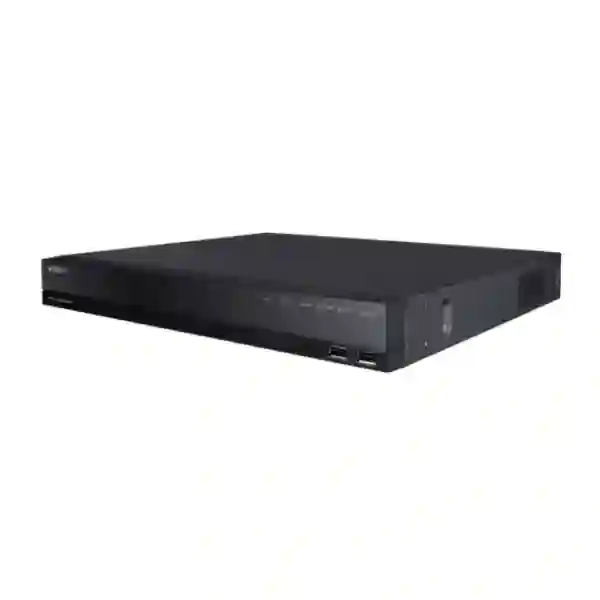
HANWHA VISION • HYBRID VIDEO RECORDING
Hanwha HRX-435 4-Channel Pentabrid DVR for CCTV Systems in Tanzania
Keep suitable existing coaxial cameras while planning a controlled move toward IP video. The HRX-435 supports AHD, HDTVI, HDCVI, CVBS and IP video, up to 8MP inputs, H.265 recording and two SATA drive positions. For a reliable buying decision, verify your camera formats, channel mix, recording rates and storage requirements before ordering.
Specifications at a glance
Figures are manufacturer specifications. Their applicability to particular camera models and regional supply variants should be checked before procurement. No price, stock or included drive is implied.
What the HRX-435 is designed to do
The Hanwha HRX-435 is a four-analogue-channel Pentabrid digital video recorder built for sites that need to retain existing coaxial cameras while gaining flexibility for selected network cameras. Pentabrid means the recorder is intended to work with five broad video-input families: AHD, HDTVI, HDCVI, standard-definition CVBS and IP. Instead of assuming every installed camera must be replaced together, a buyer can evaluate existing cabling, camera condition and future expansion needs as part of one realistic recorder specification.
For a small office, shop, reception area or compact security installation in Tanzania, the important question is not simply whether the recorder says “4-channel.” It is whether the exact installed camera signals, expected recording quality, storage retention and remote-viewing conditions will work together. The HRX-435 has four BNC analogue inputs and network-camera capability that can reach a six-channel total under the manufacturer’s stated channel arrangements. That makes it useful for carefully sized installations, rather than for projects requiring many camera inputs.
Before requesting a unit, document the number of cameras already installed, the formats they output, the resolutions required at each position and how many days recordings must be retained. This information helps distinguish a practical hybrid upgrade from a recorder purchase that later creates capacity or compatibility problems.
Analogue and IP channel capacity explained
The recorder provides four physical analogue video inputs through BNC connectors. Where all four are used, the published specifications describe capacity for up to two additional network cameras, giving six channels in that configuration. The manufacturer also describes support for up to six network channels when the analogue/IP balance changes. These figures should not be interpreted as four analogue cameras plus six IP cameras simultaneously. The combined supported channel plan must be checked for the exact deployed configuration.
Channel limits matter when preparing a bill of materials. A business with four existing coaxial cameras and a plan to install two network cameras may be considering a sensible migration path. A business already expecting eight cameras should consider a higher-capacity recorder instead of relying on unspecified software tricks, spare connectors or a future upgrade that the product documentation does not promise. Likewise, a camera being ONVIF-capable does not automatically guarantee every advanced event or control function is available through this DVR.
Count each camera that the recorder must receive, record and replay. Include proposed future doors, gates, storage areas and counters in that count before selecting a model. If the location may expand significantly, compare a larger Pentabrid recorder or an IP-focused NVR at the design stage rather than forcing the HRX-435 beyond its published limits.
Understanding the five supported camera signal families
AHD, HDTVI and HDCVI are high-definition analogue video technologies commonly used over coaxial connections. CVBS is the older standard-definition analogue format, while IP cameras transmit video over a data network. The HRX-435 is intended to accept these families, which can reduce the need to replace a functioning cable run simply because the recording unit is being upgraded. The value is especially practical where moving to completely new network cabling would require separate building work.
Support for a signal family is not the same as confirmation that every camera model, firmware version, output mode and resolution will be accepted. An installer should identify camera make and model, the active video mode and resolution, required coaxial control functions, cable condition and power supply. Where possible, test one representative camera from each installed model before finalising the entire system. Check any unusual camera feature, including audio over coax or manufacturer-specific event information, separately.
IP cameras require a network path to the recorder and an appropriate method of powering the cameras. The recorder specification does not describe built-in PoE camera ports, so a project should plan for compatible network switching or injectors as needed. A hybrid system can be a cost-conscious upgrade, but it must still be designed as two connected technologies rather than an assumption that any camera can be plugged into any connector.
Resolution and recording frame rates: the detail that matters
The HRX-435 supports video up to 8 megapixels, but maximum input resolution and actual recorded frames per second are different specifications. Hanwha’s published recording figures for analogue input include approximately 8 fps at 8MP and 12 fps at 5MP, with rates that vary by video format, regional timing standard and the incoming camera signal. At lower resolutions, higher frame rates are listed. An 8MP capability label should therefore never be interpreted as 8MP recording at 25 or 30 fps on every channel.
For slow-moving scenes such as an office entrance, a modest recording frame rate may be acceptable depending on the assessment of the site. For a fast-moving doorway, cash-handling point, vehicle lane or process where motion detail is essential, the recording-rate requirement needs to be written down and compared with the exact camera and recorder setting. Greater pixel count alone cannot correct motion blur, poor lighting, an unsuitable lens or dropped frames caused by bandwidth limits.
Review live-view capability, recording rate and playback rate separately. The HDMI output can present a high-resolution local display, but the monitor’s pixel resolution does not determine the frames saved from each camera. A proper design identifies the evidence needed at every camera position and balances resolution, frame rate, lighting and retention time accordingly.
Recording throughput, network load and system sizing
Hanwha lists a maximum recording bandwidth of 30 Mbps and playback bandwidth of 32 Mbps for the HRX-435. These are system-level considerations, not an automatic per-camera allowance. Several high-resolution streams must share the recorder’s available recording budget. Codec selection, camera bit-rate limits, scene complexity, recording schedule and audio usage all affect the size of those streams. A configuration that appears comfortable on paper can behave differently in scenes with rain, moving foliage or continuous pedestrian movement.
During system design, estimate the combined main-stream bandwidth of every camera, then allow headroom instead of selecting settings that continuously run at the published maximum. Identify the streams used for live view and remote viewing separately from the streams intended for archived evidence. Keep the network path between IP cameras and recorder reliable; unstable links can undermine recording even when the channel count is within limits.
If all connected cameras must record high-detail scenes simultaneously, perform a documented throughput check using their proposed settings. Where the required total is above the recorder’s rating, choose a higher-capacity platform or adjust project requirements transparently. Do not assume adding a faster switch or bigger hard drive will increase the recorder’s own ingest limit.
Storage: two SATA drive bays and retention planning
The HRX-435 provides two SATA hard-drive positions, with Hanwha specifying up to 6 TB for each supported drive and up to 12 TB total raw installed capacity. Actual usable recording space depends on the installed drives, formatting, recording configuration and system operation. The capacity figures indicate supported hardware limits; they do not confirm that a particular seller’s package includes hard drives. The contents of a quotation should explicitly distinguish recorder-only supply from a pre-installed storage bundle.
Storage retention is a calculation, not a fixed benefit of the device. Four cameras recording continuously at different bit rates can use very different amounts of disk space. Event-based recording may reduce storage requirements where events are reliably detected, but it may not be appropriate for every evidence policy or scene. Use the planned number of cameras, actual target stream bit rates, daily recording hours, audio settings and retention period to estimate the drive capacity required.
Select hard drives from Hanwha’s applicable compatibility information rather than assuming that any desktop SATA drive is an acceptable continuous-duty recorder drive. Also consider the business process for removing old recordings, exporting incidents and confirming that camera time settings are accurate. Storage capacity is only useful when important footage can be located, played back and preserved consistently.
H.265 compression and what it can—and cannot—save
The recorder supports H.265, H.264 and MJPEG. Compression determines how video is encoded and affects recording bandwidth, disk usage and compatibility with viewing and export workflows. H.265 can offer more efficient video storage than older encoding methods for suitable content and profiles, but the practical saving depends on the camera feed, image detail, motion, lighting and configuration. No fixed percentage reduction should be promised for every installation.
An operator should decide recording quality based on what the footage must show. For example, a general corridor overview and a closely framed entrance identification view may need different frame rates or bit-rate settings. Aggressive compression can produce undesirable artefacts when there is motion or fine detail. Settings should be tested using real footage, ideally including difficult lighting and busy periods rather than only an empty daytime room.
Check the export format and playback tools used by the person who may later review the footage. A small file has little operational value if the responsible team cannot open it in its intended environment. Document the agreed recording profile and keep a copy of the settings for future maintenance or troubleshooting.
Local viewing, live display and playback
Hanwha provides one HDMI and one VGA output for local monitoring on the HRX-435, with simultaneous monitor capability listed in the product specifications. An on-site operator can use the recorder’s graphical interface for live monitoring and playback. HDMI offers display modes up to 3840 × 2160, while VGA offers lower specified output options. These monitor-output resolutions describe the display connection, not a guarantee that all connected cameras will record or play back at the same resolution and frame rate.
The system supports date-and-time-based searching and multiple playback methods. Effective playback requires more than fast hardware: camera names need to be meaningful, date and time must be set correctly, and operators must understand the difference between a live view and a stored recording. It is worth testing incident retrieval on the intended monitor and exporting a sample clip before the installation is handed over.
Think about the control position. A receptionist may need one simple live layout, while a manager may only review recorded evidence occasionally. Position the recorder so authorised people can access it, but not where untrusted visitors can disconnect storage or change settings. The monitor, mouse, network and backup power should all be part of the operating design.
Mobile access and remote viewing
The HRX-435 includes remote-viewing capabilities associated with Hanwha’s supported viewing software and mobile ecosystem. The manufacturer lists QR-code-assisted P2P configuration and network services for remote connection. This is useful when an authorised owner or security supervisor needs to inspect cameras away from the recorder, but it is not a substitute for a properly configured and secured internet connection.
Remote access depends on the site’s working network, available upstream bandwidth, current software, appropriate user permissions and the way the device is configured. A location with intermittent connectivity may still record locally while remote viewing becomes unavailable; that distinction should be explained to the people relying on the system. Where mobile data costs or bandwidth are concerns, confirm the remote-viewing stream profile and test the actual viewing experience.
Hanwha has also published a support notice covering P2P changes for the HRX-435 with firmware version 5.x.x and newer. Recorders previously added to Wisenet Mobile by QR code may need to be removed and paired again with the new code after the relevant update. Confirm the installed firmware and current approved setup instructions during commissioning instead of assuming an old saved connection will keep working unchanged.
Security controls and sensible network practices
The published specification includes features such as access logs, IP filtering, encryption-related functions, device certificates and 802.1X support. These capabilities can form part of a safer installation, but the mere presence of a security feature does not establish that it is active or correctly configured. Installer and operator responsibilities include strong unique credentials, sensible account permissions, review of event logs and managed firmware maintenance.
Keep recording equipment and IP cameras on a network segment that matches the organisation’s risk profile. Allow only the network services needed by the installation, and avoid exposing the recorder’s management pages to the public internet unnecessarily. A controlled remote-access design is preferable to indiscriminate port forwarding. Record configuration changes, verify time synchronisation and protect any exported files because footage may contain sensitive operational or personal information.
Before a firmware change, check Hanwha’s exact-model release and update instructions, confirm that the update is suitable for the device in hand and plan a maintenance window. Afterwards, test recording, live viewing, playback, user accounts and mobile access. A successful update should be judged by the operational checks, not merely by a new version number shown in a menu.
Integrating IP cameras with SUNAPI and ONVIF
The manufacturer lists SUNAPI and ONVIF among the HRX-435’s network-camera interfaces. SUNAPI is associated with Hanwha’s device integration ecosystem, while ONVIF Profile S addresses common network video interoperability functions. Support for a protocol is an important starting point when considering an IP camera from another brand, but it does not eliminate differences in firmware, stream profiles, authentication methods, events, audio support or PTZ behaviour.
A practical compatibility check confirms whether the recorder can discover or manually add the exact camera, display live video, record the desired stream, reconnect after a power interruption and play back the saved result. Test the functions the project actually uses, not only the presence of an image. For example, a camera’s advanced analytics may be viewable through its own software but not automatically available as a searchable event on the recorder.
Where several brands are being retained, prepare a camera schedule with models, firmware versions, supported resolutions and protocol modes. This makes quotes comparable and prevents an apparently small upgrade from becoming a trial-and-error integration project. For devices requiring advanced analytics, high frame rates or unusual codecs, request an explicit compatibility confirmation before choosing this DVR.
Coaxial camera control, PTZ and event handling
The HRX-435 supports coaxial control for compatible analogue-camera technologies and includes PTZ control options through supported interfaces. It also lists RS-485/422 connections for certain control protocols. In practice, PTZ control must be matched to the camera’s actual signalling method and settings. A camera that produces a picture does not necessarily respond to every movement, zoom or configuration command from the recorder.
Event functions include concepts such as motion detection, video loss and tampering on applicable analogue feeds, along with supported network-camera events. The exact events available depend on the installed cameras and their integration. These can help staff locate recordings or be alerted to an issue, but they require deliberate tuning. Excessively broad motion rules may generate frequent nuisance events, while rules that are too narrow may omit important activity.
Hanwha also lists alarm inputs and relay outputs. Use them only where the connected sensor or alarm design has been checked for compatible electrical and operational requirements. Decide what response is needed when an event occurs: a local buzzer, a review flag, a notification or another permitted action. Then perform an end-to-end test and provide the operator with a simple response procedure.
Audio, alarms and peripheral connections
The published interface information for the HRX-435 includes four line-level audio inputs, one audio line output, four alarm inputs and two relay outputs. There are also two front USB 2.0 ports, an RJ-45 network connection and the analogue BNC connections. This combination may help a project retain useful peripherals, but the correct wiring and permitted operation depend on the specific equipment being installed.
Before adding microphones, assess the site’s legal, privacy and workplace requirements for audio recording. Do not assume that audio is necessary simply because the recorder has inputs. Similarly, an alarm output is not a general-purpose power connection; its use should be planned around the appropriate relay and supported load. Check the installation manual and the connected device specifications before wiring.
USB backup may be useful for authorised export, but storage media and export handling should follow an agreed evidence procedure. Where recordings might be used to review incidents, train staff to note the correct date, time, camera and incident context and to avoid overwriting or casually circulating copies. Good operating practices protect the value of a capable recorder.
Power supply, ventilation and Tanzanian site conditions
The HRX-435 is specified for a 12 V DC power input and a maximum power consumption of 40 W in Hanwha’s stated two-drive test configuration. Its listed operating environment is 0°C to +40°C and 20% to 85% relative humidity. These specifications are especially relevant when selecting an enclosure or equipment room in a warm, humid or poorly ventilated building. An enclosed cabinet exposed to direct heat may run significantly hotter than the room around it.
Use the correct compatible power adapter and confirm the supplied regional plug, input-voltage requirements and accessory contents with the vendor. The recorder’s DC rating does not mean it can be connected directly to a building’s AC supply. Where electrical interruptions would threaten recordings or evidence continuity, assess an appropriately sized UPS for the recorder, its network switch, connected camera power supplies and any viewing equipment that must remain operational.
Protect cables and connectors from moisture, dust, accidental pulling and unauthorised access. Allow ventilation space, keep equipment off damp floors and consider the entire camera power chain: the DVR remaining on does not preserve video if all camera power has failed. No site-specific environmental suitability, installation coverage or Tanzanian certification is implied without separate verification.
Installation planning: from existing cameras to first recording
A structured installation starts with an inventory rather than opening the recorder box. Record every existing camera’s model and video format, its cable condition, the power method and the scene it covers. Decide which cameras are being kept, which are being replaced and which new IP positions may be added. Verify the required view for each camera, including entrances, access points and any areas where detail matters for incident review.
Next, choose recording profiles and storage based on actual business requirements. Confirm disk compatibility, decide the retention policy and estimate capacity from camera bit rates. Plan monitor placement, network connectivity, user accounts, remote access and backup power before installation begins. If mixed camera types are used, test an example of each one and confirm correct recording—not just live images. Install the recorder in an accessible but protected place with adequate airflow.
Commissioning should include date-and-time verification, sample day and night recordings, event checks, a controlled power-cycle test, playback of several channels and at least one authorised export. Test the chosen remote-viewing route, then leave the administrator with documented configuration details and a simple support checklist. These steps are more meaningful than a handover limited to showing the live camera grid.
An upgrade path for existing coaxial CCTV sites
One useful role of the Hanwha HRX-435 is as a bridge between a legacy analogue installation and a gradual move toward network cameras. The business may be satisfied with certain older views but need higher-detail coverage at a newly important entrance or counter. A Pentabrid recorder lets the buyer evaluate keeping sound cameras while upgrading particular positions rather than treating every component as disposable.
The migration still has limits. The analogue connectors remain a finite four-channel resource, and network-camera capacity is restricted by the recorder’s channel and bandwidth specifications. A business expecting rapid expansion, many high-bit-rate cameras, complex analytics or centralised enterprise management should compare more capable recorders from the beginning. An economical first purchase is not economical if it must be replaced before the deployment is complete.
Assess the condition of the existing cables and camera power arrangements, not just the age of the recorder. Unreliable coaxial terminations, voltage drops, water ingress or damaged connectors can persist after an upgrade. Confirm how the proposed network cameras will be powered and routed. The objective is a dependable recording system with a clear future path, not simply a newer black box connected to the same unresolved faults.
Common business scenarios and recommended checks
Different sites may need the same recorder for very different reasons. The HRX-435 is best assessed against a documented camera schedule and evidence requirement. These examples describe design questions rather than promises that a particular installation or camera mix has been tested.
Retail shop
Retain existing counter and entrance coaxial cameras while considering an IP camera for a new doorway. Check scene lighting, footage retrieval speed and recording of busy customer periods.
Office reception
Monitor visitor access and a compact corridor layout. Prioritise clear camera names, restricted user accounts, reliable time settings and the ability to find an incident without technical assistance.
Small warehouse
Review loading-area and internal access coverage. Confirm required movement frame rates, cable runs, night lighting, camera power and the storage budget for hours of activity.
Branch premises
Provide on-site recording and authorised occasional mobile viewing. Test internet reliability, controlled remote access, UPS runtime and what happens when connectivity is unavailable.
Choosing between a Pentabrid DVR and a dedicated NVR
A Pentabrid DVR makes the most sense when existing analogue cameras are a meaningful part of the planned system and the camera count will remain within the supported hybrid limits. A dedicated network video recorder is generally worth considering when most cameras will be IP-based, more network channels are needed or advanced IP-camera features drive the project. The right choice depends on the installed devices, required recording performance and future expansion plans—not simply the label on the chassis.
For buyers with four functioning coaxial cameras, the HRX-435 may preserve those investments and make room for some network cameras. For a new building with a network-first CCTV design, compare the full cost and management model of an NVR with a matching network switch, cabling and power arrangements. For larger buildings, a higher-channel hybrid recorder may avoid later replacement even if the first phase is small.
Compare camera support, the simultaneous recording bandwidth, storage configuration, client software, export requirements, environmental constraints and the practical installation cost. A lower headline price should not obscure missing hard drives, network equipment, backup power or support requirements. Ask for a written configuration rather than treating “supports IP” or “8MP” as a complete specification.
How to compare quotations for this recorder
An effective quotation identifies the exact model as HRX-435 and describes what is physically supplied. There are separately described storage configurations in various markets, so do not infer that every offer includes the same hard drives or accessories. Request the installed drive quantity and capacity in writing and distinguish the raw storage size from any claimed retention period. Check that proposed hard drives are compatible with the recorder and fit the expected recording workload.
The quotation should list each camera, its output format, intended resolution and recording frame rate, along with the cabling or networking work required to connect it. Where IP cameras will be used, ask how they will be powered and whether their specific models have been validated. Request a calculation of the combined recording bandwidth and a realistic test plan for playback and mobile access. Clarify whether any monitor, UPS, switch, camera power supplies or installation services are included.
Commercial terms such as stock, delivery location, warranty, after-sales support and final price should come from the actual Tanzania quotation, not assumptions imported from another region. A clear proposal gives the buyer a reliable basis for comparing suppliers and deciding whether this small hybrid recorder meets the site’s life-cycle needs.
What a complete HRX-435 system may also require
The recorder is one component of a surveillance system. Depending on the existing installation, a complete working solution can also require compatible cameras, coaxial cable and connectors, network cable, a suitable switch, camera power supplies, a hard drive, a monitor and a supported power adapter. Those items should appear as explicit line items or verified inclusions rather than being hidden behind a generic description of a “full CCTV system.”
For a new or partly rebuilt system, consider the field of view, lens choice, mounting position, lighting and any requirement to identify faces, movements or objects. A high-resolution recorder cannot recover detail that a poorly placed camera never captured. Similarly, a hard drive cannot replace a backup and evidence-retention procedure. If incidents must be reviewed by multiple people, the customer may need an access-policy and operating-workflow discussion.
Plan future maintenance. Someone should know how to inspect recording health, confirm that disks are recognised, identify a failed camera, check date and time, manage passwords and export an incident safely. The best solution is the one the responsible team can operate and support after installation, not just the one with the longest list of specifications.
Procurement checklist before ordering
Before approving the Hanwha HRX-435 for a Tanzania project, confirm that the four analogue input positions and available network-camera configuration match both current and planned devices. Check whether footage must be recorded at 8MP or whether another resolution/frame-rate combination better matches the security objective. Verify the aggregate bit-rate requirement against the 30 Mbps recording specification and ensure the selected storage is adequate for the agreed retention policy.
Confirm the camera signal standards, test any mixed-brand IP integrations, document which events matter and state whether the project needs PTZ functions or audio. Validate the physical installation environment against the recorder’s published temperature range. Include backup power when continuity is important, and confirm how users will view and export incidents locally and remotely. Agree who will maintain firmware, passwords and configuration records.
Finally, request a product-specific quotation that states the storage bundle, optional accessories, technical configuration, commercial terms and warranty conditions. No availability, lead time, local service location or final Tanzanian-shilling amount should be assumed from this product description. The next step is a configuration review that establishes whether the HRX-435 is a suitable fit.
Frequently asked questions
These answers address common purchasing, compatibility and operating questions for the specific recorder, while keeping decisions tied to the proposed installation.
Is the HRX-435 an analogue DVR or an IP recorder?
It is a Pentabrid DVR intended for analogue camera technologies as well as supported IP inputs. That makes it a hybrid recording option, not a network-only recorder. The presence of both technologies does not remove the published channel and bandwidth limits. Confirm the proposed camera mix and required functions before finalising a design.
Can I connect four analogue cameras and two IP cameras?
Hanwha’s stated configuration includes four analogue BNC inputs with capacity for two additional IP cameras in a six-channel system. The exact IP camera compatibility, resolution and stream settings still need to be checked. Do not interpret the specification as allowing ten cameras by adding a six-network-channel headline to four analogue connectors.
Does the HRX-435 support 8MP cameras?
The manufacturer’s published material lists support for video up to 8MP. Recording speed at that resolution is lower than the rates available at some lower resolutions; Hanwha lists approximately 8 fps at 8MP for specified analogue recording modes. Assess the required image detail and movement before deciding which camera profiles will be used.
What does 5-in-1 Pentabrid mean?
It refers to support for five signal families: AHD, HDTVI, HDCVI, CVBS and IP. This can help when reusing equipment of more than one type during a carefully planned upgrade. Exact compatibility depends on the installed camera models, output settings and supported features, so it is sensible to test representative devices before fitting out the site.
How many hard drives can I install?
The manufacturer specifies two SATA positions with support for drives up to 6TB each, making 12TB the published maximum raw installed capacity. A particular sales package may include no hard drive or a specific pre-installed storage configuration. Check the quote and Hanwha’s drive-compatibility information before choosing the storage hardware.
Does 12TB guarantee a particular number of recording days?
No. Retention depends on the number of active channels, codec, resolution, target bit rates, frames per second, recording schedule, audio usage and scene activity. A seller should calculate storage based on your actual settings rather than applying a universal number of days. Also check how footage will be protected and exported when needed.
Can I view the cameras on a phone?
The recorder has manufacturer-listed mobile-viewing support and QR-code-assisted remote connection features. Real-world access requires suitable networking, appropriate user permissions and supported software. Some firmware updates change the P2P pairing procedure, so verify the device’s installed firmware and test mobile viewing before commissioning is complete.
Will the recorder continue recording if the internet stops?
A correctly configured local recorder can continue local recording when the internet connection is unavailable, provided its cameras, storage and required local network are still operational. Internet failure can interrupt remote viewing or alerts. Test this behaviour for the installed camera mix, particularly if any IP cameras depend on network equipment that may lose power.
Does the DVR supply PoE power to network cameras?
The published interface specifications do not identify integrated PoE camera ports. Plan IP camera power separately, such as through a suitable PoE switch or compatible power equipment. Confirm each camera’s electrical requirements and the network layout. A recorder’s ability to accept an IP video stream does not mean it can power the camera directly.
Which video compression formats are supported?
Hanwha lists H.265, H.264 and MJPEG. The right format depends on camera compatibility, image requirements, bandwidth and the software used to play or export recordings. Compression efficiency is not a guaranteed fixed percentage saving. Test a representative recording and export to confirm that the quality and access workflow meet the business need.
Can I use existing cameras from another brand?
The supported analogue signal families and network protocols make some mixed-brand installations possible, but compatibility should not be assumed solely from a logo or protocol name. Confirm the exact output format and resolution for analogue cameras and test discovery, streaming, recording and playback for IP cameras. Special analytics and PTZ functions may need separate validation.
Does HDMI output mean all cameras record at 4K in real time?
No. HDMI monitor resolution and recorded-camera frame rates are separate specifications. The HDMI interface can provide a high-resolution display output, while the recorder’s recorded frame rate varies with camera resolution and mode. If fast movement must be captured clearly, compare the recorded frame rates and sample footage, not just the monitor output label.
Can the HRX-435 trigger alarms or respond to events?
The product specification lists four alarm inputs, two relay outputs and recording-related events including video loss, motion and certain supported camera events. Whether a particular action works depends on sensors, electrical wiring, camera integration and configuration. Define desired actions and test the complete alarm pathway before depending on it operationally.
What temperature conditions should I plan for?
Hanwha specifies an operating range from 0°C to +40°C and relative humidity from 20% to 85%. A closed cabinet or location with direct sun exposure can be hotter than surrounding air. Plan ventilation and protection from moisture and dust; consider backup power if the site experiences electrical interruptions that would compromise recording.
How do I obtain a Tanzania price or confirm local availability?
Request a current written quotation for the exact HRX-435 configuration. Ask whether drives, a compatible power supply, installation, networking hardware and backup power are included. Price, stock, delivery arrangements, warranty and support are not established by a manufacturer’s global specification sheet and should be confirmed for the actual proposed transaction.
When should I choose a larger DVR or an NVR instead?
Choose a higher-capacity option when the planned channel count exceeds the HRX-435 limits, aggregate bit rate is too high or IP-camera features and expansion dominate the requirements. A larger Pentabrid DVR may fit an expanding mixed-camera site, whereas a dedicated NVR may fit an IP-first deployment. Compare the total design, not only recorder purchase cost.
Request an HRX-435 configuration and quotation
Tell the sales team how many analogue and IP cameras you intend to use, the installed models or signal formats, required resolution and frame rate, recording retention period, preferred monitor arrangement and whether mobile viewing is needed. Request confirmation of compatible HDD supply, system power accessories, optional networking items and the exact local commercial terms before proceeding. A short compatibility review at this stage is more useful than selecting a recorder from its headline channel count alone.
Next step: request a product-specific quotation and compatibility review for your CCTV project in Tanzania.




Reviews
There are no reviews yet.