
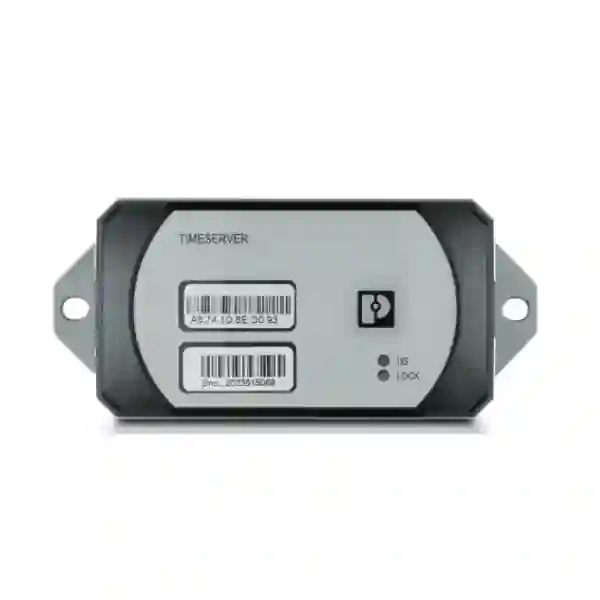
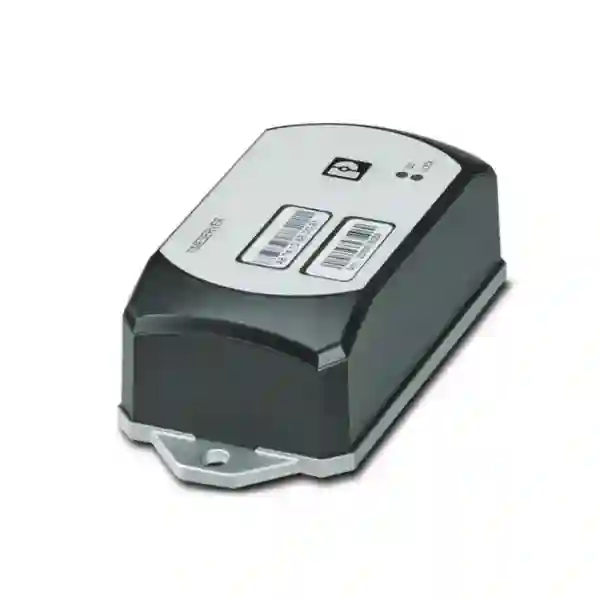
Hanwha SSM-ST41 GPS Time Synchronisation Server in Tanzania
A shared GPS-derived NTP reference helps compatible cameras and NVRs tell a consistent time story across a surveillance network.
A clear answer for CCTV buyers
The Hanwha SSM-ST41 GPS time server is a dedicated hardware accessory for synchronising the clocks of compatible surveillance devices. It is worth considering when incidents must be checked across several IP cameras, NVRs, recording servers or related security records. The best next step is to check your exact device compatibility, network routing and site reception conditions, then request a quotation for the verified model. This page explains the proven specifications, fit, limits and commissioning checks without assuming local stock or a universal plug-and-play installation.
Specifications at a glance
| Product / model | Hanwha Vision SSM-ST41 GPS time synchronisation server |
|---|---|
| Purpose | Reference timing for compatible CCTV cameras and recording devices |
| Network interface | 10/100/1000 Mbps |
| Power input | 10–30 V DC; PoE support listed |
| Power consumption | ≤ 2.5 W (manufacturer-listed) |
| Operating temperature | −40°C to +70°C |
| Enclosure protection | IP68 (manufacturer-listed) |
| GPS | Integrated receiving antenna; position information listed |
| Size | 113 × 62.8 × 36.5 mm (2025 manufacturer line-up) |
| Not confirmed here | NTP client capacity, accuracy, holdover, kit contents, local price and warranty |
Figures refer to manufacturer-published summaries for this model. Confirm the current technical manual for exact procurement and integration requirements.
Time consistency is part of the surveillance system, not an optional cosmetic setting
When a security incident occurs, investigators commonly compare several independent records: a camera clip, an NVR event log, a door-access record, an alarm message and a report written by the security team. If the clocks differ, the sequence becomes harder to reconstruct. A person may appear to have arrived before a door was opened, or an alert may appear to have preceded the action that caused it. The Hanwha SSM-ST41 GPS time server addresses this operational problem by providing a common network time reference for suitable devices. It does not change image quality or add recording capacity. Its value lies in making the time context of recorded events more dependable.
For a buyer in Tanzania planning a new CCTV installation or reviewing a growing existing system, time synchronisation should be treated as a design requirement alongside camera placement, bandwidth, storage retention and power protection. A local GPS-derived reference can be particularly useful where equipment needs a defined time source independent of a public internet time service. That does not eliminate the need for a working local network, a suitable satellite reception position or compatible device configuration. The first design question is therefore whether your cameras and recorders can reach and use the proposed time server.
What the SSM-ST41 is—and what it is not
The SSM-ST41 is a physical GPS-based time synchronisation server presented in Hanwha Vision’s CCTV accessory literature. Its role is to receive satellite timing information and provide network time to connected surveillance equipment through an NTP-based architecture. Manufacturer diagrams show the unit operating with a network switch, a server, cameras and a service computer. In practical terms, it can be one element in a consistent time plan across a surveillance network, subject to each client’s NTP support and the final installation design.
Do not confuse the SSM-ST41 with Wisenet SSM video management software, a camera channel licence, a network video recorder or a GPS tracking system. It does not itself view live cameras, store footage, analyse events or locate people. The product literature also refers to an integrated GPS receiving antenna and availability of latitude, longitude and altitude information; those are characteristics of the unit, not a promise of vehicle tracking or map-based surveillance. If the procurement requirement is video management licensing, recording storage or analytics, the correct product category is different.
Manufacturer-listed technical characteristics
Hanwha Vision identifies the model as SSM-ST41 and describes camera and recorder time synchronisation as the principal application. Its literature lists 10/100/1000 Mbps network connectivity, support for Power over Ethernet, a 10–30 V DC operating supply, low-power consumption of no more than 2.5 W, a specified operating temperature range of minus 40 to plus 70 degrees Celsius, and an IP68 dust and water protection rating. The 2025 product line-up additionally lists physical dimensions of 113 by 62.8 by 36.5 millimetres and an integrated GPS receiving antenna. These figures should be checked against the particular supplied unit and current manufacturer documentation before purchase.
Specifications do not answer every implementation question. The publicly reviewed product summaries do not establish a client-count limit, timing accuracy under a given installation, detailed holdover behaviour, exact PoE class, bundled power accessories, satellite acquisition time or supported management interface. Those items should be confirmed with an official product manual or a written supplier response for the unit being quoted. Avoid substituting another time server’s specification. In project schedules and tender documents, distinguish manufacturer-stated facts from engineering choices and from still-open supplier confirmations.
How a GPS reference becomes usable network time
A GPS timing device receives a signal from satellites and derives a time reference. An NTP server can then make an appropriate reference available to network clients such as recorders, cameras and servers. In a planned deployment, cameras and NVRs are configured to consult the specified NTP address rather than relying on unrelated default public servers or manually maintained clocks. This makes a shared source part of a manageable system design. The SSM-ST41 is shown in manufacturer material in this GPS-to-NTP role. Exact configuration screens and protocol details depend on the device and its software.
Time synchronisation is not instantaneous magic. Each client implements its own polling, adjustment and failure-recovery behaviour, and an existing device clock may require deliberate correction during commissioning. The difference between actual clock time, time zone display, video timestamp overlay and event-log formatting should also be understood. A correct NTP source alone will not fix a recorder configured with the wrong local time zone. A useful acceptance test compares the actual timestamps generated by several devices during the same observed event, not merely the NTP setting shown on a configuration page.
Why a local reference can matter in Tanzanian CCTV projects
Tanzania includes installations with very different network conditions, from a single building on a managed LAN to facilities linking several buildings or remote operating sites. Some installations use a stable internet connection; others restrict security equipment from direct internet access. A GPS-based time server can serve as a locally managed reference within an approved network architecture when public time services are inappropriate or unavailable. This is a design possibility, not a guarantee that every location will obtain good satellite reception or that every network has a usable route to the server.
Before specifying the SSM-ST41, document the real network topology, camera count, NVR models and sites that need a shared reference. Identify who manages VLANs, firewall rules, device credentials and changes to recorder settings. Determine how the system will handle a failed source or interrupted power supply. A time server is most valuable when operations staff can monitor the result, diagnose discrepancies and demonstrate consistent timestamps later. The correct selection depends on the deployment, rather than on a broad claim that every CCTV system must use GPS.
Plan the overall system architecture first
Draw a simple architecture showing the satellite receiving position, the SSM-ST41, its power feed, the switch or router, network segments, NVRs, cameras, management workstations and any connected recording servers. Mark which systems are expected to be NTP clients and which may need an intermediate time source. The manufacturer’s example diagram includes a GPS reference, the SSM-ST41, a PoE switch, a server and cameras. Your actual design may differ; the important point is that every relevant device has a documented path to the correct server.
Next, decide where the primary time source belongs logically. A dedicated management VLAN can make it easier to restrict access, but only if approved routes permit the intended clients to reach the service. Multiple security zones may require an explicitly designed relay or separate synchronisation arrangement. Avoid casually exposing an internal time server to the public internet. For a large site, confirm whether one appliance can serve the required number of clients at the intended poll rates; a stated Gigabit network interface is not the same as a verified maximum client capacity.
Assess GPS reception before choosing the mounting position
Satellite reception is a practical dependency of a GPS-based source. Examine the proposed position for visibility of the sky, surrounding structures and potential shielding by metal roofing, plant rooms or heavily enclosed cabinets. An integrated GPS receiving antenna is listed for this model, but the manufacturer summaries reviewed here do not specify a guaranteed indoor acquisition performance. Do not assume that a shielded rack room will provide adequate reception simply because the unit is small or its enclosure carries an environmental rating. Confirm the supported installation methods and antenna requirements for the exact device.
An installer should verify that the chosen position is physically secure, accessible for maintenance and compatible with safe cable routing. The mount must not create a leak path or expose connectors to inappropriate stress. Check the supplier’s installation guidance regarding orientation, sealing, grounding and lightning protection before placing any electronic equipment outdoors. The IP68 listing describes an enclosure protection classification; it is not permission to ignore connector protection, mounting requirements or local electrical safety practice. Include a satellite reception test in the commissioning checklist.
Power choices: PoE and 10–30 V DC
The SSM-ST41 manufacturer literature identifies PoE support and a 10–30 V DC operating supply, with stated power use of 2.5 W or less. Those characteristics make it important to clarify the expected power method at procurement. Ask whether the offered kit is supplied with a compatible adapter, an injector, a suitable cable and any necessary mounting accessories. Do not infer the included components from a picture. If the device is to be powered via a network switch, verify the switch port’s PoE compatibility and budget against the current product documentation.
Power continuity can matter more than nominal wattage. A time reference that shuts down when the security network loses electricity may take time to recover once service returns. Align its protection with the availability goals of the cameras, NVRs, switches and recording servers. Where a UPS exists, determine whether the time server and its intervening network path are also protected. Record the approved supply arrangement and label the power source so maintenance workers know what will be affected when the switch, adapter or distribution circuit is serviced.
Network configuration and reachability
The manufacturer lists a 10/100/1000 Mbps network interface, but interface speed by itself does not establish network integration. The project team must confirm the addressing method and accessible device management features for the supplied unit. If a static management address is appropriate, select it under the site’s IP address plan, document the subnet and gateway settings if required, and reserve it from conflicting use. Keep the addressing scheme understandable to future maintainers. Each camera or NVR must have a valid route to the configured NTP endpoint.
Test connectivity from representative devices, not only from the installer’s laptop. Networks may isolate cameras behind an NVR, use separate management and camera VLANs, or restrict traffic between buildings. Standard NTP commonly uses UDP port 123, but device-specific documentation and site firewall policy must be checked before rules are added. If a network policy forbids certain flows, design an approved time distribution method rather than bypassing controls. Capture the actual configuration in the handover record to avoid future dependence on unwritten assumptions.
Secure the time service as part of the CCTV network
Time integrity supports investigation quality, so the time infrastructure belongs in the security plan. Put the appliance under controlled administration, restrict network reachability to approved clients and maintain an inventory of the device, firmware, access credentials and configuration. The manufacturer’s description includes a network security design, but the summary does not enumerate exact authentication algorithms, encryption modes or management protocols. It would be misleading to promise particular protections without a model-specific security guide. Validate supported controls rather than assuming features found on unrelated NTP appliances.
Use the same operational discipline applied to NVRs and cameras: avoid shared default passwords where administrative accounts exist, document authorised access, and follow the vendor’s supported firmware and patch practices. Where logs or monitoring are available, make the status visible to someone responsible for the surveillance system. Consider how a malicious or accidentally incorrect time source could affect log correlation. Do not open unnecessary ports, permit unrestricted remote management or weaken existing segmentation merely to make initial commissioning easier.
Time zones, UTC and readable local timestamps
NTP generally distributes a common reference time, while the local device determines how that time is displayed. For a Tanzania site, equipment typically needs the appropriate East Africa Time setting, UTC plus three hours, when the user interface requires a local time zone. A recorder set to a different zone can show the wrong local clock even while its NTP configuration is functioning. Confirm that timestamp overlays, event logs, exported clips and operator workstations follow a consistent convention understood by the security team.
Agree whether investigation records will use local time, UTC or both, and write the convention into the operating procedure. Test a single documented event using an NVR clip, camera overlay and any integrated alarm or access-control log. When footage is exported for external review, include the displayed time zone and any known clock uncertainty in the evidence notes. A shared NTP source reduces one class of discrepancy, but good evidence handling still requires clear procedures for export, retention, chain of custody and naming.
Camera integration: configure, then verify
Many IP cameras expose a time configuration area where the operator can choose an NTP server, time zone and synchronisation settings. Hanwha Vision’s support information discusses NTP behaviour in its NVR and network camera products, but installation teams must verify the exact firmware and model in their project. Do not assume that every legacy camera, third-party camera or firmware revision provides identical options. Create an inventory noting which devices support NTP, which are manually managed and which obtain their time from another component.
Where camera clocks are separately configured, ensure the intended server address is consistent with the site’s design. After applying settings, check a group of representative cameras and observe the actual time shown in their video or management interface. Record any deviation, investigate large differences and confirm the result after a normal polling interval. If the NVR also timestamps incoming video, identify which clock is responsible for each displayed field. This distinction helps prevent a situation in which overlays look correct while exported recorder events remain offset.
NVR and recording-server integration
NVR synchronisation is often more visible to investigators than camera configuration because playback searches, recording timelines and system events typically depend on recorder time. Hanwha Vision’s support documentation notes that NTP handling can include model-specific synchronisation thresholds and retry behaviour. It is therefore unsafe to claim that any NVR will instantly correct any difference after being pointed at a new server. Review the product’s current settings and firmware guidance before changes, especially on a live installation where a time jump could affect timeline continuity.
For a commissioning window, note the recorder’s time before adjustment and verify the impact on playback search results and logs afterward. Where multiple NVRs cover one premises, use a common reference when technically supported, then compare a deliberate test event across recorders. If a third-party VMS or recording server is involved, check its own clock policy independently. Time should be treated as an end-to-end system property: a correct network server cannot compensate for every incompatible client, manually overwritten clock or incorrectly configured application.
Working with existing VMS and operational applications
The SSM-ST41 should not be sold as a video management platform or as a universal plug-and-play integration package. A VMS may run on a computer whose operating system synchronises from a corporate time hierarchy, while cameras and NVRs may use a separate reference. Align those decisions before setting the source. If two approved sources are used, document why and how their clocks are expected to agree. Where the VMS receives video with embedded timestamps, learn whether it displays device time, server time or the viewing workstation’s clock.
Access control, intrusion detection and building management can produce logs useful alongside CCTV, but those applications may have their own supported time mechanisms. Avoid assuming that all platforms can point directly at this unit. Ask their vendors or system integrator about standard NTP support, security restrictions and any application-specific clock requirements. A short integration test that records one event in each system is often more informative than a generic compatibility statement. Capture the result in the acceptance record.
Design for more than one building or network segment
A campus, industrial site or multi-building property can have cameras spread across separate switches, routers and security zones. A single SSM-ST41 may serve as the intended time reference in the design, but the final architecture must account for routing, latency, policy and actual appliance capacity. Do not extrapolate a supported number of clients from the physical network speed. For remote sites, decide whether they can safely depend on a central reference, require their own locally available source or have a documented fallback.
Prepare a logical diagram with each client group, owner and expected reference server. Verify access through each firewall and switch path during commissioning. If different teams control the WAN, local LAN and surveillance devices, involve them before purchase. The system should have a clear response when a link fails: operators should know which clocks may drift, whether temporary operation is acceptable and what checks are required after connectivity returns. Those answers depend on network design and individual client behaviour, not solely on the SSM-ST41.
Resilience: what happens when GPS, power or the network fails?
The most useful availability question is not simply whether the time appliance turns on. Ask what happens if satellite reception is blocked, the network cable is damaged, a switch restarts or a client temporarily loses access. The accessible manufacturer summaries reviewed for this page do not establish the SSM-ST41’s exact holdover accuracy, alarms, fallback hierarchy or response to sustained GPS loss. These need supplier confirmation if the project requires a defined continuity target. Do not publish guaranteed accuracy or uninterrupted service without model-specific evidence.
Risk management should include practical checks rather than unsupported redundancy claims. Decide who receives an alert or complaint about drifting timestamps, how a technician determines whether the issue is local to one camera or system-wide, and whether an alternate approved reference is permitted. For higher-consequence deployments, ask for documented failover and monitoring requirements before selecting equipment. Provide a power and network restoration procedure, since recovering connectivity does not automatically prove that every recorded timestamp has returned to the expected accuracy.
Commissioning checklist: prove that it works
Commissioning begins with a verified delivery and installation inspection: confirm the model marking, supplied accessories, supported power method, secure mounting, correct cabling and intended GPS exposure. Record the assigned IP configuration and the project’s selected NTP reference. With the system energised, check the device’s available status indications according to the actual manual. Then test connectivity from each relevant camera and recorder group. A good handover pack records the date, tester, device models, software versions and final results.
Do not stop at a green network link light. Compare clocks using a known observed event, then inspect the time shown in camera overlays, NVR playback, exports and other correlated logs. Verify that the displayed zone matches the site’s agreed convention. Repeat checks after a normal synchronisation period and after a planned restart if the maintenance window permits. Include a controlled loss-of-connectivity scenario only when operationally safe. Document exceptions with responsible owners and a resolution plan; do not silently mark an untested legacy device as compatible.
What to ask before requesting a quotation
A useful enquiry states that the requirement is a Hanwha Vision SSM-ST41 GPS/NTP time synchronisation server, not an SSM software licence. Include the number and brands of IP cameras, NVRs and other intended clients, the existing LAN or VLAN structure, and the preferred power arrangement. Tell the supplier whether there is a suitable location for GPS reception, whether outdoor installation is being considered and whether the device must be integrated into a monitored security system. This provides a basis for checking fit rather than merely quoting a part number.
Request the current product datasheet or manual, commercial availability for the exact model, accessory contents, supported commissioning steps and a written response to any capacity or accuracy requirements. Ask for pricing, applicable terms, warranty and delivery details as part of the actual Tanzania quotation; none of those commercial facts is assumed here. If the site requires a specific NTP authentication method, redundancy configuration or security certification, place the requirement in writing and ask for explicit model-specific evidence before ordering.
Use case: commercial offices and shared premises
In an office block, cameras may be controlled by one facilities team while access-control records belong to another department. When an entry incident is reviewed, both groups need a reliable sequence of events. A shared time plan helps reduce confusion caused by manually adjusted clocks and different server defaults. The SSM-ST41 can be considered as the local GPS timing reference for compatible surveillance clients, while other applications should be separately checked for the time sources they support.
Designers should concentrate on the operational handoff. The security operator must know whether a timestamp displayed in the VMS represents camera time or recording-server time. The IT team needs the NTP address, approved routes and device ownership. Facilities staff need to understand power dependencies and whether the installed location offers reliable GPS reception. A practical acceptance exercise is to create a test access event and compare its timestamp with camera and NVR records, then document how any difference was resolved.
Use case: warehouses and logistics operations
A warehouse can contain loading areas, gates, storage zones and office entrances, each captured by different cameras. A delivery dispute or security investigation may require footage from more than one point in the movement of goods. If the recording systems use different clocks, it becomes difficult to reconstruct the journey without manual correction. Time synchronisation is therefore a supporting infrastructure requirement for an effective search and review process rather than an analytics function provided by the time server itself.
For these sites, prioritise a network drawing showing all camera segments and recording equipment, including any disconnected or independently operated areas. If an NVR has its own time source setting, confirm it agrees with the plan. Check timestamp overlays and exports at both ends of a test journey. Consider how power interruptions and network maintenance affect the reference. The SSM-ST41 does not replace a camera, access system or warehouse management application; it supports the consistent interpretation of records generated by compatible equipment.
Use case: manufacturing and industrial facilities
Industrial operations may combine perimeter CCTV, equipment area cameras, gate access, alarms and operational logs. When a fault or unauthorised entry is investigated, operators often need to compare an event visible on video with a separate system entry. A common time reference can help, provided the connected systems implement it correctly. The SSM-ST41’s manufacturer-stated temperature range and enclosure rating may be relevant to a challenging environment, but those specifications are not a blanket suitability approval for every industrial hazard.
Site assessment should include mounting conditions, environmental exposures, cable routes, network segregation and safe electrical installation. Corrosive atmospheres, explosive zones, hazardous dust and specialised compliance requirements demand separate product and site verification. Do not infer a hazardous-area certification from an IP rating. Engage the facility’s engineering and safety teams, record the required timestamp convention, and test with relevant NVR and logging systems. A qualified design also identifies who is responsible for monitoring time service health after handover.
Use case: education, healthcare and public-facing facilities
Schools, hospitals and other facilities can operate numerous surveillance devices spread through different buildings and departments. Event reviews may cross reception desks, corridors, parking areas and entrances. In such settings, consistent timestamps reduce avoidable reconciliation work when authorised personnel need to review a reported occurrence. A GPS/NTP reference is only one part of the design. Access permissions, privacy rules, storage policy and appropriate disclosure procedures remain separate organisational decisions.
For a new project, define the surveillance clock policy early and make it part of tender acceptance criteria. For an existing system, inventory camera and recorder models before changing live settings. A time server should be introduced through a controlled maintenance procedure, since clock corrections on some systems can affect the order of events in recordings. Confirm that any required IT network access is allowed, choose an appropriate reception position and give the operations team a simple documented way to check a suspected timestamp mismatch.
Use case: residential compounds and building security
Building management teams may need to compare footage from gates, parking areas, shared corridors and service entrances when handling an incident. If separate NVRs or cameras show different times, the security supervisor may spend valuable effort estimating offsets between clips. The SSM-ST41 can be evaluated as a time-reference device within a properly designed network. Its purpose should be explained clearly in the bill of materials, so it is not mistaken for an extra recorder or additional camera licence.
The building’s topology matters. A gate NVR that is isolated from the management LAN may not be able to consult the same NTP source without deliberate network configuration. Identify where the GPS device can receive satellite signals, how it will be powered and who can service it. Agree the correct local time zone and test cameras across each recording group. Provide written operating instructions so that future changes to switches, NVR addresses or service providers do not quietly break time synchronisation.
Use case: distributed and remote-site CCTV
A business may operate one management office and several facilities whose networks are not continuously connected. It is tempting to assume a single time appliance will automatically solve timestamp differences across all locations. In reality, network isolation, link failures and client design determine the result. A local GPS-based reference at one site can be appropriate for compatible local clients, but the location of additional references, any WAN reliance and consistency between sites must be designed and validated.
Start by defining the investigation requirement: do clips from different facilities need to be compared to the nearest second, to a broader sequence, or only within each site? Request evidence for the attainable timing performance of the complete system rather than a promise based on one device. For each site, record time zone, source address, reachability, power protection and support ownership. A remote recorder using a public time server while another uses a local GPS source is not necessarily wrong, but the arrangement needs verification and clear documentation.
Compare the SSM-ST41 with alternative ways of setting time
Manual clock setting can be adequate for temporary tests, but human changes are difficult to keep consistent across large fleets. A public internet NTP service can be convenient where approved internet access is dependable, yet some security networks deliberately block that route. A corporate time service can simplify enterprise management if it is accessible and meets the CCTV requirements. The SSM-ST41 belongs in a different category: a dedicated GPS-derived local network reference that can form part of the surveillance time architecture.
Selection should be based on the real failure modes and governance requirements. A public service may be unsuitable for an isolated camera network; a dedicated appliance may be unnecessary where an approved, resilient internal time hierarchy already exists. A GPS receiver adds satellite reception and physical installation considerations. Compare documentation, client capacity, security requirements, monitoring options, maintenance capability, power resilience and total installation cost. Avoid assuming that a GPS label automatically provides superior evidence quality when surrounding devices remain incorrectly configured.
Common deployment mistakes worth avoiding
One mistake is identifying the SSM-ST41 as software solely because its part number begins with SSM. Another is ordering hardware before checking whether the intended cameras and NVRs expose usable NTP settings. Teams sometimes install a time server in a shielded cabinet without assessing GPS visibility, or connect it to a VLAN from which most cameras cannot reach it. A third frequent problem is selecting the right NTP endpoint but leaving one NVR with the wrong time zone. Each mistake can undermine the expected operational benefit.
Maintenance processes can introduce new errors after commissioning. A replacement recorder may revert to a default public NTP server. A switch change may remove a required route. A camera firmware update may alter time settings or cause a new polling behaviour. Avoid these pitfalls by preserving an approved baseline, listing expected NTP client settings and assigning an owner to verify changes. Treat a successful installation as a maintained service, not a one-time hardware sale.
Diagnosing a time discrepancy systematically
When one camera shows the wrong timestamp, start locally: compare its clock, time zone and NTP settings with the approved baseline. Check whether it is reaching the chosen source and whether its software supports the expected update behaviour. Then compare a second camera on the same switch or VLAN. If both are wrong in the same way, investigate the segment and source settings before replacing individual devices. If only an NVR timeline is wrong, inspect the recorder clock, camera timestamps and export settings separately.
When all clients diverge, review the common network path, server power, GPS reception status and recent changes. Do not equate basic network ping success with proven NTP service operation. A log can show a failure that a simple reachability test misses. Also check for time zone differences before concluding that the GPS reference itself is inaccurate. For severe or unexplained discrepancies, preserve existing logs and configuration information before making corrective changes, since those records may be important for understanding what happened.
After repairs, repeat a structured comparison using a deliberately observed event and a known reference. Record the original symptom, root cause if identified, settings changed and final comparison. If the exact model’s diagnostics are not available in current accessible documentation, seek approved manufacturer or supplier guidance rather than guessing undocumented commands. The goal is not merely to make a screen display the desired time; it is to show that the system produces interpretable and consistent records over ordinary operation.
Procurement checklist for the exact model
Confirm the quotation names Hanwha Vision SSM-ST41, clearly describes a GPS time synchronisation server and identifies the exact hardware revision where relevant. Ask which power method, mounting provisions and accessories are supplied. Request official technical documentation for environmental ratings, physical dimensions, supported NTP functions, expected satellite reception conditions and system configuration. If a tender specifies standards, test reports or compliance documents, obtain them for the exact offered hardware. General statements about the brand should not substitute for model-specific evidence.
Include the site engineering questions with the commercial request: numbers and models of clients; required time precision; time zone convention; network security policy; available GPS location; power continuity; system monitoring; installation responsibilities; training; and handover documentation. Ask the supplier to highlight exclusions and any client compatibility restrictions in writing. A price alone cannot resolve the operational questions that determine whether the equipment will meet the site’s surveillance objective. Local stock, import conditions, warranty terms and delivery timelines must be established by the actual quote.
A sensible deployment and handover sequence
Begin with a requirements workshop that includes the security operations lead, network administrator and installer. Agree which systems need synchronised time and how success will be assessed. Create an asset list and drawing before installation. Verify the offered unit and its current manufacturer documentation, then identify a secure position with suitable GPS reception and safe power provision. Configure the appliance according to its approved manual, establish authorised network reachability and gradually bring representative NTP clients into the time plan.
Once the initial devices work, extend the configuration to the remaining supported cameras and recorders. Conduct acceptance tests using observed events and cross-system comparisons, including an export from at least one recorder. Provide a handover record with model, configuration, power circuit, network location, firmware, expected clients, time zone and known exceptions. Assign responsibility for regular checks and change management. These steps help convert a technically plausible appliance installation into a time service that remains useful when footage is reviewed months later.
Operational checks after commissioning
An installation can pass its first acceptance test and still develop clock problems later. Include time integrity in routine CCTV maintenance, especially after NVR replacement, camera resets, network changes, firmware updates or extended power outages. During an agreed inspection, compare a sample of camera and recorder clocks, check the configured time source and review any available device fault indications. The inspection frequency should follow the organisation’s risk assessment and operational requirements, not an invented fixed schedule attributed to the manufacturer.
Keep a clear escalation route. Security personnel may notice a suspicious overlay, while IT staff may be needed to examine routing or time service access. Facilities staff may be needed when a power supply or mounting location has changed. A short record of each check, including date, tested devices and observed offset, can reveal recurring problems. When major discrepancies arise, preserve original evidence and involve the organisation’s incident process before making broad time adjustments on production recording equipment.
Important limits and points requiring confirmation
The reviewed public materials establish the SSM-ST41’s basic role and headline characteristics, but they do not establish every deployment-specific capability. Do not assume a particular maximum client count, microsecond accuracy figure, GPS holdover interval, supported PoE standard, inclusion of an external antenna, firmware management feature or local warranty. IP68 and a wide operating temperature range are documented, yet actual installed performance depends on connectors, mounting, reception and the surrounding equipment. Commercial terms are also outside these verified technical facts.
Buyers should ask for a current official manual, a written answer to critical compatibility questions and confirmation that the quoted unit meets their security and engineering requirements. If the installation requires assured timing under GPS outage, redundant references, monitoring integration or specialised network protection, treat those as explicit acceptance criteria. The right procurement decision is not the one with the longest feature list. It is the one whose verified features and tested system behaviour match the problems the surveillance team actually needs to solve.
Frequently asked questions
Is Hanwha SSM-ST41 a licence or physical device?
It is a physical GPS time synchronisation server listed in Hanwha Vision’s accessories and network product literature. The similar SSM prefix can be confusing because Hanwha also uses SSM for video management products. This unit is not a camera channel licence, video recording server or video wall application. Confirm the model description on any quotation before approval.
What does the Hanwha SSM-ST41 GPS time server do?
It provides a GPS-derived reference within a network time synchronisation architecture for compatible surveillance devices. The intended outcome is consistent clock settings among cameras, network video recorders and other approved clients. The practical result depends on satellite reception, a working network route and each device’s NTP configuration. It does not create recordings or perform video analytics.
Does the device work without internet access?
A GPS-derived time source can be useful on networks that do not use a public internet time service, provided the satellite reference and local network architecture work as intended. That does not mean every installation works disconnected without planning. GPS reception, power, the device’s supported configuration and client reachability remain essential. Confirm the required operating mode and any limitations using current product documentation.
Can it synchronise cameras and NVRs from other manufacturers?
Do not assume universal interoperability. Standard NTP support on the intended client is an important starting point, but compatibility also depends on routing, configuration options, software behaviour and the system design. Build a list of exact makes and models, obtain confirmation where needed and test representative devices before a large rollout. A shared protocol name is not a substitute for commissioning evidence.
Is PoE supported?
Yes. Hanwha Vision’s published SSM-ST41 material lists Power over Ethernet support. The same literature lists a 10–30 V DC operating supply and low consumption of no more than 2.5 W. Check the exact supported PoE implementation and whether a compatible injector, switch or power accessory is included in the offered package. Do not assume all accessories are supplied.
What network speed and physical size are specified?
The manufacturer’s brochures list a 10/100/1000 Mbps connection, while the 2025 line-up specifies dimensions of 113 by 62.8 by 36.5 millimetres. Network speed describes the interface, not the number of NTP clients supported or the assured clock accuracy. Physical size helps with space planning, but mounting clearance, connectors and safe cable routing should be checked against current installation documentation.
What environmental rating does it have?
Hanwha Vision literature lists IP68 dust and water protection and an operating temperature range from minus 40 to plus 70 degrees Celsius. Those ratings are useful selection facts, but they do not establish safe operation in every hazardous or corrosive location. Real installation suitability includes correct connectors, cable sealing, mounting, electrical safety and the actual site environment. Check any specialised approval separately.
Will it correct time zone settings automatically?
A time source and the device’s local time zone setting are different parts of the configuration. An NTP-connected recorder can still show the wrong local time if its zone is set incorrectly. For Tanzania, agree the proper local display convention and verify representative camera, recorder and export timestamps. Do not treat a correct server address as proof that every recorded event is displayed correctly.
Will every recorder change its clock immediately?
Not necessarily. Clock adjustment, polling, retry behaviour and handling of large differences can vary by recorder model and firmware. Hanwha Vision publishes separate support guidance discussing NTP synchronisation behaviour in its NVR and network camera products. Plan a maintenance window when changing production systems and verify the actual recorder behaviour instead of expecting instant corrections on all models.
How should the GPS receiving location be selected?
Choose a secure location that meets the device’s installation guidance and offers suitable satellite reception. Metal structures and enclosed cabinets may make reception difficult, so verify conditions rather than assuming an equipment room is suitable. Check power, network cabling, access for maintenance and protection of connectors. The IP rating does not replace safe mounting and the manufacturer’s installation instructions.
Is pricing or stock confirmed in Tanzania?
No local price, stock status, delivery period or warranty term is stated in this description. Those details require a current quotation for the exact listing and destination. This avoids confusing overseas retail prices with a verified Tanzanian offer. Request a written breakdown of hardware, accessories, tax treatment, installation scope and any support terms that apply to your project.
What should be included in a quote request?
Provide the exact model SSM-ST41, intended camera and NVR models, approximate number of devices, network layout, mounting environment, available power and security requirements. State whether the deployment is a new system or a live-site upgrade. Ask for the current technical documentation, included accessories, integration assumptions, training or commissioning scope, and explicit answers to any precision or resilience requirements.
What if the time server or network becomes unavailable?
Client behaviour depends on the specific devices and their configured time strategy. The public summary reviewed here does not establish a guaranteed holdover duration or failover feature for the SSM-ST41. The project should document expected behaviour during GPS, power or network failure and test recovery in a controlled manner. If resilience is critical, request model-specific evidence before buying.
Does a GPS time server make CCTV footage legally admissible?
No product alone determines legal admissibility or evidentiary weight. Consistent timestamps may support clearer analysis, but video quality, retention, access control, chain of custody, authenticity, organisational procedures and applicable law remain important. Use the unit as part of a documented surveillance system rather than presenting it as a certification of evidence. Seek qualified legal guidance where case-specific rules apply.
How can a buyer confirm the installation is successful?
Use a written acceptance test. Check the exact model and wiring, ensure the unit has an appropriate GPS reference and network path, configure each supported client to the intended NTP source, and compare timestamped events across sample cameras and NVRs. Repeat after normal operation and document exceptions. A lit power indicator on its own does not demonstrate system-wide time consistency.
Can this device replace an NVR or video management system?
No. The SSM-ST41 is a timing accessory, not a recording or viewing platform. Its value is in supporting a consistent time reference for appropriate surveillance equipment. Cameras still generate video, NVRs or servers still record and store it, and management applications still provide viewing and search functions. Make sure the bill of materials includes all required components for the complete surveillance system.
Request a Hanwha SSM-ST41 project quotation
Share your CCTV device models, approximate client count, network design, GPS mounting constraints and required power arrangement when requesting information for a Tanzania project. Ask for the current datasheet, model-specific compatibility answers and a written breakdown of accessories, installation and commercial terms.
Contact FourTeck Tanzania to request product details and a project-specific quote.




Reviews
There are no reviews yet.