
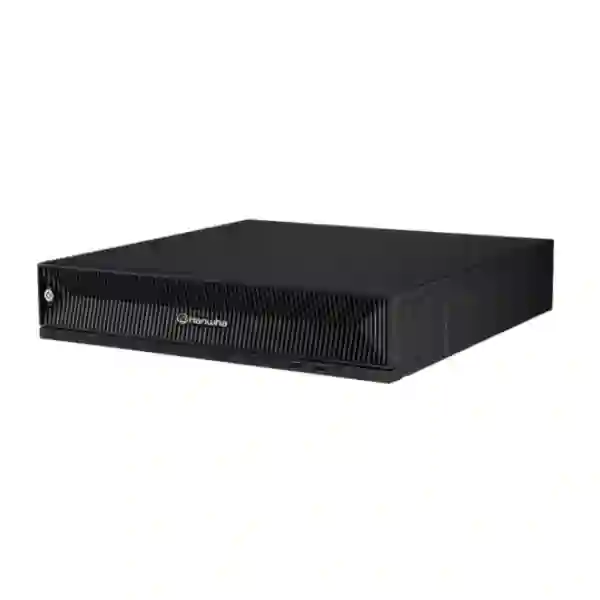
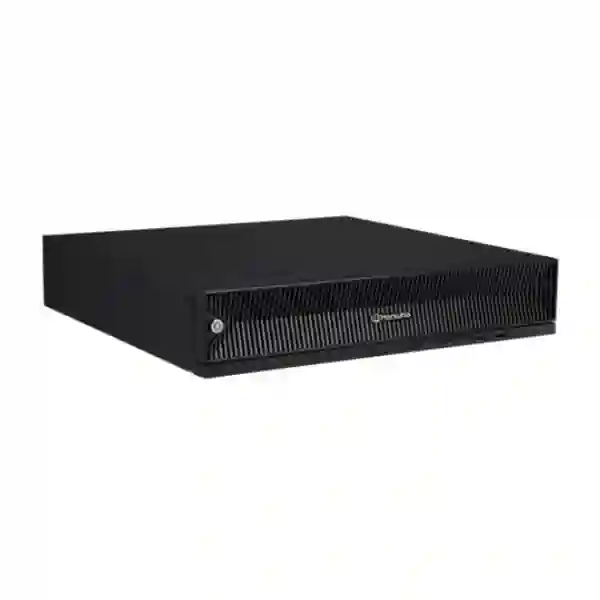
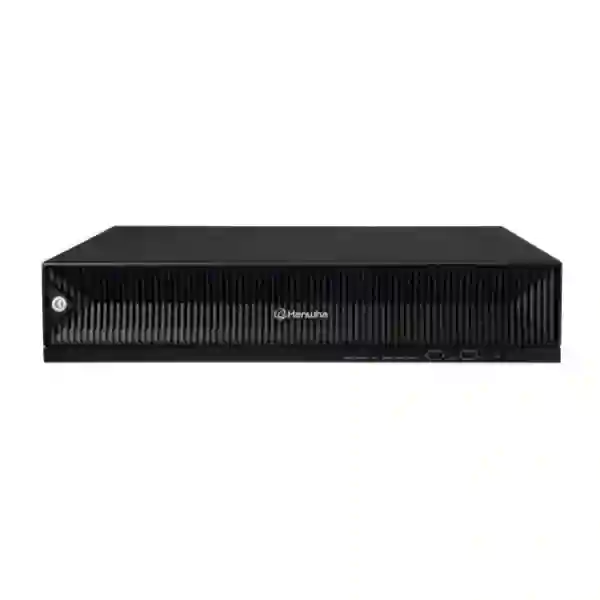
Hanwha Vision • server-based IP video recording
Hanwha XRP-4010B2 16-Channel Server-Based NVR
Plan an IP surveillance recording system around sixteen camera channels, Wisenet SSM management, up to 32 MP supported recording resolution, a 400 Mbps recording ceiling and configurable RAID storage. The goal is footage that a security team can locate, review and preserve—not an impressive specification that has never been tested against the actual site.
Considering a project in Tanzania? Request a configuration-specific review of cameras, disk capacity, retention, network infrastructure and the exact commercial package before placing an order.
Key specifications at a glance
| Product class | 16-channel server-based NVR with Wisenet SSM |
|---|---|
| Camera input | Up to 16 channels as a standalone unit |
| Recording resolution | CIF to 32 MP, subject to compatible camera configuration |
| Maximum recording bandwidth | 400 Mbps |
| Video codecs | H.265, H.264, MJPEG; compatible WiseStream workflows |
| Storage positions | Eight SATA drive bays |
| Supported RAID | RAID 1 / 5 / 6 / 10 |
| Video management | Wisenet SSM preinstalled |
| Power input | 100–240 V AC, 50–60 Hz |
| Recorder package / price | Confirm disks, accessories and commercial terms with supplier |
Technical values are manufacturer-referenced maximums or supported capabilities, not an assurance that every camera, hard drive, event or deployment configuration is compatible.
What the XRP-4010B2 does
The Hanwha XRP-4010B2 16-channel NVR is designed for a site where dependable camera recording and controlled access to footage matter more than a long list of consumer-style features. It brings IP-camera streams into a server-based recording environment with Wisenet SSM video management software. For a security manager, that means the purchasing discussion should start with camera count, evidence needs, operator workflow and storage resilience. It is not itself a surveillance camera, a PoE camera switch or an automatically complete installation. The system around the recorder determines how useful it will be day to day.
In a typical deployment, IP cameras connect through the surveillance network; the recorder receives and stores streams within its rated channel and bandwidth limits; authorised operators review live and recorded footage through supported viewing tools. The manufacturer identifies a maximum of sixteen camera inputs for this unit as a standalone appliance, together with a recording resolution range reaching 32 megapixels. Those figures describe capabilities, not a guarantee that any arbitrary mixture of sixteen cameras and recording settings will perform identically. Camera bitrates, codec choices, analytics, storage write load and network design all need to be checked.
Businesses evaluating recording equipment in Tanzania can use this product as the starting point for a tailored bill of materials rather than treating the recorder alone as the total cost of ownership. The practical quotation should identify the base unit, licensed or enabled functions, camera compatibility, disk configuration, switches, cabling, display, backup and power protection. This makes proposals easier to compare and reduces the chance of discovering that an essential component was excluded after approval.
At-a-glance capabilities and limits
The verified headline specification is a sixteen-channel server-based recorder with up to 400 Mbps recording bandwidth and support for video streams from CIF through 32 MP, subject to the actual network-camera configuration. It uses Wisenet SSM, supports H.265, H.264, MJPEG and compatible WiseStream workflows, and offers eight SATA storage positions. The manufacturer lists RAID 1, RAID 5, RAID 6 and RAID 10, along with hot-swap support. These capabilities are relevant to storage resilience and operational flexibility, but they do not remove the need for a tested backup policy.
The model supports event-oriented workflows and camera-driven detection information where the selected cameras and software configuration expose them. It should not be described as a recorder that independently generates every form of AI analysis on all attached cameras. Likewise, a stated high maximum recording resolution does not mean a control-room screen will display every high-resolution source at full native detail simultaneously. Display layouts, decoding load and operator workstations have their own practical limits.
For budgeting, do not assume a hard-drive bundle, an individual camera, an Ethernet PoE supply, off-site storage, licences beyond the supplied configuration or a specific service level. Clarify the exact country-specific package and current lifecycle with the supplying team. The data shown here is a product capability summary; final suitability remains dependent on an approved design and the manufacturer's current compatibility information.
Who should consider this recorder?
A sixteen-channel recorder can be a good match for a facility that has a defined number of entrances, corridors, loading areas, reception points, perimeter views or process-monitoring cameras. Examples of prospective buyers include a warehouse site that needs searchable delivery-bay footage, a commercial office that must review access incidents, a school administration that needs controlled evidence access, or a retail operation that needs recordings from several public-facing areas. These are examples of needs, not claims that the unit has been installed at particular customer locations.
The strongest reason to consider this server-based design is workflow. A site with a staffed security function may want operators to review time ranges, identify camera events, export footage and maintain access policies without jumping between unrelated camera interfaces. Wisenet SSM can be part of that operating model when configured with compatible devices and valid software entitlements. If the requirement is simply a few inexpensive cameras with no structured review process, a different recorder class may meet the need at lower system cost.
Before specifying sixteen channels, count future cameras as well as the initial ones. A project launching with fourteen cameras has little native headroom on this model. Clustering is referenced in manufacturer literature, but it requires a supported multi-appliance system design; it should not be treated as a free expansion of the capacity of one recorder. If multiple facilities, significantly more cameras or intensive concurrent viewing are planned, ask for an architecture review rather than selecting by channel count alone.
Recording resolution: what up to 32 MP means
The published input-resolution range extends to 32 MP, which makes the recorder relevant for designs that may use selected high-resolution network cameras. Higher megapixel counts can provide more image detail at a given scene coverage, but image usefulness still depends on camera optics, mounting height, lighting, shutter behaviour and compression settings. A recording system cannot recover faces, labels or vehicle details that the camera did not capture clearly. Specify evidential image quality at the camera and scene level, not only by the maximum megapixel number on the recorder.
Resolution and frame rate should be selected for each location. A wide entrance may need useful detail around a doorway, while a general corridor view can often prioritise continuity and predictable storage usage. Recording every stream at the highest possible setting can consume bandwidth and disk space without improving every investigative task. Practical commissioning includes collecting test clips at day, night and busy periods, then checking whether the footage actually answers the operational questions that justified the camera.
Also distinguish recording from local monitoring. The appliance can accept and record supported high-resolution sources, while the displayed mosaic and the resolution of a connected monitor are separate matters. Investigators may need to open one camera, zoom into the source footage or use an appropriately specified client workstation. It is better to design the operator experience around likely investigation tasks than to promise universal full-resolution playback in a large multi-camera grid.
Recording bandwidth and network sizing
Manufacturer literature specifies a maximum recording bandwidth of 400 Mbps. That figure is a ceiling for the appliance, not a recommended operating target for every installation. Add the expected configured bitrates of all recording streams, consider peak activity and estimate overhead before choosing camera profiles. For example, a project with sixteen cameras can distribute the bitrate budget unevenly according to scene complexity; the right design is the one that gives critical views adequate quality while maintaining reasonable aggregate headroom.
Compression methods influence bandwidth and retention. H.265 can often reduce required storage relative to older compression at comparable visual goals, but actual savings are scene-dependent and not guaranteed. Fast motion, dense detail, rain, low-light noise and frequent scene changes can change a camera's bitrate significantly. WiseStream is associated with compatible Hanwha camera workflows and should be checked on the exact camera models. Test in realistic conditions rather than relying only on an average number from a specification sheet.
Keep surveillance traffic predictable. Plan switch uplinks, VLANs where appropriate, camera addressing, NTP time synchronisation and available capacity between camera networks and the recorder. If operators access the system from different buildings, factor in inter-building links, firewall rules and the impact of concurrent live viewing. Remote access should use a controlled, supported security design rather than exposing recording interfaces openly to the public internet. Good IP design makes event timelines, recorded video and user sessions more reliable.
Storage capacity: design for retention, not a headline terabyte figure
Eight SATA hard-drive positions give designers choices about disk count and storage layout, but bays are not the same as usable recording capacity. Actual capacity depends on disk models, supported disk sizes, the selected RAID level, drive formatting and reserved capacity. For the XRP-4010B2, consult Hanwha Vision's current HDD compatibility list and confirm the exact drive part numbers. Do not assume that every standard desktop disk or every capacity offered by retailers is approved for continuous video workloads.
Start the calculation with evidence retention: how many days must operators be able to retrieve video, and from which cameras? Then estimate the expected average and peak video bitrates, recording hours, event frequency, audio where used and the effects of multiple recording profiles. A simple first-pass storage equation is total average megabits per second multiplied by 86,400 seconds per day, divided by eight to obtain megabytes per day, then adjusted for the required days and practical overhead. This is a planning method, not a promise of retained footage.
For continuous recording, a one-day estimate should be stress-tested against a period with busy scenes and night-time noise. Event recording may use less capacity, but it can miss context if detection zones, pre-event intervals or camera notifications are wrong. Sites with legal, operational or insurer-driven retention requirements should define those requirements before equipment selection and obtain appropriate professional guidance on privacy and records handling. Your system design should include routine checks that the oldest expected recordings are still retrievable.
Ask how drives are supplied, installed and tested. If a quotation lists the recorder only, drive procurement is a separate line item. The right procurement pack should state the number of drives, their specific compatible models and capacities, RAID topology, projected usable space, estimated retention and what happens when a disk fails. This turns an abstract storage specification into an auditable design decision for the buyer.
RAID levels and the difference between resilience and backup
The manufacturer lists RAID 1, 5, 6 and 10 support for the recorder. RAID can improve service continuity during some disk failures if configured and maintained properly. RAID 1 mirrors data between drives; RAID 5 uses distributed parity; RAID 6 uses additional parity; RAID 10 combines mirroring and striping. The useful choice depends on the number of installed drives, the required fault tolerance, write workload, rebuild exposure and budget. Not every RAID level is available with every drive count, so the final design must be validated.
A RAID configuration is not a complete backup strategy. It does not inherently protect against deliberate deletion, theft of the appliance, catastrophic damage, misconfiguration, malicious access or the simultaneous failure modes that exceed the array's tolerance. Critical clips should be exported and preserved by an approved evidence workflow. Where retention risk justifies it, plan a separate backup location or policy and verify that the actual product, storage network and budget support that workflow.
Hanwha's service guidance recommends periodic RAID-status checks and prompt replacement of a failed disk. An array in a degraded state has lower tolerance for further problems; a rebuild may put sustained load on remaining disks. Maintenance procedures should define who receives alerts, who is authorised to replace a drive, how compatible replacement parts are sourced and how the team verifies healthy status afterward. Hot-swap support simplifies some maintenance operations but does not mean every disk may be removed without checking array condition and procedure.
Continuity features and ARB considerations
Manufacturer materials associate the model with Auto Recovery Backup, commonly abbreviated ARB, and redundancy-related functions. ARB is intended to help recover some video gaps in supported camera-recorder configurations, but successful recovery depends on camera capabilities, suitable local camera storage, recording settings and the circumstances of the interruption. It should never be presented as universal protection from a network cut or a power outage. Confirm the support requirements for each camera and software version before including ARB in a resilience plan.
Recording continuity involves more than one feature. Network uplinks can fail, switches can reboot, clocks can drift, storage can fill and software settings can be changed. Map plausible failures and decide which ones must produce a quick operator alert, which can tolerate a short gap and which require an alternative recording path. If redundancy or failover across servers is required, verify the exact SSM architecture, supported server roles, licence terms and storage behaviour with the current vendor documentation.
A practical acceptance test deliberately simulates a controlled, approved interruption in a test environment. Observe when the recorder marks loss of video, what footage remains on the camera, whether reconciliation takes place and what operators can actually retrieve. Record the result alongside the installed firmware and software versions. A written recovery test is stronger evidence of suitability than a sales statement that the recorder has a feature with the word recovery in its name.
Wisenet SSM and operator workflow
Wisenet SSM is Hanwha Vision's video management software, and the XRP-4010B2 is listed with SSM preinstalled. For control-room teams, the software layer is important because it shapes camera organisation, live viewing, event response, search and investigation. Define the routine tasks first: who monitors which cameras, how an incident is escalated, who can review recordings and which staff may export evidence. The user interface should support these tasks without giving every user unrestricted administrator access.
Site setup should establish consistent camera names and a logical location structure. A meaningful label such as loading-bay east view is easier to work with than an unstructured camera identifier during a fast investigation. Where applicable, operators can use supported event notifications and time-based searches to narrow down hours of footage. Confirm the precise version and licence functions supplied with the appliance rather than assuming every function described in general SSM marketing is included without additional configuration or entitlement.
Software lifecycle is another buying factor. Hanwha has published maintenance and update information for the XRP series and newer Wisenet SSM versions. That does not mean every update can safely be installed on every deployed appliance without checking its approved upgrade path. Before rollout, record the shipped SSM release, permitted software upgrades, camera firmware requirements, backup and rollback procedure, client requirements and the support contact responsible for changes.
Network-camera compatibility and integration
Compatibility is more precise than the statement that a recorder accepts IP cameras. Hanwha's published specifications reference Wisenet and ONVIF-related interfaces, including ONVIF Profile S and SUNAPI client functions. These are useful starting points for integration, but individual devices still differ in streams, authentication methods, event reporting, time settings and analytics metadata. Request an exact camera-model compatibility check and, for mixed brands, a proof-of-concept with every required feature tested.
A camera may provide ordinary video streaming while not exposing all of its advanced functions through the recorder. For example, object attributes, vehicle events, people-counting metadata, licence-plate recognition or audio events depend on the camera's own capabilities and the supported software integration. Video support and analytics-event support should be recorded as separate acceptance criteria. Do not promise that connecting a third-party ONVIF camera automatically delivers the same event catalogue as a specifically supported Hanwha device.
The integration review should include the number of streams per camera, encoding options, target frame rate, required privacy masks, user permissions, time stamps and any audio or I/O requirements. If the site already has cameras, collect exact model numbers and firmware versions before ordering the recorder. This avoids a costly assumption that a generic model-family name is sufficient to validate a specialist function.
Camera analytics and useful event review
The published product-family specifications describe handling camera events such as motion and certain video analytics, as well as AI-event categories associated with supported camera integrations. These event pathways can help a security team find relevant moments more quickly. They do not make the recorder a substitute for correct camera placement or prove that analytics work equally well in darkness, crowded scenes or difficult weather. Camera selection and field testing remain essential.
Use event-driven workflows where a clear operational question exists. At an entrance, an operator might need to review movement through a specific boundary; at a vehicle gate, they may need to locate a supported vehicle event; around restricted equipment, a camera-generated tamper event may prompt inspection. Decide whether the alarm is for immediate response, later evidence search or simple operational reporting. The same event type can have different value depending on what staff do when it appears.
Test nuisance alarms and missed events before enabling email, audio or pop-up notifications at scale. Rain, shadows, lights, reflections and shifting stock can create confusing results in some video-analytics deployments. Record detection zones, schedules and thresholds in a change log. Make a clear distinction between an alert that points to footage for human review and a verified conclusion about an event or person. Human review is still necessary for decisions that could have significant consequences.
Recording schedules, evidence and playback
Manufacturer materials describe normal, scheduled, continuous and event-related recording modes, along with pre-event and post-event concepts. Choose these settings camera by camera, based on why each view exists. Continuous capture is useful when context before a detected incident is important; an event-driven policy may suit selected low-activity locations if the camera reliably supplies the trigger. Use scheduled profiles when access patterns vary during the day, but ensure the settings do not accidentally disable needed recording overnight or at weekends.
During commissioning, simulate realistic incidents and ask an operator who did not configure the system to retrieve the relevant clip. The person should be able to identify the camera, search the right time window, confirm the recorded time and export a file where their role permits it. Video quality should be assessed from the exported evidence, not just a live preview. Verify any required file formats and playback tools using the installed version rather than promising one universal export workflow.
For evidentiary processes, document the time source, access log expectations, export approvals, secure transfer method and the person responsible for preserving an original clip. Retention and disclosure obligations can differ across institutions; the buyer should define an appropriate local governance policy. Reliable evidence handling is a combination of technology, authorised staff and documented procedure, not simply the presence of a recording button.
Cybersecurity and controlled access
An NVR contains potentially sensitive video and should be treated as an important networked system. Create named accounts for authorised users where the supported software permits it, apply least-privilege roles, manage credentials securely and disable unnecessary accounts. Separate daily operator tasks from administration. Establish how users are removed when roles change, how audit needs are handled and who approves external support access. Security controls need to work with the exact SSM version and deployment design.
Place cameras and the recorder on a planned network, protect management interfaces and use supported encrypted connections where available. Do not assume that opening router ports directly to the internet is an acceptable remote-access design. A managed VPN or other approved secure-access approach may be more appropriate, subject to the site's IT policy. Patch scheduling must be coordinated with recording continuity and vendor compatibility, especially on appliances with an embedded operating system.
If viewing or storing footage involves employees, visitors, children or other identifiable people, establish notices, permitted purposes, access rules and data-retention policies suited to the organisation and applicable law. The recorder's technical ability to retain footage does not establish permission to collect or disclose it. Buyers should arrange a suitable internal legal and privacy review rather than assuming a general product description proves compliance with a particular Tanzanian regulation.
Electrical, rack and physical environment planning
The manufacturer lists 100–240 V AC, 50–60 Hz input for this product family and a maximum consumption of approximately 180 W for the B2-class configuration under its stated test conditions. A final electrical schedule should use the current exact-model documentation and include the actual disk population, display, network switches and any other attached equipment. Do not size a UPS from the recorder's figure alone; camera power, PoE switches, network uplinks and any required communication path may also need battery support.
A server-based recorder needs a secure, ventilated physical location that staff can service safely. Check the exact chassis dimensions, rack mounting requirements, front and rear clearance, heat rejection, dust levels and room access before delivery. Long-term video storage can be affected by thermal stress, so air flow and sensible environmental monitoring are not optional planning details. Where mains interruptions are a project concern, arrange controlled shutdown behaviour and test restoration rather than assuming that a UPS guarantees endless recording.
This model should not be mistaken for a built-in multi-port PoE camera switch. Design camera power separately using suitable switches, injectors or other approved infrastructure. Label the circuits and network ports, preserve camera-to-recorder connectivity during the required outage window and document the sequence for restarting the system. Physical protection also includes locking the recording area and controlling who can remove drives or export data.
Business scenarios worth discussing
For a distribution facility, the buyer may prioritise dispatch areas, loading doors and the sequence of movement around goods. The design challenge is not just covering the floor; it is being able to follow an incident across time-synchronised cameras and preserve a clear clip when a discrepancy is raised. Camera mounting, night lighting and retention are often as important as the recorder's headline resolution. The sixteen-channel limit should be checked against all needed vehicle and pedestrian views, including potential future loading bays.
At a professional office or mixed-use commercial building, security staff may need to review entrances, reception, corridors and service areas. Here, simple permissions and reliable search may matter more than complex video analytics. A deployment plan should define who is allowed to see sensitive areas, how incidents are escalated and how long recordings remain available. The installed camera positions should avoid collecting unnecessary private-space footage and should follow the organisation's data-handling procedures.
For a retail or education-related site, demand may vary across opening hours, visitor patterns and incident types. The system can be designed to use different recording schedules and camera profiles where that is operationally sensible. Test motion and people-related events with the exact cameras being purchased before committing to a workflow that relies on them. The outcome should be an intelligible set of camera views and review steps, not a dashboard full of unprioritised alarms.
A multi-building compound requires a different conversation. The distances between buildings, fibre or wireless uplinks, camera power, earthing considerations and network segmentation may dominate the engineering design. The recorder's sixteen channels do not remove the need for resilient inter-building links. If a fault in one building must not interrupt evidence capture elsewhere, consider whether distributed recording or a separately designed redundancy arrangement is needed. Make these architecture decisions before calculating a simple equipment total.
How to size the installation before requesting a quote
Begin with a camera schedule. For each proposed view, record the purpose, scene width, day/night lighting, image-detail target, expected scene movement and whether audio or analytics are actually needed. Map the camera schedule to sixteen available channels, leaving practical allowance for additions if they are foreseeable. Ask a technical reviewer to confirm the selected cameras' encoding features and event compatibility. That turns a broad product enquiry into a solution that can be priced and checked.
Next, establish the retention and resilience requirements. State the number of days of footage needed, whether continuous or event recording is required, the acceptable risk of data loss and how important clips must be copied. Estimate disk usage from the recording profiles and compare feasible RAID layouts, available drive counts and compatibility constraints. Insist that the proposal show usable capacity and expected retention instead of only the sum of raw disk labels. Reserve space and operating margin for conditions that differ from optimistic assumptions.
Finally, list the supporting infrastructure and the project's definition of completion. Include switching, PoE, racks, UPS, operator workstations, secure remote access, cable testing, configuration, user training and maintenance documentation where they belong in the scope. Agree on who supplies each item and who owns the software and backup procedures. A useful quote includes what is excluded as clearly as what is included, so that later changes are visible rather than surprising.
Commissioning checklist for a reliable handover
At delivery, verify that the supplied model label matches XRP-4010B2 and check the complete accessory and disk schedule against the agreed purchase order. Confirm the supported drive firmware and disk health before adding the recorder to the production system. Record serial information in the customer's controlled asset register rather than in public documentation. Review the currently approved software and firmware combination, then make an agreed configuration backup where the product provides that facility.
During installation, set a reliable time source and meaningful device names, add cameras with correct credentials and validate each stream at the intended bitrate and resolution. Configure authorised user roles, the required recording schedules, alarms and retention parameters. Test playback from all critical cameras across normal and peak scenes, and review storage health under real recording load. If camera-generated events are required, prove them using scenarios representative of the actual site instead of accepting a single vendor demonstration.
Before handover, simulate approved fault scenarios, confirm expected alerts, check power restoration and document the recovery process. Give operators a concise guide for viewing, playback, incident export, security hygiene and escalation. Give the administrator a separate maintenance guide describing disk monitoring, account review, software change control and backup checks. Acceptance is complete when the people responsible can perform their jobs and the customer knows what was tested, what remains outside scope and whom to contact for a configuration question.
Maintenance, monitoring and lifecycle
Operational ownership begins after installation. A regular review should confirm that every camera is recording, timestamps are correct, the expected retention window remains available and disk or RAID alerts have not been ignored. Record the dates and findings of these checks. An occasional look at a live camera grid is not enough: footage may be visible live while a recording schedule, storage fault or time problem affects historical evidence. Spot-check actual recorded clips from a sample of critical views.
Use Hanwha's approved HDD compatibility information when replacing or expanding storage. Keep replacement procedures and known-good configuration information available to the designated technical staff. A degraded RAID state should trigger a documented response, but technicians must still follow the selected topology's rebuild guidance. Periodic backup or export checks should include confirmation that copied files can actually be opened by the people who will need them.
Software and security maintenance should be governed rather than improvised. Track the installed Wisenet SSM build, changes to connected cameras, access rights and any relevant manufacturer support notices. Where an update introduces new capabilities or fixes, confirm appliance compatibility, release notes, rollback options and a maintenance window. Because purchasing and service arrangements vary by contract, do not infer a specific warranty, guaranteed response time, lifetime support commitment or local replacement-stock promise from the model number alone.
Comparing the XRP-4010B2 with alternative recorder sizes
The sixteen-channel rating is a clear decision boundary. For a compact project with a settled camera plan, a sixteen-channel server-based design may provide a suitable balance of recording capacity and structured management. For a location already needing more than sixteen native camera inputs, the buyer should evaluate a higher-channel appliance or a properly designed multi-recorder system. Manufacturer literature identifies larger XRP models, but each alternative has its own supported limits and bill of materials; channel count cannot simply be swapped without revisiting network, storage and operator requirements.
Comparisons should be based on the installed system, not a single equipment figure. A lower-priced recorder may save money initially but create extra work if the site needs centralised events, disciplined evidence workflows or specific camera integrations. Conversely, a sophisticated appliance is not cost-effective if its operational features will go unused and a simpler system satisfies all defined requirements. Compare the same set of cameras, target image quality, storage days, disk redundancy, switch capacity and support responsibilities across proposals.
Ask vendors to identify technical uncertainties explicitly. Does the camera's analytical metadata reach the chosen software? What recording load is expected in difficult night scenes? Which enterprise drives are compatible? Does the proposed client workstation support the intended operator views? How is an exported clip preserved, and what happens after a disk fault? A good alternative assessment answers these questions with tests or verified documentation rather than relying on brand preference or an impressive specification headline.
Questions to settle before purchase in Tanzania
For a Tanzania-based purchase, ask the supplying team to confirm the precise configuration offered, whether the base appliance and drives are supplied together or separately, the applicable commercial terms, the shipping and installation scope if any, and the support path for the installed location. This page does not make a claim about local inventory, a price in Tanzanian shillings, a delivery date or any particular local office. Those are quotation-specific facts and should be documented by the seller when available.
Ask for an electricity and network readiness check, particularly if the facility requires recording through short power interruptions. Requirements can vary widely by building, so an engineered UPS plan should account for camera power as well as the recorder. If the buyer needs access from several sites, request a secure topology and an estimate of the expected link traffic. Do not infer cloud storage, local data residency or an off-site monitoring service merely because the software can support networked operation.
A complete procurement decision should include a documented compatibility list, a usable-storage estimate, a test and handover plan, user training and written exclusions. This gives the organisation a clear basis for comparing offers and accepting the delivered system. When a specialised feature is central to the purchase, request confirmation against the current manufacturer documentation and a sample of the exact camera hardware, not just a generic product-family description.
Frequently asked questions
Is the XRP-4010B2 a camera or a recorder?
It is a server-based network video recorder for IP-camera systems. Cameras, camera power, switching and storage-media provisioning are distinct elements of a complete surveillance solution. Verify what the specific supply package includes before ordering.
How many cameras can it record?
The manufacturer lists up to sixteen network-camera channels for this model as a standalone appliance. Overall performance also depends on bitrates, supported camera profiles and the 400 Mbps recording limit. Multi-appliance clustering requires a separate supported design.
Can it record 4K or 8K cameras?
Manufacturer literature lists a recording-resolution range up to 32 MP, which includes resolutions above typical 4K. Confirm the exact camera models, codec, frame rates, recording load and playback workflow before relying on a particular high-resolution configuration.
Does the recorder include hard drives?
Drive inclusion is a commercial-package question, not something to assume from the product name. The design offers eight SATA positions; ask the supplier to itemise compatible enterprise drives, usable capacity, RAID level and the proposed retention period.
What RAID types are supported?
Published specifications list RAID 1, 5, 6 and 10, subject to valid drive counts and configuration. RAID protects against certain disk failures but is not a replacement for separate evidence backup or a site-wide recovery plan.
Will every connected IP camera provide AI events?
No. Advanced camera events depend on the specific camera, firmware, protocol and SSM integration. A device that can stream video through ONVIF may not provide the same analytics metadata as a verified compatible camera.
Does it power cameras through PoE?
The server-based recording appliance should not be treated as a built-in camera PoE switch. Design separate suitable camera power and networking, and include that equipment in any UPS or continuity calculation.
Can recordings be accessed remotely?
Supported viewing software and an approved network design may enable authorised remote review. The precise options depend on software, licences and IT security policy; avoid exposing management ports directly to the public internet.
What is needed for a meaningful quotation?
Provide the camera list, locations, recording profiles, retention target, desired disk resilience, operator requirements and site network and power constraints. Request a quotation that clearly separates confirmed inclusions, optional accessories and deployment services.
How does ARB help during recording interruptions?
Auto Recovery Backup can address certain missing-recording situations in supported configurations, but it is dependent on camera capability and correct setup. Ask for a recovery demonstration with the actual cameras and do not treat ARB as guaranteed uninterrupted recording.
Request an XRP-4010B2 configuration review
For a tailored Tanzania project enquiry, share your proposed camera models, target recording days, event requirements, preferred resilience policy and network or power constraints. Ask FourTeck Tanzania to confirm the current offer, compatible drives, software and installation scope, and any additional components required for the design.
The Hanwha XRP-4010B2 16-channel NVR should be selected from the requirements outward: a tested recording plan, appropriately sized storage and a review workflow that works for the people protecting the site.




Reviews
There are no reviews yet.