
Hanwha Vision | Public View Monitoring | Tanzania
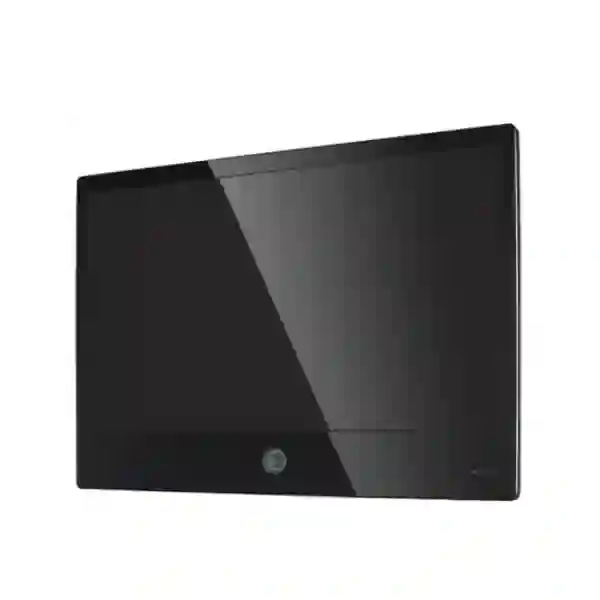
Hanwha SMT-2702PVM: 27-Inch White Public View Monitor with 2MP Camera
The Hanwha SMT-2702PVM is a 27-inch white public view monitor with an integrated 2-megapixel IP camera. It is intended for situations in which showing people a live view of the area can form part of a broader security and customer-awareness strategy. The Full HD screen, built-in camera and configurable monitoring message make the product different from an ordinary office monitor. For buyers evaluating a public view monitor in Tanzania, the first decision is whether the proposed location needs a visible live camera image, not simply a separate screen for a CCTV control room.
A public view monitor is often positioned where customers, visitors or staff can see the image while moving through a public-facing area. Its presence can communicate that an area is monitored, but it does not replace an appropriately designed surveillance system, trained response procedures or site security assessment. The SMT-2702PVM offers the monitor and network camera in one unit, reducing the need to place a separate camera beside a display for this particular application. The result can be a more coherent installation when the viewing angle, lighting and physical location are suitable.
Before committing, confirm that a 27-inch screen fits the intended field of view, that a white housing suits the environment and that the camera’s fixed perspective covers the required public space. Recording, event notifications, integrations, mounting accessories, power continuity and network policies should all be checked as separate elements of the final solution. The SMT-2702PVM is a product component, not a guarantee of complete video security. Request a quote and an installation-specific compatibility review before making an equipment decision.
Verified features at a glance
Feature availability is based on the manufacturer information for the exact product family; installed behaviour depends on configuration, compatible equipment and site conditions.
What makes a public view monitor different?
A conventional security monitor usually displays video to an operator in a restricted control area. A public view monitor performs a different role: it deliberately presents a live image where people in the observed area can see it. This can be useful where the operator wants to make camera presence understandable and visible without requiring a separate wall of CCTV displays. The Hanwha SMT-2702PVM is designed around that distinction. It combines a monitor intended for public viewing with a network camera integrated into the housing, so its function is more specific than an ordinary 27-inch display.
The visible picture is part of the experience. A visitor approaching a counter may notice the live image and a configured monitoring notice before engaging with staff. At a reception desk, the same arrangement can make the monitoring environment more obvious to arriving guests. In a customer-access area, the display may support clear communication about observation. Results depend on placement, content, visibility and staff procedures. No public view monitor can guarantee that misconduct will be prevented, and its presence should never be described as a substitute for a site risk assessment.
For a purchaser, the practical advantage of this product class is the integrated design. A standalone CCTV monitor plus a separate network camera may be more flexible in some layouts, but requires additional coordination between components. A public view monitor is attractive where the camera should face generally toward the people viewing the screen. Where the desired camera angle is substantially different from the screen direction, separate devices may be more suitable. Decide the intended purpose and viewing geometry first, then choose the hardware.
A 27-inch Full HD display for a clear local view
The SMT-2702PVM uses a 27-inch LED display with Full HD resolution of 1920 × 1080 pixels and a widescreen 16:9 format. That combination gives the screen a familiar shape for presenting a live local camera image. A buyer should consider the distance from which people will view the screen, whether reflections are likely and whether the picture will remain noticeable in normal activity. The stated resolution describes the display’s pixel grid; it does not guarantee that every subject will be identifiable at every distance, and the camera’s scene coverage is a separate consideration.
The 27-inch size can suit a deliberate, visible installation near a customer-facing location, but scale must be tested against actual space. A screen mounted far above eye level may become less effective as a communication tool, while one installed too low may obstruct movement or become vulnerable to accidental contact. The panel should be visible without interfering with doors, cashier operations, accessibility routes or emergency equipment. Measure the available wall or fixture area and allow room for cabling, airflow and maintenance access before selecting the final position.
The white external finish is a defining characteristic of the SMT-2702PVM. Hanwha identifies its closely related SMT-2701PVM as the black version. Buyers should specify the full model number when requesting a quote rather than asking generically for a 27-inch Hanwha public view monitor. Housing colour is not a minor detail for projects with consistent interior finishes. The requested finish, exact model and intended installation environment should appear clearly on the purchase quotation and approval record.
Integrated 2MP network camera and camera orientation
An integrated 2-megapixel network camera is central to the SMT-2702PVM’s function. Instead of relying solely on a feed from some unrelated camera, the product includes its own imaging source. Hanwha describes the camera as inconspicuous within the monitor housing, allowing the installation to look like a unified display. That should not be confused with an invitation to conceal monitoring from people: the appropriate deployment should include clear notice and comply with the organization’s privacy responsibilities. The camera and display together create a specific field of view that must be assessed on site.
The product is most effective when the display faces the audience that the built-in camera needs to observe. A public entrance, service waiting space or customer approach line may be a natural candidate, but each has different geometry. If a counter edge, door frame or shelving unit blocks the lower part of the camera’s view, moving the display or choosing a different mounting height may be necessary. Test with people standing and moving naturally through the area; a static picture of an empty room can hide practical problems with coverage.
The camera should not be represented as a replacement for every other surveillance angle. A separate wide-angle, corridor, ceiling or exterior camera may remain necessary to cover blind spots, emergency exits or other risk areas. Similarly, the display cannot make a poor position perform well through software alone. Treat camera placement, the direction of customer travel and the visibility of the live monitor picture as a linked design problem. A practical pre-purchase survey can identify those constraints before installation costs are committed.
Face-detection display: an on-screen cue, not identity recognition
The manufacturer lists face detection with a coloured bounding-box display for visual deterrence. When configured, this feature can draw a visible box around a detected face in the image, helping a viewer notice that the camera is responding to what it sees. The function is best understood as a visual cue associated with detection. It is not evidence that the system can identify an individual person, determine a person’s name or match someone against an identity database. Those would be different capabilities and should never be promised on the basis of a face-detection label.
Whether the boxes are useful depends on the mounting height, subject distance, lighting and amount of movement in the scene. A crowded entrance can be visually different from a quiet reception area. Buyers should consider whether the overlay is understandable to visitors and whether it distracts from other information on the screen. Testing the actual approach path is especially valuable: people may turn their heads away from the camera, approach from the edge of the scene or stand in a group. Real-world detection results can vary from controlled demonstrations.
An organization should also decide what it intends to communicate. A coloured box may make monitoring visibly obvious, but the appropriate wording of notices and the handling of images depend on its operational policy and applicable law. Do not describe this device as automatically recognizing suspicious behaviour or making security decisions. It supplies a detection and presentation capability that human operators can incorporate into a broader, proportionate monitoring programme. The review should include privacy, visitor expectations, accessibility and how staff respond to genuinely relevant events.
Wide dynamic range and difficult entrance lighting
Hanwha lists wide dynamic range of 150 dB for the SMT-2702PVM. This specification is relevant when the camera observes an area with bright and dark regions at the same time, such as an indoor entrance facing daylight. Wide dynamic range is intended to help preserve useful scene detail across differing exposure levels. It is not a claim that the camera will deliver equally detailed images under every lighting condition. Strong backlight, reflections, very low light and rapidly changing illumination can still affect the usefulness of the image.
In a shop entrance, a person entering from bright outdoor light may initially appear against a darker interior. At a reception point, glass doors or polished surfaces can create reflections and uneven illumination. During the survey, observe the intended location at more than one time of day rather than judging it from a single test image. Look for excessive glare on the monitor itself as well as exposure difficulties in the camera feed. Both can undermine the central purpose of allowing people to see a recognisable live scene.
Do not infer night-vision illumination, thermal imaging or weather resistance from the WDR specification. These are separate design questions. If the location is poorly lit at night, assess the lighting scheme and any need for additional cameras or equipment. If a screen is planned near an open external entrance, confirm that the mounting space remains within the device’s rated environmental conditions. A public view solution succeeds when its real placement works under normal operating conditions, not merely when the advertised camera specification looks impressive.
Network video integration and management
The integrated camera is network-capable, and the official feature list describes the SMT-2702PVM as IP video and network manageable. This matters when the installation is part of an existing video surveillance architecture rather than a completely isolated display. The camera may need an approved network address, security settings, access permissions and coordination with a recorder or video management platform. A network connection should not be confused with automatic compatibility: the exact receiving software, supported profiles and required functions must be checked before purchasing.
Start by identifying who will operate the device. A security administrator may need to manage user permissions, change passwords and check firmware. An integrator may need to add the camera stream to an existing recorder. An IT team may need to assign the equipment to a security network and ensure that access is limited to authorised devices. A project should define these responsibilities before installation. Leaving the monitor’s network interface unmanaged can create unnecessary operational and cybersecurity risk, even if the public-facing live image appears to work correctly.
Network design is particularly important for multi-site organizations. The ability to manage an IP camera does not automatically establish cloud access, remote monitoring rights, video storage capacity or internet bandwidth. These choices depend on the rest of the system. If a site needs off-site access, ask the integrator to confirm secure connectivity and relevant policies. If local operation is sufficient, a controlled local area network may simplify design. Either way, the video service must be configured and tested within the customer’s actual environment.
Video compression, streaming and bandwidth planning
The SMT-2702PVM supports H.265, H.264 and MJPEG video compression, according to Hanwha’s product information. Multiple streaming is also listed. These capabilities give an integrator options for how video is delivered to compatible endpoints, but they do not eliminate the need to calculate network and recording requirements. Different codecs and quality settings can change bandwidth consumption and storage use. Selecting a codec should be based on the supported recorder, management software, quality expectations and operational needs, rather than simply choosing the newest name.
An installation using a local recorder may favour a particular codec for compatibility, while a management interface or other viewing client may call for a different profile. The availability of multiple streams can help serve distinct viewing and recording purposes when those functions are supported by the selected equipment. It should not be interpreted as unlimited simultaneous delivery. Confirm the recording frame rate, stream resolution, expected scene motion and retention target through an actual test with the chosen video platform before signing off the design.
Bandwidth planning also matters when an organization has shared internet access or constrained network infrastructure. Local IP video may remain on the local network, while remote access can introduce additional traffic and security considerations. A reliable design records the expected viewing endpoints and measures video traffic under realistic activity levels. If the site has intermittent connectivity, decide what must continue operating locally during an outage. Compression options are useful engineering tools, not substitutes for capacity planning or a documented operating requirement.
Local storage and recording decisions
Hanwha specifies a microSD, SDHC or SDXC card slot supporting capacity up to 256 GB. This creates an edge-storage option for supported recording workflows, but storage media and recording behaviour must be considered separately. A memory card is not necessarily supplied with the product, and inserting one does not by itself define a retention policy, event rules or recoverable evidence process. Ask what type of recording is required, which events should trigger it and how footage will be retrieved by authorised personnel.
Storage duration cannot be stated responsibly without knowing codec settings, frame rate, scene activity and whether recording is continuous or event driven. A card rated at a given capacity can hold different amounts of video under different configurations. Operational conditions can also shorten the useful life of removable media. For business-critical recording, assess whether a recorder or network storage solution is more appropriate and whether redundancy or a backup procedure is required. No storage arrangement is immune to device failures, media wear or improper shutdown.
The phrase “Recording in progress” is available as a configurable on-screen notice. That phrase should only be displayed in a way that accurately describes the organization’s real operating practice. A visible message is not proof that recordings are actually being captured, retained or monitored. During commissioning, verify that the configured event or continuous recording mode produces retrievable files, timestamps are correct and authorised users can access the required evidence. Keep the documentation aligned with the actual configuration rather than the default display wording.
HDMI and VGA inputs for display-source flexibility
The model includes HDMI and VGA inputs in addition to its integrated camera capability. This is useful when the display may need to show a source other than its own camera feed, subject to the operating modes provided by the unit. It does not mean that every modern video source or every simultaneous display layout is automatically supported. The buyer should identify the exact equipment they intend to connect, its output signal and the viewing mode required, then verify how the monitor behaves in that situation.
For example, a security project might have a local video device with an HDMI output, while an older installation might provide a VGA signal. Those inputs offer potential flexibility, but an integrator must confirm signal format and cabling. Consider cable length, secure routing and whether the connection can be maintained without leaving exposed wires in a public-facing area. If the source is a recorder, check whether its desired output format is compatible with the screen and whether staff can easily return to the public view image when needed.
A common procurement mistake is to specify “HDMI” without defining whether the requirement is an input or an output. On this product, Hanwha lists HDMI and VGA as additional inputs. Do not treat that feature as a promise of HDMI recording output or digital signage functions. The purchaser should document the source device, connector, intended on-screen content and operator control method. The better the usage scenario is described, the easier it is to confirm that the chosen display supports it before installation.
Motion detection, analytics and useful event rules
Hanwha lists motion detection and advanced video analytics among the SMT-2702PVM’s capabilities. These functions can help an integrator design a more selective video workflow than a simple permanent live feed, but the practical value depends on configuration. Detecting activity is not the same as identifying a threat. Movement by customers, staff, cleaning personnel or changing shadows may be entirely normal. A sensible solution starts by identifying which event types matter to the business and which should be ignored.
Consider a reception area where someone enters the visible zone during business hours. That activity could be routine and need no alert. In a restricted section, similar motion outside operating hours may warrant closer attention, provided the camera actually covers the relevant space. The process of defining zones, schedules and response actions is more important than enabling every available event simultaneously. Excessive alerts can make a system less useful by distracting operators from the events that require a decision.
Any analytics feature must be tested in the deployed environment and should retain human oversight. Lens angle, crowding, lighting, environmental movement and software configuration can influence event quality. Treat the manufacturer’s feature list as an indication of supported tools, not a guarantee of a particular detection rate. Before approval, agree what an event means, who receives it, how it is recorded and how false alerts will be reviewed. This turns a technical feature into a manageable business procedure.
Mounting the screen safely and at the right height
The product is intended to be securely mounted, and the manufacturer documentation lists VESA mounting patterns for the 27-inch models. Selecting a bracket should not be based solely on whether the fixing holes appear to align. The supporting structure, approved screw dimensions, expected load, tilt and maintenance access all matter. A qualified installer should assess the wall, column or ceiling assembly. In a customer-facing setting, a secure mount protects visitors and staff as well as the display and camera.
Think about the intended audience before choosing the final height. A screen that is highly visible to people entering a shop may need a different angle from one observed by a waiting queue. The built-in camera points from the monitor, so each adjustment affects both what people see and what the camera records. Very high or steeply angled mounting can change facial visibility and compromise the front-facing public view experience. Mark the candidate position and test the viewing area before drilling or ordering a custom bracket.
Cabling should be routed where it cannot be caught, damaged or casually unplugged. Allow suitable ventilation and access for authorised service work. Avoid installing in places likely to be struck by carts or doors without considering physical protection. Outdoor exposure should not be assumed acceptable merely because the unit serves a security purpose; confirm environmental suitability from the product documentation. The final mounting plan should state the fixing method, chosen bracket, cable path, permitted access and who signs off the installation.
Electrical power, resilience and site readiness
The integrated camera is described by Hanwha as internally powered, simplifying the relationship between the display and camera electronics. However, the complete monitor still requires its specified electrical supply. Procurement and installation teams should verify the supplied power adapter, local socket arrangement and approved connection method for the exact unit. Do not infer that the entire monitor can be powered solely over a network cable. Power arrangements for an integrated public view monitor are not interchangeable with those of a small standalone PoE camera.
A security-related display may be expected to operate through normal business hours or longer. Ask whether the site experiences power interruptions and whether a backup power strategy is required. An uninterruptible power supply may be considered as part of the wider design, but the required rating and expected runtime must be calculated from the real equipment load. Include network switches, recorders and any upstream devices that the live feed depends on. Keeping the screen powered will not help if an essential connected system loses power at the same time.
During commissioning, check that the unit restarts appropriately after an interruption and that any recording and network connections recover. Confirm safe cable routing, grounding and overcurrent protection according to the applicable installation requirements. Environmental conditions, ventilation and the use of appropriate accessories should also be checked. These steps are ordinary engineering precautions rather than special claims about local electrical certifications. A properly documented supply design reduces the likelihood of avoidable operating interruptions later.
Planning a deployment in Tanzania
For a Tanzania project, start with the actual premises rather than generic assumptions about a city or business sector. A site near strong daylight may need careful screen orientation, while an interior reception area may have relatively stable lighting. A business with an existing IP video network faces different integration questions from a location installing surveillance for the first time. The SMT-2702PVM can be evaluated in either context, but product suitability should be verified against the specific network, mounting and security requirements of that location.
The purchaser should also ask about environmental conditions and practical maintenance. Heat, dust, humidity, reflected sunlight and exposure to public contact can all affect the suitability of a proposed position. Use the manufacturer’s stated operating limits when assessing the intended room or sheltered location, and do not assume weatherproof or outdoor performance without evidence. A monitored entrance may remain safe and functional only if the device is installed within its intended conditions and staff can reach it for cleaning, inspection and service.
Commercial details deserve the same discipline. Availability in another country does not establish availability in Tanzania, and an online price elsewhere should not be converted into a local quotation. Ask FourTeck Tanzania to confirm the exact model, white finish, current sourcing options, included accessories, price, lead time and any available support arrangement. Where installation is required, obtain a separate written scope rather than assuming that mounting, configuration, data retention or staff training is automatically included with the monitor.
Where this model can fit business workflows
At a retail entrance, a visible public view image may help make the use of video monitoring clear to customers and staff. The key design issue is whether the approach path falls within the camera’s usable field of view without creating obstructions. A screen positioned beside a doorway may show people only after they have walked past it, limiting the intended effect. Plan the installation around the traffic direction, not simply the nearest available wall surface. Coordinate the display with any existing entrance cameras or store security procedures.
At a reception desk, visitors may see their image while approaching a service point. Here the installer should consider queue formation, lighting behind the visitor and whether the screen is visible without making the waiting experience uncomfortable. A reception area may also require careful privacy zoning so private desks, paperwork or restricted doors are not unnecessarily displayed to the public. The public view camera is meant to serve a specific observable space; it should not expose information unrelated to that purpose.
At a service counter or controlled access point, the monitor can complement the organization’s signage and employee procedures. The display may be useful where an obvious visual reminder of monitoring is desired, but it cannot verify access credentials or replace physical access control. Hospitals, schools, offices, hospitality venues and warehouses have different privacy and safety requirements, so no single placement should be assumed universally suitable. Define the workflow and ask whether a public view monitor, an ordinary display, a standalone IP camera or a combination is the most proportionate choice.
A practical pre-purchase specification checklist
Confirm the model identifier SMT-2702PVM and the white housing in the quotation. Check the 27-inch Full HD screen requirement against the available installation area. Document why an integrated 2MP network camera is needed and whether its fixed viewing direction can cover the relevant space. Decide whether the face-detection bounding box and on-screen message will be used. State whether HDMI or VGA is actually required, rather than assuming every connector will be used. These details prevent the purchase from drifting into an unsuitable generic monitor specification.
For the security system, list the current recorder or video management platform, relevant software versions, network topology and required stream format. Ask for a compatibility test or written confirmation where integration is essential. Specify recording expectations, card or recorder storage, retention requirements and access permissions. If alarm events are planned, define which ones matter and how they will be delivered. Verify that any needed accessories, memory cards, bracket, cables or electrical components are part of the quoted supply rather than relying on assumptions.
For the site, record mounting surface, approximate screen position, cabling route, ambient lighting, power quality and environmental exposure. Determine who will approve privacy notices, hold administrative credentials and manage routine maintenance. Ask about delivery, warranty terms and support only through a verified written offer for the specific transaction. No price, availability or warranty is represented on this page as confirmed for Tanzania. A clear checklist helps procurement compare proposals fairly and reduces costly surprises during installation.
Suggested installation and commissioning sequence
First, carry out a short site assessment. Walk the approach area and decide precisely what people should see on the screen and what the camera should capture. Test the proposed mounting height with realistic lighting and traffic. Confirm the mount’s mechanical suitability and the route for power and network cables. At this point, the installer should be able to explain why the chosen place serves the public view purpose better than neighbouring positions. Capture those decisions in a simple site plan before physical work starts.
Second, install the equipment in accordance with the manufacturer’s instructions and configure the camera and network settings. Use unique administrator credentials, an appropriate time source and controlled user permissions. Select video settings compatible with the recording or management system and verify the actual picture on the local display. If a face-detection overlay or monitoring message is required, configure it deliberately rather than leaving the entire deployment to default settings. Confirm that the displayed wording matches the site’s monitoring policy.
Third, commission the whole workflow. Ask people to approach the monitored area at typical speeds, in normal groups and under representative light conditions. Review what appears on the public display and what the recorder or authorised viewer receives. If recording is enabled, retrieve a sample clip rather than relying only on a live preview. Test restart after a controlled interruption, document access credentials securely and give the designated operator basic instructions for checks and escalation. Acceptance should be based on observable functions, not solely on the device powering on.
Privacy, transparency and responsible operation
A public view monitor is visible by design, but visibility alone does not settle privacy questions. Organizations should determine a lawful and appropriate purpose for monitoring, identify which spaces are included and decide how people will be informed. Camera placement should avoid unnecessarily capturing private or sensitive areas. The live display may be seen by visitors who are not authorised to view certain business activities, so framing matters as much as the recording destination. Review these issues with the organization’s appropriate compliance or legal adviser.
Face detection should be explained accurately to staff and customers. A coloured box around a detected face is not the same thing as a verified identity match. Similarly, a motion alert does not establish misconduct. Avoid signage that overstates what the system does. The notice shown on screen should be consistent with actual recording settings and the retention policy. If footage is retained, the organization should define who can view it, when it can be disclosed, how long it remains and how it is securely removed.
Sound recording and remote access should not be assumed to be enabled, permitted or necessary merely because a product family offers related technical features. Each additional type of data collection should have its own operational justification and configuration review. The site should also plan responses to visitors’ reasonable questions about monitoring. Using the product in a proportionate and transparent way can support the purpose of public view monitoring while limiting unnecessary risk and confusion for people who enter the space.
Maintenance, administration and long-term reliability
A public-facing monitor is part of the day-to-day environment, so its upkeep should be assigned to someone rather than left to occasional troubleshooting. Routine checks can include screen visibility, physical security of the bracket, cable condition and whether the camera view remains aligned. Changes to shelving, signage or queue barriers may alter what the camera sees even though the equipment has not moved. A short inspection schedule can help staff notice those changes before the screen ceases to serve its intended purpose.
From an IT perspective, maintain an inventory entry with the exact model, installation location, network address and responsible administrator. Keep firmware and configuration changes within a controlled process, checking release compatibility before updating equipment. Review user accounts and passwords when staff responsibilities change. Where video is recorded, periodically confirm that timestamps, event rules and file retrieval still work. A green network indicator or a visible image alone cannot prove that the entire recording workflow remains healthy.
Plan for eventual service, replacement and end-of-life decisions. Availability of parts, firmware support and an identical replacement should be verified with the relevant supplier when those details become important; this page does not assert a particular lifecycle status. Retain purchase and commissioning records, including the approved accessories and wiring method. If a replacement model is considered, compare actual functions and integration behaviour instead of assuming that the next similar-looking public view monitor is a drop-in substitute.
Choosing between this monitor and other security displays
A buyer comparing options should begin with the intended job. If the requirement is to give a control-room operator several camera views, a conventional CCTV display combined with a recorder may be more appropriate. If the requirement is to make customers aware of a live camera image directly in their area, a public view monitor offers a more focused approach. If the camera must face a location different from the screen, a separate IP camera and display may provide greater mounting flexibility. The right solution follows the geometry and workflow of the site.
Within Hanwha’s related product family, the SMT-2701PVM is described as a black 27-inch public view monitor, whereas SMT-2702PVM is white. That distinction matters for finishes and correct ordering, but it is not evidence of a performance difference. Other screen sizes may be more proportionate where wall space is limited or viewing distance is short. Do not select solely by the largest display or the most analytics features. Evaluate the picture seen by the visitor, the image captured by the camera and the equipment already deployed.
Compare proposals on the basis of a common checklist: screen size and resolution, housing finish, integrated camera, network integration, display inputs, mounting requirements, recording configuration, cyber administration and support requirements. A lower-priced generic screen is not a like-for-like alternative if it lacks the camera or public-facing monitoring functionality. Conversely, the integrated product may be unnecessary if a screen merely needs to show an existing remote camera. Explaining the intended outcome makes the total project cost and tradeoffs clearer.
Frequently asked questions about the SMT-2702PVM
What is the Hanwha SMT-2702PVM?
It is a 27-inch white Full HD public view monitor incorporating a 2-megapixel network camera. It is intended to show people a live monitored scene in a public-facing location. It differs from a regular monitor because the camera and related video capabilities are integrated into the same unit. Buyers should confirm the required installation environment and actual system integration before ordering.
Is SMT-2702PVM a camera or a monitor?
It is both a public view monitor and an integrated network camera. The screen presents video for public viewing, while the built-in camera provides the image source. This does not mean it replaces other site cameras, recorders, storage policies or response processes. Those are separate elements of a complete security system and may be needed depending on the project.
Is this the white or black 27-inch model?
The SMT-2702PVM is the white version. Hanwha lists the closely related SMT-2701PVM as the black version. Buyers should request the exact model identifier in writing and check the finish when reviewing a quotation. A generic description such as 27-inch Hanwha PVM may not sufficiently distinguish the requested product.
Does the monitor recognize people’s identities?
The manufacturer lists face detection with a coloured bounding-box display. This is a visual detection function, not a verified personal identity recognition feature. It should not be advertised as matching individuals to a database or determining who someone is. Detection behaviour can vary with subject position, distance and lighting, so test it in the intended location.
Does it support a recording message?
Hanwha lists a configurable on-screen text overlay, including a pre-configured Recording in progress message. The wording should be used in a way that matches the real monitoring and recording configuration. A displayed message does not itself prove that files are being recorded or retained. The installer must verify recording separately.
Can it use a microSD memory card?
The manufacturer’s feature list includes a microSD, SDHC or SDXC slot supporting up to 256 GB. This describes a storage capability, not a promise that a card is supplied or that a particular recording period is guaranteed. Recording quality, codec, frame rate and activity influence storage use. Confirm media compatibility and test file retrieval.
Are HDMI and VGA available?
Yes. Hanwha lists additional HDMI and VGA inputs. Buyers should check which external display source they wish to connect and whether its signal and required operating mode are supported. Inputs are not the same thing as recording outputs. Confirm cables, routing and the actual display workflow rather than assuming that every connector type serves the same purpose.
Can it work with my existing CCTV system?
It may fit a network-video environment, but compatibility must be checked with the specific recorder or video management system. Review supported stream formats, network requirements, available client features and software versions. A visible picture on the screen does not automatically establish that the camera can record correctly into a particular system. Request an integration check where necessary.
Will it work during an electricity outage?
The unit requires its specified power supply, and connected recording or network equipment may also depend on mains power. If continuity is important, a qualified installer should design and size any backup power equipment for the complete required workflow. The public view monitor alone should not be described as having a guaranteed outage runtime.
Is it suitable for an outdoor location?
Do not assume that a security product is weatherproof. Check the manufacturer’s environmental limits and whether the proposed installation is sheltered from rain, dust, excessive temperature and direct environmental exposure. A public entrance may still contain challenging conditions even when part of the site is covered. Confirm suitability before purchase or installation.
Does it need an internet connection?
The built-in camera has network management and video capabilities, but whether internet access is needed depends on the selected local or remote workflow. A local security network and an off-site monitoring design have different requirements. Specify who needs to view the camera, where video is recorded and how access will be protected before finalising connectivity.
Can I order it in Tanzania through FourTeck?
You can request a product quotation and confirmation from FourTeck Tanzania. Current stock, sourcing, delivery scope, commercial terms, installation availability and warranty have not been verified in this content. Provide the exact model SMT-2702PVM, desired quantity, installation location and any compatibility questions so the response can address the actual requirement.
Request a Hanwha SMT-2702PVM quotation in Tanzania
If you are considering the Hanwha SMT-2702PVM for a retail entrance, reception area, customer service location or another public-facing space in Tanzania, request a quotation with the exact model and white finish stated clearly. Include the intended quantity, display location, existing surveillance equipment and whether you need a configured recording workflow. These details make it easier to assess suitability without promising stock or technical compatibility that has not been checked.
Ask FourTeck Tanzania to confirm current sourcing, included accessories, commercial terms and any separately quoted installation or integration service. A site-specific review is worthwhile before selecting brackets, storage media or power backup equipment. The next step is a verified quotation and compatibility discussion, not an assumption that every public view monitor will fit every premises.
Contact FourTeck Tanzania for model confirmation, product details and a written quote.




Reviews
There are no reviews yet.