
UNIFI ENTERPRISE WIFI 7 | E7-CAMPUS
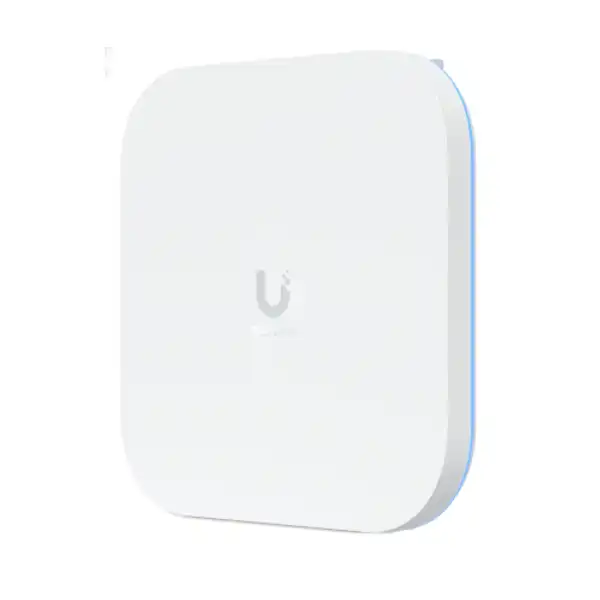
Ubiquiti E7 Campus (E7-Campus) WiFi 7 Access Point
Directional enterprise wireless coverage for demanding indoor and outdoor locations. Evaluate the E7 Campus for defined campus service zones, dense client environments and carefully planned high-availability networks in Tanzania.
Request a project-specific product and infrastructure review from FourTeck Tanzania before specifying your installation. Regional radio operation, stock, price and service terms require confirmation.
Why buyers evaluate this model
The Ubiquiti E7 Campus combines directional antennas, PRISM active RF filtering, ten-stream WiFi 7 hardware, PoE++ power and a 10 GbE primary Ethernet interface in a product designed for demanding coverage zones. Its secondary 1 GbE port can participate in a correctly engineered resilient power-and-data topology. The practical benefit is control over where service is delivered, alongside tools for managing a large number of devices and a flexible mounting arrangement. Buyers should evaluate the real operating environment, not just theoretical radio speed.
The key decision for a Tanzania deployment is the match between an engineered coverage requirement and the actual regionally supported equipment features. Ubiquiti’s public 6 GHz support list currently does not name Tanzania; accordingly, this page does not claim that 6 GHz is usable locally. It also does not present the manufacturer’s reference client count or coverage figure as a guaranteed outcome. A supplier quotation should resolve regulatory questions, wired switching, PoE power, weatherproof installation and operational support before anyone commits to a specific site design.
Technical overview and what to verify
| Topic | Manufacturer information | Buyer decision |
|---|---|---|
| Wireless platform | WiFi 7; 10 spatial streams | Radio availability and supported channels vary by location |
| Interfaces | 10 GbE RJ45 plus secondary 1 GbE RJ45 | Design primary backhaul and redundancy separately |
| Antenna approach | Integrated directional antennas | Aim coverage; survey actual service zones |
| RF features | PRISM filtering; spectral analysis | Mitigates some interference, not poor physical placement |
| Power | PoE++; up to 44 W maximum | Verify switch power budget and injector data rate |
| Weatherproofing | IPX6; IP67 with included waterproof door kit | Install kit correctly and review outdoor conditions |
| Manufacturer references | 465 m² coverage; 1,000+ clients | Not guaranteed at-site area, throughput or busy-user count |
| Administration | UniFi Network; technical requirement 9.0.114+ | Check current software and controller compatibility |
Figures above reflect Ubiquiti’s documented E7 Campus platform and must be interpreted for the exact regional hardware and permitted operating bands. There is no promised Tanzania price, inventory status, product authorization, warranty or site performance in these specifications.
Where this access point may fit
Campus and education
Courtyards, building approaches and well-defined high-client gathering spaces, subject to survey.
Enterprise compounds
Focused outdoor work zones with appropriate switching, policy controls and support ownership.
Hospitality and events
Visitor areas requiring deliberate coverage, user isolation and capacity planning for peak attendance.
Logistics and operations
Loading zones or operational lanes where scanner compatibility and reliable coverage are tested.
Who is the E7 Campus designed for?
The E7 Campus is aimed at network designers who must serve a defined area with many moving users or a mixture of enterprise and guest devices. The central buying question is not simply whether WiFi 7 is faster. It is whether a directional, ruggedized access point with enterprise management helps solve a real coverage, interference or capacity problem at a particular site. Universities may need resilient wireless connectivity across teaching blocks and courtyards. A commercial campus may need consistent access around offices, walkways and shared outdoor spaces. Warehouses, resorts and event facilities may benefit from deliberate antenna aiming and careful client distribution. In each example, network design remains more important than a headline radio figure.
For a buyer in Tanzania, the sensible starting point is a simple site brief: where users gather, what applications matter, how many devices are active at the busiest time and where a reliable wired backhaul can reach. The Ubiquiti E7 Campus is suitable for evaluation when those requirements justify its higher-capacity hardware. It should not automatically replace every ordinary indoor ceiling access point. Conventional omnidirectional models may provide a cleaner fit for small rooms, while specialist point-to-point equipment may be more appropriate for links between distant buildings. Matching the radio pattern to the space is the first decision.
What the ten-stream WiFi 7 platform actually means
Ubiquiti specifies ten spatial streams across the hardware’s 2.4 GHz, 5 GHz and 6 GHz radio architecture, with 2 x 2 MIMO at 2.4 GHz and 4 x 4 MIMO on the higher bands. Streams describe simultaneous spatial transmission capabilities; they are not ten guaranteed independent gigabit connections. Modern compatible clients can benefit from WiFi 7 mechanisms, but each laptop, handset and scanner negotiates its own capabilities. A WiFi 5 or WiFi 6 client does not become a WiFi 7 device merely by joining this network. Its negotiated data rate depends on the client radio, signal strength, interference, channel width and configured security settings.
This distinction matters in projects containing a wide range of hardware. A campus may have new workstations, older handheld terminals, telephones, access-control devices and staff smartphones on the same infrastructure. Most applications need predictable useful throughput and roaming behaviour, rather than the highest theoretical physical-layer figure. Plan the radio environment for the traffic profile: collaboration calls require steadiness and latency control; large downloads need capacity; basic mobile applications need reliable reach. The E7 Campus supplies radio headroom, yet performance is delivered by the complete system: access points, switches, cabling, gateways, configuration and client devices.
Directional antennas: place coverage where people work
The E7 Campus uses integrated directional antennas rather than a conventional uniform all-around pattern. Ubiquiti publishes nominal antenna gains of 9 dBi at 2.4 GHz and 12 dBi at 5 GHz and 6 GHz for the North American technical variant, with beamwidths that differ by band. In practical planning, these numbers describe a focused service area. A unit mounted on the side of a building and aimed towards a courtyard may serve the intended space better than an access point radiating comparable energy in every direction. It can also reduce unnecessary signal spill into spaces outside the planned cell. Exact antenna patterns and permitted transmit settings depend on the chosen regional model.
Focused coverage is not the same as limitless range. People standing behind the access point, around a heavy concrete corner or beyond a metal obstruction may see weaker performance. A polished design evaluates horizontal and vertical aiming, mounting height, client antenna limitations and the effect of doors, roofing, walls and vegetation. High mounting can clear obstructions, but it may weaken coverage close to the installation point if the beam is misdirected. Before buying multiple units, mark the intended service zones on a plan and conduct a practical survey, especially when users must move between outdoor paths and indoor spaces without losing important sessions.
PRISM RF filtering and crowded wireless environments
PRISM is Ubiquiti’s active RF-filtering technology, intended to help the access point operate in challenging radio environments. Alongside real-time spectral analysis and advanced radio management, it gives administrators tools to understand interference and improve channel choices. This is valuable where adjacent wireless networks, dense client populations or other sources of radio energy compete for usable spectrum. However, an RF filter cannot remove every noise source or overcome poor placement. Physical obstructions, insufficient signal at the client and overlapping coverage cells still require careful engineering. Treat PRISM as a helpful hardware capability within the design, not as permission to skip measurement.
A sound approach is to take baseline readings before installation, document the current channel occupancy and then verify results after configuration. Test where workers actually stand, not only at the nearest access point. In multi-access-point buildings, review channel reuse, transmit power, cell overlap and roaming decisions together. Using maximum transmission power everywhere can be counterproductive because a handset with a small antenna may hear the access point while the access point struggles to hear it. Balanced two-way links and sensible channel widths often produce a better experience than aggressively maximizing the advertised rate on one radio.
Coverage and client figures: how to interpret them
The official E7 Campus specifications state a coverage area of 465 square metres, or roughly 5,000 square feet, and a maximum client count above 1,000. These are manufacturer reference figures. They do not mean that any room of that size will receive consistent throughput or that a thousand users can all stream demanding applications simultaneously with a guaranteed service level. Building materials, background interference, device location, spectrum permissions and traffic concurrency alter the usable capacity. A crowded conference or examination venue should be sized from realistic usage assumptions, not by treating a maximum association count as the number of fully active clients it will support.
During planning, separate how many devices might connect from how many are actively transmitting during the busiest interval. Estimate application types, likely throughput per active device, roaming expectations and any required service-level targets. Account for the location of access points relative to people, the effect of bodies in dense crowds and the amount of usable radio spectrum. Multiple strategically placed cells may outperform one high-capacity unit at the edge of its service area. Test an occupied representative zone when possible, then adjust the final access-point quantity instead of assuming the catalogue figure is a universally guaranteed footprint.
Radio speeds versus delivered application performance
The manufacturer’s technical sheet quotes maximum physical radio data rates of up to 688 Mbps on 2.4 GHz, 8.6 Gbps on 5 GHz and 11.5 Gbps on 6 GHz under specified channel-width conditions for the documented variant. These figures are not measured internet download speeds and they do not add up to a promised throughput for every site. WiFi has protocol overhead, airtime contention and shared radio resources, while a wired upstream path can create its own limit. Real connected clients normally use fewer spatial streams than the access point offers. Even when the strongest possible link is established, real user traffic will generally run below its nominal connection rate.
For a procurement decision, ask what experience must be delivered rather than requesting a theoretical number alone. A video class may need stable bidirectional performance for dozens of devices. A warehouse scanning workflow may consume little bandwidth but be sensitive to reconnect delays. An engineering office moving files may care about a fast local LAN even when external internet is limited. These are different design problems. Include switching throughput, firewall capacity, any network-wide traffic shaping, device density and the actual internet connection in estimates. If 6 GHz operation is unavailable in the country of deployment, do not use its published data rate in a local business case.
Important Tanzania 6 GHz and regulatory consideration
The E7 Campus hardware platform has 6 GHz capability, but availability of that radio band is region dependent. Ubiquiti’s current public list of countries supporting 6 GHz operation does not list Tanzania. In addition, Ubiquiti describes outdoor 6 GHz operation as limited to selected regions with appropriate coordination and equipment requirements. Therefore this page does not promise 6 GHz service, 320 MHz channels or automatic-frequency-coordination operation in Tanzania. Confirm the current Tanzania Communications Regulatory Authority requirements, exact local SKU and Ubiquiti country-specific firmware behaviour before finalizing a design that depends on those features.
A responsible Tanzania deployment can still be evaluated for its 2.4 GHz and 5 GHz utility, directional design, RF filtering, wired interfaces and weather protection, subject to equipment authorization and local conditions. If 6 GHz is a mandatory project requirement, obtain written confirmation of lawful operation and vendor support for the exact installation environment before making a purchase commitment. Indoor-only permission in another country must never be treated as outdoor permission in Tanzania. Likewise, the presence of a 6 GHz antenna or software menu does not itself establish authority to transmit. This regulatory distinction protects the project’s investment and reduces the risk of building around a feature that cannot be deployed as intended.
10 GbE uplink and a secondary 1 GbE connection
The E7 Campus has one 10 Gigabit Ethernet RJ45 interface and a separate 1 Gigabit Ethernet RJ45 interface. The 10 GbE connection offers a high-capacity wired path that is appropriate for a premium multi-radio access point, provided the upstream equipment and cable run support it. The secondary Gigabit interface is intended to participate in a high-availability design rather than to be mistaken for another 10 GbE uplink. Ubiquiti describes redundant power-and-data arrangements using separate compatible switches. Such a topology can reduce exposure to a single link or power-source failure, but effective failover depends on the complete network configuration.
Before installation, confirm the desired port speed, supported copper cable category, run length, PoE delivery and switching architecture. A ten-gigabit-labelled access point cannot deliver ten-gigabit backhaul through an ordinary one-gigabit switch port. Nor does adding a secondary port automatically make an unreliable upstream internet connection resilient. Review switch uplink capacity and aggregation points, especially when several access points share one distribution switch. In a critical network, document normal and failover paths, then conduct an actual controlled failure test. A redundant cable that terminates on the same unsupported power source may not address the failure scenario the organization is trying to avoid.
PoE++ power and electrical planning
Ubiquiti specifies PoE++ power for the E7 Campus, a supported DC input range of 42.5 to 57 volts and maximum consumption of 44 watts. That makes the power budget a genuine design requirement. Check whether the selected switch supports the necessary PoE standard and whether enough power remains available across all its ports at peak consumption. A device can have sufficient network bandwidth while still failing to start or operating unreliably because its power source is unsuitable. Where a suitable switch is not available, a compatible Ubiquiti 10G PoE++ adapter may be considered, subject to the exact design and accessory availability.
For multiple units, add the total load with sensible design allowance and include every other powered device on the same switch. Account for UPS runtime, environmental conditions around the injector or switch, grounding and appropriate surge protection in exposed installations. Do not assume that all PoE adapters preserve a 10 GbE data path; verify the specific injector’s Ethernet rating. A backup power plan should include the access point, its switches, management and the upstream gateway, not just a battery attached to one network box. These checks are particularly important for wide outdoor properties where the cable path is long and the equipment enclosure is distant from the main communications room.
Outdoor enclosure and the IP67 condition
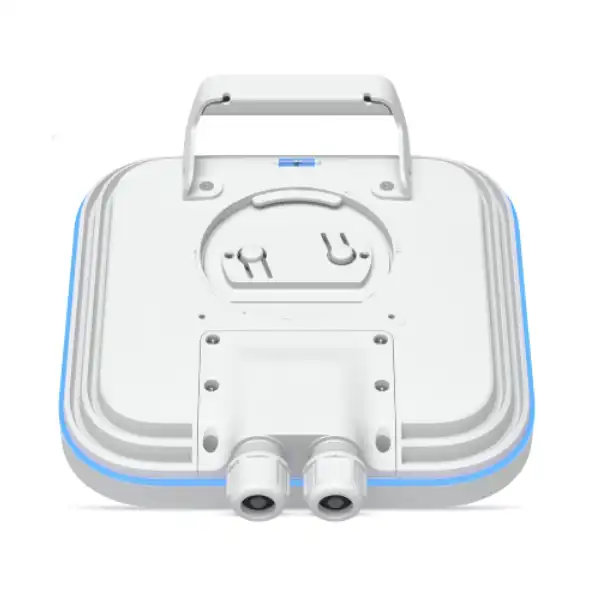
The manufacturer rates the E7 Campus enclosure IPX6 in its standard configuration and IP67 when the included waterproof door kit is installed as specified. This distinction should be retained in every purchase specification and installation checklist. IP67 protection is not an unconditional promise independent of assembly, cable entry or environmental handling. The connection area must be closed correctly, suitable cables and seals should be used, and the mounting arrangement should avoid unnecessary strain and trapped water. Always follow the official installation guide, including permitted orientation and any requirements for protective accessories.
Outdoor deployment introduces risks beyond rain. Sun exposure, wind, vibration, cable movement, power disturbances and physical access can all affect reliability. Ubiquiti lists UV-stabilized polycarbonate and aluminum alloy enclosure materials for the documented E7 Campus variant and publishes an operating-temperature range extending from minus 30 to 60 degrees Celsius. Those figures do not replace a site-specific assessment of solar heating, corrosion, lightning exposure or structural safety. Installers should verify bracket fixation, appropriate earthing practices and the full path for water to drain away. A protective enclosure rating is an engineering input, not a substitute for professional installation at exposed locations.
Mounting, alignment and physical space
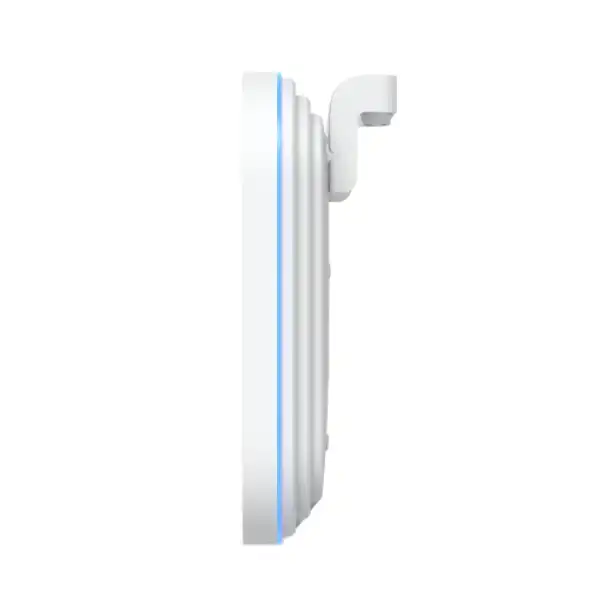
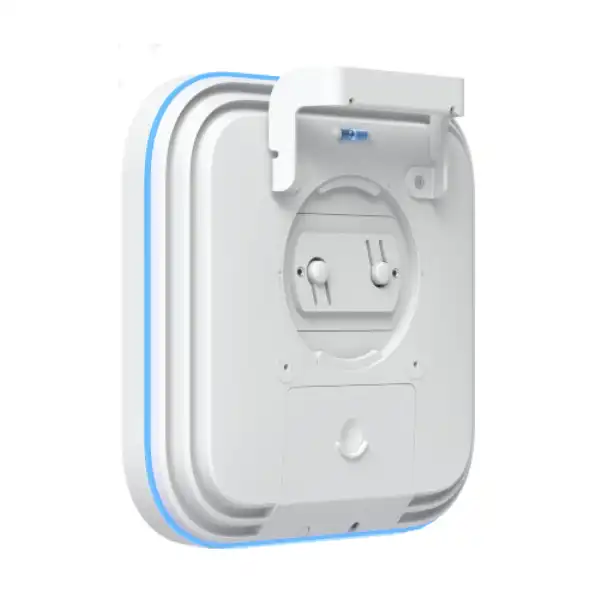
The E7 Campus is designed around an articulating mounting arrangement, with wall and pole options identified in Ubiquiti’s specifications and VESA mounting available as an optional route. The access point body is approximately 250 by 250 by 45.5 millimetres in the documented technical sheet, with additional clearance needed for the mount, cabling and service access. Because its antennas are directional, this mounting hardware is more than a convenience: it allows installers to aim the service cell towards the intended users. Poorly chosen mounting orientation can undermine the benefit of the antenna pattern and leave important areas undercovered.
A good mounting location has a clear service objective, manageable cable access and a structurally appropriate attachment surface. Do not select a position purely because power is nearby. Look at pedestrian areas, loading zones, building entrances and the actual height of user devices. Plan around trees, metal structures, roofing and likely future construction. Where access points face each other across a yard, test whether their beams create excessive overlap or channel contention. Record the final angle and location so that subsequent maintenance or replacement can restore the designed coverage. Check physical security and whether maintenance teams can reach the installation safely without interrupting site operations.
Campus and university deployment scenarios
On an educational campus, the challenge often changes from one building to the next. A classroom demands reliable coverage across a dense and relatively enclosed set of seats. A courtyard needs directional service over open space and an appropriate weather-resistant installation. A corridor may require thoughtful roaming and control over the shape of the wireless cell. The E7 Campus is most compelling when its coverage direction, RF features and client capacity align with that mix, rather than when it is bought solely because the product name contains the word campus. Several ordinary indoor access points may remain the better choice for symmetrical rooms.
Start by mapping learning areas, offices, library spaces, outdoor meeting areas and any temporary events that create traffic peaks. Consider student and staff identities, the separation of guest access, examination traffic and administrative applications, and whether handheld devices must roam between zones. Review whether network connectivity is essential for attendance, authentication, voice communications or access to learning platforms. The wireless design should reflect the priority of those applications. Any deployment across several buildings also needs reliable wired distribution, managed switching, policy enforcement and a maintenance process. The access point is one component in a broader education-network architecture.
Enterprise offices, courtyards and multi-building compounds
An enterprise property may contain offices, reception spaces, a central courtyard, shaded outdoor working areas, warehouse doors and visitor facilities. These are distinct RF environments with different client expectations. An E7 Campus facing a planned outdoor work zone can provide a targeted cell without attempting to fill every indoor office behind concrete walls. This is especially useful where a site wants controlled coverage in the directions people gather. Pair it with suitable indoor access points where omnidirectional service or lower mounting profiles make more sense. Avoid assuming one powerful outdoor unit can replace an appropriately designed multi-cell network.
In a multi-building compound, backhaul resilience deserves as much attention as radio coverage. Confirm which building houses the gateway, where fibre or copper distribution exists and how a switch failure affects the users in each area. Plan consistent network naming and access policies across access points, but avoid unnecessary roaming changes that are disruptive to legacy clients. Business owners should also decide who receives alerts, who approves firmware updates and how outages are escalated. Documenting these responsibilities during procurement is less costly than discovering after commissioning that the new wireless hardware has no agreed operational owner.
Hotels, event spaces and visitor access
A property serving guests may need coverage in courtyards, outdoor dining areas, meeting spaces or event lawns. The E7 Campus can be considered where the mounting position lets its directional antennas focus on a clear visitor zone. Its manufacturer-listed captive-portal capabilities include guest isolation, branding options and multiple authentication approaches when correctly supported and configured in UniFi Network. None of these capabilities automatically establishes a complete hospitality management or paid-access system; authentication policy, internet capacity, payment services and legal requirements must be separately designed and evaluated.
Guest traffic should not have unrestricted access to internal administration, point-of-sale terminals or security systems. Establish separate network policies and test the actual isolation behaviour. Peak event attendance may be far above everyday occupancy, and many guests may attempt uploads or live streams simultaneously. Size the internet link and wireless cells for that busy interval, including the likely demands of organizers and staff. Conduct tests using real representative clients and leave enough management headroom to investigate radio congestion. Outdoor event structures may also block or redirect signals, so a permanent installation should not rely on a site map that ignores temporary stages, canopies or crowds.
Industrial, logistics and warehouse edge coverage
Warehouse and industrial locations create a different challenge: metal racks, machinery, loading bays, doors and moving vehicles can alter wireless propagation. A directional access point may be useful when there is a clear loading zone or service lane to illuminate, but the E7 Campus should not be described as a universal industrial radio without a site assessment. Wireless scanners, tablets and maintenance devices may place a higher value on stable roaming and low packet loss than on headline bandwidth. The organization should validate the exact device models, operating conditions and application behaviour before changing wireless infrastructure.
For a logistics site, begin with the movement of people and equipment. Identify scanning positions, vehicle waiting areas, warehouse doors and any point where workers commonly lose connectivity. Check client-side radios and whether their antennas can communicate adequately at the chosen mounting distance. Separate operational devices from visitor and employee traffic using appropriate policies. Where outages could affect safety or production, define fallback procedures rather than assuming that radio redundancy alone provides business continuity. Industrial outdoor work may also demand specific surge, earthing and access controls. Confirm any environmental suitability beyond the manufacturer’s published rating instead of inferring extra industrial certification from the rugged enclosure.
Security controls and network segmentation
The E7 Campus supports modern UniFi Network wireless administration, including client isolation, guest-network isolation and enterprise-oriented authentication features listed in the manufacturer specifications. Ubiquiti also documents private pre-shared keys, dynamic RADIUS-assigned VLAN capabilities and RADIUS over TLS support. Whether an organization should use each feature depends on the chosen identity system and operational readiness. A well-designed campus may separate staff, contractors, public guests, facilities devices and other traffic into independently managed policy groups. This separation requires the rest of the network to enforce routing, firewall and access rules, not merely different WiFi names.
Security planning should address both the initial setup and ongoing administration. Define approved encryption and authentication modes, the treatment of legacy devices, user onboarding and credential rotation. Limit management access and establish a method for controlled changes. Review logging, monitoring and incident escalation without collecting unnecessary personal data. A new access point does not automatically make an insecure upstream gateway or poorly separated VLAN safe. Make sure any guest portal communicates the site’s access rules plainly and that sensitive traffic does not depend on a guest password shared broadly. Security should be validated with connection tests from each intended user category before the network is handed over.
Roaming, client compatibility and older equipment
Ubiquiti lists 802.11r fast roaming, 802.11k radio resource management and 802.11v BSS transition management among the E7 Campus capabilities. These features can support a more coherent multi-access-point design, but roaming decisions are influenced heavily by the client device. A handset moving from a teaching block to a courtyard may remain attached to a weaker signal longer than a designer expects. Conversely, an aggressive roaming policy may interrupt an older handheld scanner or specialized device. Start with a clear list of critical device types and test them across the proposed access-point boundaries.
Compatibility testing is particularly useful where organizations have older phones, payment terminals, tablets or embedded systems that use only 2.4 GHz. Those devices may connect successfully while gaining none of the latest high-bandwidth features. Establish the supported authentication type, band and channel widths for each important client group. Keep the wireless configuration understandable; combining multiple advanced features without validation can make faults harder to diagnose. During rollout, record failures, signal levels and handoff behaviour at known trouble spots. A mixed-generation network often needs a more conservative, tested configuration than a demonstration using only the latest flagship laptop.
UniFi Network management and operating visibility
The E7 Campus is administered through the UniFi Network application, and Ubiquiti’s technical reference lists UniFi Network version 9.0.114 or later for the documented variant. Management can bring wireless configuration, client monitoring, radio controls and policy settings into a common interface. This can be valuable for campuses with multiple access points and staff who need consistent procedures. Before deployment, confirm that the chosen gateway, controller or hosted UniFi Network environment meets the current support requirements and that administrators know how to back up configurations and restore service.
Operational visibility should focus on meaningful service outcomes. Track client connection experience, recurring low-signal locations, crowded channels, availability events and the performance of important applications. Define maintenance windows for firmware updates and confirm that a recovery process is documented. A dashboard can highlight symptoms but cannot replace observation in the actual service area. If users report poor calling quality near a gate or outdoor seating area, investigate their location, client capabilities and the wired backhaul before changing every radio setting. Clear site labels, documented port maps and a consistent naming plan make later troubleshooting faster, particularly when a network spans several buildings or outdoor zones.
Redundancy is a system design, not a product label
A secondary RJ45 interface is an important differentiator, but it only delivers meaningful resilience when used with an appropriate upstream architecture. Ubiquiti documents an E7 family approach in which the primary 10 GbE and secondary 1 GbE paths can connect to separate switches for power and data redundancy. Determine which outages the organization needs to tolerate: an unplugged cable, an access-switch failure, a local power event or an upstream routing outage. Each scenario has a different remedy. The wireless access point cannot prevent an ISP fault, and two cables do not help if they share a single failed distribution or power dependency.
Ask the network designer to show normal and backup paths on one simple diagram, including switches, UPS circuits and gateways. Confirm equipment compatibility and supported operation of both interfaces for the selected firmware and network version. The deployment should include a controlled test in which a defined failure is introduced and user connectivity is observed. Record what remains available, how long traffic is interrupted and whether management visibility changes. Do not promise zero interruption without a measured result for the exact topology. For noncritical areas, a single well-protected uplink may be adequate; for operationally important zones, the extra switch and cabling investment may be justified.
Choosing E7 Campus versus other access point styles
This model is not the default answer for every WiFi project. Compared with a typical indoor access point, the E7 Campus emphasizes directional coverage, rugged outdoor deployment options and premium wired capacity. It can be a better match for a courtyard or outdoor building approach where the intended coverage direction is clear. An indoor ceiling access point with a more even antenna pattern may be preferable when clients are distributed in rooms all around the unit. A lower-cost outdoor model may serve a modest garden, parking corner or lightly used walkway without the expense and infrastructure demands of an enterprise-grade unit.
If the objective is a dedicated point-to-point network link between buildings, evaluate purpose-built bridging technology instead of assuming that an access point is the ideal substitute. If users are spread across a stadium-size crowd, study whether a more specialized high-density solution and multiple service cells are warranted. Model names can be confusing: E7 Campus and E7 Campus Indoor are distinct products with different intended deployment and regional spectrum characteristics. Verify the exact model on the quote. The right choice depends on the site’s directional geometry, legal spectrum, client mix, management platform, power budget and total installed cost.
A practical installation sequence for Tanzania projects
A structured deployment reduces rework. First, establish user needs and create a sketch of service zones. Second, assess existing internet, gateways, switches and cable paths. Third, survey the radio environment and define realistic capacity expectations. Fourth, confirm regional hardware availability and radio regulations before relying on a particular frequency band. Fifth, select mounting locations and determine weatherproofing, PoE++ power, surge protection and maintenance access. Sixth, produce a bill of materials that covers more than the access points themselves. Seventh, test a representative location before repeating the design across a large property. Each phase should have a named decision owner.
During commissioning, verify that the wired links negotiate at the intended speed, PoE remains stable, the correct UniFi Network version is installed and the desired security policies actually apply. Test client authentication, guest isolation, movement between cells and everyday user applications. If redundancy was specified, test the defined failure cases. Document the final radio settings, mount orientation, port identifiers and service contacts. Review performance after the site is used at normal occupancy; a quiet empty-space survey is not the same as a loaded workday. These practical steps make the purchase useful long after the first successful connection test.
What should appear on the quotation
For accurate evaluation, request confirmation of the exact E7-Campus hardware variant and item description rather than relying on a broad WiFi 7 label. A complete equipment schedule may require one or more access points, compatible PoE++ switches or adapters, appropriate Ethernet cabling, weatherproof installation components, surge protection, rack or outdoor enclosures and any required changes to distribution networking. The mounting surfaces and power locations should already have been assessed. Also ask whether a UniFi controller or gateway is part of the existing environment and whether software upgrades are necessary. These costs can materially change the project budget.
The commercial quotation should separately identify equipment, any design or installation services, validation work and ongoing support if offered. Do not assume a standard manufacturer claim establishes local stock, delivery timing, warranty handling or authorization. Confirm those terms for the specific transaction. If service is required at more than one site, provide the areas, user estimates and construction constraints so the quotation can be based on an achievable plan. A price for one access point without compatible power and wired capacity is not the same as a functioning campus wireless solution. Buyers comparing offers should evaluate that full installed scope.
Buyer checklist before ordering
The most useful pre-purchase checklist is short but specific. Confirm that coverage must be directional, not uniform in every direction; record the number of active devices and their most important applications; establish whether outdoor exposure is expected; and verify a structurally safe wall or pole position. Identify an appropriate 10 GbE or other justified switching design and a PoE++ source that can deliver the required budget. Decide whether the secondary interface is needed for a tested high-availability design. Check the actual cable route and whether it requires protection from weather, surges or physical damage.
Next, confirm the UniFi management environment, current software support and the security method to be used by staff and guests. Review local rules for the exact operating bands and do not plan around unconfirmed 6 GHz permissions. Ask who will survey the site and how acceptance tests will be performed. Finally, check the exact hardware variant, commercial terms, delivery arrangements and scope of any requested technical assistance. If several of these questions have no answer, the correct next step is a design review rather than an unconditional order. The E7 Campus can be a strong component of a disciplined project, but it is not a replacement for one.
Frequently asked questions about E7 Campus
Is E7 Campus suitable for outdoor installation?
Yes, it is designed for indoor and outdoor scenarios. Ubiquiti specifies IPX6 protection for the standard unit and IP67 when the included waterproof door kit is fitted correctly. A safe installation still needs appropriate mounting, cabling, drainage, surge planning and environmental assessment. Do not interpret the enclosure rating as a promise that every installation method is weatherproof. Follow the correct installation guide and confirm the site conditions.
Does E7 Campus need PoE++?
Yes. The published power method is PoE++, with a maximum manufacturer-rated consumption of 44 watts. The switch or compatible injector must support the appropriate power standard and have a sufficient budget alongside the other devices it supplies. If the project requires a 10 GbE wired link, verify that every component on the selected power and data path supports the required speed. Ordinary low-power PoE equipment should not be assumed sufficient.
Can the E7 Campus use 6 GHz in Tanzania?
Do not assume that it can. The hardware platform includes 6 GHz capability, but Ubiquiti’s current publicly listed 6 GHz countries do not include Tanzania. Confirm current TCRA requirements, the exact regional device and the manufacturer’s software support before specifying 6 GHz as a usable feature. In particular, outdoor 6 GHz requirements can differ substantially from indoor operation. This product page makes no local 6 GHz availability or authorization claim.
Does its 465 m² coverage figure guarantee a working signal?
No. The published figure is a manufacturer design reference, not a service guarantee. Placement, antenna direction, obstacles, client sensitivity, usable spectrum and competing networks all affect a real site. A courtyard with unobstructed line of sight is very different from a building with thick walls and metal partitions. A measured survey and defined performance targets should determine the final number and location of access points.
Can more than 1,000 people use one unit at once?
Ubiquiti lists more than 1,000 clients as a maximum capacity reference. It should not be interpreted as one thousand simultaneous users receiving any particular bandwidth or application performance. Active load, traffic mix, airtime, upstream capacity and the client devices matter. For dense classes or events, plan with realistic concurrency and application demands, and use multiple well-positioned cells when engineering evidence calls for them.
Is the 10 GbE port required for every site?
The access point includes a 10 GbE primary interface, giving an option for high-capacity backhaul. Whether the project needs full 10 GbE capability depends on the expected wireless load and upstream architecture. Verify the intended data rate of the switch, cable and PoE path. A device attached to a slower compatible network will not gain 10 GbE end-to-end throughput simply because the access point has a faster port.
What is the secondary 1 GbE port for?
Ubiquiti documents the secondary port as part of a redundant power-and-data architecture when correctly connected to supported switching equipment. It can improve resilience to certain failures, but the overall design determines the outcome. It is not a second 10 GbE port or a guarantee of zero interruption. Ask for a network diagram and defined failover tests if business continuity is a key requirement.
Will older WiFi phones and scanners connect?
Many older client standards can coexist with newer access-point hardware, subject to supported bands and authentication settings. However, older devices do not receive WiFi 7 features merely by connecting. Legacy or specialized clients may need compatibility testing, particularly for security modes and roaming. Survey the actual devices the organization depends on and validate them before migration. Use design decisions guided by their applications rather than relying only on modern laptop tests.
How does E7 Campus differ from E7 Campus Indoor?
They are distinct Ubiquiti products. The E7 Campus discussed here is designed for indoor and outdoor placements with an IP67-capable weatherproof configuration and directional RF design. The separately named Indoor variant has a different deployment emphasis and different regional spectrum considerations. Verify the exact product name and model code on a proposed quote. Do not substitute one variant for the other without reviewing the requirements and manufacturer documentation.
Is the quoted WiFi 7 speed the same as internet speed?
No. Maximum radio data rates are theoretical physical-layer figures under specified conditions. User throughput is affected by the number of devices, client capabilities, interference, WiFi overhead, switch capacity, gateways and the actual ISP service. The highest published 6 GHz rate should not be included in Tanzania performance estimates unless lawful regional operation and manufacturer support have been confirmed. Measure the applications that matter in the intended location.
What does a supplier need to scope a deployment?
Share a site sketch or floor plan, expected users, important applications, indoor and outdoor areas, approximate cable distances and the existing network equipment. Identify places where connectivity drops, any requirements for secure guest access and the consequences of a service interruption. This information helps determine whether the E7 Campus is suitable, how many units might be needed and what compatible powering, switching and mounting equipment should be included in a detailed quotation.
Can FourTeck confirm stock, price, support and warranty?
These commercial details must be confirmed for the actual Tanzania transaction and quoted scope. This page does not state a local price, availability status, delivery promise, installer coverage or specific warranty term. Ask FourTeck Tanzania for the current product quotation and any available project support terms. If local authorization, 6 GHz capability or a regulated installation feature is essential, request documentation for the exact device and deployment before the purchase is finalized.
Request an E7 Campus quotation and design review
Share your intended coverage area, mounting conditions, approximate active-client count, network equipment and applications with FourTeck Tanzania. Ask for a quotation that distinguishes the E7-Campus model from the Indoor variant and covers any necessary PoE++, switching, cabling, survey and weatherproofing items. Confirm current Tanzania commercial terms and equipment suitability before ordering.
Next step: Contact FourTeck Tanzania to request a project-specific quote and compatibility assessment. No local price, stock, delivery or service promise is implied.




Reviews
There are no reviews yet.