
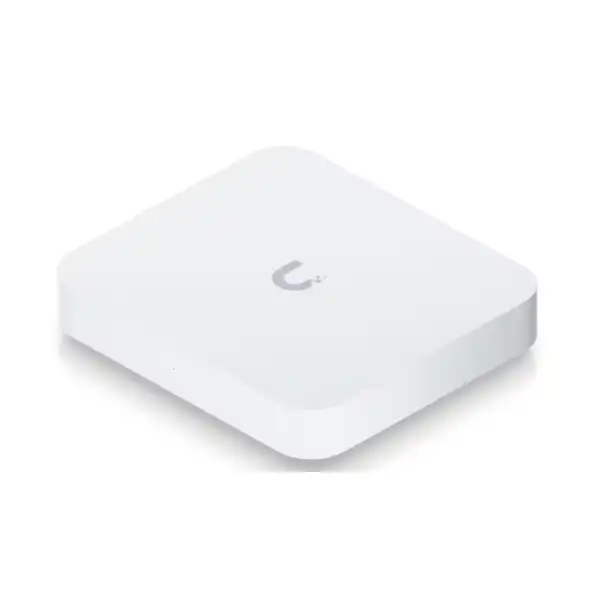
Ubiquiti UniFi • Independent security gateway
Ubiquiti Gateway Max UXG-Max in Tanzania
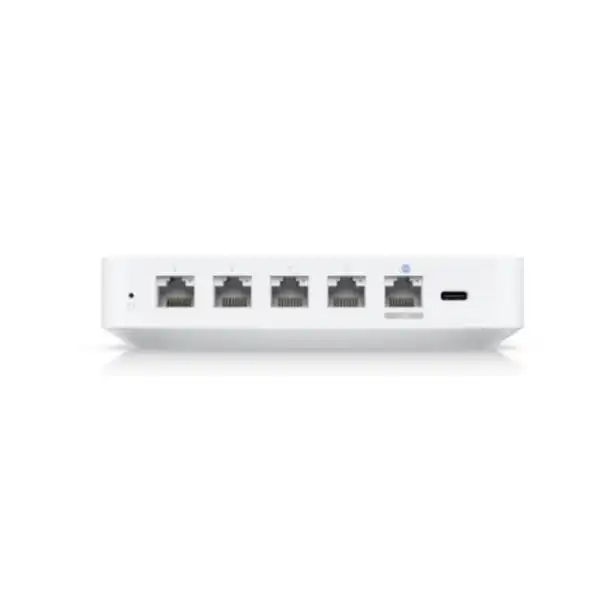
Five 2.5 GbE ports, advanced UniFi routing and firewall functions, multi-WAN flexibility, and up to 2.3 Gbps rated IDS/IPS throughput. Designed for networks with a separately managed UniFi Network control plane.
Request a quote for the exact UXG-Max model and confirm controller compatibility before purchase.
At a glance
- Interfaces: five 2.5 GbE RJ45 ports
- Default layout: one WAN and four LAN
- Manufacturer-rated IDS/IPS throughput: up to 2.3 Gbps
- Form factor: compact desktop
- Management: separate UniFi Network 8.1.113 or later
- Power: USB-C 5 V DC / 3 A, adapter included
What the Gateway Max does
The Ubiquiti Gateway Max UXG-Max is a compact, independent UniFi security gateway for networks that need modern multi-gigabit Ethernet, policy-driven routing, traffic visibility and a centrally managed firewall. It sits between an internet connection and the local switching infrastructure. Rather than being a wireless access point or an all-in-one controller, it provides routing and network security while an external UniFi Network management system supplies configuration and monitoring. This separation suits businesses that already operate a CloudKey, an appropriately configured self-hosted UniFi Network server, or Official UniFi Hosting. In a new deployment, include that management requirement in the purchase plan before choosing the hardware. The value is not simply a faster socket: it is the ability to create controlled pathways for employees, guests, business devices and internet links while viewing activity through the UniFi interface. When comparing models, first check management architecture, line speed, required security inspection and the number of physical ports. A gateway should fit the wider design rather than determine it accidentally.
Who should consider this model
The UXG-Max is a practical candidate for a small or medium office, branch network, professional practice, retail location or technically managed home where a UniFi controller is already available. It is especially relevant when the incoming internet service exceeds standard gigabit Ethernet, or where a 2.5 GbE connection to a suitable switch avoids constraining internal traffic at the router interface. A service organization might segment staff computers from a guest Wi-Fi network. A retail location might isolate point-of-sale devices from visitor access. A shared workspace might need different policies for office users, tenant devices and infrastructure. In all cases, gateway configuration should reflect actual operational needs and the security policy of the organization. A larger installation with many high-demand services may need a higher-capacity gateway or a different port mix. A very small site without an existing UniFi control plane may find an integrated cloud gateway simpler. The deciding factor is whether independent gateway management is a benefit rather than an extra operational obligation.
A quick buying decision
Choose the Ubiquiti Gateway Max UXG-Max when your design calls for five multi-gigabit copper interfaces, UniFi security features and an independent management model. Reconsider if you need built-in Wi-Fi, a built-in UniFi Network controller, built-in Power over Ethernet switching, a rack-mounted form factor or interfaces faster than 2.5 GbE. None of those capabilities should be assumed from the word Max. Confirm that the intended switch and endpoint devices also support the link speeds you want. Identify which port will serve as the primary WAN and whether an additional port must be reassigned for a second internet connection. Decide how the site will continue operating if the management server is temporarily unreachable, and how configuration changes will be documented. For a Tanzania deployment, also check the local internet handoff type, modem or optical termination equipment, provider credentials, power quality and business continuity requirements. A good procurement decision includes the complete network path, not just the security gateway.
Five 2.5 GbE ports explained
The hardware has five RJ45 Ethernet ports supporting 2.5G, 1G, 100M and 10M link rates. The standard layout provides one 2.5 GbE WAN port and four 2.5 GbE LAN ports; one of the LAN ports can be reassigned to WAN. Ubiquiti also lists a maximum WAN port count of four, subject to port reassignment and supported configuration. This does not mean a single connection automatically becomes four times faster. Every Ethernet link negotiates a speed based on equipment and cabling conditions, and external internet performance depends on the service and upstream equipment. A 2.5 GbE port can connect to a capable aggregation or access switch, while 1 GbE devices may continue using their normal rate. For a larger set of local devices, place an appropriate managed switch downstream: the five-port gateway is not intended to replace a full office switching platform. Plan for LAN connectivity remaining after the desired number of WAN ports has been allocated.
Security inspection and performance
Ubiquiti currently specifies up to 2.3 Gbps IDS/IPS throughput for the Gateway Max. IDS refers to intrusion detection, while IPS adds prevention actions against traffic that matches configured threat indicators or policies. The published figure is a manufacturer specification, not a guarantee that every encrypted workload, VPN route, packet size or traffic mixture will perform identically. Application-aware security, filtering, packet characteristics and concurrent traffic patterns can affect real-world results. For sizing, compare the expected peak internet demand with inspection needs and include headroom for growth. If a business prioritizes security visibility over raw speed, establish which inspection options the administrators will enable and what operational alerts they will review. A useful security posture is based on good segmentation, software maintenance, sensible authentication and monitoring, not solely an IPS checkbox. Plan periodic configuration reviews so that protective rules remain relevant as new applications and users join the network.
Firewall and traffic segmentation
The device supports stateful firewall functions, application-aware Layer 7 controls, traffic identification and zone-based filtering. Zones can help express a security policy in human terms: trusted office devices, guest clients, administration systems and internet-facing traffic should not all receive the same permissions. Begin by listing the networks that need to communicate; then explicitly define the services and paths to allow. For example, visitors may require internet access but no route to internal printers or business databases. An administration VLAN may need access to switch management interfaces while ordinary office clients do not. The gateway can enforce routing policies across appropriately designed VLANs, but a VLAN alone is not a complete security solution. Matching switch and access-point configurations are important. Document each exception, especially cross-network access for devices, printers or application servers. Firewall changes should follow an approval process and be tested from both permitted and blocked networks before being accepted as complete.
Multi-WAN design and failover
The Gateway Max provides multi-WAN functionality including load balancing. For businesses that experience connectivity interruptions, two independently sourced internet services can provide a more resilient design than relying on a single connection. However, failover performance depends on monitoring settings, physical connection independence, service addressing, upstream equipment and the applications in use. Existing real-time calls and sessions may not always continue seamlessly when an external IP address changes. Load balancing does not usually combine two separate consumer internet subscriptions into one single faster download. Instead, traffic distribution policies may place different sessions on different links. Plan separate WAN paths, test outages deliberately and note how recovery should behave when the primary connection returns. If a backup cellular arrangement is planned, verify the specific compatible hardware and the operator’s service conditions independently. Avoid promising automatic, uninterrupted service until the complete failover workflow has been tested in the customer’s actual environment.
VPN options for branches and remote workers
The published feature set includes site-to-site options such as IPsec, OpenVPN and UniFi Site Magic, alongside supported VPN server and client capabilities including WireGuard and OpenVPN. These tools serve different goals. A branch-to-branch tunnel can let authorized systems communicate across offices, while a remote-access VPN can grant an employee controlled access when outside the workplace. Choose the tunnel type based on client compatibility, identity management, network architecture and the required encryption policy. Site Magic is designed around supported UniFi environments and should be evaluated against the rest of the installed control plane. VPN throughput is not identical to IDS/IPS throughput; encryption, configuration, traffic size and peer devices affect results. For remote access, prefer limited network permissions and strong account security rather than automatically granting broad internal reach. For branch connections, check overlapping subnet ranges, dynamic public addresses, provider NAT arrangements and DNS requirements before the installation date.
The critical controller requirement
This model is an independent gateway. It does not provide the same integrated UniFi Network management experience as the UCG-Max Cloud Gateway Max. Ubiquiti identifies management through a CloudKey, Official UniFi Hosting or an appropriate UniFi OS Server, with UniFi Network version 8.1.113 or later specified for this product. Procurement should therefore include either an existing compatible management environment or a separately planned hosting solution. The gateway remains a routing and security appliance, while the network application is the administrative control plane. Before ordering, identify who owns access to that application, how configuration backups are retained, who receives alerts and who can restore management after a failure. A buyer replacing an older UniFi Security Gateway may already have a compatible workflow, but should still review current software version and adoption instructions. Do not assume that a controller embedded in another cloud gateway can simply adopt this independent gateway in a normal deployment.
Gateway Max versus Cloud Gateway Max
The names are similar but the operating models differ. UXG-Max is the independent security gateway discussed here; UCG-Max refers to a separate cloud gateway product that integrates the UniFi control plane. A business already managing many UniFi locations from a common system may prefer an independent gateway because the management architecture stays consistent. A buyer building a first UniFi network may instead prefer the convenience of a self-contained cloud gateway, subject to application requirements and overall capacity. Both model names contain Max, so purchasing teams should record the full model code on purchase orders and quotation requests. Check the exact unit pictured and the management description, not only the retail title. Neither name alone establishes the number of access points supported, the client scale appropriate for a specific installation or the physical accessories included. The right comparison accounts for hosting, maintenance, feature use, expansion strategy and total system cost.
Deployment scenario: professional office
Consider an office with staff laptops, shared printers, a reception system, conference-room devices and visitors. The UXG-Max can act as the internet-facing router and policy enforcement point while an appropriately selected UniFi switch supplies additional wired ports and access points supply wireless coverage. Different SSIDs can be mapped to carefully planned network segments, helping prevent guest devices from reaching internal systems. Administrators can monitor internet health and adjust filtering based on business requirements. If the office relies on video meetings, design the upstream connection and traffic rules to protect interactive applications without claiming that any firewall can fix a congested or unreliable ISP. Label cables, maintain a network diagram and keep management credentials within an authorized team. For a Tanzania site, evaluate whether the primary WAN handoff and any backup service are genuinely independent. A good office solution also considers UPS capacity and the equipment required for employees to keep working during short power interruptions.
Deployment scenario: retail and hospitality
A retail store or customer-facing property may need separate connectivity for staff, payment operations, guest Wi-Fi, building systems and vendor-maintained devices. The gateway can form part of a segmented topology where business-sensitive devices have narrow network permissions. A visitor network should typically reach the internet without reaching internal equipment. Payment-related networks require careful design around applicable contractual and security requirements; installing a gateway does not itself establish payment-standard compliance. For a small hotel or guest property, the number of users, captive access design, network usage policies and wireless density can influence the whole architecture. The gateway does not contain an access point, so wireless capacity is determined by separately selected Wi-Fi hardware and deployment. Ensure that any guest onboarding method matches the experience expected by the business and can be supported by staff. Monitor bandwidth usage and link failures as operational signals, not as substitutes for customer service or network maintenance.
Deployment scenario: connected branch
A branch office can use the UXG-Max with separate managed Wi-Fi and switching, while a centralized UniFi Network system provides a shared administration model. Site-to-site connectivity may support specific services, such as a central accounting application or controlled access to a headquarters resource. Before enabling the VPN, map the local and remote IP subnets, firewall policies, DNS resolution and expected traffic volumes. Restrict access to approved business services instead of routing every branch device toward the central environment by default. If remote management is important, establish procedures for provider outages, security updates and credential rotation. A second WAN connection can improve resilience where the connections use different infrastructure, but shared ducts or shared upstream dependencies may still cause simultaneous outages. For teams with several branches, consistent naming and standard configuration templates make routine support easier. Record each site’s requirements rather than applying identical rules without considering local applications.
Deployment scenario: demanding home network
A technically managed home with 2.5 GbE devices and a separate UniFi Network server may benefit from the hardware. Common motivations include segmenting work-from-home equipment from entertainment devices, keeping less-trusted smart devices away from private storage, or using a faster uplink to a compatible switch. The unit does not create Wi-Fi by itself and does not eliminate the need for a switch when more ports are required. It can also be excessive for a simple connection where a single integrated gateway would be easier to maintain. Households should consider who will administer the system when its primary technical user is unavailable. A well-planned small network includes accessible documentation, a recovery process and backup power for the ISP termination unit as well as the router. Compare the total purchase and maintenance requirements, including controller hosting, before choosing on specification headlines alone.
Power, physical installation and environment
The compact chassis measures 141.8 by 127.6 by 30 mm and weighs approximately 520 g. It uses a USB-C power input specified at 5 V DC and 3 A, with an adapter included in Ubiquiti’s product information; the published maximum consumption is 9.6 W. The manufacturer lists an operating temperature range from minus 10 to 40 degrees Celsius and relative humidity of 5 to 95 percent noncondensing. Keep the device in a ventilated location protected from direct moisture, excessive heat and accidental cable strain. In Tanzania, where room conditions and power continuity can vary by site, evaluate the actual installation enclosure and power backup rather than presuming a compact desktop unit can operate safely in any cabinet. Use the supplied or manufacturer-approved power arrangement. Although the LAN ports use Ethernet connections, they are not presented as integrated PoE outputs for powering switches or access points. Plan separate, correctly rated power supplies or PoE-capable infrastructure for those devices.
Cabling and switching considerations
Multi-gigabit performance requires an end-to-end physical path designed for the speed in question. Inspect the internet equipment’s Ethernet handoff, the patch leads, wall cabling, switch uplink and connected devices. Existing 1 GbE equipment can coexist with 2.5 GbE ports, but a negotiated 1 GbE link will not operate at 2.5 GbE simply because the gateway supports it. The Gateway Max should usually connect to an appropriately specified managed switch when many office ports or VLAN-aware Wi-Fi access points are needed. Plan a trunk or other suitable connection based on the intended VLAN design, then verify the switch’s port capabilities and tagging configuration. Avoid assigning all available gateway ports as WAN interfaces before confirming how local traffic will connect. Good labels, a clear diagram and measured cable testing are inexpensive ways to reduce deployment time. Where cable runs are long or environmentally exposed, consult qualified installers for the correct medium and protection.
ISP handoff and connection planning
Ask the internet provider what equipment delivers the service and how customer routers are connected. The service might present a standard Ethernet handoff, require a particular VLAN, use dynamic addressing, or need PPPoE details; those requirements vary by provider and plan and must be verified rather than assumed. If a provider’s modem or router remains in place, decide whether bridge mode or an appropriate routing design is available. Double NAT can affect inbound services and some VPN arrangements, although many ordinary applications still function. Record the primary link’s contract speed, expected upload demand, public-address requirements, DNS behavior and available technical support. When comparing to the 2.3 Gbps IDS/IPS specification, remember that a purchased service rate and a gateway’s laboratory-rated capacity are different measurements. For a backup link, confirm whether it is delivered over genuinely separate infrastructure and whether automatic transition will meet the needs of voice or business systems.
Network segmentation checklist
Begin with an inventory of devices and applications rather than a list of firewall rule names. Identify administrators, trusted users, visitors, servers, printers, phones, cameras and third-party maintenance access. Group systems by legitimate access requirements and determine which groups should be isolated. Define a default approach for inbound and inter-network communication, then add narrowly scoped exceptions. Match each subnet and VLAN to the downstream switch and wireless design. Protect management access so that ordinary users cannot reach infrastructure administration interfaces unnecessarily. Where DNS and DHCP are needed across segments, account for them explicitly. Test both positive and negative cases: an authorized workstation should reach its required application, and a guest client should fail to reach restricted business systems. Maintain a change log for each firewall modification. Segmentation does not eliminate endpoint security, backups, user training or periodic review; it is one layer of a larger protection strategy.
Monitoring, reporting and maintenance
UniFi Network can provide a consolidated view of gateway status, connection health and traffic information when the device is correctly adopted and managed. Use these measurements to investigate recurring disruptions, unusual usage and the effect of policy changes. Establish a reasonable alerting process and identify which team will respond; an alert that no one reads offers limited value. Review software release notes and compatibility before upgrades, especially if the site runs third-party VPN clients, unusual routing rules or business-critical services. Back up important configuration information and document recovery procedures. When replacing older hardware, plan a controlled maintenance window and keep a rollback option until the new network has passed acceptance tests. Avoid exposing remote management or administrative accounts without appropriate security controls. Administrators should also confirm that logs and monitoring practices align with the organization’s privacy, retention and access policies. Clear routine operations are as important as the hardware’s feature list.
What is not included
The UXG-Max should not be mistaken for a wireless router with antennas, a PoE access switch, a network video recorder or a plug-and-play controller appliance. A suitable UniFi Network management environment is required. Wi-Fi access points and switches are separate components where needed, as are any required power-protection devices. The model should not be sold as providing built-in 10 GbE ports, integrated cellular service, built-in rack rails or guaranteed compliance with a customer’s industry-specific standards. Subscription-dependent enhancements should be reviewed separately; the manufacturer’s broader feature descriptions do not imply every optional service is included at no additional cost. Nor does the published IDS/IPS figure promise a fixed end-to-end throughput under every VPN or security workload. Confirm exact accessories, approved deployment options and any service entitlements against the actual quotation. This avoids a common buying mistake: selecting a gateway based on a feature present elsewhere in the UniFi ecosystem but not integrated into this particular unit.
Before requesting a quotation
Prepare a concise description of the deployment: number of sites, approximate users, available internet services, current switches and Wi-Fi access points, expected VLANs, remote access needs and whether a compatible UniFi Network controller is in place. Include intended WAN speed and any business-critical applications that cannot tolerate long interruptions. If you are replacing an existing gateway, provide the present model and explain what limitation is driving the change. A network diagram and photographs of the current ISP handoff may help a technical team identify missing accessories. Ask the seller to confirm the exact model UXG-Max, local commercial terms and the items included in the proposed package. Price, stock, delivery, warranty coverage and installation services should be confirmed for the specific Tanzania quote rather than inferred from an international listing. This information supports a more accurate recommendation and reduces the chance of ordering a gateway that cannot be managed by the planned network.
Installation and acceptance testing
A systematic rollout starts before the gateway is powered on. Record the existing internet parameters, address ranges, gateway rules, VPN settings and any services published to the internet. Prepare the UniFi management environment and verify the required Network version. Connect the primary WAN and the correct LAN uplink, then follow the current manufacturer adoption process. Test an ordinary client first, then test VLAN routing, DNS resolution, permitted and blocked firewall paths, application connectivity and remote access. If a second WAN is configured, disconnect the primary connection under controlled conditions and observe the behavior of active sessions. Record actual negotiated link speeds and baseline throughput using an appropriate method. Validate access from all intended switch and wireless networks; otherwise a seemingly successful gateway setup may hide errors on downstream ports. Keep an installation record that the next technician can understand without relying on verbal handover.
Long-term capacity and upgrade planning
Network needs can change quickly as a site adds cloud applications, more Wi-Fi users, remote branches or security monitoring. Leave room in the design for a stronger internet connection, more VLANs and additional switching capacity. Five 2.5 GbE gateway interfaces may be enough for an office edge, yet not appropriate as the primary switching fabric for a building. Consider how the chosen controller platform will scale with the number of managed UniFi devices and sites. If planned traffic rises above the appliance’s relevant inspection capability, assess higher-tier gateways before the limit becomes an operational issue. Keep an inventory of hardware models and software versions, and review them during annual budget planning. A refresh discussion should separate internet speed from local switching, wireless coverage, VPN encryption and security policy complexity, because each can become the bottleneck independently. Designing for supportability often saves more time than selecting the device with the most prominent headline number.
Common questions before purchase
Does it include a controller? No; the UXG-Max is independently managed through a supported UniFi Network environment. Does it provide Wi-Fi? No; use separately selected access points. Are the Ethernet ports all multi-gigabit? Yes; the five listed RJ45 ports support up to 2.5 GbE, subject to the speed negotiated with connected equipment. Can it support more than one WAN connection? Yes; its supported multi-WAN configuration enables additional internet interfaces through compatible port assignment. Does a second ISP double the speed of one download? Not normally; load balancing distributes suitable traffic rather than promising connection bonding. Does it support VPNs? Yes, with specific supported server, client and site-to-site options; verify the design and required endpoints. Is the 2.3 Gbps security throughput guaranteed? It is a manufacturer-rated IDS/IPS figure, and live performance varies by conditions. Is a Tanzania price published here? No: request a current quotation for this exact model and configuration.
Frequently asked questions
Is UXG-Max the same as UCG-Max?
No. UXG-Max is an independent gateway that needs separately hosted UniFi Network management. UCG-Max is a different integrated cloud gateway product.
How many 2.5 GbE ports are provided?
Five RJ45 ports support 2.5 GbE. The default configuration is one WAN and four LAN, with configurable WAN assignment.
Does Gateway Max have Wi-Fi or PoE LAN outputs?
It is not a wireless access point or a PoE switch. Plan separate access points and suitable power arrangements.
What controller version is required?
Ubiquiti specifies UniFi Network 8.1.113 or later, managed through a supported CloudKey, hosted or server-based setup.
What should a buyer in Tanzania confirm?
Confirm the exact device, compatible controller, ISP handoff, switching and Wi-Fi needs, backup power, and current quotation terms.
Request a Gateway Max quotation
Ask FourTeck Tanzania about the Ubiquiti UXG-Max and provide your expected internet speeds, number of networks, controller arrangement and preferred installation configuration. Confirm current local price, stock, delivery, warranty and any required supporting equipment in your quote.




Reviews
There are no reviews yet.