
UBIQUITI • EDGEMAX • WIRED ROUTING
Ubiquiti EdgeRouter 4 ER-4 — Gigabit Router with SFP
Build a configurable wired network edge with three Gigabit copper data ports, one Gigabit SFP port, and EdgeOS management. Assess the ER-4 for small business, branch, infrastructure, and networking-lab deployments in Tanzania.
3 × Gigabit RJ45 1 × 1G SFP Quad-core CPU
Verified technical specifications
| Model | Ubiquiti EdgeRouter 4 (ER-4) |
|---|---|
| Data interfaces | 3 × 10/100/1000 RJ45; 1 × 1 Gbps SFP |
| Console | 1 × RJ45 serial console |
| Processor | 4-core 1 GHz MIPS64 |
| RAM | 1 GB DDR3 |
| Storage | 4 GB eMMC; 8 MB SPI NOR |
| Layer 3 forwarding | 3.4 Mpps (64-byte packets); 4 Gbps line rate (512-byte or larger packets) |
| Maximum power draw | 13 W |
| Input | 100–240 V AC, 50/60 Hz |
| Dimensions | 229 × 136.5 × 31.1 mm |
| Weight | 795 g |
| Operating conditions | −10 to 50°C; 10–90% RH noncondensing |
| Rack mounting | Optional ER-RMKIT |
Forwarding figures are manufacturer Layer 3 laboratory specifications, not guaranteed VPN or firewall throughput. Verify feature-dependent performance for your deployment.
What the EdgeRouter 4 is designed to do
The Ubiquiti EdgeRouter 4 ER-4 is a compact wired network router for administrators who need control over how traffic moves between internet connections, local networks, and routed segments. It is appropriate to evaluate for a small business gateway, a managed site edge, a lab network, or an infrastructure deployment that needs physical Gigabit interfaces and a dedicated SFP interface. Unlike a Wi-Fi access point, it does not provide wireless coverage by itself. A complete solution commonly requires a separate Ethernet switch and access points. Before selecting it, define the broadband connection type, VLAN count, expected concurrent traffic, firewall rules, and management skills. This avoids choosing by processor specifications alone. The ER-4 is best assessed as a configurable routing platform rather than a turnkey consumer Wi-Fi router.
Why port count matters
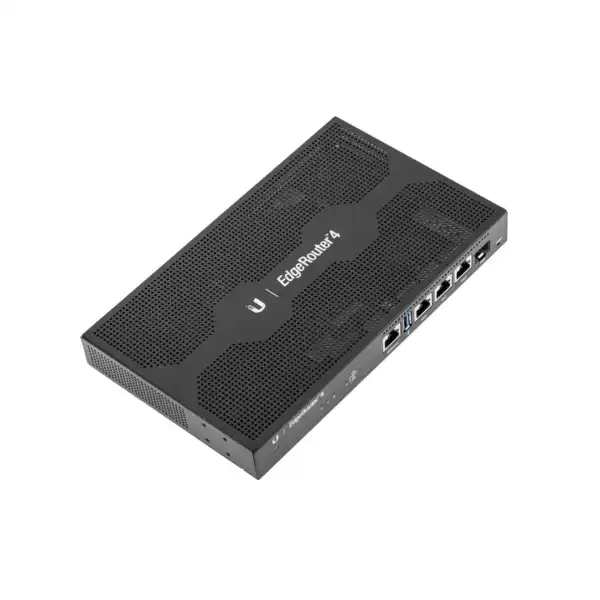
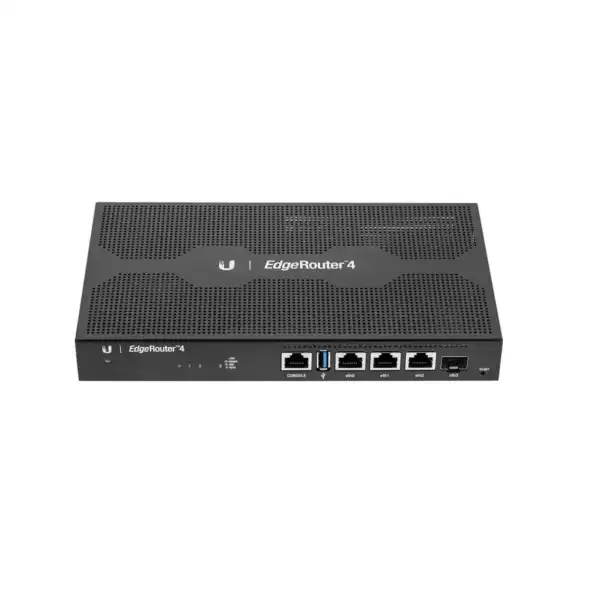
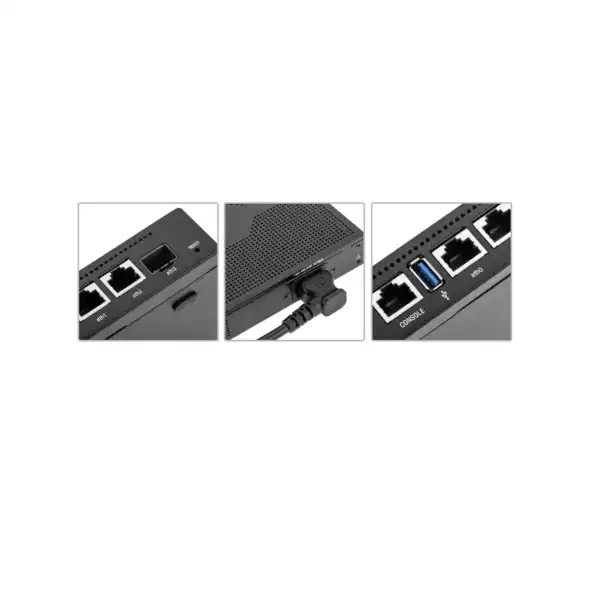
The physical layout includes three 10/100/1000 Mbps RJ45 network data interfaces, designated eth0 through eth2, plus one 1 Gbps SFP network port, eth3. The RJ45 serial console is for administration and is not a fourth copper Ethernet LAN connection. This distinction is especially important when reviewing a listing described as a four-port router. Plan each interface before installation. For example, a copper port may connect to the ISP handoff, another to a managed switch, and another to an additional segment or secondary connection according to the intended configuration. The SFP interface may suit a compatible fiber connection. SFP is not the same as an SFP+ 10 GbE interface. If your site needs several copper LAN connections, include an appropriate switch in the bill of materials instead of assuming every desktop device connects directly to the router.
Understanding the SFP interface
The ER-4 provides a single 1 Gbps SFP cage for an appropriate network module. This can be useful when the upstream or downstream network equipment presents a compatible fiber Ethernet interface. Choosing the module requires checking speed, optic type, wavelength, fiber type, connector, reach, and interoperability with equipment at the far end. The mere presence of an SFP slot does not guarantee that an internet provider will allow its fiber service to connect directly. Provider authentication, an optical network terminal, handoff type, and other service details can still matter. A practical purchasing check is to ask whether the intended connection is standard Ethernet via a supported SFP module or whether the provider requires a separate device. Budget for the transceiver and cabling separately unless a quotation explicitly includes them.
Processor, memory, and flash
A four-core 1 GHz MIPS64 CPU, 1 GB DDR3 system memory, and onboard storage specified as 4 GB eMMC plus 8 MB SPI NOR underpin the hardware. These are manufacturer hardware specifications rather than a promise that every possible configuration will run at a particular speed. Actual outcomes depend on packet size, enabled features, route design, firmware, number of rules, and traffic mix. For a busy office, it is worth identifying heavy requirements such as complex policy rules, encrypted tunnels, extensive logging, or multiple simultaneous services before setting performance expectations. RAM and flash figures describe the platform; they should not be compared directly with an access point, NAS, or server. Administrators should choose supported firmware and maintain tested configuration backups as part of deployment.
Published Layer 3 performance figures
Ubiquiti’s EdgeRouter datasheet lists Layer 3 forwarding figures of 3,400,000 packets per second with 64-byte packets and 4 Gbps line-rate forwarding with packets of 512 bytes or larger. These are specified test figures for routing rather than a universal estimate for every business workload. Do not interpret the 4 Gbps aggregate figure as a 4 Gbps speed available through any single 1 Gbps physical interface. Firewalling, traffic inspection, tunnels, QoS, unusual packet sizes, and software options can lower realized throughput. When comparing candidates, calculate the actual link capacity and test a configuration resembling expected production traffic. If the ISP plan or internal segmentation demands 2.5 GbE or 10 GbE links, choose a platform with matching ports rather than relying on aggregate forwarding numbers.
Routing and segmentation planning
A router connects distinct IP networks; a switch expands local ports; an access point provides wireless access. In a structured office network, the ER-4 can sit at the boundary between ISP equipment and internal switching. Segmentation may distinguish staff traffic, guest devices, management systems, and equipment networks, but it requires an appropriate configuration and often a VLAN-capable downstream switch. Each subnet needs an addressing plan, gateway, DHCP strategy, and carefully reviewed access rules. Decide which groups should talk to each other and which should reach only the internet. Document these decisions before configuration rather than assuming isolation follows automatically from creating separate VLANs. A functioning routing topology is not a substitute for a deliberate security policy. Testing should cover both allowed and blocked paths.
Considering more than one internet service
Some deployments consider multiple WAN connections to improve resilience or distribute outbound traffic. The ER-4 has several routable network interfaces, but suitable multi-WAN behavior depends on explicit EdgeOS configuration, available interface capacity, service-provider equipment, and the desired failover design. Confirm whether the requirement is active/standby failover, policy-based routing, traffic distribution, or a particular service continuity objective. Existing sessions do not necessarily survive changing providers, and inbound services may need additional DNS or addressing considerations. Do not promise seamless continuity simply because a second cable is attached. Administrators should simulate a primary line failure, restore the connection, and document how routing behaves in both directions. For essential applications, power and upstream availability are often as important as router configuration.
Firewall design and access controls
A business edge should apply an intentional policy to traffic entering and leaving its network. In a planned EdgeOS deployment, administrators can create rules appropriate to their network, but the rules must be designed and validated for the specific topology. Begin with a diagram of trusted and untrusted interfaces, then identify services that must be reachable from outside. Review management access separately from normal user traffic. Limiting administration to trusted addresses and avoiding unnecessary exposed services reduce avoidable risk. Consider whether remote employees, suppliers, or field technicians need access and document the approved method. The best firewall rule set is understandable and testable, not merely long. Rule order, return traffic, exceptions, logging volume, and firmware features should be checked in a staging environment when possible.
VPN and remote connectivity decisions
Remote connectivity requirements vary widely. A site-to-site link, remote administrator session, or staff-access solution should be selected around security policy, client compatibility, authentication, and performance. Before purchasing for an encrypted-network use case, verify the specific protocols and firmware support in the current EdgeOS release you intend to deploy. Encrypted throughput must be assessed separately from published plain Layer 3 forwarding figures. Include key or certificate management, endpoint hardening, and recovery procedures in the design. Network teams should also check whether an existing company VPN appliance or a managed firewall service is expected to handle this function. Do not treat a router’s general networking capability as evidence that it supports every modern tunnelling standard or identity integration.
Management methods
The ER-4 uses EdgeOS for configuration, with a management interface and a command-line workflow available for network administrators. Ubiquiti’s quick-start material also describes UISP management options. The serial RJ45 console can be especially helpful during initial provisioning or when network configuration prevents ordinary IP access. The serial port is not intended for a standard Ethernet switch connection. Organizations should establish who may administer the gateway, where configuration backups are stored, how firmware changes are approved, and how outages are escalated. Before using any management service across the public internet, review current vendor security guidance. For multi-site deployments, a consistent naming convention and secure credential process make future troubleshooting substantially easier. A managed dashboard does not remove the need to understand site-specific routing.
Not a UniFi controller gateway
The EdgeRouter product family uses EdgeOS and a management model distinct from UniFi gateway devices. Buyers already using UniFi access points or switches should not assume an ER-4 becomes a UniFi-managed gateway in the UniFi Network application. Interoperation at the Ethernet and IP layers is a separate question from centralized configuration. If a requirement specifically calls for a single UniFi console to configure gateway firewall rules, inspect the current UniFi gateway lineup instead. If an independent routing appliance operated by a network engineer is acceptable, EdgeRouter may be a useful fit. Identify the intended management environment first so the purchase does not create unexpected operational work. Mixed-vendor networks can function, but the team must be comfortable with separate interfaces and support processes.
Physical installation and mounting
The ER-4 measures 229 × 136.5 × 31.1 mm and weighs approximately 795 g according to Ubiquiti. Its compact, fanless design can suit a small network cabinet, shelf, or equipment area with adequate airflow. Ubiquiti documents wall mounting; rack mounting requires the optional compatible rack kit rather than an assumption that the bare unit includes brackets. Leave clearance around ventilation openings, avoid stacking heat-producing equipment directly against the enclosure, and keep patch cables accessible for maintenance. Confirm that the selected cabinet provides safe cable routing, protected power, and enough space for SFP optics. Label every interface at the switch and router ends. When designing an installation in an occupied office, physical access control and safe placement matter just as much as the network diagram.
Electrical input and power budgeting
Ubiquiti specifies a universal 100–240 V AC supply range, 50/60 Hz, with an internal AC/DC power arrangement and a maximum equipment consumption of 13 W. The product uses an AC power cord, not a PoE-powered input. As with other infrastructure devices, verify the locally supplied cord, socket arrangement, surge protection, and any UPS or power-distribution equipment before connecting it. A UPS is an option to evaluate when short power interruptions can disrupt voice, payment, or remote connectivity services. The router also depends on upstream modem or optical equipment and downstream switches; powering only the ER-4 will not keep the entire network operational. Specify the expected backup duration for all critical devices as a system requirement rather than basing resilience on one device’s wattage.
Environment and ventilation
The published operating temperature is -10 to 50 degrees Celsius with 10 to 90 percent noncondensing humidity. These numbers apply to the device, not to an assumption that every unventilated outdoor box or roof-level cabinet will remain within range. For Tanzania deployments, assess the actual indoor equipment-room temperature, dust, moisture, and cable entry points. The manufacturer’s installation guidance cautions against exposing the router itself to rain or moisture. If network cabling reaches external structures or outdoor radio equipment, use an appropriately engineered protective enclosure and suitable cabling and grounding practices. Do not ignore lightning and surge exposure on long cable runs. Installation quality, ventilation, and maintenance access can determine whether a correctly specified router remains reliable in daily operation.
Fiber deployment checklist
Before connecting a fiber handoff, ask the provider for a written description of the service interface and any required terminal equipment. Determine whether the upstream presentation is copper Ethernet, standard optical Ethernet, or a provider-specific optical system. If a direct SFP connection is permitted, check the transceiver’s type and supported link characteristics on both ends. A fiber patch cord has connector, polishing, wavelength, and handling requirements that must not be guessed. Plan cable strain relief and bend radius, and avoid exposing unused optical connectors to dust. Test the link at the intended Gigabit rate before bringing production users online. Keep a record of the optic and service details so a replacement after failure is straightforward. The ER-4’s single SFP slot is a design choice, not a built-in guarantee of fiber service activation.
Structured office network example
Consider an office that receives an Ethernet internet handoff and has a managed Gigabit switch. One ER-4 RJ45 interface can be assigned to the provider-facing connection while a second links to the switching infrastructure. Depending on the intended policies, the switch may carry logical segments for administration, workstations, and guest access. The remaining router interfaces should be reserved or allocated through the actual design rather than connected arbitrarily. Wireless access points can attach to the switch but are separate purchases and require their own planning. The appropriate firewall rules control inter-segment traffic and permit only necessary services. This example illustrates topology, not a preset factory configuration. The engineer should verify the ISP addressing method, DHCP scope, DNS behavior, and fail-safe access before installation.
Branch and remote-site example
A branch may require a wired router with an independent management workflow, predictable interface naming, and a compact physical footprint. The ER-4 can be considered where the required internet and internal links fit within its 1 Gbps interfaces. A useful checklist includes service provider handoff, local switch capacity, internal addressing, access to central applications, local breakout policy, remote monitoring, and a documented recovery process. If the branch operates unattended, define who can reach the router when the primary network path is unavailable. A physical serial-console option may assist onsite troubleshooting but does not provide an out-of-band cellular connection by itself. Business continuity depends on both network architecture and practical support arrangements. Avoid assuming branch suitability simply because a router is described as high performance.
Networking lab and training example
The combination of several routable Gigabit ports, EdgeOS management, and a serial console makes the ER-4 an option to evaluate for a hands-on routing lab. A lab can demonstrate separate IP networks, controlled access policies, routed links, and troubleshooting practices without requiring wireless hardware inside the router. Students or technicians should use a safe, isolated environment rather than testing disruptive rules on a live business connection. Record the device firmware version, baseline configuration, experiment scope, and restoration procedure. Labs needing extensive virtual machines, container workloads, or enterprise orchestration may require additional equipment. The training value depends on the curriculum, supported firmware features, and an instructor’s ability to explain the results. For procurement, confirm whether the lab needs an EdgeOS-specific appliance or a different routing platform.
Small ISP and managed network considerations
An internet service provider or managed-network operator may value a compact EdgeOS edge router for a particular customer site or management segment. The ER-4’s data-port arrangement, console interface, and routing capabilities can be relevant to that assessment. However, the suitability of any carrier-facing role depends on subscriber count, control-plane requirements, the exact service configuration, feature support, and traffic engineering. Do not generalize marketing statements about service-provider networks into a guaranteed subscriber capacity. Define failure domains, monitoring access, spare-device policy, firmware management, and escalation procedures. If the infrastructure demands multiple high-capacity uplinks or redundant power, this compact 1 Gbps-interface device may not be the right architecture. Choose the network design first and then match the hardware to verified feature and performance requirements.
Security maintenance and firmware
A router is a security-sensitive infrastructure component and should have an ongoing maintenance owner. Before putting an ER-4 into production, review the current manufacturer firmware and security advisories for the exact model and supported software branch. Back up a known-good configuration and document the recovery procedure. Apply upgrades during a controlled maintenance window after considering compatibility with existing routing behavior. Disable unused management services and avoid reusing administrator credentials across installations. Periodically verify access rules, time settings, monitoring destinations, and log retention. An initial secure configuration does not remain secure automatically. Where a device will operate for many years, establish what happens if vendor updates cease or organizational requirements change. The purchasing decision should include the continuing effort required to operate EdgeOS safely.
Assessing fit against alternatives
The ER-4 is attractive to evaluate where a compact wired gateway, three Gigabit copper network ports, one 1 Gbps SFP port, and independent EdgeOS administration meet the specification. A different solution may be better when the primary need is integrated Wi-Fi, numerous built-in LAN ports, PoE switching, 2.5 GbE or faster interfaces, a single-console UniFi gateway, or turnkey cloud-managed security. Some buyers may also prioritize hardware redundancy, support contracts, or prescribed VPN functions. Compare products using the actual deployment checklist rather than a generic performance ranking. Include power backup, a switch, optics, access points, and installation effort in the comparison. An inexpensive router alone does not necessarily imply a lower total network cost once all equipment and administration are included.
What to confirm before requesting a quote
Share the intended business or site use, internet access technology, provider handoff, expected internet speed, estimated network users, desired VLANs, and any special routing or access requirements. Mention whether the ER-4 will replace an existing router or form part of a new design. Ask whether an SFP transceiver, switch, access points, rack-mount kit, patch leads, or protected power are required. If compatibility with a particular ISP, optic, or management system is essential, request explicit confirmation for that configuration. Clarify whether the inquiry is for hardware supply alone or also for setup and ongoing support. Price, delivery, warranty, and stock must be confirmed from the actual Tanzania quotation; they are not established by the router’s global technical datasheet.
Installation preparation checklist
Create a basic network diagram, record ISP credentials or handoff parameters securely, and list the systems that must remain reachable during the change. Identify which port will face the internet and which will connect to the local switching infrastructure. Prepare management access via a trusted workstation and retain a recovery path before editing critical settings. Verify power and cable labeling, then check physical links at the expected speeds. Apply the approved configuration in a staged sequence and test connectivity after each major change. Preserve a backed-up copy of the previous working settings and specify a rollback decision point. Arrange an appropriate maintenance window if replacing a functioning business router. These steps reduce confusion if a link works electrically but routed traffic does not flow as expected.
Commissioning and acceptance tests
After installation, validate basic traffic in both directions, internal subnet separation, DNS resolution, DHCP behavior where applicable, and access to required applications. Verify that unauthorized administration paths are blocked. Check the negotiated link speed on each copper and SFP interface and look for errors or unstable link states. If there is a secondary internet service, test failure and recovery rather than assuming configuration statements will behave exactly as planned. Review CPU utilization and other relevant monitoring under representative load. Record any performance measurement with the firmware, packet mix, and features in use so that it can be interpreted later. A handover should include a network diagram, authorized contacts, configuration backup location, and a concise explanation of routine checks.
Operating the router over time
An operational checklist should cover firmware review, configuration backup validation, event monitoring, capacity trends, and response to unexpected restarts or interface errors. Review changes to ISP service and internal networks before applying new routing policies. When staff leave or external support arrangements end, revoke unnecessary management access. Keep a spare transceiver or replacement network path when an SFP link is important to site operations. Document which upstream devices and downstream switches are dependencies of the router so that outages are not automatically blamed on the gateway. If remote administration becomes unavailable, a known local recovery procedure is especially important. Good maintenance practices are transferable across products, but the exact commands and available monitoring depend on the installed EdgeOS version.
Understanding practical limitations
The ER-4 is wired-only hardware with Gigabit-class physical interfaces, not a Wi-Fi router, multi-gigabit switch, PoE source, or standalone fiber termination for every provider system. It has three copper network data ports rather than four copper LAN ports. Its SFP slot supports a 1 Gbps class link, not a 10 Gbps SFP+ connection. The manufacturer performance figures are not automatic firewall or VPN throughput guarantees. Configuration also requires knowledge of addressing, routing, and security. The suitability of newer integrations should be checked against current software documentation. These boundaries do not diminish the device’s utility; they make it easier to purchase the right equipment and avoid missing components. A site requiring features outside these limits should evaluate a more appropriate platform.
Tanzania procurement and deployment notes
For a Tanzania project, begin with the exact access method provided at the location, rather than assuming a generic international router setup fits every connection. Request the handoff details from the contracted ISP and confirm whether the provider equipment will remain in place. Consider safe power distribution, backup power where needed, equipment cooling, and the local availability of compatible cables and transceivers. Do not infer local stock, warranty, taxes, price, installation coverage, or regulatory status from a manufacturer specification sheet. The product can be evaluated technically before these commercial details are confirmed, but a binding procurement decision should rely on the actual supplier quotation. For multi-site projects, record differences in provider connections and on-premises equipment rather than imposing a single untested configuration everywhere.
Frequently asked questions: ports and Wi-Fi
Does the EdgeRouter 4 have Wi-Fi? No. It is a wired router; add appropriate access points for wireless service. Does it have four RJ45 LAN ports? No. Its network data interfaces comprise three Gigabit RJ45 ports and one Gigabit SFP port. It also has a separate RJ45 serial console for management. Is the SFP port 10 Gigabit? No, the specified SFP network port is 1 Gbps. Can I connect every office PC directly? A managed or unmanaged switch may be needed to fan out local connections, depending on the design. Does the router supply PoE to access points? Do not assume PoE output from this product; plan a compatible switch or injector for devices that require it. Is a transceiver bundled? Confirm the exact supplied package and quotation before ordering.
Frequently asked questions: performance and setup
Is 4 Gbps the internet speed on one port? No. The datasheet’s 4 Gbps line-rate Layer 3 figure is a forwarding test claim for packets of at least 512 bytes, while individual network ports are specified at 1 Gbps. Is it ready for a particular ISP out of the box? Provider credentials, topology, and configuration must be assessed. Is it suitable for VPN service? That depends on verified software functions, the required tunnel design, and realistic encrypted-throughput testing. Can it be rack mounted? Ubiquiti identifies an optional rack mount kit, model ER-RMKIT. Is setup suitable for nontechnical buyers? A qualified network administrator is advisable for deployments involving VLANs, access policies, or business-critical connectivity. Check the precise management workflow against your team’s skills.
Frequently asked questions: power and ongoing support
What power input does the ER-4 use? The manufacturer lists 100–240 V AC, 50/60 Hz via an internal supply and compatible mains cord. Does it consume 30 watts continuously? No. The datasheet lists a 30 W power-supply rating and a 13 W maximum device power-consumption figure. Can it be installed outdoors? The manufacturer’s guide warns against rain and moisture; plan protected installation and check environmental limits. How should firmware be maintained? Review current vendor releases and advisories for the exact model, retain backups, and test upgrades. Can all four interfaces be configured identically in every topology? Interface roles depend on a deliberate EdgeOS configuration. Is local warranty or delivery included? Those commercial terms require confirmation in the Tanzania quotation.
Request an EdgeRouter 4 quotation
The Ubiquiti EdgeRouter 4 ER-4 is a focused option for buyers who need an independently managed wired gateway with three Gigabit RJ45 data connections, one 1 Gbps SFP connection, and EdgeOS configuration capabilities. The next step is to validate its fit against your actual internet handoff, interface allocation, security requirements, and support model. Request a product quotation and describe the planned environment so that accessories and configuration needs can be assessed alongside the router. Ask for current Tanzania stock status, pricing in the applicable quote, warranty terms, and any available installation or configuration support. No price, delivery commitment, or local certification claim is implied by this technical product description.




Reviews
There are no reviews yet.