
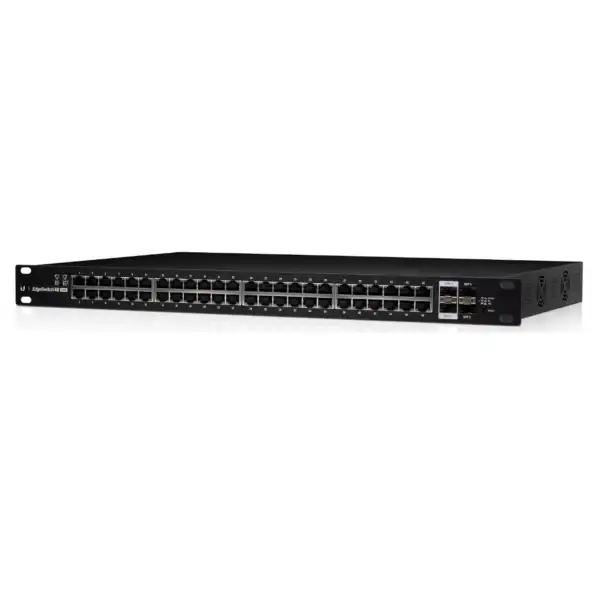
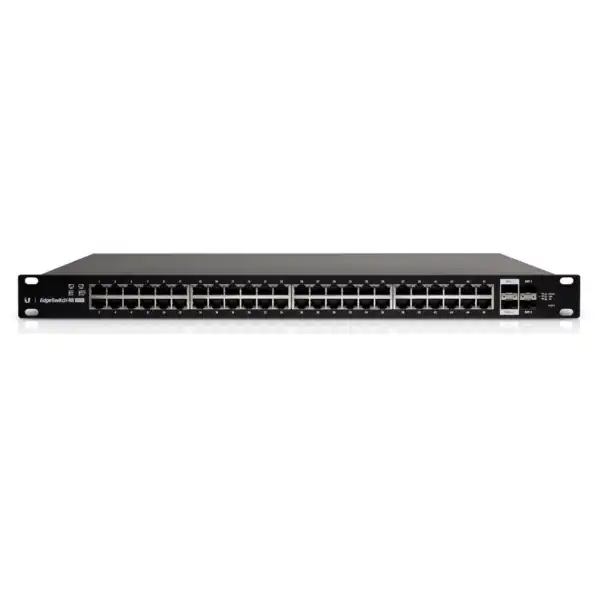
Managed 48-port network switching
Ubiquiti EdgeSwitch 48 PoE 500W (ES-48-500W)
Connect up to 48 Gigabit copper endpoints, supply compatible PoE devices and build faster uplinks with two 10G-capable SFP+ slots. Plan power, ports and management carefully for a dependable Tanzania business deployment.
Verified technical specifications
| Model | ES-48-500W |
|---|---|
| Copper interfaces | 48 × 10/100/1000 Mbps RJ45 |
| High-speed uplinks | 2 × 1/10 Gbps SFP+ |
| Additional uplinks | 2 × 1 Gbps SFP |
| PoE modes | IEEE 802.3af/at and configurable 24V passive |
| Total PoE available | 500W |
| PoE+ per-port maximum at PSE | 34.2W |
| 24V passive per-port maximum | 17W |
| Non-blocking throughput | 70 Gbps |
| Switching capacity | 140 Gbps |
| Forwarding rate | 104.16 Mpps |
| Power input | 100–240V AC, 50/60 Hz |
| Rack format | 1U, 19-inch |
| Dimensions | 485 × 43.7 × 374.6 mm |
| Weight | 6.1 kg |
| Temperature | -5°C to 40°C |
Specifications reflect Ubiquiti model documentation. Verify current firmware, accessory compatibility and commercial terms before ordering.
A practical 48-port PoE switch for growing networks
The Ubiquiti EdgeSwitch 48 PoE 500W, model ES-48-500W, is a rackmount managed switch for installations that need many wired endpoints, flexible Power over Ethernet, and higher-speed uplinks. Its 48 Gigabit RJ45 interfaces can connect computers, wireless access points, IP telephones, security equipment, and other Ethernet devices. Two SFP+ slots support 1 or 10 Gbps modules, while two additional SFP slots support 1 Gbps modules. For a Tanzanian buyer evaluating a large office, education facility, hospitality property, or equipment room, the key question is not simply whether 48 sockets are available. It is whether the ports, uplinks, PoE modes, power budget, and management method match the actual design.
The ES-48-500W is suitable when a single wiring cabinet needs substantial port density and the deployment team is comfortable administering an EdgeSwitch rather than assuming it is a UniFi switch. The device offers managed switching features and Layer 3 capabilities, but those capabilities require deliberate configuration and should not substitute for an appropriate security gateway or network architecture. Before requesting a quote, prepare a connected-device list, expected port count, PoE draw, optical uplink requirements, and operating-environment details. That information will make compatibility and capacity decisions far more reliable than choosing by port count alone.
What the hardware provides
The hardware combines 48 copper 10/100/1000 Mbps interfaces with four separate optical-capable uplink slots. Of those slots, two are SFP+ and can operate at 1 or 10 Gbps with compatible modules, while the other two accept 1 Gbps SFP modules. This arrangement allows a rack to serve copper devices while using fibre or an appropriate direct-attach solution for links to other network equipment. SFP+ capability should not be confused with 10 Gbps speed on every RJ45 access port: the 48 copper ports are Gigabit ports.
Ubiquiti specifies 70 Gbps total non-blocking throughput, 140 Gbps switching capacity, and a 104.16 million packets-per-second forwarding rate for this model. These are switching specifications, not guarantees of an application’s throughput. Real applications remain dependent on connected devices, upstream links, traffic patterns, packet sizes, configuration, and the quality of the installation. The unit is designed for standard 19-inch rack mounting and occupies 1U, with a chassis depth that should be accounted for when selecting a rack or wall enclosure. Review both the electrical and physical plan before ordering.
PoE and PoE+ power delivery
Power over Ethernet is one of the most important reasons to consider the ES-48-500W. Standard IEEE 802.3af/at-compatible endpoints can receive data and power over a suitable Ethernet cable, reducing the need for local power adapters. Ubiquiti lists PoE/PoE+ output on all 48 copper ports and a total PoE available figure of 500W. Its stated maximum per-port PoE+ output at the power-sourcing equipment is 34.2W. However, a maximum per-port figure does not mean all 48 ports can simultaneously draw that amount: the aggregate power budget must be respected.
A planning sheet should assign a realistic maximum draw to every intended powered endpoint, including any planned replacement device that may consume more power. Sum those requirements and retain a sensible operational margin for device starts, changing configurations, or future additions. For example, a deployment consisting mostly of low-draw phones may have different overall needs from one using high-powered wireless access points. Confirm each endpoint’s PoE class and specifications. If the combined requirement approaches the available total, reconsider device distribution, select a suitable higher-budget option, or distribute the load across switches rather than assuming the power system can exceed its rating.
Important 24V passive PoE warning
In addition to standards-based PoE+, the EdgeSwitch supports configurable 24V passive PoE on its copper interfaces. This is useful only when a connected device explicitly accepts the corresponding voltage and wiring. Ubiquiti states up to 17W per port for passive PoE, with a nominal 24V output range specified as 20–27V. Passive PoE does not provide the same negotiation behavior as IEEE 802.3af/at. Selecting the wrong mode may damage equipment or cause it not to operate correctly.
The published quick-start guidance indicates that PoE+ automatic mode is the default on ports 1–48. It separately warns installers to check compatibility before activating 24V passive PoE. This detail matters particularly when a deployment combines older wireless equipment with modern access points, IP cameras, and phones. Label each cable and record the required power method beside its switch port. If the device documentation does not unambiguously confirm 24V passive support, do not enable passive power for that port. During commissioning, check the selected mode and endpoint operation for every powered connection. Treat power mode as a compatibility decision, not a performance upgrade.
Uplink choices and fibre planning
The two SFP+ slots are intended for higher-speed uplinks and support 1/10 Gbps connections with appropriate modules. The separate SFP slots provide 1 Gbps links. That mix can help when connecting multiple access switches to a distribution device, or when a wiring closet needs a fibre route to a different building area. Nonetheless, fibre does not automatically guarantee 10 Gbps performance. Speed is constrained by both ends of the link, installed transceiver type, optical fibre characteristics, and how the ports are configured.
Before purchasing modules or patch leads, document whether the remote equipment presents SFP or SFP+ interfaces, its supported optical standards, the fibre type, connector type, and expected distance. Check module compatibility using current manufacturer documentation for the exact hardware and software combination. If the design requires redundant links, work out the supported topology and loop-prevention behavior in advance. Do not connect duplicate links indiscriminately and assume resilience will emerge without configuration. For uplinks into an existing routed or switched environment, agree on tagging, allowed VLANs, speed, and management addressing before site installation. These checks can prevent unexpected downtime during a network changeover.
VLAN segmentation for different users
An unmanaged flat network may be simple to start, but it often becomes difficult to troubleshoot or protect as more devices arrive. Managed VLAN support lets the network designer divide logical traffic groups while using the same physical switch. A typical deployment might keep employee workstations, visitors, telephony devices, and building-management endpoints in distinct segments. VLAN assignments should follow an actual addressing and security policy, not merely a list of departments.
The EdgeSwitch software supports IEEE 802.1Q VLAN functionality and related managed switching controls. Administrators should determine which access ports carry a single untagged network, which upstream interfaces carry tagged VLANs, and which device performs routing between segments. Segmentation on its own does not create a complete firewall policy. A suitably configured gateway or firewall is still required where inter-VLAN access must be restricted. Document the network purpose for each VLAN, its IP subnet, DHCP handling, DNS requirements, and any services that must cross boundaries. During handover, test ordinary business use, not only whether a link LED lights up. A design that is easy to understand is also easier to maintain when staff or equipment change.
Managed features and traffic control
Ubiquiti’s EdgeSwitch family documentation covers capabilities such as spanning-tree protocols, link aggregation, port-oriented management, and traffic-priority controls. These tools can help administrators maintain a structured wired network, but benefits depend on selecting appropriate settings for the actual topology. Spanning tree can help control accidental Layer 2 loops; it is not a substitute for a clear cabling plan. Link aggregation can combine suitable connections where both devices support compatible configuration; it does not change the maximum speed of a single endpoint port.
Quality-of-service settings can be useful for delay-sensitive traffic, including voice, but an effective outcome requires consistent classification and adequate capacity through the rest of the path. A high-priority label cannot repair an overloaded upstream internet connection. Before enabling advanced options, identify what the business is trying to achieve and how success will be tested. Save a configuration backup and record the baseline state first. Administrators should also use a maintenance window for changes that may interrupt active switch ports. Small, well-documented changes are generally safer than enabling many features at once in a live production environment.
Layer 3 functions and routing boundaries
The product is described by Ubiquiti as a Layer 2/3 managed switch. That makes it relevant to designs requiring more than basic access-port switching, yet it does not mean the EdgeSwitch replaces a fully featured enterprise router, security appliance, or internet edge solution. Layer 3 capabilities should be matched to the particular firmware and deployment requirements. Routing, network-policy enforcement, WAN termination, remote access, and threat protection are distinct responsibilities even when some can be combined in a larger network.
When evaluating this model, decide where each VLAN’s default gateway should live and what controls will apply between network segments. If routing remains on a firewall, the switch may primarily act as a managed access or aggregation device. If selected routing functions are configured on the switch, document how traffic reaches the firewall, which networks are reachable, and where filtering occurs. Validate the chosen behavior using product documentation and a lab or controlled acceptance test. Do not infer support for a specialized routing or security requirement merely from the phrase ‘Layer 3’. This careful separation of roles makes later troubleshooting, auditing, and upgrades more predictable.
Administration, access and maintenance
The EdgeSwitch provides Ethernet-based management and an RJ45 serial console interface. Its quick-start guide describes using DHCP for initial management addressing, with a fallback IP address if an automatic lease cannot be obtained. It also references web-based configuration and UISP management. These are operational tools for the EdgeSwitch family and should not be confused with UniFi Network controller adoption. A buyer who specifically requires a UniFi-managed switch should check product-family compatibility before selecting this model.
Plan the management environment before deployment. Use a controlled management VLAN or equivalent network boundary, restrict who can reach administrative interfaces, replace any factory credentials, and maintain a secure credential record. Check the applicable release documentation before any firmware change and back up the running configuration. Keep a list of device names, cabinet positions, management addresses, uplink mappings, and software versions. Where remote monitoring is planned, verify whether the required monitoring and backup behavior is supported by the selected software deployment. An administratively manageable network is not automatically a secure network; it must be configured and maintained accordingly.
Physical rack and power considerations
The ES-48-500W is a 1U rackmount unit with published dimensions of 485 × 43.7 × 374.6 mm and a weight of approximately 6.1 kg. These figures are important in wall-mounted racks and shallow cabinets: usable depth must accommodate the chassis, rear power connection, cable bend radius, and access for service. Ubiquiti specifies 100–240V AC input at 50/60 Hz, so the electrical supply and protective arrangements should match the installation guidance. The switch is not a device to place in an exposed outdoor location.
A professional cabinet layout should keep high-density Ethernet patching readable, separate equipment from avoidable sources of heat, and provide ventilation consistent with the manufacturer’s operating limits. The stated ambient range is -5°C to 40°C and 5% to 95% noncondensing humidity. In warm or dusty environments, do not assume that a cabinet with closed doors will remain within specification. Consider monitored cabinet temperature, airflow, dust management, and a properly sized UPS where continuity is important. Power planning must account for the full system, including connected PoE loads and any other rack equipment, rather than looking at switch electronics alone.
Applications for offices and business campuses
An office with numerous fixed workstations may use this switch to consolidate wired access and support equipment such as IP phones and wireless access points. The advantage is a managed, organized distribution point rather than a patchwork of small switches. Port density should be calculated from an actual floor plan: count current users, printers, shared devices, building systems, and uplinks, then reserve capacity for practical expansion. Remember that a wireless access point still uses wired network capacity and may require power even if end-user devices are connected over Wi-Fi.
For a multi-floor site, several access switches connected to distribution equipment may be preferable to forcing unusually long cable runs into one cabinet. Consider the maximum supported copper cabling distances, structured cabling quality, and the location of network rooms. A building with 48 nearby endpoints may be a natural fit, while one with 48 endpoints across widely separated blocks may need a different topology. Make sure the design also includes DNS, DHCP, security policy, backups, and fault monitoring. The EdgeSwitch is a component of that design, not the entire network solution.
Wireless access point installations
Wireless networks can create substantial demands on PoE and uplink capacity. A business adding many ceiling-mounted access points should not simply assume every device requires the same power draw or supports the same cabling speed. Read the specification for each access point and compare its required input method with the EdgeSwitch’s output options. Standards-based 802.3af/at and passive PoE should never be treated as interchangeable. Record any high-power or specialized endpoint that may fall outside the capabilities of this particular switch.
Wireless performance is also influenced by access point placement, radio planning, interference, client density, authentication, and upstream bandwidth. A 10 Gbps SFP+ uplink can be useful where aggregate access traffic justifies it, but it will not solve poor radio coverage or overloaded channels. For growth planning, map expected access point locations to patch-panel ports, verify cable quality and length, and calculate the PoE budget under realistic operating conditions. The device is suitable for use alongside compatible wireless infrastructure, but individual models and any centralized management expectations must be checked separately.
IP video surveillance networks
IP camera installations are another potential use case for a 48-port PoE access switch. The combination of many Gigabit ports and managed network controls may simplify connection of cameras located around a facility, provided the cameras’ power and network requirements are compatible. Some surveillance cameras draw more power when infrared illumination, heaters, or motorized functions are active. Estimate maximum rated demand rather than relying only on ordinary daytime measurements. The 500W aggregate budget becomes particularly important when numerous cameras operate simultaneously.
Video traffic should be designed end to end. The bandwidth used by each camera depends on resolution, frame rate, encoding, scene complexity, and recording settings. Multiply a considered per-camera estimate by the intended quantity, and compare it with uplink capacity, recorder interfaces, and storage throughput. Consider isolating video equipment using VLANs and appropriate firewall controls. A switch does not provide video recording, storage, or camera-management software by itself. For outdoor cameras, specify suitable surge protection, bonding, grounded infrastructure, and protective routing under the applicable installation guidance. The switch itself should remain in an appropriately protected indoor or cabinet environment.
Voice and IP telephone networks
Many modern IP telephones can take power and connectivity from an Ethernet switch, which makes managed PoE switching attractive for office telephony. Before choosing the ES-48-500W for a voice deployment, verify each phone’s supported PoE standard and its power consumption. If telephones connect through integrated desktop pass-through ports, confirm the expected client-link speeds and network configuration. Do not rely on the words ‘IP phone compatible’ as an assurance for every device or telephony platform.
Voice quality is affected by end-to-end latency, packet loss, congestion, and the design of the wider network. Appropriate VLANs, discovery mechanisms where supported, and traffic-priority policy can support an orderly design. However, call signalling, SIP connectivity, PBX functionality, emergency calling, and provider service are outside the switch’s role. The switch can provide Ethernet transport and compatible PoE power; it is not a telephone exchange. During commissioning, check real call setup and audio quality while representative business data traffic is present. Document which ports serve telephones, any associated computers, and the upstream path that telephony traffic uses.
Schools, training centers and shared facilities
An educational or training environment may have computer rooms, administration areas, wireless access points, and networked teaching resources sharing the same building infrastructure. A 48-port managed switch can be appropriate for a dense room or central cabinet, particularly when there is an established network design and trained administrator. The practical benefit is the ability to organize endpoints and monitor connections without relying on a collection of unmanaged desktop switches.
In shared facilities, plan distinct user groups and operational policies. Student computers, staff systems, and infrastructure devices may require separate VLANs, controlled access, and different maintenance schedules. Cable labeling and cabinet access control matter because physical changes are common during renovations or class reconfigurations. Consider whether a spare switch or alternative uplink path is required for critical services. A single 48-port device also creates a concentration of connected endpoints: failure or maintenance may affect the entire set of attached devices. Build that operational risk into a realistic support and replacement plan rather than focusing only on initial port count.
Hospitality and multi-service properties
Hotels, guest facilities, and commercial properties may combine staff networks, cameras, access control, Wi-Fi, telephones, and building systems. A managed switch with multiple PoE options can help consolidate equipment, but mixing services also increases the importance of clear segmentation and capacity allocation. Separate guest connectivity from management and critical operations using a carefully designed network, including firewall policy at the routing boundary. Different device manufacturers may use different power methods, so inspect every endpoint’s input requirements before enabling PoE.
A property with distributed buildings or floors may need multiple smaller edge switches and fibre backhaul instead of one central switch. Start by mapping distances, cabinet locations, service priorities, and maintenance access. Keep switches and power supplies within approved environmental conditions, and consider what services must continue during a local power interruption. Hospitality networks often change as new services are introduced; leave practical space in both the port plan and the PoE power budget. Ask for an equipment schedule that separates confirmed requirements from future possibilities, so procurement decisions remain understandable and defensible.
How to calculate a realistic PoE budget
Create an inventory with one row per powered device, including manufacturer, exact model, required PoE type, maximum input watts, and intended port number. Add the rated maximum for all simultaneously operating devices. Compare the result against the switch’s 500W total available PoE figure and ensure no individual endpoint exceeds the supported port output. The per-port PoE+ rating is not permission to exceed the total budget. A design close to its ceiling may leave insufficient room for future devices or changing power demands.
As an illustration of the calculation method rather than a recommended hardware mix, suppose 20 devices are budgeted at 12W each and 10 devices at 20W each. The planned total is 440W before any extra contingency or added equipment. That may appear below 500W, but the designer still needs to verify peak requirements, actual PoE negotiation, cable conditions, and the remaining capacity. Conversely, 48 devices budgeted at 20W each would total 960W, well above this model’s aggregate budget despite there being 48 physical ports. A simple spreadsheet is often the fastest way to expose such a mismatch before an order is placed.
Network speed and performance expectations
Switching capacity, forwarding rate, interface speed, and internet bandwidth describe different things. The EdgeSwitch’s published 140 Gbps switching capacity reflects internal switching performance under manufacturer-defined conditions. The 70 Gbps non-blocking throughput figure describes aggregate switching throughput, while the 104.16 Mpps forwarding figure concerns packet handling. None of those figures changes the copper access ports from 1 Gbps to 10 Gbps, and none guarantees that a server, internet link, or application will run at the same advertised value.
Review likely traffic directions. If many workstations access a single server through a 1 Gbps uplink, contention may occur even though the switch has ample internal capacity. A suitable 10 Gbps SFP+ uplink can reduce a particular bottleneck if the far end and associated equipment support it. Other bottlenecks may be elsewhere, such as firewall throughput, server storage, radio access, or a service provider circuit. Measure or estimate actual flows and plan redundancy appropriately. During acceptance testing, inspect link negotiation and interface errors rather than relying solely on the maximum figures shown on a specification sheet.
Security and operational safeguards
A managed network switch is only one element of an overall security posture. Appropriate safeguards include restricted management access, unique strong credentials, software update procedures, port inventory, and network separation suited to the business. Consider disabling unused access ports and controlling physical access to cabinets and patch panels. Where supported and appropriate, additional features such as authentication and network visibility may be useful, but should be implemented under an approved policy.
Documentation is an important security control. Record why a particular uplink carries specific VLANs, which device acts as a gateway, and who is responsible for configuration backups. Test recovery procedures rather than assuming a backup file will be usable in an emergency. The product has a serial console option that can be helpful for local troubleshooting when Ethernet-based administration is unavailable, but physical access and console security should be controlled. For critical systems, consider monitoring, a spare-parts strategy, and maintenance windows. No single switch feature can substitute for ongoing patch management, firewall controls, logging, and trained operations staff.
Tanzania deployment and site readiness
When evaluating this switch for a project in Tanzania, focus on the actual operating site rather than assumptions about nationwide stock or service coverage. Confirm that the installation room has a suitable rack, safe electrical supply, grounding, environmental protection, and access for servicing. The hardware’s universal 100–240V AC specification is a device input rating; it does not independently establish that a particular building’s wiring, protection, or backup arrangements are satisfactory. A qualified local installer should check the installation environment against applicable requirements.
For networks spanning buildings or connecting outdoor devices, plan optical or copper cabling with attention to electrical exposure, earthing, and environmental conditions. The manufacturer’s installation guidance recommends appropriate shielded cabling for outdoor runs and says the switch itself should be protected. Avoid placing the device where heat, water, dust accumulation, or unstable power can undermine reliable operation. If business operations depend on uninterrupted connectivity, size the UPS for actual full-system demand and expected runtime. Because product availability, local price, delivery, and warranty terms are not established here, request those details for the exact model before making a purchasing commitment.
Selecting the 500W model versus alternatives
The ES-48-500W is not automatically the best choice for every 48-port network. If endpoints are mostly unpowered, the buyer may be paying for PoE capacity that will not be used. If many endpoints require relatively high power simultaneously, a larger power budget or several switches may be necessary. If management must be performed specifically through UniFi Network, examine a suitable UniFi switching model instead of assuming all Ubiquiti products use the same management interface.
Also consider the uplink and access-port requirements. The ES-48-500W provides Gigabit copper access with two 10G-capable SFP+ slots; it is not a 48-port multigigabit access switch. Buyers needing higher-speed RJ45 connections, more 10G uplinks, or different software functions should compare current alternatives with those exact requirements. Because model availability and lifecycle information can change, ask for confirmation of current supply and support circumstances when the quotation is prepared. Compare total deployment cost, power, rack capacity, modules, support, and future expansion rather than selecting from a model name alone.
Commissioning checklist and acceptance testing
A professional handover should demonstrate that the installed switch supports the intended network, not simply that it powers on. Start with correct rack mounting, safe AC power, patch-panel labeling, and visual inspection of cabling. Confirm firmware and configuration are appropriate for the approved plan. Verify management access, credentials, and backups before connecting critical systems. Review PoE settings on every active port and explicitly check that any passive 24V output is assigned only to compatible devices.
Next, test each occupied access link for expected speed and basic connectivity. Confirm that VLAN tagging and untagged membership match the port schedule, that intended devices can reach required services, and that prohibited connections are appropriately blocked elsewhere in the network. Inspect SFP or SFP+ uplink negotiation, module compatibility, and error counters. Run representative business traffic, including wireless access, voice, and video where relevant, and confirm the PoE budget remains acceptable. Handover documents should include the switch model, installed software version, cabinet location, management address, backed-up settings, port map, and the name or role responsible for future changes.
Maintenance, monitoring and troubleshooting
Once installed, switch reliability depends on more than the hardware specification. Keep a current configuration backup, documented recovery procedure, and maintenance record. Establish normal baseline levels for connected ports, uplink utilization, PoE consumption, and operating conditions. Periodic review can reveal overloaded links, forgotten endpoints, and patterns of disconnects before they become serious incidents. When a device fails to connect, investigate the physical layer and port configuration first rather than changing several network settings simultaneously.
For a nonworking powered endpoint, confirm the cable, endpoint power requirement, switch PoE mode, individual port status, and remaining total budget. For slow connectivity, inspect link speed, duplex negotiation, error counters, packet loss, and traffic bottlenecks upstream. If a management interface is unreachable, consider management IP assignment, VLAN access, and the local console where authorized. Follow the manufacturer’s official firmware and recovery guidance for any upgrade or reset. Maintain clear change records so that the effects of a modification can be distinguished from an unrelated fault.
Before requesting a Tanzania quotation
Provide the exact product identification Ubiquiti EdgeSwitch ES-48-500W and indicate whether the requirement is for a new installation, replacement, or planned network expansion. Share the required unit quantity, intended number of powered endpoints, their models or maximum PoE consumption, and the uplink interface specification. State whether the rack and optical modules are already available or must be included in a project bill of materials. This information helps an equipment supplier distinguish a switch-only request from a complete deployment requirement.
It is also helpful to explain whether the business expects dedicated EdgeSwitch management, UISP-related monitoring, or integration with a different network-management approach. Identify any particular support, lifecycle, warranty, delivery, or installation questions that must be answered before ordering. Price and availability should be confirmed by quotation for the exact item and delivery context; they are not stated on this page. If a different platform or power budget would better meet the design, the requirements list provides the basis for discussing an appropriate alternative without making risky assumptions.
Frequently asked questions
Does the ES-48-500W provide 48 PoE ports?
Yes. The manufacturer specifies PoE/PoE+ support on 48 Gigabit copper interfaces, along with configurable 24V passive PoE. All ports share the overall power budget, so endpoint power requirements must be calculated rather than assuming maximum output on every port simultaneously.
Can all 48 ports use 34.2W at once?
No. Ubiquiti lists up to 34.2W PoE+ output per port at the switch, but this unit has a 500W aggregate PoE budget. Forty-eight endpoints each drawing the individual maximum would exceed that total. Design from the combined load as well as the per-port limit.
How many 10G uplinks are available?
There are two SFP+ slots supporting 1/10 Gbps operation with compatible modules. There are also two separate 1 Gbps SFP slots. The 48 RJ45 access ports support up to 1 Gbps, not 10 Gbps.
Is the switch compatible with 24V passive PoE devices?
It provides a configurable 24V passive mode, but only endpoints documented as compatible with the specified voltage and pinout should use it. Incorrect passive-power settings can damage connected equipment. Confirm every device and port setting before enabling the mode.
Does it work with UniFi Network management?
The EdgeSwitch belongs to Ubiquiti’s EdgeMAX switching family and has its own management workflow. Its guide discusses web-based administration and UISP management. It should not be purchased on the assumption that it adopts into the UniFi Network controller like a UniFi-branded switch.
Can it connect IP cameras and wireless access points?
It may serve compatible cameras and access points through Gigabit Ethernet and standards-based PoE or supported 24V passive mode. Check power requirements, cabling, traffic demand, and the aggregate PoE total for the exact devices. Video recording and Wi-Fi management are separate system functions.
What size rack is needed?
Ubiquiti specifies 1U mounting in a standard 19-inch rack. The switch measures approximately 485 × 43.7 × 374.6 mm. Allow extra cabinet depth for the rear power connector, airflow, rack hardware, and appropriate cable management.
Does the 500W specification mean constant electricity usage?
No. The figure identifies the rated PoE power capacity and product power class; actual draw depends on operating conditions and connected powered loads. Ubiquiti separately lists 64W maximum consumption excluding PoE output. UPS planning should consider the overall installed system rather than just one headline value.
Is it suitable for outdoor mounting?
The switch itself should be installed in a protected environment consistent with the manufacturer’s guidance and operating limits. External Ethernet routes require suitable cabling, grounding, surge protection, and environmental design. Do not assume an ordinary outdoor wall location is acceptable for the switch chassis.
Does the switch include fibre transceivers?
Do not assume optical modules or fibre patch cords are included. The manufacturer confirms the SFP and SFP+ slots, but the exact bill of materials should be checked with the supplier. Confirm transceiver standards, wavelength, fibre type, connector and distance before procurement.
Can it replace a router or firewall?
It includes managed Layer 2 and Layer 3 switching capabilities, but it should not automatically be treated as a substitute for an internet-edge router, security firewall, or dedicated WAN solution. Determine the required routing and security functions separately and verify support for the planned architecture.
What should be confirmed before buying in Tanzania?
Confirm the exact model, current availability, local quote, warranty and support terms, firmware/lifecycle requirements, power budget, module compatibility, rack space, and installer readiness. The listing does not claim a particular Tanzanian stock level, local price, or delivery schedule.
Request a quote for the ES-48-500W
Tell FourTeck Tanzania the quantity you need, your list of connected devices, expected PoE demand, and uplink requirements. Ask for confirmation of model availability, delivery arrangements, support terms and any suitable alternatives before purchase.
Contact FourTeck Tanzania for product and deployment guidance.




Reviews
There are no reviews yet.