
Professional wireless calling · Tanzania
HP Poly Voyager Legend 50 Bluetooth Headset
Clear speech, practical hands-free controls and a lightweight single-ear fit for people who move between conversations and tasks. The standard Voyager Legend 50 combines four noise-cancelling microphones, Poly NoiseBlockAI, WindSmart and Bluetooth 5.4 for everyday calling with compatible phones and computers.
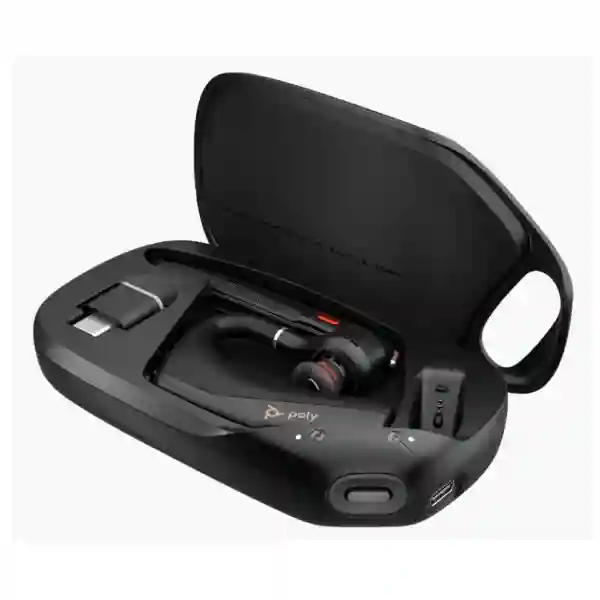
Before purchasing, confirm whether your workflow needs the standard headset or a separate UC kit with a charging case and USB adapter. Ask FourTeck Tanzania to confirm the exact product configuration and commercial details in a quotation.
A practical headset for people who make calls all day
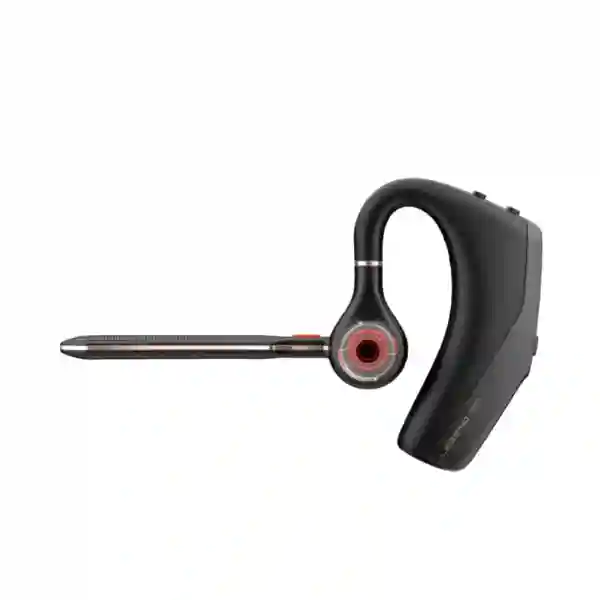
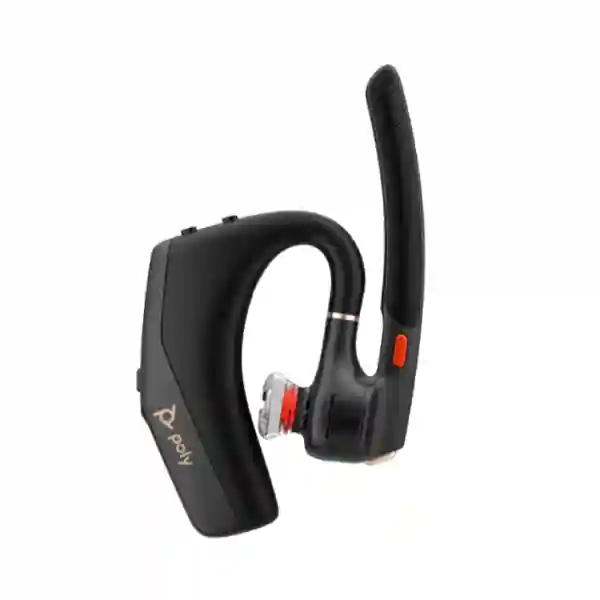
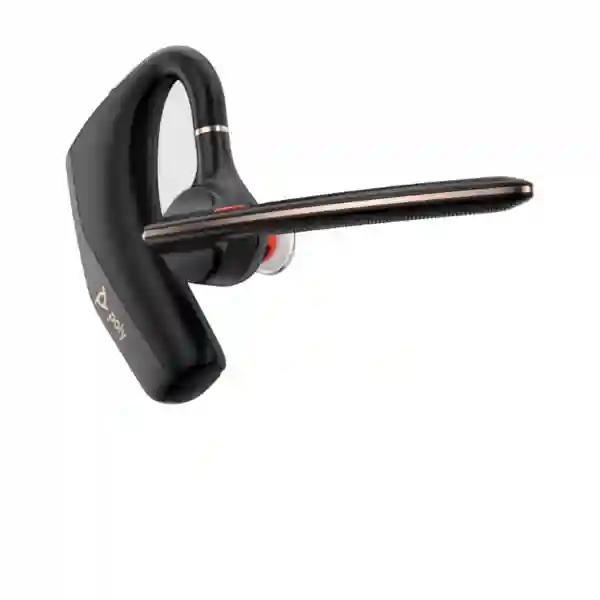
Many work conversations happen between tasks rather than at a dedicated desk. A professional may take a supplier call on a smartphone, return a customer call while reviewing an order, or join a discussion from a laptop. The Voyager Legend 50 is designed around this reality: one lightweight earpiece, a visible microphone boom, direct call controls and a Bluetooth connection without a cable running down to a phone. It is primarily a communication tool for people who want their speech to be the focus.
Its mono design is especially relevant when you need to hear a colleague beside you or remain aware of normal activity around your workspace. The result is different from wearing two large headphones or sealed stereo earbuds. It can be a sensible fit for reception work, management, sales, field coordination, customer support and professionals who divide their day between a phone and computer. It is not intended to provide an immersive stereo listening experience.
For a buyer in Tanzania, the key decision is less about fashionable features and more about the actual calling workflow. Check which device receives important calls, whether the computer has reliable Bluetooth, whether a USB adapter is needed, and how long the headset must run between charging opportunities. Those answers will determine whether this standard model or a UC bundle is the more practical purchase.
What matters at a glance
The core offer combines four noise-cancelling microphones with Poly NoiseBlockAI and WindSmart processing, Bluetooth Core 5.4, support for two simultaneously connected devices, and a rechargeable headset rated for up to 10 hours of talk time. HP lists a headset weight of approximately 20.5 g, a 13.6 mm speaker and USB-C cable charging. Smart sensors, physical controls and voice alerts complement the audio hardware.
These figures are useful when comparing professional mono headsets, but they do not tell the entire story. Maximum range and battery figures are manufacturer-rated test values, not promises for every room or workload. Meeting-app behaviour can depend on the phone, computer, Bluetooth implementation and application. Extra battery time from a charging case must be evaluated separately because the case is not included as a standard-model assumption.
A sensible product decision therefore starts with three questions: will the earpiece feel comfortable for your ear, will your principal device and calling app work as expected, and does the package include every accessory your setup needs? The rest of this guide explains those practical checks in a way that makes ordering and deployment clearer.
How NoiseBlockAI helps your caller hear you
When speaking near colleagues, traffic or office equipment, the problem is often the sound travelling from your environment into the other person’s call. NoiseBlockAI is Poly’s microphone-side noise-reduction technology. It helps distinguish speech from unwanted background sound so the voice transmitted to the caller remains more prominent. Four noise-cancelling microphones and a boom placed close to the mouth provide the hardware foundation for that processing.
It is important to separate microphone noise reduction from active noise cancellation for the listener. The Legend 50 is a single-ear calling headset, not a pair of over-ear headphones intended to silence the environment around both ears. NoiseBlockAI aims to improve outbound speech intelligibility; it does not mean the wearer will stop hearing everything nearby. This distinction is particularly useful when comparing the headset with entertainment-oriented earbuds advertised with ANC.
No microphone system can guarantee perfect results in every environment. Loud machinery, overlapping speech, poor mobile network quality and extreme wind can still affect what others hear. For best results, use the correct fit, keep the boom positioned as intended and make a short test call in the location where the headset will actually be used. Ask the other person whether they hear your speech clearly rather than judging quality only from what you hear yourself.
WindSmart and the realities of calling outdoors
Outdoor calls pose a different challenge from office chatter. Air moving across a microphone can create a low, rough noise that overwhelms words even when the surrounding area seems relatively quiet. Poly WindSmart technology is designed to reduce that kind of wind-related microphone interference. The microphone design and digital processing work together to make speech more usable when the caller is moving between normal indoor and outdoor settings.
This can benefit someone answering calls near a building entrance, walking between site offices or taking a brief conversation in an open area. It is not a claim that the headset is weatherproof, safe for use in heavy rain or suitable for every industrial setting. The published specifications considered for this product do not establish a water-resistance rating, so protection from moisture should not be assumed.
A practical approach outdoors is to find a sheltered position before an important discussion, avoid touching the microphone during the call and check the mobile connection as well as the headset. Network dropouts and wind are separate problems: a headset can reduce microphone noise but cannot repair a weak phone signal. If the conversation includes confidential details, choose an environment where others cannot overhear it.
Why a single-ear headset can be the right tool
With one ear occupied and the other left open, the mono wearing style is intended for conversations that happen alongside everyday work. You can maintain awareness of ordinary office sounds and respond more naturally when someone nearby needs your attention. This is especially useful for people who must balance remote callers with face-to-face colleagues, rather than closing themselves off with two earcups.
Awareness is not the same as guaranteed safety. Even a single-ear headset can distract its wearer, and call audio can mask important sounds. Do not use it in a way that interferes with driving, operating machinery or performing a task that requires undivided hearing. Follow applicable workplace procedures and local laws. For loud or hazardous environments, an appropriate hearing-protection solution may be required instead of a standard communications headset.
Because it is a mono in-ear device, audio presentation differs from a stereo headset. It is made for intelligible speech and everyday media rather than cinematic effects or balanced stereo music. Buyers who primarily edit audio, listen to music for extended periods or need isolation in a busy open office may prefer another category. Choosing on the basis of the actual job prevents disappointment after purchase.
Fit, comfort and wearing position
HP describes the Legend 50 with an ergonomic, over-ear style and three earbud sizes in the series design. The headset itself weighs about 20.5 g, which can help reduce the bulk associated with over-the-head equipment. A comfortable fit depends on ear shape, selected ear tip, how the loop sits behind the ear and the position of the microphone boom. A light headset is not automatically comfortable for every wearer.
When first using the device, take time to find an ear tip that sits securely without excessive pressure. A headset that is too loose may require repeated adjustment and make the microphone position inconsistent. One that feels tight can become uncomfortable during lengthy calls. Try it while standing, turning your head and moving normally in the workplace, not only while sitting still for a few seconds.
Long calling days still benefit from short breaks. If you notice discomfort, adjust the fit or remove the headset between calls. Keep the silicone contact surfaces clean according to manufacturer guidance, especially where devices are shared. For purchasing teams, replacement ear tips and a clear policy against sharing personal ear pieces can be more useful operational considerations than simply choosing the headset with the longest feature list.
Bluetooth 5.4 without the cable
Bluetooth Core 5.4 gives this headset a direct wireless route to compatible smartphones and computers. HP identifies support for Windows 11, macOS, Android and iOS. These platform names establish broad compatibility, but they do not guarantee every device generation, Bluetooth driver, calling application or specialised call-control feature. Pairing and hands-free audio must be supported by the device you intend to use.
A direct phone connection is often the simplest arrangement. Put the headset into pairing mode using its controls, open the phone’s Bluetooth settings and complete the pairing process using the on-screen prompts. On a computer, the operating system’s Bluetooth menu performs the equivalent task. If an application needs microphone access, also confirm that the headset has been selected as its input and output device where appropriate.
HP gives a wireless operating range of up to 30 metres, or 98 feet, under suitable conditions. Real-world distance can be shorter because of walls, metal structures, nearby wireless devices, crowded radio environments and the position of the phone or laptop. Treat that figure as a reference point rather than an invitation to leave the host device far away during an important conversation. A short walk test in your own premises is more informative.
Two active connections and eight remembered pairings
One of the more useful capabilities is multipoint connectivity. The Legend 50 can maintain connections to two devices at the same time, which supports people who divide calls between a mobile phone and another compatible device. For example, someone may carry a business smartphone while keeping a computer available for scheduled meetings. Multipoint reduces the need to disconnect and pair from scratch whenever the work pattern changes.
The specification that it remembers up to eight paired devices has a different meaning. Eight is the number of devices the headset can retain in its pairing history; it does not mean eight phones and laptops can all have active audio connections simultaneously. The simultaneous-connection limit stated by HP is two. This distinction matters in shared offices where several employees might otherwise expect the same headset to switch instantaneously among many computers.
Actual audio priority, call acceptance and switching behaviour depend on the devices and the applications involved. Do not assume that two separate live calls can be mixed, recorded or controlled together. Test what happens when the phone rings during a computer meeting, and identify whether a manual selection or pause is required. This small deployment test can prevent missed calls and confusing handovers.
A day split between phone calls and computer meetings
Consider a salesperson who receives customer enquiries on a mobile phone but uses a laptop to review quotations. A mono headset leaves the hands available for notes or data entry while keeping the conversation close and relatively private compared with a speakerphone. The user can look up information without balancing the handset against a shoulder or interrupting the conversation to change equipment.
Another worker may take scheduled internet meetings from a computer, then respond to a supplier on a smartphone. Bluetooth multipoint can simplify that routine, although the exact switching experience must be checked against the conferencing software and computer’s Bluetooth stack. A direct Bluetooth connection is not identical to a professionally managed UC USB adapter arrangement; organisations that depend on centrally managed meetings should evaluate the package rather than relying on the name alone.
For a team purchasing several units, ask one prospective user to complete a full working-day trial. Include incoming mobile calls, outgoing calls, a computer meeting, mute and unmute, a device handover, and the normal charging routine. A short real-work test reveals compatibility issues more reliably than generic claims about every collaboration platform.
Talk-time expectations and battery planning
HP rates the rechargeable headset for up to 10 hours of talk time. That is a useful benchmark for a day with frequent calls, but it describes a maximum under the manufacturer’s test conditions. Listening patterns, call volume, connection behaviour, battery age and environmental conditions may change actual endurance. A person taking several short calls may experience a different charging cycle from someone on continuous audio calls.
The specification also mentions up to 30 hours when using the optional charging case: roughly 10 hours from the headset plus up to 20 additional hours from the case. The extra capacity belongs to the headset-plus-case arrangement, not to the standard headset alone. HP identifies the charging case as bundled with UC models and otherwise sold separately, so a buyer should not interpret a 30-hour headline as the standalone headset’s run time.
Before ordering, estimate how many hours of active calls occur during a typical day and how often there is an opportunity to charge. For workers who return to a desk regularly, cable charging may be enough. For people moving between appointments, a compatible charge case may be worth discussing. Do not calculate required quantities based solely on a best-case battery claim; allow a sensible buffer for intensive days.
USB-C charging and the optional portable case
The standard headset supports USB-C cable charging, with a published charge time of less than about 1.5 hours under specified conditions. HP’s package listing for the standard model includes a USB-C charging cable and a USB-C-to-USB-A adapter, along with the headset and quick-start guide. Confirm the exact regional package and accessories before checkout, because suppliers may offer different bundles or part-number variants.
An optional mobile charging case makes more sense for someone who regularly works away from a fixed desk. HP describes the case as providing two additional full headset charges and supporting Qi wireless charging of the case. That does not mean the bare earpiece can be placed directly on any wireless charging pad. The distinction is important when specifying chargers for a fleet or preparing a travel kit.
Charge the headset in a dry, suitable location and avoid forcing unfamiliar charging accessories into the connector. If using a case, check the exact case model and compatibility before buying it separately. For shared workstations, a labelled charging area and a habit of returning headsets after use can do more for call readiness than relying on nominal battery life alone.
Call controls that reduce small interruptions
Dedicated physical controls are valuable when a caller needs your attention immediately. HP lists controls for answering, ignoring and ending calls, adjusting volume, muting the microphone, power, pairing and voice-assistant access. This makes common actions available without finding the correct window on a screen. During customer conversations, an obvious mute control can be particularly useful while checking details with a colleague.
Voice alerts can report conditions such as an incoming call, mute status or battery state. These audio prompts help the wearer understand what the headset is doing without looking at a phone. Voice commands for answering or ignoring calls are also part of the published feature set, though their exact availability can depend on configuration and device behaviour.
It is worth learning the controls before the first important call. Practice muting and then checking the indicator or voice prompt so you do not accidentally speak while muted. If several team members receive identical equipment, a simple quick-start card explaining the most common actions can reduce basic support requests. Do not assume a particular meeting application’s on-screen mute button and the headset’s hardware mute always behave identically without testing.
Smart sensors and what they actually do
Wear-detection sensors are intended to make routine call handling more natural. HP describes smart-sensor actions that can answer calls when the headset is put on and mute when it is removed. This reduces the number of manual steps in a common workday, particularly for someone who takes the headset off between conversations. The sensors are a convenience feature rather than a substitute for checking whether the microphone is active.
Automatic behaviour may not be appropriate in every setting. Someone sharing a room with confidential conversations may prefer to review incoming calls before answering. Another user may wear the headset loosely or remove it frequently, which can affect whether the sensors behave as expected. Review the applicable settings and perform a realistic test rather than relying solely on the general feature description.
Sensor functions and software configuration can change across devices or firmware versions. Where available, use supported Poly management tools to inspect settings and updates. If a headset appears to answer unexpectedly or remain muted, first check the wearing position and sensor-related configuration. Train users to verify the call state on the connected phone or computer before discussing sensitive information.
Clear sound for the wearer, not just the far end
The call experience has two sides: the voice leaving the microphone and the sound coming through the earpiece. HP lists a 13.6 mm speaker, a speaker bandwidth of 100 Hz to 20 kHz and SoundGuard acoustic-protection technology. Those technical properties support the product’s design as a communications headset, although the final listening experience still depends on the source audio, network and level settings.
Use a moderate volume and raise it only as needed for intelligible speech. Excessively high levels are not a reliable cure for poor call quality and can lead to listening fatigue. A call may sound rough because the other participant has a weak microphone or connection, even when your own headset is functioning properly. When diagnosing problems, make a reference call to another person with a known good device.
The single-ear design has a limitation: it does not provide the channel separation of stereo headphones. Buyers wanting rich music playback, sound editing or a large amount of isolation should consider a different type of headset. Buyers who prioritise hearing speech and remaining available to nearby colleagues may find the mono approach better suited to their everyday work.
Using the headset with a PC or Mac
A computer must support an appropriate Bluetooth connection and recognise the headset’s call-audio functions. On Windows or macOS, pair through the system Bluetooth interface, then open the intended calling application and select the headset for microphone and speaker output. It can be helpful to place one test call before a meeting begins, especially when the machine has built-in speakers, a webcam microphone and multiple other audio devices.
Direct Bluetooth operation is different from a package that includes the Poly BT700 USB adapter. UC variants commonly include that adapter for a managed computer-call configuration, while the basic Legend 50 should not be sold as though the dongle is included. If the organisation relies on desk phones, custom softphones, remote desktops or locked-down laptops, confirm integration and accessory needs before committing to a multi-unit order.
A program may recognise audio but not map every headset button to its own meeting controls. If answering, ending or muting from the earpiece does not work as expected, review the application configuration and supported device features. Distinguish a headset connection problem from a call-platform integration issue. Testing the exact PC build, operating system version and app prevents avoidable assumptions about universal plug-and-play behaviour.
Mobile phone use during ordinary business travel
For smartphone-first workers, a direct Bluetooth connection is generally the headline feature. The headset can stay with the wearer during office movement and short stops between meetings, without a cable linking it to the phone. Its compact mono style may be easier to carry than a large over-ear headset, and voice alerts can help when the phone is inside a bag or pocket.
For work on the move, organise calls around safe locations. A headset is not a reason to handle a phone while driving, walk inattentively through traffic or discuss confidential customer information in a public queue. Bluetooth only changes how audio is carried; it does not remove safety obligations or make the surroundings private. Important customer conversations deserve both a stable connection and an appropriate place to speak.
When moving between an Android phone and an iPhone, remember that stored pairing and two-device multipoint have practical limits. The headset can remember several devices but need not automatically behave the same way across them. Check which device currently owns the active call before changing settings, and keep the battery topped up before a long day away from reliable charging.
Where it fits in a Tanzanian business workflow
A customer-facing team may need to answer calls while checking orders, invoices, service tickets or supplier messages. A headset designed for speech leaves the hands free for those related tasks. It can also help a manager move from a desk discussion to a remote call without reaching for a wired handset. These are examples of potential use rather than claims about any particular organisation’s deployment or FourTeck’s service coverage.
For companies evaluating equipment in Tanzania, the useful purchasing questions are familiar: what phones and laptops are already in use, how stable is connectivity in the primary calling locations, how many people need headsets, and where will equipment be charged and stored? Those issues can be more decisive than selecting features that users will rarely access. A pilot with one device is often a sensible way to test an unfamiliar endpoint.
If calls often take place in busy shared offices, assess microphone performance during a normal work period rather than in a completely quiet demonstration. If work regularly requires switching between two devices, test multipoint and call routing. If users spend long periods away from desks, compare the standard package with an appropriate case-equipped bundle. Confirm local commercial terms separately; this description makes no promise about price, stock, delivery, servicing or warranty in Tanzania.
Standard Legend 50 versus Legend 50 UC
The most important buying distinction in this family is the package and intended computer-calling setup. The standard Voyager Legend 50 is a Bluetooth mono headset suited to direct connections with compatible devices. Its core microphone technologies, Bluetooth version and basic calling concept are shared with the wider series. The standard offer should be evaluated as a headset with cable charging, not automatically as a docked UC kit.
HP’s UC configurations add a portable Qi-capable charging case and a BT700 USB Bluetooth adapter in the published UC package. The case can extend total talk time between access to external power, and the adapter supports a computer-oriented connectivity arrangement. Organisations that rely on specific collaboration-platform certifications should check the precise UC or Teams-oriented part number, platform support and adapter included in the quote. A product-family claim does not make every variant equivalent.
The word “UC” should not be treated as a cosmetic suffix. It can alter accessories, deployment choices and the total cost of obtaining the required configuration. Conversely, someone who only takes smartphone calls may not need the extra hardware. Choose the simplest package that actually fits the work, and have the supplier confirm the exact item and box contents in writing before payment.
What to expect inside a standard-model package
HP’s technical listing for the standard Legend 50 identifies the headset, a USB Type-C charging cable, a quick-start guide and a USB Type-C-to-Type-A adapter. Package details can differ by part number and distribution region, so the final contents should be confirmed against the exact quoted item. Do not assume the case, BT700 computer adapter, office charging stand or every optional accessory shown in promotional photographs is supplied with this standard variant.
The manufacturer describes a choice of three earbud sizes for the series, but the exact accessory assortment should still be checked for the supplied package. A business buying multiple units may also want to confirm whether replacement ear tips are available, how devices will be labelled and what process users should follow when an earpiece needs cleaning or replacement. Those questions are part of the actual cost of ownership.
Because the buyer has not supplied FourTeck’s exact listing SKU, no SKU should be invented from a manufacturer’s part number. A number printed on a manufacturer datasheet is not necessarily the inventory identifier used for this specific store record. Ask for the confirmed target listing and product configuration if an internal quotation needs a precise code.
A structured checklist for purchasing teams
Start by identifying the main host device: smartphone, Bluetooth-enabled laptop or a particular enterprise communications system. Confirm whether users also need a second simultaneous device connection. For a laptop fleet, verify Bluetooth policy, driver restrictions, supported conferencing apps and whether a USB adapter is required. If a desk phone is involved, determine the exact supported connection or accessory rather than assuming the headset pairs with any office telephone.
Next assess the user experience. Is one open ear an advantage or will the person need stereo listening? Does the headset feel stable for the anticipated call duration? Is microphone noise reduction more important than blocking sound at the listener’s ear? How many active call hours occur before charging is possible? The answers will often distinguish a suitable communications headset from a superficially similar consumer earbud.
Finally, confirm commercial facts from the exact seller: selected model variant, supplied accessories, local price, available quantity, warranty terms, invoicing requirements and any delivery arrangement. Those details are intentionally not invented here. A clearly documented quotation should state whether a case or USB dongle is included so the team can compare like with like. A short pilot call is a useful final technical acceptance step before a broader rollout.
A straightforward setup and acceptance test
Begin with a sufficient charge, then power on the headset and place it in its pairing mode according to the quick-start instructions. On the primary phone or computer, search for nearby Bluetooth devices, choose the matching headset entry and complete any prompts. If a second host is needed, pair it according to the supported multipoint procedure. Avoid repeatedly resetting the device unless the official instructions call for it, because that can remove useful pairing information.
Make a normal test call. Ask the person at the other end whether your speech is clear when you remain still, turn your head and walk a short distance within your usual workspace. Then try mute, volume adjustment and ending the call. Check incoming-call alerts and confirm that removing or putting on the headset produces only the sensor behaviour your team expects. Repeat with the second host if multipoint is important.
Next test the scenario most likely to fail in production: an incoming phone call while the computer is in a meeting, or a laptop call after a phone has been used. Verify the intended audio path rather than making assumptions. Record any successful device settings for colleagues. This simple acceptance routine is a practical way to distinguish an accessory requirement, application setting or radio interference from a defective earpiece.
Poly Lens and ongoing device care
HP identifies Poly Lens as management software associated with the Voyager Legend 50 family. Depending on supported device, host and software version, it can help users or administrators review settings and device updates. For a company managing several headsets, maintaining a consistent configuration may simplify training and troubleshooting. IT teams should verify current software requirements and permitted management features before promising central control.
Firmware and application changes can alter how device controls interact with a computer. When updates are available through official supported tools, follow the manufacturer instructions and complete updates at a suitable time rather than immediately before an important call. Keep a record of which device, operating system and meeting app were used when investigating a problem. That context prevents repeated guesswork across multiple staff members.
Basic physical care also matters. Keep the earpiece and contacts clean, store it so the boom is not crushed and prevent moisture from reaching connectors. Avoid using harsh cleaning products without confirming material compatibility. If an accessory no longer fits securely, investigate the correct replacement rather than improvising. Good care protects call readiness and helps a team get consistent value from everyday equipment.
When to choose a different headset
The Legend 50 is not necessarily the best answer for every user. People who want to hear rich stereo music or work with detailed audio may prefer two-ear headphones. Workers in environments requiring certified hearing protection need equipment approved for that purpose. Someone who wants to reduce the sound arriving at both ears may seek a headset designed with active noise cancellation for listening rather than relying on microphone-side NoiseBlockAI.
A team that primarily uses a particular conferencing platform may find a verified UC variant more appropriate than the base unit, especially if USB adapter behaviour and app controls matter. A person on lengthy travel days might value the added charge capacity of a separate or bundled case. Someone who rarely makes calls may not need a dedicated boom-microphone headset at all.
The best purchase is the one that avoids paying for the wrong capability. Decide first whether the priority is outbound speech clarity, awareness of the surroundings, cross-device calls, computer integration, charging flexibility or stereo listening. Then check the specific product package rather than relying on a shared family photograph or a loosely worded specification sheet.
Common connection and audio problems
If the headset does not appear in Bluetooth settings, confirm it has enough power and is actually in pairing mode. A device already connected elsewhere may not behave as expected during setup. Turn Bluetooth off and back on at the host if appropriate, then follow official pairing or reset instructions when ordinary steps fail. Do not assume a missing device entry means the headset is defective.
If other people cannot hear your voice, check the hardware mute state and the microphone chosen inside the calling application. If you hear the caller through a computer speaker while the headset microphone is active, inspect the application’s input and output settings independently. If audio breaks up while walking away, return nearer to the host and remove obvious sources of radio obstruction before changing unrelated settings.
If the headset switches unexpectedly between a phone and laptop, test one device at a time to isolate multipoint behaviour. If a sensor action is surprising, check the wearing position and supported configuration. When escalating to IT or the supplier, record the host model, operating system, calling app, observed symptoms and steps already tested. That short description often makes support far more productive.
Responsible use and communication etiquette
A wireless headset is a convenience, not a guarantee of private conversation. The person beside you can still hear what you say, especially in a shared workspace or public place. Before discussing customer records, passwords, financial details or sensitive operations, move to an appropriate setting and use the organisation’s approved communication service. Speak at a normal level and avoid leaving the microphone active while asking a colleague for a private answer.
For audio comfort, set listening levels conservatively and take breaks during long calling sessions. Pay attention to signs of discomfort from the ear tip or over-ear loop. Do not assume that a headset with one free ear is safe for every outdoor or industrial activity. Local rules, job-specific hazards and the need for situational awareness still apply.
Where several employees use headsets, define who owns each unit and how hygiene, storage and charging are managed. A small amount of practical training covering mute, pairing, battery status and accessory differences can keep users focused on their work rather than the equipment. Such workplace practices help the product deliver its intended value without exaggerated performance promises.
Verified technical specification summary
The figures below describe the standard Voyager Legend 50 family configuration as specified by HP. Some bundled accessories and feature support vary by model or region, so an exact part-number check remains important.
| Form factor | Single-ear (monaural), in-ear headset with microphone boom |
|---|---|
| Connectivity | Bluetooth Core 5.4; direct Bluetooth connection |
| Wireless range | Up to 30 m / 98 ft under suitable conditions |
| Paired-device memory | Up to 8 paired devices |
| Simultaneous connections | Multipoint: 2 devices |
| Microphone system | Four noise-cancelling microphones; Poly NoiseBlockAI; WindSmart |
| Headset talk time | Up to 10 hours; up to 30 hours only with compatible optional charging case |
| Headset charging | USB-C cable; listed charge time less than 1.5 hours |
| Headset weight | Approx. 20.5 g |
| Speaker size | 13.6 mm |
| Audio protection | Poly SoundGuard |
| Smart functions | Wear-detection sensors, voice alerts, answer/ignore voice commands |
| Compatible platforms | Windows 11, macOS, Android and iOS with appropriate Bluetooth support |
| Standard pack reference | Headset, USB-C cable, USB-C to USB-A adapter, quick-start guide; verify local box |
| Colour | Black |
Technical details are provided to help compare products and plan integration, not as promises about a particular shop’s inventory, accessories, service terms or field performance.
Frequently asked questions
Is the HP Poly Voyager Legend 50 Bluetooth Headset suitable for business calls?
Yes. It is designed as a professional mono communication headset with four noise-cancelling microphones, NoiseBlockAI and WindSmart. These technologies focus on the speech you transmit to other callers. Suitability still depends on your phone, computer, work environment and preferred fit. For a team deployment, test at least one headset using the calling applications your staff actually use.
How long does the standard headset battery last?
HP specifies up to 10 hours of talk time for the headset itself. Actual endurance can vary with usage and conditions. References to up to 30 hours describe the combined headset and compatible charge-case arrangement, with additional charges from that case. The standard headset should not be advertised as providing 30 hours on its own.
Does the standard Voyager Legend 50 include a charging case?
No charging case should be assumed for the standard model. HP’s series comparison identifies the wireless charging case as included with UC configurations and otherwise available separately. The exact package supplied by a seller must be verified because promotional photographs may depict optional accessories.
Is the BT700 USB Bluetooth adapter included?
The BT700 is associated with relevant UC bundles rather than an assumed accessory of the standard Legend 50. If your laptop deployment requires that adapter, ask for an exact UC configuration or a confirmed compatible accessory. Do not rely on an unqualified statement that every Legend 50 box contains the same equipment.
Can it connect to a phone and laptop simultaneously?
HP specifies Bluetooth multipoint support for two connected devices at a time. That is useful for workers with both a smartphone and computer. Call switching and meeting-button behaviour can vary by host and app, so complete a practical test using the intended phone and conferencing software before a wider deployment.
What is the difference between eight paired devices and multipoint?
The headset can remember up to eight devices in its pairing history, but only two can be connected simultaneously according to HP’s published specification. Remembered devices do not each have an active audio path. If several colleagues want to share a single headset across computers, factor in the time and effort of changing the active connections.
Does NoiseBlockAI remove background sound for the wearer?
NoiseBlockAI is primarily about reducing unwanted noise picked up and transmitted by the microphones. It should not be confused with two-ear active noise cancellation intended to make the wearer’s environment quieter. The open-ear mono design preserves some surrounding awareness, which may be an advantage or a limitation depending on the job.
Does it work with Windows, macOS, Android and iPhone?
HP lists compatibility with Windows 11, macOS, Android and iOS using Bluetooth. Exact phone models, computer Bluetooth hardware, drivers and calling applications still matter. Pair the headset with the actual device and confirm microphone selection, audio output and required call controls. Specialised desk-phone or UC integrations may need a different accessory or bundle.
Can I use it outside in windy conditions?
Poly WindSmart technology is intended to reduce wind-related microphone noise, and NoiseBlockAI helps suppress unwanted background sound. Performance cannot be guaranteed in severe wind or poor network conditions. The headset should not be treated as waterproof without a verified rating. Find a sheltered, safe place for important calls when possible.
How heavy is the headset?
HP lists a headset weight of approximately 20.5 grams. That lightweight construction may be comfortable for frequent use, but the correct ear tip and wearing adjustment matter more than the number alone. Try the headset over a realistic call period and check for pressure or slippage before buying a large quantity.
Can it be used for Microsoft Teams and other meetings?
It may be usable as a Bluetooth audio device with compatible meeting applications, but that is not the same as a verified Microsoft Teams-certified UC configuration. The precise variant, USB adapter and application support need to be confirmed for enterprise requirements. Do not assume the standard package has every certification or software-control feature of a Teams-labelled model.
What should I confirm before requesting a quote in Tanzania?
Confirm whether you want the standard Legend 50 or a specific UC package; name the primary phone or laptop; state whether a charging case or USB dongle is required; and request confirmation of the exact box contents. The seller should separately confirm price, inventory, any local warranty terms and fulfilment arrangements. No such commercial terms are implied by the technical description.
Request the right configuration for your team
The HP Poly Voyager Legend 50 Bluetooth Headset is worth considering when business calls, outgoing speech clarity, an open-ear mono fit and direct Bluetooth communication matter more than stereo entertainment features. The correct package depends on the devices, charging routine and collaboration software you use every day. A short compatibility trial and clear accessory list help prevent confusion at the ordering stage.
Next step: Contact FourTeck Tanzania to request a quote for the standard Legend 50, confirm the exact supplied items, and discuss whether a UC configuration or optional charging case is needed. Price, availability, delivery and local warranty terms should be confirmed in the formal offer.




Reviews
There are no reviews yet.