
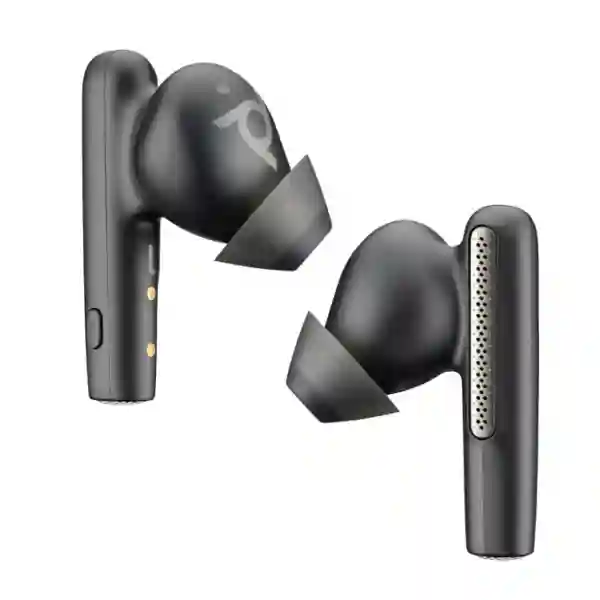
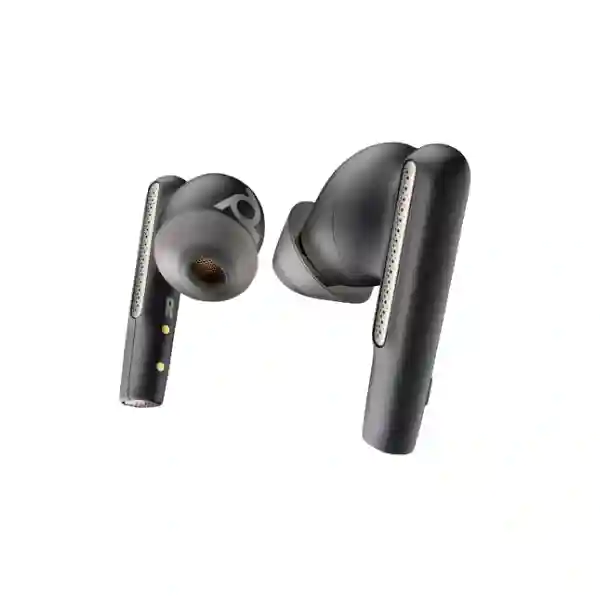
HP Poly Voyager Free 60+ UC Wireless Earbuds
Bring business calls, laptop meetings and mobile listening into one compact audio kit. The HP Poly Voyager Free 60+ UC wireless earbuds combine six call microphones across both earbuds, adaptive noise cancellation, a BT700-enabled UC connection and a touchscreen case that makes supported controls easier to reach. The right configuration can be useful for mobile professionals and hybrid teams in Tanzania, provided the adapter type, collaboration-platform edition and commercial terms are confirmed for the actual order.
Is this the right choice?
Choose this model if a professional needs portable earbuds for laptop and smartphone calls and will actually use the touchscreen charging case. Before requesting a quotation, check the full manufacturer variant because USB-A versus USB-C and standard UC versus Teams editions can change the purchasing decision. FourTeck Tanzania can be asked to confirm the exact configuration and applicable commercial details; no stock or local price is presumed here.
Verified feature overview at a glance
These family-level and documented-configuration details help establish fit. The final bundle must be matched to its full manufacturer description.
| Specification | What buyers should know |
|---|---|
| Product | Poly Voyager Free 60+ UC wireless in-ear stereo earbuds |
| Defining Plus feature | Touchscreen charging case with supported call and device controls |
| Call microphones | Three microphones in each earbud; HP WindSmart and NoiseBlockAI technologies |
| Listening modes | Adaptive ANC and transparency mode |
| Computer connection | BT700 Bluetooth USB adapter in the applicable UC bundle; USB-A or USB-C variant |
| Bluetooth | Core 5.3; two active paired devices and up to eight remembered |
| Stated talk time | Up to 5.5 hours earbuds; up to 16.5 hours with case |
| Stated music time | Up to 8 hours earbuds with ANC on; up to 24 hours with case |
| Case charging | USB cable; Qi wireless charging supported, charging pad not necessarily included |
| External audio | 3.5 mm audio source via Plus case, listening only |
| Variant reminder | Teams and adapter configurations must be verified before ordering |
Who these earbuds are designed for
The HP Poly Voyager Free 60+ UC wireless earbuds are intended for people who move between computer meetings, phone calls, focused work and travel. Their strongest reason to consider them is not simply wireless audio. It is the combination of a business-oriented USB Bluetooth adapter, call-focused microphones, an interactive charging case and a compact in-ear design. That combination can suit a consultant joining meetings from a laptop, a manager taking calls on a smartphone, or an employee whose workstation changes during the week.
They are less obviously the right choice for someone who mainly wants a low-cost music accessory or an over-ear headset for uninterrupted, full-day calling. Earbuds fit differently from traditional headsets, and a charging break may be necessary during a very long schedule. Buyers should decide whether mobile convenience, computer calling and easy access to mute outweigh the extra cost and the personal nature of in-ear fit.
The practical value of the touchscreen case
The distinctive feature of the Plus model is a touchscreen charging case. Beyond storing and recharging the earbuds, the case provides direct access to functions such as call mute and device settings. That can make a difference when a laptop is connected to an external monitor, a meeting window is hidden, or a phone is tucked into a bag. A glance at the case also provides a convenient way to check charging information without first opening a companion application.
The case should be understood as a control accessory rather than a replacement for every meeting application. Its available controls can depend on the paired device, software integration and current operating mode. It is also physically larger than a minimal earbud case. If a buyer would rarely touch the display, the less elaborate Voyager Free 60 UC may deserve consideration. If quick call control while moving between devices matters, the touchscreen is a meaningful differentiator.
Voice pickup for professional calls
Each earbud has three microphones. HP describes the system as combining microphone processing with WindSmart technology to limit wind disturbance, while Poly NoiseBlockAI helps reduce unwanted background sounds on calls. These technologies aim to make speech more intelligible to colleagues when the surrounding environment is not completely quiet. That matters in shared offices, at home when there is incidental activity, and during a short business call away from a dedicated meeting room.
Microphone processing is not a promise that every conversation will be free from noise. A very loud street, strong wind, poor network connection or a microphone blocked by clothing can still interfere with communication. For an important presentation, test the microphone in the actual room and meeting platform beforehand. For frequent meetings in consistently high-noise workplaces, compare this in-ear approach with a boom-microphone business headset before making a final choice.
Active noise cancellation versus microphone noise reduction
Active noise cancellation, or ANC, primarily changes what the person wearing the earbuds hears. The Voyager Free 60+ UC uses adaptive active noise cancellation to reduce distracting environmental sound while listening. Microphone noise reduction, by contrast, aims to improve the voice transmitted to other participants. A buyer should evaluate both independently: quieter listening does not automatically mean that the far-end caller receives perfectly isolated speech.
In a shared workspace, ANC can help the wearer concentrate on a presentation or training recording. On a call, three microphones per earbud and Poly’s voice processing address the other side of the communication. Real-world performance depends on the ear-tip seal, background noise and audio settings. Anyone who needs stronger isolation than in-ear hardware can provide should consider alternatives. The sensible goal is fewer distractions and clearer conversations, not a guarantee of silence.
Why transparency mode is useful
Transparency mode is for moments when hearing the surrounding environment matters more than maximum isolation. Instead of removing an earbud every time a colleague speaks or a public announcement is made, users can switch listening modes. This is especially convenient during a mixed workday, when the same pair of earbuds is used for a focused spreadsheet session, an incoming phone call and a quick conversation at a desk.
The appropriate listening mode changes with the situation. ANC can be useful in a controlled environment; transparency mode can help the user remain aware of nearby voices. Neither mode substitutes for normal caution around roads, machinery or situations that demand full attention. People who work in safety-sensitive environments should follow their workplace policy on in-ear devices. Before a meeting, set the mode that best suits both comfort and the need to remain aware of the room.
Connecting a computer with the BT700 adapter
UC versions of the Voyager Free 60 series include a Poly BT700 Bluetooth USB adapter. On a compatible computer, this creates a purpose-designed connection path for the earbuds rather than relying only on the computer’s built-in Bluetooth radio. HP states that the adapter supports higher-quality audio integration, remote call control with supported applications and remote device firmware updates. These are useful considerations for an organization purchasing headsets for meeting-heavy employees.
The exact adapter connector must be checked before ordering. HP sells USB-A and USB-C bundles, while the short product name supplied here does not identify which connector is included. Ask the purchasing team to confirm whether the intended laptops have a suitable port, whether an approved USB hub is used and whether company security policy permits the adapter. Direct Bluetooth pairing may still be possible, but it should not be assumed to provide the same application integration as the BT700 pathway.
Using a smartphone and laptop together
HP specifies that the earbuds can connect to two Bluetooth devices at the same time and remember as many as eight paired devices. This is valuable for an employee who participates in desktop meetings but also receives business calls on a phone. Instead of maintaining separate audio accessories, the user can establish the supported computer connection and pair a compatible smartphone, then manage the transition between communication activities.
Multipoint should not be confused with simultaneous audio mixing from every device. It provides connection flexibility, but the way an incoming call interrupts music or a meeting can vary with application settings and operating systems. Test the preferred behavior before a high-stakes call: start audio on the computer, place a test call to the phone, and observe which device takes priority. Staff sharing workstations should also keep personal pairing records tidy and remove devices they no longer use.
UC collaboration and meeting-platform checks
The Voyager Free 60 UC family is positioned for unified communications, including business calling and online meetings. HP presents the series as compatible with leading collaboration platforms and offers Poly Lens tools for setup and administration. For a buyer, the important question is not whether the earbuds can play audio from a computer; it is which call controls, mute indicators and device functions are supported by the exact meeting application and software environment.
Confirm the organization’s collaboration platform, operating system and USB requirements before placing a multi-user order. Test a typical meeting with microphone selection, speaker selection, answering, ending and muting calls. If employees switch between desktop applications and browser-based meetings, test both. Platform support and available features can change with application versions, firmware and the exact UC variant, so an approved purchasing decision should be based on the current combination actually used by the business.
Standard UC versus Microsoft Teams variant
The term UC does not by itself prove that a particular box contains the Microsoft Teams-specific edition. HP offers standard and Teams-focused configurations within this product family. The Teams-oriented variant can provide application-specific behavior, while standard UC configurations are intended for broader unified-communications use. These editions should not be silently treated as interchangeable, especially when the business requires a specific certification or meeting-button function.
Before procurement, request the complete manufacturer configuration name and verify it against the deployment requirement. If the workplace uses Teams as its primary platform, ask specifically whether the quoted kit is the relevant Teams variant and what its supported controls are. If the company uses a different UC platform, check the standard variant and its application integration instead. The name in this brief is intentionally kept generic until a specific bundle is confirmed; no Teams-only feature is being promised for an unidentified package.
What the 3.5 mm audio connection does
A useful but easily misunderstood capability of the Plus model is its external audio connection through the touchscreen case. HP states that an external source can connect using the supplied 3.5 mm audio cable for listening only. The case can relay that source’s audio to the earbuds, which may help with an aircraft entertainment screen or another audio device that does not itself offer the desired Bluetooth connection.
This feature does not turn the earbuds into a wired microphone headset for every device with a headphone jack. Do not plan to use the 3.5 mm connection as a two-way conference microphone input unless the manufacturer explicitly supports that arrangement. Confirm the source device’s audio connector and any restrictions before travel or deployment. For ordinary computer conferencing, the included BT700 adapter is the more relevant connection method. The two accessories serve different purposes and should be described separately in a purchase specification.
Battery figures explained without ambiguity
HP lists up to 5.5 hours of earbud talk time, with up to another 11 hours provided by the case, giving a stated combined talk-time figure of 16.5 hours. For music listening with ANC switched on, HP lists up to 8 hours from the earbuds and up to another 16 hours from the case, giving a stated combined music figure of 24 hours. These are different usage scenarios, not two promises that apply simultaneously.
Actual running time depends on volume, connection type, call activity, ANC operation, battery condition and environmental conditions. A meeting-heavy employee should plan around the shorter talk-time figure rather than the music figure. A charging case extends the time available between wall charges, but only if it has been charged itself. For teams with consecutive meetings, build a short recharge opportunity into the workday and keep a backup communication option available when business continuity is critical.
Charging routine and travel power planning
The manufacturer lists an earbud charge time of less than two hours and a case charge time of less than three hours for the documented configuration. The case supports Qi wireless charging, although a Qi charging pad is not necessarily part of the package. A USB charging cable is included in the documented bundle. This flexibility is useful at a desk where a charging pad is already present or during travel where a USB power source is readily available.
A simple routine helps avoid disappointment: return both earbuds to their case after calls, check the case charge before leaving the office and pack the appropriate charging cable for trips. Do not assume that a case showing some remaining power can cover a full day of conference calls. Battery specifications describe test-condition capability, not a service-level guarantee. If users expect multiple long meetings without a break, compare the charge pattern with their actual calendar and consider a wired backup headset.
Comfort depends on correct ear-tip fit
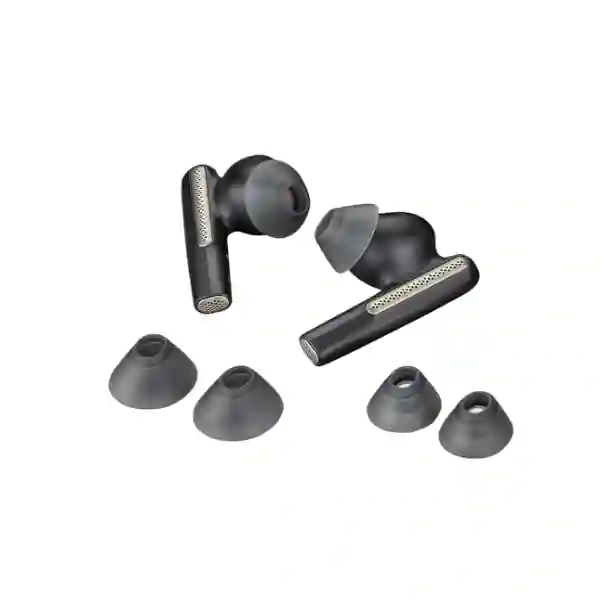
HP includes small, medium and large ear tips in the documented USB-C package. Selecting the right size is an important part of the setup process because comfort, passive isolation, microphone positioning and the effect of ANC can all change with fit. A seal that is too loose can reduce low-frequency isolation; one that feels too tight can become uncomfortable during extended use. An in-ear headset is personal equipment, so one size should not be specified for everyone.
Start with the tips already fitted, then try the alternatives in a quiet place. Test both ears, speak naturally, walk around briefly and check whether the earbuds remain stable without constant adjustment. Avoid judging comfort solely during a two-minute unboxing. A user who experiences pressure or irritation after prolonged use may prefer another wearing style. For a business purchasing several units, a small pilot with representative users is more useful than assuming the same comfort result for every employee.
Button, swipe and case controls
The earbuds combine physical and touch-based interaction. HP lists button call-answer and call-end operation plus touch functions including mute and volume adjustment. The Plus case adds another surface for supported call and device controls. This variety can be helpful when the phone is across the desk or when the user is walking between work areas, but it also means that users should learn which controls work in each operating mode.
For onboarding, teach a short repeatable sequence: answer a test call, mute the microphone, confirm the mute state, change playback volume and end the call. Check the same steps in the workplace’s preferred meeting application. Settings may be configurable through Poly Lens, so avoid distributing a control guide that assumes every installation uses identical preferences. In organizations that have many new users, a concise instruction card can reduce accidental unmuting and missed calls.
Poly Lens for individual device management
Poly Lens is HP Poly’s management and companion software ecosystem. HP describes a Poly Lens app for device updates and user settings as well as administrative tooling that gives IT teams visibility into supported Poly equipment. For one employee, software management may mean checking updates, reviewing controls and adjusting available preferences. For a larger organization, centralized visibility can help standardize how supported devices are configured.
Do not assume every Poly Lens function is available on every phone, operating system or enrollment model. Confirm supported versions, administrator permissions and organizational data policies before deployment. Firmware updates should be planned so that devices are not taken out of service immediately before an important meeting. The practical purchasing question is whether the workplace wants users to manage their own earbud preferences, IT to provide an approved configuration, or a mixture of both.
How a hybrid worker might use them
Consider a staff member who starts the morning at home, travels to a client office and finishes with a call from a laptop. The BT700-equipped computer setup can provide a familiar conference-audio path at the first location. Bluetooth smartphone pairing supports voice calls while away from the desk. The touchscreen case can provide a quick view of the charge state and access to convenient controls in between. The portable form factor means the device need not stay beside one workstation.
The value in this scenario comes from fewer changes of equipment, not from pretending every workspace has identical acoustics or connectivity. At a client site, the person should check available USB ports, local meeting rules and background noise. At home, they should verify microphone selection in the calling application. During travel, the case must remain charged. This kind of real workflow is the right way to assess whether the Plus edition earns its place in the equipment budget.
Using them in a shared office or hot-desk environment
Shared desks create a different set of requirements from a dedicated private office. The employee may not control the computer’s USB layout, noise level or default audio settings. A compact headset that travels with its owner can reduce dependence on desk-specific audio accessories. The user’s BT700 adapter and earbuds can form a consistent pairing arrangement where the organization’s devices and security rules support it.
That does not remove the need for sensible setup. Employees should not leave the USB adapter in a shared workstation, and they should check their meeting platform’s selected microphone and speaker after each move. A busy shared office may still be too noisy for an uninterrupted confidential discussion, regardless of microphone processing. For sensitive calls, use an appropriate private space. The earbuds are a mobile communication aid, not a substitute for meeting-room privacy, office acoustic planning or a reliable internet connection.
Travel and commuting use cases
The Voyager Free 60+ UC can serve two different roles while travelling. Bluetooth audio supports compatible phones and tablets, and the touchscreen case can relay listening-only audio from a 3.5 mm source. ANC can help manage listening distractions during suitable portions of a journey. The charging case protects and recharges the earbuds between uses, which is convenient when meetings and transit are combined on the same day.
Travel use still calls for practical caution. Follow airline and local rules on electronic devices and audio accessories, and use awareness-oriented listening where surrounding sounds must be heard. The analogue audio input is not a replacement for a dedicated aviation headset or a promise of compatibility with every in-flight socket. For a trip that includes several long calls, carry the USB charging cable and confirm the charge status before departure. Prioritize hearing safety and environmental awareness over uninterrupted playback.
Windows, macOS and mobile compatibility
HP’s published specifications for a documented Free 60+ UC USB-C configuration list Windows 10, Windows 11, macOS, Android and iOS among compatible operating systems. This supports a broad device discussion, but does not make every function identical across every operating system. Basic media audio, microphone selection, remote call controls and management tools may each have their own requirements.
For a business fleet, build a brief compatibility matrix before purchasing. Record the computer models, USB-A or USB-C ports, operating-system versions, primary meeting clients and permitted software installation methods. Then verify the important user actions with a sample unit. This is particularly useful when some workers use corporate Windows laptops, others use Macs and others are mostly mobile. The right procurement outcome is a setup that fits the actual technology environment, not the broadest possible compatibility claim on its own.
Quick technical specification guide
The documented Carbon Black USB-C configuration uses Bluetooth Core 5.3 and supports simultaneous connections to two devices, with memory for up to eight paired devices. HP lists 10 mm speaker drivers, in-ear stereo construction, and a nominal wireless range of up to 30 metres under suitable conditions. A buyer should treat wireless range as a maximum test-condition figure because walls, interference and the placement of a computer can affect practical performance.
The earbuds are compact, but the charging case includes the touchscreen hardware that distinguishes the Plus edition. HP lists each earbud at 5.8 grams and the touchscreen case at 80 grams for its referenced configuration. Those measurements can help compare portability with a conventional headset; they do not predict personal comfort. The exact included adapter, finish and software-specific edition must still be checked against the chosen manufacturer configuration before the specifications are attached to an order.
Understanding the package contents
For HP’s documented Carbon Black USB-C configuration, the package contains the wireless earbuds, touchscreen charging case, BT700 USB-C Bluetooth adapter, USB-C charging cable, 3.5 mm audio cable and small, medium and large ear tips. This makes the kit more than a pair of standalone consumer earbuds because it contains accessories for computer calling and for listening to an analogue audio source.
These contents describe the referenced configuration, not every possible package with a similar name. If a quote specifies a USB-A variant, a Teams configuration or another finish, confirm the manufacturer’s actual bundle details. The user should receive a clear answer about the adapter type and all included cables before approving a purchase. Some workplaces also require a carrying arrangement or replacement ear tips; do not assume extras are included unless they are itemized. Check the packing list during receipt and report discrepancies before issuing equipment to staff.
How to set up the first computer call
Begin by charging the earbuds and case, then check that the computer has the correct port for the supplied BT700 adapter. Follow the manufacturer’s pairing guidance and allow the computer to recognize the audio device. In the meeting application, select the correct microphone and speaker rather than relying on an old default headset. Make a brief test call and ask another participant to confirm voice clarity at a normal speaking level.
Next, practise the controls that matter: answer, mute, unmute, adjust volume and end the call. Confirm how the touchscreen case indicates call and battery information. Where permitted by IT policy, use the supported Poly Lens software to review available firmware updates and settings. Only after these checks should the user rely on the setup for a customer or board meeting. Document any application-specific differences, because an instruction that works on one computer may need adjustment when the device is used elsewhere.
How to pair a mobile phone responsibly
A smartphone connection is useful for calls and music when the user is away from a computer. Use the manufacturer’s pairing procedure, open the phone’s Bluetooth settings and select the intended earbud device. After pairing, place a test call to check whether audio is routed to the earbuds and whether the microphone works as expected. Adjust playback and microphone settings if the phone offers them.
For employees managing a work phone and a personal phone, consider what should happen when both devices ring or attempt to play sound. The earbuds can remember multiple devices, but the business should still decide which devices are authorized for work calls. Avoid pairing sensitive shared devices without permission, and remove obsolete pairings when changing roles or returning equipment. If a connection becomes unreliable, review active pairings and the manufacturer’s reset guidance rather than repeatedly changing unrelated computer settings.
Testing real-world call quality before a wider rollout
A short controlled pilot gives buyers stronger evidence than a long list of marketing features. Recruit users from different roles: one person who joins online meetings all day, one who changes desks regularly and one who frequently makes smartphone calls. Ask each participant to evaluate microphone intelligibility, comfort after extended wear, the usefulness of the case and how often charging interrupts work.
Run the same basic checks in a quiet room and in a typical working area. Test direct Bluetooth where appropriate and the BT700 computer path separately; evaluate the actual UC client rather than only a generic voice-recorder application. Record the outcomes without claiming that a single user’s comfort result applies to the whole organization. If a user needs a boom microphone or dislikes in-ear tips, that is a meaningful buying result. A pilot can also reveal whether the touchscreen controls are genuinely useful for the intended workflow.
What to compare before choosing an alternative
The right comparison depends on the employee’s job. Against ordinary music earbuds, the Voyager Free 60+ UC’s advantages lie in its UC-oriented adapter, call controls, enterprise management ecosystem and multifunction charging case. Against a business over-ear headset, its strengths are compact storage and portability, while a larger headset may be more comfortable for some people during continuous calls or offer a more distinctive microphone boom.
For cost-sensitive purchasing, compare the Plus model with the Voyager Free 60 UC, which retains the UC adapter but uses a basic case. Ask whether the touchscreen and analogue source connection solve real problems. When comparing across brands, use the same criteria: actual platform compatibility, microphone performance in the workplace, support for the chosen computer, charge pattern and wearing comfort. A premium feature list is only worthwhile when it improves the way the employee works.
Planning a small-team equipment deployment
Small teams can often standardize quickly, but even five employees may have different port types, meeting applications and wearing preferences. Start with an inventory of devices and define the required UC platform. Confirm whether USB-C or USB-A adapters are needed. Choose a clear process for assigning each kit to one user, checking accessories at handover and storing basic setup instructions.
A simple deployment plan should also cover who helps with software updates, how users report a lost adapter and how the business handles a failed or uncomfortable unit. These details matter because the accessory bundle is part of the overall product value. If several employees move between customer premises, include a short checklist for pairing, correct microphone selection and battery status before each trip. This is more actionable than giving every employee the same generic feature sheet and assuming the rollout is complete.
Purchasing for Tanzania without guessing local terms
For organizations buying in Tanzania, the practical questions are configuration, quotation terms and support arrangements. The buyer should ask FourTeck Tanzania to identify the exact requested variant, confirm whether it can be supplied, and state the current commercial terms in a written quotation. The generic product name alone does not establish whether the kit contains a USB-A or USB-C adapter, the standard UC or Teams-specific edition, or a particular colour.
Do not infer a local selling price, delivery lead time, import charge, warranty entitlement or stock position from international product material. Those are transaction-specific details that require confirmation for the actual offer. The manufacturer may describe a general warranty for a reference configuration, but local coverage and the handling process should be verified in the quote. Buyers who require a particular compliance document or device-approval record should ask for the relevant evidence rather than assuming it applies to every configuration.
Procurement questions that prevent the wrong bundle
A useful quote request names the business environment rather than only the marketing title. State how many employees need the earbuds, whether their laptops have USB-A or USB-C ports, the primary UC platform and whether Microsoft Teams-specific functionality is required. Mention whether travel listening through an analogue source is valuable and whether Poly Lens management is part of the planned deployment.
Ask the supplier to respond with the full manufacturer configuration description, an itemized list of included accessories, commercial terms, and the support or replacement process relevant to Tanzania. If a reference number is supplied, verify that it belongs to the quoted variant; do not substitute another seller’s stock identifier. This simple discipline prevents receiving a technically similar product that lacks the required adapter or software configuration. A reliable quote should make the exact product and its deployment fit understandable before payment is considered.
Security, privacy and responsible audio use
Wireless earbuds are still endpoints connected to work computers and phones. Follow the organization’s rules on approved Bluetooth accessories, USB peripherals, application permissions and firmware installation. A small dongle is easily misplaced, so treat the BT700 adapter as part of the assigned equipment. When moving between shared computers, remove adapters and disconnect personal devices as appropriate.
Noise cancellation does not create privacy for confidential speech. Other people may still hear the employee speaking, even when the employee hears less of the environment. A private room is preferable for commercially sensitive discussions. The display on the case is useful for quick controls, but users should still verify meeting mute status in the platform when confidentiality matters. Good device behavior, secure computers and suitable working spaces are as important as the features of the earbuds themselves.
Care, storage and day-to-day reliability
Keep the earbuds and case clean and dry in accordance with the manufacturer’s care instructions. Avoid forcing an ear tip onto an earbud or using harsh cleaning products without checking whether they are permitted. Return the earbuds to their case when not in use so that they are protected and ready to recharge. Store the USB adapter with the assigned kit rather than allowing it to remain loose in a shared bag.
If audio becomes uneven, first check fit, charge level, connection selection and whether another paired device is taking priority. If a meeting application has no microphone input, confirm its audio-device settings before assuming there is a hardware fault. Check official support instructions for reset and firmware steps. Do not claim water resistance or suitability for exposure to rain without verified information for the exact device. Normal care cannot eliminate every failure, but it can reduce avoidable disruption.
A practical day-in-the-life workflow
Before the first meeting, the wearer confirms the earbud and case charge state and connects through the intended computer path. During a video call, the microphone is checked in the application and the mute control is practised. Between meetings, the wearer can switch to music with ANC in a suitable environment. A phone call can then be handled through the paired smartphone, with attention to the way the devices prioritize audio.
After lunch, the earbuds may be returned to the case for a charging opportunity. For a later trip, the user can take the case, charging cable and, if useful, the analogue audio cable. At the end of the day, the case is recharged for tomorrow. None of these steps is complicated, but together they show the intended benefit: one compact audio kit supporting several everyday work moments. The value comes from preparation and correct configuration as much as from any single feature.
Strengths and trade-offs in plain language
The strongest reasons to shortlist the Voyager Free 60+ UC are its business-call focus, three-microphone design, BT700 adapter, two-device connectivity, adaptive ANC and unusually capable charging case. The ability to relay a listening-only analogue source is an additional benefit for some travellers. Poly Lens may also fit organizations that already manage supported Poly collaboration equipment.
The trade-offs deserve equal attention. In-ear fit is subjective. The case adds bulk compared with simpler earbuds. Battery life for calls is shorter than the total music listening figure, so a recharge pattern may be necessary. The UC experience can differ according to connector and software variant, and some meeting controls depend on application compatibility. Buyers seeking the strongest possible music isolation or an all-day boom-microphone headset should compare other categories. A good purchasing decision is based on workflow fit rather than on the novelty of a touchscreen.
Questions to ask an internal IT team
Before purchasing, IT should confirm that the intended computers permit the BT700 adapter, have compatible physical ports and run supported operating-system and conferencing-software versions. Ask whether automatic audio-device switching is desirable, whether employees may pair personal smartphones and who is responsible for Poly Lens configuration. Verify that the meeting software recognizes the headset’s microphone and speaker the way the business expects.
For larger or regulated workplaces, ask how firmware updates are scheduled, how peripherals are inventoried and what happens when an employee leaves the organization. Not every deployment needs elaborate administration, but a few documented responsibilities make support easier. The most useful acceptance test is not a theoretical compatibility badge; it is a successful representative call using the exact computer, platform, adapter and controls that staff will use every day.
When this model is a poor fit
It is useful to identify cases where the product is not the first option. A reception agent or call-centre employee who speaks continuously throughout a shift may prefer a purpose-built headset with a boom microphone and a wearing style designed for long sessions. A user who cannot comfortably tolerate in-ear tips should not be persuaded by a touchscreen feature. Someone who only needs occasional phone audio may find a simpler pair of earbuds more economical.
The product also is not a guaranteed solution to unreliable video-call quality. Weak broadband, congested Wi-Fi, poor application settings or a noisy meeting location can still undermine a call. The earbuds can address part of the audio experience, but they cannot replace network planning, training or a quiet space. Recognizing these limitations supports better purchasing decisions and fewer disappointments after deployment.
A simple pre-purchase decision framework
Start with three questions. First, is the main problem business calling across a laptop and phone, or is the buyer primarily shopping for recreational listening? Second, will the touchscreen case, BT700 adapter and analogue listening connection be used frequently enough to justify the Plus configuration? Third, does the specific bundle match the laptop connector, collaboration platform and user comfort requirements?
If the answers support the product, request an exact-variant quote and use a sample unit to verify the key workflows. If the team only needs UC connectivity but not the smart case, compare the non-Plus UC model. If prolonged microphone use and all-day comfort are top priorities, include a traditional business headset in the comparison. This approach allows FourTeck Tanzania customers to define value through needs and compatibility rather than selecting from a product name alone.
Getting the most from the first week
The first week after setup is a good time to refine how the earbuds are used. Encourage users to learn their preferred listening mode, test microphone position and adjust ear-tip size if fit is not stable. Confirm whether the case controls or earbud controls are easier during meetings. If the user regularly alternates between two connected devices, establish a predictable routine so incoming audio is not surprising.
Keep a note of any recurring issue, including the device involved, connection method and meeting application. That information helps the support team separate a pairing problem from an application configuration problem. Recharge the case consistently and confirm that any software updates come from approved tools. After a week, decide whether the selected configuration is a good personal fit before extending the purchase to more staff. A short review improves outcomes without adding unnecessary complexity to normal work.
Frequently asked questions
Direct answers to the questions that most affect fit, configuration and a confident purchase.
Is the Voyager Free 60+ UC suitable for video meetings?
Yes. It is designed around professional audio use and includes a UC-oriented BT700 adapter in the relevant bundles. For the best experience, verify microphone selection, supported call controls and compatibility with the exact meeting platform used by your organization. A test call is recommended before an important meeting.
What is the difference between Voyager Free 60 UC and Free 60+ UC?
The Plus edition has a touchscreen charging case and supports a listening-only connection from an external 3.5 mm source through that case. The Voyager Free 60 UC uses a basic charging case. Both are part of the UC family with a BT700 adapter in the relevant packages. Confirm bundle details before purchase.
Are these earbuds the Microsoft Teams version?
Not necessarily. The name HP Poly Voyager Free 60+ UC does not identify a specific Teams edition by itself. HP has standard UC and Teams-focused configurations. Request the complete manufacturer description and confirm any Teams-specific certification or control requirement before ordering.
Does the package include a USB-A or USB-C adapter?
The adapter connector depends on the exact bundle. HP documents both USB-A and USB-C variants. A verified Carbon Black USB-C bundle includes a BT700 USB-C adapter, but that does not prove the configuration of every listing. Specify your computer port requirement in the quotation request.
Can the earbuds connect to a laptop and phone at once?
HP lists two simultaneously connected Bluetooth devices and memory for up to eight paired devices. How calls and audio switch between those devices can depend on software and operating-system behavior. Test your expected laptop and smartphone workflow before relying on it for a critical call.
Can I use the touchscreen case to mute a call?
The Plus model’s touchscreen case is designed to provide mute and other supported controls. The exact behavior can depend on the active connection and collaboration application. Always confirm mute state in the meeting software when privacy matters, especially during sensitive discussions.
Does ANC stop other people from hearing background noise?
ANC primarily reduces noise reaching the wearer’s ears. The microphones and Poly voice-processing technologies address transmitted call audio. Both can help, but neither guarantees perfect noise removal. If the space is extremely noisy, consider moving to a quieter location or using a different headset design.
How long does the battery last during calls?
HP lists up to 5.5 hours of talk time from the earbuds and an additional 11 hours with the case, under the relevant test conditions. Music listening figures are different. Actual performance varies, so people with long meeting schedules should plan charging breaks and retain an alternative audio option.
Can the earbuds be used with an aircraft entertainment system?
The Plus touchscreen case supports listening-only audio from a compatible external source through a 3.5 mm cable. That can be useful with certain in-flight entertainment systems. Check the source connector and comply with airline instructions; it is not a two-way microphone connection.
Do I need Poly Lens to listen to music?
Basic audio use and supported device pairing are separate from the optional management experience. Poly Lens provides supported device settings, updates and management functions. Your IT team may have a preferred setup policy. Check application and firmware requirements if you need advanced controls rather than assuming every feature is identical on all devices.
Are they comfortable for all-day wear?
Comfort depends on ear shape, ear-tip fit and personal tolerance for in-ear devices. The documented package includes three ear-tip sizes. For continuous calling, try a realistic wear test before buying several units. A traditional over-ear or boom-microphone headset may suit some employees better.
Are they waterproof or suitable for heavy rain?
Do not assume an environmental protection rating that has not been verified for the exact configuration. Use the earbuds according to the manufacturer’s care and safety guidance. Customers who need audio gear for outdoor rain, dust or industrial exposure should confirm an appropriate rating before purchase.
What should Tanzanian customers check before ordering?
Confirm the exact UC or Teams variant, adapter connector, included accessories, current quotation terms, availability and locally applicable support arrangements. Ask for these details in writing. International product descriptions are useful for technical comparison but do not establish Tanzania stock, price, delivery or warranty handling.
Can the earbuds replace a wired call-centre headset?
They may suit mobile and hybrid workers, but not every call-centre workload. Continuous talk time, wearing comfort, microphone preferences and business call-control requirements should guide the choice. Pilot the equipment in real shifts before replacing established wired or boom-microphone headsets.
Does Bluetooth 5.3 guarantee a 30-metre office range?
No. HP publishes Bluetooth 5.3 and up to 30 metres of wireless range for a documented configuration, but practical range depends on obstacles, radio interference and the surrounding environment. The best verification is a test in the office or building where the device will be used.
How should we request a quote for the correct bundle?
Provide the number of users, laptop port types, preferred collaboration platform, required standard or Teams configuration and any accessory needs. Ask FourTeck Tanzania to confirm the complete manufacturer configuration, included items and current supply terms. Do not rely on a short generic title alone.
Request a configuration-checked quote
Tell FourTeck Tanzania how many users need the HP Poly Voyager Free 60+ UC wireless earbuds, which USB connector their computers require, and whether standard UC or a Teams-specific edition is necessary. Ask for the full quoted configuration, included accessories, supply terms and support arrangements. This is the most reliable next step when a generic product name does not identify the exact box.
Next step: request a written quote and confirm the variant before ordering.




Reviews
There are no reviews yet.