
Professional wired communication | Tanzania product guide
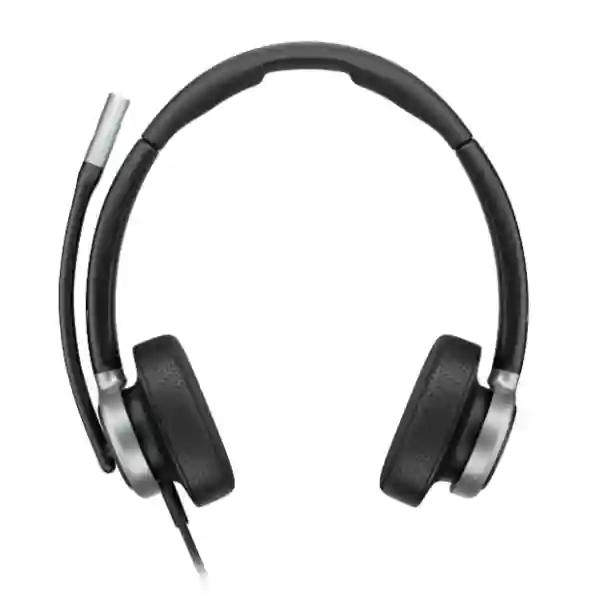
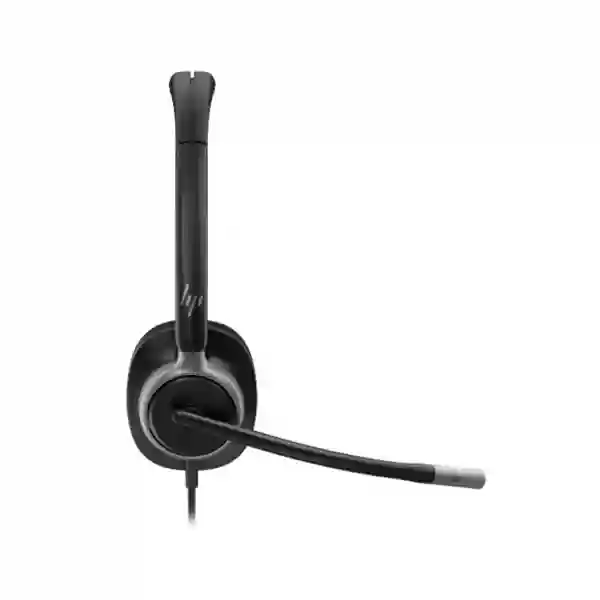
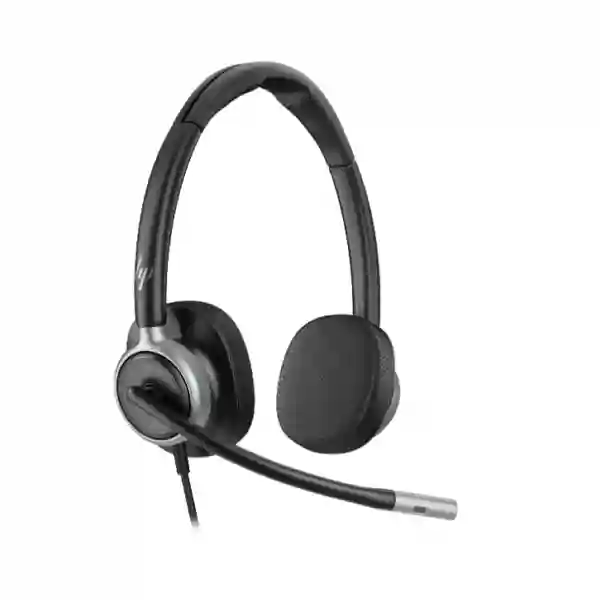
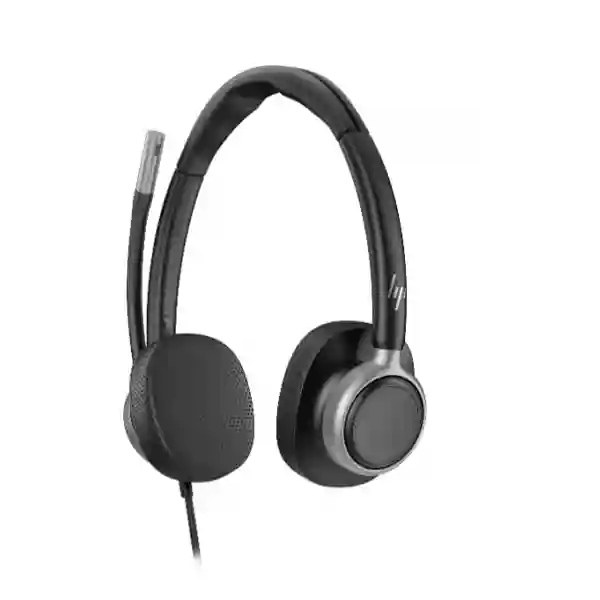
HP Poly Mission 625 Stereo USB Wired Headset
Give your team a dependable wired headset for clear conversations without the uncertainty of batteries or wireless pairing. The HP Poly Mission 625 Stereo USB Wired Headset is an on-ear, dual-ear business headset made for video meetings, voice calls and focused daily communication. Two microphones with AI-enhanced transmit noise reduction help colleagues and customers hear the speaker more clearly when an office becomes busy. Memory-foam ear cushions, a padded adjustable headband and a lightweight 147 g design make it practical for frequent calls.
Connect through USB-C, or use the supplied USB-C to USB-A adapter on a suitable computer. The two-metre cable, call controls, rotating boom microphone and visible busy indicators support a comfortable working routine. The headset is Microsoft Teams certified, including the Teams Open Office microphone specification, and is also certified for supported Zoom and Google collaboration environments. It is a strong option for teams assessing professional USB audio in Tanzania. Review the device and software requirements below, then request confirmation of the exact variant, local availability and commercial terms before ordering.
At a glance
- Two-microphone AI-enhanced transmit noise reduction for speech-focused calls.
- Wired USB-C connection plus included USB-A adapter, with a two-metre cable.
- Lightweight 147 g stereo on-ear design with padded headband and memory-foam cushions.
- Microsoft Teams Open Office microphone specification; additional Zoom and Google collaboration certifications.
- 285° adjustable boom with rotate-to-mute, call controls and visible earcup busy indicators.
Clear speech when the office gets busy
In a shared office, the caller at the other end does not need to hear every nearby conversation, keyboard tap or movement. The Mission 625 uses a two-microphone system with AI-enhanced transmit noise reduction to reduce typical background sounds in the outgoing microphone signal. That matters for customer service teams and meeting participants who speak from open-plan desks, reception areas and collaborative spaces. The main benefit is intelligibility for the listener, not a promise that the entire room becomes silent.
There are realistic limits. A microphone cannot remove every loud voice, sudden impact or competing conversation, especially when the interfering sound is close to the user’s mouth. Position the boom correctly, speak in a natural tone, and test the headset in the actual working environment. If your employees sit beside loud machinery or constantly changing public noise, arrange a pilot in that location rather than relying on a specification alone. The goal is consistent speech quality, with sensible expectations about what microphone processing can achieve.
Understand the two-microphone design
The headset has two microphones and a rotating boom, rather than relying on a laptop microphone positioned far from the speaker. Bringing the speech pickup nearer to the mouth generally gives the system a better opportunity to distinguish the intended voice from environmental noise. HP specifies a microphone bandwidth of 50 Hz to 16 kHz and identifies AI noise reduction as part of the transmit-audio design. These figures describe component capability; application processing and the remote caller’s device also affect what is ultimately heard.
For a proper evaluation, record a short test call during a typical working day. Include normal speech, a colleague talking nearby and some movement around the desk. Play the recording back on a different device and compare it with the headset currently in use. Ask whether words remain understandable rather than judging only how much noise disappears. A controlled workplace trial gives an IT buyer more useful evidence than simply assuming that any headset advertised with noise reduction will behave the same way.
Stereo listening for meetings and multimedia
The dual-ear on-ear layout delivers audio to both sides, which can help users stay focused on a presentation or hear colleagues on a conference call. HP lists 32 mm speaker drivers and a speaker bandwidth of 20 Hz to 20 kHz in multimedia mode. It also advertises super wideband audio for more detailed voice reproduction. The actual calling bandwidth still depends on the collaboration application, operating system, audio settings, network conditions and the far-end connection.
This is a communication-focused headset, not a dedicated studio-monitoring or high-isolation hearing device. Stereo playback is useful for training videos, recorded presentations and ordinary business multimedia between meetings. For specialist music production, extremely noisy environments or applications demanding particular measurement tolerances, assess purpose-built audio equipment instead. On a work computer, set the headset as the desired output device in both the operating system and conferencing application so calls do not unexpectedly play through the laptop speakers.
Comfort built around real working days
At approximately 147 g, the Mission 625 is relatively light for a wired stereo business headset. HP describes a padded, adjustable headband and memory-foam ear cushions with a PU-leather surface. The design aims to spread the wearing pressure and give each user some flexibility in fit. The headset measures 170 × 180 × 40 mm according to HP’s published specification. Those numbers are useful when comparing devices, but they cannot determine how comfortable a headset will feel on a particular person’s head.
Plan a wear test that resembles the intended shift: a quick five-minute try-on may miss pressure that emerges after several consecutive calls. Check how the ear cushions sit on glasses, whether the headband adjusts sufficiently and whether the microphone boom stays in the preferred position. Staff who dislike anything resting directly on their ears may prefer a different wearing style. Encourage short breaks as appropriate; no product should be presented as guaranteeing fatigue-free use for every person.
A visual cue that colleagues can understand
HP describes 360-degree visible busy lights on both earcups. They illuminate during supported call states so people nearby can see that the user is engaged. In shared working environments, this is a small feature with practical value: a colleague approaching from the side can notice the light before beginning a conversation. Visual call indicators may reduce avoidable interruptions without the wearer having to signal manually every time a call starts.
A busy indicator is not a privacy shield or a guarantee that coworkers will always notice it. It also should not be interpreted as a recording indicator or a secure status display. Behaviour can depend on the calling application, device software and supported integrations, so test the light in the specific platform your organisation uses. Establish a simple team convention around visible call indicators, especially where employees frequently alternate between incoming calls and discussions with people in the room.
Keep essential call actions close at hand
The inline controller provides access to mute or unmute, volume adjustment, a Microsoft Teams button and call answer, ignore or end functions. HP also lists spoken alerts for common states including mute, incoming calls and volume limits. These controls are intended to reduce the need to hunt for small icons while following a conversation or consulting notes on the screen. Users can keep their attention on the person speaking and make quick changes without navigating several application menus.
Controls are most useful when employees understand their exact behaviour. During onboarding, demonstrate muting from the inline control, checking the call application display and restoring the microphone before speaking. Call answer and Teams functions may depend on compatible software and configuration, so verify them in your organisation’s versions rather than promising universal one-button operation. Where confidentiality matters, employees should confirm mute status visually and audibly instead of assuming that moving a switch or pressing a button has taken effect.
Rotate the microphone and mute more intuitively
The boom microphone can rotate through approximately 285 degrees. HP also specifies a rotate-to-mute function: lifting the boom allows a quick way to mute the microphone. This is helpful when an employee must ask a colleague a question, cough, check confidential details or deal with an interruption while keeping the headset on. The rotating design allows practical positioning choices for different users and desk layouts.
Train staff to return the boom to a sensible speaking position after each interruption. If a voice sounds faint or inconsistent, check the physical boom position before adjusting advanced software settings. Test mute behaviour in the platform being deployed, since the state presented by the headset and the application should agree. Where staff use several communication tools, do not assume that a habit developed in one program applies identically to every other program. A simple test call can reveal configuration issues before they affect customers.
One wired connection, two common USB port types
HP specifies wired USB-C connectivity with a USB-C to USB-A adapter. This is useful in organisations with a mixture of newer laptops and older desktop workstations because the headset can be connected to either supported physical port type. The cable measures approximately two metres, giving a seated user some freedom to turn, type or consult documents without an unnecessarily short lead. A wired connection also removes the routine tasks of pairing a Bluetooth headset and watching its battery level.
The adapter is not a conversion to an analogue phone headset. The Mission 625 is not described as a 3.5 mm audio or RJ9 device, and a USB-shaped connector alone does not prove that every desk phone or terminal supports it. Before procurement, confirm that the host has a compatible USB audio interface and supports the required call functions. Avoid running the cable across a walkway or through an area where it may be caught by a chair or drawer.
Windows, macOS and other supported systems
HP lists compatibility with Windows 11, macOS, ChromeOS, Android and iOS. That is a useful starting point for mixed fleets, but operating-system compatibility should not be confused with guaranteed support for every device, every application and every headset button. In particular, phones and tablets may require compatible USB-C ports, adapters or operating-system permissions, and device-specific USB audio behaviour may vary.
For managed deployments, identify the actual endpoint models and operating-system versions in advance. Test microphone selection, stereo output, call-control functions and any planned management software on representative devices. On restricted corporate computers, applications may need deployment approval from IT. If employees frequently move from a desktop workstation to a mobile phone, verify that switching process in practice. Purchasing for a fleet should be based on a tested combination of endpoint, conferencing application and expected use, not on a broad compatibility logo alone.
Designed for Microsoft Teams workflows
The Mission 625 is Microsoft Teams certified and HP states that its microphone meets the Teams Open Office specification. This makes it especially relevant for teams that spend much of the working day in scheduled meetings, ad hoc calls or hybrid collaboration. The headset provides a dedicated Teams control as part of its inline user interface, while the boom mute and busy indicators support frequent transitions into and out of calls.
Certification is a useful assurance about the model’s intended collaboration environment, but it does not replace a deployment test. Teams application updates, operating-system permissions and organisation-level policies can affect call controls and notification handling. Confirm that the device appears correctly in Teams device settings and that employees can answer, mute and end calls as expected. If a team also uses another communication platform, verify those workflows separately so users know when a particular Teams-specific button is relevant and when it is not.
Zoom and Google Meet collaboration
Official HP model documentation also lists Zoom Workplace Headset, Zoom Workplace Contact Center and Google Meet certifications, along with Works With Chromebook certification. This broad collaboration emphasis is useful to organisations that join meetings with different customers, suppliers or partner offices. A headset that is comfortable in multiple communications environments can reduce the amount of equipment an IT team needs to issue for routine business calling.
The practical experience still depends on how the conference application is configured. Some controls, indicators and advanced features may be implemented differently across applications or browser-based meetings. Carry out a quick incoming and outgoing call test on each platform that matters to your users. If your company uses a less common softphone, treat it as an additional compatibility question rather than assuming it is covered by the named certifications. Headset audio may work even when every special call-control feature is not available.
SoundGuard Digital and sensible listening practice
HP includes SoundGuard Digital acoustic protection technology in the product specification. The technology is intended to address sudden sound spikes and accumulated listening exposure. HP’s notes distinguish between default SoundGuard protection and additional SoundGuard Digital functions that require the HP Poly Studio App. Organisations should review those conditions carefully rather than assuming that every named protection capability is active in every unmanaged installation.
Headset acoustic protection is only one part of workplace listening practice. Employees should start calls at a moderate volume, adjust only as much as needed for speech intelligibility and avoid unnecessary loud playback. If a particular call is distorted or unexpectedly loud, investigate the source rather than continuing to raise volume. Where formal occupational audio-exposure policies apply, have a qualified team assess the entire environment and equipment configuration. Product features do not replace individual fit, sensible volume control or applicable workplace procedures.
HP Poly Studio App and device configuration
HP identifies the Poly Studio App as management software for the Mission 625. The app may support configuration and settings management on supported endpoints, and HP specifically notes that it is needed to enable SoundGuard Digital features. For an organisation, this creates a useful distinction: basic USB audio can be assessed separately from any advanced settings that require approved software deployment.
Before rolling out the app, check the current supported version, its operating-system requirements and your enterprise security policies. Decide whether settings should be consistent across users or whether some personal adjustments are allowed. Prepare a documented support procedure so service-desk staff can identify the correct headset model, firmware or software version when troubleshooting. Do not install utilities from unfamiliar sources or promise a particular remote-management function without testing it. Effective device management is a process that combines supported tools, inventory discipline and clear user guidance.
A practical fit for hybrid working
Hybrid employees often move between an office desk and a home workspace while using the same laptop. A wired USB headset can simplify that routine: there is no pairing history to manage, charging schedule to remember or wireless connection to recover after a device switch. The supplied carrying case is useful for taking the headset between work locations. The headset’s dual-ear design may help users concentrate on the conversation when other household or office sounds are present.
There are tradeoffs. A two-metre cable means the wearer stays near the connected device, and the on-ear design does not block every environmental sound. It is not a wireless headset for walking around the room or an active noise-cancelling travel product. Employees who work in shared households, busy common rooms or mobile locations should consider the balance between outgoing microphone clarity, personal listening comfort and freedom of movement. The best choice is the one that matches the user’s actual pattern of work.
Service desks and customer-facing calls
Customer service staff need more than a long list of audio specifications. They need clear two-way communication, quick mute access, durable daily handling and simple replacement procedures when equipment is shared across a department. The Mission 625 combines a targeted business microphone system, inline call controls, a rotating boom and a lightweight stereo form. These are relevant characteristics for support teams, help desks and office-based employees who regularly speak to customers.
Before purchasing for a call-heavy environment, evaluate how the headset behaves with the actual softphone or contact-centre platform. Check incoming call notification, answer and end handling, hold operations within the software, and whether busy lights reflect the desired call state. If employees share workstations, define a hygienic process and confirm any approved replaceable cushion options. It is better to pilot a representative group of agents than to assume every platform integration works identically simply because USB audio is supported.
Reception, administration and training scenarios
Not every wearer is a full-time contact-centre agent. A receptionist might need a headset for video enquiries, a finance employee for routine supplier calls, an administrator for online briefings, and a trainer for presenting while monitoring participants. The stereo speakers and clear speech design make the headset relevant across these desk-based activities. Its physical controls are also useful for staff who switch repeatedly between meetings and other computer work.
Consider the surrounding workflow. Reception desks often require frequent face-to-face conversations, making the rotate-to-mute boom and easy volume control useful when managed carefully. Training teams may care more about long-session comfort and playback clarity. A busy office administrator may appreciate a visible call indicator. For every role, check whether a wired connection is practical and whether employees need to hear nearby conversations. A monaural design may be preferable when staff must keep one ear free for their environment.
How to get a comfortable fit
Start by adjusting the headband so both ear cushions sit evenly and lightly over the ears. Position the boom where it can capture speech clearly without obstructing the face or rubbing against clothing. Set the computer and application to a comfortable listening level, then run a brief voice test. A small adjustment to the microphone position can often make a bigger difference than increasing the software gain.
During a longer trial, ask users about pressure on the top of the head, heat around the ears and interference with glasses or jewellery. The memory-foam cushions adapt to the wearer, but comfort remains personal. A headset that fits one employee well might be less suitable for another. If your workplace has a mixture of tasks, consider whether dual-ear listening is right for every role. This honest fit evaluation is particularly important when buying a large quantity and trying to minimise later replacements.
Preparing an IT rollout
For a team deployment, begin with an inventory of endpoint types, USB ports and communication platforms. Select a small pilot group representing different job roles and working environments. Provide a short setup guide showing how to connect USB-C or the supplied USB-A adapter, select the device in the operating system, choose it inside the conferencing app and check mute operation. Record any differences between Windows and other supported systems.
After the pilot, capture the settings that worked, the application versions involved and any user questions about the controls. Define where the carrying cases and spare accessories will be kept, how a damaged cable or cushion will be handled and who will contact support. Central management tools can help in some environments, but they do not remove the need for clear procedures. For secure organisations, test any required app deployment through the usual IT approval process before a wider rollout.
Troubleshooting the first test call
If the headset is connected but no one can hear the user, first confirm that the application has selected the headset microphone. Check whether the boom is raised in its mute position and whether the inline mute control or application mute is active. Next review operating-system microphone permissions. Run a local audio test before checking the network or remote participant’s equipment. This sequence avoids unnecessarily replacing hardware when the problem is only an input-selection setting.
If the user cannot hear others, check the headset as the playback device, verify volume in both the app and the inline controller, and reconnect the USB plug. If using an adapter or docking station, test a compatible port directly where practical. For inconsistent call buttons or lights, test the same functions in a supported platform and check approved software updates. Escalate persistent faults with the device model, operating system, connection method and observed symptoms clearly recorded.
What to check before purchasing in quantity
Start with the business need rather than the product photograph. Confirm whether employees require stereo listening, whether they can remain at a desk, how often they use Teams or other meeting services, and which devices they will connect. The Mission 625 fits a wired USB workflow; it is not a substitute for a wireless roaming headset, an analogue telephone accessory or a specialised high-noise hearing solution. That distinction helps buyers avoid buying equipment that is technically impressive but poorly suited to the job.
For a multi-user order, ask for the exact HP product variant and the included accessories in the quotation. HP identifies the standard model using manufacturer product number C01C6AA, while separate bulk-packaging variants exist. A supplier’s own stock-keeping unit may differ; it should be confirmed from that supplier’s listing rather than inferred from HP’s model number. Check any local warranty and return terms in writing, and request an evaluation unit when the deployment is large or the workflow is unusual.
How this compares with alternative headset types
A basic laptop microphone and speakers can be enough for occasional, quiet meetings, but they may pick up room noise and allow surrounding people to hear conversations. A dedicated wired boom-microphone headset provides a closer speaking position and private ear-level playback. An entry-level mono headset keeps one ear available for nearby discussions, while a stereo model like this one gives sound to both ears. A wireless DECT or Bluetooth headset adds mobility, usually with charging and pairing considerations.
The Mission 625 stands out through its combination of dual-microphone AI transmit processing, the Teams Open Office specification, stereo listening, busy indicators and straightforward USB connection. Do not confuse outgoing microphone noise reduction with active noise cancellation for what the wearer hears: those are different benefits. If the wearer needs to walk freely between rooms, prioritise wireless mobility. If the employee is mainly seated and needs dependable calls across supported collaboration tools, a wired stereo model is worth serious consideration.
Materials and product-life considerations
HP lists paper-based packaging and at least 30% post-consumer recycled plastic, measured as a share of the total plastic weight. The Mission 600 family is also described by HP as TCO Certified, generation 10, with certification criteria covering environmental and supply-chain considerations. These published attributes are useful to procurement teams that track materials and product sustainability information. They should not be turned into a claim that the device has no environmental impact or that every disposal route is equally responsible.
HP also describes replaceable pads and ear cushions for the Mission 600 range, sold separately. Replaceable wear items may help organisations maintain a comfortable headset over time rather than replacing complete units solely because a cushion has deteriorated. Before ordering spare parts, confirm compatibility with the exact stereo model and availability from the intended supply channel. Keep purchasing records and follow appropriate local electronics and packaging disposal practices without assuming that a global certification establishes a local regulatory approval.
Care, hygiene and storage
A headset used every working day benefits from a simple maintenance routine. Keep liquids away from the inline controller, USB connectors and microphone openings. Wipe external surfaces using methods approved in the manufacturer’s care guidance and allow cleaned parts to dry before use. Do not saturate the memory-foam cushions or apply aggressive cleaning chemicals without confirming material compatibility. Staff should avoid pulling a headset off by its cable or placing heavy objects on the earcups.
When the headset is not in use, store it somewhere it will not be crushed or tangled with other equipment. The included carrying case can help protect the unit during normal travel between working locations. In a shared-workstation environment, set a clear policy for personal assignment, cleaning and replacement of consumable contact surfaces. Consider keeping spare, model-compatible pads available for high-use roles. Sound equipment lasts longer when daily habits support it, but no specific service life should be promised without applicable evidence.
Check the dimensions and cable layout
The published dimensions are 170 × 180 × 40 mm, with a weight of 147 g and a two-metre cable. These details help deskside planners estimate how the headset sits on a workstation and how much cable will reach the computer. The microphone boom is 130 mm long and rotates approximately 285 degrees. This gives a useful physical reference for users assessing a desk layout, monitor position and preferred headset wearing side.
Two metres is sufficient for many seated laptop and desktop arrangements, but it is not a guarantee for every under-desk computer tower, cable-managed workstation or room layout. Measure the path from the USB port to the user’s head, allowing slack for normal movement without creating loops that catch chair arms. If the desk configuration is unsuitable, choose a compatible arrangement rather than stretching the cable. Keep connector and adapter placement accessible for troubleshooting and routine moves between workstations.
What comes inside the standard package
HP lists the headset, a USB-C to USB-A adapter, a carrying case, a quick start guide, a warranty card and a product notice for the standard C01C6AA presentation. This makes the adapter an important item to check upon receipt, especially when the deployment includes desktop PCs with USB-A ports. The carrying case supports normal transportation, while the printed materials give users a starting point for setup and product information.
Packaging and accessory bundles may differ between regions or variants, so review the exact supplier quotation and carton contents rather than relying on a photograph or a different listing’s description. HP also identifies a bulk variant under a different manufacturer product number. Before distribution, IT or purchasing staff can check a sample carton, record any missing items and test the connector type on representative computers. That simple receiving check can prevent a larger onboarding problem once headsets are issued to staff.
Tanzania buyer considerations
For a business purchasing headsets in Tanzania, the most important questions are operational: will the units fit the organisation’s computers, support its chosen meeting services and be comfortable for local staff? Confirm the exact manufacturer variant, quantity, supported application functions, local quotation currency, any applicable taxes, delivery arrangements and written warranty terms with the seller. These details depend on the particular offer and should never be assumed from international product pages.
If several branches or departments are involved, ask for a clear procurement plan, including evaluation, staff onboarding, spare accessories and a process for reporting faults. Companies using restricted corporate devices should seek IT approval for the HP Poly Studio App before relying on its optional management capabilities. The published compatibility list is helpful, but a practical test with the actual laptop models and business calling software reduces uncertainty. Request a tailored quote instead of relying on foreign-market prices as a local price estimate.
A short evaluation plan for decision makers
Choose three to five employees with different calling patterns, including someone who works in a shared space and someone who spends long periods in meetings. Ask each person to make an outgoing call, receive an incoming call, join a scheduled meeting, raise and lower the boom to mute, and test the volume buttons. Repeat the test with the USB-A adapter if relevant. Record whether the device is detected and whether the application controls behave predictably.
Have participants assess speech intelligibility, comfort after an extended session, cable reach, and how visible call indicators work in their workspace. Compare results with the current headset or laptop audio rather than a hypothetical ideal. Document any platform limitations clearly and confirm if users need configuration or training. This trial does not require specialised lab equipment to generate useful buying feedback. It helps purchasing, IT and end users reach a decision based on everyday tasks instead of a long feature list alone.
Where the Mission 625 fits best
This headset is a sensible candidate for employees who remain close to a computer, participate in frequent online meetings and need a microphone designed for professional speech capture. Its dual-ear design, lightweight form, adjustable padding, AI-enhanced transmit processing and built-in call controls combine to address routine collaboration problems. It is especially relevant when Microsoft Teams is important, while other verified collaboration certifications broaden the possible use cases.
There are equally valid reasons to choose something else. A roaming supervisor might need wireless range; a receptionist who must continuously hear face-to-face visitors may prefer one open ear; a specialist media editor may prefer reference-oriented listening equipment. Evaluate the Mission 625 against those role requirements before committing to a fleet. If the wired stereo fit is right, the next step is to confirm the exact device configuration, quote, accessory package and support arrangements for the intended purchase.
Verified technical specifications
The figures below describe the standard manufacturer model and are intended for buyer comparison. A seller’s exact configuration, warranty coverage and stock-keeping unit must be checked separately. Compatibility and performance depend on the chosen host and application.
| Manufacturer product number | C01C6AA (standard product model; not a confirmed FourTeck SKU) |
|---|---|
| Headset type | On-ear, dual-ear stereo, wired USB |
| Connection | USB-C with USB-C to USB-A adapter |
| Cable length | 2 m |
| Microphone | Two microphones with AI-enhanced transmit noise reduction |
| Boom movement | 285° rotation; rotate to mute |
| Drivers | 32 mm |
| Speaker bandwidth | 20 Hz–20 kHz (multimedia mode) |
| Microphone bandwidth | 50 Hz–16 kHz |
| Acoustic technology | HP Poly SoundGuard Digital; app-related requirements apply |
| Weight and dimensions | 147 g; 170 × 180 × 40 mm |
| Cushions | Memory foam with PU-leather surface |
| Operating systems | Windows 11; macOS; ChromeOS; Android; iOS (device and app conditions apply) |
| Platforms | Microsoft Teams; Google Meet; Zoom Workplace (per HP’s published certifications) |
| Colour | Black |
| Manufacturer warranty | HP describes a standard two-year limited warranty; local terms require confirmation |
Frequently asked questions
These answers address common buying, setup and usage questions for a professional USB headset. Confirm site-specific commercial terms with the seller before making a purchasing decision.
Is the Poly Mission 625 wireless?
No. It is a wired USB headset. It connects over USB-C and includes an adapter for compatible USB-A ports. There is no Bluetooth pairing or rechargeable wireless battery to manage. That can simplify a desk-based setup, but the user remains within the available cable length.
Does it work with USB-A computers?
HP includes a USB-C to USB-A adapter with the standard package. A computer still needs compatible USB audio support and an appropriate port. Test the intended workstation and conferencing application, particularly if it is managed by corporate policies or connected through a docking station.
Is it suitable for Microsoft Teams?
Yes. HP lists Microsoft Teams certification and the Teams Open Office microphone specification for this model. The inline controls also include a Teams button. Verify specific button actions and device settings in your organisation’s Teams application version before large-scale rollout.
Can it be used for Zoom or Google Meet?
HP lists certifications covering Zoom Workplace and Google Meet, as well as Works With Chromebook. Core audio is designed for collaboration, but not every button or indicator is guaranteed to behave the same way in every application. A brief call test with each required service is recommended.
What does AI noise reduction do?
It processes the outgoing microphone signal to reduce typical surrounding sounds so the listener can hear the user’s voice more clearly. It cannot remove every nearby sound, and it should not be confused with active noise cancellation that blocks noise for the person wearing the headset.
How do I mute the microphone?
The headset offers mute control on the inline controller and a rotate-to-mute boom function. Raise the boom to use the physical mute action, then verify the current mute state in the application when confidentiality is important. Users should test both functions during initial setup.
Is the headset comfortable for long calls?
HP specifies a 147 g lightweight design, adjustable padded headband and memory-foam ear cushions. These features are designed for extended professional use, but comfort depends on individual head shape, glasses, sensitivity and working habits. Test the headset over a realistic session before buying in bulk.
Does it include a carrying case?
HP’s standard package description includes a carrying case alongside the headset, USB-A adapter and printed product materials. Confirm the packing list for the exact variant offered by the seller, especially when comparing standard and bulk purchase options.
Does it have a built-in busy light?
Yes. HP describes visible call-status indicators on both earcups. They are intended to signal that the user is engaged in a call and reduce interruptions. The exact behaviour can depend on the communication application and supported device integration, so test it in your environment.
Can it connect to a desk phone?
Only if the specific desk phone supports compatible USB headset audio and the required controls. This is a USB device, not a direct RJ9 or traditional analogue headset. Confirm the desk phone manufacturer’s compatibility guidance before ordering for a telephone deployment.
What are the speaker and microphone specifications?
HP lists 32 mm drivers, stereo on-ear speakers, two microphones with AI transmit noise reduction and super wideband audio. The speaker bandwidth is stated as 20 Hz to 20 kHz in multimedia mode, while the microphone bandwidth is 50 Hz to 16 kHz. Real call quality depends on the complete communications path.
What is SoundGuard Digital?
It is HP Poly acoustic-protection technology intended to manage sudden and cumulative listening exposure. HP notes that the Poly Studio App is needed to enable SoundGuard Digital features, while a baseline SoundGuard protective function is enabled by default. Review HP’s feature notes and keep listening volumes moderate.
Does it work with Android or iOS?
HP includes Android and iOS on its operating-system compatibility list. Practical use requires a suitable device interface, USB audio support and a compatible app. Connection and call-control behaviour can differ by handset or tablet, so check your exact hardware before specifying mobile use.
Can cushions be replaced?
HP describes replaceable pads and cushions for the Mission 600 family, sold separately. Buyers should confirm the accessory part intended for the stereo Mission 625 and the seller’s availability before purchasing spares. Do not assume that pads from an unrelated Poly family will fit.
What is the warranty and price in Tanzania?
HP’s international specification identifies a standard two-year limited manufacturer warranty, but local service eligibility, proof-of-purchase conditions and commercial terms must be confirmed for the exact offer. No Tanzania-specific selling price, local stock status or delivery commitment is established here; request a current written quotation.
What information should I provide for a quote?
Share the required quantity, computer models, USB port types, conferencing platforms, preferred purchasing timeline and whether staff work mainly at desks or on the move. If you have a corporate support requirement or need spare cushions, include that as well so the seller can verify a suitable product and package.
Request a headset quotation for your team
The HP Poly Mission 625 Stereo USB Wired Headset offers a practical wired option when clear speech, stereo listening, familiar USB connectivity and supported business collaboration platforms are priorities. Share the required quantity, intended computer models, main calling applications and any accessory needs so the exact package can be reviewed for your deployment.
Ask FourTeck Tanzania for a current quotation and confirmation of local availability, variant, delivery arrangements and applicable warranty terms. No unverified price, stock promise or processing deadline is implied by this guide.




Reviews
There are no reviews yet.