
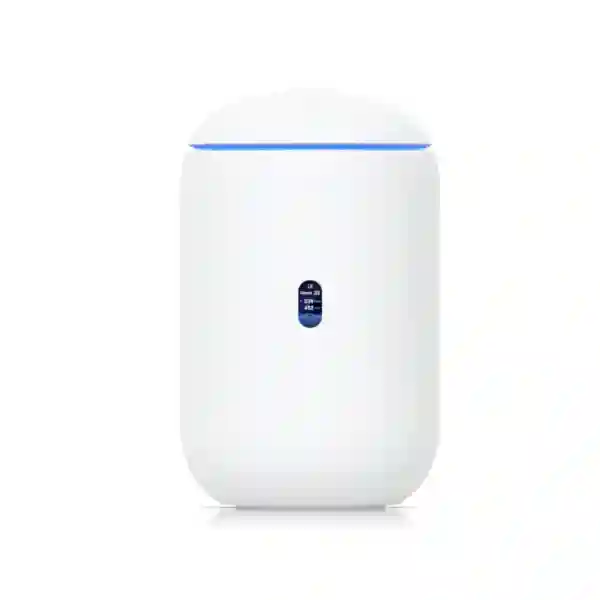

Ubiquiti Dream Router 7 (UDR7): Wi-Fi 7 Cloud Gateway for Tanzania
The Ubiquiti Dream Router 7 (UDR7) is a compact UniFi cloud gateway for buyers who want modern Wi-Fi, managed wired networking and security policies without assembling a full rack of equipment. It combines tri-band Wi-Fi 7, multi-gigabit Ethernet, one 10G SFP+ interface, UniFi application hosting and an integrated PoE output. For a home office, small business, retail counter or growing workplace in Tanzania, the important question is not simply whether a router advertises Wi-Fi 7 or 10G. It is whether the internet handoff, access-point coverage, security workload, power plan and future expansion needs suit this particular hardware. This guide explains those choices, including the limits that matter before ordering.
For a suitable UDR7 quotation, confirm your ISP handoff, wired-device count, Wi-Fi coverage needs and any PoE or camera requirements before choosing accessories.
Key specifications at a glance
| Specification | Verified UDR7 detail |
|---|---|
| Wi-Fi | Tri-band Wi-Fi 7, 2.4/5/6GHz, 2×2 MIMO per band |
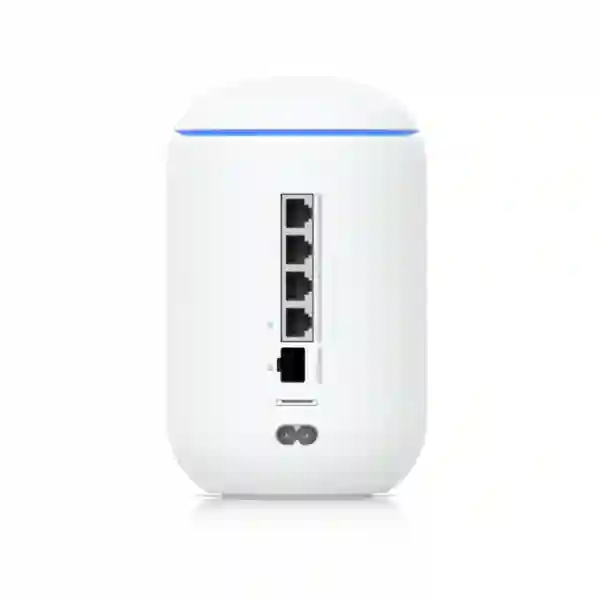
| Ethernet | Four 2.5GbE RJ45 ports, including one PoE output |
| High-speed interface | One 10G/1G SFP+ port |
| Default WAN | One 2.5GbE RJ45 and one 10G SFP+ |
| IDS/IPS | 2.3Gbps manufacturer-rated throughput |
| PoE output | 15.4W budget; confirm downstream device power |
| NVR storage | Preinstalled 64GB microSD card |
| Published scale | 30+ managed UniFi devices; 300+ simultaneous users |
| Indicative coverage | 160m²; actual coverage varies with site |
| Power | 100–240V AC input; 26W max excluding PoE output |
The figures above come from Ubiquiti’s published specifications. Wireless link rates, radio coverage and supported device counts are not guarantees of application throughput or a particular installation result.
A practical fit for home offices and smaller business networks
The Dream Router 7 fits buyers who want one visible, manageable device to serve as their router, primary wireless access point and starting point for a UniFi network. A small professional office may need secure employee Wi-Fi, a separate guest connection, several wired computers and monitoring of network health. A connected household may instead care about reliable calls, streaming, gaming, cameras and sensible separation of smart-home equipment. In both cases, the appeal is a central interface for routing, wireless policies and connected UniFi devices rather than several unrelated management consoles. The compact desktop format helps where a communications rack would be excessive, but it is still network infrastructure that needs good positioning, suitable ventilation and dependable electrical power. It is a particularly relevant candidate when the buyer wants hands-on control over firewall, virtual networks and remote connectivity instead of a basic consumer-router interface.
A buyer should not assume that every installation is a one-device project. Large floor plates, concrete internal walls, multiple levels or separated buildings can require additional UniFi access points and an appropriate switch. Sites with heavy surveillance recording, many high-power PoE devices or several 10-gigabit wired endpoints may be better designed around a separate gateway, switching and storage. The published 30-plus managed UniFi device and 300-plus simultaneous-user figures describe platform capacity, not a promise of excellent performance for 300 people using intensive applications in every layout. The correct decision comes from the number of active clients, application traffic, security settings, internet contract and physical site. Treat the UDR7 as an expandable starting point, not as a replacement for basic network planning.
What the integrated design actually includes
Ubiquiti describes the UDR7 as a compact desktop cloud gateway with integrated Wi-Fi 7, PoE switching, microSD storage and support for the UniFi application suite. In day-to-day use, the gateway routes traffic between the internet and local networks, applies firewall rules, distributes wireless access through its internal radios and provides a management interface for supported UniFi equipment. Its 0.96-inch status display offers an at-a-glance local indication, while UniFi Network provides more detailed configuration and monitoring. The unit is powered through a universal 100–240V AC input rather than being an Ethernet-powered access point. This distinction matters when preparing an electrical cabinet or desk installation: the gateway needs its own mains connection, while its PoE output can supply one compatible downstream device.
Having several capabilities inside the enclosure does not mean each capability offers the capacity of a dedicated enterprise appliance. A 64GB microSD card is preinstalled for network-video recording, but that does not make the device a substitute for a large dedicated video recorder with many camera streams and retention requirements. A single PoE-capable output does not replace a multiport PoE switch. Likewise, one SFP+ socket is useful for a suitable high-speed uplink but is not an array of 10G ports. The all-in-one approach is attractive when it reduces complexity in a small site; the value becomes weaker if the project immediately needs large external storage, several powered access points or a 10G wired backbone in multiple directions. Inventory what will connect before assuming the package is complete.
Tri-band Wi-Fi 7: speed features and realistic expectations
The UDR7 includes 2.4GHz, 5GHz and 6GHz radios with two-by-two MIMO on each band. Ubiquiti lists maximum radio data rates of 688Mbps on 2.4GHz, 4.3Gbps on 5GHz and 5.7Gbps on 6GHz. These are advertised wireless link characteristics under specified radio conditions, not guaranteed internet download speeds or a promise that a single laptop will achieve those numbers. Actual throughput varies with the client’s antenna capability, channel width, signal level, obstacles, interference, software and network path. Wi-Fi 7 can be useful for compatible new laptops and phones, while older Wi-Fi generations remain supported for everyday connectivity. The product therefore offers a forward-looking wireless platform without requiring an immediate replacement of every client device.
The main practical gain for a mixed office can be better flexibility in assigning devices to the right wireless environment. Older accessories may stay on 2.4GHz, normal workplace computers can use 5GHz, and eligible newer clients may benefit from 6GHz where lawful, supported and enabled. The higher frequency does not automatically travel farther; it can be less forgiving of walls and obstructions. Wi-Fi 7 features such as wider channels and multi-link operation also depend on compatible clients, operating software and permitted channel settings. In Tanzania, verify the regional hardware variant and the current TCRA operating rules before planning around 6GHz availability. A specification sheet showing a 6GHz radio is not proof that every channel or power level may be used at every local site.
Coverage planning matters more than a single advertised area
Ubiquiti publishes an indicative coverage area of 160 square metres for the UDR7. Use that as a rough reference rather than a survey result. Building materials, room arrangement, local radio congestion, ceiling height and placement have a material effect on usable signal. A thick concrete wall between reception and an office can be more important than the nominal size of the rooms. A router placed behind a metal cabinet, beneath a desk or in a corner may produce a poorer outcome than the same unit installed in a more open central location. For business use, the goal should be consistent working coverage in the areas where staff and customers actually use applications, not merely a detectable signal at the edge of the property.
Start with a simple floor plan and identify critical spaces such as cash desks, meeting rooms, VoIP workstations, home-office desks, corridors and outdoor-adjacent areas. Confirm which rooms need strong 5GHz or 6GHz performance and where a separate wired access point would be more reliable. Additional UniFi access points can extend coverage under one managed network, but each model has its own power requirements, uplink needs and radio characteristics. A wired access-point connection is often easier to predict than relying solely on wireless backhaul through multiple walls. If the deployment includes more than one floor or separated sections of a building, budget for proper switching and cabling early. This avoids paying for an advanced router while leaving the actual coverage problem unsolved.
Ethernet and SFP+: understand the port map before ordering
The UDR7 provides four 2.5GbE RJ45 ports and one 10G-capable SFP+ port. The default WAN arrangement uses one 2.5GbE RJ45 port and the SFP+ port, leaving three 2.5GbE RJ45 ports in the normal LAN role, including the PoE-capable port. Supported UniFi configurations may allow reassignment of eligible port roles for different WAN or LAN designs. This is useful flexibility, but the installation should begin with a precise diagram of the ISP handoff and every required wired connection. A desktop computer, network-attached storage device, switch and access point can use several ports quickly. If the endpoint count is larger, select an appropriately sized external switch rather than relying on an undocumented assumption about spare connections.
The 10G connector is SFP+, not a built-in 10G RJ45 Ethernet socket. The media and module must match the external equipment, link type and cabling. A fibre service, optical network terminal or ISP modem may present a different interface that needs a compatible module, switch or Ethernet connection. Before purchase, ask whether the service arrives as copper Ethernet, optical SFP/SFP+, or through an operator-managed device and whether the provider requires VLAN tags, PPPoE, static addressing or another handoff configuration. Do not assume that plugging an ISP fibre strand directly into the gateway is supported. Also remember that an SFP+ transceiver or adapter is a separate compatibility decision and may not be part of the router’s supplied accessories.
Why 10G connectivity is not 10Gbps security throughput
A standout specification is the 10G SFP+ interface, but its port signalling rate must be distinguished from the gateway’s security-processing capacity. Ubiquiti rates IDS/IPS throughput at 2.3Gbps. Intrusion detection and prevention inspect traffic for suspicious patterns, so this rating is especially relevant when planning a fast broadband circuit with threat protection active. A 10G-capable port can still be valuable for an uplink, flexible topology or a connection to compatible switching equipment. However, a buyer who requires approximately 5Gbps or 10Gbps of fully inspected internet traffic should not infer that the UDR7 is the correct gateway solely because the physical port supports 10G.
The same distinction applies to local wired performance. One 10G SFP+ port alongside 2.5GbE copper ports does not create several native 10G wired connections. A workstation needing a dedicated 10G copper port would require a compatible network design and perhaps additional equipment. Performance is also influenced by traffic patterns, concurrent users, enabled services, encryption, protocol overhead and the speed of the opposite endpoint. A good buying conversation therefore begins with real application demand: internet speed now and in the next few years, expected security features, VPN usage, large local file transfers and the need for redundancy. The appropriate gateway is the one that sustains the intended workload, not the one whose largest printed interface number looks most impressive.
PoE output: convenient, but deliberately limited
One 2.5GbE Ethernet port provides a published 15.4W PoE budget. This can simplify a small installation if the connected device is explicitly compatible with the available PoE standard and its power draw fits the port budget. It may be useful for an eligible camera, phone or other low-power endpoint. The correct way to select that device is to check its manufacturer-rated input standard, maximum demand and any power needed for optional features. Do not confuse 15.4W PoE with PoE+ or higher-power PoE modes. Many advanced Wi-Fi 7 access points and certain cameras require more power than this output can provide. If those products are part of the project, include a suitable PoE switch or injector in the design.
PoE is a procurement detail that can affect total project cost. A network diagram that shows only the gateway and access points may look economical until the installer discovers that the access points require additional power equipment. Count the powered endpoints, calculate their individual maximum requirements and include a practical allowance for future additions. For devices connected through an external switch, verify that the switch supplies the required PoE mode and aggregate wattage; the UDR7’s own 15.4W limit does not expand merely because the external switch is managed by UniFi. Treat cabling, surge protection, power supply placement and maintenance access as part of the same planning exercise. Compatibility checks made before ordering are simpler and safer than troubleshooting power delivery on installation day.
Network segmentation for staff, guests and connected devices
The UniFi platform supports VLAN-based segmentation and guest traffic isolation. For a small business, this can make it possible to keep employee equipment, guest Wi-Fi, point-of-sale devices and selected IoT products on separate logical networks. Segmentation is not just about offering several wireless names. The key benefit is controlling which groups can communicate with sensitive systems. A retail guest should generally not be able to browse a back-office computer, while an administrative workstation may need access to a particular printer or payment-management service. Those relationships should be intentionally documented. UniFi’s integrated routing and firewall functions help manage communication between networks, but the safety of the design depends on the rules configured.
A simple deployment might create an internal staff network, a restricted visitor network and a separate network for cameras or other managed devices. Each needs an address plan, DHCP settings, wireless security and explicit access rules. If a device must discover a printer or casting system across network boundaries, that exception should be designed narrowly rather than disabling isolation everywhere. For hospitality or public-facing installations, captive-portal and guest controls may be relevant, but the required visitor experience, privacy expectations and operational management should be agreed in advance. As connected-device counts rise, clear network names and policy documentation become as valuable as hardware speed. The UDR7 supplies capable tools; disciplined setup determines whether those tools actually improve security.
Firewall, intrusion prevention and secure operation
The gateway supports a stateful firewall, application-aware controls, deep-packet traffic identification, zone-based policy filtering, content filtering and IDS/IPS. These features can help administrators understand traffic and build sensible boundaries between trusted and untrusted devices. Their benefit is not automatic protection from every cyberattack. A firewall cannot compensate for weak passwords, unsupported software, exposed administrative accounts or compromised user credentials. A practical rollout should begin with the smallest necessary access permissions, strong account security, secure device-management settings and a tested process for applying software updates. Security policies should remain understandable to the people who will operate the network after the installer leaves.
Ubiquiti also describes optional CyberSecure signature enhancements; do not assume every enhanced signature or associated subscription benefit is included indefinitely with the basic hardware. Clarify current feature and licensing terms when a procurement decision depends on a particular security function. Administrators should review alerts for false positives, understand how blocking rules affect legitimate business services and record any policy exceptions. For example, a payment terminal or business VPN may use traffic that requires careful rule treatment. Monitoring is most useful when someone is responsible for reading it and responding. The UDR7 can form a strong security-management foundation for a smaller site, provided expectations about throughput, service configuration and ongoing administration are realistic.
Remote work, VPN and multi-site connectivity
Remote access is often a reason to choose a managed cloud gateway instead of a basic wireless router. The UDR7 supports VPN-related features including WireGuard, OpenVPN, Teleport, IPsec site-to-site capability and Site Magic options, subject to relevant versions and configuration requirements. These can help a small team access permitted internal resources or connect suitable UniFi-managed sites without treating the open internet as a trusted workplace network. The specific approach should follow the business requirement: occasional remote administration, employee access to a file server, access to an internal application, or network-to-network communication between branches. Not every application belongs on a broad VPN; access should be restricted to what the remote user actually needs.
VPN performance depends on encryption processing, internet upload capacity, routing choices and latency at both ends. A remote worker with a slow or unstable connection will not gain an enterprise-quality session merely because the head-office router has modern hardware. Before enabling remote access, confirm whether the ISP supplies public addressing, uses carrier-grade NAT, or places another router in front of the UDR7. Consider how authentication, identity changes and lost devices will be handled. For a business with more than one location, agree on subnet numbering in advance so branches do not accidentally use conflicting address ranges. Document what happens when the primary internet service fails, especially if remote access is essential to operations.
ISP handoff, backup connectivity and Tanzania deployment
Buying a router in Tanzania should start with the actual internet service, not the largest advertised Ethernet rate. Confirm the provider’s delivered connection type, contracted speed, upstream equipment and whether the customer may operate an independent gateway. Some installations place an ISP-supplied optical network terminal or modem ahead of the router; others expose a standard Ethernet handoff. Ask about static public IP addressing, IPv6, PPPoE requirements, VLAN tagging and any restrictions on bridge mode. The UDR7 has multi-WAN and policy-routing capabilities, but the second connection must still be provisioned and tested. A business continuity design should specify which traffic receives priority when one link goes down and whether the backup service has enough capacity for essential tasks.
Additional Internet failover options exist within the broader UniFi ecosystem, but do not confuse those with an internal mobile SIM slot in this particular UDR7. If cellular backup is desired, identify an appropriate compatible external solution and validate local network connectivity, service terms and interface requirements. The configuration must also account for power failure: a secondary internet path does not help if the gateway, ISP terminal or switch loses electricity. For a small office, a modest UPS plan protecting the full connection chain may be more valuable than an over-specified headline bandwidth number. Avoid treating any ISP or mobile-provider compatibility as automatic. Written technical details from the provider and a commissioning test give a more dependable basis for deployment.
UniFi applications and the scope of on-device recording
Ubiquiti lists support for UniFi Network, Protect, Access, Talk and Connect on the UDR7. This can be useful when a small site wants coordinated administration across networking and selected UniFi services. Actual use of an application still depends on compatible peripheral hardware, supported features and the scale of the workload. UniFi Network is the core application for routing, switching and wireless administration. Protect provides a path to suitable camera management and recording, while other applications address their own specialised equipment and workflows. Buyers should identify which applications they intend to run immediately and which are only possible future options, rather than purchasing devices simply because a software icon appears on a specifications page.
The device includes a preinstalled 64GB microSD card for network-video recording. Ubiquiti’s published capacity illustrations include configurations such as five HD cameras, two 2K cameras or one 4K camera; these are planning references, not a guarantee of a particular number of days of retained footage. Actual storage consumption depends on resolution, frame rate, compression, motion patterns, recording mode and retention targets. A site that needs long historical retention, multiple high-resolution streams, evidence export or other demanding surveillance functions should evaluate dedicated recording hardware and storage separately. Document camera locations, desired retention duration, monitoring responsibilities and privacy requirements before using a router’s integrated storage as the basis of a security system.
Managed device capacity, future growth and network ownership
Ubiquiti rates the gateway for more than 30 managed UniFi devices and over 300 simultaneous users. It is tempting to interpret those figures as a universal business-size recommendation, but user counts alone rarely describe an actual network workload. Thirty lightly used endpoints can consume less network capacity than a small number of intensive backup jobs, live streams or high-resolution cameras. Consider real-time calls, video meetings, cloud applications, guest browsing, surveillance traffic and large file transfers. It also matters whether the gateway is hosting several UniFi applications while inspecting traffic and managing multiple switches or access points. The goal is stable performance under realistic peak conditions, not meeting a numeric limit in isolation.
An expandable UniFi environment should have clear ownership of credentials, configuration backups, hardware inventory, software updates and administrative responsibilities. This is especially important for a growing business that may change IT providers or add another location. Name the networks and devices consistently, document VLAN IDs and physical port roles, and record any nonstandard ISP settings. Where remote management is enabled, assess the account-security implications and restrict administrator access appropriately. When new access points or switches are added, review the actual hardware power and uplink requirements rather than assuming that central manageability means automatic electrical compatibility. A well-documented small network can scale more gracefully than a larger network assembled without an architecture.
Installation and commissioning checklist for a reliable result
Before powering on the UDR7, confirm the intended location, mains connection, ventilation, internet handoff, network cable terminations and the local network addressing plan. Prepare the necessary information from the ISP, including any VLAN credentials or static IP details. Label the outgoing Ethernet cables, and determine whether the SFP+ port will be used for WAN or LAN. If an external switch or access point is part of the design, confirm its power method and compatible link speed. Verify that the specific hardware variant and configured radio settings are suitable for the installation country. In particular, assess the current operating requirements for the 6GHz band rather than assuming all regional Wi-Fi settings are interchangeable.
During commissioning, complete the initial UniFi setup, update to an appropriate supported software release and test basic routing before adding complex policies. Configure secure administrative access and the planned staff, guest and equipment networks. Test guest isolation, DNS resolution, internet reachability, wired link negotiation, DHCP assignment and any required business application. If intrusion prevention, VPN or multi-WAN failover is used, test those functions rather than relying on enabled checkboxes. Record baseline speeds from a suitable wired client and a representative wireless client at the actual working locations. Finally, export or document the configuration and hand over a short recovery procedure that explains how to recognise a failed ISP connection, power issue, overloaded switch or forgotten access credential.
Hardware, power, and environmental considerations
The UDR7 measures approximately 110mm in diameter and 184.1mm tall, with a published weight of about 1.1kg. Internally, Ubiquiti specifies a quad-core ARM Cortex-A53 processor running at 1.5GHz and 3GB of system memory. Its maximum listed power consumption is 26W excluding PoE output, and its internal power supply is rated at 50W. Those specifications help explain why the unit fits a desktop or open shelf rather than requiring a full rack installation. They do not remove the need for stable mains electricity and airflow. The site should provide an accessible power socket, room for cables and a location where status indicators can be inspected without placing the router in a confined hot cabinet.
Ubiquiti lists an operating temperature range of minus 10 to 40 degrees Celsius and non-condensing humidity limits. In warm, poorly ventilated indoor locations, pay attention to ambient temperature rather than judging only the temperature of the surrounding room at one time of day. Avoid direct sun, damp surfaces, dust accumulation and unstable shelves. Plan cable strain relief for SFP+ modules and Ethernet leads, and make the microSD slot accessible if storage maintenance is expected. Power protection is worth considering in a deployment where a short outage interrupts payment processing or office communications. A UPS should be sized for all essential devices in the chain, not just the gateway. These straightforward physical choices influence reliability as much as sophisticated network features.
How to decide between UDR7 and a more modular UniFi design
Choose the UDR7 when integrated wireless coverage, modern management, several multi-gigabit copper interfaces and a limited PoE output fit the actual site. Its strength is simplicity with room to add supported UniFi devices. Consider a separate cloud gateway and access points when the best router location is not the best Wi-Fi location, such as a locked network cabinet far from users. A modular system can also make more sense when coverage needs grow beyond one area, when multiple high-power access points are required or when a dedicated high-speed switch is central to the design. The right arrangement depends on the site and workflow, not on an assumption that all-in-one is always cheaper or modular is always better.
For comparisons with the earlier Dream Router, focus on the upgrades that affect your deployment: Wi-Fi generation, multi-gigabit port capability, gateway security throughput and application capacity. For comparisons with the more compact UniFi Express 7, evaluate application support and wired-port needs, not merely the word Wi-Fi 7. For high-demand networks, investigate a gateway with sufficient inspection performance, the required number of 10G ports and appropriate surveillance storage. Avoid comparing only maximum radio rates: the quality of access-point placement, uplinks, VLAN design and support practices often decides user satisfaction. A short equipment schedule covering ISP connectivity, wired clients, wireless areas, powered devices and future extensions makes these comparisons clearer.
Use cases: where the UDR7 adds practical value
A professional office can use the gateway to centralise wired and wireless connectivity, apply employee and visitor policies, and monitor the condition of its internet service. A retail counter may value separation between transaction equipment, staff devices and guest access, combined with a compact design that does not dominate limited space. A home office can use managed Wi-Fi, firewall policy and optional remote access for legitimate business tasks. A small hospitality site might use guest-isolation functions and expand coverage through appropriately positioned access points. In each example, the benefit is the ability to design intentional networks from one coherent platform. The device itself does not guarantee compliance with payment, privacy or industry-specific rules.
These scenarios also reveal when extra hardware becomes necessary. A busy café with guest users spread over multiple rooms may need more access points even if the user count is not high. A clinic or business with sensitive records should treat access policies, account security and backup arrangements as essential design work rather than optional router features. A small site with several cameras and a long recording-retention requirement may need dedicated NVR storage. A business with many PoE phones needs an adequately rated PoE switch. A company moving large files between high-speed local servers may benefit from a genuine multiport 10G switching design. Product suitability is therefore determined by the complete network task, not by the building label.
What to confirm before requesting a Tanzania quote
Prepare the intended use, approximate number of active devices, physical site layout, desired internet speed and any existing UniFi equipment. Include whether the project requires 6GHz Wi-Fi, additional access points, security cameras, voice devices, remote access or internet failover. Describe the provider’s handoff and confirm which side owns the optical network terminal or modem. If your current equipment includes PoE devices, record the exact models and power needs. Tell the supplier whether the UDR7 will replace an existing router or be installed in a new network, since migration may involve VLAN settings, DNS configuration, service interruptions or preserved VPN routes. This information supports a realistic equipment list and avoids buying a router whose ports cannot satisfy the intended arrangement.
Commercial details must be verified for the specific Tanzania quotation. Ask for the exact regional model supplied, included accessories, applicable taxes, current stock status, delivery terms, local support options and any warranty conditions in writing. A manufacturer list price in another country is not a verified Tanzanian selling price, and a generic model identifier is not necessarily the seller’s internal SKU. If a technical service is required, request a clear statement of whether design, configuration, site survey or installation is included. Buyers should also check compatibility with the ISP and the current regulatory rules governing wireless operation. A useful quote is one that connects the equipment to the actual site requirements and separates included hardware from optional implementation services.
Deployment decision: five checks worth completing
- Confirm the ISP handoff and which interface will serve as WAN.
- Check actual room coverage and the need for added access points.
- Count PoE equipment and compare each device with the 15.4W port budget.
- Compare required security throughput with the 2.3Gbps IDS/IPS rating.
- Confirm regional radio settings, power continuity and the equipment included in the quote.
Frequently asked questions about the UDR7
Is the UDR7 a Wi-Fi 7 router or a UniFi controller?
It is both a Wi-Fi 7-capable integrated access point and a UniFi cloud gateway that hosts management applications. Its core role is routing and managing a UniFi environment, not merely broadcasting wireless service. It can handle supported networking policies and connected UniFi equipment from the same platform. However, adding a compatible camera, access point or other component may require extra hardware, power equipment or configuration. The right expectation is a compact integrated gateway with room to expand, rather than a bundle containing every network component a site could require.
Does the 10G SFP+ port provide 10Gbps of internet speed with IDS/IPS?
No such guarantee follows from the interface speed. Ubiquiti rates IDS/IPS throughput at 2.3Gbps, and real results depend on workload, traffic mix and settings. The SFP+ socket can carry a compatible 10G link, but this does not imply 10Gbps of inspected routed traffic or several 10G Ethernet outputs. If the site needs very high internet speed while threat prevention is enabled, plan around the published security-throughput figure and compare a gateway designed for the required sustained workload.
How many Ethernet ports does the Dream Router 7 have?
There are four 2.5GbE RJ45 ports and one SFP+ port that supports a 10G link. In the default arrangement, one copper port and the SFP+ interface are WAN ports, leaving three copper LAN ports. UniFi configuration may provide supported role flexibility. One copper port offers PoE output. Buyers should separately check the exact ISP connection, the type of required SFP+ module and whether an external switch will be necessary for the number of wired devices.
Can the UDR7 power another Wi-Fi 7 access point directly?
Only when that particular downstream device is compatible with the UDR7’s PoE standard and its published 15.4W output budget. Many high-performance access points need PoE+ or another higher-power method and should not be connected on the assumption that all PoE modes are equivalent. Look up the exact access-point model’s power requirements before ordering. Where the port cannot meet them, use a correctly rated external PoE switch or supported injector. Network management compatibility is separate from the electrical question.
Can I use Wi-Fi 7 with older laptops and phones?
Yes. The radio specifications include support for older Wi-Fi generations, so a mixed environment is practical. Older devices do not acquire Wi-Fi 7 features simply by connecting to the newer gateway. Actual available bands, channel widths, security options and speed depend on client capabilities, chosen settings and the regulatory configuration. If a critical device only supports a legacy security mode, review how to support it safely without weakening the primary staff network. Modern clients can be added over time as devices are replaced.
Will one UDR7 cover a complete office or multistorey home?
It may cover a suitable compact layout, but the listed 160-square-metre reference area should not be treated as a guaranteed coverage promise. Concrete walls, floors, metal fixtures, placement and interference can substantially change the result. Test representative work locations and give priority to the rooms where calls, payment systems and other critical tasks occur. Additional properly positioned UniFi access points are often a more effective remedy for weak areas than attempting to increase transmit power on a single router.
Does the UDR7 include surveillance storage?
A 64GB microSD card is preinstalled for UniFi Protect network-video recording. That makes entry-level recording scenarios possible with suitable compatible cameras, but capacity and retention depend on camera count, resolution, frame rate, motion recording and other settings. It is not a substitute for a retention calculation. If the site needs multiple high-resolution cameras, long retention periods or a more demanding security workflow, evaluate a separate recorder and storage plan before committing to the router’s integrated option.
Can I connect two internet services for failover?
The UniFi gateway platform supports multi-WAN capabilities, and the UDR7 has default WAN interfaces for that purpose. The second connection still requires its own properly configured service and compatible physical handoff. Test whether traffic changes to the backup as expected, and decide which applications take priority on a slower backup circuit. For mobile connectivity, evaluate a compatible external solution; do not assume this unit contains a built-in cellular SIM modem. Protect the ISP equipment and gateway with a suitable power strategy.
Is 6GHz Wi-Fi use automatically permitted in Tanzania?
No. A radio capability printed in a global technical specification is not by itself a statement of legal local operating permissions. Current Tanzanian frequency rules, the exact regional device variant, supported channels and firmware country settings must be checked for the installation. The Tanzania Communications Regulatory Authority publishes radio-frequency and short-range-device requirements. An installer should verify the applicable restrictions and avoid enabling channels or power settings merely because a menu exposes them. If 6GHz is central to the project, resolve that question before purchasing.
Does this product need a monthly license to run basic UniFi networking?
The core UniFi networking functions are part of the gateway platform, and Ubiquiti describes license-free SD-WAN capability. That does not mean every optional premium service, security feed, telephony arrangement or connected product has no separate commercial terms. Optional CyberSecure enhancements, for example, may involve subscription conditions. Ask for the specific feature and service details that matter to the project. Avoid assuming that a quoted hardware price covers unrelated internet service, external installation, accessories or all future optional software.
Can an existing UniFi network be migrated to the UDR7?
Migration may be possible depending on the existing gateway, UniFi application versions, device compatibility and network settings. A safe process includes a configuration backup, inventory of adopted devices, documentation of WAN parameters, and planned checks for VLANs, VPNs, firewall rules and wireless names. If the site has essential cameras or transaction systems, plan a maintenance window and a fallback option. Do not treat migration as automatic merely because two products share the UniFi brand; confirm the specific supported path before changing the production gateway.
What should I send to request the right UDR7 quotation?
Share the product name and intended location in Tanzania, the internet service and handoff type, approximate number of users, floor plan or room layout, wired-device count, planned UniFi equipment and any camera or PoE needs. Explain whether you want the unit only or a complete network design with installation and testing. Request confirmation of the regional model, included accessories, stock, final price, taxes and warranty terms. A clear requirements brief helps distinguish a correct single-unit purchase from a project that also needs switches, access points, cabling or backup power.
Request a UDR7 quotation for your network
Share your internet handoff, building layout, expected users and connected devices, plus any surveillance, remote-access or backup-power goals. Ask for confirmation of the exact regional unit, included accessories, compatibility, current price, taxes and any requested implementation service. A correctly scoped quotation helps you avoid underpowered PoE, insufficient coverage and unsuitable security-throughput expectations.
Contact FourTeck Tanzania to discuss the appropriate Ubiquiti Dream Router 7 configuration and request a product quote.




Reviews
There are no reviews yet.