
WI-FI 6 • GIGABIT ETHERNET • ALIEN-FAMILY MESH
Ubiquiti AmpliFi Alien Router AFi-ALN-R
A touchscreen-equipped Wi-Fi 6 router for homes and straightforward small-workspace networks. Compare its real connectivity options, coverage considerations and mesh requirements before requesting a Tanzania quotation.
1 × Gigabit WAN | 4 × Gigabit LAN | 4.7-inch touchscreen
Key decision points
- Standalone AFi-ALN-R router, not the router-plus-MeshPoint bundle.
- Wi-Fi 6 for compatible clients, with actual performance dependent on environment and service.
- One Gigabit Ethernet WAN port and four Gigabit Ethernet LAN ports; no specified multi-gigabit interfaces.
- Compatible Alien-family expansion for larger or difficult layouts.
- Confirm exact regional variant, local terms and support status before ordering.
Who this router is for
The Ubiquiti AmpliFi Alien Router AFi-ALN-R is designed for people who want modern Wi-Fi 6 coverage without turning home networking into a specialist project. It can serve family homes, apartments, work-from-home spaces and smaller offices where several people browse, join video meetings, stream and use connected devices at the same time. Its unusually visible touchscreen provides a convenient local view of the network, while the AmpliFi management experience provides a practical way to configure wireless settings. The right purchasing decision still depends on your building layout, internet service, number of wired devices and expectations for roaming between rooms.
This is a standalone router, not a complete router-and-mesh-point bundle. Buyers should distinguish AFi-ALN-R from the separately identified AFi-ALN router-and-MeshPoint kit. A single Alien can provide Wi-Fi from one central point; compatible additional Alien hardware can be considered when a house has concrete walls, multiple floors or separated rooms. Before ordering, establish whether one router is adequate for the intended footprint. A second unit is a capacity and coverage planning decision rather than an automatic requirement for every installation.
For Tanzania-based buyers, a useful starting question is whether the existing service terminates in an Ethernet connection from a modem, optical network terminal or upstream provider router. The Alien provides a Gigabit Ethernet WAN connection and routes traffic to wireless clients and four wired LAN devices. It is not presented as an integrated cellular modem, fibre optical terminal or DSL modem. If your internet provider supplies a separate connection device, retain or configure it as necessary and confirm how the Alien will connect before purchasing.
What Wi-Fi 6 changes in everyday use
Wi-Fi 6, technically IEEE 802.11ax, introduces methods intended to use wireless airtime more efficiently when multiple compatible clients are active. AmpliFi Alien supports OFDMA, MU-MIMO and transmit beamforming. These features are useful where laptops, phones, televisions and other network devices compete for time on the same wireless network. They do not guarantee a particular internet speed: the subscribed connection, server, client capability, interference and distance remain critical. Think of Wi-Fi 6 as a better framework for handling modern client demand, not as a replacement for a suitable broadband plan.
Compatible Wi-Fi 6 devices can use 802.11ax features, while older devices may connect using supported earlier Wi-Fi standards. This makes the router relevant when a household contains a mixture of recently purchased laptops and established televisions or smart devices. Actual negotiated link rates differ across clients because devices have different antenna counts and radios. The highest rate printed in a datasheet describes a radio capability under specific assumptions, not the typical throughput of every phone or a promise of simultaneous application speed.
The manufacturer lists high theoretical rates for the international model, including up to 1,148 Mbps on 2.4 GHz and 4,800 Mbps on 5 GHz. These are wireless data-rate figures; protocol overhead, signal conditions and the Gigabit Ethernet internet port limit what users can measure in ordinary testing. A client can experience a strong local wireless link while still being limited by a slower external connection. Evaluate performance using the applications that actually matter: stable calls, responsive browsing, video playback and transfers to local wired resources.
Networking hardware and design
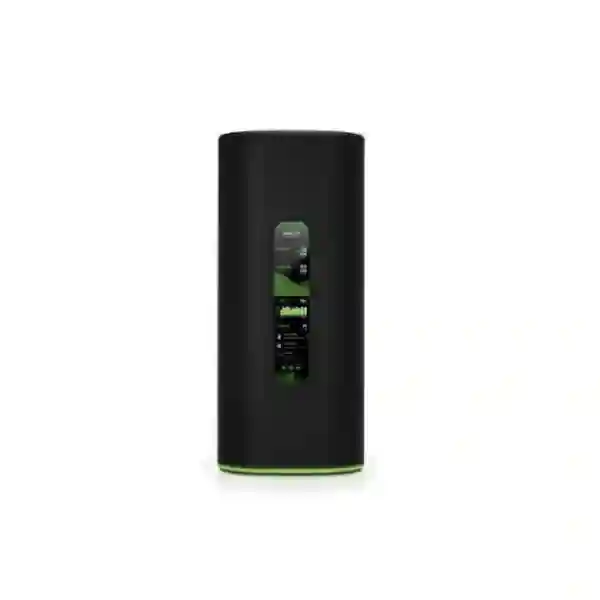
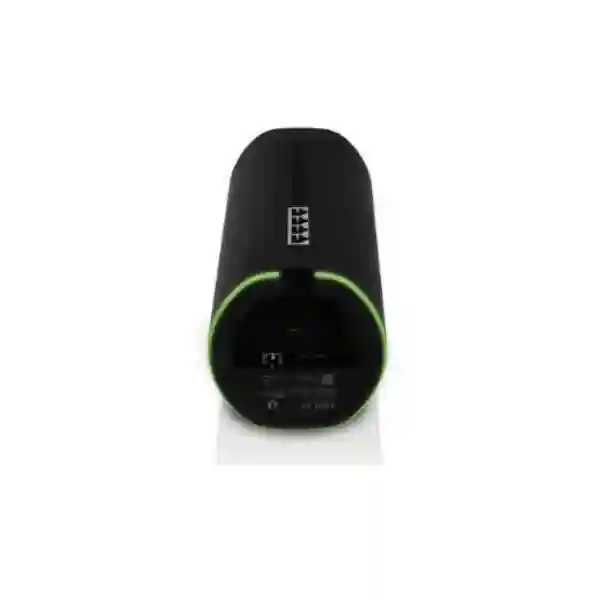
The router enclosure measures approximately 110 by 110 by 250 millimetres and weighs about 1.2 kilograms. Its vertical form factor is intended to stand in an open position rather than hide inside a rack. A 4.7-inch full-colour touchscreen is an immediately noticeable design feature. The display can make high-level information accessible without first opening a separate network management application. The illuminated ring is another visual feature, so consider where the device will stand if it is installed in a bedroom or shared workspace.
Inside the device, Ubiquiti specifies a 2.2 GHz quad-core ARM Cortex-A53 processor and 1 GB DDR3L memory. Those hardware specifications help identify the model but do not, on their own, prove a given routing throughput under every feature combination. The router’s network connectors are one Gigabit RJ45 WAN and four Gigabit RJ45 LAN ports. A desktop computer, printer, network storage device or switch can be connected using compatible Ethernet cabling. Where more wired ports are needed, plan a suitable Ethernet switch rather than assuming extra ports exist on the Alien.
The manufacturer specifies universal AC input of 100–240 V, 50/60 Hz and maximum power consumption of 35 W. Check the plug format and exact regional unit supplied with the order. Keep the power supply accessible and provide reasonable ventilation around the enclosure. In environments where outages interrupt work, assess a properly sized UPS for the router and, importantly, for the upstream modem or optical terminal as well. Keeping only the Wi-Fi router powered will not preserve internet connectivity if the provider equipment loses power.
Understanding coverage before buying
Coverage depends more on site conditions than a single headline number. Dense masonry walls, reinforced concrete, metalwork, long corridors and separate floors can weaken a signal. A compact apartment with central placement may behave very differently from a sprawling house with the same total floor area. Position the router in an open, elevated and reasonably central location, away from large metal obstacles and major sources of electrical interference. Avoid a closed cabinet merely because its appearance is neat; enclosure placement can undermine the benefit of a capable radio.
Consider the most demanding areas first: the desk used for important video meetings, the television receiving high-resolution streaming, and any room with a weak existing connection. If those are far from the router or separated by thick walls, survey the property rather than promising that one Alien will reach every corner. A second compatible unit can be a better response than increasing transmitter power or changing settings repeatedly. More radio power does not solve every problem because mobile devices must still send an adequate return signal.
For a multi-storey building, vertical separation deserves particular attention. Test from the actual working positions, with doors in their typical positions and with several devices active. Observe not just the maximum speed next to the router but connection stability at the edge of coverage. Where the route between nodes is difficult, wired Ethernet backhaul can provide a more predictable interconnection if the selected Alien hardware and installation arrangement support it. Verify cable routing and equipment placement before committing to a mesh plan.
Mesh expansion and compatibility
Alien-family mesh is useful when a single router cannot cover the required floor plan. Compatible Alien routers or Alien MeshPoints can extend the wireless system, but the choice of products matters. Ubiquiti’s support material distinguishes Alien mesh compatibility from other AmpliFi families. Do not assume that a standard AmpliFi HD MeshPoint or an unrelated Wi-Fi extender will behave as a native Alien mesh node. A third-party extender arrangement, where feasible, is not equivalent to the integrated Alien mesh experience.
Wireless backhaul allows compatible nodes to communicate without a dedicated data cable between them, which can simplify placement. However, backhaul itself uses wireless capacity and is affected by walls and distance. An Ethernet backhaul can improve predictability in suitable installations, particularly where floors or concrete structures obstruct the radio path. If an installer proposes a wired topology, confirm the actual port connections and app setup process against the support guidance for the exact router and node. Do not assume that every Alien kit component has the same port layout.
A mesh addition should be positioned where it can still receive or access a useful connection, not automatically in the room with the weakest signal. For a wireless node, an intermediate location often performs better than the farthest corner. For wired nodes, put effort into proper Ethernet termination, cable testing and protection of any exposed runs. Measure the experience after installation from the usual client locations. A successful mesh design improves coverage consistency and user experience rather than merely increasing the number of visible access points.
WAN connection and internet service planning
AFi-ALN-R has one Gigabit Ethernet WAN port. This is a practical match for many services that hand off internet connectivity over Ethernet, but users should distinguish the physical link rate from the service package they purchase. A connection marketed above one gigabit per second cannot deliver its full headline speed through a single Gigabit WAN connection on this device. Conversely, a slower provider package may limit internet speed even though the local wireless connection supports a much higher rate.
Check whether the existing provider equipment already performs routing and network address translation. Connecting another router behind it may create a double-NAT environment, which can complicate some gaming, remote access and inbound connection use cases. Depending on the provider equipment and account setup, the network may be simplified by an appropriate bridge-mode configuration. Do not change provider settings without understanding the implications for telephone services, television services or managed equipment that may depend on the original configuration.
Before installation, document the internet handoff type, whether login credentials or VLAN settings are required, and whether the service provider restricts changes to customer premises equipment. The Alien supports VLAN functionality according to manufacturer specifications, but the available configuration and exact suitability for a particular provider should be verified before purchase. Retain a recovery route to the original modem or provider router in case the new topology does not immediately authenticate. A small amount of preparation helps avoid unnecessary downtime.
Wired connections and local traffic
The four LAN ports provide useful flexibility for devices that are better served by a cable. A work desktop, a gaming console, a media player and a shared printer can all benefit from a stable physical connection where wiring is practical. Ethernet usually avoids some of the variation caused by neighboring Wi-Fi networks and room-to-room attenuation. It can also free wireless airtime for devices that genuinely need mobility, although overall benefits depend on the applications and traffic levels involved.
For a workstation moving large files to local storage, consider where both endpoints sit. A fast wireless link does not remove the restrictions of a Gigabit Ethernet port on a connected storage device or network switch. Test file transfers separately from an internet speed test to determine whether the bottleneck is the WAN, Wi-Fi, switch, endpoint or storage system. Buyers expecting multi-gigabit wired ports for high-performance local networking should choose another product category, because this Alien model is specified with Gigabit RJ45 interfaces.
A wired switch may extend the available number of LAN outlets, but it should be selected according to port count, power needs and whether PoE is required by downstream equipment. The Alien’s listed LAN connectors should not be described as dedicated PoE outputs. If cameras, VoIP handsets or access points need Power over Ethernet, include suitable PoE switching or injectors in the wider design. This distinction prevents buyers from assuming that a router with several Ethernet sockets automatically powers attached equipment.
Everyday wireless management
The AmpliFi management environment is designed to make common wireless tasks more approachable. A user may need to choose a network name, adjust the password, establish a guest network and review connected clients. Follow the current AmpliFi setup guidance and confirm the available options in the firmware actually installed. Screens and feature names can change over time, so printed guides or older screenshots may not correspond precisely to the latest application. Keep management credentials private and document recovery information securely.
Guest traffic isolation is listed in the manufacturer’s software specifications. This is useful when visitors require internet access but should not automatically reach personal computers or other local resources. Before relying on isolation for a sensitive environment, verify the actual configuration and test whether guests can reach local addresses. A guest wireless network is a convenience and separation feature, not by itself a complete enterprise security policy. For businesses handling sensitive data, evaluate network segmentation, monitoring and administrative controls in the broader context.
Ubiquiti also documents an IoT network feature for supported AmpliFi models and firmware versions. This can help organize smart-home devices that do not need the same access as primary laptops and workstations. Because smart devices vary widely, check whether discovery protocols, casting functions or local app connections still operate after isolation is configured. Some connected products legitimately need local-device communication. Decide whether grouping and isolation suit the application’s functional requirements instead of enabling every possible restriction without testing.
Security and responsible configuration
The manufacturer technical specification lists WPA2 wireless security for this router. Check the exact software version and available security selections rather than assuming any particular later wireless security mode is guaranteed. Use a long, unique wireless passphrase and change default management credentials where applicable. Keep trusted devices on the main network and consider an appropriately configured guest or IoT network for other users and equipment. Security is partly a configuration and maintenance practice, not merely a feature badge on a product box.
Firmware maintenance is important for long-lived networking equipment. Before purchasing, review the current support and update position for the exact regional model, especially when choosing a product originally introduced several years ago. Install firmware from the manufacturer’s supported process, preserve working configuration notes and plan updates at a time that minimizes disruption. No buyer should interpret a historic launch date or a technical specification sheet as proof of unlimited future security maintenance. Evaluate lifecycle expectations alongside radio performance.
Businesses may require policies and audit controls beyond what a consumer-focused mesh router provides. For example, complex multi-site VPN needs, central fleet administration, detailed traffic logging or demanding VLAN architecture should be validated against current supported software rather than inferred from the presence of a processor or a networking brand. Where such capabilities are business-critical, compare a purpose-built gateway and managed access-point solution. The best fit is the product that fulfills actual operating and security requirements, not the one with the longest general feature list.
Work from home and conferencing
A work-from-home network should prioritize reliability where people join video meetings, upload documents and use cloud applications. Start with a stable provider connection and a router placement that gives the main workspace a strong signal. Where a desk is fixed, Ethernet can be a good choice for a laptop dock or desktop PC. If Ethernet is impractical, assess signal quality and competing client load before assuming the service provider is responsible for every dropped call. Network troubleshooting works best when you separate local wireless problems from upstream internet interruptions.
Advanced QoS appears among the manufacturer’s listed software features, but it is important to verify the controls exposed by the installed firmware and understand their tradeoffs. Quality-of-service behavior cannot rescue a connection that is severely overloaded or intermittent; it can help manage contention within defined limits. Ask which applications truly need responsiveness and establish realistic expectations about the number of simultaneous video calls. Bandwidth planning is especially important when backups, large downloads and video streaming occur during working hours.
For a small office with printers, laptops and a shared connection, the Alien’s combination of Wi-Fi and four wired ports may be sufficient where the operational environment is straightforward. Larger offices with many rooms, dedicated IT policies, multiple networks or critical service-level needs may benefit from managed networking infrastructure instead. Map user count and building topology before selecting a router. A product designed for easy ownership can be attractive, but operational simplicity should not come at the expense of business requirements.
Streaming, gaming and family devices
Streaming households often operate several screens alongside phones, tablets and smart speakers. The router’s Wi-Fi 6 radio capability can help service compatible devices efficiently, especially when numerous clients share airtime. Streaming quality still relies on a continuous service connection and appropriate bandwidth from the content provider. If a television remains in a fixed location near an Ethernet outlet, a wired connection may be the simplest reliability improvement. A good network design should reduce interruptions without claiming that a particular router can guarantee every stream at every resolution.
Gaming requires consideration of latency, jitter, internet routing and game-server conditions, not simply the highest quoted wireless megabits per second. Whenever possible, use an Ethernet link for a stationary console or gaming computer. If wireless is required, place the console where the signal is robust and avoid unnecessary repeaters or poor backhaul placement. Examine double-NAT and the provider’s addressing policies if a game requires inbound connections. The router can contribute to a responsive network, but it cannot control distance to remote servers or upstream congestion.
In family settings, a simple administration experience can be as valuable as headline speed. A known wireless name, a sensible guest access policy and well-planned locations for smart devices make future troubleshooting easier. Consider whether the household expects network management from a phone, what happens when the primary administrator changes devices, and how configuration information will be retained. Clear ownership and maintenance routines prevent routine Wi-Fi questions from becoming emergencies when an important activity depends on the connection.
Evaluating a small-business installation
A small office may need dependable shared internet, Wi-Fi for employees, a visitor network and a few wired devices. For this limited scope, Alien offers an accessible hardware profile and wireless feature set. However, not every business should select a premium home mesh router. Organizations with extensive remote management requirements, audited security controls, many distinct departments or highly available WAN connections should compare systems engineered for those requirements. A realistic needs assessment avoids paying for a striking touchscreen while missing a critical operational feature.
Before choosing equipment, create a simple inventory of endpoints and locations. Record how many computers have wired Ethernet, which devices need fixed local addresses, whether visitors should reach company systems and how often large data transfers occur. Identify where weak spots exist and whether cable routes are possible. These basic questions are more useful than counting rooms alone because a spacious open-plan office may be easier to cover than a compact arrangement of reinforced partitions.
Plan how faults will be diagnosed after installation. The display and app can help with visibility, but staff should also know where the modem, router, switch and power units are located. Label network cables and retain a diagram of the connection sequence. Confirm whether business continuity needs a secondary internet service, UPS or equipment spares. Those are system-level design choices, not features that can be assumed simply because a router supports Wi-Fi 6.
Tanzania deployment considerations
Buyers in Tanzania should establish the exact internet access technology available at their premises and confirm the service handoff supplied by their provider. Some locations use an optical network terminal, others use a separate wireless broadband gateway or another upstream device. The Alien is an Ethernet-WAN router and therefore normally belongs behind an appropriate internet termination device. Confirm how the service is authenticated, whether a provider router must remain in place and whether changing the local network device affects any subscribed services.
Electrical continuity matters wherever reliable connectivity is important. The router’s universal AC specification addresses input compatibility, but a suitable plug, surge protection and a trustworthy power path remain practical considerations. If power backup is required, account for the router, upstream gateway, any network switch and possibly devices that provide coverage or communications. A backup that protects only one component of the network may still leave users offline. Have installation work assessed for the building and the equipment actually supplied.
Regional radio rules and device variants should also be checked. Manufacturer specifications identify differences between United States and international wireless configurations, and operating channels and transmit power can vary with regulatory region. A frequency or certification shown for another market is not proof of Tanzania-specific type approval. Confirm the exact part variant, local regulatory suitability and any applicable import or approval requirements with the relevant parties before deployment. Avoid assuming that every online listing represents the same regional hardware.
Installation workflow
Begin by inventorying the equipment. Identify the existing internet gateway, its Ethernet output and the intended router location. Decide whether the Alien will be the main router or whether an upstream device remains in a routing role. Arrange a short, suitable Ethernet patch lead for the WAN connection and additional cables for fixed LAN devices. Keep a written note of the existing network name and service settings before making changes. This gives the household or office a practical way to restore service if a new configuration does not work as expected.
Place the Alien on a stable, open surface with room for ventilation. Connect the upstream internet Ethernet link to the WAN port and provide power according to the product guide. Use the current AmpliFi onboarding process to configure wireless access and relevant internet settings. If the upstream service requires special authentication details, obtain those from the service provider rather than guessing. After setup, verify internet access on one wired and one wireless device. Then confirm other client devices can join using the intended credentials.
Complete the setup with tests from actual use locations. Check a meeting-room desk, television area and distant room rather than running a speed test only beside the router. Confirm whether guest access behaves as intended and whether printers or other shared devices remain reachable where needed. Record any dead zones before adding mesh hardware. If the system is expanded, introduce one compatible node at a time and test the resulting topology so that a configuration problem can be isolated quickly.
Troubleshooting weak performance
When users report poor speed, first determine whether the problem affects all devices or one client. Test over Ethernet where practical and compare the results with a wireless test close to the router. If both are slow, inspect the provider service, WAN link and upstream equipment. If only one distant wireless device is affected, consider signal conditions, client capabilities and interference. Avoid changing many settings at once. A disciplined sequence of tests provides stronger evidence than repeatedly restarting equipment without recording what changed.
Congestion can appear during busy periods, particularly when uploads, cloud synchronization or streaming share limited internet capacity. Check whether performance problems coincide with particular applications or times of day. A Wi-Fi 6 router can improve airtime use for compatible devices, but it cannot create additional capacity from a limited internet subscription. Network optimization may require adjusting workloads, using wired connections for fixed devices or purchasing an appropriate service package. Use consistent test conditions when comparing before-and-after results.
Unreliable smart-home devices may be sensitive to network naming, band selection and isolation options. Review the current SSID configuration guidance and test the device’s setup requirements. For mesh systems, confirm that each node has a useful backhaul path. A weak link between nodes can affect all clients attached to that node, even when their signal to the nearby node looks strong. If a fault persists, capture the device model, firmware version, network topology and symptoms before requesting technical assistance.
Buying checklist
Confirm the exact AFi-ALN-R model and the regional variant shown on the quotation. Ensure the offer is for the standalone router rather than the AFi-ALN router-plus-MeshPoint kit. Check the quantity, included power components and any accessories or cables required by the planned installation. Verify the current sales terms, return conditions and manufacturer support position with the seller. The product model name alone does not establish stock, delivery, warranty terms or local approval for any specific listing.
Match the network interfaces to your internet connection and equipment. This product has one Gigabit WAN port and four Gigabit LAN ports; buyers seeking multi-gigabit Ethernet, an internal optical fibre port or an integrated cellular modem should consider different hardware. Check whether a single centrally located Wi-Fi device is realistic for the property. If mesh is needed, ensure compatible Alien equipment is available and confirm whether Ethernet backhaul can be provided. Do not assume other AmpliFi product families will join the native Alien mesh.
Finally, make a list of the jobs the network must perform: stable conferencing, family streaming, gaming, visitor access, local device sharing and perhaps coverage over separate floors. Assign priority to each job and decide which tests will demonstrate a successful installation. Request a quotation for the correct configuration rather than choosing solely on theoretical wireless speed. This approach makes the Alien easier to assess against alternatives and helps avoid paying for equipment that does not resolve the original connectivity problem.
Specifications at a glance
Manufacturer specifications identify the model as AFi-ALN-R, a Wi-Fi 6 router with 2.4 GHz and 5 GHz radio capability and MU-MIMO, OFDMA and transmit beamforming support. The international wireless figures listed by Ubiquiti are up to 1,148 Mbps on 2.4 GHz and 4,800 Mbps on 5 GHz. These are maximum supported wireless data rates rather than guaranteed transfer rates. Wireless operation is subject to the regulatory region and client device capabilities. Exact US-model radio arrangements differ, so do not substitute one region’s radio table for another.
The documented physical networking interfaces are one 1 GbE RJ45 WAN and four 1 GbE RJ45 LAN ports. Manufacturer hardware data also specifies a quad-core ARM Cortex-A53 processor at 2.2 GHz, 1 GB DDR3L memory, a 4.7-inch colour touchscreen, dimensions of 110 × 110 × 250 mm, a weight of approximately 1.2 kg and a maximum power draw of 35 W. The accepted AC input range is 100–240 V at 50/60 Hz. These details are useful for installation planning and comparisons.
The specified operating temperature range is approximately −10°C to 45°C and operating relative humidity is 5–95% non-condensing. This is an indoor networking device, not a weatherproof outdoor access point. Avoid direct rain, water exposure, enclosed hot spaces and excessive dust. The manufacturer describes advanced QoS, VLAN and guest traffic isolation among software functions, but individual configuration options should be checked in the actual current firmware. No specifications here imply a local price, official Tanzania certification, guaranteed coverage area or guaranteed internet throughput.
How Alien compares with alternative designs
A conventional single Wi-Fi router can be the simplest option when the property is compact and the router can be centrally located. Alien adds Wi-Fi 6 capability and a touchscreen to this basic role. If the home is divided by thick walls or several floors, compatible mesh nodes may provide a more useful improvement than buying a more capable single router. The difference is primarily architectural: multiple well-positioned radios can bring service closer to users. However, wireless mesh needs thoughtful backhaul placement and does not remove every capacity constraint.
A separate gateway plus managed access points is a different type of solution. It can be appropriate for premises that require several cabled wireless zones, centralized policies or more complex networking. That approach may need more configuration and infrastructure, but can better match a growing office. Compare administrative demands as carefully as wireless speeds. If an organization needs centrally managed security or multi-gigabit switching, those requirements should be explicitly included in product evaluation rather than assumed to be supported by Alien.
Likewise, a modern Wi-Fi 7 or multi-gigabit router might be more suitable for households with newer compatible clients, faster-than-gigabit WAN service or demanding local network transfers. The AmpliFi Alien AFi-ALN-R remains a Wi-Fi 6, Gigabit-Ethernet product by specification. Choose it where its design, ecosystem and connection limits fit the use case. If the requirement is explicitly for another wireless generation or higher wired port speeds, consider alternatives without treating wireless marketing rates as interchangeable with WAN throughput.
Frequently asked questions
Is the AmpliFi Alien AFi-ALN-R a Wi-Fi 6 router? Yes. The manufacturer identifies 802.11ax Wi-Fi 6 support, alongside backward support for earlier Wi-Fi generations. Actual client performance depends on the client’s capabilities and the radio environment. A phone that only supports an older Wi-Fi standard will not gain a Wi-Fi 6 radio merely by joining this router.
Does it have a built-in SIM slot or fibre modem? The documented networking interfaces are Ethernet: one Gigabit WAN and four Gigabit LAN ports. Do not treat it as a cellular modem or optical network terminal. For fibre or mobile broadband, confirm the upstream device that will supply the Ethernet internet handoff.
Can I connect a desktop computer with a network cable? Yes. Four Gigabit RJ45 LAN ports are specified. Wired connections are well suited to stationary equipment such as desktop computers, game consoles and printers when a suitable cable route exists.
Can Alien mesh with any AmpliFi device? No. Manufacturer support guidance says native Alien mesh compatibility is within the Alien line. Confirm the exact proposed router or MeshPoint model before purchasing expansion hardware. A non-native extender arrangement should not be described as equivalent to Alien mesh.
Will a second Alien always make the internet faster? No. A second compatible device can improve coverage where a single router struggles, but the result depends on placement and backhaul. It does not increase the speed of the internet service subscription. A poorly placed wireless node can add complexity without solving the weak-signal area.
Is the router suitable for a gigabit broadband plan? It has a Gigabit Ethernet WAN port, which aligns with gigabit-class Ethernet handoffs. Real-world measured internet throughput will be lower than theoretical line-rate ceilings in many circumstances. It is not a multi-gigabit WAN router.
Can the router work behind my provider’s existing router? Depending on the topology, yes, but double-NAT or addressing issues may result if both devices route traffic. Review bridge-mode possibilities and provider requirements before changing the configuration. Preserve any provider equipment needed for telephone or television service.
Does it offer a visitor network? Manufacturer software specifications include guest traffic isolation. Review the current application settings and test access separation for the installed firmware. Guest isolation is a useful capability, but organizations with strict security requirements should review the whole network design.
Can it be installed outdoors? The specifications describe operating conditions for the router but do not identify a weatherproof outdoor rating. Use it in a protected indoor location with adequate ventilation. Outdoor coverage can be planned using equipment designed for those conditions.
Is it available in Tanzania with an official local warranty? Local price, current inventory, delivery and warranty terms are not established by the manufacturer’s technical document. Request confirmation of the exact listing, regional variant and seller terms before ordering. No local approval or availability is implied by this informational product description.
Does the touchscreen replace app management? The touchscreen adds useful on-device visibility, but configuration and administration may still use the AmpliFi software experience. Refer to current setup guidance to determine which tasks are available directly on the display and which require another interface.
How much area does one router cover? There is no reliable universal coverage figure for every building. Walls, floor separation, interference, client capabilities and router position strongly affect results. Consider a site survey or practical signal tests before promising coverage of an entire property.
What is the right first step before asking for a quote? Record the internet handoff, building floor plan, wired-device count and the rooms where wireless quality matters most. Specify whether you need only AFi-ALN-R or an Alien-family mesh arrangement. That information makes product selection and installation planning more accurate.
Request the right configuration
Looking for a Ubiquiti AmpliFi Alien Router AFi-ALN-R for a home or small workspace in Tanzania? Request confirmation of the exact regional model, current commercial terms and whether a standalone router or compatible Alien mesh design better suits your floor plan. Share the number of floors, the type of internet provider handoff and any rooms with existing coverage difficulties. This information helps frame a quotation around real requirements rather than a headline wireless speed.
Before purchase, confirm inventory, supplied accessories, regional suitability, seller warranty terms and the support lifecycle appropriate to your expectations. If you are upgrading an established network, include details of the existing modem, router and wired switch. If you are starting from scratch, describe how the provider delivers connectivity to the building. A considered purchase begins with verified compatibility and an implementation plan, not assumptions about bandwidth or coverage.




Reviews
There are no reviews yet.