
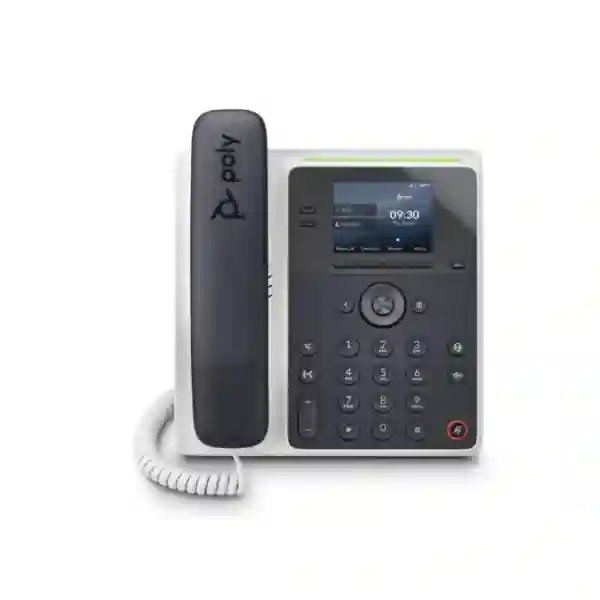
HP Poly Edge E100 IP Desk Phone
Need a dependable desk phone for routine business calling without an unnecessarily complicated interface? The HP Poly Edge E100 IP Desk Phone is a wired, SIP-based office handset for individual desks, reception points, common areas and other places where an easy-to-reach physical phone remains useful. It combines a 2.8-inch colour display, two physical line keys, up to eight SIP lines accessed through pagination, Poly voice-processing technology and wired network connectivity. For a Tanzania deployment, the important buying question is not simply whether the phone has the right buttons; it is whether your telephone platform, network, power arrangements and day-to-day calling workflow are ready for it.
This guide explains the manufacturer-confirmed capabilities, likely use cases, practical limitations and technical questions to check before purchasing. The Edge E100 is an IP endpoint rather than a complete telephone service: it needs a suitable voice platform and working network configuration. Ask FourTeck Tanzania to verify the exact supply variant, your intended SIP or PBX environment, headset needs and quotation terms before placing an order. Local stock, price, delivery, warranty terms and installation services are not stated here because they have not been verified for this listing.
Essential specifications at a glance
The specifications above describe the manufacturer-documented Poly Edge E100 family and HP’s PoE-enabled product configuration; some features depend on software, connected systems and accessories. They should be read as a technical starting point, not as a promise about the contents or price of a particular Tanzania package. Confirm the exact offered product identifier and power-supply arrangement in the quotation. A local SKU has not been supplied for this product, so none is assigned here.
Who is this desk phone designed for?
The most natural buyer is an organisation that wants the familiarity of a traditional handset while moving calls through an IP network. A receptionist may need a visible ringing alert and easy call handling; a staff member may prefer physical buttons for regular customers; a small office may need straightforward desk telephones without a large display or complex key layout. The Edge E100 addresses those situations with a compact screen, illuminated controls, basic desk-phone ergonomics and the option to use a wired headset. It can also suit positions where a phone is left at a fixed station rather than carried between rooms.
An IP desk phone is not automatically the right answer for every employee. A mobile-first sales person may prefer a softphone, a high-volume switchboard may need more visible line keys, and a room used mainly for group audio may need a conference device. The Edge E100 has only two physical line keys even though its paginated interface can present more SIP lines. That distinction matters for users who monitor several colleagues or handle many simultaneous calls. Before buying multiple units, match the number of keys, screen size and call-control workflow to how each employee actually works.
Tanzania businesses assessing a new calling setup should look at the whole endpoint-to-service chain: the phone, Ethernet cabling, PoE switch or suitable power arrangement, voice network, IP PBX or hosted service, and upstream calling connection. This is especially important when an office is replacing analogue extensions or switching from a purely mobile-based communication system. The telephone can be technically capable yet still fail to register if credentials, network access, provider requirements or supported provisioning methods have not been established. A small compatibility check before procurement can prevent a much larger rollout problem.
Clearer business calls: understanding the audio technology
HP identifies Poly HD Voice and Acoustic Clarity among the Edge E100 audio features. HD Voice is intended to make speech more natural when the calling path and codec negotiation support wideband audio; Acoustic Clarity addresses full-duplex conversations, echo management and background-noise control. In practical terms, this is useful for a desk shared with nearby colleagues, routine customer enquiries or an office that conducts many brief calls throughout the day. The exact experience still depends on the headset or handset in use, the far-end device, network stability, audio settings and the voice service.
Poly Acoustic Fence is designed to reduce distracting sounds while using the handset or a supported wired headset. Poly NoiseBlockAI targets much of the background noise that can be picked up while the speakerphone is used. These are different audio paths and should not be treated as identical features or a guarantee that every sound disappears. An employee calling from a busy reception area may find the handset more predictable than open speakerphone audio, while somebody typing during a hands-free call should test the room acoustics and microphone placement before relying on background-noise processing alone.
For buying teams, the best test is a realistic call rather than a specification comparison on paper. Make a call from the actual work area during a busy period, ask the far-end person to evaluate speech clarity, then repeat with the headset and speakerphone modes employees are likely to use. Check for clipping, echoes and interruptions, and repeat while another person uses the office network. If users struggle to hear, look at volume, acoustic conditions and the complete calling path before concluding that the desk phone itself is defective. Good audio engineering is a combined device, network and user-workflow decision.
Screen, buttons and everyday call handling
The 2.8-inch colour IPS display presents calling information in a more approachable format than a small monochrome screen. HP lists a 320 × 240-pixel native resolution and an RGB lightbar status indicator. The combination can make incoming-call status easier to notice at an attended desk, although visibility depends on placement, lighting and user preferences. Physical navigation and context-sensitive soft keys support actions shown on the screen, while the familiar numeric keypad makes the device straightforward for occasional users. It is a purposeful desk-phone interface rather than a touch-screen collaboration terminal.
Two physical line keys support access to as many as eight SIP lines using pagination, according to HP’s product description. The word “support” is important: it identifies the phone’s interface capability, not an entitlement to eight telephone accounts or eight independently purchased numbers. The actual number of configured lines, shared appearances and calling features is governed by your PBX or service provider. Teams that need to see many extensions at once should confirm the visible-key requirement instead of choosing purely by the maximum line figure. Pagination can work well for occasional access but may not fit heavy monitoring duties.
The adjustable two-position stand helps adapt the viewing angle on an ordinary desk, and HP documents wall-mount capability for the product. Evaluate cable routing, handset clearance and mounting position before fixing a unit to a wall or a narrow counter. A reception position near direct sunlight can need a different screen angle from a private office; an accessible service counter may require lower positioning and a longer usable handset reach. Employee comfort is not a cosmetic detail: if call information is difficult to see or the handset is awkward to reach, the device will be less useful however capable the software may be.
SIP lines, PBX compatibility and calling services
The Edge E100 is a SIP desk endpoint, which means it normally participates in a larger IP telephony environment. A compatible business PBX, cloud calling service or other properly configured SIP platform supplies identities, extensions, call routing and feature policies. The phone itself does not include a public telephone number, a paid SIP trunk or a hosted PBX subscription. The network administrator may need server addresses, authentication details, transport settings, time configuration and provisioning instructions. Different vendors can interpret supported SIP features differently, so a generic statement that a platform “uses SIP” is not sufficient proof of interoperability.
Before purchase, ask the intended platform administrator to confirm the precise model and current software support. Typical questions include whether the E100 can register using the required authentication method, whether the desired firmware release is supported, and whether the platform exposes the call features employees expect. Transfers, hold, voicemail indicators, busy-lamp functions, contact directories and shared-line behavior may depend on service-side configuration. Where these functions are business critical, request a demonstrated test with the exact PBX edition or hosted-service plan rather than assuming the desk phone automatically enables every feature.
If an office has analogue incoming lines or existing legacy telephones, transitioning to an IP endpoint may require a gateway, a provider-side service change or a new PBX architecture. Replacing a handset is not the same as replacing the telephone exchange. Record where inbound calls arrive, how extensions are numbered, which users share numbers and how after-hours routing operates before moving to new endpoints. This protects customer-facing telephone numbers and helps identify functions that rely on the current system. FourTeck Tanzania can be asked to review the proposed endpoint requirement, but any integration or installation commitment must be confirmed in an actual quote.
A successful small pilot should include more than one outgoing test call. Test inbound ringing, answering, hold, attended and unattended transfers where available, missed-call indicators, call waiting, voicemail access, emergency-calling arrangements applicable to the service and recovery after a power interruption. Check that staff can recognise which line is active and that any permissions applied by the PBX work as intended. A short written acceptance plan gives purchasers clear criteria and makes it easier for the IT team and service provider to troubleshoot a failed step without blaming an unrelated component.
Wired connectivity, PoE and network planning
HP documents two RJ-45 Ethernet connections operating at 10/100/1000 Mbps. In a typical office arrangement, one connects towards the network and the other provides a passthrough connection for a nearby computer. This can simplify a desk with only one wall data outlet, but it does not remove the need to check switch capacity, VLAN handling and site cabling. The phone may be part of a chain carrying both voice and computer traffic, so the network design should protect business calling from heavy data transfers. A Gigabit port rating is a local interface specification, not a guarantee of any internet speed.
Built-in IEEE 802.3af Power over Ethernet, Class 3, allows a compatible PoE network port to provide electrical power over the data cable. HP states up to 13 W maximum power in its product specifications. Check that the proposed switch supports the required PoE standard and that the total switch power budget covers all connected phones, access points and other powered devices. A switch advertised as PoE capable may not have sufficient total budget for a fully populated office. Where power is provided by an adapter or injector instead, verify its compatibility with the exact purchased variant.
The distinction between PoE enabled and power-adapter included is worth resolving explicitly. HP sells and documents variants whose bundle wording differs; the buyer should not infer from the phone model name that a particular mains power unit is in the carton. Ask the seller to list the contents of the exact quote and any separate power accessories. At sites that experience electricity interruptions, a UPS for the network switch, router and upstream connectivity may be as important as maintaining power to the desk phone. Keeping one handset powered is not enough if the telephone service and local data path are offline.
For stable voice performance, consider data-cable quality, switch configuration, DHCP behavior, DNS resolution, accurate time settings and appropriate voice quality-of-service treatment. Voice traffic is usually more sensitive to packet loss, variation in packet arrival times and high latency than ordinary webpage loading. An office may have a connection that feels fast for downloads yet provides uneven call quality when the upstream link is congested. Monitor real calls at peak usage and choose network controls appropriate to your PBX and provider guidance. A segmented voice network can be helpful where it is supported and properly managed.
The E100 also has a USB 2.0 Type-C connection and NFC identified in manufacturer specifications. These capabilities do not mean the handset provides a general-purpose Wi-Fi replacement for Ethernet or guarantees compatibility with every USB accessory. HP identifies media and storage uses for USB-C, and describes wired headset options within the product family. Check the specific headset model, cable and software support before ordering accessories. Likewise, do not plan a wireless-device workflow merely because NFC appears in a specification table; establish exactly what the supported deployment or pairing feature does in the intended configuration.
Choosing a handset, headset or speakerphone workflow
The familiar handset is well suited to quick, private desk calls. A compatible wired headset may be more comfortable for employees who need to type, update customer records or consult a screen while speaking. HP lists USB, RJ9 and electronic hook switch headset approaches for the Edge E100 product description. Those are interface and accessory categories, not a guarantee that every headset carrying the same connector will operate correctly. A supplier should confirm the approved combination, required adapter or cable, and whether remote answer and end-call control are supported for the selected accessory.
If the position handles frequent calls, ask the intended user to test the device in their normal working posture. The right headset should remain comfortable through repeated sessions and reproduce speech clearly in the room where it will be used. Where a team shares a desk, hygienic handling and a simple process for connecting personal headsets may be important. Confirm that employees understand whether their audio is routed to handset, headset or speakerphone, and that supervisors can identify any service-side restrictions before rollout. Simple training often resolves apparent device problems faster than changing hardware.
A speakerphone can make brief hands-free conversations convenient, but it is not always the right option for private customer information or a noisy open-plan office. Use the handset or appropriate headset when privacy and controlled microphone pickup matter. If a shared room needs several participants around a table, evaluate a dedicated conference-phone solution rather than assuming a single-desk handset can cover every seating position. Plan equipment around the conversation pattern, room acoustics and privacy requirements, not just the presence of a speakerphone button.
Planning a Tanzania office deployment responsibly
Tanzania businesses may be modernising a small branch, replacing ageing desk phones or designing telephone access for a new workplace. In each case, the deployment questions are largely practical: is there a supported calling service; are the right network ports and power sources available; do staff know which extensions they will use; and does the organisation have a plan for outages? Avoid buying a large quantity of handsets before verifying these elements. A test unit on the actual network can reveal unexpected restrictions that do not appear in an attractive features list.
For a cloud-hosted telephone system, the reliability of the connection between the premises and hosting environment is an important consideration. Confirm that the chosen internet or private-network service delivers consistent call quality during normal business hours, and establish a backup communication process if that connection becomes unavailable. For an on-premises PBX, assess the local server, its electrical supply, network segmentation and upstream trunk. These are design checks, not claims that a particular Tanzanian carrier, cloud provider or SIP trunk is officially certified with the Edge E100.
Procurement should include a written inventory of working positions and user roles. A front desk may require transfer access and a conspicuous ring alert; an administrator may need a comfortable headset; a meeting-room lobby may need a simple shared extension; and a supervisor may need a phone with more simultaneous line visibility. That final case may call for another model. Once requirements are grouped, the purchaser can request a quote that separates handsets, compatible accessories, PoE infrastructure and any telephony service or configuration work. It also becomes easier to compare offers fairly without assuming they include identical items.
Physical conditions also deserve attention. HP lists an operating temperature range of 0 to 40°C for the Edge E100 series. The phone should be used indoors in a location that respects the stated environmental limits and protects equipment from dust, liquid exposure, direct heat and unstable electrical arrangements. The published range does not justify leaving the unit in a hot unventilated enclosure or exposing it to rain. Local site conditions vary, so place the equipment where staff can use it safely and where the network cable cannot be pulled or damaged during routine work.
Where an organisation has several offices, aim for a repeatable configuration rather than a different improvised setup at each desk. Decide how extensions will be named, how devices will receive configuration, who approves firmware updates and how lost credentials or failed registrations will be handled. Keep records of the handset location and business owner without posting secrets on the device. A consistent deployment standard helps new staff become productive and provides a useful checklist for expansion. It is particularly valuable when procurement, IT support and telephone service management are handled by different teams.
Security and business calling controls
HP documents security features including 802.1X authentication, encrypted provisioning options, HTTPS provisioning, TLS and SRTP media encryption. These features give administrators useful building blocks, but merely buying the hardware does not mean every call is automatically encrypted end to end. The actual level of protection depends on the enabled settings, the PBX and provider, certificates, firmware and the rest of the call route. Where security is a purchasing requirement, ask the responsible IT team to specify which connections will be encrypted and how those settings will be tested.
Good practice starts with controlled credentials and predictable provisioning. Avoid using shared default passwords, restrict management interfaces where practical and keep SIP account secrets in an approved administration system rather than in printed desk labels. If the platform supports device-level policies, assign them consistently, review who can change configuration and document how credentials will be revoked when a handset is reassigned. These steps do not require a complicated security project, but they do need to be included in normal telephony administration instead of postponed until after a problem occurs.
For shared workplaces, telephone privacy is also a people-and-process issue. A device that displays recent numbers, directories or missed calls may reveal information to the next user unless access and retention practices are appropriate. Decide what customer details should remain visible at a shared counter and whether a shared extension is actually suitable for that position. Staff should know how to report a suspicious call, unexpected forwarding rule or unrecognised registration event. Technical controls work best when they support the organisation’s real call-handling and data-protection procedures.
Network access control and voice segmentation may improve administration, but they require careful implementation. For example, a phone connected ahead of a computer should not become an accidental route around policies designed for either device. Test that the approved switch settings still permit the handset to register and that the passthrough computer behaves as expected. Document any changes so that replacing a device does not require reverse-engineering old configuration. Treat security specifications as capabilities to be configured and audited, not as marketing proof of regulatory approval or compliance in Tanzania.
Provisioning, monitoring and ongoing management
HP lists Poly Zero Touch Provisioning, Poly Lens and provider-oriented management services among the Edge E100 management options. Their practical value is greatest where several phones must be installed with consistent settings or supported by a small IT team. Instead of manually entering the same details at every workstation, supported provisioning workflows can streamline initial configuration and subsequent updates. The exact services, licensing conditions and administrative features should be checked for the chosen deployment; a feature named in a datasheet does not establish that it is already activated in a customer account.
For day-to-day maintenance, create a small set of operational records: which extension belongs to each desk, who owns the PBX account, which software version is approved, and how to contact the person responsible for line faults. Include a documented replacement procedure so a failed handset can be configured without exposing passwords or interrupting other extensions. Management tools can assist with inventory and deployment, but they do not replace clear ownership of network access, service contracts or security policy. A straightforward inventory often matters more than a complex dashboard for a small office.
Firmware change control deserves deliberate attention. Updates may address reliability or security, but installing a new version without checking platform compatibility can affect a working environment. Follow HP and the service provider’s release guidance, test changes on a limited set of devices and retain a recovery procedure before a wider rollout. For distributed teams, schedule changes around business requirements and confirm that telephone service remains available through a backup procedure. A consistent update policy is useful whether the organisation has five endpoints or many more.
Common business scenarios and their buying implications
Reception and customer service: The E100 can be considered for a reception desk where visible incoming-call indications, a conventional handset and access to common transfer functions are valuable. Confirm that the connected telephone system exposes the desired transfers, hold treatment, directory access and routing. A receptionist handling very high volumes may need more immediately visible line or busy-lamp keys than this model provides. In that case, a larger desk-phone configuration should be considered instead of forcing a workflow into a smaller interface.
General office staff: For people who make and receive routine calls alongside email and document work, the combination of a clear display and familiar buttons can reduce dependence on a computer application. A suitable wired headset may free the user’s hands, while the passthrough Ethernet connection can fit desks with limited cabling. Check network policy before using passthrough and validate headset compatibility for the exact accessory. Employee training should cover call transfer and voicemail behavior as delivered by the organisation’s calling platform.
Shared counters and common areas: A fixed telephone can be useful where several authorised employees need a predictable way to contact another department. In these spaces, simple navigation and a clear ringing indicator may matter more than advanced executive features. Decide whether the phone should use a shared extension, how call logs are handled, and who can alter settings. Consider physical mounting, cable safety and whether the device is exposed to uncontrolled public access. Access control and privacy matter even if the desk phone is regarded as basic equipment.
Small businesses upgrading from analogue lines: An Edge E100 purchase can be one component of a move towards IP calling, but it is not a direct plug-in replacement for every analogue telephone socket. Identify whether existing public numbers are supplied through analogue lines, a gateway or a hosted service, then plan the PBX and trunk arrangement accordingly. An initial test with one desk phone and the proposed provider can help establish a realistic budget for the remaining devices, switch power, network work and user training.
Teams with substantial monitoring duties: A manager or switchboard operator who continuously watches many shared lines may need more visible keys, a different screen arrangement or additional call-control tools. The E100 supports paginated access to multiple SIP lines, but pagination is not equivalent to having eight dedicated physical keys in view at the same moment. Confirm the required simultaneous visibility and workflow before choosing equipment. Selecting the simplest model that genuinely meets the role is usually more useful than assuming all staff should have identical devices.
How to evaluate the E100 against alternative desk phones
Start with the amount of calling information a person needs to see. The Edge E100 has a relatively compact 2.8-inch display and two physical line keys; larger desk-phone models may offer more screen area or more dedicated keys. That tradeoff has a direct operational consequence for receptionists, executives and staff who monitor several call appearances. Write down how many keys must remain visible at once, how frequently employees transfer calls and whether a paging action would be disruptive. These details are more useful than choosing a model solely because it has a larger number in its name.
Next consider connectivity requirements. The E100 is designed around wired Ethernet and PoE, with documented USB-C and compatible wired-headset approaches. If staff specifically require integrated Wi-Fi, Bluetooth workflows, expansion modules or other features, verify them against the exact model and variant rather than assuming all Poly Edge E-series handsets are identical. A solution can look similar in a product photograph while offering very different network and accessory options. A feature checklist signed off by IT and a representative user will make a comparison between shortlisted models more reliable.
Finally, compare the total cost of a usable working position. That can include the device, PoE switch capacity, approved headset, configuration, PBX or hosted-service fees, and any required support arrangement. Avoid comparing a quote for a handset alone against a second quote that includes integration and power accessories. For Tanzania buyers, request actual local commercial terms rather than extrapolating from foreign retail prices. A detailed, itemised quotation also prevents confusion about whether an adapter, headset, setup work or other component has been included in a particular offer.
Practical pre-purchase checklist
Telephone service: Identify the PBX or hosted calling platform and obtain a clear compatibility response for the Edge E100 model and the software version intended for use. Ask what registration and calling features are supported, and document anything requiring extra configuration. If a provider says “SIP compatible,” request an exact-model test for business-critical functions rather than relying only on that general label.
Network and power: Check every proposed desk has a suitable network path, confirm PoE standard and power budget, and decide whether passthrough Ethernet is permitted. Where an adapter or injector is needed, have the supplier specify the compatible part and whether it is included. Consider the impact of a local power interruption on the phone, switch, router and the upstream calling service.
Users and accessories: Record which people need a headset, whether they need electronic call control, and which workstations require wall mounting. Check the specific headset part and accessory combination. A short desk-side trial can reveal mismatches in ergonomics or audio workflow that are not apparent from specification sheets. Avoid ordering every accessory before the intended user has tried the combination.
Security and operations: Decide how configuration will be provisioned, who manages passwords and firmware, and what the organisation expects from TLS, SRTP or network-access controls. Build a simple equipment register and a support escalation route. This helps reduce interruptions when users move desks, a unit is replaced or the PBX service changes. Make sure security settings are confirmed in practice and not merely listed as available.
Acceptance and purchasing: Ask for a quote identifying the exact device variant, supply contents, price, tax treatment, delivery conditions and local warranty/support arrangements. None of these commercial conditions should be inferred from the manufacturer’s general product description. Agree on a pilot that checks inbound and outbound audio, transfers, missed calls, headset operation and recovery after restart before approving a larger deployment.
Suggested rollout sequence for IT and office administrators
Step 1 — Define the call flow. Map existing telephone numbers, extensions, ring groups, after-hours handling and receptionist responsibilities. Confirm which staff require their own extension and which positions use a shared identity. If the organisation is migrating from analogue telephony, identify the necessary gateway or trunk decisions before ordering endpoints. This stage should leave the project with a plain-language description of how callers reach each department, rather than only a count of handsets.
Step 2 — Inspect desk and network readiness. Verify data outlets, cable paths, PoE switch capacity, upstream connectivity and backup power where necessary. Record any desks that need a different power arrangement or mounting method. Test voice connectivity at the busiest time of day, not only during quiet periods. The result should be a short readiness list showing which locations can accept a phone immediately and which require additional work.
Step 3 — Prepare the supported configuration. Work with the PBX or service provider to define extension credentials, firmware expectations, provisioning method and relevant security policies. Avoid setting secrets in shared documents that can be read by unrelated staff. If central provisioning is used, test the device identity and replacement process before releasing the configuration widely. Have an administrator document the expected behavior for lines, voicemail and call routing.
Step 4 — Pilot with real users. Install one or a small number of phones in roles that represent the proposed deployment, such as a receptionist and a regular office user. Have them try inbound and outbound calling, hands-free audio, headset use where applicable, and any transfer steps central to the business. Capture what works and what needs adjustment. A pilot should exercise the actual telephony service rather than only verify that the device powers on and shows a screen.
Step 5 — Roll out and train. Apply the approved settings consistently, record device locations and provide a short guide for common tasks. Explain where employees should report a failed registration, one-way audio, missing calls or a headset issue. Schedule a follow-up check after normal call volume has been experienced. This process turns a hardware purchase into a supported communications service without assuming that all workplaces or providers operate in the same way.
Troubleshooting questions worth preparing for
The phone powers on but cannot make calls. Check whether the device has a valid network address and can reach its configured voice service. A powered PoE connection confirms electricity, not successful SIP registration. Review extension credentials, DNS or server reachability, provisioning details and any network policy affecting signalling. Distinguish a registration error from a provider-side issue or a restriction on outbound calling. Changes should be made by the authorised administrator so that a working configuration is not accidentally lost.
Audio works in only one direction. Ask the network and voice teams to investigate the audio-media path, NAT or firewall behavior where relevant, and the supported media settings for the PBX. A phone can signal a completed call while the voice packets fail to travel correctly. Try a call between two internal extensions and compare it with an external call to narrow down the problem. Record the exact time and extensions involved so logs can be checked efficiently.
Calls sound choppy or distant. Test the handset, headset and speakerphone separately, then evaluate packet loss, latency variation, congestion and the environment around the user. A wideband-capable device cannot overcome a poor underlying network or an inappropriate audio accessory. During a real call, note whether the problem affects one user or many sites, and whether it coincides with heavy data traffic. That information can help isolate an endpoint fault from a larger network or service problem.
Line keys or call functions behave differently than expected. Confirm the service-side feature setup and what each physical key is programmed to present. The fact that the E100 supports up to eight SIP lines does not mean every deployment exposes all eight or offers identical functions. Test hold, transfer and voicemail indicators under the intended configuration. Where a feature is essential, keep a written pass/fail checklist and arrange a supported configuration change rather than assuming that every missing function indicates defective hardware.
Frequently asked questions
Is the Poly Edge E100 a traditional analogue telephone?
No. It is an IP desk phone intended for a suitable SIP-based calling environment. It normally connects through Ethernet and relies on an appropriately configured PBX, hosted service or other compatible voice platform for calling identities and call routing. It is not a direct replacement for every analogue wall socket. If the office still uses analogue telephone service, discuss the required gateway or migration steps before buying.
How many lines does the Edge E100 support?
HP states that two physical line keys provide access to up to eight SIP lines through pagination. That describes the phone’s line-interface capacity, not a guarantee of eight public numbers, eight licensed accounts or identical calling features on every platform. The actual setup depends on the PBX and the provisioned service. Where many lines must be visible simultaneously, consider whether a model with more physical keys would be easier to operate.
Does the phone need a separate power adapter?
The manufacturer documents built-in IEEE 802.3af Class 3 Power over Ethernet. With a suitable PoE network port and sufficient power budget, a separate desktop power adapter may not be needed. The contents of commercial bundles differ, so confirm the exact quoted variant and whether any adapter or injector is included or required. Also check that essential network equipment has suitable power continuity if the office cannot tolerate telephone downtime.
Can a computer share the network outlet with the phone?
The E100 includes two RJ-45 Gigabit Ethernet ports and HP describes a passthrough connection for a nearby PC. Whether this is appropriate depends on the organisation’s cabling, switch rules, VLAN design and security policy. An IT administrator should validate that voice and computer traffic work correctly together. The interface rating is not a promise about internet speed or network performance during heavy workloads.
Can it be used with a headset?
HP describes compatible wired headset options including USB, RJ9 and electronic hook switch approaches. The correct choice depends on the particular headset, cable, software and preferred call-control method. Do not assume that every device sharing a connector is interoperable. For people who take frequent calls, confirm comfort, microphone performance and whether answering from the headset is supported before purchasing a large quantity of accessories.
Does it connect to Wi-Fi or Bluetooth by default?
Do not assume either feature from the appearance of the phone or from the features of other Edge E-series models. HP’s E100 specification clearly documents wired Gigabit Ethernet, USB-C and NFC. If an office requires a specific wireless workflow, ask the supplier to confirm support on the exact device variant and firmware, and select another endpoint if that requirement is not met. This avoids making the network design depend on an unverified capability.
What improves voice clarity on the E100?
HP lists Poly HD Voice, Acoustic Clarity, Acoustic Fence and NoiseBlockAI. These features address speech quality, echo and certain background-noise conditions through different audio paths. Real results still depend on network performance, the calling platform, the room and whether the user is speaking through the handset, headset or speakerphone. A short call test in the intended office environment is the most useful way to judge suitability.
Is the phone compatible with my existing PBX?
Compatibility cannot be guaranteed from the term SIP alone. Give the PBX administrator the exact Edge E100 model, firmware and required calling features, then ask for confirmation against the platform’s supported-device documentation. Check registration, transfers, voicemail, directories and shared-line behavior where relevant. For critical installations, use a pilot handset on the actual system before committing to a broader purchase.
Can administrators provision many phones centrally?
The manufacturer identifies Poly Zero Touch Provisioning, Poly Lens and provider-oriented management options for the series. These capabilities can help with consistent deployment and support, but particular workflows may require a compatible service, account, administrative setup or version. Ask the intended administrator to verify the provisioning route and the exact feature entitlement. Do not treat mention of a management platform as proof that a paid subscription or deployment service is included.
Is the E100 appropriate for a busy receptionist?
It may suit a smaller reception or routine front-desk role, especially where visible call status and straightforward buttons are valued. However, someone monitoring many extensions continuously may find two physical line keys restrictive even with paginated access to additional SIP lines. Map the real receptionist workflow and validate transfer, hold and line-monitoring needs with the PBX. A larger-key model can be more appropriate when immediate visibility matters.
What is included in the box?
HP’s published standard product information lists the phone console, handset, handset cord, desk stand, network cable, setup documentation and wall-mount hardware. Exact cartons and accessories can vary by product variant or market. Treat this as manufacturer reference information rather than a confirmed local package list. Request an itemised quote and verify whether a mains power unit, headset or other accessory is included before ordering.
What is the price and availability in Tanzania?
A local Tanzania price, stock status, lead time and supply warranty have not been verified for this listing. They should therefore be obtained through a current, itemised FourTeck Tanzania quotation rather than inferred from a price shown in another country. State the quantity required, exact product variant, headset or power accessories and intended telephone platform so that the offer covers the equipment you actually need.
Request a Poly Edge E100 quotation for your office
For a useful quotation, specify the number of desk positions, your PBX or hosted calling platform, the required headset types and whether the network already supplies IEEE 802.3af PoE. State any reception, shared-line or wall-mounting requirements so the proposed package can be assessed against the working environment. Ask for confirmation of exact product variant, included accessories, current pricing, availability, applicable local commercial terms and any optional configuration services. The goal is a working, supportable office telephone setup—not simply a box count.
Contact FourTeck Tanzania to request product information and a tailored quote for the HP Poly Edge E100 IP Desk Phone. There is no linked checkout or contact-page URL in this description because a relevant published destination could not be verified from the permitted local sitemap sources. No unverified supply promise, automatic platform compatibility or local regulatory approval is implied.




Reviews
There are no reviews yet.