
Professional IP telephony · Dual displays · Open SIP
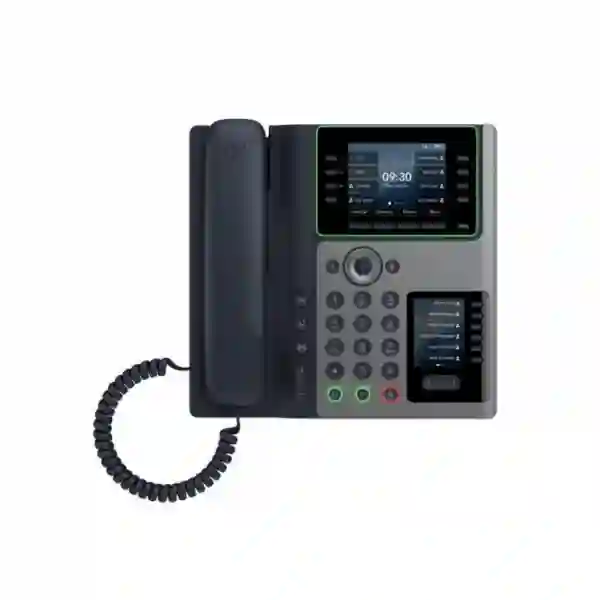
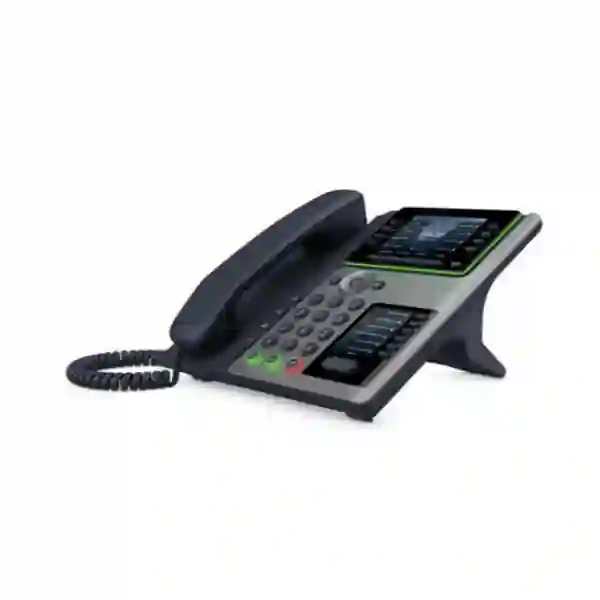
HP Poly Edge V650 IP Desk Phone
Take control of busy office calls with a second screen, programmable keys, advanced Poly audio processing and flexible connectivity. Built for collaborators and administrative teams who value reliable visibility at the desk.
Features at a glance
Displays
3.5-inch main and 2.4-inch secondary
Keys
8 main + 6 secondary; up to 44 positions
Wireless
Wi-Fi 6, Bluetooth 5.4 and NFC
Network
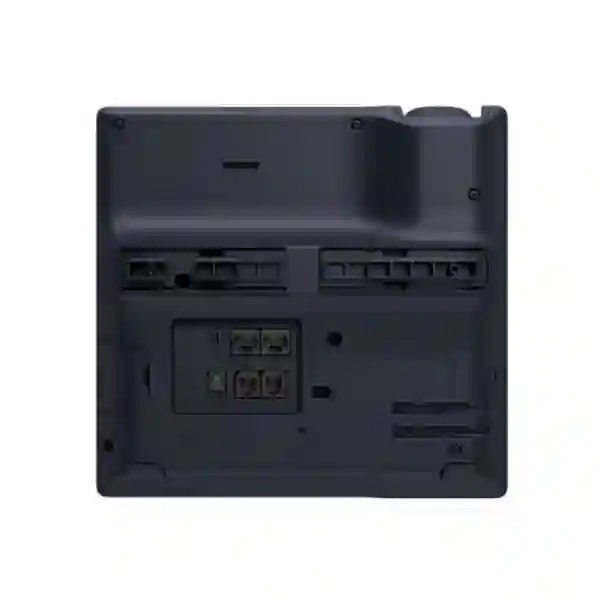
2 Gigabit Ethernet ports
Peripherals
2 USB Type-C ports
Audio
HD Voice, NoiseBlockAI v3, Acoustic Fence
Security
Trusted Security Module; TLS and SRTP support
Expansion
1 optional Edge V expansion module
Capabilities refer to the manufacturer’s V650 specification; exact regional package and telephone service compatibility must be confirmed.
Why choose this desk phone?
The HP Poly Edge V650 IP Desk Phone addresses a specific challenge: people who handle many calls need a reliable way to see colleagues, recognise call states, reach frequently used contacts and move confidently between conversations. A basic desk handset may be adequate for someone who makes only an occasional call, but administrative desks, departmental leads and front-office staff often need more visible information. The V650 combines a conventional physical telephone with dual colour displays and a larger set of keys. It is designed to keep useful calling functions close at hand instead of requiring constant navigation through menus. That combination is particularly relevant when staff must use telephone controls while also working in another computer application.
This is an Open SIP business endpoint, not an independent telephone service. It requires a suitable network and an appropriately configured SIP platform to place business calls. The most useful way to evaluate the V650 is therefore to start with daily workflows: who answers the calls, which lines are shared, who is monitored and what happens when a caller needs a transfer. A purchase decision becomes clearer when each device feature can be tied to one of those tasks. For a Tanzania organisation, this functional review should come before selecting quantities, accessory packages or regional service arrangements.
Two colour displays for busy call handling
The V650 features a 3.5-inch main colour screen and a 2.4-inch secondary colour screen, according to HP’s official product brief. The arrangement allows the main interface to present active calling information while the second area provides more visible key positions for suitable contacts, lines and features. A dual-screen design can be helpful when a caller is waiting and the employee needs to locate another person without losing the current conversation from view. The benefit is not simply having more pixels; it is reducing the number of steps between noticing a call and choosing an appropriate response.
In a reception scenario, a secondary area can make frequently monitored colleagues or departments easier to identify. In a team-lead scenario, an administrator might place recurring contacts near the top of the key layout. In a shared office, standardised labels can help different users recognise the same functions without retraining. The actual screen contents and key behaviour depend on provisioning and the telephone system. During evaluation, organise the keys around frequent tasks, test the labels with the intended staff and keep little-used functions off the primary layout. A clear interface will outperform a cluttered screen even when both have the same technical capacity.
Understanding eight plus six line keys
HP identifies eight primary physical line keys and six additional keys on the V650, with support for up to 44 line, contact or feature positions through its page-based arrangement. Buyers should separate physical buttons from configurable positions. A physical key is an immediate control on the desk phone; a configured position may represent a line appearance, speed dial, monitored extension or supported PBX function. The published total does not mean that forty-four outside telephone numbers are automatically available, and it is not a promise of forty-four simultaneous conversations. The platform and the configured call services determine what each position can actually do.
For an office coordinator, several positions may be best used for departmental contacts. A person who manages shared answering responsibilities may instead prioritise shared line appearances and call pickup controls, if those features are supported. Ask the PBX administrator to document which keys need to remain visible on the main screen and which can live on another page. Users should not need to remember unfamiliar numbering or repeatedly search for essential functions. When comparing models, assess how many actions are immediately available in the layout that the employee will actually use, not just the largest number in a specification chart.
Busy-lamp fields and contact visibility
The V650 support documentation describes busy-lamp-field monitoring on its secondary display, together with favourites, buddy information and directory functions. In a suitably configured office, these tools can help staff identify an extension, recognise a supported presence status and choose the next person to contact. An assistant managing calls for several departments may benefit from that visibility more than someone who only uses one direct line. The second display can provide a useful home for frequently consulted positions while the main display continues to show call activity.
Presence should not be mistaken for a complete account of somebody’s availability. Busy-lamp information usually reflects specific telephone-system events, not whether a colleague is physically at a desk or free to discuss a project. Different providers implement monitoring, call pickup and shared-line behaviour differently, and some may not support the exact features an organisation expects. During a pilot, test indicators with known extensions, perform transfers and evaluate what happens when a monitored contact does not answer. Train staff in the meaning of each indicator and the appropriate fallback action. A working monitoring setup is a combination of capable hardware, a compatible platform and a sensible key configuration.
Clearer speech with Poly audio technologies
The V650 brings together Poly HD Voice, full-duplex speakerphone operation and echo cancellation. HP also highlights an enhanced bass response for this model within the Edge V family. These technologies are intended to make everyday business conversations more natural and intelligible through the handset, speakerphone or supported listening device. Full duplex can be especially important when participants briefly talk over one another; a conversation should not feel like a radio exchange in which only one side is allowed to speak at once. Good speech reproduction matters when staff discuss product codes, names, appointment details and other information that should not have to be repeated.
Professional audio still depends on the wider telephone environment. The selected SIP service must agree on an appropriate codec, the network must deliver packets consistently and the user must position the microphone sensibly. HP lists codecs including G.711, G.722, G.729AB, iLBC, Opus and G.722.1, but available use depends on negotiation with the connected platform. During trials, make calls from the handset, hands-free speakerphone and each intended headset. Ask remote listeners whether speech remains clear when someone types or colleagues speak nearby. Validate audio at busy times rather than assuming a strong specification will overcome every network or room problem.
NoiseBlockAI v3 and Acoustic Fence
NoiseBlockAI v3 and Acoustic Fence target different aspects of difficult office sound environments. NoiseBlockAI uses processing to reduce distracting non-speech sounds such as typing or other workplace activity, while Acoustic Fence is designed to concentrate the microphone pickup around the intended speaking area. This can be valuable at open desks, reception points or administrative counters where background movement is unavoidable. The goal is to help the person on the other end of the call hear the speaker more clearly, without being distracted by everything that happens in the surrounding room.
These functions are aids to communication rather than guaranteed silence. Very loud noise, poorly positioned equipment and voices close to the microphone can still affect the result. A confidential call also requires a suitable physical environment; software noise reduction should not be treated as a privacy boundary. During a practical evaluation, make comparable calls with typical office sound in the background and ask a remote listener to judge both the words and residual noise. Where a user spends long periods on telephone calls, a properly fitted headset and an appropriate workspace may make more difference than relying on processing alone. Choose the combination that suits actual working conditions.
Handset, speakerphone and headset options
A dedicated business phone should support several comfortable calling styles. A handset offers familiar private operation for short conversations. A full-duplex speakerphone is useful when reviewing notes or keeping both hands available, while a well-fitted headset can benefit people who take sustained calls and type at the same time. HP lists USB Type-C and Bluetooth headset capabilities, an RJ-9 connection and an Electronic Hook Switch interface for an optional APP-51 adapter. These connection options create flexibility, but a port or wireless standard does not mean all accessories provide identical functionality.
Before buying headsets, verify exact model compatibility and the desired call controls. Answer, end, mute, volume and remote-hook functions should be tested rather than inferred. Some configurations may require an additional cable or adapter; others may support audio without every control feature. For shared headsets, consider hygiene, user preferences and a process for replacing worn accessories. A lightweight headset that fits a long-shift worker well may be more useful than a premium model selected solely on a specification. The purchasing plan should list each tested headset model and any required part separately from the base phone.
PC audio using USB-C
HP identifies PC Connect via USB-C for the Edge V650 and specifies two USB 2.0 Type-C ports. The supported PC audio mode can allow the desk phone to serve as a microphone and speaker for a connected computer in suitable circumstances. That can be helpful at hybrid workstations where staff participate in computer-based calls while retaining a physical desk telephone for ordinary SIP calling. It may also create a more organised workspace for people who would rather use one familiar audio device than constantly move between multiple microphones.
However, computer-audio support should not be confused with guaranteed integration into every meeting or softphone application. Features such as application call control, device switching, mute synchronisation or meeting status may depend on the computer, software version and supported connection mode. Test the actual corporate laptop build and applications before standardising. Where a user relies on sophisticated native softphone controls or video collaboration, evaluate those functions independently. The right solution may be a desk phone for voice and a separate headset or webcam for meetings, or a tested combination that handles both. The desired workflow matters more than assuming all USB-C devices behave alike.
Gigabit Ethernet for a wired installation
The manufacturer lists two 10/100/1000 RJ-45 Ethernet ports on the V650. These allow a wired office connection and can provide a pass-through arrangement for a nearby workstation where the organisation’s network design permits it. Wired networking is often the easiest baseline for voice because it avoids wireless coverage uncertainties and keeps the path predictable. Nevertheless, Gigabit-capable ports do not guarantee a Gigabit end-to-end service or remove ordinary LAN security considerations. Network speed depends on negotiated links, switching equipment and the configuration of the broader environment.
A proper deployment review checks cabling, switch ports, VLANs, DHCP, DNS, the provisioned SIP destination and any quality-of-service requirements. If a computer uses a pass-through path, verify that network segmentation and security policy remain appropriate and that phone maintenance will not create unacceptable desktop disruption. Give installers clear cable labels and record asset locations so that later troubleshooting is practical. Where a voice VLAN is used, confirm that the device and network agree on the intended assignment. A well-configured wired connection is more important for dependable calling than simply having two Ethernet sockets on the product.
Wi-Fi 6 for adaptable desk placement
Wi-Fi 6 is integrated into the V650, making it possible to consider wireless networking where Ethernet cabling is difficult or a workplace is frequently reconfigured. Examples include temporary administrative areas or offices that lack a conveniently located network drop. Wireless flexibility can simplify placement, but it does not mean the phone can operate without a stable network or an appropriate source of power. Voice calls can become unpleasant with packet loss or variable delay even when general browsing seems acceptable. A wireless deployment therefore needs deliberate testing at the exact desk location.
Check signal quality, wireless authentication, access-point density, congestion and coverage under normal business load. Review the security policy for admitting voice devices to the wireless network. If a user will change desks, consider what the phone will experience as it reconnects. The device also needs a supported power arrangement when it cannot use PoE on a wired connection. Include access points and network gateways in any backup-power plan if calls are important during electricity interruptions. A wireless phone is successful when it remains usable in its intended environment, not merely when its Wi-Fi icon appears connected.
Bluetooth 5.4 and NFC
HP’s product brief lists Bluetooth 5.4 and NFC for the Edge V650. Bluetooth can be useful for compatible headsets and supported mobile-device scenarios, and HP documents contact synchronisation possibilities on models that support relevant pairing functions. These options may suit offices where staff prefer a wireless headset or need flexibility across nearby communication devices. NFC is a specified interface, but its presence should not be interpreted as proof of a particular payment, access-control or automatic configuration capability without documentation for the intended feature.
Plan mobile pairing carefully when business devices can interact with personal phones. Company policy should address who may pair accessories, whether contacts may be imported and what happens when a device is reassigned. Verify Bluetooth profiles and headset controls with the exact equipment proposed for use. Document a simple method for clearing an old pairing and connecting a new approved headset. Users should know what to do when an audio source unexpectedly changes or a headset is already connected to another device. Wireless accessories can improve convenience, but well-managed permissions and support procedures are essential in shared environments.
Power and physical installation
Power requirements deserve explicit attention in any IP telephone project. HP describes PoE and USB-C power options within the Edge V family and references an optional power-supply adapter in the V650 brief. The standard listed package includes the phone, handset, handset cord, CAT 5e network cable, desk stand and Quick Start Guide; it is not safe to assume a specific local bundle contains a mains adapter. For each workstation, confirm the planned network path and compatible power source before deciding which accessories to include on the quotation.
For a wired desk, check the switching infrastructure and its PoE capacity. For a wireless desk, verify the supported alternative power arrangement. Where communication must survive local power interruptions, assess every dependent device, including switches, routers, access points and any hosted-service connectivity. Backup power for the phone alone cannot maintain calls if the rest of the network is offline. The included two-position desk stand enables a choice of viewing angle, while a wall mount is listed as optional. Allow room for safe handset access, cable routing and any expansion module. A neat installation helps users and reduces avoidable support issues.
Open SIP and PBX compatibility
Open SIP is a useful indication that the phone is designed for standards-based IP telephony rather than solely for a closed proprietary environment. This makes the V650 a potential candidate for organisations using an on-premises PBX, a hosted business voice system or a service-provider platform with appropriate SIP endpoint support. It is not proof that the phone has been certified for every system or that all advanced features will be available. Successful registration and basic calling are only the beginning of a complete compatibility evaluation.
Ask the chosen platform provider to verify the exact Edge V650 model, installed firmware and supported provisioning process. Test inbound and outbound calls, hold, attended and blind transfers, caller identification, voicemail indicators, shared lines, directories, monitoring and any conference features required by the role. Some platforms may support the basic features while omitting a particular key function. Do not assume native certification for Microsoft Teams, Zoom Phone, 3CX or any other named service without exact model documentation. A small pilot on the actual PBX reveals the operational fit much better than a generic claim that Open SIP means everything will work.
Security features in practice
The Edge V650 product brief identifies a Trusted Security Module and capabilities including 802.1X authentication, TLS, SRTP, HTTPS provisioning, encrypted configuration files, digest authentication and signed software executables. Together, these features can support stronger control of an enterprise voice endpoint. Hardware-backed mechanisms can help protect certain device functions, while transport and media security capabilities may reduce risks when appropriately deployed. These are model capabilities, not a claim that every installation is automatically secure on first connection.
The network and telephone platform must support the intended authentication and encryption settings. IT administrators should document which protections are required, verify them during a pilot and monitor configuration changes. Restrict administrative privileges, protect configuration services, manage credentials carefully and use supported firmware. A secure network architecture may include appropriate voice segmentation and access controls. For shared or reassigned phones, follow a reset process that removes unnecessary personal information. Security is strongest when the phone, platform, network and staff practices work together; a single prominent security feature cannot substitute for sound management.
Provisioning and management for multiple phones
HP lists Poly Zero Touch Provisioning, Poly Lens and Poly Device Management Service among the V650’s management-related capabilities. These can help teams consider repeatable configuration and device management at scale, subject to the selected service model, entitlement and deployment requirements. That matters when dozens of telephones need consistent extension settings, call keys, software versions and network profiles. Manual configuration may be reasonable in a tiny pilot, but it can create unnecessary variation when repeated across many desks.
An organised roll-out profile should identify each role, standard line assignments, naming scheme, directory access and the process for applying updates. Record which phone belongs to which user or shared workspace and who is authorised to change settings. Maintain a device inventory that includes the deployed firmware and relevant support information. Test new templates on a small sample before rolling them out more broadly. The goal is not merely to configure phones quickly; it is to make them predictable so users can move between suitable workstations and support teams can diagnose problems from a known baseline.
Software updates and long-term support
An IP phone continues to depend on software after installation. Firmware updates can introduce changes to device behaviour, network security and supported functions. HP provides Edge V software and release information to help administrators understand version-specific issues. A responsible deployment should use that information in combination with guidance from the organisation’s actual SIP service provider. Simply installing the newest release without testing can be disruptive if the surrounding platform or configuration has not been checked.
Define a maintenance owner and an update schedule appropriate for the organisation. Where possible, test on a spare device or a small group that represents reception, headsets and monitored lines. Keep relevant configuration records and a plan for recovery if a phone behaves unexpectedly. After a major change, confirm basic calls, transfers, voicemail indication and any specialised keys. Tell users how to report abnormal behaviour. Ongoing support is a genuine component of the purchase decision: a device with a good specification delivers its full value only when the organisation can maintain it reliably over time.
Accessibility and inclusive use
HP describes accessibility features for the Edge V series such as text-to-speech, larger fonts and options intended to improve use for people with colour-vision differences. The V650 brief also identifies hearing-aid compatibility characteristics and compatibility with certain TTY adapter equipment. These features may matter when an organisation wants a standard phone that serves employees with varied communication and visual needs. A readable screen and predictable physical buttons can also improve everyday usability for people without a specific accessibility requirement.
Accessibility should be evaluated with the actual user rather than inferred from a specification. Check display contrast under office lighting, comfortable handset audio, the location and feel of controls and the availability of required settings on the installed firmware. Verify any assistive accessory before purchase. Essential actions such as answering, holding and transferring should not rely only on the meaning of coloured lights. Train staff on the functions they need most and provide reasonable alternatives where the standard profile is unsuitable. Good deployment practice makes features easy to use, not simply present in a catalogue.
Optional Edge V expansion module
The V650 accepts one optional HP Poly Edge V Series Expansion Module. HP describes an accessory with a five-inch display and twenty-two configurable line keys across three pages, supporting up to sixty-six additional positions. This can be useful for a receptionist or coordinator who must frequently access a larger group of people than the built-in dual-display layout comfortably presents. The expansion module is an additional accessory, not a component to assume is packaged with every V650.
An expansion module adds visible controls, not new SIP trunk capacity or an automatic operator service. Those functions still depend on the PBX. Count how many staff members or destinations genuinely need one-touch access before specifying a module. Consider how updates to contact assignments will be maintained and whether the desk provides enough room for the additional hardware. Some users may achieve their goals using the secondary screen and programmed pages already built into the phone. The most efficient arrangement is the smallest configuration that keeps important controls visible and easy to remember.
Comparing V650 with V400 and V450
HP positions the V400 and V450 for knowledge workers and the V650 for office collaborators. The V400 and V450 offer a 3.5-inch single colour display and eight physical line keys, while the V650 adds a secondary 2.4-inch screen and six extra integrated keys. The V450 includes Wi-Fi and Bluetooth capabilities, while the V400 is the more straightforward wired member of that pair. All three may be considered in an environment where supported expansion capability is useful, but exact model features should be checked before ordering.
The meaningful question is whether the V650’s extra visibility will improve the intended employee’s normal routine. Someone who primarily makes direct calls and rarely transfers traffic may be well served by a simpler phone. A department administrator who checks colleagues’ status, answers multiple lines and needs quick access to recurring destinations may gain more from the V650 layout. Compare a small set of actual call-handling exercises rather than assuming that the larger specification is always the right fit. The correct mix of models can also avoid buying the same high-feature phone for every workstation without a clear need.
Comparing V650 with V800 and V850
The Edge V800 and V850 family is positioned higher in the range for executive and reception workflows that demand a larger display and more extensive line visibility. HP describes five-inch main screens and secondary displays in that series, along with support for more physical key positions and up to two expansion modules. The V650 sits between simpler knowledge-worker phones and those larger configurations, combining a dual-display interface with support for one optional expansion module.
A large central reception desk with extensive monitoring may justify evaluating the V800-series alternatives. A team lead or administrator who needs substantial but not maximum visibility may find the V650 better suited to available desk space and daily tasks. Wireless availability also differs across individual models in the Edge V family, so compare precise variants rather than interpreting a series name as a uniform feature set. If a mixed deployment is planned, build a role-based matrix and test representative positions. Selecting devices by workflow can improve staff acceptance and avoid paying for complexity that will never be used.
Tanzania office deployment considerations
For Tanzania businesses, the starting point is the organisation’s existing voice service and workplace infrastructure. Determine whether calls run through an on-premises PBX, a hosted provider or another managed SIP arrangement. Review the local network, the condition of office cabling, any Wi-Fi coverage limitations and how power interruptions are handled. A metropolitan office with managed switching has different practical constraints from a small branch with minimal IT coverage. The V650 can be considered in either sort of environment, but the final design must match real network and operational conditions.
Confirm local numbering and service arrangements through the intended provider rather than assuming a particular carrier or trunk works automatically with the phone. Request relevant SIP settings, codec policy, account provisioning guidance and any required firewall arrangements. If the business depends on an internet connection for external calls, understand its resilience and fallback procedures. Avoid treating the phone’s specifications as evidence of Tanzania-specific regulatory approval, local installation coverage, in-country stock or current price. Those are separate commercial and technical questions for the exact proposed deployment.
Voice quality and network resilience
A strong desk phone cannot compensate for a persistently unreliable connection to the telephone platform. Voice is sensitive to latency, jitter and packet loss, sometimes before ordinary web browsing appears slow. Busy networks, large backups, overloaded wireless links and routing problems can lead to gaps or distortion. Plan the V650 deployment with the real number of concurrent conversations in mind rather than focusing only on total line-key capacity. Appropriate network traffic handling and stable reachability to the voice service are essential.
Conduct calls during peak office activity and note whether quality changes when other applications use bandwidth. Test the chosen wired or wireless route and record any provider requirements for prioritisation. Consider whether backup internet or an alternative contact method is needed for business-critical positions. Power protection should include network infrastructure and not just the handset. Clearly document who investigates a fault and what evidence they should collect. A well-designed calling environment allows the phone’s audio features to be appreciated; network instability can undermine even expensive endpoints.
Reception and front-office scenarios
Reception staff often answer an incoming call, identify the right department, check whether someone is available and complete a transfer while another caller is waiting. The V650’s visible programmable keys can make those tasks easier when the connected PBX supports the required services. A sensible configuration groups important departments and people logically, keeps essential call functions near the user and reserves less convenient pages for infrequent destinations. That consistency is especially useful when several employees cover the same desk.
Test attended and unattended transfers, call pickup where used, hold recovery, shared lines and any monitored extensions before relying on the phone for front-office duties. If the receptionist regularly needs more visible contacts, assess the optional expansion module. When the desk also uses a computer application, evaluate whether a supported headset or PC audio arrangement helps staff work comfortably. Provide a simple written guide using the organisation’s own labels. The goal is not just to answer calls quickly but to reduce mistaken transfers and improve continuity when staff change shifts.
Managers and departmental coordinators
A manager who receives direct calls, internal enquiries and team coordination requests may value a handset with more visible shortcuts. The V650 can keep familiar contacts and supported status indicators nearby while the main screen shows active call information. A project coordinator could organise frequently contacted colleagues into logical groups, while an administrator may reserve positions for service teams or shared functions. Such layouts are especially useful when people spend much of their day in another application and prefer a dedicated physical control for business calls.
Avoid filling every available key merely because it exists. Ask staff to identify which contacts and actions they use most frequently, then build around those requirements. Review the layout after a pilot and move rarely used entries away from the most accessible positions. If a user conducts nearly all communication through a software client, compare the desk-phone approach with a tested headset and softphone workflow. The right answer depends on real habits and platform support, not job title alone. A thoughtful arrangement improves confidence and reduces training effort.
Shared desks and changing users
Shared-office phones need careful identity and directory handling. Users may expect an extension, personal contacts or a particular group of shortcuts to appear when they take over a workstation, but such behaviour is governed by the phone platform and its supported configuration. Do not assume that every Open SIP system provides the same hot-desking functions. A V650 at a shared reception desk can still be useful when its controls are standardised and all staff understand the calling profile attached to that position.
Document how a phone is reassigned, how personal information is cleared and who confirms that outbound caller identity is correct. Create a consistent user guide for essential tasks and make sure headset pairing can be reset when staff change. For hybrid or remote workstations, verify that wireless service and power are suitable at the intended location. Maintaining clear ownership records helps technical support avoid confusion between devices assigned to named employees and phones configured for shared organisational roles. Predictable configuration can be as valuable as flexible hardware.
Emergency feature planning
HP describes a programmable discreet emergency-calling function in the Edge V family, including the V650. In an appropriately configured environment, a programmed action can contact a predetermined assistance destination while reducing the visible signs of that call on the local interface. This is a specialised safety capability, not a promise of automatic connection to public emergency services and not a substitute for an organisation’s established emergency procedure. Its use must be reviewed with the responsible security and telephone administrators.
Choose the intended receiving number, escalation method and test protocol carefully. Confirm that the connected telephone service supports the necessary call behaviour and that any local requirements have been considered. Avoid setting up a silent action where routine handling could trigger it accidentally. Train authorised staff on what the feature does and what they should do if a power or network failure prevents it from working. Safety functions provide value only when the surrounding organisational process is understood, tested and maintained.
What comes in the box?
The April 2026 HP product brief lists the V650 phone, handset, handset cord, Quick Start Guide, CAT 5e network cable and desk stand. Those are the manufacturer’s documented standard contents, not a guarantee about a particular regional retailer bundle. The optional Edge V expansion module, wall mount, headsets and certain power accessories need separate consideration. If an overseas seller includes an adapter or accessory in its commercial package, that does not establish that the same item will be supplied with a Tanzania quotation.
Prepare a bill of materials listing the exact number of phones, required power options, headset types, network equipment, wall-mount kits and expansion modules. Identify any compatibility tests or installation services expected. Make the quotation clearly distinguish the base hardware from accessories and implementation work. This avoids surprises after delivery, particularly when the phone is planned for a desk without PoE or when a headset requires a specific adapter. The most useful commercial comparison includes everything required to make the phones operational.
SKU, model and regional configuration
Different sellers may use different stock-keeping units and region-specific part numbers for devices from the same model family. HP lists the regulatory model number PVAN-EDGE-V650 in its product documentation, but a regulatory model number is not a FourTeck product SKU. The exact Tanzania listing SKU was not provided with this content request and should remain unfilled until the appropriate listing data is supplied. Copying an identifier from another retailer could result in a misleading product record.
When requesting an order, state the full model name and include the intended quantity, headset requirements, expansion accessories and preferred network arrangement. Ask the supplier to confirm the precise orderable configuration, required power accessories and applicable terms. If an organisation has already standardised on a PBX, include that platform in the technical review. The objective is to buy the correct combination of hardware and supported functionality rather than assuming every market package with the same family name is identical.
Pilot testing before buying at scale
For a larger deployment, test a small set of V650 phones under the conditions they will face in production. Include a typical reception desk, an administrator who uses monitored contacts and a user who needs a headset or USB-C computer audio. Configure the devices through the planned provisioning method, then assess the activities staff perform repeatedly. Confirm call setup, ringing, incoming caller identification, hold, transfer, conferencing where required and essential shortcuts.
Include network stress, wireless coverage and a controlled reboot where appropriate. Check that line labels remain accurate after configuration updates and that the software version is supported by the service. Gather feedback from people with different levels of technical confidence. Record what worked, what needed retraining and what remained unsupported. A pilot protects purchasing decisions by revealing workflow mismatches before they are repeated across many desks. The documented results can become acceptance criteria for the rest of the installation and a practical basis for user training.
Procurement questions that matter
Before purchasing, ask how many users genuinely need dual-screen call handling, how many keys must be visible and whether one optional expansion unit is likely to be required. Confirm the existing voice platform and any exact-model support statements. Identify the preferred connection type for each desk and confirm the power method. Specify tested headsets and adapters separately. Ask which administrative team will own provisioning, software updates and changes to contact layouts.
Review the commercial quote for the exact model, accessories and support arrangements rather than using an overseas online price as a Tanzania estimate. Clarify whether installation, configuration and training are part of the proposed scope. Identify how staff will obtain help when a phone has no service, and how important calls will be handled during network outages. These questions can reveal a better device mix and prevent unnecessary accessory spending. An informed procurement process compares a working communication solution, not only a product box.
Acceptance checklist for each installation
When a new phone reaches a desk, verify its asset assignment, visible extension or calling identity, software version and appropriate power and network connection. Place an outbound call and answer an incoming one. Confirm two-way audio, hold and resume, transfers, voicemail indications and any configured favourites or monitored lines. Test a headset if one is included. On Wi-Fi, test the actual desk location during ordinary activity. Where security policies require particular provisioning or authentication, verify compliance through authorised procedures.
Ask the end user to complete two or three of the calling tasks that matter most to their role and note any confusing labels. Provide a concise support contact and recovery instructions. Repeat essential tests after major configuration changes. An acceptance checklist should describe successful behaviour rather than merely recording that the device powered up. This disciplined handover is particularly helpful at shared workstations or sites where onsite technical support is limited. It ensures that visible features correspond to working services before the user depends on them.
Limitations and alternatives to consider
The V650 does not provide an internet connection, SIP trunk, public number or PBX subscription on its own. Optional expansion hardware increases the number of available control positions, not the telephone provider’s capacity. A built-in wireless interface does not power the device. Security capabilities need compatible infrastructure and correct configuration. Computer audio support should not be read as universal application-level control. These limitations are typical for professional IP phones and belong in a responsible buying decision.
A simpler V400 or V450 may make sense for employees who rarely handle multiple calls. A V800-series model might be more suitable for very large attendant layouts. A softphone and headset may be a better match for a mobile-first user, especially when the main requirement involves computer-based collaboration rather than fixed-desk voice. Evaluate each alternative using the same real-world tasks, network conditions and support requirements. Choose the device that reduces friction for the intended employee rather than the one with the longest feature list.
Frequently asked questions
What is the HP Poly Edge V650?
It is an Open SIP business desk phone with two colour displays, 14 physical line keys, advanced Poly audio processing, wired and wireless connections, and optional key expansion. It requires a compatible telephone service or PBX and suitable networking; it is not a standalone telephone subscription. It is intended for office staff who benefit from more visible multi-call handling.
How many lines can it support?
HP describes eight plus six physical line keys and up to 44 line, contact or feature positions through available pages. Positions may be configured for different purposes, subject to the telephone platform. This is not a guarantee of 44 separate public numbers or simultaneous conversations. Confirm your specific line and call-handling requirements with the PBX administrator.
Does the V650 have Wi-Fi and Bluetooth?
Yes. HP lists built-in Wi-Fi 6 and Bluetooth 5.4 as well as NFC. These features provide options for appropriate wireless networking and supported peripherals. A wireless deployment still needs suitable signal coverage and a reliable power arrangement. Pairing profiles and headset functionality should be checked using the exact accessory models.
Can I use a headset?
HP specifies USB-C and Bluetooth headset support, an RJ-9 connection and an EHS interface for an optional APP-51 adapter. Compatibility should be confirmed for the exact headset and call-control requirements. A successful audio connection does not necessarily mean headset answer, mute and end buttons function with every combination of device and service.
Can it work with an existing PBX?
The device is intended for Open SIP telephony and may work with suitable standards-based platforms. Nevertheless, verify the exact model, software version, provisioning method and functions that your provider supports. Test real workflows such as transfers, shared lines and busy-lamp monitoring rather than assuming broad compatibility includes every advanced feature.
Is an expansion module included?
No expansion module should be assumed to be included in the standard package. HP lists support for one optional Edge V expansion module that provides additional configurable line-key positions. If an attendant workflow needs this accessory, include it explicitly in the commercial quote and confirm the necessary configuration with the telephone system.
Can it be powered without PoE?
HP documents PoE and supported alternative power approaches in its product literature. The suitable arrangement depends on the exact deployment and regional package. Check the manufacturer’s power specifications and the offered accessories before installation. A Wi-Fi network connection does not itself power the phone.
Does the phone secure calls automatically?
The phone has a Trusted Security Module and supports several security mechanisms, including TLS and SRTP. End-to-end protection depends on the service, network configuration, credentials and administrative policies. Have IT verify that the required controls are enabled and operating correctly; supported specifications alone are not a security audit.
What comes with the V650?
HP’s product brief lists the phone, handset, handset cord, Quick Start Guide, CAT 5e network cable and desk stand. Exact regional offers may differ. Ask whether the quoted configuration includes any required power adapter, headset, wall mount or other accessories. Do not infer Tanzania bundle contents from an overseas retailer.
How do I request price and availability in Tanzania?
Ask FourTeck for a quote specifying the intended quantity, existing SIP platform, network connection, optional expansion hardware and desired headset arrangement. Local price, stock, delivery, warranty administration and support scope should be confirmed for the exact offer. No Tanzania-specific price or stock level has been independently verified for this listing.
Request a Tanzania business quotation
Tell FourTeck how many workstations you plan to equip, which SIP or PBX platform you use and whether you need headsets, expansion modules or power accessories. Ask for confirmation of the exact product configuration, compatibility and applicable commercial terms. This is a non-linked enquiry invitation because no appropriate internal destination URL could be verified.




Reviews
There are no reviews yet.