
BUSINESS SIP DESK PHONE • TANZANIA BUYER GUIDE
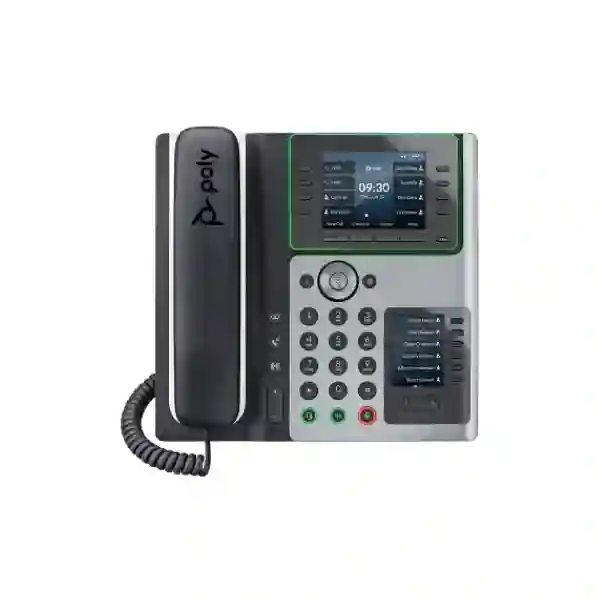
HP Poly Edge E450 IP Desk Phone
Built for business conversations that need a clear voice, accessible call controls and flexible wired or wireless networking. Compare its dual displays, SIP functionality, headset options and power requirements before selecting units for your workplace. For a configuration-specific quotation in Tanzania, provide the quantity, current telephone platform and preferred connection method.
Key technical details at a glance
| Main display | 3.5-inch colour IPS LCD, 320 × 240 pixels |
|---|---|
| Secondary display | 2.4-inch colour IPS LCD, 240 × 320 pixels |
| Line access | Eight main keys; up to 32 SIP lines with pagination |
| Additional contacts | Six secondary keys; up to 12 contacts |
| Audio | Poly HD Voice, Acoustic Fence, NoiseBlockAI |
| Network | Two 10/100/1000 Mbps RJ-45 ports |
| Wireless | Integrated Wi-Fi, Bluetooth 5.0, NFC |
| Connections | USB 2.0 Type-C, RJ-9 headset, EHS port |
| Power | PoE supported; optional 5 V DC, 3 A adapter for non-PoE sites |
| Desk setup | Adjustable two-position stand |
These are device capabilities, not an offer of service subscriptions, regional certification, current stock or bundled installation. The exact supplied configuration should be checked against the purchase quotation.
What to confirm before purchasing
The Edge E450’s feature set makes sense when it matches your actual telephone environment. Confirm the SIP platform, desired line and contact layout, wired or wireless network path, PoE availability, optional power supply and required headset compatibility. This prevents the common mismatch between an impressive endpoint specification and an installation that lacks the necessary services or accessories.
If you are preparing a larger deployment, pilot the phone with a representative user and test calling, audio paths, provisioning, transfers, restart behaviour and escalation procedures. A short acceptance plan protects the investment more effectively than assuming a product’s network feature list proves compatibility with every service.
A capable desk phone for changing business workstyles
The HP Poly Edge E450 IP Desk Phone suits organisations that want a familiar handset with more flexibility than a basic single-screen office telephone. It is a network-based SIP endpoint, meaning that calls are handled through a compatible VoIP service or IP PBX rather than by simply plugging the handset into a traditional analogue telephone socket. For a receptionist who changes between colleagues, a manager who moves between desk and headset, or a hybrid worker who needs the same general interface at different work locations, the layout helps make everyday call tasks less cumbersome.
The most practical reason to consider this model is its combination of two colour displays, accessible call keys and several connection methods. It offers an Ethernet-first office installation with PoE, as well as integrated Wi-Fi and Bluetooth for supported deployments and accessories. Those capabilities make it adaptable, not entirely self-contained: the phone still needs network access, sufficient power, an appropriately configured SIP platform and valid service credentials. FourTeck Tanzania can be asked to quote against a documented requirement, without assuming that every provider or accessory is automatically supported.
Who is the Edge E450 intended for?
Reception and administrative staff often need visible colleague contacts, reliable transfer controls and an easy route between incoming calls. The Edge E450 provides a second screen for frequently used contacts and a physical keypad that is more predictable for many office workflows than an entirely touch-based interface. Managers may value the ability to move between handset, speakerphone and a compatible headset. Shared-desk teams can assess whether their supported call platform and provisioning setup make the device suitable for their hot-desking process.
IT purchasers should evaluate the phone for both individual desks and repeatable deployment across several workstations. Its dual Ethernet ports may reduce the need for an extra wall data outlet when a computer shares the network connection, provided the planned switch, VLAN and security policy allow this arrangement. Wi-Fi can help where wired cabling is difficult, but a nearby electrical supply and a compatible power unit remain essential if PoE is unavailable. Organisations with modest call volumes may not need all of the line-key capacity; higher-volume operators may need to assess expansion modules or a dedicated attendant solution.
Two displays that keep important controls visible
The 3.5-inch primary colour IPS screen is the phone’s main area for call information and menu navigation. A 2.4-inch secondary colour display is devoted to additional accessible keys and contacts. This separation can be useful during a busy workday: a user can concentrate on the live call while keeping important colleagues or extensions available through the secondary area. HP lists 320 by 240 pixels for the main display and 240 by 320 pixels for the secondary one, so these are purposeful interface panels rather than large general-purpose computer displays.
Both the screen layout and available actions are influenced by the phone configuration and the connected telephony service. If a business wants names, presence indicators, direct-dial destinations or shared call appearances, its administrator must confirm which functions the platform exposes to the device. The secondary display has six associated keys and supports up to twelve contacts through the stated navigation arrangement. That should not be confused with twelve dedicated buttons always visible at once. It is worth defining the exact call-button layout during planning rather than assuming the default configuration will match a busy reception desk.
Eight line keys and up to 32 SIP lines explained
HP specifies eight main line keys supporting up to 32 SIP lines with pagination. In plain language, the physical buttons can provide access to further line appearances through pages, so the number of available SIP lines is not identical to the number of keys currently on screen. This is helpful where a user needs several numbers, line appearances or call-related assignments, but it is not a promise that an organisation will receive 32 paid telephone numbers, 32 simultaneous calls or 32 service subscriptions with the hardware.
Actual concurrent calling capacity, line registration, shared-line behaviour and visual presence depend on the IP PBX or hosted provider, configured accounts and any subscription limits. For planning, ask the administrator how many active registrations a user needs, how the phone should display shared lines, and whether additional keys will be occupied by functions such as speed dial, monitoring or transfer shortcuts. A reception environment may prioritise colleague availability over many personal line appearances. A department manager may choose fewer lines but more direct contacts. The flexible key arrangement is valuable precisely because it should be designed around the workflow.
Clearer speech in everyday office conditions
The Edge E450 uses Poly HD Voice and Acoustic Clarity features intended to support natural conversations. Manufacturer specifications describe full-duplex audio, acoustic echo cancellation, background-noise suppression and a bass-enhancing speaker design. The phone also supports codecs including G.711, G.722, G.729AB, iLBC and OPUS, although a real conversation can use only what both the phone and service platform successfully negotiate. A clear handset is useful for finance, service, operations and customer-facing calls where misunderstanding a name, amount or instruction can create avoidable follow-up.
Two noise-handling technologies deserve separate attention. Poly Acoustic Fence targets unwanted sound when users speak through the handset or a supported wired headset, while Poly NoiseBlockAI is described for speakerphone use. Neither technology makes every environment silent or fixes a poor internet connection. A noisy open-plan office may still need an appropriate headset, thoughtful desk placement and sensible microphone behaviour. Ask users to test speech from their normal working positions, including when neighbouring staff are talking. Perceived clarity is a combination of endpoint design, call-platform settings, network performance and local acoustics.
Handset, speakerphone and headset options
Office calling habits vary. Some users prefer the privacy and simplicity of the supplied handset, others frequently switch to speakerphone for quick internal conversations, while a call-heavy employee may be more comfortable with a headset. The Edge E450 is designed to support these approaches with dedicated call controls and compatible accessories. Its documented connection choices include an RJ-9 headset connector, USB-C headset support, Bluetooth 5.0 and an electronic hook switch port for a separately obtained compatible adapter. Those choices should be matched to specific headset models, not treated as universal compatibility.
For wireless headset use, confirm pairing behaviour, call-answer control, charging arrangements and any adapter requirement before ordering. Bluetooth support also provides a route for compatible mobile-phone pairing, but mobile integration must be tested against the actual device and firmware. An EHS accessory can allow remote answer and end controls in supported combinations; a basic audio connection does not necessarily provide those controls. If several staff members share one desk, consider hygiene, individual headset preferences and easy daily sign-in or configuration. The goal is a comfortable calling setup, not simply the greatest number of connectors.
Built-in Wi-Fi is useful, with a power condition
Integrated Wi-Fi can make the Edge E450 useful in a home office, a temporary work area or an office where adding Ethernet cabling is impractical. HP documents connectivity across 2.4 GHz and 5 GHz ranges and markets the model as Wi-Fi ready. Before selecting wireless operation, the network team should confirm signal strength at the actual desk, authentication compatibility, interference from nearby access points and the ability to keep voice traffic stable while other users are online. Successful web browsing from a laptop is not sufficient evidence that every voice call will be dependable.
The key limitation is power. A Wi-Fi connection carries data but does not energise the telephone. Without a PoE connection the Edge E450 requires the separately available external 5 V DC, 3 A power supply specified by HP. The adapter must be the correct approved type for the particular unit and local installation, and should be included in the quote if required. Assess the position of the power outlet, electrical continuity and whether the phone can remain accessible during an outage. Where Ethernet and PoE already exist, the wired option is often the simpler baseline for stable office deployment.
Bluetooth 5.0 for supported everyday pairing
Bluetooth 5.0 adds flexibility for users who want compatible Bluetooth headsets or supported connections involving a mobile phone. It can reduce the inconvenience of a trailing headset lead for staff who occasionally stand up, consult a colleague or move within a small workspace while remaining engaged in a call. HP also describes fast pairing with selected Poly headsets. However, wireless range and connection behaviour depend on the physical environment, accessory design, software and competing radio activity; they are not guaranteed uniformly across every office.
Make a headset compatibility list before buying in quantity. Check the exact headset model, whether it requires a base station or dongle, how it receives power, whether call-control buttons work as intended and whether firmware changes are necessary. The presence of Bluetooth should not be used to promise connection to an arbitrary conference device, mobile application or computer workflow. For critical customer-service positions, organisations may prefer to keep a wired option available as a fallback. Wireless freedom is useful when it matches how people work, but a tested connection is more valuable than a theoretical feature.
Dual Gigabit Ethernet and desk cabling
Two RJ-45 interfaces support 10/100/1000BASE-T connectivity. In a common office arrangement, one interface connects the phone to the local network and the second can provide a pass-through connection for a nearby computer. This may simplify a workstation that has one data cable available from the wall, but both devices will still depend on the switching and security design behind that connection. A phone should not be assumed to function as a complete network switch for unrelated equipment, nor should the pass-through port be assumed to deliver PoE power to another device.
IT staff should confirm whether the access switch has enough PoE budget, whether the right port configuration is applied, and whether computer and voice traffic must be separated through VLAN policies. Throughput expectations should reflect the shared uplink and any network-management controls. Test the exact physical cabling arrangement before replicating it across a floor or building. A tidy desk is convenient, but proper segmentation, dependable network access and supportability are more important than avoiding one additional cable. Label ports and document any desk-specific exceptions so later moves are less disruptive.
Power over Ethernet and power budgeting
Power over Ethernet allows an appropriately equipped network connection to carry both data and power to the telephone. HP lists built-in auto-sensing IEEE 802.3af PoE support and a maximum power figure of 13 W. For an organisation purchasing many units, those figures should prompt a real switch power-budget calculation rather than an assumption that every network port can power another phone. The availability of PoE depends on the switch or an appropriate power injector; a standard Ethernet socket on its own does not necessarily supply power.
When planning a phone roll-out, multiply the number of endpoints by the verified design allowance, add capacity for other powered devices and leave an operational margin according to the network design. Check that the selected port profile allows correct voice VLAN access and that the power infrastructure behaves predictably after a restart. If the phone will be connected via Wi-Fi without an active PoE cable, provide the optional 5 V, 3 A external adapter instead. Confirm accessory inclusion in the commercial quote, especially when comparing prices between configurations. Do not equate the quoted cost of the handset with the full cost of a powered, provisioned seat.
SIP calling: what must work with your platform
The Edge E450 supports the Session Initiation Protocol, commonly called SIP, for use with compatible IP-PBX or hosted voice services. This makes it a candidate for many business VoIP environments, but SIP support does not automatically guarantee every feature on every platform. Registration methods, provisioning templates, firmware, shared line appearance, directory integration, voicemail controls, call park and other functions can vary between service providers or software versions. A compatible endpoint must be tested with the specific system the organisation intends to use.
Before deciding, identify the PBX or service name and version, SIP registration method, codec policy, licensing and whether the platform supports the precise business features required. Clarify whether the supplier provisions devices or whether the IT team manages them. If a provider advertises certification for particular devices, verify that the exact Edge E450 model and software branch are within its scope. Avoid assuming that broad claims about the wider Edge E family, a different firmware profile or a special service-provider edition apply unchanged to the purchased unit. A brief pilot with real inbound and outbound calls is often the best safeguard.
Provisioning and managing several phones
For one phone, an administrator may be able to configure a small number of settings through the supported management process. For dozens of phones, that approach can become inconsistent and time-consuming. HP documents provisioning features and management options associated with the Poly family, including centralised configuration methods and the Poly Lens ecosystem. The practical benefit is the possibility of applying standard settings across a fleet, but eligibility, entitlement, service compatibility and administrative features need checking for the exact deployment.
Prepare a configuration standard that covers firmware policy, SIP accounts, regional settings, date and time, contact layout, security, emergency calling where supported and the process for replacing a failed handset. Decide who owns credentials and how configuration files are protected. Keep records of assigned device locations and user roles without exposing passwords or calling credentials in shared spreadsheets or public documents. A good roll-out should make future changes straightforward: new employees, relocated staff, modified line keys and network alterations should follow a repeatable process. Configuration consistency usually matters more than adding every available feature on day one.
Security considerations for business voice
The Edge E450 includes documented security capabilities such as 802.1X network authentication, HTTPS-based provisioning, Transport Layer Security and Secure Real-time Transport Protocol. HP also lists encrypted configuration files and other access controls. These mechanisms can help protect signalling, audio and provisioning when the supporting infrastructure and service are configured appropriately. Their presence in the specifications does not mean encryption is automatically active, that every SIP provider supports the same modes or that the device makes a network secure without further work.
Ask the administrator to define a supported security baseline. That includes unique credentials, controlled administrator access, appropriate firmware maintenance, compatible certificates, protected provisioning services and segmentation between voice and unrelated traffic. For Wi-Fi, use a security approach supported by both phone and network; do not retain older wireless settings merely because a compatibility list mentions them. Review the exposure of management interfaces and preserve logs needed for troubleshooting without storing unnecessary personal information. Businesses handling sensitive conversations should also assess physical call privacy, headset discipline and recording policies at the service-platform level.
Directories, speed dial and reception workflow
An office phone can help staff work faster when colleagues and frequently called numbers are easy to find. The Edge E450’s secondary display and associated keys are particularly relevant where a receptionist or team assistant makes repeated transfers throughout the day. HP documents support for a secondary group of six keys and up to twelve contacts. Depending on the platform and phone configuration, administrators may also be able to assign line appearances, shortcuts or other features to keys. Plan the layout using actual call patterns rather than placing every number on the phone by default.
One useful exercise is to list the destinations most commonly called or monitored during a normal shift. Separate internal extensions, external speed dials, shared support queues and emergency procedures, then check which tasks have appropriate platform support. The screen is a complement to a good directory, not a replacement for maintaining accurate extensions and user records. Where teams frequently change, central provisioning or directory integration may save effort if supported. Train staff on the difference between transferring a call, placing a call on hold and sending a call to voicemail, because these outcomes matter more to the customer than how many programmable keys are available.
Accessibility and everyday ease of use
HP highlights accessibility functions in the Edge E family, including text-to-speech, font-size adjustments and options for people with colour-vision differences. Its technical information also identifies hearing-aid-related support for the handset and compatibility with certain assistive equipment. These details are relevant when organisations choose a single phone model for a team with different needs. A product specification is an important starting point, but accessibility should still be evaluated with the users and their actual workflows.
During a demonstration, test the visibility of the two screens under local lighting, ease of identifying important controls, audio volume, headset comfort and how quickly a user can perform common calling actions. Check accessibility feature availability in the installed firmware and any dependency on the configured service. Staff who need higher-contrast displays, different audio paths or particular assistive devices may require individual settings or a separate accessory. Inclusion is best supported through tested accommodation rather than a generic claim that one phone suits everyone. The adjustable two-position desk stand can also help users find a more convenient viewing angle.
Shared desks, home offices and hybrid work
A business may use the Edge E450 at a fixed office workstation, a shared desk or a home working area. The core experience stays recognisable because employees interact with a physical handset, main display and line buttons rather than learning a new calling interface each time. Yet portability between locations is not just a matter of moving the hardware. The destination network must support the intended connectivity, the phone must receive power, and the voice service must permit and correctly route registration from that location.
For shared desks, ask whether the SIP platform supports the required employee sign-in, extension mobility or hot-desking workflow with this exact device and firmware. For home offices, check router features, Wi-Fi signal, upstream reliability, headset preference and the availability of local power. Make sure users understand whether their number follows their account or remains associated with a particular device. Some organisations will find an endpoint at each site simpler than regularly transporting one handset. Choose the operating model before ordering units so the technology supports the policy instead of forcing employees into awkward workarounds.
Network readiness for reliable voice
Voice calls are sensitive to packet loss, jitter and long interruptions in ways that many ordinary web applications are not. The Edge E450 includes network and media features that can support well-managed VoIP traffic, but the overall result depends heavily on the LAN, Wi-Fi and internet path. A sound deployment begins with a voice-ready network rather than with an expectation that a premium handset will compensate for unstable connectivity. Review switch capacity, firewall settings, name resolution, time synchronisation and the routing path to the voice platform.
Quality of service, VLAN configuration and compatible provisioning should follow the requirements of the selected IP PBX or service provider. If Wi-Fi is part of the plan, assess coverage and channel contention in real working conditions, including the busiest hours. Conduct inbound, outbound and internal test calls, and include scenarios where a computer on the same desk transfers large files. Document symptoms and timestamps of any call-quality problems. It is useful to distinguish whether a problem affects one phone, one network segment, one carrier path or the entire voice platform before changing handset settings. Thoughtful preparation improves both user confidence and support efficiency.
Practical deployment considerations in Tanzania
For organisations buying IP desk phones in Tanzania, the most useful preparation is to describe the actual site and calling arrangement. An office with structured cabling and PoE-capable switches may favour wired Edge E450 deployment. A temporary workplace or small office may use Wi-Fi, provided the separate power supply is planned. Multi-site organisations should understand how their chosen PBX connects locations, how numbers and outbound calls are routed, and how staff will obtain technical support when a network or telephony problem occurs.
Do not assume a particular local carrier provides a compatible SIP trunk, that a purchased endpoint has Tanzanian regulatory approval, or that a given importer offers a specific warranty or delivery service. Those claims require confirmation for the exact equipment, service and transaction. Instead, ask your telecoms provider or systems integrator for current SIP details, approved device lists and operational requirements. Consider power continuity for the access switch, router and any local PBX equipment, because a phone cannot complete calls when its upstream services are down. A Tanzania-focused quotation should state the configuration assumptions clearly and avoid hiding power adapters, headsets or commissioning work.
Power continuity and business-call resilience
A handset with PoE can be part of a more orderly office power design, but PoE is not automatically a backup supply. The phone remains dependent on the switch or injector and, beyond that, the network route and telephony platform. If calls are operationally important, review the power arrangement for all the equipment in the path. A UPS supporting a PoE switch may be useful only if the router, necessary network equipment and any on-site communications systems are also powered for the required duration.
Wi-Fi-only desks have a different dependency: the phone needs its own external power adapter, while the wireless access point and upstream network must also remain available. Confirm which calls should still be possible during an internet outage and how the organisation will handle exceptions; this is a service architecture question rather than an inherent handset feature. Document a simple fallback procedure for customer service, reception and critical internal contacts. Resilience comes from coordinating endpoints, network design, power and provider arrangements, not from listing a single device as business-continuity ready.
What is included and what may cost extra?
HP lists the standard package contents as the phone console, handset, handset cord, two-position desk stand, CAT-5E network cable and setup sheet. That is enough to identify the basic physical items a buyer should expect in the manufacturer’s standard package description. It does not automatically include an activated telephone service, the business’s SIP credentials, a suitable PoE switch or external power adapter, a headset, an EHS adapter, expansion module or installation services. Product bundles can vary by commercial configuration, so check the exact quotation rather than inferring inclusions from a product photograph.
Potential extras include a compatible 5 V, 3 A power supply for installations without PoE, a headset selected for the user, optional wall-mount hardware and one supported Poly Edge E expansion module where additional contact access is required. HP describes an expansion capability of up to 66 additional contacts with the compatible module, subject to configuration and relevant conditions. Before purchasing an accessory, check its exact model and compatibility with the E450; a similar-looking item intended for a different family may not work. A complete bill of materials makes it easier to compare competing quotes fairly.
Comparing the E450 with simpler and larger options
The E450 is most compelling when both the dual-display arrangement and built-in wireless connectivity are useful. A basic SIP desk phone may be sufficient for staff who make occasional calls and need only a handful of direct contacts. Within the HP Poly Edge range, different models offer different screen layouts, line-key counts and wireless options. Rather than choosing by a model number alone, decide how many assigned keys each user needs, whether Wi-Fi and Bluetooth are genuinely required and what the chosen phone platform supports.
At the other end, high-volume reception or operations teams may need additional key capacity, a supported expansion module, or a dedicated attendant application rather than simply more SIP line appearances. Consider desk space and accessory costs alongside the headline handset specification. Also compare the cost of wired infrastructure with the separate power requirements for Wi-Fi. A practical shortlist should include ease of administration, support arrangements and compatibility testing, not only screen size. If an office standardises on one model, pilot it with a typical desk user and a demanding call-handling user before approving a larger purchase.
A structured purchasing checklist
First identify the intended calling service: hosted SIP, an IP PBX or another supported platform. Record its current software version and its endpoint requirements. Next list the number of users and the roles that genuinely need dual screens, extra contacts or wireless capability. Decide whether each workstation will use PoE or an external adapter, and confirm whether the network already has adequate PoE capacity and compatible wired or wireless authentication. A quote based on these facts is much easier to evaluate than a generic request for business phones.
Then specify any headsets, expansion modules, mounting hardware and commissioning work separately. Ask the seller to confirm exact device model and configuration, included physical items, applicable support conditions and the method used to validate compatibility. Plan firmware and provisioning responsibility and decide how phones will be assigned and documented. Include a small acceptance test covering registration, inbound and outbound calling, transfers, voicemail, headsets, network interruption and restart. Finally confirm the local commercial terms, including current price, stock position, taxes, warranty arrangements and delivery, directly from the supplier. None of those transaction details should be inferred from unrelated international listings.
An orderly installation and acceptance process
Begin with the physical setup. Position the phone where its display is readable, fit the stand and connect the handset. For wired operation, connect the network cable to the correct LAN port and ensure the switch or injector supplies the required PoE. For wireless operation, confirm the compatible external power adapter is present and configure Wi-Fi according to the supported instructions and local security policy. Before entering account details, verify that the phone reaches the expected network and can receive its assigned configuration safely.
Next provision the SIP service and apply the desired line-key and contact assignments. Update or confirm firmware using the organisation’s approved process and ensure administration credentials are secured. Test ordinary calls, hold, transfer, speakerphone, handset, voicemail and a headset if supplied. Check date, time and any contact labels. For pass-through computer cabling, confirm both voice and computer connectivity and the intended segmentation. Give users a short quick-start guide explaining where to find their most common functions. Record the final configuration and handover responsibilities so that a replacement device can be deployed consistently.
Troubleshooting without guesswork
If the phone fails to start, inspect the correct power source first: the PoE-capable switch or injector for a wired setup, or the optional external adapter for Wi-Fi-only use. Confirm that the cable is connected to the intended port and that the PoE equipment has sufficient available budget. If the display works but the phone will not register, check its network connection, address assignment, DNS, provisioning settings and SIP account status. Avoid repeatedly changing passwords or factory-resetting a centrally managed handset before contacting the administrator.
If a call connects but sounds poor, test more than one destination and compare handset, wired headset and speakerphone modes. Check whether only Wi-Fi users are affected, whether other network applications are consuming bandwidth and whether the issue occurs at a predictable time. For Bluetooth trouble, verify the supported accessory, pairing state and nearby interference. For missing contact keys or call features, inspect the platform configuration rather than assuming a hardware defect. Document the exact symptom, firmware and relevant service details for support, but keep account secrets out of tickets and screenshots. A repeatable diagnosis saves time and reduces unnecessary device replacement.
Frequently asked questions about the Poly Edge E450
Is the HP Poly Edge E450 an analogue telephone?
No. It is a SIP-based IP desk phone designed for use with a compatible VoIP service or IP PBX. It is not a direct substitute for a basic analogue handset plugged into a conventional telephone wall socket. Before ordering, check how calls will be delivered to the phone, how its SIP account will be configured and whether the intended provider supports the features needed by the user.
Does the Edge E450 work over Wi-Fi?
Yes. The E450 has integrated Wi-Fi with support for documented 2.4 GHz and 5 GHz radio modes. However, Wi-Fi carries network data, not operating power. A Wi-Fi-only position without PoE needs the compatible optional 5 V DC, 3 A power supply. Confirm signal quality, supported wireless security and the installation’s electrical arrangement before treating Wi-Fi as a replacement for desk cabling.
Does it need a Power over Ethernet switch?
A PoE switch or suitable injector is one way to power a wired installation, and HP documents IEEE 802.3af PoE support. It is not the only route: an appropriate separately purchased external power adapter can power the phone where PoE is not available. The correct option depends on the chosen network topology. A plain Ethernet connection should not be assumed to provide power.
How many screens and line keys does it have?
It has a 3.5-inch colour primary display and a 2.4-inch colour secondary display. The main eight line keys can provide access to up to 32 SIP lines through pagination, while the secondary six keys support access to as many as twelve contacts in the stated arrangement. These figures describe interface capacity, not automatically included telephone numbers or provider subscriptions.
Can I connect a Bluetooth headset?
Bluetooth 5.0 is built in, and HP documents support for compatible Bluetooth headsets. Exact accessory compatibility and remote call-control behaviour should be checked before buying in quantity. The phone also has wired headset options, including RJ-9, USB-C and an EHS port used with an optional adapter. Headsets and certain adapters are separate accessories, not guaranteed standard box contents.
Will it work with my existing PBX or hosted service?
Possibly, provided the exact IP PBX or hosted voice system supports this model, firmware and provisioning method. Generic SIP capability is an encouraging starting point, not universal certification. Request the service provider’s supported-device guidance and test registration, incoming and outgoing calls, voicemail, transfer, contacts and any shared-line features required before a full rollout.
Can the phone share an Ethernet connection with a computer?
The phone includes two Gigabit RJ-45 ports and supports a pass-through desk connection. Suitability depends on the switch setup, security policies and available network capacity. The second port must not be assumed to power another device via PoE. Have an IT administrator confirm the recommended cable arrangement, computer connectivity and voice VLAN configuration before deploying it widely.
Can the E450 help in a noisy office?
HP lists Poly HD Voice, Acoustic Fence and NoiseBlockAI features, with specific technologies intended for handset or wired headset calling and for speakerphone operation. They can help reduce distracting sounds, but results depend on the environment and calling mode. A suitable headset and a properly configured network may still be necessary for consistently comfortable customer calls.
What comes in the standard phone package?
The manufacturer’s package description lists a console, handset, handset cord, desk stand, CAT-5E LAN cable and setup sheet. A power adapter, headset, wall mount, EHS adapter, expansion accessory, telephony subscription or installation work should not be assumed to be included. Ask for the exact bill of materials and accessory inclusions on the quotation supplied for the Tanzanian transaction.
Can additional contact keys be added?
HP documents support for one compatible Poly Edge E expansion module, which can provide up to 66 additional contacts in supported configurations. The module is optional and must be sourced separately. Check its model compatibility, power and firmware requirements, and the actual number of contact assignments your service platform allows. Some teams may find a directory or attendant application more appropriate.
Is this a good choice for a reception desk?
It can be a strong candidate when staff need quick access to colleagues, transfers, shared calls and multiple contact assignments. The two-display layout is particularly relevant to such work. However, compare its available key capacity and platform feature support with the reception’s actual call volume. For a larger attendant operation, an expansion module or separate attendant software may be more suitable.
How do I request a price in Tanzania?
Ask FourTeck Tanzania for an exact-model quotation and describe the quantity, intended SIP platform, wired or Wi-Fi operation, headset requirements and any accessories. Request confirmation of the current price, local stock, taxes, delivery terms, warranty arrangement and any configuration or installation charges. Those details vary by transaction and cannot be responsibly inferred from international product listings.
Request an HP Poly Edge E450 quotation for Tanzania
Tell FourTeck Tanzania how many phones you need, which SIP system you use, and whether each desk has PoE or needs an optional power supply. Include any compatible headset, wall-mount or expansion-module requirements. Ask for current commercial details, service compatibility checks and configuration scope in the written quote.
Specify your deployment • Confirm compatibility • Request a quotation




Reviews
There are no reviews yet.