
Business IP desk phone | Tanzania buying guide
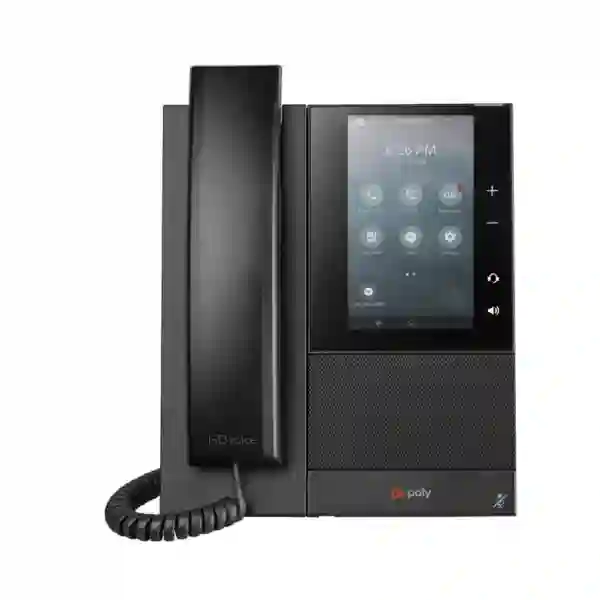
HP Poly CCX 500 Business Media Phone
A five-inch touchscreen desk phone with Poly voice technologies, Bluetooth accessory connectivity and PoE. Select the edition that matches your calling environment, then confirm the details needed for a reliable installation.
At a glance: the buying decision
Best considered for voice-intensive office desks, customer-facing workstations and organisations that want a dedicated business calling endpoint. Confirm Open SIP versus Microsoft Teams edition before ordering. Confirm the network can support wired Ethernet and PoE or the correct adapter. Check headset compatibility, firmware and the requirements of the PBX or calling platform. No local price, stock or warranty is assumed.
Verified hardware at a glance
| Product family | Poly CCX 500 business media desk phone |
|---|---|
| Display | 5-inch colour multi-touch LCD |
| Primary network | Wired Ethernet, with dual Gigabit Ethernet ports |
| Power | Power over Ethernet; compatible external adapter where required |
| Audio | Poly HD Voice, Acoustic Clarity, Acoustic Fence and NoiseBlockAI technologies |
| Audio choices | Handset, full-duplex speakerphone and compatible headsets |
| Accessory connections | Integrated Bluetooth and supported USB, RJ9 and EHS arrangements |
| USB connections | One USB-A and one USB-C port |
| Wireless LAN | No integrated Wi-Fi on standard CCX 500; see CCX 505 |
| Software choice | Confirm Microsoft Teams or Open SIP variant and firmware |
| Price, stock and local warranty | Confirm in the current supplier quotation |
This is a family-level feature guide, not a promise that every software feature or accessory is supported on every ordering variant. Always compare the exact quoted configuration.
A professional desk phone for voice-led work
The HP Poly CCX 500 Business Media Phone is built for people whose working day still depends on clear, dependable telephone conversations. It combines a five-inch colour touchscreen with dedicated business calling hardware, a handset, speakerphone operation, headset choices and Ethernet connectivity. This makes it worth considering for reception teams, office staff, managers, customer-facing employees and other users who want a familiar desk-based phone without giving up a modern touch interface. For organisations planning an IP telephony refresh in Tanzania, the most important first decision is not the screen size or appearance: it is whether the chosen device configuration matches the telephone service or collaboration platform your business actually uses.
A desk phone is only one part of a complete calling solution. Its usefulness also depends on the internet or private network, the switching and power arrangements, the voice service, user accounts, supported firmware and peripheral accessories. This page explains the practical fit of the CCX 500, the difference between Open SIP and Microsoft Teams configurations, the specifications that can be stated confidently, and the deployment questions an IT buyer should resolve before placing an order. The goal is to help teams select the correct device and avoid preventable rollout problems rather than promising that one phone will suit every installation.
Start with the right edition, not just the model name
The CCX 500 family has been offered in configurations for Microsoft Teams and for Open SIP environments. Those options serve different requirements. A Microsoft Teams configuration is intended for deployment within a supported Teams calling environment and may offer a Teams-oriented interface and dedicated Teams button. An Open SIP configuration is intended for a compatible standards-based SIP telephone platform and uses an application button. The exact software image, licensing requirements, available functions and provisioning process must be checked for the proposed version and service. A photograph or shortened catalogue title is not sufficient evidence that a device is the required edition.
When requesting a quotation, state the collaboration or PBX platform, existing service provider, number of users, preferred headset arrangements and whether your network offers PoE. Ask the supplier to confirm the precise variant and manufacturer ordering identifier on the quote. That confirmation is especially useful when replacing older handsets or buying additional units for an existing fleet. Do not assume a Teams unit can be converted to a standard SIP phone, or that an Open SIP unit will deliver the full Teams experience, without a documented, supported path for the exact firmware and device. Match the edition to the intended service from the beginning.
Who should consider the CCX 500?
The CCX 500 is a sensible candidate where a user handles frequent voice calls and benefits from a screen that is easier to navigate than a conventional button-heavy handset. In a private office, the user may want quick access to contacts and ongoing call controls. At a service desk, staff may need to alternate between handset and headset use as they answer customers. In an administrative department, a common device experience can reduce the learning curve when employees move between desks. Managers who join supported collaboration calls may value dedicated access to familiar applications, depending on the selected edition.
It is less suitable when the project demands integrated wireless LAN on every desk, because standard CCX 500 hardware does not provide integrated Wi-Fi. For wireless network access, investigate the CCX 505 or another suitable model. If the requirement is video calling with an integrated camera, select a device intended for video rather than treating this audio-led phone as a video endpoint. If the team only makes occasional calls and already uses a proven softphone workflow, a dedicated desktop device may not be necessary. The strongest business case comes from actual call patterns, user comfort and a compatible telephony environment.
Five-inch touchscreen designed around common call tasks
The five-inch multi-touch colour display is one of the clearest reasons to choose this model over a basic IP phone. Instead of relying exclusively on small physical keys and memorised menu sequences, users can interact with visible call controls, contacts, status information and the functions made available by their configured platform. A touchscreen does not remove the need for training, but it can make routine actions more discoverable for people moving from a smartphone or software-based calling experience. The screen and interface are intended to support an organised desk workflow without requiring a large external computer display.
Daily usability depends on both the platform profile and the settings applied by the administrator. A contact list may be sourced from a supported account or directory, and a meetings view may be present only where the edition and software support it. It is therefore better to demonstrate the exact proposed device than to promise every illustrated menu in every installation. During evaluation, ask real users to place a call, answer another call, adjust volume, find a contact, use the speakerphone and access voicemail. A five-minute trial with representative staff will reveal whether the interaction style fits the workplace.
Poly audio technologies and a realistic expectation of clarity
HP identifies Poly HD Voice and Poly Acoustic Clarity as important audio capabilities in the CCX 500 series. The design supports full-duplex conversation, helping both sides speak naturally without the stop-start behaviour associated with poorly implemented speakerphones. Poly Acoustic Fence is designed to reduce distracting sound in supported handset or wired-headset scenarios, while Poly NoiseBlockAI addresses background noise during speakerphone use. These features are valuable in open-plan workplaces, but they should be described as tools for reducing interference rather than as a guarantee that no environmental noise will ever be heard.
Real call quality depends on the complete audio chain. A noisy room, incompatible headset, congested network, unstable internet connection, poor microphone position or the far-end participant’s equipment can still impair the conversation. In a Tanzania office with occasional network instability, handset audio technology cannot compensate for prolonged packet loss or a failed link. During a pilot, test voice quality using ordinary customer calls and the headsets staff intend to wear. Compare a quiet meeting room with the busiest working area and check that users can be heard clearly while speaking at a normal volume.
Handset, speakerphone and headset flexibility
A business phone becomes more useful when employees can choose how to listen and speak. The CCX 500 supports conventional handset use, hands-free speakerphone conversations and headset options. HP’s series information describes Bluetooth, USB, RJ9 and electronic hook-switch connectivity choices, with exact accessory support determined by the phone’s software and the particular headset. That allows an organisation to evaluate wireless freedom for a user who moves around a workstation, a wired headset for sustained customer service calls, or the familiar handset for users who prefer it.
Headset purchasing deserves its own compatibility check. A Bluetooth headset may pair at the radio level without every control, mute indication or call-answer function behaving as expected. USB audio peripherals can also depend on firmware and software support. A headset using RJ9 or EHS may require a specific cable or electronic interface. Instead of buying headsets for all employees based on connector type alone, identify the exact headset model, verify the applicable HP Poly compatibility guidance, and test answering, ending, muting and volume changes. Include comfort, hygiene and charging arrangements in the evaluation.
Built-in Bluetooth does not mean built-in Wi-Fi
Bluetooth and Wi-Fi solve different problems. Integrated Bluetooth on the CCX 500 can support suitable short-range audio accessories, notably compatible wireless headsets. It does not replace the phone’s wired network connection. The standard CCX 500 is an Ethernet-based desk phone without integrated Wi-Fi, whereas the CCX 505 adds wireless network capability. This distinction matters when a desk is far from structured cabling, when a temporary workspace changes position regularly, or when a buyer has seen descriptions for the combined CCX 500/505 family and assumes every feature applies equally to both devices.
For an ordinary office desk, a wired network may actually be preferable because it offers a predictable physical connection and can supply power through PoE. For a space that cannot be wired conveniently, confirm whether a CCX 505 or another model better matches the building layout. Do not assume a generic Wi-Fi adapter or an improvised third-party bridge is a supported substitute. Assess connectivity early in the buying process, along with the number of active LAN outlets, access-switch capacity and the possibility that a computer shares the same desk location.
Two Ethernet ports and practical desk cabling
The CCX 500 provides an Ethernet-based installation with a network-side connection and a computer-side connection. Its integrated dual-port Gigabit Ethernet arrangement can be useful where a desk has a single structured network outlet but both the telephone and a computer require wired access. The actual network design should be approved by the organisation’s IT team: voice and data VLANs, authentication, endpoint identification and switch policies must all be considered. Connecting a PC through the phone does not automatically create a secure or correctly segmented network.
For a new installation, label the cabling clearly and confirm which port connects to the LAN and which is designated for the computer. Test the connection after applying the required voice VLAN or network access policy. Check that the existing wall socket, switch and patch leads are in good condition, especially if the phone is replacing a device with a slower interface. Where the computer needs uninterrupted network access, discuss what happens to pass-through connectivity when the telephone restarts or loses power. Good cable planning costs little compared with troubleshooting multiple desks after rollout.
Power over Ethernet and the power-supply decision
Power over Ethernet simplifies the desk by allowing a compatible network switch to supply electrical power over the LAN cable. HP documentation identifies the CCX 500 as a PoE-capable phone. That is helpful when deploying many devices because it can reduce the need for separate adapters at every workstation. It does not mean the phone will power itself from an ordinary non-PoE network port. If PoE is unavailable, a compatible optional external power adapter is required. Whether a power adapter is included in a specific package must be confirmed on that exact supplier quotation.
When designing a floor of IP phones, calculate the total PoE budget of the access switch rather than merely counting free ports. Allow capacity for all connected devices and check whether battery-backed power is needed for business continuity. HP guidance lists the CCX 500 as PoE class 0 with a maximum PoE class allocation of 12.95 watts; real consumption depends on activity and connected peripherals. A power backup for the switch alone is insufficient if the router, internet termination or PBX also loses power. Coordinate power planning with the full voice path.
Microsoft Teams configuration: questions to answer
For an organisation already standardising on Microsoft Teams calling, the Teams-oriented CCX 500 may offer a more familiar dedicated desk endpoint than a conventional SIP telephone. HP describes a Teams interface and access to contacts and meetings on applicable devices. However, the feature set customers see is controlled by the software build, account entitlement, administrator policies and Microsoft’s current support requirements. A device being described as Teams-capable is not, by itself, a promise that every licence or tenant has all calling services enabled.
Before purchasing, ask your Microsoft 365 or Teams administrator to confirm the intended calling service, user licence, phone sign-in requirements, supported firmware, provisioning method and any organisational security restrictions. Test inbound and outbound calling with a real account, then evaluate transfers, hold, voicemail and meeting functions as relevant. If the deployment depends on Teams shared-device functionality, verify those entitlements separately. Also review current support status for the hardware and its software with the relevant providers, especially for large new installations planned over several years. Do not rely on historical certification statements alone.
Open SIP configuration: PBX fit and provider validation
Open SIP is the more relevant route when the organisation uses a compatible standards-based IP PBX or hosted business calling system rather than requiring a native Teams phone experience. An Open SIP CCX 500 can be evaluated for environments in which a service administrator controls registration, extension configuration and telephony features. The useful distinction is control and compatibility, not a promise that the device works automatically with every SIP product or operator. Hold, transfer, presence, directory functions, line appearances and other features may rely on the precise PBX or service implementation.
For an existing PBX, request a compatibility statement or conduct a pilot before a volume purchase. Record the PBX vendor, version, registration method, transport and security settings, required codecs, network topology and provisioning process. Where hosted calling is used, ask the provider whether the device and firmware are supported and whether remote device management is available. The CCX 500 is an endpoint: it does not, by itself, replace a PBX, create a telephone number or provide a SIP trunk. A correctly specified phone should be purchased alongside the service design rather than expected to solve it.
What the main hardware features mean to a buyer
A product specification is most useful when translated into the job it performs. The five-inch touchscreen supports visual navigation at the desk. Bluetooth offers a path to supported wireless headsets. USB-A and USB-C connections expand the types of compatible peripherals that administrators can evaluate. The handset and full-duplex speakerphone support different ways of handling a call. Dual Gigabit Ethernet ports make wired desk integration easier, while PoE can reduce adapter clutter. The result is a mid-range business voice endpoint that prioritises usability and call handling instead of integrated video.
The specification sheet should not be treated as a list of automatically activated software services. For example, having a USB port does not establish universal compatibility with all headsets or storage devices. Having a touchscreen does not establish the availability of every meeting or directory feature. Similarly, the inclusion of a Bluetooth radio does not guarantee a particular headset’s remote answer controls. Separating hardware capability from licensed, configured and supported software functions will make supplier comparisons more accurate and prevent disappointed users after the devices are installed.
Deployment across one office or several sites
A single desk phone can often be configured individually, but a fleet needs a repeatable deployment method. Start by grouping employees according to their actual requirements: standard office users, frequent call handlers, managers, shared desks and any exceptional workstations. Confirm that each group needs a physical desk phone and that the chosen edition suits its calling service. For users on multiple floors or at multiple sites, document the network port, extension or account, device identifier, headset choice and location. This baseline becomes especially useful when a telephone is moved or replaced later.
An effective rollout uses a small pilot before a wide deployment. Install a few phones in contrasting environments, including a quiet desk and a busy department. Check real call workflows, network behaviour, sign-in, handset comfort, audio peripherals and service recovery after a restart. Gather feedback from end users rather than relying only on an IT demonstration. Once settings are stable, create an installation checklist and record the configuration version. If offices operate over different internet connections, pilot each materially different network environment rather than assuming identical performance.
Provisioning, account setup and device administration
Business phones require more than plugging in an Ethernet cable. Depending on the chosen edition, administrators may need to configure a provisioning service, sign in a collaboration account, apply a device profile or register an extension to a compatible platform. The exact process should follow the current HP Poly guidance for that software family and the requirements of the service provider. A predictable approach to configuration makes it easier to replace an individual phone without starting the setup process from scratch, and helps IT teams maintain consistent user experience across departments.
Before deployment, prepare a controlled inventory that records the model, variant, serial or asset information, assigned user, room, firmware baseline and administrative owner. Keep credentials and provisioning secrets out of ordinary spreadsheets circulated to staff. Where remote management or automated updates are used, test the update process on a small group first. Make sure administrators know how to restore a known-good configuration after a failed change. A phone can have impressive hardware yet remain frustrating if the organisation does not have a reliable way to manage settings, accounts and replacements.
Security considerations for a networked desk phone
An IP desk phone is a managed network endpoint, so it belongs in the organisation’s security plan. Use approved provisioning channels, protect administrative access, keep device credentials confidential and restrict management traffic according to the network architecture. Work with the voice platform owner to decide whether encrypted signalling and media are available and required for the intended service. Do not assume the presence of a modern-looking screen means that every security feature has been activated automatically. Firmware version, configuration and platform support all matter.
A practical security review should cover physical access, signed-in users, device reassignment and lost or retired equipment. Shared workspaces may need different account policies from assigned desks. When someone leaves the organisation or moves departments, ensure that old credentials, call histories and access rights are handled according to company policy. Schedule updates through a controlled process, keeping in mind that a software update can change application behaviour. For a long-lived deployment, verify the manufacturer’s current support and security-update position before choosing hardware for a new large estate.
Network performance matters as much as the phone
Voice traffic is sensitive to interruptions that may be less noticeable during ordinary web browsing. Packet loss, large changes in delay, congestion and unstable routing can affect an IP call even when the CCX 500 hardware is functioning normally. An organisation should test the route between each office and its voice service, paying particular attention to busy periods and any shared upload capacity. Internal network segmentation and quality-of-service policies may be helpful when implemented correctly by the organisation’s network administrator, but they are not substitutes for sufficient network capacity.
If the office uses a cloud PBX or an externally hosted calling service, consider the reliability of the internet connection and the steps staff should take during an outage. A business that depends heavily on incoming calls may need a documented fallback or an alternative communications channel. Confirm how emergency calling is handled by the selected service and location; do not assume emergency services will operate like a traditional analogue line. Testing a phone on a fast network at a supplier’s office does not prove the same result on every buyer’s office connection.
Practical considerations for businesses in Tanzania
For a Tanzania deployment, the CCX 500’s core hardware considerations are similar to those in other markets, but the surrounding service arrangements must be assessed locally. Before ordering, identify whether the organisation’s calling platform is on site or hosted, how it connects to the office network, and which party is responsible for telephone numbers and external calling. Verify any provider-specific interconnection and support requirements directly with the intended service. A phone’s support for SIP as a technology does not establish compatibility with a particular locally offered service.
Also consider the physical work environment: the availability of structured cabling, PoE switching, consistent electricity, suitable headset storage and a safe location for the device. In locations where power or connectivity interruptions are operational concerns, test the complete calling solution under realistic conditions and document a recovery process. Any statement about local stock, delivery, warranty, import costs, regulatory approval or installation coverage should be supplied by the relevant seller and independently verified for the proposed purchase. This page intentionally does not invent those commercial details.
Choosing between the CCX 400, CCX 500 and CCX 505
Within the HP Poly desk-phone family, the right choice depends on the working environment rather than simply choosing the highest number. The CCX 400 is another touchscreen desk-phone option and may appeal when Bluetooth headset capability is not a deciding requirement. The CCX 500 adds integrated Bluetooth and connectivity options valuable for more headset-focused workstyles. The CCX 505 is especially worth examining if the same general user experience is required with integrated Wi-Fi. Compare exact editions and accessories carefully, since family-level feature descriptions can hide meaningful differences.
The CCX 600 and other larger models are also worth evaluating where a bigger display or a different user profile justifies the additional hardware. Conversely, a basic desk phone may be enough for occasional internal calls. Do not compare models only by screen diagonal, advertised account capacity or the first price shown by an unrelated retailer. Compare the entire working scenario: platform, network availability, headset type, power, user expectations, support policy and total number of desks. A modest model with the correct provisioning and accessories can deliver more value than a richer model installed into an incompatible environment.
How the CCX 500 fits into a customer-service desk
A customer-service employee may spend much of the day switching between spoken conversations and information on a computer. A dedicated desk phone can keep core telephony functions available without requiring the user to search for a softphone window. The CCX 500’s tactile handset, speakerphone and touchscreen give different interaction methods, while a compatible headset can make longer conversations more comfortable. The ideal arrangement depends on the call volume, privacy requirements, workplace noise and the telephony platform’s supported functions.
For a service operation, map the entire call journey before making a hardware decision. Does a call enter a queue, ring one employee, transfer to another team or move to voicemail? Are call reports and recordings generated by the PBX or contact-centre platform? Does the user need CRM screen-pop or advanced queue controls? Those are generally platform and integration decisions, not features to assume simply because a phone is labelled a business media phone. Pilot the transfer and escalation process with real users so that the telephone’s controls match the workflow.
Considerations for reception and administrative staff
Reception desks typically need rapid access to frequently called colleagues, dependable transfer behaviour and clear awareness of the current call state. A touchscreen phone may help, but the details of directory presentation, multiple calls and line handling depend on the configured service. Staff should not be expected to learn an unfamiliar interface during a busy opening hour. Plan a short orientation session and provide a quick reference that reflects the deployed platform rather than a generic illustration from a product brochure.
Administrative teams often benefit from a repeatable standard across many desks. Using the same approved phone and headset combinations can simplify replacement parts, training and troubleshooting. Still, distinguish assigned users from shared stations, and verify how sign-in and extension ownership work in each case. Before assuming that one device can act as a complete operator console, confirm any required attendant or switchboard functionality with the PBX provider. For high-volume reception work, a dedicated operator application or compatible expansion solution might be a better fit than relying on the phone alone.
A useful installation and acceptance checklist
Before the installer leaves, check the exact edition and model against the quotation, then verify the physical condition of the device. Confirm that the handset and any separately ordered headset are correctly connected. Verify that the network cable reaches the approved LAN socket and that the phone receives power from PoE or an appropriate adapter. Ask the administrator to confirm registration or account sign-in, correct time settings, expected directory access and relevant incoming and outgoing call behaviour. Test the user’s real calling requirements rather than just checking that a dial tone appears.
Next, make an internal call, an external call where authorised, and a call that involves hold or transfer. Adjust the volume using the intended audio device, check mute, and test the headset’s answer control if that feature is expected. Restart the phone once to confirm it recovers its intended configuration. Record the outcome against an acceptance checklist and tell the user whom to contact if something changes. This simple process is more reliable than assuming that a powered-on display means the entire calling service is ready for productive work.
Common deployment problems and sensible first checks
If a phone will not start, first check whether the switch port provides the required PoE or whether a compatible external adapter has been installed. If it powers on but cannot connect to the calling service, verify the LAN connection, network settings and registration or sign-in state with the administrator. If outbound calling works but inbound calling fails, the issue may lie with account policy, number routing or the PBX rather than the phone hardware. Do not reset a managed device without first considering whether doing so will remove required provisioning.
When users report poor audio, test a second handset or headset mode to separate the accessory from the network. Ask whether the issue occurs on all calls or only to particular destinations. Review the network path for packet loss and congestion, and verify that the intended codec and platform settings are supported. If Bluetooth audio behaves inconsistently, check the specific headset’s compatibility and firmware before concluding that the telephone is defective. Document the test and send it to the responsible IT or service team so problems can be diagnosed systematically.
Purchasing for a project rather than one desk
A project quotation should describe more than a quantity of identical-looking phones. Ask for the exact variant, required application profile, handset inclusion, power-adapter inclusion, headset choices, mounting accessories and any separate licensing or service costs. Make a list of users who need wireless audio, users who need a shared desk, and those who may be better served by another device. Confirm that the purchase is aligned with an existing service contract and the proposed deployment schedule. This reduces the chance of discovering an edition mismatch after cartons have been opened.
For larger quantities, request an approval unit or pilot set that matches the final order as closely as possible. Evaluate firmware and peripheral behaviour during the pilot, especially where the project uses multiple call-control features. Require an acceptance test for the deployed environment and obtain documented support responsibilities. Do not equate a supplier’s general familiarity with Poly hardware with verified compatibility for every PBX and software version. Clear purchasing specifications protect both the buyer and the installation team from avoidable misunderstandings.
Long-term support, firmware and replacement planning
Business telephones often remain on desks for years, making software support and lifecycle management important selection criteria. HP publishes documentation and release information for the CCX family, and software capabilities can change over time. The current application requirements of Microsoft Teams or a hosted calling platform may also evolve independently of the hardware. For a new deployment, confirm the specific firmware version intended for installation, the manufacturer’s current support position and any published requirements from the calling-service provider.
Treat the pilot configuration as a controlled baseline. Agree how the organisation will approve and schedule updates, how it will back up device settings where supported, and how it will handle replacement hardware. Keep enough spare peripherals for the chosen headset and power arrangements. Plan for changes in user accounts, provider contracts and network security policies. A good support plan does not need to be complex, but it should assign ownership. Without it, a deployment that works well on the first day can become difficult to maintain as staff, applications and networks change.
Total cost and what belongs in the quotation
The purchase price of a business phone is only one part of the cost of putting it into service. A realistic calculation includes supported headsets, any required power adapters, network cabling work, PoE switching capacity, telephony licences, configuration effort, staff training and support. Costs also vary depending on whether the company already has an appropriate PBX or Teams calling environment. Because no verified Tanzania listing price has been supplied for this product, a local TZS price is not shown here. A quotation should describe the precise configuration and the items included.
When comparing offers, ask vendors to identify what is not included. One proposal may contain a handset and power supply while another assumes a PoE network and separately purchased accessories. A cheaper device can be more expensive overall if it requires rework, new cabling or a replacement after an edition mismatch. Consider the service’s ongoing costs and the expected duration of the deployment. A well-defined bill of materials and practical acceptance criteria will usually support a better purchasing decision than selecting the lowest standalone telephone price.
What this device cannot replace
The CCX 500 is a physical user endpoint, not a complete communications service. It does not create a telephone number, supply internet access, replace the company’s network router or provide all PBX functions by itself. It should not be described as a guaranteed solution for local emergency calling, voice recording, contact-centre analytics or CRM integration without separately verifying the full service. Likewise, an integrated Bluetooth radio is not wireless LAN connectivity, and an audio-first desk phone should not be marketed as a camera-equipped video collaboration station.
Being clear about limitations helps customers invest in the right supporting components. An organisation may need a hosted telephony contract, an on-premise PBX, a suitable Teams calling entitlement, a compatible SIP service, a call-routing design or a headset standard. Where a user needs advanced video, mobile-first calling or specialist attendant features, another endpoint may be more appropriate. A useful supplier conversation begins with the business process and then specifies the hardware, platform and network needed to support that process.
How to prepare a useful request for quotation
When contacting FourTeck Tanzania about the HP Poly CCX 500 Business Media Phone, include the number of phones, whether you need an Open SIP or Microsoft Teams configuration, and the name and version of the existing communications platform if known. State whether the phones will be deployed on a new network or added to an existing telephone estate. Identify whether each desk has PoE, whether a handset is required and which headset models users already own. This information helps structure a meaningful compatibility discussion before an order is finalised.
If you do not know the calling platform, describe the current service and how employees dial internal and external numbers. Explain whether you want to retain existing business numbers, whether staff work at fixed desks and whether any departments handle high call volumes. Ask for clarification of the exact supplied variant, included accessories, supported firmware and commercial terms. Stock, delivery, installation scope and warranty conditions should be confirmed in the supplier’s current written offer. The aim is to receive a configuration-specific quotation, not an unsupported promise of universal compatibility.
Decision guide for IT administrators
Before signing off on a CCX 500 standard, an IT administrator can evaluate it against five practical conditions. First, the proposed edition must be appropriate for the voice platform. Second, the physical network must support a wired phone and a suitable power method. Third, the selected handset or headset must pass actual audio and control tests. Fourth, the configuration and support procedure must be repeatable across the required quantity. Fifth, the device’s currently supported software path must be acceptable for the organisation’s expected ownership period.
If any of these conditions is uncertain, the next step is a focused pilot rather than a bulk commitment. For a Teams environment, involve the tenant administrator. For Open SIP, involve the PBX or hosted voice provider. For the physical network, involve the switch and security administrators. For customer-facing teams, involve supervisors and representative users. These stakeholders do not need to debate every specification, but they should agree on a few measurable acceptance tasks. The result is a disciplined buying decision grounded in successful calls, not only in a product description.
Frequently asked questions
Is the HP Poly CCX 500 suitable for a business IP phone system?
Yes, an appropriately specified Open SIP configuration can be evaluated for compatible standards-based IP PBX or hosted calling systems. The provider, firmware, registration method and required features must be confirmed before purchase. A product-family description is not proof of support for every specific PBX.
Does the CCX 500 work with Microsoft Teams?
HP offers a Teams-oriented configuration of the CCX 500. Actual capabilities depend on the exact edition, current firmware, account and calling-service entitlements, and administrator policies. Ask for confirmation of the Teams variant and validate current platform support for the intended deployment.
Is Wi-Fi built into the CCX 500?
No. The CCX 500 uses a wired Ethernet network connection and does not include integrated Wi-Fi. The closely related CCX 505 adds integrated Wi-Fi. Bluetooth on the CCX 500 is for supported accessories and must not be confused with wireless network access.
Can I connect a Bluetooth headset?
The CCX 500 has integrated Bluetooth and supports compatible headset arrangements. Pairing and remote call-control behaviour can differ by headset model and software. Test the exact headset and confirm the manufacturer’s compatibility information before buying a large number of accessories.
Can the phone operate without a separate power adapter?
Yes, on a suitable Power over Ethernet network the phone can receive power through its LAN connection. A compatible external power adapter may be needed where PoE is not provided. Check whether an adapter is included with the exact device bundle being offered.
Can one network outlet serve the phone and a computer?
The phone has a dual-port Gigabit Ethernet arrangement for network and PC connectivity. The organisation’s IT team must verify the approved cabling, segmentation and access rules. Power interruptions or restarts may affect pass-through arrangements, so assess operational requirements at each desk.
Does the five-inch screen support video meetings?
The CCX 500 is primarily an audio-focused business desk phone. A colour touchscreen does not mean that the device has an integrated video camera. If video capture or a particular meeting experience is essential, evaluate a purpose-built compatible video device and platform.
Will it work with every SIP trunk available in Tanzania?
That cannot be assumed. A SIP trunk connects to a PBX or calling platform, and the telephone endpoint must be supported by the overall service design. Confirm compatibility, registration, codecs, routing and provider-specific requirements with the selected platform and provider.
Is a phone licence included in the hardware purchase?
Do not assume so. The hardware, platform subscription, Teams calling entitlement, PBX licence and external calling service can be separate elements. Request a written breakdown that identifies which services and licences are included and which must be obtained or renewed independently.
How many CCX 500 phones should a business test before rollout?
The appropriate pilot size depends on the environments and calling workflows involved. Include representative users, networks, headset models and service configurations. A small but varied test group is more informative than testing many phones that all share the same quiet desk and simple call pattern.
What should I include in a request for a Tanzania quotation?
Provide the quantity, preferred Teams or Open SIP edition, intended platform, power arrangements, headset needs and any installation constraints. Ask the supplier to specify the exact device variant and accessories, and to confirm current price, availability, warranty and delivery terms in writing.
Where should firmware and support information come from?
Use the current HP Poly product support and software documentation together with guidance from the applicable calling-platform provider. Check the exact device model, software profile and release rather than relying on older general compatibility statements or assumptions about automatic upgrades.
Request a configuration-specific quotation
For the HP Poly CCX 500 Business Media Phone, tell FourTeck Tanzania whether you need Microsoft Teams or Open SIP, how many desks are involved, which voice platform you use, and whether your network provides PoE. Include any headset requirements. Ask for written confirmation of the exact variant, firmware suitability, accessories, price, availability, support and delivery terms before ordering.
Next step: contact FourTeck Tanzania to request a product quotation and compatibility review.




Reviews
There are no reviews yet.