
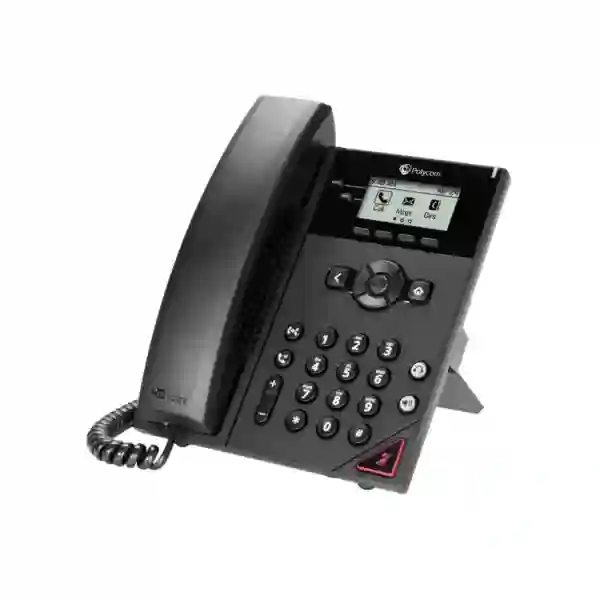
HP Poly VVX 150 IP Desk Phone
A focused two-line desk phone for clear everyday business calls, wired office connections, and straightforward SIP-based extension deployment.
For businesses in Tanzania: confirm PBX support, network power, exact device variant and lifecycle before placing an order. Request a requirements-based quotation for the appropriate configuration.
At a glance
- Two SIP identities with two programmable line keys; actual line behaviour depends on the calling platform.
- 2.5-inch, 132 × 64 backlit monochrome screen with four context-sensitive soft keys.
- Poly HD Voice, Acoustic Fence and Acoustic Clarity audio technologies.
- Two 10/100 Ethernet ports, PoE Class 2 and optional compatible external power.
- RJ-9 wired headset support, speakerphone, hold, transfer, and three-way audio conferencing.
- Suitable for straightforward fixed-desk or shared-area calling; not integrated Wi-Fi or gigabit pass-through.
Designed for the desk that needs dependable calling
The HP Poly VVX 150 IP Desk Phone is a two-line, wired business telephone for teams that need familiar physical calling controls rather than a complicated communications terminal. Its job is straightforward: connect a desk or shared location to a suitable SIP-based voice service, let the user place and receive calls, and keep everyday functions within easy reach. Poly HD Voice, a compact backlit display, and Power over Ethernet make the phone worth considering wherever simple voice communication is the main requirement.
For a business in Tanzania planning new extensions or replacing older desk phones, the decision is not just whether the handset looks suitable. The more important questions are whether your existing call platform can register the device, whether the network supplies reliable power and voice connectivity, and whether the phone has enough line capacity for the actual user. Confirm these items first and request a quotation based on the exact hardware variant and deployment requirements rather than assuming every VVX-branded phone behaves identically.
The VVX 150 particularly suits a fixed desk, a small office, a reception overflow position, or a common area where staff make ordinary calls and do not need a large colour display. It can also work in a home office with a suitable wired connection and supported business calling service. It is less appropriate for a busy operator handling many simultaneous line appearances, someone expecting built-in wireless connectivity, or a team needing advanced app-driven collaboration on the phone itself.
What the hardware actually provides
The phone has two SIP identities and two programmable line keys according to Polycom’s product datasheet. A SIP identity is an account registration to a voice platform; a line key is a physical control that can display or select a line appearance. These are related concepts but not a promise of two independent external telephone numbers, two guaranteed simultaneous conversations, or two separate subscriptions. Your PBX configuration and service agreement determine how each identity is used.
The 2.5-inch graphical backlit monochrome LCD has a 132-by-64-pixel resolution. That is practical for basic status, menu choices, calling information, and available soft-key labels. It is not a touchscreen or a modern colour dashboard. Four context-sensitive soft keys change function according to the screen, while a navigation pad and dedicated calling buttons support familiar actions without requiring a mouse, browser, or smartphone.
Two 10/100Base-TX Ethernet ports allow a LAN connection and an optional wired PC connection through the phone. The phone supports standards-based SIP communications and IEEE 802.3af PoE Class 2. It also offers a dedicated RJ-9 headset connection and a reversible desk stand/wall-mount arrangement. These details are useful when planning workstations, but they do not turn the unit into a wireless handset, a gigabit Ethernet switch, or a general-purpose USB conferencing device.
Manufacturer documentation describes full-duplex speakerphone operation, a handset, dedicated hold and transfer keys, mute and headset controls, call waiting, forwarding, voicemail support, and local three-way audio conferencing. Some features depend on supported PBX or hosted-service settings, the software build, and administrator provisioning. Think of the feature list as the device’s technical capability, then ask your communications provider which capabilities will actually be enabled for your account.
Who should choose a two-line IP desk phone?
A small business with several ordinary desks may need a consistent, easy-to-learn handset more than a feature-rich executive phone. The VVX 150 gives staff a recognisable keypad, clear line controls, and direct access to common tasks. That can make sense for administrative offices, internal departments, back-office desks, and locations where users switch between desk calls and other work. It also reduces the need to teach a new user a complex screen-based interface before they can answer an incoming call.
For a shared point such as a staff office, security desk, service corridor, or reception overflow station, the phone can provide a fixed endpoint for a configured extension. The business should still decide who may use the extension, whether outgoing calls are restricted, and who receives missed-call or voicemail notifications. A common-area phone should not automatically inherit an individual’s personal contacts or private account configuration simply because that is convenient during installation.
A remote or home-based worker may prefer a dedicated handset when computer audio and web meetings already consume a laptop’s attention. The VVX 150 can serve that role if the worker has reliable Ethernet, power, and a supported calling account. A home deployment may require different security and network settings from an office installation. Internet access alone does not guarantee that the phone can register to a corporate PBX across a firewall or through a particular VPN.
By contrast, a heavily used front-desk position with numerous department appearances, rapid queue switching, or a large contact directory may justify a model with more line keys and a more informative display. The VVX 150 should be selected because its limited, focused interface matches the work—not merely because it is an entry-level model. Count the interactions staff perform during their busiest hour before selecting a phone for an entire team.
Audio clarity and what affects it
Poly HD Voice is designed to deliver clear, natural-sounding conversations when the network and the other end of the call support suitable audio processing. The VVX 150 also features Poly Acoustic Fence and Poly Acoustic Clarity technologies. These are intended to reduce distracting noise and support usable voice communication, especially in everyday workplace surroundings. Their effectiveness depends on the calling position, audio mode, acoustics, and the level and type of background noise.
The datasheet identifies codecs including G.711, G.729AB, G.722, and iLBC. A codec is the method used to encode voice for travel across the network. For example, G.722 supports wideband audio, while other codecs can be selected to suit interoperability or bandwidth constraints. The actual codec in a live conversation is negotiated by both call endpoints and the intervening voice platform. A handset with HD audio capability cannot create a wideband call when another part of the connection forces narrowband operation.
Call quality also depends on packet delivery. Congested uplinks, wireless bridges, saturated office networks, unstable internet access, or poorly configured routing can introduce delays, breaks, echo, and one-way audio. The device includes technologies for echo cancellation, jitter buffering, and packet-loss concealment, but these do not eliminate an unreliable connection. Before purchasing many phones, test an internal call, an external call, a transfer, and a longer conversation during a busy working period.
For conversations in an open-plan area, placement matters. Keep the phone away from direct airflow, loud machinery, and competing speakers; test the handset and speakerphone separately. A compatible wired headset may help a frequent caller maintain consistent microphone position. Avoid promising absolute noise elimination: the practical aim is intelligible communication with fewer distractions, while the network, room, and far-end system continue to influence what people hear.
Physical controls that help ordinary users
Dedicated hold and transfer keys reduce the number of menu steps for common office tasks. When a call arrives, the display and line indicator help the user identify its status. The four soft keys can present context-specific actions, while the navigation cluster supports menu movement. Users can access speakerphone and mute functions directly. This conventional layout is one reason to consider the VVX 150 for users who prefer tactile controls and do not need to learn an extensive set of collaboration features.
Call-transfer behaviour is an important area to test. Some office workflows use an immediate transfer, while others use a consultative transfer so the sender can speak with a colleague first. The precise choices displayed on the phone are influenced by the service platform and its provisioning. Configure the method your staff use, then practise it with real department extensions. Clear transfer procedures often matter more to a customer than the sheer number of functions on the device.
The phone supports local three-way audio conferencing, but that should not be confused with a large conference bridge or a video meeting service. Confirm the limits imposed by the platform and any external calling charges before relying on it for routine meetings. Likewise, a voicemail indicator is valuable only if the underlying system has voicemail configured and is allowed to signal new messages correctly. The phone is an endpoint in a wider solution rather than a complete telephony system in a box.
Wired Ethernet and the 10/100 decision
The VVX 150 has two 10/100 Ethernet interfaces, commonly described as the network and PC ports. A single office network outlet can therefore connect to the phone and, when configured appropriately, continue to a computer. This can simplify cable routing where there is only one wall jack. However, the downstream computer connection is limited by the phone’s 100 Mbps Ethernet interface, even if the building switch and computer support gigabit speeds.
That bandwidth limitation is a real buying consideration. For light browsing and ordinary office tasks, the arrangement may be acceptable. For workstations handling large file transfers, high-resolution media, demanding cloud applications, or frequent backups, a separate gigabit connection may be preferable. If the computer has demanding network requirements, choose a different wiring plan or a phone offering gigabit pass-through. Do not assume an IP phone is invisible to the attached computer’s network performance.
Good cabling is equally important. Use suitable Ethernet patch leads, label connections clearly, and avoid heavily bent or damaged cables. The phone should connect to a managed office network or appropriately configured router, not to an arbitrary public socket. If the attached PC must belong to a different traffic segment from the phone, ask the network administrator to confirm the switch’s voice and data VLAN configuration, authentication rules, and port behaviour.
The VVX 150 supports network features such as DHCP, VLAN discovery, and quality-of-service tagging. These can help integrate the telephone into a managed network, but they are not automatic assurances of prioritised calls. The upstream switches and routers must honour the design. A practical installation test should verify that the phone obtains the intended address, reaches its SIP server, and continues to behave correctly after a switch reboot or network outage.
Power over Ethernet and power planning
Built-in IEEE 802.3af PoE Class 2 support allows a compatible switch or injector to supply network connectivity and power through the same Ethernet cable. The manufacturer’s datasheet specifies a maximum phone power consumption of 5 W. That can make desks tidier and centralise power management, provided the switch has enough total PoE budget for all connected devices. It does not mean every switch with Ethernet ports will power the phone.
An optional compatible external power supply can be used when PoE is unavailable. The manufacturer datasheet specifies an external 5 V DC, 3 A supply for the documented variant; because adapters and bundles can vary by hardware revision and market, verify the exact model’s label and official setup instructions before connecting an adapter. Never use an unrelated adapter simply because its plug seems to fit. Confirm whether the quotation includes an adapter, since PoE-focused bundles may not supply one.
Business continuity deserves attention in locations subject to short power interruptions. A PoE switch connected to an appropriately designed UPS may keep desk phones running when wall power drops, but the complete calling path also needs electricity: local network equipment, the internet connection or PBX, and any relevant gateway. Test a controlled outage against your organisation’s communication requirements. The phone itself does not provide battery operation or independently keep a remote calling service online.
Understanding SIP, extensions, and calling services
A VoIP desk phone uses a data network to communicate with a compatible voice platform. The VVX 150’s SIP support makes it a candidate for a range of open SIP deployments, but the telephone does not independently supply an external telephone number, a business calling subscription, a SIP trunk, or an IP PBX. These are separate elements of the solution. Before ordering, identify the platform responsible for extension registration and the provider responsible for external calls.
The distinction matters when replacing legacy analogue phones. A traditional analogue handset often connects directly to a telephone line or an analogue PBX port. The VVX 150 instead needs an Ethernet network and suitable IP telephony infrastructure. If the business has an analogue-only installation, additional equipment or a different migration plan may be required. Do not plug the handset’s network interface into an ordinary analogue phone line and expect it to behave like a conventional landline.
Two SIP identities can support more than one configured account where the platform allows it, but many offices need only a single personal extension. If a business wants a shared line appearance, monitored extension, multiple numbers, or queue membership, those requirements must be checked against the PBX feature set. The device’s presence of a key is not a guarantee that every feature offered by a particular hosted service can be mapped to it.
For hosted telephony, clarify who performs provisioning and support. Some providers use centrally managed configuration, while others permit local configuration by a trained administrator. Ask whether the selected VVX 150 hardware and software variant appears on the provider’s currently supported device list. Open SIP capability alone is not equivalent to full vendor certification for every PBX product, firmware release, emergency calling scenario, or cloud voice platform.
Simple calling workflows worth testing
Answer and transfer: a team member receives a call, confirms the caller’s needs, then transfers the call to the correct extension. Test the chosen transfer method, what appears on the receiving phone, and what happens if the destination is busy. If your business depends on warm transfers, write that procedure into training. If call parking or picking up another user’s ringing extension is required, test that separately because available actions are controlled by the telephony platform.
Missed calls and voicemail: decide who owns an unanswered call and how it should be followed up. The VVX 150 offers voicemail-related features and call notifications, but voicemail storage, notifications, retention, and routing usually belong to the voice service. A shared phone may need a shared mailbox or an alternative escalation path. Do not assume that putting a phone in a public area creates a secure or useful missed-call process without an administrator’s design.
Hold, mute, and speakerphone: staff should know the difference between holding a customer and muting their own microphone. A call on hold still exists within the calling system; mute simply stops the local microphone while the conversation continues. Speakerphone can be convenient for a quick discussion, but it may expose private conversations to the room. Set an appropriate policy for sensitive work and show users how to switch back to the handset.
Short three-party discussions: local three-way conferencing can help with a brief consultation among colleagues or a customer and a specialist, assuming the calling platform permits the required legs. It is not designed to replace scheduled group conferencing or collaboration software. A test should cover adding the third party, dropping a participant, transferring away, and handling external numbers, so the user understands how the real configured system behaves.
A workable rollout for a small office
Start by listing the physical seats where a desk phone adds value. Include the assigned user, extension, work area, expected call pattern, headset needs, and whether there is an existing network outlet. This simple inventory prevents ordering a two-line telephone for someone who routinely needs many simultaneous appearances. It also makes it easier to distinguish personal phones from shared stations, where account ownership and access controls may be different.
Next, verify the voice platform. Ask the PBX administrator or hosted-service provider for a written confirmation of VVX 150 support on the intended firmware and provisioning method. Check SIP credentials or central management requirements, emergency and outbound calling rules, dial plans, call transfer, voicemail, and any special line-key configuration. A compatible protocol is the starting point, not the final acceptance test.
Then survey network readiness. Review switch port availability, PoE budget, cable condition, IP addressing, voice VLANs if used, and firewall paths to the voice service. Confirm who manages the WAN connection and how outages will be diagnosed. Where data and voice share network resources, coordinate quality-of-service settings across the switches and internet edge. An inexpensive handset can become a costly distraction if the network is not ready to support stable voice traffic.
Configure one pilot unit before rolling out every handset. Register it with a test extension, complete inbound and outbound calls, test transfer, check voicemail indication, and try a three-way call if required. Repeat during busy periods, and test restart and recovery. Check the actual display labels and key behaviour against what the user was taught. Record the configuration version and the steps needed to restore the phone if it is reset.
Finally, document the rollout. Keep an internal record of the telephone’s assigned user or location, hardware variant, approved firmware, support owner, provisioning method, and network port. Keep access credentials in a secure credential manager rather than in the visible site documentation or taped beneath the phone. Provide a one-page guide showing answering, hold, transfer, voicemail, and who to contact if the line is unregistered.
Network conditions and troubleshooting basics
Voice quality depends more on consistency than headline download speed. Even a fast office internet connection can produce poor calls if packets are delayed or lost during congestion. Ask your IT team to watch packet loss, jitter, and latency on the relevant path and look for patterns by time of day. Check whether large uploads, backups, or other traffic coincide with reported problems. A voice VLAN or prioritisation design is useful only if the infrastructure is configured and maintained correctly.
If the handset does not start, first check its PoE source, cable, correct port, and compatible external adapter if one is intentionally used. If the handset starts but cannot register, inspect the assigned network address, DNS resolution, provisioning details, SIP credentials, and firewall policies with the authorised administrator. A display showing no registration is not by itself proof that the phone hardware is faulty; many upstream causes produce the same symptom.
If calls connect but audio is missing in one direction, investigate routing, NAT, firewall handling, and negotiated media paths. If calls sound broken, inspect bandwidth utilisation, cabling, switch errors, and the remote service. If a specific feature such as transfer fails, compare the PBX configuration and device software against the supported feature list. Keep diagnostic logs private because they may contain extension numbers, addresses, or account information.
Before changing firmware or resetting a business handset, preserve the approved configuration and confirm the recovery procedure. A factory reset may remove the details that allow the phone to reconnect. If the device was previously managed by another provider, re-provisioning rights and software variant may affect the migration. Plan changes during an appropriate maintenance window and test at least one incoming and outgoing call after each meaningful change.
Security, privacy, and administration
Manufacturer documentation identifies security-related capabilities including TLS, SRTP, 802.1X, password controls, encrypted configuration files, and HTTPS provisioning. Whether a specific deployment uses these controls depends on the firmware, certificates, server configuration, and service provider. For purchasing, ask how signalling and media are protected in the actual system. A technical specification naming TLS or SRTP is not proof that either protection is active on every call.
Use unique administrative credentials and restrict access to the phone’s management interface. Limit who can change server addresses, extension credentials, and dial plans. Keep the device on the intended network segment and do not expose its administrative service directly to the internet. If the business uses central provisioning, manage configuration files and access credentials carefully because a compromised provisioning source can affect many phones at once.
Firmware lifecycle matters, particularly when purchasing an established model. HP still provides product and support information, while individual distributors may describe certain listings as end-of-life or unavailable. Those observations do not establish a universal lifecycle status for every variant or region. Ask for the exact hardware number, a currently supported software path, security-update expectations, and a realistic replacement plan before making a large commitment.
Personal and business privacy also deserve attention. A phone in a public area should not expose someone else’s directory, voicemail, or account details. At a dedicated desk, define how to clear call history or de-provision the extension when an employee changes role or leaves. Use appropriate data handling practices when returning or disposing of a device. Treat the phone as a managed network endpoint rather than a harmless standalone appliance.
Headsets, ergonomics, and shared areas
The VVX 150 includes a dedicated RJ-9 headset port for compatible wired headsets. That can be useful for staff who make frequent calls while entering information on a computer. However, connector shape alone does not prove that every headset or electronic hook-switch accessory will work correctly. Check the accessory manufacturer’s compatibility guidance for the precise phone variant and firmware, especially if users need remote answer, end-call control, or specialised hearing assistance.
The reversible stand supports desk positioning and wall-mount arrangements. Before wall mounting, verify access to a safe Ethernet cable route and sufficient space for the handset cord. Keep the screen readable from the user’s normal angle and place the phone within comfortable reach. In a reception or passageway, avoid installation positions that expose the phone to impacts, moisture, excessive heat, or unnecessary tampering.
For a common-area phone, consider visible instructions and access rules. Staff might need a simple note describing internal extension dialling, emergency procedures supported by the organisation, and the contact for faults. Those instructions should not display passwords or private account information. The phone’s compact interface is well suited to straightforward tasks, but shared use works best when the call plan and responsibility for responding are clear.
Tanzania deployment considerations
For an organisation operating in Tanzania, a reliable communications plan should start with the voice service actually available at the premises. Determine whether the business already has an IP PBX, a hosted voice subscription, or an analogue system requiring migration. Obtain confirmation from the selected service provider about SIP account provisioning, numbering, emergency calling arrangements, and supported equipment. Do not infer that every local internet or telephone service automatically permits an independently supplied SIP handset.
Inspect the actual premises network and power arrangement. Ask whether every intended desk has wired Ethernet, whether the switch supports the required PoE standard, and whether the calling path remains available during the type of power or connectivity interruption relevant to the business. Consider the cost of network switches, structured cabling, a UPS where appropriate, and installation work alongside the handset purchase. Those costs can change which telephone is the best value for a particular site.
Local procurement questions also matter: request a quote in the terms the seller actually offers, and confirm the current product variant, stock, warranty terms, delivery options, and after-sales responsibilities directly. No specific Tanzania price, stock level, certification, or installation coverage is assumed here. If a business has multiple sites, plan network testing and configuration management by site rather than assuming a pilot from one office will behave identically everywhere.
When a more capable phone is worth it
The VVX 150 is appropriate when two line keys and basic call handling cover the job. A user who routinely manages several appearances, has a busy operator role, or expects fast access to many contacts may find its limited screen and keys restrictive. The first question is therefore functional: what must happen during a typical call, a busy call period, and an escalation? Choose the least complex device that meets those requirements comfortably, not simply the lowest-priced device on a spreadsheet.
HP Poly also lists higher VVX models such as the four-line VVX 250, six-line VVX 350, and twelve-line VVX 450. Those are different product classes and may be more suitable where line capacity or a colour display is a priority. The larger number of keys does not replace a compatibility check, and the final decision still depends on platform approval, hardware version, network capacity, and actual user needs. A carefully configured basic phone can be a better choice than an underused premium one.
If a gigabit desktop connection is important, compare Ethernet specifications before committing to a shared phone-to-PC cable path. If workers require Wi-Fi or cordless movement, consider hardware explicitly designed for wireless use. If the business depends on Microsoft Teams-native controls, video collaboration, or a specialised contact-centre interface, verify those needs against the selected platform and device rather than assuming every SIP desk phone offers them.
Total cost includes provisioning, power, cabling, support time, firmware maintenance, spare handsets, and eventual replacement. For a larger purchase, a successful pilot may save more than a small difference in unit cost. If the organisation’s voice system is also changing, coordinate handset selection with the PBX project so that the chosen devices do not constrain future features or complicate the migration.
What to confirm before asking for a quote
Exact device and condition: request the precise HP Poly VVX 150 variant, whether the quotation covers new or other-condition hardware, and which accessories are included. Different product numbers and bundles exist in the market; a manufacturer part number should not be mistaken for the FourTeck listing’s SKU. Ask for photographs of the actual unit and packaging only when necessary to clarify a variant, not as a substitute for a written specification.
PBX and provisioning: state the hosted service or PBX software and version if known, the number of extensions required, any shared-line behaviour, and the method of configuring phones. The seller or integrator should explicitly confirm whether the variant works with the chosen service. Where compatibility is uncertain, make a live demonstration or pilot registration part of acceptance rather than relying on a generic compatibility claim.
Network and accessories: specify whether PoE is available, how many free switch ports exist, whether a PC will connect through the phone, and whether staff need headsets. Include any required power adapters, replacement patch leads, compatible accessories, and installation work in the request. If high-speed PC connectivity is critical, say so before selecting a phone with 10/100 pass-through.
Support and lifecycle: ask who will provide firmware updates, configuration backup, replacement handling, and fault diagnosis. Confirm the warranty applicable to the actual sale rather than assuming older published product documentation describes the current seller’s offer. For substantial deployments, ask about spares and a supported alternative model. A clear support arrangement reduces the risk of owning hardware that works initially but becomes difficult to maintain.
Frequently asked questions
Is the HP Poly VVX 150 IP Desk Phone a normal analogue landline phone? No. It is a wired IP phone designed to register with a compatible SIP-based calling platform over an Ethernet network. It does not independently replace an analogue line or include the full PBX service. Confirm the underlying voice account and network requirements before installation.
How many lines does the phone support? Manufacturer documentation lists two SIP registrations and two programmable line keys. The exact behaviour of those keys depends on the provisioned PBX and may include different arrangements of line appearances. Ask the administrator how many accounts and calls the intended workflow actually requires.
Does the VVX 150 support Power over Ethernet? Yes. It supports IEEE 802.3af PoE Class 2, according to the manufacturer’s datasheet. A compatible PoE switch or injector must be present, with enough available power budget. Ordinary Ethernet connectivity does not automatically provide electrical power.
Is a power adapter included? Do not assume one is included. Packages can differ by variant or seller, and the manufacturer describes the external supply as optional. Confirm the actual contents of the offer and use only a correctly rated compatible adapter specified for that unit.
Can I connect a computer through the phone? The device has two 10/100 Ethernet interfaces, including a PC-side connection. This can reduce the number of wall outlets needed, but it limits the connected desktop path to 100 Mbps. Users needing a gigabit link should plan an alternative arrangement.
Does the phone work over Wi-Fi? The VVX 150 is designed around wired Ethernet. Do not purchase it expecting integrated Wi-Fi. If the desk has no appropriate wired network connection, consult the IT team about cabling or choose a model explicitly designed for the needed connectivity.
Can it be used with a headset? The manufacturer’s datasheet lists a dedicated RJ-9 headset port, and the hardware is described as electronic-hook-switch capable. Check the particular headset and accessory combination before buying because advanced control functions and compatibility can vary.
Can I use two different telephone numbers? The phone can support two SIP registrations, but external telephone numbers and routing are allocated by the calling service. Two registered identities do not automatically provide two public numbers or separate subscriptions. Confirm the required number presentation and routing with the provider.
Does it support call transfer and voicemail? The device has transfer controls and voicemail-related functions. The underlying PBX or service must support and configure them, and some workflows differ between providers. Test transfers, voicemail retrieval, and notification during a pilot.
Can the VVX 150 make conference calls? Manufacturer documentation lists local three-way audio conferencing. That is suitable for a small supported call scenario, not a substitute for a large conferencing platform. Check your provider’s calling restrictions and any charges for external participants.
Will it work with my existing IP PBX? Possibly, but the answer requires the specific PBX name, software version, phone firmware and provisioning method. SIP support is useful but does not guarantee every function on every system. Request current compatibility confirmation and test a sample unit.
Is it a good choice for a busy reception desk? It can work for light reception or overflow calls, but two line keys and a small monochrome screen may constrain a heavy operator workflow. Map the required calls and line appearances before deciding. A phone with more keys may suit complex reception better.
Does the phone include a SIM card or mobile service? No. It is an IP desk phone connected through Ethernet. A mobile data connection, external telephone numbering, or a SIP trunk is separate from the handset and depends on the selected provider and network.
Is the model still available and supported? HP continues to publish VVX 150 product and support material, but individual reseller listings may show end-of-life or unavailable status. Verify current stock, exact variant, firmware maintenance, and service-platform support for the proposed purchase. Do not treat a listing for one region as proof of global availability.
How can an office in Tanzania order the right configuration? Share the quantity, intended PBX or hosted service, PoE availability, desk use cases, headset requirements, and preferred purchasing terms when requesting a quote. Ask for written confirmation of the exact variant, accessories, compatibility, local sales conditions, and support responsibilities.
Quick buyer’s verification checklist
- Match the exact hardware variant and supported software release to your hosted service or PBX.
- Decide whether two line keys are sufficient for the intended user or shared station.
- Confirm IEEE 802.3af PoE availability or the correct separately supplied adapter.
- Check whether the optional PC-through-phone connection can operate at 100 Mbps.
- Verify compatible headsets and any required call-answer accessories.
- Agree testing, warranty, support owner, lifecycle arrangements and exact quote terms.
Request a VVX 150 configuration and quotation
Tell FourTeck Tanzania how many phones you need, which PBX or SIP service you use, whether your desks have PoE, and whether users need headsets or other accessories. Ask the team to confirm the exact device variant, current sale terms, compatibility and support arrangement before proceeding. A short pilot can help validate call quality and daily workflows.
Contact FourTeck Tanzania to discuss requirements and request a quote.




Reviews
There are no reviews yet.