
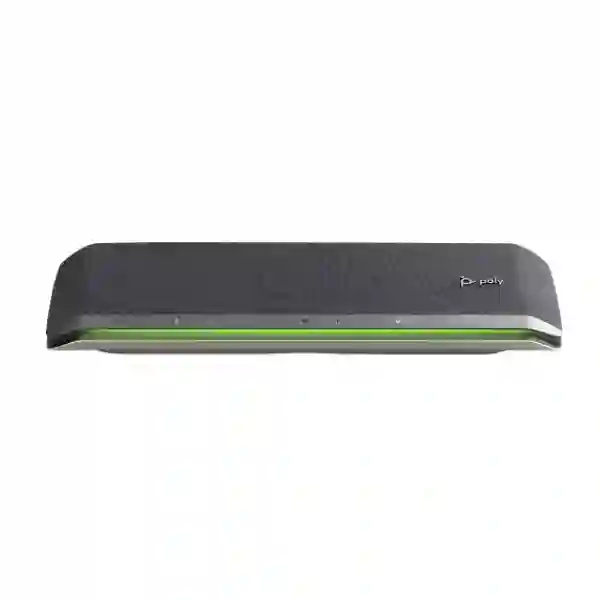
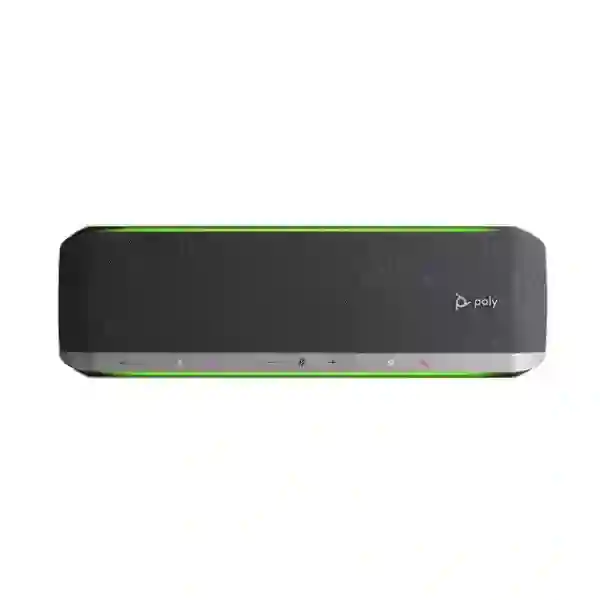
HP Poly Sync 60 Microsoft Teams Conference Speakerphone
Bring clearer two-way conversation to a shared meeting table with a six-microphone array, dual speakers, full-duplex audio and practical USB or Bluetooth connectivity.
The HP Poly Sync 60 Microsoft Teams speakerphone is aimed at organisations equipping small to medium conference rooms, meeting tables and bring-your-own-device collaboration spaces. The Teams-certified version includes a dedicated desktop-app Teams control. Request a specification and compatibility review from FourTeck Tanzania before selecting room quantities or accessories.
A practical answer for shared meeting-room audio
For a hybrid meeting to work, remote participants need to hear the people around the table without forcing everyone to gather around a laptop. The Poly Sync 60 brings the microphone and loudspeaker functions into a dedicated tabletop unit. Its six-microphone steerable array is designed to favour voices while helping reduce noise and echo, and its two 50 mm speakers support audio that is easier to follow than a typical laptop speaker in a group setting.
This is the Microsoft Teams-certified configuration, associated by HP with manufacturer product number 77P41AA. It suits buyers who want straightforward computer-based meetings rather than a complete standalone room video system. The speakerphone connects to a computer for meetings, while compatible smartphones can use Bluetooth for mobile calls. It requires mains power through its supplied adapter, so plan for a reliable power outlet near the table.
Whether it is the right solution depends on room dimensions, table shape, acoustic conditions, the conference platform and how staff join calls. Confirm the intended host computer, meeting software, required camera and expected number of people speaking before ordering.
Best fit
A room where several colleagues share one laptop or meeting PC and need one centrally managed tabletop audio device for hybrid calls.
Check before ordering
Mains power access, meeting-room dimensions, Microsoft Teams desktop software, USB connectivity, video-camera needs and user procedures.
Not a complete room system
The speakerphone supplies audio and convenient controls. A host computer, meeting account, suitable network connection and optional camera remain separate planning items.
Microsoft Teams certification: what it does and does not mean
The Microsoft Teams edition is intended to work with Teams on a computer and provides a dedicated Teams touch control. According to HP documentation, this control can bring the Teams desktop application into view and indicate certain notifications or meetings. This is useful when a participant needs to return quickly to the meeting window rather than searching among several open applications during a presentation.
There is an important boundary: HP states that the Teams button works with the desktop application and does not support Teams mobile-app interaction. Bluetooth connectivity to a phone does not turn the phone app into a fully controlled Teams-room installation. Nor does a Teams-certified speakerphone independently host a Teams meeting. A computer, an appropriate account and the application remain necessary.
For shared-room consistency, select the Poly device as the microphone and loudspeaker inside Teams, test mute behaviour and give users a short joining guide. Certification supports a defined compatibility use case; it should not be read as a promise that every feature of every third-party meeting application is identical.
Six-microphone array and voice pickup
The six-microphone steerable array is one of the main reasons to consider the Sync 60 for a meeting table. Multiple microphones give the audio system more information about where speech is coming from, while noise and echo reduction can help preserve intelligibility for the people listening remotely. HP also describes adaptive gain control, intended to help prevent a nearby speaker from sounding dramatically louder than a colleague seated farther away.
In practice, the outcome depends on much more than the microphone count. Background music, open doors, an air conditioner directly above the table or multiple people talking across each other can still reduce clarity. A dedicated tabletop microphone cannot remove the impact of every acoustic problem. Position the device near the speaking area and keep it away from loud equipment and rustling paperwork.
HP’s current UK product listing gives an indicative microphone pickup range of up to 3 metres. Use that as a room-planning reference, not a guaranteed intelligibility radius in every environment. Run a short test with real seating positions before deciding that all corners of a room are covered.
Full-duplex sound supports natural discussion
Full-duplex audio means the near end and far end can speak and hear at the same time, rather than taking turns as though using a two-way radio. This matters in workshops, reviews and decision-making meetings where one person may briefly agree, clarify a number or ask a question while another is still speaking. A conversation is easier to manage when the audio system does not unnecessarily cut off one side.
The Sync 60 combines full-duplex audio with processing that addresses unwanted echo. That is helpful because a remote participant’s voice comes out of the room speakers and could otherwise re-enter the microphones. Echo control is a technical function, not a substitute for sensible volume settings and placement. Excessively high speaker volume, nearby reflective surfaces or additional uncontrolled microphones in the room may complicate the result.
During setup, ask an external participant to listen while two people at the meeting table exchange short comments. That test reveals whether the chosen volume, device selection and acoustics produce an easy-to-follow conversation rather than relying only on published specifications.
Dual speakers and the listening experience
The device uses twin speakers, each identified by HP as 50 mm, along with an audio design featuring dual passive radiators. Those components support conference audio with more room presence than many integrated laptop speakers. In a review meeting, employees should be able to listen from their seats rather than crowding around the computer that is running Microsoft Teams.
The published speaker bandwidth is 75 Hz to 20 kHz. This describes a technical frequency range, not a guarantee that a particular room will sound like a dedicated music system. For speech conferencing, priority should be given to intelligibility at comfortable volume, low distraction and the ability to hear quieter speakers. A device may produce sufficient volume but still be poorly placed for an unusually long or noisy room.
A good commissioning test includes a remote voice speaking normally, a quieter voice, and the same remote participant speaking while someone in the room talks. Check that all seats can hear clearly at a reasonable level before changing any advanced audio options.
Room size and seating layout decisions
HP’s UK specification describes the speakerphone as ideal for rooms up to approximately 5 by 5 metres. That is a useful first indication for small to medium meeting spaces, not a fixed certification of a room’s seating capacity. A square room with a central table is quite different from a narrow room where participants sit far from the nearest microphone. Even two rooms with the same floor area may need different audio layouts.
Begin by drawing the table and marking where people actually sit, not only the room walls. Identify the most distant regular speaker, the likely location of the host laptop, the available power socket and any display or camera. Place the Sync 60 where voices come from several directions without allowing a document pile or display stand to obstruct it.
If the intended room is unusually long, frequently packed or highly reverberant, test the proposed setup with a second unit or compare it with a designed meeting-room audio installation. Avoid purchasing solely on a headline room size.
Correct tabletop placement can matter more than volume
Where the speakerphone sits changes how well it can capture voices. A central position on a conference table is often a sensible starting point, especially if people speak from both sides. Leave the touch controls accessible and do not hide the microphone surface behind a monitor, laptop lid, water jug or stack of folders. Direct airflow from a fan or air conditioner may also contribute unwanted sound.
Consider cable routing before the meeting starts. The included USB connection must reach the host computer, and the AC power cable must reach a suitable outlet without crossing a walkway in an unsafe way. In rooms with a cable trough or floor box, allow sufficient access for cleaning and maintenance. A stable surface is better than a movable trolley that changes position every day.
Test the device when the room is occupied, not only when empty. Chairs move, doors open, fans are switched on and the actual table arrangement can differ from the plan. Record the position that gives the clearest result for repeatable use.
USB connection for a predictable computer-hosted meeting
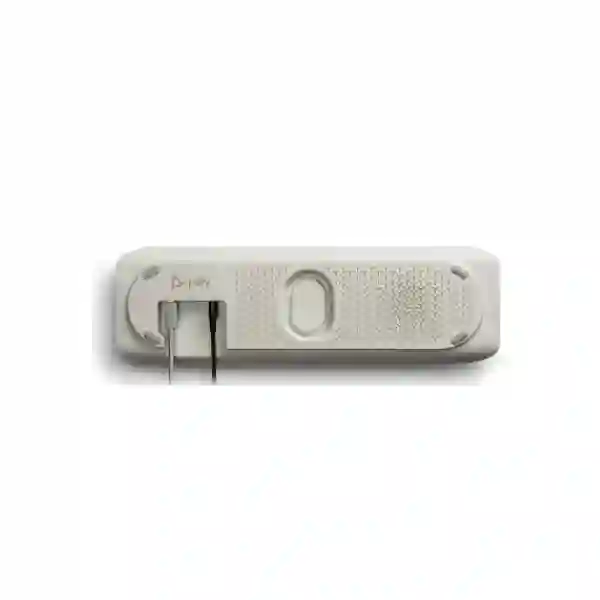
For meetings hosted on a PC or laptop, HP specifies a USB Type-A cable with a Type-A-to-Type-C adapter. The speakerphone-side USB-C connector goes into the computer USB port on the reverse of the device, while the other end connects to the host computer using the available connector. The USB link carries the computer audio connection; it does not remove the need for the supplied power adapter.
Before deploying in several rooms, check the real laptop models staff bring, the available ports and whether the organisation’s docking stations pass through audio reliably. Windows and macOS are named by HP among compatible operating systems. Application permissions, endpoint security software and a locked-down device policy can still affect what an employee can select or update.
After connection, choose the Poly speakerphone as both speaker and microphone in the computer’s operating system and in Microsoft Teams. Make a test call rather than relying on the operating system merely showing that a USB device is present.
Bluetooth for mobile flexibility and visitor use
The Poly Sync 60 also offers Bluetooth 5.1. HP specifies compatibility with smartphones over Bluetooth, enabling mobile voice calls without using the computer USB connection. The manufacturer quotes a wireless range of up to 30 metres under suitable conditions. This figure concerns the radio connection, not microphone pickup, and walls, interference and the particular phone can change practical range.
For an invited guest using a smartphone, explain pairing and unpairing clearly. The manufacturer’s guide directs users to hold the Bluetooth control to enter pairing mode and then choose Poly Sync 60 from the phone’s Bluetooth list. NFC pairing is also documented for compatible phones, but the phone’s NFC support and configuration matter.
For company rooms, consider the secure connection option described in HP’s desktop software. When enabled, it disconnects a paired mobile device after a call so that later personal audio is less likely to play unexpectedly through the shared speakerphone. This is a user-privacy and room-etiquette consideration, not a network security guarantee.
Dedicated Teams controls and visible call status
Touch controls include call answer or end, mute, volume, Bluetooth pairing and the Microsoft Teams control. HP also lists a programmable function control, while a hardware button supports wireless linking. The central benefit is operational: participants do not need to search around a laptop keyboard for every adjustment, and visitors can identify the basic controls after a short introduction.
HP documents two status light bars that help the room see call and mute states. Visual indications are especially useful when several colleagues are contributing and need to know whether the room microphone is live. The Teams button can also pulse for selected notifications when the compatible desktop application is in use.
During onboarding, explain the difference between muting the meeting application and muting the physical speakerphone, and test that the state is reflected as expected. For accessibility, do not rely only on colour-based instructions: show staff what the microphone, volume and call symbols mean and where to find the corresponding state in Teams.
Power, mobility and reliability planning
This is an AC-powered tabletop unit rather than a battery-powered portable speaker that can run a room meeting away from power. The supplied power adapter is therefore a core part of the installation. HP lists the device weight as approximately 1 kg, so it can be moved between suitable locations, but it needs deliberate power and cable arrangements each time it is set up.
If the meeting room is used for sensitive operational meetings, review how a power interruption affects the complete session. A powered speakerphone cannot compensate for a laptop running out of battery, a display failing or internet connectivity dropping. Offices with backup power arrangements should include any room audio equipment and networking gear in their continuity planning as appropriate.
For the Tanzania market, assess site electrical conditions using the actual equipment label, power adapter and local installation requirements rather than assuming that a global product description confirms a particular socket or plug arrangement. Confirm the delivered adapter version for the exact order.
An optional USB camera can complement audio
HP describes a USB video-camera input on the Poly Sync 60. The rear camera port is covered from the factory and the manufacturer’s user guide explains how to access it using the supplied installation tool. A compatible camera can then connect through that dedicated USB-A port while the device is connected to the host computer. This can reduce the number of visible cable runs to the computer in some room arrangements.
It is important to distinguish that interface from an included camera. The Sync 60 is an audio product and HP states that the USB video device is sold separately. The required camera cable is also not listed as part of that camera procedure. Camera compatibility, orientation, cable length, mounting and the meeting application still need a separate review.
If the room already has a USB webcam or a conferencing bar, decide whether routing the camera through the speakerphone adds value. Test the complete camera-and-audio combination on the exact meeting PC before standardising the arrangement.
Linking two speakerphones for a larger table
HP’s user guide describes wireless linking, or daisy-chain audio, between compatible Poly Sync speakerphones. The current guide says Sync 40 and Sync 60 units may be linked, provided their device software is updated. One speakerphone connects to the computer or mobile device as the primary unit, and the second links wirelessly to extend the arrangement. The linked system can offer more flexible tabletop placement.
Linking should not be treated as an automatic promise that two devices will cover every large conference room. Room acoustics, furniture, wireless conditions and how far people sit from either device still matter. HP instructs users to enter linking mode when the devices are idle, and settings for the primary unit govern the linked pair.
Before ordering two units, confirm the chosen model combination, software compatibility and expected meeting-platform behaviour in a pilot. Also verify whether staff require the default party audio output or the configurable stereo option, since the latter has channel-assignment implications.
Device updates and IT administration
The manufacturer describes software support for configuration and firmware updates. The Poly Sync 60 product materials mention Poly Lens management, while the current user guide directs administrators to the HP Poly Studio Desktop application for preferences and firmware maintenance. Your IT team should confirm the current supported management route, operating-system permissions and deployment method in the organisation’s environment.
The operational benefit is consistency. Rather than relying on every user to adjust a room device, administrators can document preferred audio settings, a standard device name, and a process to handle a failed update or an unexpected mute state. Where enterprise management features are considered, verify which functions are available for the exact firmware and software combination.
In a company with several meeting rooms, record the device location and manufacturer product number in the internal asset register. Keep a modest maintenance schedule for checking the power cable, USB connector, firmware version and audio test. These simple steps help reduce meeting-start delays.
Privacy and shared-device etiquette
A shared conference speakerphone changes where meeting audio is audible. When a call is active, the room hears remote participants through the speakers, and any voice close enough to the microphones may be captured. Teams participants should know when the microphone is live, and staff should avoid leaving a confidential call connected when the room is vacated.
A straightforward room instruction sheet can cover muting before side conversations, confirming the end of a call, disconnecting personal Bluetooth devices, and checking the LED status before discussing sensitive information. These practices are especially relevant when rooms are booked back-to-back and one team enters while another is still closing its meeting.
HP describes a secure Bluetooth connection setting that disconnects paired phones following a mobile call. That setting may help prevent accidental playback, but it does not replace organisational information-security controls, meeting permissions or sound isolation. Consider individual headsets for confidential one-to-one sessions in open-plan areas.
Four practical room scenarios
A small management meeting might have four to eight people discussing a report around one table. A centrally placed speakerphone provides a clearer audio focal point than a laptop tucked at one end. The host keeps the Teams desktop app open, checks the correct microphone and speaker, then starts the call. Participants can use the visible mute and volume controls while working with a shared screen.
For a training session, the presenter may move around or face a screen. The microphone system can help when speech remains within a practical pickup area, but a presenter walking well beyond the table should not assume identical audio quality. Test the natural presentation route, especially when a wall-mounted fan, projector or sound system is operating.
A project room with frequent external partners benefits from simple USB connection and consistent user guidance. A visiting employee can connect an approved computer and choose the device in the calling application. If a mobile connection is needed, Bluetooth provides an alternative, subject to pairing policies and application behaviour.
For a longer conference table, linking a second compatible Poly Sync speakerphone may be worth evaluating. Pilot the placement and audio with representatives at the far ends before treating it as the final room design.
Consider network quality separately from speakerphone quality
A high-quality microphone cannot repair a dropped internet connection. For Microsoft Teams meetings, the host computer and network must sustain the call, and real-world latency, congestion, Wi-Fi signal strength and packet loss influence what remote attendees hear. A clear local microphone test can sound poor over an unstable connection even when the speakerphone itself is working as intended.
Before buying room hardware, confirm that the normal meeting location has usable connectivity throughout expected busy periods. If the computer relies on Wi-Fi, test at the table rather than near the access point. Where business policies permit, a reliable wired connection may be useful for the room host. The correct network design depends on the organisation’s IT environment.
For Tanzania deployments, discuss the actual office internet service and power continuity with the customer’s own IT team. Avoid assuming that a particular network provider or locality guarantees a conferencing experience. Separate network troubleshooting from speakerphone audio testing to identify problems more efficiently.
Getting better sound in reflective or noisy rooms
Glass, tile and hard painted walls can make a room look professional while producing reverberation that reduces voice intelligibility. Even excellent conference audio processing has limits if several reflections reach the microphones at different times. A carpet, fabric seating, curtains or appropriate acoustic treatments may improve the room’s response where a facilities assessment supports those changes.
Keep the speakerphone away from the strongest noise sources. A projector fan, a desktop computer with a loud cooling system or a portable air conditioner may be closer to the microphone than any seated person. The device’s noise reduction is helpful, but moving the sound source or repositioning the speakerphone is often a simpler first test.
Run comparisons with the room in its normal operating state. Use a test partner who is joining remotely and ask whether speech is clear, uneven, echoing or intermittently cut off. Record what changed between tests instead of increasing volume repeatedly.
How to compare this device with other meeting-room audio options
When only one person joins meetings from a desk, a well-fitted headset may provide better privacy and predictable microphone placement than an open-room speakerphone. When several people sit around one table, the Sync 60 becomes a more relevant option because everyone can share a single audible conversation without passing a laptop around.
For a smaller meeting area, a more compact speakerphone may be sufficient; for a larger boardroom, a designed room-audio system with multiple microphones and installation-specific loudspeakers could be more suitable. Compare real speaking distance, connection method, power needs, room management, camera integration and the cost of supporting multiple rooms. Avoid treating microphone count as the only decision criterion.
If the meeting space needs native room scheduling, touch-panel control, multiple fixed cameras or other advanced capabilities, a speakerphone alone is not a complete answer. Map all the room requirements first and decide what hardware and software must work together.
Commercial buying considerations in Tanzania
Organisations evaluating the HP Poly Sync 60 Microsoft Teams speakerphone in Tanzania should request a quotation that clearly identifies the Microsoft Teams model and manufacturer product number 77P41AA. Model naming matters because a standard unified-communications configuration and a Teams-oriented configuration may have different controls. Do not rely on a photograph alone when specifying the item for a procurement request.
Confirm the exact package contents, condition, adapter variant, local price, currency, lead time and applicable warranty arrangements through the seller’s written quotation. The manufacturer lists a two-year limited warranty for the reference model, but purchase-channel terms and service procedures must be confirmed for the actual transaction. This page does not claim current Tanzania stock or a specific local price.
For a multi-room project, the quotation should also distinguish the number of speakerphones from the number of complete meeting setups. A room may additionally need computers, cameras, longer approved cables, cable management, displays or other equipment. Request a bill of materials based on the room inventory rather than assuming that every component comes inside the speakerphone carton.
What is included in the manufacturer-listed package
HP’s reference specification identifies the Poly Sync 60-M speakerphone, a user guide, an AC power adapter, a USB Type-A cable with a Type-A-to-Type-C adapter and an installation tool. This is a useful baseline when checking that the selected quote matches the Teams edition. Packaging and regional adapter details should still be confirmed with the seller before procurement.
A video camera is not part of that standard list. If a deployment needs video meetings, specify the camera separately and confirm the camera cable and mounting arrangement. Similarly, linking two speakerphones requires two compatible units; do not assume a second device is supplied in one product box.
Once a unit arrives, record the model identification and inspect the connectors before an important meeting. Keep the installation tool in a known place if the camera connection is planned. Train staff not to confuse the dedicated camera port with the smartphone charging ports or the primary computer USB connection.
Technical specifications buyers can verify
The manufacturer identifies the Microsoft Teams configuration as product number 77P41AA. Core specifications include six steerable microphones, two 50 mm speakers, Bluetooth 5.1, USB computer connectivity, full-duplex audio and support for Windows 10, Windows 11 and macOS in HP’s regional product specifications. HP lists a microphone frequency range of 100 Hz to 6.7 kHz, speaker bandwidth of 75 Hz to 20 kHz and a 1.5 m USB cable.
Published specifications also include an approximate 1 kg product weight and the dimensions 3.7 × 11.6 × 39.4 cm in the manufacturer’s sequence. The nominal wireless Bluetooth range is up to 30 m under suitable conditions. The UK listing describes a microphone pickup distance up to 3 m and a room guideline of up to 5 × 5 m; these are planning indications rather than commitments for a specific installation.
These figures are a comparison starting point, not a substitute for checking the exact delivered configuration, host-device requirements and room conditions. They should be read alongside the deployment guidance and practical testing recommendations on this page.
Specification reference table
| Attribute | Manufacturer reference |
|---|---|
| Product | Poly Sync 60 Microsoft Teams Certified Speakerphone |
| HP reference product number | 77P41AA (manufacturer identifier; not a FourTeck SKU) |
| Microphones | Six-microphone steerable array |
| Speaker drivers | Two 50 mm speakers |
| Audio features | Full duplex; noise and echo reduction; adaptive gain control |
| Connection options | Computer via USB Type-A cable / Type-C adapter; compatible smartphone via Bluetooth |
| Bluetooth version | 5.1 |
| Bluetooth wireless range | Up to 30 m in suitable conditions; not microphone pickup range |
| Indicative pickup / room guide | Up to 3 m pickup; up to 5 × 5 m room guideline in HP UK listing |
| Power | AC adapter; mains-powered |
| Desktop systems | Windows 10, Windows 11, macOS per HP listing |
| Controls | Call, mute, volume, Bluetooth, dedicated Teams button, programmable function |
| Dimensions | 3.7 × 11.6 × 39.4 cm (HP listed sequence) |
| Approximate weight | 1 kg |
| Package basics | Speakerphone, AC adapter, USB cable with USB-C adapter, guide, installation tool |
Manufacturer figures are reference information; confirm the exact regional package, firmware, compatibility and terms for the quotation. No local price, inventory or delivery claim is implied.
Frequently asked questions
Is this the Microsoft Teams edition or a standard UC speakerphone?
This content concerns the Poly Sync 60 Microsoft Teams Certified Speakerphone, identified by HP as reference 77P41AA. The Teams edition has a dedicated Teams control designed for the supported desktop application. Confirm that identifier in a written quotation so that the intended model is supplied. Do not treat another Poly Sync 60 variant as interchangeable without checking the controls and specifications.
Can it connect to a computer without Bluetooth?
Yes. HP describes wired USB connection using the provided USB-A cable and adapter for a computer with a suitable USB-A or USB-C port. The device still requires its AC power adapter. In a shared room, this can be a straightforward approach because staff can connect the host computer and select the speakerphone as the microphone and output device in Teams.
Does the Microsoft Teams button work with the Teams phone app?
HP’s user guide specifies the Teams desktop application for the button and explicitly says the Teams mobile app is not supported for this function. A smartphone may still use the speakerphone for Bluetooth audio, but that is a separate capability. Businesses that depend on mobile Teams workflows should test their exact application behaviour rather than assuming desktop button support carries across.
Is the Poly Sync 60 a complete video-conferencing system?
No. It is a conference speakerphone for room audio. A computer or suitable host device runs the meeting software, and video requires a separate camera if one is needed. The speakerphone has a dedicated USB camera input for a compatible camera, but HP says the video device is sold separately. A display, camera mounting and any licensing also need separate consideration.
How large a meeting room can it serve?
HP’s UK product listing describes a room guideline of up to 5 by 5 metres and a microphone pickup range of up to 3 metres. Actual suitability depends on table layout, speaker distance, room noise and acoustics. These figures are helpful for initial planning but should not be converted into a fixed number of supported attendees. A live test from each usual seat is recommended.
Can two Poly Sync devices be used together?
HP documents wireless audio linking for compatible Sync 40 and Sync 60 devices using current device software. One unit remains the primary connection to the host computer or phone. Linked audio behaviour, placement and available configuration should be validated before buying additional units. Simply buying a second speakerphone does not automatically resolve every long-table or noisy-room issue.
Does it need to be plugged into a wall outlet?
Yes. HP’s user guide instructs users to connect the power cable to an electrical outlet; the product is not positioned as a battery-powered mobile speakerphone. Plan an appropriate outlet near the meeting table and route the power cable safely. Confirm the supplied regional power-adapter configuration as part of the procurement process.
Can a mobile phone pair through Bluetooth?
Yes. HP specifies Bluetooth connectivity with compatible smartphones and describes pairing using the Bluetooth control. NFC pairing is also supported with suitable mobile hardware and settings. For shared offices, consider the documented secure connection setting so that phones do not unintentionally continue playing sound into the room after a call.
Is the microphone pickup range the same as Bluetooth range?
No. Bluetooth range measures how far the device may remain wirelessly connected to a compatible host under suitable conditions. Microphone pickup describes how far a person can speak from the conferencing unit while remaining usefully audible. HP lists up to 30 metres for Bluetooth and an indicative up to 3 metres for microphone pickup in its UK listing. They solve different planning questions.
Can it charge smartphones during a meeting?
HP’s user guide identifies two USB-A charging ports for phones while the speakerphone is powered on. These connections provide charging power only and are separate from the main computer USB connection and the dedicated camera connection. Charging cables are not listed as included for that purpose. Users should not mistake a charging port for the computer audio port during setup.
What operating systems are supported?
HP’s current regional specification names Windows 10, Windows 11 and macOS. Actual app features, endpoint permissions and firmware management can vary by environment. Check that the organisation’s computers, USB policies and calling application support the intended setup, especially if devices are centrally managed or users do not have permission to install support software.
What should a Tanzania business verify before purchasing?
Ask for the exact Teams-certified model reference, written price, actual regional package and power adapter, warranty handling, expected delivery arrangements and a compatibility review for the intended meeting rooms. This page does not state current Tanzanian stock or a local price. A room plan and brief audio pilot are useful when selecting equipment for more than one space.
Request a Poly Sync 60 room-audio quotation
Share your meeting-room dimensions, normal seating arrangement, host computer, preferred conferencing software and any existing USB camera. Ask FourTeck Tanzania to confirm the Microsoft Teams-certified product reference 77P41AA, the package and compatible accessories, and the quotation terms for your requirements. This is a request for configuration and purchasing information, not a statement of stock availability or delivery time.
Contact FourTeck Tanzania to discuss the Poly Sync 60 Microsoft Teams Conference Speakerphone.




Reviews
There are no reviews yet.