
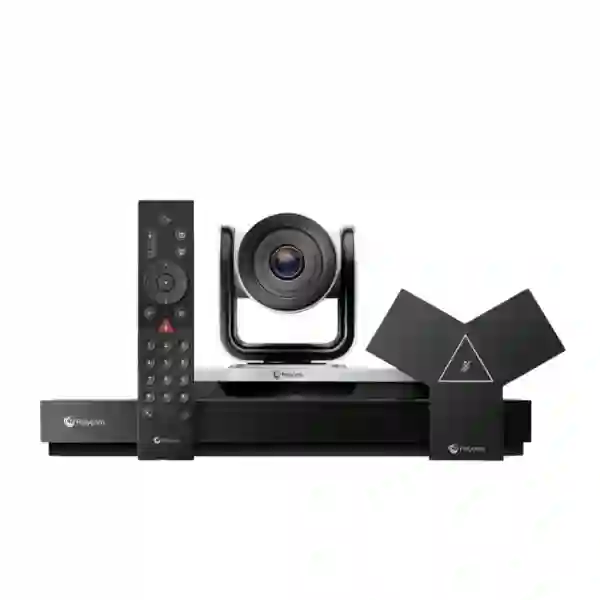
HP Poly G7500 Video Conferencing System
Build a room around how people really meet: choose compatible cameras, microphones, presentation connections and controls for the space instead of forcing every boardroom or training area into the same fixed hardware layout.
For Tanzania procurement, request a configuration-led quote. Confirm the exact kit, accessories, conferencing mode, installation scope and current support status before purchasing.
Quick buying checklist
- Identify the room shape, seating arrangement and regular participants.
- Choose the intended conferencing platform and supported operating mode.
- Specify the camera model, microphone plan, controller and display arrangement.
- Confirm all accessories, cables, mounting hardware and software requirements.
- Validate network performance, power continuity and room acoustics.
- Agree installation, user training, acceptance tests and ongoing support.
At-a-glance technical and buying facts
| Room design | Modular room-video system; camera, microphones and accessories depend on configuration |
|---|---|
| Displays | Supports up to two video displays |
| Content connection | HDMI input in HP’s documented base-unit port specification |
| USB connections | Three USB Type-A and one USB Type-C in the documented base unit |
| Video interfaces | Two HDMI video outputs; HDCI connection; separate HDMI audio output |
| Audio support | Up to three IP microphone arrays in a documented system configuration |
| Network | Gigabit Ethernet; mode-dependent standards-based calling capabilities |
| Platform options | HP lists Teams and Zoom certification and Poly Video/USB modes; verify current support |
| Call video capability | HP lists up to 4K at 15 fps in call for one documented standalone configuration |
| Kit contents | Exact camera, microphone, controller and cable package must be confirmed in the quote |
These are manufacturer-documented system capabilities, not a promise that every kit, peripheral or software mode includes each feature. Confirm the exact configuration before ordering.
From room requirement to working system
1 · Assess
Measure the room and understand real meeting workflows.
2 · Design
Confirm supported cameras, audio, displays and meeting mode.
3 · Install
Prepare cabling, power, networking and secure settings.
4 · Test
Prove speech, video, sharing and joining with real users.
What the HP Poly G7500 solves
The HP Poly G7500 Video Conferencing System is designed for teams that want a permanent, shared meeting-room experience rather than a camera placed on a desk whenever someone schedules a call. It acts as the core of a modular video-conferencing installation, connecting selected room peripherals and supporting collaboration workflows that can be managed by IT. The practical benefit is flexibility: a wide boardroom may need a very different camera position and microphone plan from a training area, yet both can be designed around a dedicated room system. The buying decision should start with meeting behavior, not the codec specification alone. Consider whether participants normally present detailed documents, whether people sit far from the display, and whether the room needs to connect with an existing audio system. These answers influence almost every accessory choice.
A modular system, not an all-in-one bar
A modular design separates the room’s video-processing unit from the camera, microphones, and other AV equipment. That makes it useful where mounting points, furniture, sightlines, architectural finishes, or acoustic conditions prevent a simple video bar from delivering a satisfactory result. The G7500 can be paired with supported Poly cameras and microphone solutions and can form part of a larger integrated design. It is important to distinguish architectural flexibility from unlimited compatibility. Not every USB camera, microphone, amplifier, or controller is supported in every room mode or software release. Before selecting third-party equipment, check the current HP Poly integration information for the actual device and software version. Treat a system diagram and component compatibility review as standard purchasing documents, especially when more than one supplier is involved.
Choose the right room type first
HP Poly positions the G7500 for medium and larger rooms that benefit from custom room video design. A medium conference room may require only a carefully positioned camera, clear table pickup, and one or two displays. A longer executive boardroom may need more deliberate voice coverage, defined seating zones, and cameras that can see participants at both ends of the table. A classroom or divisible meeting space presents a different challenge because people may move while speaking. No published room-size label substitutes for a site survey. Width, depth, ceiling height, reverberation, lighting direction, and the distance between users and screens affect the outcome. The right question is not simply how many seats the room contains; it is whether everyone can be heard clearly and shown naturally while using the actual layout.
Understand what you are ordering
The name G7500 can describe a base video codec or different packaged kits. HP documentation for the standalone G7500 identifies the main unit, AC power adapter, Ethernet cable, and Bluetooth remote control as the box contents for a documented configuration. Cameras, microphone arrays, touch controls, cabling extensions, mounting accessories, and displays may be separate purchases or included with a particular kit. Exact contents differ by part number and region, so the commercial quotation must identify the precise configuration rather than relying on a generic product photograph. When comparing offers, ask for an itemized bill of materials that identifies the unit, camera model, microphone quantity, controller, power and network accessories, licensing assumptions, and installation responsibilities. This prevents an apparently lower codec-only quotation being mistaken for a complete room solution.
Camera selection and image framing
Camera design should begin with the people who need to be visible. A fixed seating layout often calls for a carefully framed field of view, while a training room may benefit from another camera position or more sophisticated framing behavior. HP highlights flexible camera options for the G7500 and describes intelligent framing functions in compatible configurations. Those functions depend on the selected camera and software, so they should not be advertised as features of every package. An HP Poly Studio E70 is one relevant camera option described by HP for G7500 environments, but it is not automatically part of a base-unit purchase. Before choosing, review lens coverage, participant distance, camera mounting height, privacy requirements, cable routes, and the desired image composition during both speaker-led and group conversations. Conducting a sample call from the farthest seats is more informative than a showroom demonstration at close range.
Why camera placement matters
Even an excellent camera produces a poor meeting experience if it is mounted above eye level at an awkward angle or faces bright windows without room-lighting control. Place the lens as naturally as the room permits relative to the screen participants will watch, so remote attendees feel they are being addressed rather than observing the side of a meeting. Consider where the presenter stands, where paper documents may be displayed, and whether participants will turn toward a secondary screen. Glass walls and reflective tables can complicate exposure, while a projection screen can leave faces underlit. A room plan should mark the camera position before cable runs and furniture are finalized. Where meetings involve confidential material, include a practical privacy procedure and confirm which camera functions or shutters are actually provided by the selected model.
Microphone planning for clear speech
Clear audio usually contributes more to meeting quality than an impressive video resolution figure. HP lists support for up to three Poly IP microphone arrays in a documented G7500 configuration, and it describes standard Ethernet-based cabling as part of its modular room approach. Whether one array is enough depends on table length, seating, nearby noise, room reflections, and speaking patterns. A tabletop unit may suit a central meeting table; an approved ceiling solution may be more appropriate where surfaces must remain clear. Microphone coverage should be measured against the whole occupied area, not just the person nearest the codec. Ask for a pickup plan that identifies how quiet speakers will be heard and how noise from air conditioning, corridors, keyboards, and chair movement will be minimized during calls.
Integrated audio and specialist AV rooms
Some rooms already have ceiling speakers, wireless presentation microphones, a lectern, or a dedicated audio digital signal processor. In those settings, the G7500 can be considered as part of an existing or redesigned AV signal chain, subject to supported interfaces and verified third-party compatibility. HP describes use with professional audio-conferencing processors from vendors such as QSC, Shure, and Biamp over USB in supported arrangements. That statement should lead to a specific integration check, not an assumption that every processor model and firmware combination works. Echo cancellation, gain structure, speech reinforcement, and near-end versus far-end audio routing all need a commissioning plan. Decide who owns DSP configuration, who will troubleshoot acoustic problems, and who will maintain configuration backups after updates. A conference room is a connected system, not merely a collection of compatible boxes.
Noise management and a natural conversation
HP Poly identifies NoiseBlockAI and Acoustic Fence among its room-audio technologies. These features can help manage distracting sounds in suitable configurations, but they should be viewed as aids to good room design rather than substitutes for acoustics. A hard-floored room with large glass surfaces can create echo even if the microphones capture speech accurately. Outdoor traffic, HVAC units, and nearby conversation may also remain audible depending on source position and setup. Consider soft furnishings, acoustic panels where appropriate, door seals, microphone placement, and controlled speaker volume. Test speech from ordinary seating positions rather than asking participants to project toward a particular device. Good audio commissioning should include interruptions, simultaneous conversation, and speech from the edges of the room, because real meetings rarely happen in perfectly quiet conditions.
Dual displays and viewing arrangements
HP describes support for up to two video displays on the G7500. Dual screens can make a useful difference in boardrooms where people want to see remote participants while examining a shared spreadsheet, presentation, or design. However, two displays do not automatically make the room better: poorly chosen screen size or positioning can force users to turn away from the camera. Plan screen dimensions against the viewing distance and typical document type. A room that often reviews dense financial tables may have different requirements from one that mainly holds conversational calls. Check the signal path, available inputs on the actual displays, mounting hardware, audio output selection, and how content is arranged in the preferred conferencing platform. A room-control demonstration should show exactly what appears on each screen while starting, joining, sharing, and ending a meeting.
Presentation and content sharing
The G7500 hardware includes an HDMI input for wired presentation in its documented port configuration, and HP describes wired and wireless content-sharing approaches across its G7500 solution. These options are valuable when guests need to present without changing the room’s permanent camera or microphone arrangement. Nevertheless, wireless methods, content applications, and sharing controls can differ by software mode and organizational policy. Before procuring the room, decide how an external visitor will connect, whether corporate laptops have appropriate output adapters, and whether the meeting chair can switch sources without help. Make sure a confidential document cannot be accidentally shown on the room display before a call begins. If spreadsheets, engineering drawings, or small text are common, test actual readability at the farthest seat and on the far-end participant’s screen.
Microsoft Teams meeting rooms
HP lists the G7500 as certified for Microsoft Teams, with a native Teams experience supported in the appropriate configuration. For an organization standardized on Teams, that can provide a more consistent meeting-room workflow than relying on a different employee laptop every day. Certification should not be confused with a promise that every operating-system release, meeting feature, or license entitlement remains available indefinitely. Check the current certified device and software combinations, the intended room-account setup, calendar service, network policy, and Microsoft licensing before placing an order. A useful live test includes scheduled meeting join, ad hoc calling, wired content presentation, remote participant audio, and exit behavior. If a mixed-platform workflow is required, define how staff will handle invitations that are not native to the selected room mode rather than assuming one interface behaves identically across services.
Zoom Rooms meeting experience
HP also identifies Zoom certification for the G7500, and this can suit organizations operating Zoom Rooms in dedicated spaces. The value of a purpose-built room interface is the reduction of repeated setup: users should not need to reconnect a webcam, change speaker settings, or search for audio devices at every meeting. The selected Zoom software version, touch control, licensing, and device-support lifecycle must still be verified as part of procurement. IT teams should confirm that their update policy is compatible with the room’s expected service life and that they have a process for handling certification changes. A room handover should demonstrate scheduled meetings, participant management, content sharing, audio volume, and recovery after a network interruption. If the same room must serve multiple platforms, document the chosen operating mode and its practical limitations before installation.
Standards-based conferencing and interoperability
In Poly Video App mode, HP documents H.323 and SIP conferencing capabilities for the G7500. That can be relevant where organizations communicate with established standards-based video endpoints or conferencing infrastructure. However, network admission, call routing, encryption policy, traversal services, firewall treatment, and supported calling features depend on the wider environment. A standards-based call path is not evidence that every external conference service will connect without testing or additional infrastructure. Before specifying a cross-organization solution, list the actual endpoints and services the room must call, identify who owns dialing plans, and confirm the expected security approach. If the organization is migrating from an older codec, retain a written record of required workflows and make test calls to real partner systems. Interoperability is best validated with the exact destination rather than inferred from protocol names alone.
USB device mode and bring-your-own-meeting options
HP identifies USB Device mode as one of the G7500’s connectivity approaches. In the appropriate arrangement, a connected computer may use a room’s installed conferencing peripherals for a software meeting, helping a host run a different collaboration application without redeploying the room. Implementation details, cabling, supported host devices, and software behavior need to be confirmed against the current G7500 documentation and the selected configuration. Do not assume every laptop, docking station, or meeting service will provide the same audio and camera control. Where staff regularly bring their own computers, make the laptop connection conspicuous and provide clear instructions for choosing the correct microphone, speaker, and camera. Test both Windows and macOS workflows if both are in use, and decide how external guests can connect without compromising enterprise security settings.
Ports and external equipment
A documented G7500 base-unit specification lists an HDMI input, two HDMI video outputs, a separate HDMI audio output, an HDCI connection, three USB Type-A ports, a USB Type-C port, analog audio connections, and RS-232. The hardware also provides Ethernet networking and local LAN interfaces described by HP for room integration. Port presence alone does not prove that a particular peripheral or video format is supported in every operational mode. A practical design document should show what connects to each port, why it is needed, and whether a converter, controller, extension cable, or separate amplifier is required. Match connector types to actual cable lengths and the installed room architecture. Clearly distinguish room-display HDMI cabling from the HDMI content source so that installation staff do not accidentally reverse signal directions during commissioning.
Network planning for dependable meetings
A stable network is as important as the selected camera. HD and higher-resolution video requires sufficient sustained bandwidth, suitable latency, low packet loss, and sensible traffic management. HP lists Gigabit Ethernet connectivity, IPv4 and IPv6 capabilities, dynamic bandwidth allocation, and lost-packet recovery functions for its documented G7500 configurations. Those functions can mitigate some network issues, but they cannot fix a severely congested connection or a failed internet circuit. For a Tanzanian business connecting multiple offices or international meeting participants, evaluate the actual circuit quality at the installation site instead of estimating performance from advertised download speed alone. Ask IT to check firewall policies, name resolution, time synchronization, authentication, and platform-specific endpoints. Prefer an installation plan that provides controlled network access and an agreed process for diagnosing packet loss, dropped calls, or poor remote audio.
Power continuity and operating environment
Power design deserves attention when the meeting room supports board decisions, teaching, or externally scheduled sessions. The G7500 uses an external power supply in a documented configuration, while displays, microphones, network equipment, and an audio processor may have separate power needs. A backup arrangement should consider the complete signal chain: a codec operating on backup power is of limited value if the display, access switch, or internet connection has shut down. Select any power-conditioning or backup components according to local electrical engineering advice and the actual equipment load. HP lists a 0 to 40 degree Celsius operating temperature range for a documented G7500 model, so cabinet ventilation and heat buildup are practical checks. Do not enclose electronics in an unventilated cupboard or assume ordinary room air conditioning also provides adequate airflow inside a rack.
Security and organizational policy
A shared video room often has access to calendars, meeting invitations, management interfaces, and enterprise networks. HP documents administrative authentication, encryption options, certificates, and security settings across its G7500 capabilities. Those controls should be implemented as part of an organization-wide security design rather than accepted as a guarantee of security out of the box. Agree which staff may administer the unit, how credentials are stored, how room accounts are provisioned, and how software updates are approved. Assess guest presentation access and network segmentation as well as participant privacy. For confidential board meetings, write down the rules for room scheduling, local media handling, and who can physically access controllers or cabling. Security reviews should also consider the selected conferencing platform, because cloud-service settings and the codec’s local configuration address different portions of the overall risk.
Device administration with HP Poly Lens
HP promotes Poly Lens software for insight, device administration, configuration, and software management across supported Poly installations. For a single meeting room, centralized administration can make it easier to understand device health and coordinate software changes. For several offices, the operational value becomes greater when the team uses consistent naming, asset records, change windows, and incident procedures. Management capability still depends on device enrollment, platform configuration, network access, and the applicable administrative service. Do not assume a cloud dashboard replaces local troubleshooting or that all peripherals report the same details. Assign clear responsibility for firmware reviews, configuration backups, certificate changes, user training, and responding to support calls. Document the deployed video mode because support staff need to know which meeting service the room is configured to run before recommending a change.
Furniture, cabling and installation quality
A successful installation should feel simple to users even when the wiring behind the displays is complex. Plan where the codec will sit, how heat can escape, which cables require service loops, and how equipment will be reached for maintenance. Mark microphone positions before drilling, and keep presentation cables easy for visitors to locate. In a formal boardroom, concealed cabling can make the room look polished, but accessibility must not be sacrificed. Record cable labels, equipment addresses where appropriate, controller associations, and the installed software version at handover. If a touch controller is included, its location should be convenient without occupying valuable writing space. A well-designed room also considers safe cable routing, speaker direction, user sightlines, and who can reset the system during a meeting. These small choices often determine whether staff trust the equipment.
Boardrooms and executive meeting spaces
Executive rooms frequently combine participants seated at long tables, private discussions, presentations, and remote decision-makers. In such a room, audio coverage should be even across all positions, not strongest only at the chairperson’s end. The camera plan should avoid repeatedly presenting an empty wide shot if speakers are far apart, while the display plan should allow people to see confidential documents clearly. A modular G7500 design may be appropriate where existing AV components need to be incorporated or where the room’s shape calls for a more flexible layout. Decide whether the usual meeting is a small executive discussion or a full-table session, because the optimal microphone and camera arrangement may differ. A commissioning test should use actual seating, speaking volumes, and presentation material; a five-minute test with two people standing near the display can hide significant deficiencies.
Training rooms, lecture spaces and hybrid learning
A teaching or training space may have an instructor who walks between a lectern, screen, and whiteboard while participants sit farther from the camera than in an ordinary meeting room. A G7500-based room can be designed with appropriate supported camera and audio peripherals to address these distinct needs. The critical detail is how the far end hears the instructor and how remote learners see instructional material. Decide whether voice pickup is needed from the audience, whether a presenter microphone is required, and whether the instructor can control content without returning to the codec. Test writing on a board, movement across the teaching area, and questions from the back row. If a room is partitioned into smaller spaces, the AV design may need special consideration for independent audio zones and display routing. These requirements should be resolved before hardware is specified.
Multi-office meetings and distributed teams
Organizations coordinating meetings between branches often want predictable room behavior across multiple sites. A shared G7500 platform can be considered for spaces that need modular AV design, but identical hardware will not guarantee identical user experience. Rooms may have different furniture layouts, acoustic conditions, lighting, and network circuits. Create a common operational standard that describes how calls are initiated, which meeting platform is used, how content is shared, and where assistance is requested. Then adapt the camera and microphone plan to each room instead of forcing a single fixed bundle everywhere. If video calls are important across multiple Tanzanian locations, assess link quality separately at each installation and clarify whether the organization has backup connectivity arrangements. Standardized documentation, naming, and support procedures help IT teams manage a deployment even when peripheral combinations are not identical.
Selecting an operating mode before purchase
One of the most important G7500 buying decisions is the intended software and meeting workflow. A room optimized for native Microsoft Teams use may be administered and operated differently from a native Zoom room or a standards-based Poly Video App deployment. USB-connected host meetings add another workflow. Features, supported accessories, update paths, licensing, and the best control experience can vary among these modes. List the three meeting scenarios that occur most often and at least two less-common cases that are business-critical. Ask the supplier to map each scenario to the specific operating mode, peripheral set, and user steps. This is particularly important when external partners use a different meeting service. A demonstration should show the actual join process and content-sharing behavior rather than simply stating that the system supports a named platform.
G7500 versus an all-in-one video bar
A compact all-in-one bar can be a strong choice for smaller, straightforward rooms where the camera, speakers, and microphones can all sit in one convenient location. A modular G7500 room is more appropriate when the space benefits from custom microphone placement, a separate camera choice, dual displays, or professional AV integration. The tradeoff is that a modular room generally involves more components, design decisions, cabling, and commissioning effort. A bar may be easier to move and simpler to install, while a purpose-designed modular solution can better suit challenging architecture and established meeting-room infrastructure. Do not choose the G7500 simply because it sounds more powerful. Compare the completed system against the specific room, including the number of microphones, controller needs, lifecycle support, actual user workflows, and maintenance responsibilities.
Compare the G7500 with newer modular options
HP also markets other modular conferencing solutions, including the Poly Studio G62. A comparison should not assume either product is automatically the right upgrade or replacement. Instead, evaluate the required conferencing platforms, the organization’s existing peripherals, room-management preferences, physical connections, certified software lifecycle, and the practical needs of the installation. If a company already has compatible Poly room equipment, reusing an asset may appear attractive, but support status and integration requirements still need checking. For a new-build meeting room intended to operate over several years, ask for current manufacturer guidance on product availability, certification, supported software releases, and the implications of future updates. Those factors may matter as much as the initial hardware cost. A quotation should therefore explain why the proposed platform is the most suitable choice today and identify any lifecycle assumptions that could change.
A realistic total-cost assessment
Comparing only the codec price can distort the overall decision. A functioning video room may need a suitable camera, microphones, touch control, display mounting, cable extensions, speaker or DSP equipment, network adjustments, and professional configuration. Project costs can also include room acoustic work, electrical provision, licensed collaboration services, training, maintenance, and replacement planning. Ask that each element be shown separately, with the expected scope of installation and testing made explicit. If two quotes differ substantially, investigate whether one includes the camera and audio hardware while the other prices only the codec. For organizations procuring in Tanzania, locally applicable pricing, taxes, shipping arrangements, and warranty terms should be confirmed from a specific seller’s written offer rather than estimated from an overseas listing. This supports an informed decision without misleading claims about local availability.
A practical pre-order room survey
Before approving equipment, collect the room dimensions, a simple floor plan, photographs of the display wall, planned seating, and ceiling details that may affect microphone placement. Record the typical and maximum number of active participants, the usual meeting applications, and whether guest laptops frequently present content. Identify existing display models, amplifier or DSP equipment, network-switch locations, and whether corporate IT allows the necessary services. Include lighting conditions at the time meetings usually happen and sources of background noise. A room survey should also ask who schedules calls, who starts them, and what people expect to happen when a visitor brings a different conferencing platform. This checklist is valuable because it turns a broad technology request into a configuration that can be measured, quoted, and commissioned with fewer surprises.
The equipment checklist to request with a quote
A good proposal should name the exact G7500 configuration and clearly indicate whether the offer is for a standalone base unit or a complete kit. It should identify the camera, microphone type and quantity, any touch controller, displays if included, audio processor if required, room cabling, and mounting accessories. It should also document which conferencing mode is planned, what licenses or subscriptions the buyer must supply, and the party responsible for software setup. Ask whether the supplier has included installation, commissioning, handover, and user training or intends to deliver equipment only. Where warranty or support terms are offered, request the written terms relevant to the precise part number and location. Avoid relying on photographs, informal model descriptions, or generic manufacturer marketing to determine the contents of the quotation.
Installation and commissioning sequence
A disciplined deployment generally begins with agreed room requirements and a final wiring diagram. The equipment is then installed, network settings configured by authorized IT staff, peripherals associated and tested, and the selected meeting mode commissioned. After that, evaluate real conferencing scenarios rather than accepting a system just because the home screen appears. Verify camera framing from near and far seats, check pickup from every speaking area, confirm presentation input and display behavior, and assess echo or noise with a remote participant. Test the normal booking or join flow and confirm that users can adjust volume and end calls without assistance. Record the configuration and provide basic instructions at the controller. This sequence helps catch practical problems before a high-stakes meeting becomes the first meaningful system test.
Acceptance testing that reflects real meetings
An acceptance test should specify measurable room behaviors. Can every participant speak at a conversational volume and be understood by someone joining remotely? Can a presenter display a detailed slide deck without unwanted clipping or illegible small text? Can people view remote attendees while also following shared content? Does the system recover sensibly from temporary network disruption, and is the expected join workflow understandable to someone unfamiliar with the room? Test with the selected conferencing platforms, not a substitute. Include at least one user who was not involved in installation, because installers often know shortcuts ordinary staff do not. Record issues, owners, and fixes before the final sign-off. A documented handover is especially valuable when the organization expects another IT team to support the room later.
Training meeting organizers and local support staff
A technically excellent room can still be underused if people find the controls intimidating. Provide a short, room-specific guide that covers turning on the displays, joining a scheduled meeting, presenting from a laptop, adjusting sound, switching an input if needed, and ending the session. Place the instructions where users can find them without navigating an intranet during a call. For IT support, create a different document showing the equipment inventory, current software mode, network requirements, management access procedure, and escalation path. Avoid embedding passwords in printed guides. Identify which problems are appropriate for an organizer to resolve and which require a trained administrator. A small amount of training can prevent recurring incidents such as muted microphones, incorrect presentation sources, and meetings launched through the wrong platform.
Ongoing software and compatibility planning
Room systems need maintenance over their working life. Firmware releases can address reliability and security issues, while conferencing-platform vendors can change supported versions, certification requirements, or user interfaces. HP maintains Poly VideoOS release information and device guidance that administrators should check against their own configuration. Plan updates through a controlled process: review release notes, verify the intended video mode, schedule a maintenance window, preserve configuration records, and test key meeting workflows after changes. Do not claim a particular future support period without current documentation for the exact device and service. If a platform has a defined certification lifecycle, incorporate that into the procurement decision before treating a low initial price as long-term value. Room availability depends on operational ownership as much as hardware quality.
When a G7500 deployment may not be the best fit
The system may be more elaborate than necessary for a small meeting room that needs only simple calls, one screen, and no specialized AV equipment. It may also be a poor match when the organization needs a specific software feature or accessory arrangement that is not currently supported in the chosen mode. An installation without dependable network access or clear IT ownership can struggle regardless of codec capability. Where a meeting room will be moved frequently, integrated permanent cabling may offer less value than a simpler portable solution. In those cases, investigate an appropriately sized video bar or another current room platform. Good purchasing advice includes knowing when not to over-specify. The most suitable solution is the one that reliably handles actual meetings with the least unnecessary complexity.
Tanzania procurement and deployment considerations
For an organization deploying a new conferencing room in Tanzania, operational planning should include the reliability of the site’s internet circuit, the power arrangements for all room equipment, service access for IT staff, and the ability to obtain the exact compatible peripherals specified. Local procurement should not be based on assumed stock, delivery times, or pricing. Request a written quote that identifies equipment configurations and any supplier responsibilities. If a room is part of a larger public-sector, education, or enterprise network, confirm internal procurement rules, information-security expectations, and the meeting platforms approved by the organization. International meeting schedules make reliability especially important, so it is sensible to establish escalation contacts and fallback meeting procedures. These are planning considerations, not claims that any specific vendor provides nationwide installation or guaranteed connectivity.
What to include in a configuration-led request
A useful first enquiry can be concise but specific: provide the room dimensions, a photograph or floor plan, seating capacity, intended conferencing applications, and whether the project is a new installation or an upgrade. Mention any existing screens, amplifiers, cameras, or microphones that might need integration. State whether participants will present from their laptops and whether one or two displays are wanted. Indicate if the room is used mainly for board meetings, staff collaboration, training, or hybrid classrooms, because that affects microphone and framing decisions. Ask for the exact G7500 model or kit, a detailed accessory list, clearly stated software assumptions, and a commissioning scope. This enables meaningful technical comparison between offers and reduces the chance of receiving a quote for equipment that cannot deliver the intended room experience.
Making a future-ready buying decision
Future readiness is less about choosing the largest available specification and more about reducing avoidable incompatibilities. Start with a room design that can be documented, supported, and adapted if meeting workflows change. Prefer known supported peripherals and avoid relying on undocumented adapters for essential functions. Agree how the organization will evaluate software updates and who will check certification status over time. Keep records of camera positions, microphone zones, cable labels, controller configuration, and room service dependencies so a later maintenance team can understand the installation. Ask which parts of the design are reusable if the core room system changes in the future. This approach does not guarantee an upgrade path, but it creates a better basis for lifecycle planning than a purchase driven only by a single headline feature.
How to evaluate success after deployment
Once the system is operational, gather feedback from meeting organizers and remote participants. Problems may be practical rather than technical: people may not know which input to choose, a camera may show the whole room when a presenter needs close framing, or quiet voices may be missed at one end of a long table. Review typical incidents rather than treating every complaint as a reason to replace hardware. A short observation period can reveal whether the installation meets the original requirements for clarity, usability, and reliability. IT can track recurring interruptions, failed joins, software-update effects, and requests for assistance without storing confidential meeting content. Use findings to refine instructions, configuration, acoustic treatment, or peripheral placement. The objective is a meeting environment that employees can operate confidently, not simply a box that passes an initial connectivity test.
Troubleshooting priorities for administrators
When a video room develops a problem, first separate the symptoms. No picture may relate to the camera, display input, codec configuration, or physical cable. Poor sound may involve microphone positioning, gain settings, audio processing, loudspeaker routing, or the remote participant’s setup. A failure to join a meeting may be due to the selected room mode, account permissions, platform licensing, software version, or network policy. Intermittent video can indicate a network issue rather than a camera fault. Record the exact time, service, meeting mode, and visible error, then follow the organization’s authorized diagnostic procedure. Avoid making unplanned firmware changes immediately before an important event. A repeatable troubleshooting method and reliable configuration record make the room easier to support and help distinguish accessory issues from service-provider problems.
Frequently asked questions about the HP Poly G7500
Is the HP Poly G7500 a complete video conferencing kit?
Not necessarily. The G7500 name is used for the central system and for different bundled arrangements. A documented standalone configuration does not automatically include a camera, microphone arrays, touch controller, displays, or every cable a project requires. Ask the seller for the exact part number and itemized contents. If the purpose is to equip a room from scratch, request a complete design rather than a codec-only price. That will help you compare quotes fairly and confirm the room is ready for its intended meetings after installation.
Which room sizes suit the G7500?
HP positions it for medium and larger rooms and custom meeting spaces, including boardrooms and training environments. There is no single participant count that guarantees good results. Long tables, reflective finishes, background noise, ceiling height, and camera distance have substantial effects on the installed system. Choose the microphone and camera arrangement based on a room survey and actual seating patterns. The aim is for participants in every normal position to be seen and heard naturally, even when they speak quietly or share content.
Does the G7500 work with Microsoft Teams?
HP identifies Microsoft Teams certification for the G7500 in appropriate configurations. Before ordering, verify the current supported software version, licensing, meeting account, controller, and peripheral combination for the planned Teams deployment. Certification is a product-platform fact, not a promise that all future Teams features or versions will remain available. Ask for a practical demonstration of joining scheduled calls, sharing a laptop screen, adjusting audio, and recovering from a failed connection. Document any requirements for external invitations or mixed-platform meetings.
Can a G7500 room use Zoom Rooms?
HP also identifies Zoom certification for supported G7500 configurations. A native Zoom Rooms workflow can be useful for dedicated meeting spaces, but it needs the correct software environment, room licensing, peripherals, and device-management process. Check the current manufacturer and platform requirements before treating an older installed version as evidence of future support. During commissioning, test the exact meeting-room functions staff will use, including scheduled join, content sharing, local volume, and ending a call. Confirm the lifecycle policy for the proposed device and software arrangement.
Can the room use two displays?
HP documents support for up to two displays. This can allow an installation to separate video participants from presentation content, depending on the actual mode and setup. The practical result also depends on the displays, cabling, layout, and selected meeting application. Before purchasing, decide how staff expect content and people to appear, then make that behavior part of a demonstration. A second screen adds value only when it is positioned for comfortable viewing and does not compromise camera sightlines or room usability.
Does the G7500 support 4K video?
HP publishes 4K-related specifications for the G7500, but actual in-call resolution and frame rate depend on the selected camera, software mode, bandwidth, and other configuration factors. For a documented standalone model HP specifies up to 4K resolution at 15 frames per second in a call. Do not interpret the term 4K as a guarantee of 4K output on every platform and meeting. If high-resolution content or far-end image quality is a priority, verify the complete signal path with the proposed camera and realistic connection conditions.
How many microphones can be connected?
HP lists support for up to three IP microphone arrays for a documented G7500 system. The required quantity for a particular room is a design question rather than a simple maximum count. A smaller conference room may need a different solution from a long boardroom or classroom, and a professional DSP design may have other integration requirements. Check the approved microphone models, room mode, cabling, power arrangements, and physical coverage. Have the installed audio checked from each normal speaking position before accepting the room.
Can we use an existing professional audio processor?
Possibly. HP describes supported professional audio-conferencing processors in G7500 solutions, including arrangements involving QSC, Shure, and Biamp devices. That does not mean every product version, firmware level, or USB routing setup is automatically compatible. Provide the integrator with the exact audio-processor model and details of the installed microphone and speaker system. Confirm supported interfaces and audio processing responsibilities before procurement. Integration should include echo control, voice gain, volume behavior, and far-end audio testing, not just a successful physical connection.
Will a guest be able to share a laptop presentation?
The documented G7500 hardware includes an HDMI input, and HP describes wired and wireless content-sharing capabilities in the broader solution. The workflow available to a guest depends on room configuration, software mode, and enterprise access rules. A sensible design provides an obvious connection point and clear user instructions, including adapters for laptops that need them. Test a real presentation from a guest device, and establish whether local sharing also sends material to remote attendees. Avoid assuming that every wireless-sharing method works identically across conferencing applications.
Is an internet connection always needed?
An internet connection is generally required for cloud-hosted video-meeting services, while standards-based or local calling arrangements may have different infrastructure requirements. The precise answer depends on the meeting platform and network architecture. Regardless of the service, the room still needs appropriate local connectivity between the codec and its connected devices. For sites where important meetings cannot be interrupted, review circuit quality, network configuration, and the organization’s fallback procedure. A backup power supply for the codec will not help if a separate network device has lost power.
Can the G7500 be centrally managed?
HP describes Poly Lens device management capabilities for supported Poly equipment. The specific features available depend on the deployment, software, network access, and administrative setup. IT teams can plan to use centralized device information as part of broader asset management and firmware processes, while retaining room documentation and on-site support arrangements. Before a multi-room rollout, define naming conventions, approval of software updates, account ownership, and troubleshooting responsibilities. A managed device still needs a verified configuration and an owner who can respond when a meeting fails.
What information should be supplied for a quote?
Send the room dimensions, seating layout, intended meeting platform, existing displays and sound equipment, preferred camera position, and whether guest laptop sharing is required. State whether the request is for the G7500 base unit only or for a ready-to-use room with camera, microphones, controller, and installation. If possible, include photographs of the room. Ask the supplier to identify model or kit numbers, every included component, current support and certification assumptions, and the scope of commissioning. That level of detail supports an accurate technical comparison without relying on an unverified online price.
Does the G7500 require an IT team?
A dedicated room system can be easy for everyday participants to operate, but installation and maintenance benefit from competent IT or AV support. The device may require account provisioning, network policy changes, peripheral configuration, security settings, software updates, and troubleshooting. A small organization can arrange those responsibilities through an appropriately qualified service provider rather than a permanent internal team. Whoever supports the room should have access to its diagrams, authorized configuration records, and a tested recovery process. User simplicity depends on a well-supported setup behind the scenes.
Is the G7500 suitable for a new room project in Tanzania?
It may be suitable when the room genuinely benefits from modular cameras, microphones, control, and AV integration. The decision should account for the current product and platform lifecycle, availability of the chosen configuration, room acoustics, reliable internet access, and maintainability. Ask for exact local commercial terms in writing; do not assume stock, installation coverage, price, warranty, or delivery timing from a manufacturer description. Compare the complete G7500 solution with current alternatives before committing to the design. A room survey and a detailed equipment proposal are more useful than a generic model recommendation.
Request a configuration-led G7500 quotation
Describe your room size, meeting platform, seating plan and existing AV equipment. Ask for an itemized proposal covering the G7500 configuration, supported camera and microphones, room controls, installation responsibilities and acceptance testing.
Contact FourTeck Tanzania through its established enquiry channel for a quotation. Exact local pricing, availability, delivery arrangements and support terms require confirmation; no unverified stock or warranty claim is implied here.




Reviews
There are no reviews yet.