
Microsoft Teams Rooms on Windows · Modular Base Kit
HP Poly Studio Base Kit G9 Plus for Microsoft Teams Rooms
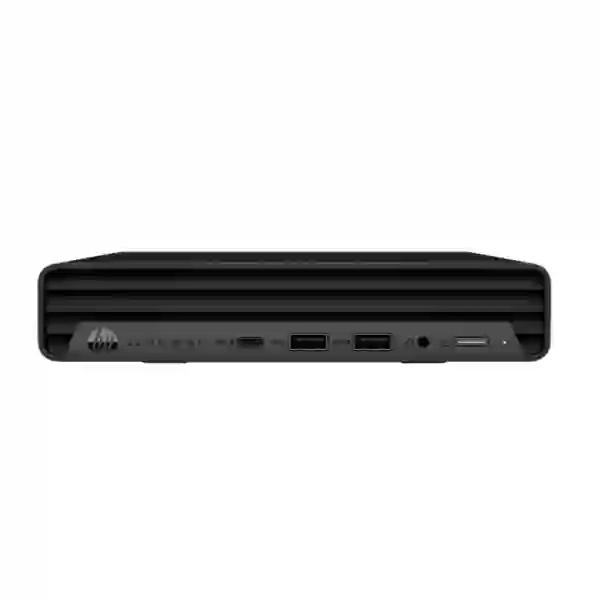
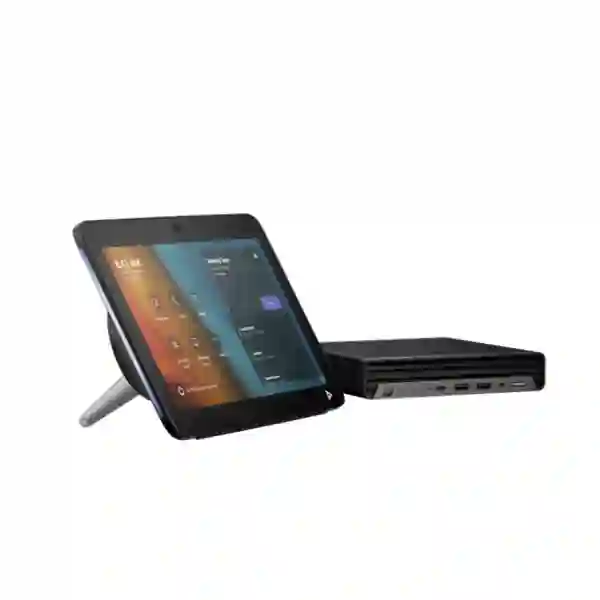
Build a dedicated Microsoft Teams meeting room with the HP Poly Studio Base Kit G9 Plus. This modular compute-and-control bundle pairs an HP Mini IP Conferencing PC with the Poly TC10 touch controller, giving teams a consistent room interface while letting planners choose the camera and audio system that suits their space. It is an effective starting point for a properly designed Microsoft Teams Rooms on Windows installation, not a complete audiovisual package. For Tanzanian buyers, the crucial next step is to confirm compatible room peripherals, Teams Rooms licensing, network readiness, exact bundle contents, and current part-number availability in one clear quotation.
At a glance: what you are specifying
Included core equipment
HP Mini IP Conferencing PC and Poly TC10 touch controller
Conferencing platform
Microsoft Teams Rooms on Windows; room account and licence required
Room flexibility
Select suitable supported camera and audio for small, medium or large spaces
Buying decision
Confirm current model availability and complete room scope in writing
Verified product facts
| Product | HP Poly Studio Base Kit G9 Plus for Microsoft Teams Rooms |
|---|---|
| Manufacturer product family code | A3LU8AA (confirm exact country variant on quotation) |
| Core hardware | HP Mini IP Conferencing PC (G9) and Poly TC10 |
| Processor family | 13th Generation Intel Core i7 |
| Memory | 16 GB RAM for G9 Plus configuration |
| Internal storage | 256 GB PCIe NVMe M.2 SSD |
| Integrated graphics | Intel UHD Graphics 770 |
| Controller | Poly TC10 10.1-inch touch interface |
| Controller power | Power over Ethernet; HP documented PC-to-controller link |
| Compute unit size | 177 × 175 × 34 mm |
| TC10 size | 260 × 184 × 64 mm |
| Room software | Microsoft Teams Rooms on Windows |
| Management ecosystem | HP Poly Lens and supported Microsoft management options |
| Not standard base-kit items | Camera, room audio, displays, dedicated room licence |
Specifications reflect HP’s G9 Plus product information. Exact regional kit contents, current orderability and local commercial terms require quote-level verification.
What the G9 Plus base kit actually does
The Poly Studio Base Kit G9 Plus for Microsoft Teams Rooms is the control and computing foundation of a dedicated meeting room, rather than a complete camera-and-speaker package. It brings together the HP Mini IP Conferencing PC and a Poly TC10 touch controller so a business can build a purpose-designed Teams room around the physical space. Users interact with the familiar room console while the compact PC runs the Microsoft Teams Rooms on Windows experience. That separation is useful when a meeting table, room shape, seating plan, or audio requirement makes a fixed all-in-one system less suitable.
For a buyer in Tanzania, the central purchasing question is not simply whether the computer is fast or the screen looks attractive. It is whether the proposed room configuration has everything required to start and sustain reliable meetings. The base kit supplies compute and control; the complete working room also needs appropriately selected video, sound, display connectivity, network access, room account, and Microsoft Teams Rooms licence. Plan those components together before ordering. Ask for a configuration quotation that names the room peripherals, not just a price for the base kit.
Key components included in the bundle
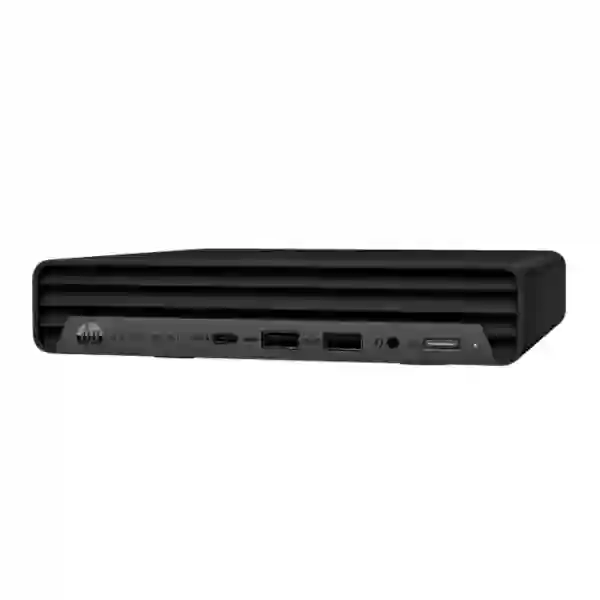
The principal hardware elements are an HP Mini IP Conferencing PC with Microsoft Teams Rooms software and a Poly TC10 IP touch controller. HP’s model-specific bundle specification also lists an Ethernet cable, setup sheet, warranty card, AC power adapter and power cable, HP DisplayPort-to-HDMI True 4K adapter, desktop mini port cover, and VESA sleeve with power-supply holder. This is valuable because the installation accessories can simplify positioning the PC behind or near a meeting-room screen, subject to available space, ventilation, and the mounting plan.
The accessories are not a substitute for a room design. The included Ethernet cable supports the controller connection, but a particular table location may require a longer structured cabling run or additional network design. The supplied display adapter may suit one screen path, while another room may need different approved cables or adapters. Confirm the precise country-specific supply contents in the quotation, since bundled plugs and product variants can differ. The user-facing benefit is a coordinated starting point, not a promise that every possible room attachment arrives in the carton.
What must be supplied separately
The camera, microphone and speaker solution, room displays, appropriate display cabling, and network services should be treated as separate design decisions unless an individual quotation explicitly bundles them. HP describes this model as a base kit and shows it paired with different Poly video bars and conferencing cameras depending on room size. The distinction matters: adding a high-quality camera without an adequate microphone pickup plan can still result in a poor remote experience. Equally, a good speakerphone cannot compensate for a camera placed too far from the people speaking.
Also budget for meeting-room licensing, a Teams room resource account, any necessary mounting work, power continuity, and the installation and testing effort. Depending on the room, the project may require a compatible digital signal processor, extension microphones, switching equipment, or acoustic treatment. These are possibilities to evaluate, not accessories represented as included. Before approving a bill of materials, request a written included-versus-excluded schedule, verify the desired seating capacity, and identify who will be responsible for maintaining each component once users begin booking the room.
HP Mini IP Conferencing PC performance
HP’s technical information identifies a 13th-generation Intel Core i7 conferencing PC, with 16 GB of memory in the G9 Plus configuration, supporting the Windows-based Microsoft Teams Rooms application. HP also lists 256 GB PCIe NVMe M.2 internal storage and Intel UHD Graphics 770 for the A3LU8AA product family. These are purpose-selected room-computing resources. The system is meant to run a managed conferencing experience connected to supported peripherals, rather than serve as a general office desktop for changing individual users.
The mini form factor makes it practical to place the compute unit unobtrusively behind a screen or inside an appropriate AV area, but discreet installation still needs accessible cabling, ventilation, and a service path for the IT team. HP gives the conferencing PC dimensions as approximately 177 by 175 by 34 millimetres, with a listed weight of 1.42 kilograms. Do not interpret hardware specifications as a guarantee of a particular meeting quality: actual results also depend on the selected camera, audio devices, room acoustics, network performance, software versions, and how the system is configured.
Poly TC10: the in-room meeting console
The included Poly TC10 is a 10.1-inch touch controller for operating the Microsoft Teams Rooms interface. It offers a dedicated control point so participants do not have to connect a personal laptop merely to start a scheduled meeting. In a correctly provisioned Teams room, users can access meeting controls from the console and manage the session without exposing the computing PC as a shared workstation. Its role is especially clear in busy conference rooms where visitors and employees need a consistent, recognizable way to join.
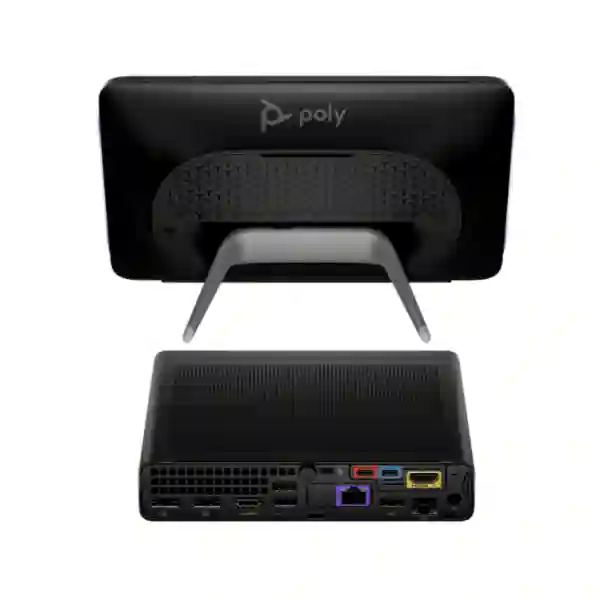
The TC10 connects over Ethernet and receives power through a Power over Ethernet arrangement. HP’s guide describes a direct link from the conferencing PC to the controller that supplies power and link-local network connectivity. HP also documents configurations using multiple TC10 controllers, with additional network and PoE equipment as required. More controllers are not automatically a benefit: decide their locations based on seating zones, table length, and accessibility. For a standard room, one well-positioned and clearly labelled controller may be the more sensible and easier-to-manage arrangement.
Why a dedicated Teams room differs from laptop conferencing
An ordinary laptop meeting depends on an attendee bringing the right device, finding a cable, choosing an audio device, and keeping notifications or personal content under control. A dedicated room system uses a shared room account and purpose-installed devices, giving the organization a consistent conferencing endpoint. The G9 Plus is intended for this latter pattern. It can reduce repeated setup decisions when the room’s camera, microphones, displays, and controller have been commissioned and the staff know the meeting procedure.
That does not mean every organization requires a dedicated room. An occasionally used space with very limited resources may be better served by a simpler USB video bar and bring-your-own-device approach. A frequently booked space, a client-facing boardroom, or a training room used by many teams has a stronger case for standardized compute and console controls. Evaluate meeting frequency, IT ownership, Teams adoption, guest-joining requirements, and audiovisual complexity before choosing. The best room design is one people can reliably operate, not merely one with the longest specification sheet.
Room sizing and camera selection
HP positions the same G9 Plus base kit as a foundation for different sizes of meeting rooms, with the camera and audio selected around the intended environment. Its room-solution guidance shows examples using the Poly Studio V12 in smaller rooms, V52 in medium spaces, and V72 or suitable E-series cameras in larger spaces. These are configuration examples, not an assurance that every accessory is stocked locally or supported with every software release. Compatibility and certification should be confirmed for the exact proposed firmware and Teams Rooms build.
Start with the farthest seated participant, how often people stand at a whiteboard, and where the camera can be mounted without backlighting. Wide-angle framing can help around a small table, whereas longer rooms may need different optical reach or tracking behavior. The camera’s stated image resolution alone is not a room-design criterion. View angle, microphone placement, loudspeaker coverage, people movement, lighting, and the display position determine whether distant participants can see and hear everyone. Compare the whole configuration against a room drawing before confirming the purchase.
Small meeting rooms and compact collaboration spaces
In a smaller meeting room, the PC and TC10 can anchor a straightforward setup using a suitable USB video bar for both image and sound. HP’s example ecosystem includes the Poly Studio V12 for small spaces, but the particular supported combination must be checked at the time of procurement. The operational objective is clarity: a seated group should be visible without a distorted view, the audio should capture normal speech, and the controller should be within comfortable reach without dominating the table.
Remember that a small physical room can still be challenging. Reflective glass walls, a noisy air conditioner, or a large screen mounted above eye level may matter more than the number of seats. Plan cable routes early and place the touch controller where users naturally gather. Test camera framing with the actual furniture arrangement, not an empty room. If staff frequently share content from laptops, confirm the intended HDMI ingest workflow and required adapters. A modest room with clean integration usually feels more professional than a complex installation people struggle to use.
Medium conference rooms and hybrid team meetings
Medium rooms typically bring a more complicated mix of seating positions, display viewing angles, and audio pickup distances. HP illustrates the G9 Plus working with its Poly Studio V52 video bar for such spaces. A project team should examine the proposed camera’s framing coverage, onboard audio capabilities, optional microphone requirements, and the room’s acoustics. If the meeting table is long or a side wall is the only practical camera position, test the design against where speakers actually sit rather than relying on a generic room-size label.
Hybrid meetings also require attention to the people joining remotely. Screens should show remote participants at useful size; local voices should reach them evenly; and presentation content must remain legible. A dual-display strategy may be appropriate in some rooms, provided the exact PC, Teams Rooms experience, cabling, and display configuration support it. Decide whether users primarily hold conversational meetings, present dashboards, teach, or collaborate on visual materials. Those patterns influence microphone coverage and screen position. The base kit supports the room platform, but the quality of the whole experience comes from considered component choices.
Large boardrooms and complex audiovisual rooms
For larger rooms, HP’s illustrated ecosystem includes Poly Studio V72 or compatible E-series cameras with suitable audio solutions. The E-series approach is particularly relevant where camera placement and sound pickup need separate treatment, while a video-bar approach may suit other layouts. In complex rooms the base kit may be one component of a wider audiovisual system that includes a mixer or digital signal processor, multiple microphones, distributed speakers, and carefully designed camera positions. An integrator should verify device compatibility and the exact supported signal path.
Do not assume an oversized room is solved by adding a second controller or choosing the camera with the highest pixel count. Boardroom tables create variable microphone distances; people speaking from the back may need targeted pickup; and architectural materials can create echo. Plan the cable paths, equipment enclosure, service accessibility, video display sightlines, and any environmental controls before finishing the room. Where multiple TC10 consoles are proposed, confirm PoE switching, firmware, and supported topology. Conduct a realistic test with people occupying the far and near seats before accepting the system.
Microsoft Teams Rooms licensing and accounts
The G9 Plus comes with Microsoft Teams Rooms software, but a business still needs a suitable Microsoft Teams Rooms licence and resource account to deploy a shared room. Microsoft currently identifies Teams Rooms Basic and Teams Rooms Pro as the relevant licensing choices, subject to its published entitlement and feature rules. A conventional individual Microsoft 365 user licence should not be assumed sufficient for a shared Teams Rooms device. Each room needs its own correctly configured identity and licensing assignment. Confirm licence eligibility and purchasing route before installation day.
Teams Rooms Basic can cover common conferencing needs in eligible environments, while Teams Rooms Pro adds broader management and other capabilities described by Microsoft. The right tier depends on organization size, administration needs, security approach, and the services actually required. Since licensing terms and service availability can change, request confirmation for the tenant rather than relying on an old quotation. Build a proper room resource account, test invitation and calendar booking behavior, and establish who owns sign-in recovery. Neither a preinstalled Teams Rooms application nor a valid desktop Teams subscription alone completes this step.
Ports, display paths and local presentation input
The HP Mini IP Conferencing PC is designed with conferencing connections rather than a single generic consumer video output. HP’s solution guide documents a dedicated PoE controller port, USB connections for room peripherals, display connections, and an HDMI ingest path for presenting content from a connected laptop. It also documents USB-C and DisplayPort-related connection options. The exact required adapters and cable type should follow the approved device guide and the project drawing; a connector’s physical fit does not prove that every audio, touch, or video feature is supported.
Before installation, write down which ports are assigned to the camera, audio system, primary and secondary displays, and laptop presentation cable. Confirm cable length limits, which display is the primary Teams Rooms screen, and how the local presenter will reach the ingest point. Do not permanently hide every port behind an inaccessible display; future troubleshooting and room changes may require access. If a touch-enabled interactive whiteboard is planned, follow HP’s documented configuration requirements rather than assuming any USB-C display will automatically perform all expected whiteboarding functions.
Content sharing without distracting from the meeting
Teams Rooms is intended to support a conversation in which local and remote participants can follow the same material. The G9 Plus hardware provides a documented HDMI ingest connection that can be used for appropriate in-room laptop content sharing. The meeting’s experience also depends on the configured Teams Rooms software, display arrangement, and organizational settings. A buyer should confirm what happens when a guest connects a laptop, whether the presentation is shown to the room and remote callers as expected, and how users stop sharing when finished.
Treat content sharing as a workflow to rehearse, not a bullet point on a product card. Test common laptop types, the intended video adapter, typical slides, and the most important application screens. Check that the presentation is readable from the back seat and that the remote audience can see the material without losing the speaker. Decide whether users will rely on HDMI ingest, Teams-native wireless sharing, or both. These options have different network and operational dependencies. If external guests are frequent, publish short room instructions that avoid any requirement for them to access internal administrator settings.
Audio design and acoustic readiness
Audio deserves the same planning attention as the room computer. HP’s guidance identifies supported audio device families and warns that not every legacy Poly product or Microsoft Teams-certified audio peripheral is supported in every G9 Plus configuration. In particular, do not assume a Poly Sync speakerphone is a compatible room audio solution merely because it works with ordinary PCs. Check the supported list and release-specific information for the proposed microphone, loudspeaker, video bar, or DSP combination. A tested end-to-end audio path matters more than a familiar brand name.
Listen to the physical room before choosing equipment. Air-conditioning noise, ceiling height, hard flooring, and glass can all affect the remote attendee’s experience. For a small room, a compatible video bar’s integrated audio may be appropriate. Larger or acoustically complicated spaces may need separate microphones, speakers, and DSP design. Evaluate normal conversation, quiet speakers, interruptions, and far-end echo during acceptance testing. Confirm whether audio is captured from all seating areas and whether users can mute and adjust volume predictably from the room interface. Make the sound plan part of the quote, not an afterthought.
Camera features and realistic expectations
Some compatible Poly cameras offer features such as intelligent framing, presenter tracking, or image processing that can improve how remote participants experience a room. These features belong to the selected camera and supported software stack, not automatically to the G9 Plus base kit itself. HP describes Poly DirectorAI and other camera technologies across its wider room ecosystem, but capabilities differ by device model and firmware. Ask the supplier to identify exactly which camera functions are supported in the combination being proposed, including the controls available on the TC10.
Viewing angle, resolution, zoom range, framing modes, and privacy features should be validated against the chosen model. An E-series camera may require a separate microphone and speaker solution, whereas certain video bars include integrated audio. A person standing at a whiteboard may benefit from different framing behavior than six people sitting around a table. Consider privacy expectations in sensitive meeting spaces, including how users can determine camera status and manage their room policies. Avoid purchasing a base kit on the mistaken belief that it already includes AI camera hardware or guaranteed tracking performance.
Network design for dependable Teams Rooms calls
A dedicated room is only as reliable as its network path. The G9 Plus should have appropriate wired network connectivity for a managed meeting space, with the TC10 connected according to HP’s documented topology. A direct controller link and a corporate uplink have different purposes, so network diagrams should distinguish them. Consult IT about DHCP, DNS, proxy rules, firewall reachability, Microsoft service endpoints, and device-management traffic. Do not assume a controller showing power means the PC can also reach Teams services and the organization’s account infrastructure.
At the planning stage, assess expected network congestion, meeting-room prioritization, available bandwidth, packet loss, and uplink resilience. A perfectly functioning camera can still appear unreliable when connectivity fluctuates. If the room is in a building with shared or inconsistent internet access, coordinate with the network administrator before choosing a deployment date. Test sign-in, call join, audio in both directions, screen sharing, software updates, and any cloud management service on the actual room network. Record a baseline so future incidents can be distinguished from cable, account, endpoint, or internet faults.
Power, temperature and physical installation in Tanzania
For facilities in Tanzania, practical site readiness should be confirmed with the building or IT team rather than inferred from the product name. HP lists a 150-watt external adapter for the conferencing PC and specifies the controller’s PoE power arrangement. The supplied local mains lead, plug format, upstream power quality, and any UPS requirement should be verified for the particular consignment and installation. A short mains interruption can disrupt a scheduled client meeting even when the conferencing hardware itself is working as designed.
HP gives the conferencing PC an operating temperature range of approximately 10 to 35 degrees Celsius in its product specification. Install it in a ventilated position rather than an enclosed area that traps heat. Dust, moisture, and cleaning practices can also influence equipment placement. A meeting table can provide an elegant controller location, but the Ethernet run should be protected from accidental unplugging or wear. Confirm that any wall or display mounting hardware is suitable for the installed surface. Good physical installation makes routine support safer and reduces future disruption.
Security and shared-room governance
Unlike a personal computer, the Teams room is used by many people. Its account, physical equipment, remote management, and network access therefore need shared-device policies. The HP conferencing PC platform includes security-oriented features, and HP documents administration and update paths for the room system. The organization should still implement its own least-privilege administration, secure access to management consoles, account recovery process, and appropriate physical cable and device protection. Meeting participants should not routinely need the Windows administrator password.
Plan who can change meeting-room settings, how guest access is managed, and whether room displays could reveal confidential calendar or meeting information. A room used for executive discussions may need different booking and privacy practices from an open training space. Where equipment is accessible to visitors, examine mounting security and network outlet placement. Keep configuration records in an approved internal system and follow current Microsoft and HP guidance for updates. The base kit is a useful managed endpoint, but it does not replace organization-specific security design or the responsibilities of the Microsoft 365 tenant administrator.
Device management, health checks and software updates
HP describes Poly Lens room management as a way to monitor and maintain supported conferencing components. Microsoft also offers Teams administration and, according to licensing and enrollment, more extensive Teams Rooms management capabilities. These tools can help the IT team view deployed room endpoints and plan maintenance, but the actual available functions depend on software, licences, and devices. Identify which platform is the operational source of truth and which team will investigate alerts. A management portal alone is not evidence that the camera, cabling, or audio path is healthy.
HP’s solution guide cautions against forcing unmanaged Windows updates on a Teams Rooms system because updates are coordinated with the supported conferencing software. Instead, follow the documented maintenance process and current release notes. Firmware compatibility matters particularly for the TC10 controller and attached peripherals. Schedule maintenance outside peak meeting periods, preserve room configuration details, and keep a tested recovery plan. When an update changes behavior, check the supported software matrix rather than randomly changing multiple components. A short routine verification after maintenance can prevent the next meeting from becoming a troubleshooting session.
A sensible deployment sequence
Begin with a room survey. Identify seating capacity, table and screen positions, available mains sockets, cable routes, network connection, lighting, acoustics, and any security constraints. Next select the camera and audio solution using HP’s supported-device information and the needs of that space. Confirm the Microsoft 365 resource account and Teams Rooms licence, and agree who will manage the room. Produce a bill of materials that clearly separates the G9 Plus base kit from displays, room peripherals, installation materials, and optional services.
During installation, mount the conferencing PC with appropriate ventilation, connect the TC10 using HP’s prescribed cabling, attach tested audio and video devices, and verify display and network paths. Complete Microsoft Teams Rooms setup through the documented console workflow, then register applicable devices with the chosen management service. Finally test a scheduled meeting with a remote participant: join from the room, speak from every seat, share a document, end the call, and restart the device. Record the observed results, asset identifiers, licence ownership, and administrator handover information. This sequence reduces the risk of discovering a missing requirement at commissioning.
Scaling from one room to several
For organizations operating multiple meeting rooms, using the same computing and control platform can make training and support more consistent while still permitting different cameras and microphone designs for each room. The G9 Plus concept supports that strategy: standardize the Teams Rooms endpoint experience, then adapt the peripherals to space requirements. An organization can document a compact-room pattern, a medium-room pattern, and a boardroom pattern instead of treating every location as a completely different technology project.
Consistency requires deliberate change control. Use a naming convention for room accounts, record software versions and attached device models, and keep a single inventory of what actually shipped and was installed. Central administration should distinguish a room’s compute platform from its camera, audio system, controller, and network equipment. Provisioning methods may assist with larger deployments, but tenant eligibility and setup must be checked with the current HP and Microsoft documentation. Pilot one representative room first, capture user feedback, refine the commissioning checklist, and only then standardize the configuration for additional spaces.
Choosing between a base kit and a complete room package
The G9 Plus is attractive where the organization wants control over the camera and audio design. A complete room package may instead be preferable when the meeting space has a conventional layout and the buyer wants a tightly specified collection of components. Compare the total finished-room cost rather than the sticker price of the computing kit. Include required camera and audio hardware, displays where needed, subscriptions, cabling, mounting, configuration, and ongoing maintenance. This prevents an apparently inexpensive base kit from becoming an unplanned project.
The distinction also matters when refreshing an existing meeting room. A site may already own compatible displays and certain room peripherals, but reuse should follow confirmed model-specific interoperability testing rather than assumption. The right question is which existing assets can remain supported and produce an acceptable experience. Sometimes retaining a suitable camera is worthwhile; sometimes replacing an ageing audio system is essential. Ask for at least one complete configuration with clearly identified dependencies, and judge each option by user experience, maintainability, room suitability, and support arrangements rather than an isolated processor specification.
Compatibility and the importance of the current release notes
Support for peripherals changes over time as Windows, Teams Rooms, HP applications, TC10 firmware, and camera software receive updates. HP publishes G9 Plus release notes that contain supported software versions and device information. That is the right reference when planning a particular installation or troubleshooting a changed setup. The manufacturer has identified several supported Poly Studio video devices and selected audio systems, but it also cautions that not all legacy audio and third-party products are supported. Do not treat any generic USB label as a compatibility promise.
Before procurement, provide the supplier with the exact proposed camera, microphone system, display features, and any external control requirements. Ask for confirmation against a specific, current compatibility matrix. Also clarify whether any desired PTZ, room-control integration, or camera-management feature is accessible in the selected Microsoft Teams Rooms software configuration. An accessory may pass audio and video yet lack a particular management feature. Conversely, a part that works with a personal Teams laptop does not necessarily suit a dedicated Teams Rooms on Windows endpoint. Accurate compatibility checking avoids difficult retrofits after the room is finished.
Day-to-day experience for meeting participants
Once commissioned, the target experience is simple. Staff book a room using the organization’s established scheduling process, enter the space, and use the TC10 controller to join and control the meeting. A predictable display and audio configuration lets them focus on the conversation rather than locating the right microphone. The detailed buttons and meeting options depend on the active Teams Rooms software and tenant settings, so room instructions should match the system actually deployed. Familiarity is improved by placing the same basic joining instructions in all managed rooms.
For guests, clear guidance is especially important. Provide a short explanation of how to start a scheduled call, share laptop content when permitted, mute, adjust volume, and finish the meeting. Identify an internal support contact rather than displaying administrator credentials. Test the room after normal scheduled cleaning or furniture changes because cables can be displaced and microphones obscured. A good experience is also inclusive: verify that the TC10 is reachable from the intended seating position and that remote attendees can hear quieter speakers. Quality is measured by consistent meetings, not the number of menu choices.
Questions to settle before requesting a Tanzania quote
Provide the intended room dimensions, typical and maximum participant counts, a photo or sketch of the table and screen wall, and the meeting formats the business uses most often. State whether the organization already runs Microsoft 365 and Microsoft Teams Rooms, whether there is an existing resource account, and whether separate room microphones or speakers are needed. If an older Poly system is being replaced, provide the exact peripheral models and current software versions. This lets a quote distinguish reusable devices from components that require replacement.
Also confirm the desired number of displays, the preferred method of laptop sharing, network readiness, power-backup expectations, equipment mounting, and who will maintain the room. Ask the supplier to confirm the exact G9 Plus orderable variant, availability, warranty terms applicable to Tanzania, support eligibility, and any current lifecycle limitations before committing. No local price, stock position, delivery promise, installation coverage, or seller authorization should be assumed from a technical product description. The goal is a quotation that makes the complete working outcome and its dependencies clear.
How to compare proposals from suppliers
Two quotations may both use the words ‘Teams Rooms solution’ while containing very different equipment. One may include only the HP PC and TC10. Another may include a Poly video bar, audio accessories, display mounts, licensing assistance, and installation tests. Compare them line by line. First verify the exact base-kit model, then check camera field of view and mounting position, microphone coverage, speaker placement, number of screens, cable types, network and PoE requirements, and accessories. The supplied configuration should support your actual meeting space.
Next inspect responsibilities: who configures the resource account, who obtains the licence, who supplies the mounting hardware, and who performs post-installation acceptance testing? Identify exclusions and any recurring charges. Request written clarification on compatibility, local warranty handling, software-management responsibilities, and how issues will be triaged between network, Microsoft 365, HP Poly, and AV components. A lower initial hardware total may not be the best value if essential services are missing. Procurement should prioritize a complete, supportable room and a transparent scope of work.
Evaluating lifecycle and future upgrades
A meeting-room system is a longer-term facility asset, so availability and support lifecycle matter alongside specifications. The G9 Plus has been on the market for several years, and reseller availability statements can vary. Do not infer that a unit advertised in another region is available in Tanzania or that a particular lifecycle status applies to every orderable variant. Request manufacturer or authorized-channel confirmation of the exact part number’s current orderability, warranty route, replacement options, and supported software path before placing an order.
If the organization already operates a G9 Plus room, the decision may be to maintain it, expand the peripheral system, or replace the compute hardware as part of a planned refresh. Consider camera support, controller firmware, Teams Rooms licensing, and whether the selected model fits current IT policy. A replacement PC is not automatically a drop-in substitute until controller pairing, audio devices, ports, mounting, and administration are verified. Record the current room’s working configuration and any repeated incidents, then compare a supported refresh with the cost and disruption of changing the wider platform.
How the system fits Tanzanian business environments
The use cases for a dedicated Teams room apply to Tanzanian enterprises, professional services teams, educational institutions, and other organizations that routinely hold hybrid meetings. A regional management office may use it for scheduled project discussions; a training space may prioritize content clarity; a boardroom may need better far-end audio and camera coverage. These are examples of possible customer needs, not claims about local customers or installations. The correct configuration depends on the organization’s own collaboration platform and the specific room.
Local readiness should be verified independently. Assess the building’s network reliability, protection against interruptions, ambient temperature, planned maintenance support, and procurement requirements. Where cloud connectivity is essential, test actual Microsoft Teams reachability from the site. Agree an escalation route for licensing or account issues and a separate route for physical audio-video faults. Confirm any needed procurement documentation or customs and tax treatment through the appropriate local processes rather than using assumed figures. A well-defined site checklist makes the same hardware specification meaningful in the real environment.
The next practical step
Request a room-specific configuration review for the HP Poly Studio Base Kit G9 Plus for Microsoft Teams Rooms. Share the room dimensions, seating arrangement, estimated number of participants, current Microsoft 365 environment, existing peripherals, and preferred presentation workflow. Ask that the proposed bill of materials separate the base kit from camera, audio, screens, networking, licences, installation, and support. This provides a practical basis for comparing a modular Teams Rooms solution with a complete packaged system.
FourTeck Tanzania can be approached for a product and configuration enquiry, with all commercial conditions to be confirmed directly in the quotation. Before authorizing any purchase, verify exact part-number orderability, product lifecycle, compatibility, total project scope, Tanzania-specific warranty handling, and the availability of the services you require. There is no need to assume a local price or delivery commitment in advance. A careful pre-purchase check is more useful than a broad promise: it helps the room team understand precisely what will be installed, how people will use it, and who will support it.
Buyer checklist before sign-off
- Room dimensions, camera sightlines and speech pickup documented
- Supported camera, audio and display configuration confirmed
- Microsoft Teams Rooms licence and room account assigned
- Network, controller PoE, mains power and ventilation checked
- Exact orderable part number and bundle contents verified
- Tanzania availability, commercial scope and warranty clarified
- Meeting-room acceptance test and support ownership agreed
Frequently asked questions
Is the Poly Studio Base Kit G9 Plus a complete video conferencing system?
No. It is the compute and touch-control foundation for Microsoft Teams Rooms on Windows. A usable room also needs suitable camera, microphone and speaker equipment, displays, a working network, and the correct Teams Rooms account and licence. Those items must be included in a separate room design or quotation. Check any proposed package carefully because a reseller may add peripherals, but those extras should not be described as standard components of the base kit.
Which computer and controller are included?
HP identifies an HP Mini IP Conferencing PC with 13th-generation Intel Core i7 processing and a Poly TC10 touch controller. Product-family specifications list 16 GB of RAM and a 256 GB PCIe NVMe SSD for the G9 Plus configuration. The TC10 provides the in-room control interface. Check the specific country variant and included accessories on the current supplier quotation before ordering.
Does the kit include a camera, microphone, or display?
Not as standard base-kit components. The camera and audio are selected to match the room, and the room displays are part of the wider installation. A compatible Poly USB video bar may provide both video and audio in an appropriate room. Other designs may use separate conferencing cameras and dedicated microphones, speakers, or a DSP. Confirm each proposed component and cable in the bill of materials.
Do we need a Microsoft Teams Rooms licence?
Yes. A dedicated shared Teams Rooms endpoint requires a valid Teams Rooms licence assigned to its room resource account. Microsoft documents Teams Rooms Basic and Teams Rooms Pro, with different features and entitlement conditions. Preinstalled software is not the same as a configured, eligible licence. Check the organization’s tenant, room count, feature needs, and current Microsoft terms before selecting a licence.
Can one base kit work in a large boardroom?
The base kit can form the computing and control foundation of larger rooms, but room size alone does not prove suitability. HP illustrates it in configurations with larger-room Poly cameras and dedicated audio equipment. For a boardroom, evaluate camera framing, room acoustics, distant speech pickup, display sightlines, controller placement, and the exact compatibility of every device before approving the design.
Can the Poly TC10 be powered over Ethernet?
Yes. HP documents a PoE-based TC10 connection and a direct port on the HP Mini IP Conferencing PC for the controller in the base-kit setup. The intended cable and topology should follow HP’s guide. More complex arrangements, including additional controllers, may require suitable switching and additional PoE planning. A generic network connection should not be substituted for the supported wiring arrangement without validation.
Which Poly cameras should we consider?
HP’s Microsoft Teams Rooms ecosystem shows example configurations using Poly Studio V12, V52, and V72, plus selected E-series conferencing cameras. The best choice depends on room dimensions, how far participants sit from the lens, expected movement, and audio design. Some cameras provide integrated sound while others require separate audio devices. Confirm the relevant certification, supported firmware, and current compatibility list for the exact combination.
Can we use any USB speakerphone or camera?
Do not assume so. HP’s G9 Plus release documentation lists supported devices and specifically cautions that not all older audio products or independently Teams-certified peripherals are supported. A generic USB connection or successful use with a personal laptop does not establish room-system interoperability. Provide the precise proposed model numbers to the supplier and check them against the current G9 Plus support information.
Can a guest share a laptop screen?
The HP conferencing PC includes a documented HDMI ingest path for content sharing. The precise behavior depends on cabling, the Teams Rooms software configuration, and the displays installed in the room. Confirm the required laptop connector or adapter and test it with typical presentation devices. Organizations can also evaluate Teams-native sharing methods according to tenant policy and the meeting workflow.
What are the main IT requirements?
Plan a correctly licensed room resource account, wired network connectivity, supported firewall and cloud-service access, software maintenance, endpoint administration, and an appropriate support contact. Review power and environmental conditions where the PC will be installed. After setup, test a real meeting with remote participants and verify camera, audio, sharing, booking, and management behavior. Keep a documented configuration and recovery plan.
What should be checked before buying in Tanzania?
Ask for the exact orderable part number, the complete hardware and service scope, compatible audio-video peripherals, locally applicable warranty terms, and confirmed product availability. Check whether the quoted price includes licensing, cables, mounts, installation, and testing. No Tanzania stock, price, delivery date, support territory, or manufacturer authorization is implied by this product description. Obtain those conditions explicitly in writing.
How should an existing G9 Plus installation be upgraded?
Start with an inventory of the installed PC, TC10, camera, microphones, displays, software versions, and room licence. Identify the problem being solved, such as inadequate audio, unsupported firmware, or a change in room layout. Use current HP release notes to check interoperability before replacing or retaining components. For a compute refresh, validate controller pairing, cabling, room-account configuration, and peripheral support rather than assuming a new PC is a direct substitute.
Request a complete Teams Rooms configuration quote
Contact FourTeck Tanzania with your room dimensions, seating plan, existing Teams environment, and preferred camera and audio workflow. Request a written quotation that identifies the G9 Plus variant, compatible peripherals, separate licensing, installation scope, and confirmed Tanzania-specific commercial conditions.
Next step: enquire about a complete room solution and current product availability.




Reviews
There are no reviews yet.